There are many ways to add text to a photo, depending on what tools and software you…
Download Winamp 5.8 v. – ultimate media player
Last Updated on
Winamp is one of the most popular media players that gives you several advanced features including rendering your favorite movies and songs, syncing with your favorite devices, and more. Winamp player, since 1997! Although modern operating systems and streaming services have changed the way people listen to music, Winamp still appeals to users who prefer having their music collection stored locally. Instead of relying on a subscription or an internet connection, users can play music files directly from their computer.
What Is Winamp?
Winamp is primarily a media player designed for playing locally stored audio and video files. One of its biggest advantages has always been its relatively simple approach. Users can create playlists, organize music libraries, adjust playback settings, and customize the appearance of the player.
A major part of Winamp’s identity is its support for skins and plugins. Over the years, thousands of user-created skins have allowed people to completely change the appearance of the application. Plugins can also add functionality, improve audio processing, or provide additional compatibility.
Winamp supports many common audio formats, making it useful for people with large and diverse music collections. It can also handle playlists and metadata, helping users organize artists, albums, and individual tracks.
If you are looking for a best performance audio and video player, you will have many options designed for you. However, many unique video players will give you features that almost no other tool will have.
Winamp player offers you some advanced playback tools such as the ability to view reproductions of your favorite videos or songs, rendering, customizable interface, support for various types of files and the ability to listen to radio stations.
Customize your interface
The first time you start Winamp, you will see that it has an interface that may seem a bit complicated at first, but once you get familiar with the tool, you will start to find some of its biggest advantages it has to offer.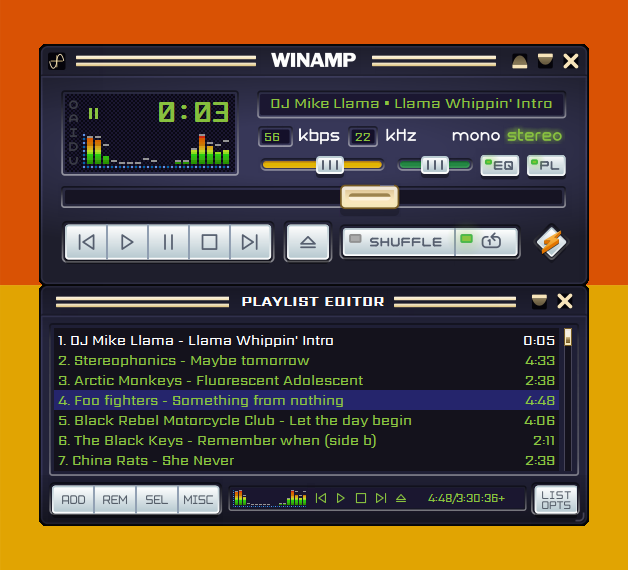
One of them is the customizable interface. Button placement is already intuitive and designed to help you perform the actions you need to perform quickly and easily. Photo: Winamp forum
But you will also be able to add a look to the interface, which will provide you with some good customization options where you will have the ability to adapt the interface to your needs.
Play songs, videos, radio
It is also a very versatile software that you can use to play a wide range of different media files. Some of the most used files include videos, songs and even radio stations.
You will be able to access the collection of Shoutcast radio stations, where you can choose from some of the most popular radio stations out there.
You can also enhance the videos and audio you have with the equalizer and other additional functions!
Winamp is one of the most popular media players, and for good reason. It has advanced features and a customizable interface that will provide you with the greatest joy possible.
Pros of Winamp
Lightweight and fast: One of Winamp’s strongest qualities is its relatively small footprint. Compared with many modern media applications, the classic player feels straightforward and responsive.
Highly customizable: Skins and plugins have always been an important part of the Winamp experience. Users can choose from a huge variety of visual designs and customize the player to suit their preferences.
Good local music support: Winamp is particularly useful for people who maintain a personal collection of MP3, FLAC, and other digital music files. It does not require a streaming subscription to play locally stored music.
Simple interface: The classic Winamp interface is familiar to longtime users and provides quick access to basic playback controls, playlists, and music libraries.
Large community and legacy: Because Winamp has been around for decades, there is a substantial amount of community-created content, including skins, plugins, guides, and configuration tips.
Cons of Winamp
A dated interface: While the classic design is part of Winamp’s appeal, new users may find it less intuitive than modern music applications.
Limited modern ecosystem: Streaming platforms such as Spotify and Apple Music provide extensive online catalogs, recommendations, synchronization, and cloud-based libraries. Winamp’s traditional local-player approach cannot compete with those services in these areas.
Inconsistent plugin compatibility: Older plugins may not work perfectly with newer versions or operating systems. Users looking for advanced functionality may need to experiment with different plugins and configurations.
Less attractive for streaming users: If most of your music comes from streaming services rather than downloaded files, Winamp may not be the most convenient choice.
Features and advantages of Winamp:
Winamp Orgler lets you track, chart and share your Winamp listening history
Find and manage add-ons directly in your media player
Improved support for iPod Sync
Podcast Directory
Smart views with new presets for dynamic
Plays many types of audio and video
Compatible Winamp 2 Plug-ins
Full support for classic skins / modern skins
New iTunes library import
Gallery of online services
Our services Radio internship online
Turkish, Romanian and Portuguese language packs
Playback: discover songs, videos, radios and photos of artists
AOL Radio powered by CBS Radio
Dynamic Song Recommendation
Multi-channel MP3 surround support
Massive Auto-Tagger provides the latest music metadata
Integrated search by artist and track information
Compatibility with album covers for portable devices
Updated Download Manager and Podcast Directory
Fully integrated browser
New visualization plugin-Milkdrop 2
Portable device sync support
Access to SHOUTcast radio stations
Enjoy thousands of free songs and videos
Listen to AOL radio stations
Support extended Flash video
Media Monitor: playing music on Theeb
Updated Winamp toolbar
Remote music and video playback and sharing
License: Free
Supported OS : Windows 11 / Windows 10 / Windows 8 / Windows 7
Winamp remains an interesting option for PC users who value local music playback, customization, and a lightweight application. Its greatest strength is also its biggest limitation: it focuses heavily on the traditional music-player experience rather than trying to replace modern streaming platforms.
For users with large personal music libraries, Winamp can still provide a familiar and flexible way to enjoy music. However, people who expect built-in streaming catalogs, modern recommendations, cloud synchronization, and a polished contemporary interface may find newer music applications more convenient.
Winamp player – Download the current 5.8 version here
Related Posts