Blockbench stands out as a versatile 3D modeling program tailored for the creation of blocky graphics, aligning with the current resurgence of interest in this aesthetic, notably seen in the popularity of games like Minecraft.
Whether you’re drawn to blocky graphics or not, delving into the world of Blockbench can be a rewarding experience, especially for those eager to explore 3D modeling. The program boasts a user-friendly interface that seamlessly guides both beginners and seasoned users. A dedicated area for designing and previewing creations facilitates real-time experimentation with various functions, making the learning curve smoother.
The process of assembling blocks to form larger objects becomes apparent, paving the way for a more in-depth exploration of Blockbench’s feature-rich tools. From adding cubes to modifying angles, orientations, and incorporating textures from existing PNGs, the program offers a comprehensive suite of options. Moreover, the ability to scale, rotate, flip objects, and create and export block models while optimizing entities all within one platform enhances the efficiency of the modeling process.
Blockbench provides multiple display views, allowing users to inspect models from different perspectives and angles. The flexibility to zoom in, switch views, enter fullscreen mode, and create presets ensures that your objects are showcased exactly as intended. Monitoring progress is simplified through the option to take screenshots, with the added bonus of placing a background to simulate how the model would appear outside the display area.
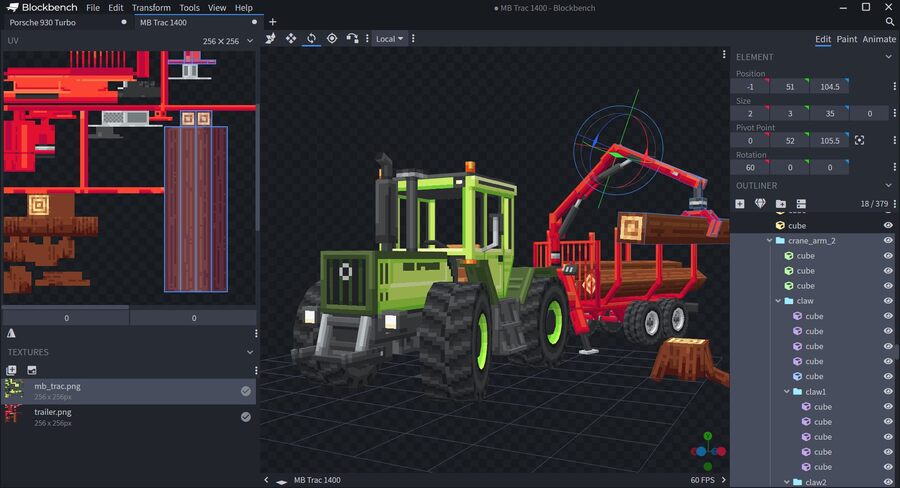
The program’s texturing tools are a standout feature, enabling users to create, edit, and paint textures directly within Blockbench. Palettes can be generated or imported, facilitating painting or drawing of shapes effortlessly. Blockbench even streamlines the process by automatically creating a UV map and template for models, facilitating immediate painting. Users can paint directly in 3D space, utilize the 2D texture editor, or seamlessly connect to external image editors or pixel art software.
Blockbench’s utility extends to the realm of Minecraft mods and serves as an excellent tool for individuals keen on learning 3D modeling. Its seamless functionality captures creative ideas while ensuring a smooth designing experience. The fact that Blockbench is free for any project type, perpetually, with an open-source GPL license, adds to its appeal.
For those on mobile devices, Blockbench is available as a progressive web app, eliminating the need for APK installations or navigating app stores. The program’s adaptability is further emphasized by its compatibility with Windows 7 and 8, in addition to Windows 10 32-bit, along with macOS and various Linux distributions.
To accommodate a wide user base, Blockbench outlines minimum system requirements, ensuring accessibility for a diverse range of devices. The recommended specifications include a Windows, macOS, or Linux computer, a mouse and keyboard, 8 GB of RAM, a 1920 x 1080 display, and 10 GB of storage space.
Blockbench excels not only in its user-friendly design but also in its adaptability to various platforms. Its availability as a progressive web app for mobile devices simplifies accessibility, allowing users to install it directly from their browsers without the need for complex installations or app store navigation.
For users on Windows 7 and 8, Blockbench continues to support these operating systems, acknowledging the diverse user base and ensuring compatibility with a range of devices. The detailed instructions for downloading the suitable version and configuring automatic updates showcase the program’s commitment to user convenience.
The system requirements, both minimum and recommended, underline Blockbench’s commitment to providing a smooth experience across different devices. Whether you’re working on a Windows 10 or newer system, macOS 10.13 or newer, or various Linux distributions, the program accommodates a broad spectrum of users. The recommended specifications, including a mouse and keyboard, higher RAM, and display resolution, reflect the program’s scalability for more demanding projects.
The open-source nature of Blockbench, licensed under GPL, not only makes it free for any project but also emphasizes a collaborative and community-driven approach. This openness encourages users to contribute to the development of the program, fostering a sense of community and continuous improvement.
In conclusion, Blockbench is not just a 3D modeling program; it’s a versatile tool that caters to a wide audience. Whether you’re passionate about blocky graphics, Minecraft mods, or simply want to explore 3D modeling, Blockbench provides a user-friendly experience with robust features. Its availability across different platforms, commitment to legacy systems, and open-source nature make it a standout choice for those entering the world of 3D modeling or seeking a reliable tool for their creative endeavors.
In essence, Blockbench emerges as a powerful and accessible 3D modeling tool, catering to both enthusiasts and novices, with features that make it an invaluable asset for those interested in blocky graphics or venturing into the realm of 3D modeling.
Blockbench is free to use for any type of project, forever, no strings attached.
The project is open source under the GPL license. Download Blockbench HERE