Close Menu
  • Home
  • Reviews
  • Tips
  • Software-App
  • IT Info
    • Privacy Policy
  • Car-Tech News
  • Communication
    • Web-marketing
  • Blog
Facebook X (Twitter) Instagram
Trending
  • How to Remove or Change Subtitles on Netflix?
  • MSI IPC Introduces MS-C9ZA Fanless Edge AI Box PC With NVIDIA Jetson Orin Nano
  • GIGABYTE Partners with NVIDIA to Launch ‘CONTROL Resonant’ Game Bundle
  • How to Remove or Change Subtitles on Netflix
  • Windows & macOS Battery Health Check Guide
  • GIGABYTE Introduces AORUS ELITE AIO Liquid Coolers
  • Difference Between Wi-Fi 6 and Wi-Fi 7: Speed, Features & Performance
  • The 4 Best ASUS Monitors in 2026
  • Home
  • Reviews
  • Tips
  • Software-App
  • IT Info
    • Privacy Policy
  • Car-Tech News
  • Communication
    • Web-marketing
  • Blog
Facebook X (Twitter) Pinterest
Webllena
Saturday, November 21
  • Home
  • Reviews
  • Tips
  • Software-App
  • IT Info
    • Privacy Policy
  • Car-Tech News
  • Communication
    • Web-marketing
  • Blog
Webllena
  • Home
  • Reviews
  • Tips
  • Software-App
  • IT Info
  • Car-Tech News
  • Communication
  • Blog
Home Blog HiSuite software – Easy connection to Huawei Android devices

HiSuite software – Easy connection to Huawei Android devices

December 25, 2025Updated:July 6, 2026 Software-App 2 Mins Read
Share
Facebook Twitter LinkedIn Pinterest Reddit Copy Link

As with other mobile phone manufacturers such as Samsung, Sony, Motorola, etc. Huawei provides users of their devices with a program called HiSuite.

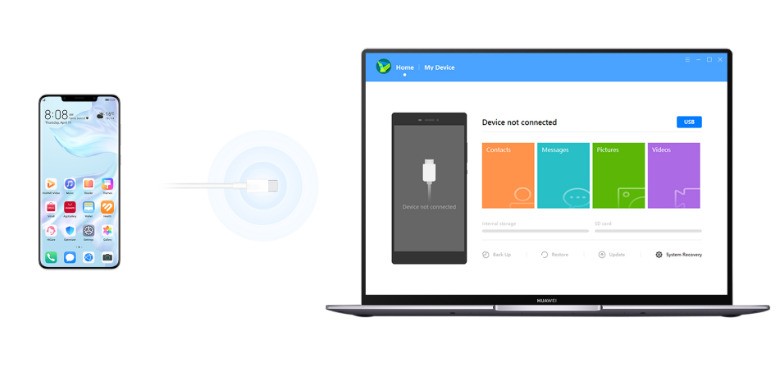
HiSuite is a versatile software tool designed to seamlessly manage your Huawei smartphone from your PC. It gives you full control over key aspects of your device, including contacts, messages, and more. Easily transfer photos, videos, documents, and other files between your phone and computer, and even update your mobile’s operating system with just a few clicks.
Download Huawei HiSuite
Huawei HiSuite
With HiSuite, you can efficiently handle file transfers, organize contacts, customize themes, and manage apps and multimedia content. The user-friendly interface features an attractive design and intuitive navigation, though some main action buttons could benefit from better highlighting for quicker access.
While the features aren’t groundbreaking, they meet the needs of everyday users effectively. You can effortlessly view, install, uninstall, or update applications. Contact management includes adding, editing, deleting, importing, and exporting entries, with similar options available for messages.
For media, browse images and videos in various modes, and import or export them as needed. A standout feature allows you to capture screenshots directly from your PC.

Essentially, it’s a way to use your PC as a way to customize, control and back up your phone.

Huawei HiSuite provides various tools in this program such as managing music, reading and sending SMS messages directly from your PC’s desktop and installing/uninstalling APK applications from your device. This freeware app can be a real-time savings.

Other features here can’t be lost and include synchronizing contacts and contact data, backing up data saved on your phone (such as photos, videos, music, etc.) and more. Huawei HiSuite supports wired USB and WiFi connections and can also function as a remote desktop.

HiSuite is a software that can send SMS messages.

Features and highlights:
-Easily manage your data and applications
-Download and install with a single click from the web
-Improved user experience of the Android smart device
-Easy connection to Huawei phone
-Managing data on devices
-Backing up and restoring data

Overall, HiSuite is a reliable, efficient software that delivers on its promises. It’s completely free, consumes minimal system resources, and simplifies device management. That said, including a built-in user guide—for tasks like creating photo albums or tackling more complex operations—would enhance the experience even further.

Download Huawei HiSuite software here

HiSuite freeware app pc to Huawei phone

Keep Reading

How to Use KMPlayer: A Complete Guide

WPS Office for Android – free, all-in-one office suite

Send all your files wirelessly with Software Data Cable

PotPlayer Review: A Detailed & Balanced Evaluation

Top 4 Less Known Browsers You Should Try

Top 3 Free Office Suites: Top Productivity

Add A Comment
Leave A Reply Cancel Reply

Facebook X (Twitter) Pinterest
© 2026 Webllena.com

Type above and press Enter to search. Press Esc to cancel.