WebllenaWebllena
  • Home
  • Reviews
  • Tips
  • Software-App
  • IT Info
    • Privacy Policy
  • Car-Tech News
  • Communication
    • Web-marketing
  • Blog
Reading: Laptops battery life and Types of Batteries
Share
Font ResizerAa
WebllenaWebllena
Font ResizerAa
  • Home
  • Reviews
  • Tips
  • Software-App
  • IT Info
  • Car-Tech News
  • Communication
  • Blog
Search
  • Home
  • Reviews
  • Tips
  • Software-App
  • IT Info
    • Privacy Policy
  • Car-Tech News
  • Communication
    • Web-marketing
  • Blog
Follow US
© 2026 Webllena.com All Rights Reserved.
Webllena > Blog > Reviews > Laptops battery life and Types of Batteries
Reviews

Laptops battery life and Types of Batteries

Last updated: September 5, 2025 4:59 PM
Admin
Share
SHARE

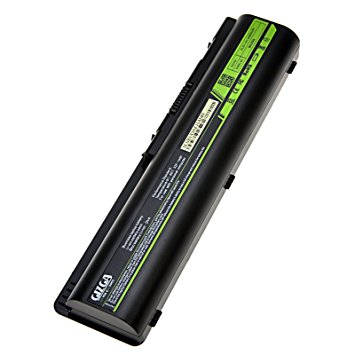
Laptops have to carry their power supply with them when you take them on the road. They do this in the form of batteries that typically plug into the bottom of the computer. Laptop batteries
come in various types, depending on the notebook manufacturer. The time you can run your laptop
on a charged battery is called the
battery life, and this varies from laptop to laptop. You must charge
your laptop battery on a regular basis.

Battery Life
Batteries provide a certain number of hours of battery life, or operating time. The average laptop battery offers anywhere from
two hours to four hours of battery life. The life of the battery is affected by whether the laptop is being used or is on standby
mode, and by the size of the laptop monitor, with large displays draining power more quickly than smaller ones.
Laptop batteries

Types of Laptop Batteries
There are several types of laptop batteries, with the most popular type being the lithium ion (Li-ion). Li-ion batteries hold a
charge longer than earlier types such as nickel cadmium (NiCad) or nickel-metal hydride (NiMH). Some laptops also feature
secondary alkaline batteries to power internal clocks or keep the laptop running while the main battery is changed. For best
performance, Li-ion batteries are the standard today.

AC Power
If you use your laptop at home or office rather than on the road, you can plug it into an electrical outlet and run the
computer off electricity all the time.However, laptops used for more than a few hours this way can become overly warm,
which can adversely damage or interfere with your computer’s “health.” To avoid this, invest in a specially made laptop pad to help disperse unwanted heat.

Sherry Kinkoph Gunter

TAGGED:BatteriesBattery lifeLaptops
Share This Article
Facebook Pinterest Copy Link
Share
Previous Article asuszenpads Fast Review-Asus ZenPad 3S 10 Z500M
Next Article iPhoneapps How Much Does It Expense To create an incredible Iphone App?
Leave a Comment Leave a Comment

Leave a Reply Cancel reply

Your email address will not be published. Required fields are marked *

Latest News

Emotiva XMC-2
Emotiva XMC-2 – 16 Channel AV Processor
Reviews
March 1, 2021
Nikon D780
Nikon D780 Tech Specs – real pro DSLR camera
Reviews
May 31, 2022
outdoor 4K TV - SunBrite SB-V3-55
Weatherproof outdoor 4K TV – SunBrite SB-V3-55-4KHDR-BL
Reviews
November 17, 2023
Technics SU-G700M2
Impressive Technics SU-G700 M2 Stereo Amplifier
Reviews
August 19, 2022

You Might also Like

ASUS ROG Swift OLED PG32UCDMR
Reviews

The 4 Best ASUS Monitors in 2026

July 18, 2026
LG XBOOM Grab by will.i.am
Reviews

LG XBOOM Grab by will.i.am Review: A Rugged, Feature-Rich Bluetooth Speaker

June 7, 2026
1 -JBL MA710 AV Receiver
Reviews

JBL MA710 AV Receiver – impressive audio experience

April 29, 2026
JBL MA310 AV Receiver
Reviews

JBL MA310 AV Receiver Review: Power + Performance

March 24, 2026
Follow US
© 2026 All Rights Reserved. Webllena.com
Welcome Back!

Sign in to your account

Username or Email Address
Password

Lost your password?