Do you often have problems with ambient noises when using the microphone? Then you can use Noise Blocker, an intuitive application that will help you block all noise coming from the background while using the microphone. When the system detects these sounds, the application automatically blocks them. It supports various applications such as Skype, Google Hangouts, Slack, Discord and many others.
When you want to communicate online today, you need to use a microphone. Often you will be sitting at home or at the office, surrounded by other people, which can create a lot of noise.
In addition, you may notice noise in the microphone when typing on the keyboard or clicking the mouse, which can be an unpleasant addition to the conversation.
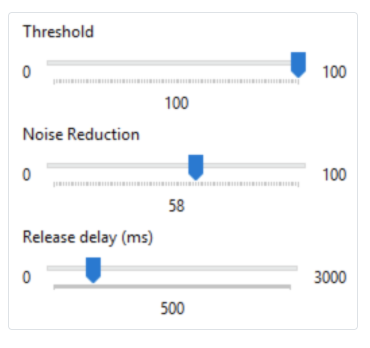
With the Noise Blocker app, you can block all noises ( from the background) while using the microphone. You will do this by recording the sounds you want to block, which will help the application to automatically detect these noises when they occur in real time, allowing you to have clearer and more audible conversations when using the microphone.
Block the noises you record
First of all, when you install the Noise Blocker application, it will first scan your computer if you already have all the correct drivers and updates installed. This will help you to make sure that you start using the application immediately without interruption.
Otherwise, the installation of this application should be simple and clear, even if you do not have much knowledge of technical problems.

Select the noises you want to block
When you are having a conversation, you may notice that your computer is making deep noises that could interrupt the conversation.
Or, you can type on the keyboard or other sounds that could come from your environment. If you have a clear idea of what is disturbing your conversations, you can block it.
Block out any noise.
Get rid of all unwanted annoying sound.
Here are some examples of what you can block:
Static background
Microphone buzz
Laptop cooling fan
Keyboard typing
Mouse click
Works with all applications.
Compatible and easy to configure with any application.
Skype
Discord
Mumble
Slack
Google Hangouts
You can do this by recording the noises you want to delete and inserting them into the application. This tool will work automatically to detect these noises as they occur and remove them in real time.
Have better conversations at the microphone with Noise Blocker, a lightweight application that will eliminate all the noise that can occur in the microphone. Download Noise Blocker app here