WebllenaWebllena
  • Home
  • Reviews
  • Tips
  • Software-App
  • IT Info
    • Privacy Policy
  • Car-Tech News
  • Communication
    • Web-marketing
  • Blog
Reading: Timer Resolution app – improves the FPS
Share
Font ResizerAa
WebllenaWebllena
Font ResizerAa
  • Home
  • Reviews
  • Tips
  • Software-App
  • IT Info
  • Car-Tech News
  • Communication
  • Blog
Search
  • Home
  • Reviews
  • Tips
  • Software-App
  • IT Info
    • Privacy Policy
  • Car-Tech News
  • Communication
    • Web-marketing
  • Blog
Follow US
© 2026 Webllena.com All Rights Reserved.
Webllena > Blog > Software-App > Timer Resolution app – improves the FPS
Software-App

Timer Resolution app – improves the FPS

Last updated: September 8, 2025 3:27 PM
Admin
Share
SHARE

Enhance your gaming experience by adjusting the default timer resolution on your Windows PC with Timer Resolution app. The standard timer on Windows fluctuates between 10 and 25 milliseconds, which may not be ideal for gamers who seek precision and detail in their gameplay.

These minute details can significantly impact your accuracy in games utilizing this mechanism. Timer Resolution allows you to modify your Windows PC’s timer resolution in seconds, ultimately boosting the Frames Per Second (FPS) for the games you’re engaged in and providing you with a competitive edge.
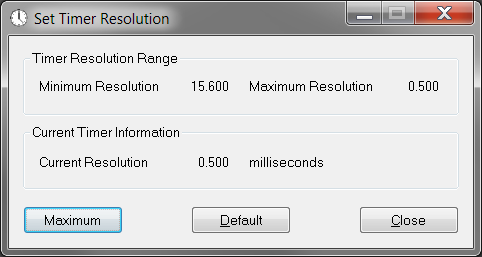
Timer Resolution app
Timer Resolution photo

The effectiveness of this utility often hinges on the capabilities of your CPU. If your CPU is sufficiently powerful, it can address a substantial portion of the performance concerns.

Setting the timer resolution is straightforward with this tool, enabling you to customize it to your advantage during gameplay. This adjustment is particularly noticeable in online First Person Shooter (FPS) games like Fortnite, where every second and detail holds significance, influencing your overall accuracy.

While the default timer resolution typically ranges from 10 to 25 milliseconds, Timer Resolution allows you to make nuanced changes that can make a substantial difference in FPS games and other genres.

The tool’s intuitive interface allows you to control the timer using buttons or convenient hotkeys. You can further enhance efficiency by customizing hotkeys for specific actions within the application, tailoring the experience to your preferences.

In summary, Timer Resolution app proves especially beneficial for gamers seeking to fine-tune their default timer resolution for a slight FPS advantage. Whether starting, pausing, or defining round time, this high-accuracy stopwatch timer for Windows can achieve 1ms timers, catering to the demands of games that require precision and rapid reactions. Elevate your gaming performance with Timer Resolution and gain an edge in the world of competitive gaming. Download Timer Resolution app HERE

TAGGED:gamingimprove FPSTimer Resolution app
Share This Article
Facebook Pinterest Copy Link
Share
Previous Article Mac How to send files via Bluetooth on Mac
Next Article VeraCrypt File Security: Unveiling VeraCrypt’s Advanced Encryption Features
Leave a Comment Leave a Comment

Leave a Reply Cancel reply

Your email address will not be published. Required fields are marked *

Latest News

Emotiva XMC-2
Emotiva XMC-2 – 16 Channel AV Processor
Reviews
March 1, 2021
Nikon D780
Nikon D780 Tech Specs – real pro DSLR camera
Reviews
May 31, 2022
outdoor 4K TV - SunBrite SB-V3-55
Weatherproof outdoor 4K TV – SunBrite SB-V3-55-4KHDR-BL
Reviews
November 17, 2023
Technics SU-G700M2
Impressive Technics SU-G700 M2 Stereo Amplifier
Reviews
August 19, 2022

You Might also Like

KMPlayer is an excellent free media player
Software-App

How to Use KMPlayer: A Complete Guide

April 7, 2026
WPS Office for Android
Software-App

WPS Office for Android – free, all-in-one office suite

January 16, 2026
Software Data Cable
Software-App

Send all your files wirelessly with Software Data Cable

January 1, 2026
Download Huawei HiSuite
Software-App

HiSuite software – Easy connection to Huawei Android devices

December 25, 2025
Follow US
© 2026 All Rights Reserved. Webllena.com
Welcome Back!

Sign in to your account

Username or Email Address
Password

Lost your password?