Tag: Android emulator

  • Android Emulator – Run Android Apps on Your Computer

    Android Emulator – Run Android Apps on Your Computer

    An Android emulator is a software application or tool that simulates the Android operating system (OS) and hardware on a desktop or laptop computer. It allows developers and users to run Android apps and test them on their computers without the need for physical Android devices. Android emulators are commonly used for various purposes, including app development, testing, and running Android apps on a larger screen.

    Here are some key points and features of Android emulators:

    • App Development: Android emulators are essential for app developers. They provide a controlled environment for testing and debugging Android applications without the need for physical devices. Developers can test their apps on different Android versions and screen sizes.
    • Compatibility Testing: Emulators allow developers to test the compatibility of their apps across various Android versions and device configurations, helping ensure that the app works correctly on a wide range of devices.
    • Performance Profiling: Developers can use emulators to profile the performance of their apps, including CPU usage, memory consumption, and more.
    • Screen Capture and Recording: Some emulators offer features for capturing screenshots and recording video of the emulator’s screen. This is useful for creating promotional materials or documenting app behavior.
    • Customizable Hardware: Many emulators allow you to configure the hardware specifications, such as screen size, resolution, RAM, and processor speed, to mimic different real Android devices.
    • Root Access: Some emulators provide root access to the Android OS, which is useful for certain testing and debugging tasks.
    • Google Play Services: Some emulators come with Google Play Services pre-installed, making it easier to test apps that rely on Google’s APIs and services.
    • Third-Party Emulators: There are various Android emulators available, both officially from Google and from third-party developers. Examples of popular Android emulators include Android Studio’s built-in emulator, Genymotion, BlueStacks, and Nox Player.
    • Cross-Platform Compatibility: Android emulators are available for various operating systems, including Windows, macOS, and Linux, making them accessible to a wide range of developers.

    LeapDroid presents a comprehensive Android emulation solution for Windows computers, offering a complete Android experience without the need for an actual Android device.

    In today’s landscape, a multitude of Android emulators exists, all serving as gateways to Android apps and the complete Android environment on your computer. These emulators empower you to manage applications, install games, and embark on an entirely new experience with your favorite apps and games, while also providing a reliable testing environment.

    LeapDroid
    photo: Pixabay

    LeapDroid, in particular, shines as an exceptional Android emulator, transforming your Windows PC into an Android platform. It emulates Android up to version 4.4, known as KitKat—an older but notably stable Android iteration that ensures a satisfying experience with a selection of top-tier apps.

    The standout advantage of employing an emulator like LeapDroid lies in the ability to harness Android’s full array of apps and games right on your computer. It’s a distinctive experience, enabling you to enjoy games and applications within the Android environment using your mouse and keyboard.

    Beyond mere app and game access, LeapDroid offers a comprehensive Android encounter. Users can customize buttons and keys, effectively tailoring the emulator’s functionality to their device.

    Notably, LeapDroid distinguishes itself through its lightweight, user-friendly, and swift performance. While enhanced hardware can unlock its full potential, it operates admirably even on more modest systems.

    In conclusion, LeapDroid stands as an exceptional Android emulator for your computer, providing the complete Android experience you’ve long desired.

    When developing and using Android emulators, it’s essential to keep them up to date with the latest Android versions and security patches to ensure accurate testing and compatibility with the latest apps and features.

  • KOPLAYER: A Powerful Android Emulator for PC

    KOPLAYER: A Powerful Android Emulator for PC

    I have been using the KOPLAYER Android emulator for PC for quite some time now, and I must say it has exceeded my expectations in every aspect. As an avid Android user, I often find the need to run Android apps and games on my computer, and KOPLAYER has proven to be the perfect solution.

    One of the standout features of KOPLAYER is its exceptional performance. It runs smoothly on my PC, allowing me to seamlessly run even resource-intensive apps and games. The emulator’s optimization is impressive, as it efficiently utilizes system resources without causing any lags or crashes. I can play my favorite games, stream media, and use productivity apps without any noticeable hiccups.

    KOPLAYER Android emulator for PC
    KOPLAYER Android emulator for PC

    The user interface of KOPLAYER is intuitive and user-friendly. Setting up the emulator was a breeze, and the controls are highly customizable, providing a personalized gaming experience. I appreciate the ability to map keyboard keys and mouse gestures to emulate touchscreen interactions, making it easy to play games that rely heavily on touch inputs.

    KOPLAYER offers a wide range of features to enhance the Android emulation experience. The emulator supports multiple instances, allowing me to run multiple apps simultaneously. Additionally, the built-in video recording feature is incredibly handy for content creators or those who want to share their gaming achievements with others. I’ve also found the file sharing feature convenient for transferring files between my PC and the emulator.

    Furthermore, KOPLAYER stays up-to-date with the latest Android versions, ensuring compatibility with the latest apps and games. It also provides access to the Google Play Store, making it easy to download and install apps directly within the emulator.

    One of the standout aspects of this app is its extensive support for a wide range of apps available in the Google Play Store. It encompasses popular games like PUBG Mobile, Call of Duty, Clash of Clans, and other multiplayer games.

    By bringing these apps to your PC, it introduces a whole new level of experience. You can seamlessly enjoy these apps without unnecessary distractions, providing a streamlined and immersive gaming experience.

    In terms of stability, KOPLAYER has proven to be reliable during my usage. It rarely crashes or freezes, which is crucial when running apps or playing games that require a consistent and uninterrupted experience.

    I highly recommend KOPLAYER to anyone looking for a reliable and feature-rich Android emulator for PC. Its exceptional performance, intuitive interface, and extensive feature set make it a top choice for both gaming enthusiasts and productivity users. Whether you want to enjoy your favorite Android games on a larger screen or test apps without using a physical device, KOPLAYER is an excellent option that delivers on its promises.

    System Requirements for KOPLAYER

    To ensure smooth and optimal performance of KOPLAYER on your system, it’s essential to meet the following minimum requirements:

    • RAM: 2GB
    • CPU: Dual-core AMD or Intel CPU
    • HDD: 10 GB of free disk space
    • OS: Windows 7 or higher versions
    • Resolution: Minimum 1024×768
    • Graphics Card: GPU with OpenGL 2.1 support

    Remember, these requirements are the minimum specifications necessary to run KOPLAYER. If your PC exceeds these specifications, you can expect even better performance and quality. In other words, the higher your PC specifications, the more enjoyable your experience will be.

    KOPLAYER is not only a fantastic Android emulator, but it also offers a superior viewing and gaming experience compared to your mobile phone. It faithfully replicates the mobile experience while leveraging the advantages of a larger screen and enhanced PC capabilities.

    Now that you are well-informed about KOPLAYER through this guide, why wait any longer? Install it on your PC or Mac today and indulge in endless fun with your friends by playing your favorite games on the expansive screen of your system.

    DOWNLOAD KOPLAYER HERE

  • LDPlayer – play mobile Android games on PC (emulator)

    LDPlayer – play mobile Android games on PC (emulator)

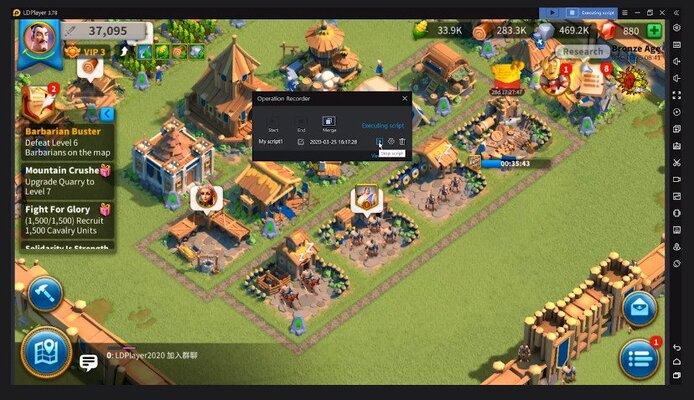
    LDPlayer is an Android emulator that focuses on providing emulation for the many modern Android video games right on your personal computer. It has been boosted to run really efficiently on PC hardware.

    It means that it has much better storage, GPU, CPU, and RAM abilities than some other similar software. It can take your PC and turn it into a highly effective gaming laptop or desktop machine.
    It does this while allowing you to run the most powerful mobile software with a high level of compatibility.

    Compatibility
    One of the very outstanding functions about LDPlayer app is that it can control a variety of different types of games that you might want to play. Think of favorite game titles like Clash Royale, Clash of Clans, PUBG, or also Call of Duty.

    You can increase your bandwidth and latency so that you can play more effectively and be successful more often.
    LDPlayer – Installation and use
    LDPlayer app is lightweight. It can be installed on varieties of Windows vers. that are the most modern installation. If you want to get the most out of this emulator software, the programmers say you should check out their FAQ and tutorials that they have made available on their website.

    LDPlayer
    Photo: LDPlayer

    This online help is a method to find out any types of solutions that you might be looking for. It comes with rendering, smooth frames, and a lot more. Keep in mind that the better your PC hardware is, the better your gaming experience will be.

    However, no matter what, you shouldn’t have much trouble playing their 2D games.

    Customize
    There are 4 tabs in terms of modification. This goes from innovative, standard properties, all the way to network and shortcuts. You can modify these configurations however you want for the emulation.

    The advanced tab is crucial. This is simply because it keeps the configuration. The configuration is a rendering setting. You will discover many different customized resolutions that you might want to play around with.

    Here, you can as well find active CPU cores, RAM, and you can even setup strings to tell the servers which machine you’re emulating at that time in the game.
    The basic tab, on the other hand, deals with things like microphone support, language, rotation, and window sizing.
    Support
    There is the capability to create custom maps and micros. That way, if you want support for finger taps or mouse and computer keyboard, you have your decision between the two. This makes it much easier to go with your personal playstyle.

    Conclusion
    LDPlayer app is a superb way to emulate Android games on your COMPUTER. It’s quick, it’s light-weight, and it’s simple to use. In addition, there are a lot of options to personalize your experience.
    Mainly because of those reasons, it definitely stands out from the rest. And that is why we think players must consider installing it right now.

    File size:  4.06 MB
    License:   Free
    Supported OS:   Windows 11 / Windows 10 / Windows 8 / Windows 7
    Download LDPlayer Android emulator HERE