Tag: Gaming Headset

  • Corsair HS65 SURROUND Gaming Headset

    Corsair HS65 SURROUND Gaming Headset

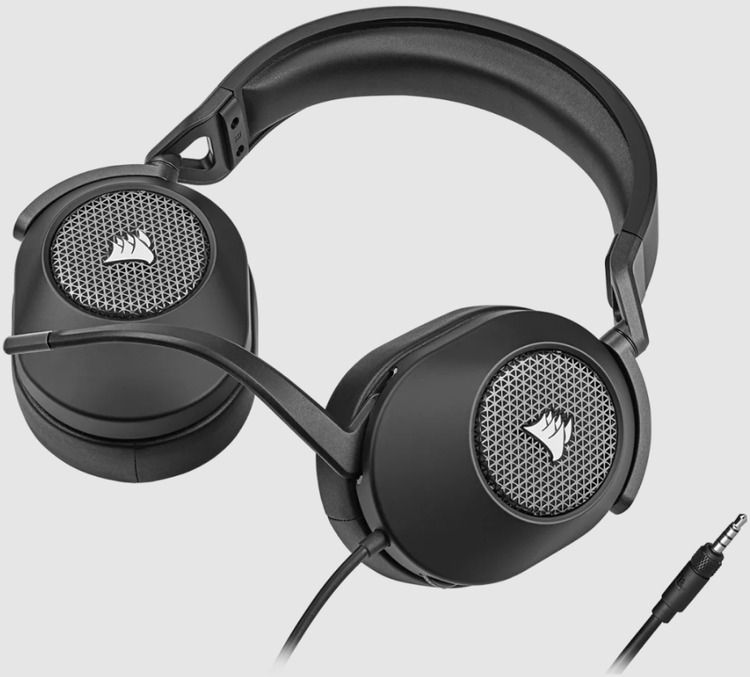
    The CORSAIR HS65 SURROUND Gaming Headset delivers all-day comfort and sound with memory foam leatherette ear pads and Dolby Audio 7.1 surround sound on PC and Mac, bolstered by lightweight construction reinforced with aluminum.

    When it comes to design, the HS65 opts for the simple yet still classically Corsair approach, obviously taking cues from some of the grievances customers have made about the HS60 Pro Surround. Instead of a detachable mic and a separate mute button, for example, it now comes with a flip-to-mute non-detachable mic, which makes its operation more effortless and intuitive. Besides the grille on each earcup bearing that famous Corsair ship sail logo, everything else looks unembellished and plain, which appeals to me. Too many gaming peripherals are festooned with “gaming aesthetic” trimmings, and frankly, the Corsair HS65 Surround’s design is a nice departure from that, especially its white-and-silver colorway (a carbon one is on hand as well if you prefer to stick with an all-black setup).

    Corsair HS65 SURROUND
    Corsair HS65 SURROUND

    Technology personalizes your headset settings to match your audio taste. An omni-directional microphone picks up your voice loud and clear, and custom-tuned 50mm neodymium audio drivers offer great sound quality and range. A 3.5mm audio connector ensures wide compatibility across most devices, including PC, Mac, Xbox Series X | S, PS5 with Tempest 3D AudioTech support, PS4, Nintendo Switch, and mobile. Powerful CORSAIR iCUE Software unlocks audio equalizer settings, multi-channel 7.1 surround sound, and more. Complete with convenient on-ear volume control, the HS65 SURROUND enables you to press play on great sound. You will need Corsair’s iCUE software and to use the USB adapter if you want to manage EQ settings and use 7.1 surround sound, otherwise it will work with the 3.5mm jack for your PC or console. It’s a comfortable fit that can be adjusted, the ear muffs are soft and don’t hurt your ears after prolonged usage.

    Corsair HS65 Surround – Software

    The Corsair HS65 Surround uses Corsair’s iCue software – the same software the brand uses for most of its gaming peripherals – and it’s as straightforward and sound-focused as ever. You can use the headset without it out of the box, but if you want to take advantage of its Dolby Audio 7.1 surround sound capabilities or tweak the current sound profile, it’s a good idea to have the software handy. And, believe me, you’ll want to toggle surround sound on at the very least.

    There are three main tabs available to you on the iCue program. There’s the Equalizer, which gives you access to the 10-band EQ, the five audio presets, mic adjustments, the stereo/Dolby 7.1 toggle button, and the ability to create your own audio profiles.

    With the Movie Theater profile on, the HS65 sound profile is quite pleasant. There is a clear spark in the highs that renders instruments and sound effects with energetic force, while the mid-range has enough room to breathe and spread out. The bass is still present, and there is quite a lot of it to contend with, but it is reasonably well controlled if not a little untamed.

    Corsair HS65
    Corsair HS65

    The soundstage is surprisingly wide for a closed-back headset like this – it is almost as if it is artificially expanded – but thankfully, there is no hollowness present which is usually the case when the sound profile is engaged in such a way. As such, vertical and horizontal positioning is quite decent, and I had no problems identifying approaching enemies in Overwatch 2. It could be a little more clearer and precise, but maybe the other equalizer presets might come of use (for example, the FPS Competition, which sounds horrible to my ears but others might get some mileage out of it).

    Of course, these equalizer presets are not available when you shift to using the headset on a console. In fact, the headset does seem to have built-in sound presets with similar functionality (triggered by pressing on the volume wheel) but they do not make any difference to the audio whatsoever. Changing from Pure Direct to Movie Theater made no difference without the iCUE software, and as such, it uses the default bass-heavy sound profile. In games, it doesn’t sound too bad as it does when listening to music, but it does lose out on a clear sense of directionality and sharpness in sound that the Movie Theater profile brings.

    If you are on PC, you can avail two additional audio enhancement features. The first one is Dolby Audio, which expands the audio to provide a virtual 7.1 surround sound setup. It’s not good at all, to be honest, and games just sounded odd and disjointed with it. I mostly left it turned off for the entire period of my time with the headset, and I suggest you do the same.

    Corsair HS65 Surround – Performance

    The Corsair HS65 Surround may not be as feature-rich as others, but when it comes to gaming headsets, audio performance is king, and that’s where this headset truly shines. The headset supports Dolby Audio 7.1 surround sound for an even more immersive experience, but even on stereo, it delivers excellent sound quality in which all frequencies are represented beautifully and there’s decent sound imaging. On top of that, it’s pretty loud at its highest volume with only the slightest hint of distortion.

    While it isn’t what I would call neutral-sounding, all frequencies are present and not one overwhelms the others. The bass is very present and actually delivers a bit of that rumble we all crave when gaming or watching blockbusters, but it’s not overwhelming. The highs are clear and detailed without being overly bright. And the mids are full without sounding muddy.

    HS65 Wireless
    HS65 – images

    Utilize the USB adapter and toggle on the Dolby 7.1 surround sound feature in iCue, and suddenly, the soundscape is much wider and much more immersive without sounding artificial. Obviously, you’re not really getting a real 7.1 speaker system here, but the effect is as close to the real thing as you can get with a pair of headsets.

    The sound imaging is even more impressive with the surround sound feature. You can really hear individual elements moving from one side to the other. Better yet, audio elements seem positioned in a three-dimensional space so you can easily hear elements relative to you, whether they’re far off to the left, moving around you, or just behind you on the right.

    For $49.99, the Corsair HS65 SURROUND is a perfectly fine choice for gamers who want surround sound and adjustable EQ options for under $100 USD. The default sound profile is just okay, and shouldn’t impede your gaming too much on other platforms, but PC gamers will benefit the most from this headset given the ability to choose EQ it. The biggest selling point is the microphone, which is great for Discord and in-game chat. Otherwise, this is just an okay headset that doesn’t really stand out.

    Specification Details
    Headphone Model HS65 SURROUND
    Headphone Interface 3.5mm
    Audio Compatibility PC; MAC; Playstation; Xbox; Mobile
    Headphone Frequency Response 20Hz – 20 kHz
    Headphone Battery Life N/A
    Headphone Sensitivity 114dB (+/-3dB)
    Headphone Wireless Range N/A
    Headphone Type Wired
    Headphone Drivers 50mm
    Impedance 32k Ohms @ 1 kHz
    Memory Type 3.5mm
    Microphone Type Omni-directional
    Microphone Impedance 2.2k Ohms
    Microphone Frequency Response 100Hz to 10kHz
    Audio CUE Software Yes
    Battery Type N/A
    Color GRAY
    Audio Dolby Audio
    Lighting No
    Platform PC, PS4/5, Xbox 1 / X
    Model HS65 SURROUND
    Microphone Sensitivity -41dB (+/-3dB)
    Surround Sound Yes
    Cable Length 1.8m
    Detachable Microphone No
    Weight 0.514
  • Turtle Beach Stealth 700 Gen2 Max Gaming Headset Review

    Turtle Beach Stealth 700 Gen2 Max Gaming Headset Review

    Are you in search of a top-tier gaming headset that delivers exceptional performance and comfort without breaking the bank? Look no further than the Turtle Beach Stealth 700 Gen2 Max Gaming Headset. With a reasonable price tag of $239.99, this headset offers an impressive combination of features that cater to both casual gamers and hardcore enthusiasts. In this review, we’ll dive deep into its compatibility, performance, gaming capabilities, battery life, and overall quality, giving you a comprehensive overview of what makes this headset stand out.

    Design and Comfort

    Let’s kick things off with the design of the Turtle Beach Stealth 700 Gen2 Gaming Headset. It sports a sleek and modern aesthetic that will undoubtedly appeal to gamers of all tastes. The over-ear, closed-back ear-cup design not only adds to the overall aesthetics but also contributes to sound isolation, immersing you in your gaming world.

    One standout feature in terms of comfort is the Aerofit™ cooling gel-infused ear cushions. These ear cushions are a game-changer, providing a plush memory foam experience with a layer of cooling gel. Long gaming sessions are no longer synonymous with discomfort and sweaty ears. The headset’s build quality feels sturdy, ensuring it can withstand the rigors of intense gaming sessions and everyday wear and tear.

    Turtle Beach Stealth 700 Gen2 Max Gaming Headset
    Turtle Beach Stealth 700 Gen2 Max Gaming Headset

    But what sets the Stealth 700 Gen2 Max apart is the ProSpecs™ glasses relief system, a patented feature by Turtle Beach. Dual-foam ear cushions cater to gamers with glasses, alleviating pressure and ensuring that everyone can game in comfort. This thoughtful design consideration is a small touch that makes a big difference for glasses wearers.

    Performance and Compatibility

    Compatibility is a crucial factor when choosing a gaming headset, and the Turtle Beach Stealth 700 Gen2 Max doesn’t disappoint. It’s compatible with a wide range of platforms, including Xbox Series X, Xbox Series S, Xbox One X, Xbox One S, PS5, PS4, PS4 Pro, PS4 Slim, Nintendo Switch, PC, Mac, iOS, Android, and other Bluetooth-equipped devices. This extensive compatibility ensures that you can use this headset across your entire gaming ecosystem, whether you’re a console or PC gamer.

    One of the standout performance features is the proprietary low-latency, lossless 2.4 GHz wireless connection. This ensures a lag-free gaming audio and chat experience, giving you a competitive edge in fast-paced games. The simple mini-USB transmitter connects swiftly to Xbox, PlayStation, PC, and Nintendo Switch, making setup a breeze.

    Gaming Experience

    Now, let’s talk about the gaming experience with the Turtle Beach Stealth 700 Gen2 Max. The headset is optimized for surround sound, with support for Windows Sonic, Dolby Atmos, and PS5. While Dolby Atmos and DTS:X may require additional purchases and hardware, the fact that this headset supports these technologies is a testament to its immersive audio capabilities. It truly brings your games to life, ensuring you catch every important detail, enhancing both your gaming and entertainment experiences.

    The high-performance Nanoclear™ speakers are a highlight, delivering realistic sound imaging. Whether you’re deep in a single-player campaign or engaged in multiplayer action, the audio quality ensures you’re fully immersed in the gaming world. The 50mm Nanoclear™ neodymium drivers are a powerhouse when it comes to sound reproduction.

    The Gen 2 flip-to-mute microphone is a significant upgrade in terms of voice chat. It’s larger, highly sensitive, and boasts a remarkable 99.95% voice accuracy rate. Moreover, it seamlessly conceals into the headset when flipped up to mute, eliminating any awkward mic visibility during your gaming sessions.

    Software and Unique Features

    The Turtle Beach Audio Hub app is a game-changer for customization. With this app, you can easily adjust your audio settings and program the mappable dial and button on the headset, all through your Bluetooth-connected mobile device (iOS/Android). This means you can fine-tune your audio settings for a custom, immersive experience tailored to each game you play.

    Superhuman Hearing® is another unique feature that can give you an edge in competitive gaming. This setting allows you to hear subtle, game-changing sounds, such as enemy footsteps and weapon reloads, with greater clarity. It’s a game-changer that can help you react faster and stay ahead of the competition.

    Battery Life and Price

    The rechargeable lithium-polymer battery ensures you won’t be constantly tethered to a charging cable. With this headset, you can enjoy extended gaming sessions, thanks to its respectable battery life. The inclusion of a USB-C cable for fast charging and easy firmware updates is a nice touch, keeping you in the game rather than waiting for your headset to charge.

    Turtle Beach Stealth 700 Gen2 Max Gaming Headset
    Turtle Beach Stealth 700 Gen2 Max – images: Turtle Beach

    Now, let’s address the price. At $239.99, the Turtle Beach Stealth 700 Gen2 Max Gaming Headset is competitively priced considering its feature set. It competes with headsets in a higher price bracket while delivering comparable, if not superior, performance and comfort. It’s a smart investment for gamers looking for top-notch audio quality without breaking the bank.

    Final Thoughts

    In conclusion, the Turtle Beach Stealth 700 Gen2 Max Gaming Headset impresses on multiple fronts. Its compatibility with a wide range of platforms, lag-free wireless connection, and immersive gaming experience make it a strong contender in the gaming headset market. The attention to comfort, especially for glasses wearers, is commendable, and the inclusion of unique features like Superhuman Hearing® and the Turtle Beach Audio Hub app sets it apart from the competition.

    Considering its competitive price of $239.99, the Turtle Beach Stealth 700 Gen2 Max Gaming Headset offers exceptional value for the features and performance it delivers. Whether you’re a casual gamer or a dedicated enthusiast, this headset is well worth your consideration for an enhanced gaming experience that won’t disappoint.

    Specifications Details
    Connections Wireless Transmitter: Xbox Series X, Xbox Series S, Xbox One X, Xbox One S, PS5, PS4, PS4 Pro, PS4 Slim, Nintendo Switch, PC & Mac<br>Bluetooth: iOS, Android, Nintendo Switch, PC & Mac, and other Bluetooth Equipped Devices
    Speakers 50mm Nanoclear™ neodymium drivers
    Frequency Response 20Hz – 22kHz
    Ear-Cup Design Over-Ear (Closed)
    Ear-Cushion Material Synthetic Leather (Black) with Memory Foam Cushioning
    Mic Design Flip-up Omni-Directional
    Battery Rechargeable Lithium Polymer
  • High quality and affordable: HyperX Cloud III gaming headset

    The HyperX Cloud III gaming headset is an exceptional choice for gamers who want a high-quality headset without breaking the bank. Priced at just under $100, this headset offers a range of features that make it a great investment.

    One of the standout features of the HyperX Cloud III is its iconic design, which is both stylish and comfortable. The headset is built to provide excellent comfort, allowing users to enjoy long gaming sessions without discomfort. The soft leatherette ear cushions provide a cozy fit that feels snug on the head without causing headaches.

    HyperX Cloud III gaming headset
    HyperX Cloud III gaming headset

    In terms of audio performance, the HyperX Cloud III delivers exceptional gaming audio. The headset offers a spatial sound stage, immersing users in their gaming environment. However, it’s worth noting that the virtual surround sound is achieved through PC software rather than onboard hardware, which means the audio experience may vary depending on the platform you use.

    The HyperX Cloud III is compatible with all modern gaming platforms, including smartphones, PCs, PS5, Nintendo Switch, and Xbox Series X. It features multiple connectivity options such as AUX, USB Type-A, and USB Type-C, ensuring versatility and ease of use across different devices.

    The headset comes with a two-year limited warranty, providing peace of mind to users in case of any manufacturing defects or issues.

    When it comes to the design, the HyperX Cloud III features a sturdy build with a swivel attachment for the cups and a red metal piece for adjusting the headband. The headband itself is made of thick leatherette material, which not only adds to the headset’s durability but also enhances its aesthetic appeal.

    In terms of accessories, the package includes a female AUX to male USB Type-C connector, which comes pre-attached to a female USB Type-C to male USB Type-A adapter. Additionally, there’s a microphone that plugs directly into the headset.

    HyperX Cloud III gaming headset
    HyperX Cloud III gaming headset

    To unlock the full potential of the headset’s audio capabilities, users are advised to download the DTS Sound Unbound software, which is compatible with PC. The software enables DTS:X audio for the headset, allowing users to choose between balanced or spacious audio settings. However, it’s worth noting that the software lacks EQ settings. For EQ adjustments, you can turn to the HyperX NGENUITY app, although some gamers may find the app to be buggy and slow.

    The HyperX Cloud III gaming headset is a perfect example of simplicity and durability. Its lightweight design feels flexible and sturdy, with no creaking or groaning during use. The large ear cups, adorned with plush leatherette cushions, are connected to the headband through thin metal yokes, creating a minimalist yet appealing look. The absence of excessive stylings and complicated features is refreshing, and there are no flashy lights, except for a small red light near the mic to indicate mute status – a commendable addition for an analog headset.

    Navigating the headset’s controls is straightforward, with a simple volume dial on the right earcup that offers a good grip and precise adjustment. However, the small mic mute button on the back of the left earcup is harder to locate and lacks a locking mechanism to indicate its status, making the mute indicator light even more important.

    HyperX has maintained the quality of its previous iterations with the Cloud III headset. Whether in games, movies, or music, the audio experience is pleasing and well-rounded. While it may not deliver groundbreaking, mind-blowing sound, it more than satisfies at its $100 price point. The headset offers a balanced presentation, with ample bass for an immersive feel and strong reproduction of mids and treble for clear and detailed audio. Volume is not an issue either, as the headset can reach higher levels than most users would desire.

    HyperX Cloud III gaming headset
    HyperX Cloud III gaming headset – photos: HyperX

    However, the processing for the spatial sound feature falls short. It introduces unusual and disruptive artifacts to the audio, diminishing the overall experience. This may not be a significant drawback for those using the Cloud III on platforms other than PC, but it’s disappointing to pay for surround sound functionality and not fully benefit from it, even on PC. Spatial audio features rarely impress me, but it’s rare for them to degrade audio quality like this. On a positive note, the microphone on the Cloud III is exceptional for its price. A good microphone can make a significant difference, surpassing the limited performance of wireless headsets, including high-end models. The HyperX Cloud III’s microphone excels at reducing background noise from peripherals like the mouse, keyboard, and fan, capturing the user’s voice with clarity and a natural tone.

    The HyperX Cloud III may not be the ultimate gaming headset, but it offers excellent value at its $100 price tag. It is built to last, compatible with various platforms, and provides reliable audio output and microphone performance. If you’re seeking a no-frills option without compromising quality, the HyperX Cloud III is a solid choice.

    Technical Specs
    • Driver: Dynamic, 53mm with Neodymium magnets
    • Form Factor: Over ear, circumaural, closed back.
    • Frequency Response: 10Hz-21kHz
    • Sensitivity: -42dBV (0dB=1V/Pa at 1kHz)
    • T.H.D: < 2%
    • Frame Type: Aluminum
    • Ear Cushions: Memory foam and premium leatherette
    Microphone Specification
    • Element: Electret condenser microphone
    • Polar Pattern: Uni-directional, Noise-cancelling
    • Sensitivity: -42dBV (0dB=1V/Pa at 1kHz)
    Connections and Features
    • USB Specification: USB 2.0
    • Bit-Depth: 16 bit, 24 bit
    • Audio Controls: Onboard audio controls
    Physical Specifications
    • Weight: 0.67lb; Weight with microphone: 0.70lb
    • Cable Length (imperial) and type: 3.93ft headset cable; 4.26ft USB dongle cable | USB cable
    In the Box
    Gaming Headset, Detachable Microphone, USB Dongle, USB-C to USB-A Adapter, Quick Start Guide
  • JBL Quantum 810 Wireless gaming headset – Review

    JBL Quantum 810 Wireless gaming headset – Review

    The JBL Quantum 810 wireless gaming headset is a premium-quality headset that offers a fantastic gaming experience. The over-ear, closed-back design provides excellent noise isolation and extended bass response, and the high-res certified 50mm neodymium drivers deliver precise, detailed sound with deep bass emphasis.

    One of the standout features of this headset is JBL’s QuantumSOUND signature, which is tuned for immersive gaming sound with hard-hitting effects. The active noise cancellation feature senses and blocks out external distractions, allowing gamers to fully immerse themselves in the game.

    The durable headband with a snug, secure fit, combined with premium leather earpads and headband with extra-thick memory foam, offers ultimate comfort even during long gaming sessions. The LED earcup logos and linings with RGB lighting effects add a touch of style to the headset.

    JBL Quantum 810 wireless gaming headset
    JBL Quantum 810 wireless gaming headset

    The built-in unidirectional boom mic with noise suppression technology allows for clear communication with other players, and the flip mic can be quickly muted for privacy. The USB-C wireless transmitter is compatible with PS4, PS5, Nintendo Switch, PC, and Mac, while the 3.5mm stereo audio connection is compatible with controllers for PlayStation® and Xbox™, Nintendo Switch in handheld mode, PC, and Mac.

    The JBL QuantumENGINE software and surround sound are other notable features of this headset. The software can be downloaded for free on PC and allows for easy adjustment of EQ, mic settings, RGB lighting, and more. The enhanced JBL QuantumSURROUND offers immersive 3D sound for PC, and the DTS Headphone:X v2.0 virtual surround sound adds to the overall gaming experience.

    The easy-to-use controls built into the headset include a volume dial and dedicated power, noise-cancellation, and Bluetooth buttons. The dial for game/chat volume mix is Discord-compatible, and the 3.5mm jack allows for wired listening. The USB-C charging input is another convenient feature that allows gamers to continue playing while the headphones charge.

    The JBL Quantum 810 wireless gaming headset is an exceptional headset that offers high-quality sound, comfort, and convenience. With a battery life of 43 hours and a charging time of 3.3 hours, this headset is an excellent choice for serious gamers who want the best gaming experience possible.JBL Quantum 810 wireless gaming headset

    While the JBL Quantum 810 wireless gaming headset has many great features, there are a few potential downsides to consider:

    1. Price: The JBL Quantum 810 is a premium headset, so it may not be the best option for gamers on a budget. ($199.95)
    2. Size and weight: The over-ear design of the headset, combined with the extra padding and materials used for comfort, can make the headset feel somewhat heavy and bulky, which may not be ideal for all users.
    3. Compatibility limitations: While the headset is compatible with a wide range of devices, there may be some compatibility limitations with certain devices or operating systems. For example, some users have reported issues with the headset not working properly on Xbox consoles.
    4. Surround sound limitations: While the headset does offer both JBL QuantumSURROUND and DTS Headphone:X v2.0 virtual surround sound, some users may find that the surround sound experience is not as immersive as they would like.
    5. Limited Bluetooth features: While the headset does have built-in Bluetooth 5.2 for wireless music listening and phone calls, some users may find that the Bluetooth functionality is limited compared to dedicated Bluetooth headphones, as it is primarily intended for use during gaming.

    Here are some pros of the JBL Quantum 810 wireless gaming headset:

    1. Low-latency wireless USB transmitter: The USB-C wireless transmitter provides a low-latency 2.4 GHz wireless connection with the headphones, which can help minimize lag and delay during gaming.
    2. High-quality audio: The JBL Quantum 810 features high-res certified 50mm neodymium drivers that deliver precise, detailed sound with deep bass emphasis. The headset is also equipped with JBL’s QuantumSOUND signature, which is tuned for immersive gaming sound with hard-hitting effects.
    3. Active noise cancellation: The headset’s active noise cancellation feature senses and blocks out external distractions, helping to improve concentration and immersion during gaming sessions.
    4. Comfortable design: The durable headband and premium leather earpads with extra-thick memory foam help relieve pressure and ensure a snug, secure fit, even during long gaming sessions.
    5. Customizable features: The JBL QuantumENGINE software, which is available for free download on PC, lets you adjust EQ, mic settings, RGB lighting, and more. The headset also has easy-to-use controls built into the earcups, including a volume dial and dedicated power, noise-cancellation, and Bluetooth buttons.
    6. Wide compatibility: The headset is compatible with a wide range of devices, including PS4, PS5, Nintendo Switch, PC, and Mac. It also has a 3.5mm stereo audio connection that is compatible with controllers for PlayStation and Xbox, Nintendo Switch in handheld mode, PC, and Mac.
    7. Long battery life: The JBL Quantum 810 has a battery life of up to 43 hours, which is longer than many other wireless gaming headsets on the market. The headset can also be used while charging via USB.

    The JBL Quantum 810 wireless gaming headset is the perfect gaming accessory with its expertly tuned 50mm neodymium drivers, which produce precise, high-fidelity sound and JBL’s QuantumSOUND signature for immersive gaming audio with powerful effects. The headset’s closed-back design offers noise isolation, and active noise cancellation keeps external noises from breaking your concentration. The headset’s sturdy and comfortable construction makes it perfect for long gaming sessions, and with a battery life of up to 43 hours, you can enjoy uninterrupted gameplay without worrying about battery life.

    The boom mic is built into the left earcup, and you can flip it up to mute your audio. The microphone also includes noise suppression technology to eliminate unwanted background noise from your team chat. JBL noise suppression technology is a feature found in some of JBL’s headsets, such as the JBL Quantum 810 wireless gaming headset. This technology utilizes advanced algorithms to identify and remove background noise from the user’s audio signal, resulting in clearer and more intelligible audio during voice chat and phone calls. The technology is particularly useful in noisy environments where external sounds might interfere with communication. With JBL noise suppression technology, users can enjoy distraction-free conversations and focus on the task at hand. The Quantum 810 also comes with a foam windscreen for the mic, which helps to soften the impact of plosives like “p” and “b.”

    The Quantum 810 headset is optimized for PC gaming with JBL’s QuantumENGINE software, which enables you to customize your EQ, mic settings, and RGB lighting. Additionally, JBL QuantumSURROUND and DTS Headphone:X v2.0 provide impressive 3D audio for a more immersive gaming experience.

    JBL Quantum 810 wireless -gaming headset
    -JBL Quantum 810 wireless gaming headset- photo: JBL

    You can also use the headset with a range of gaming consoles. Connect the headset wirelessly to your PS4, PS5, or Nintendo Switch using the included USB transmitter, or connect via the 3.5mm port if you’re playing on a mobile device or Xbox.

    The headset features a dual wireless system, enabling you to connect to the transmitter via USB-C and simultaneously connect to your smartphone via Bluetooth. This allows you to chat with your team on Discord while listening to game audio. The game and chat volume mix is adjustable using the headset’s dial, allowing you to balance environmental cues with your team’s tactical callout

    Bluetooth version     5.2
    Bluetooth profiles      A2DP 1.3, HFP 1.8
    Bluetooth frequency        2400 MHz – 2483.5 MHz
    Bluetooth transmitted modulation      GFSK, /4π DQPSK, 8DPSK
    Bluetooth transmitter power     <12 dBm
    Passive Frequency Response    20 Hz – 20 kHz
    Active Frequency Response     20 Hz – 40 kHz
    Driver sensitivity at 1kHz/1mW (dB)    95
    Dynamic frequency response range (Hz)   20 Hz – 20 kHz
    Impedance (ohms)   32
    Charging cable     Yes
    Audio cable           Yes
    Built-in Microphone        Yes
    Wireless            Yes
    Active Noise Cancelling          Yes
    Bluetooth              Yes

    JBL Quantum 810: In the box:

    • 1 X JBL Quantum 810 Wireless headset
    • 1 X USB Charging Cable
    • 1 X 3.5 mm audio cable
    • 1 X USB wireless dongle
    • 1 X Windshield foam for microphone
    • 1 X Quick Start Guide | Warranty card | Safety Sheet

    Some of the best alternatives for JBL Quantum 810

    The JBL Quantum 810 Wireless is a feature-rich gaming headset known for its high-resolution audio, active noise cancellation (ANC), and versatile connectivity options, including 2.4GHz wireless, Bluetooth 5.2, and a 3.5mm audio jack. However, its comfort issues for some users, non-retractable microphone, and limited surround sound compatibility on consoles make it worth exploring alternatives. Below, I’ll discuss several gaming headsets that serve as viable substitutes, focusing on their audio quality, comfort, connectivity, microphone performance, and additional features, while ensuring they align with the needs of gamers seeking a similar or better experience. This exploration will cover a range of price points and brands to offer options for various budgets and preferences, with an emphasis on PC and console gaming compatibility.
    1. Logitech G Pro X 2 Lightspeed WirelessPrice: ~$249.99
    Key Features: Graphene 50mm drivers, 2.4GHz Lightspeed wireless, Bluetooth, up to 50 hours of battery life, detachable Blue VO!CE microphone.
    Why It’s a Good Alternative: The Logitech G Pro X 2 Lightspeed is a strong contender for PC gamers, offering a more balanced and detailed sound profile compared to the JBL Quantum 810, thanks to its graphene drivers. These drivers deliver crisp highs and controlled bass, ideal for competitive gaming where positional audio is crucial, such as hearing footsteps in games like Valorant or Counter-Strike. Its build quality is superior, with premium materials and swappable ear cushions (leatherette or cloth) that enhance comfort for long sessions, addressing the Quantum 810’s reported tightness for users with larger heads. The detachable microphone with Blue VO!CE technology provides clearer voice capture than the Quantum 810’s tinny, Discord-certified mic, making it better for team communication.
    Connectivity: It supports 2.4GHz Lightspeed wireless, Bluetooth, and a 3.5mm jack, matching the Quantum 810’s versatility. However, it lacks ANC, which might be a drawback for users prioritizing noise isolation in noisy environments.
    Comfort and Build: The G Pro X 2 is lighter and more robust than the Quantum 810’s plastic-heavy build, with a metal headband and plush earpads.
    Software: Logitech’s G Hub software offers extensive customization, including EQ presets and surround sound for PC, though console users are limited to stereo sound like the Quantum 810.
    Drawbacks: No ANC, and the price is slightly higher. Console surround sound is limited, similar to the Quantum 810.
    Best For: PC gamers who prioritize sound clarity, comfort, and microphone quality over ANC.

    2. SteelSeries Arctis Nova Pro WirelessPrice: ~$349.99

    Key Features: 40mm Neodymium drivers, 2.4GHz wireless, Bluetooth, active noise cancellation, hot-swappable batteries, GameDAC Gen 2.
    Why It’s a Good Alternative: The SteelSeries Arctis Nova Pro Wireless is a premium alternative that surpasses the Quantum 810 in several areas. Its dual-battery system allows for unlimited playtime by swapping batteries, compared to the Quantum 810’s 43-hour battery life with play-and-charge functionality. The ANC is comparable, effectively reducing background noise, and the retractable microphone offers superior clarity and flexibility over the Quantum 810’s fixed boom mic. The GameDAC Gen 2 provides intuitive on-the-fly audio adjustments and supports high-resolution audio, making it excellent for both gaming and music. The sound profile is neutral, with customizable EQ settings via SteelSeries GG software, offering versatility for competitive and immersive gaming.
    Connectivity: Like the Quantum 810, it supports 2.4GHz wireless, Bluetooth, and a 3.5mm jack, with seamless multi-device pairing. It’s compatible with PC, PS5, PS4, Xbox, and Nintendo Switch.
    Comfort and Build: The Arctis Nova Pro is highly comfortable, with a ski-goggle headband and breathable earpads, though some users find it less comfortable than the Logitech G Pro X 2. Its build feels more premium than the Quantum 810’s plastic construction.
    Software: The SteelSeries GG software provides robust customization, including parametric EQ and surround sound for PC, with better console support than the Quantum 810.
    Drawbacks: It’s significantly more expensive, and the GameDAC’s always-on display might annoy some users.
    Best For: Gamers willing to invest in a premium headset with excellent audio, ANC, and microphone quality for both PC and console gaming.

    3. HyperX Cloud Alpha WirelessPrice: ~$199.99

    Key Features: 50mm dual-chamber drivers, 2.4GHz wireless, up to 300 hours of battery life, detachable microphone.
    Why It’s a Good Alternative: The HyperX Cloud Alpha Wireless is a standout for its exceptional battery life—up to 300 hours—far surpassing the Quantum 810’s 43 hours. Its dual-chamber 50mm drivers deliver a balanced sound with strong bass, ideal for immersive single-player games like Assassin’s Creed and competitive titles where audio cues are critical. The detachable microphone is a significant improvement over the Quantum 810’s fixed mic, offering decent voice clarity for team chats. While it lacks ANC and Bluetooth, its simplicity and long battery life make it a reliable choice for gamers who don’t need multi-device connectivity.
    Connectivity: Limited to 2.4GHz wireless, compatible with PC, PS5, and PS4, but lacks Bluetooth and Xbox support, making it less versatile than the Quantum 810.
    Comfort and Build: Known for comfort, the Cloud Alpha Wireless features plush memory foam earpads and a durable aluminum frame, addressing the Quantum 810’s comfort complaints for users with larger heads.
    Software: HyperX NGENUITY software allows EQ customization and battery monitoring but is less feature-rich than JBL’s QuantumENGINE.
    Drawbacks: No ANC or Bluetooth, and no Xbox compatibility. Surround sound is PC-only.
    Best For: Gamers prioritizing battery life and comfort on PC and PlayStation, who don’t need ANC or multi-device connectivity.

    4. EPOS H3Price: ~$119.99

    Key Features: 40mm drivers, wired or hybrid options, detachable boom mic, lightweight design.
    Why It’s a Good Alternative: The EPOS H3 is a budget-friendly alternative for gamers who don’t need wireless connectivity. Its lightweight design and soft earpads make it more comfortable than the Quantum 810 for extended sessions, especially for users with larger heads or glasses. The audio quality is clear and balanced, with a focus on mid-range frequencies, making it suitable for competitive gaming and music. The detachable microphone offers excellent clarity, rivaling higher-end models, and is a step up from the Quantum 810’s tinny mic.
    Connectivity: Available in wired or hybrid (wired with Bluetooth) versions, compatible with PC, consoles, and mobile devices via 3.5mm or USB. It lacks 2.4GHz wireless, which may be a downside for wireless enthusiasts.
    Comfort and Build: The EPOS H3 is exceptionally lightweight and comfortable, with a flexible headband that avoids the Quantum 810’s clamping issues.
    Software: Limited software support compared to the Quantum 810, but the plug-and-play design simplifies use.
    Drawbacks: No ANC or 2.4GHz wireless, and surround sound is limited to specific configurations.
    Best For: Budget-conscious gamers seeking comfort and microphone quality for PC and console gaming.

    5. Corsair VOID RGB Elite WirelessPrice: ~$109.99

    Key Features: 50mm Neodymium drivers, 2.4GHz wireless, 7.1 surround sound, breathable microfiber mesh earpads, customizable RGB lighting.
    Why It’s a Good Alternative: Priced lower than the Quantum 810, the Corsair VOID RGB Elite Wireless offers comparable features, including 7.1 surround sound for PC gaming and a robust 50mm driver setup for immersive audio. Its microphone is unidirectional and performs adequately for team communication, though it’s not as clear as the Logitech or SteelSeries options. The breathable earpads and lightweight design make it more comfortable for long sessions compared to the Quantum 810’s reported tightness.
    Connectivity: 2.4GHz wireless with a USB dongle, compatible with PC and PS5/PS4, but lacks Bluetooth and Xbox support.
    Comfort and Build: The unique angular design and microfiber earpads provide excellent comfort, especially for glasses wearers, surpassing the Quantum 810 in this aspect.
    Software: Corsair’s iCUE software allows for RGB customization and EQ adjustments, similar to JBL’s QuantumENGINE but with better integration for Corsair ecosystems.
    Drawbacks: No ANC or Bluetooth, and the microphone is non-detachable. Limited console compatibility.
    Best For: Budget-conscious PC and PlayStation gamers who want immersive audio and customizable lighting.

    6. Sennheiser GSP 670Price: ~$199.99 (often discounted)

    Key Features: 7.1 surround sound, 2.4GHz wireless, Bluetooth, broadcast-quality microphone, up to 20 hours of battery life.
    Why It’s a Good Alternative: The Sennheiser GSP 670 competes closely with the Quantum 810, offering superior microphone quality that’s near broadcast-grade, ideal for streamers or competitive gamers. Its sound profile is balanced with excellent clarity, making it great for both gaming and music. The headset supports simultaneous 2.4GHz and Bluetooth connectivity, allowing seamless device switching, similar to the Quantum 810. While its battery life is shorter (20 hours), it’s sufficient for most gaming sessions.
    Connectivity: 2.4GHz wireless and Bluetooth, compatible with PC, PS4, and mobile devices, but not Xbox.
    Comfort and Build: Comfortable for most users, though slightly heavier than the Quantum 810, with adjustable pressure settings to mitigate clamping issues.
    Software: Sennheiser Gaming Suite offers EQ customization and surround sound for PC.
    Drawbacks: Shorter battery life and no ANC. Slightly dated design.
    Best For: Gamers prioritizing microphone and audio quality with versatile connectivity.

    Each of these alternatives caters to different priorities. For PC gamers, the Logitech G Pro X 2 Lightspeed offers superior sound and comfort, while the SteelSeries Arctis Nova Pro Wireless is ideal for those seeking premium features and ANC. The HyperX Cloud Alpha Wireless excels in battery life, and the EPOS H3 is a budget-friendly wired option. The Corsair VOID RGB Elite Wireless provides value for money, and the Sennheiser GSP 670 is perfect for microphone-focused users. Consider your platform, budget, and need for features like ANC or wireless connectivity when choosing.

  • Corsair HS50 & HS50 PRO – durability and quality!

    Corsair HS50 & HS50 PRO – durability and quality!

    Corsair HS50 Stereo Gaming Headset

    The Corsair HS50 Stereo Gaming Headset is a wired headset designed for gaming and other audio applications. It features a durable aluminum frame, 50mm neodymium audio drivers for clear sound, a unidirectional noise-canceling microphone for clear communication, and memory foam earpads for comfort during extended use. The headset also has an in-line volume and mute control, which allows easy access to adjust audio without having to reach for your PC or console. Additionally, it is available in multiple colors and it’s compatible with PC, Mac, Xbox, PlayStation, Nintendo Switch, and mobile devices. Overall, it is considered a budget-friendly and good quality headset.

    The Corsair HS50 is generally considered to have good build quality. The headset features a durable aluminum frame that is designed to withstand the wear and tear of regular use. The ear cups and headband are also made with high-quality materials that provide a comfortable fit and can withstand extended use. Additionally, the audio drivers, microphone and controls are well-built and function as expected.

    Corsair HS50 Stereo Gaming Headset
    Corsair HS50 Stereo Gaming Headset

    Users and critics have reported that the HS50 has a sturdy and well-constructed design and that it can hold up well over time. Some reviewers have also praised the headset for its comfortable fit and lightweight design, which makes it easy to wear for extended periods.

    Overall, the Corsair HS50 is considered to be a well-built and durable headset that offers a comfortable fit, good sound quality and a great value for its price. ($49.99)

    The Corsair HS50 is Discord certified, which means that it has been tested and approved by Discord, a popular communication platform for gamers, for use with the platform. This certification ensures that the headset will work well with Discord and provide a high-quality audio experience for both voice and game sound.

    Discord certification includes several parameters such as mic quality, audio quality and compatibility to ensure a great experience while using Discord. The HS50 passed all the necessary tests and got certified.

    Having a Discord certified headset like the Corsair HS50 can be beneficial for gamers who frequently use Discord to communicate with others while playing. The certification ensures that the headset is optimized for use with the platform and will provide a clear and reliable audio experience.

    Corsair HS50 Stereo Gaming Headset
    Corsair HS50 Stereo Gaming Headset

    Corsair HS50 voice quality

    The Corsair HS50 is generally considered to have good voice quality for a gaming headset in its price range. The headset features a unidirectional noise-canceling microphone that helps to filter out background noise and ensure clear communication. The microphone is sensitive enough to pick up the user’s voice clearly and effectively while minimizing background noise.

    Many users have reported that the microphone is clear and easy to understand, which is helpful for online gaming and communication. Some reviewers have also noted that the microphone is flexible and can be easily adjusted to a comfortable position.

    The HS50 also has a mute button which allows you to turn the microphone on and off easily, which is helpful when you need to mute your microphone quickly.

    Overall, the Corsair HS50 is considered to be a good headset for voice quality, especially for its price range. The unidirectional microphone is effective in filtering background noise and providing clear communication. Photo: Corsair

    Audio CUE Software   No
    Surround Sound    No
    Detachable Microphone   Yes
    Rechargble Battery   No
    Weight    0.319
    Headset Frequency Response    20Hz – 20 kHz
    Headset Battery Life    N/A
    Headphone Sensitivity    111dB (+/-3dB)
    Headset Wireless Range    N/A
    Impedance    32 Ohms @ 1 kHz
    Headset Type    Wired
    Headset Connector Type    3.5mm analog
    Headset Drivers    50mm
    Cable Length    1.8m
    Model      HS50
    Color      Black
    Audio      Stereo
    Lighting       None
    Platform       PC, PS4, XBOX and mobile
    Microphone Impedance       2.2k Ohms
    Microphone Type        Unidirectional noise cancelling
    Microphone Frequency Response       100Hz to 10kHz
    Microphone Sensitivity       -40dB (+/-3dB)

    Corsair HS50 PRO STEREO Gaming Headset

    The Corsair HS50 Pro Stereo Gaming Headset is an upgraded version of the HS50 Stereo Gaming Headset, with some additional features. It still has the same durable aluminum frame, 50mm neodymium audio drivers for clear sound, and unidirectional noise-canceling microphone for clear communication, and memory foam earpads for comfort during extended use.

    The HS50 Pro has some added features like an improved microphone with a built-in pop filter that enhances the clarity of your voice. The microphone is also detachable, allowing you to remove it when not in use.

    Additionally, it has also a built-in volume control on the ear cups, which allows for quick and easy adjustments to the audio volume. This makes it more convenient for users who don’t want to reach for the volume controls on their device.

    The HS50 Pro is also compatible with PC, Mac, Xbox, PlayStation, Nintendo Switch, and mobile devices and available in multiple colors. Overall, it is considered a budget-friendly and good quality headset with some added features compared to the original HS50. ($49.99)

    Corsair HS50 PRO STEREO Gaming Headset
    Corsair HS50 PRO STEREO Gaming Headset
    Audio CUE Software    No
    Surround Sound    No
    Detachable Microphone    Yes
    Rechargble Battery   No
    Weight    0.325
    Headset Frequency Response     20Hz – 20 kHz
    Headset Battery Life     N/A
    Headphone Sensitivity    111dB (+/-3dB)
    Headset Wireless Range    N/A
    Impedance     32 Ohms @ 1 kHz
    Headset Type    Wired
    Headset Drivers   50mm
    Cable Length      1.8m

    Corsair HS50 PRO STEREO Gaming Headset
    Corsair HS50 PRO STEREO Gaming Headset
    Color        BLUE
    Audio        Stereo
    Lighting      NONE
    Platform      PC, PS4/5, Xbox 1 / X
    S, Mbl
    Microphone Impedance       2.0k Ohms
    Microphone Type        Uni-directional with noise-cancelling
    Microphone Frequency Response     100Hz to 10kHz
    Microphone Sensitivity    -40dB (+/-3dB)
