
Tag: Logitech

  • Logitech StreamCam Webcam Review – Full HD at 60 fps

    Logitech StreamCam Webcam Review – Full HD at 60 fps

    In the age of virtual meetings, online content creation, and remote socializing, a reliable webcam is no longer a luxury but a necessity. Enter the Logitech StreamCam webcam, a versatile and feature-packed device that promises to elevate your video streaming and conferencing experience. In this review, we’ll dive deep into the Logitech StreamCam webcam’s compatibility, lens quality, and supported frame rates to help you make an informed decision.

    Compatibility: A Universally Friendly Cam

    First things first, let’s talk about compatibility. The Logitech StreamCam webcam is designed to work seamlessly with both Windows and macOS operating systems. Whether you’re a PC enthusiast or a dedicated Mac user, this camera has got you covered. It’s worth noting that to harness the full potential of this webcam, you’ll need at least a 7th Gen Intel Core i5 or later processor. Additionally, the StreamCam connects via USB 3.1 Gen 1 Type-C, ensuring a speedy and stable connection. This compatibility with the latest technology ensures that your streaming setup remains future-proof.

    Logitech StreamCam Webcam
    Logitech StreamCam Webcam

    Lens: Crystal Clear Imagery

    When it comes to visual quality, the Logitech StreamCam webcam truly shines. Its premium Full HD glass lens captures video at a maximum resolution of 1080p and 60 frames per second in MJPEG format. What does that mean for you? In simple terms, your video quality will be sharp and buttery smooth, making your streams and video calls look professional and engaging.

    The f/2.0 aperture and focal length of 3.7 mm ensure excellent low-light performance, making this webcam a reliable choice even in less-than-ideal lighting conditions. The 78° diagonal field of view is perfect for framing yourself or your surroundings without making you feel cramped on the screen. Whether you’re streaming gameplay, conducting webinars, or simply chatting with friends, the StreamCam’s lens will make sure you look your best.

    Supported Frame Rates: Flexibility at Its Best

    One of the standout features of the Logitech StreamCam webcam is its support for a wide range of frame rates and resolutions. You can fine-tune your settings to suit your specific needs. From a smooth 60 fps at 1080p in MJPEG format for gaming or professional presentations to lower resolutions and frame rates for bandwidth-constrained situations, the StreamCam adapts effortlessly.

    For those who like to experiment with different frame rates and resolutions, this webcam offers MJPEG at 60 fps, 30 fps, 24 fps, 20 fps, 15 fps, 10 fps, 7.5 fps, and 5 fps, as well as YUY2 and NV12 at 30 fps, 24 fps, 20 fps, 15 fps, 10 fps, 7.5 fps, and 5 fps. This level of flexibility ensures you can optimize your video quality according to your specific needs and the capabilities of your internet connection.

    Unique Features: More Than Meets the Eye

    Apart from its technical prowess, the Logitech StreamCam webcam boasts a few unique features that set it apart from the competition. First and foremost is its autofocus capability, which ensures your image remains crisp and clear regardless of your distance from the camera. Whether you’re showcasing a product, switching between multiple subjects, or simply moving around during a presentation, the StreamCam has got you covered.

    The Logitech Capture software further enhances the StreamCam’s versatility. It offers face-based autofocus, which means the camera will automatically adjust focus to keep your face sharp, even if you’re moving around. This feature can be a game-changer for streamers and content creators who need to maintain a dynamic and engaging presence on camera.

    Logitech StreamCam Webcam
    Logitech StreamCam Webcam – images: Logitech

    Built-in Audio: Crystal-Clear Sound

    Audio is an equally important aspect of streaming and video conferencing, and the StreamCam doesn’t disappoint in this department either. Equipped with dual omnidirectional microphones and a noise reduction filter, this webcam captures audio in stereo or dual mono channel, ensuring that your voice comes through loud and clear. Say goodbye to background noise and muffled audio – the Logitech StreamCam webcam delivers audio quality that matches its outstanding video capabilities.

    Price: A Solid Investment

    With a price tag of $139.99, the Logitech StreamCam webcam offers exceptional value for the features it brings to the table. Whether you’re a professional streamer, a remote worker, or someone who simply enjoys high-quality video calls with friends and family, this webcam is a solid investment that will elevate your online presence to the next level.

    While the Logitech StreamCam webcam’s performance is undoubtedly impressive, it’s worth noting that it also excels in the design department. Its sleek and compact form factor blends seamlessly into any setup. The webcam can be mounted on a tripod or clipped securely to your laptop or monitor, giving you the flexibility to choose the angle that works best for you. The design is both modern and functional, ensuring that the StreamCam looks good while doing its job.

    The included Logitech Capture software is a valuable addition to the package. It not only provides face-based autofocus, as mentioned earlier, but also allows you to fine-tune your camera settings with ease. You can adjust exposure, white balance, and even apply filters and effects to enhance your video feed. This level of customization empowers content creators to add their unique touch to their streams and presentations.

    Furthermore, Logitech Capture lets you easily switch between multiple scenes and camera angles, a feature particularly useful for streamers who want to add variety and engagement to their content. It’s an intuitive and user-friendly software that enhances the overall experience of using the StreamCam.

    In the world of webcams, the Logitech StreamCam webcam stands out as a true contender. Its compatibility with both Windows and macOS, premium Full HD glass lens, and support for various frame rates and resolutions make it a versatile tool for streamers, remote workers, and anyone in need of high-quality video communication.

    Logitech StreamCam Webcam
    Logitech StreamCam

    The unique autofocus feature and Logitech Capture software add convenience and creativity to the mix, ensuring that your videos look and sound their best. Whether you’re hosting virtual meetings, creating content, or simply staying in touch with loved ones, the Logitech StreamCam webcam is a reliable companion that won’t let you down.

    At a price of $139.99, it’s a solid investment in enhancing your online presence. With its sleek design, exceptional performance, and user-friendly software, the StreamCam is a webcam that can help you unleash your inner streamer and make a lasting impression in the virtual world. Say goodbye to blurry, low-quality video – the Logitech StreamCam webcam is here to elevate your online game.

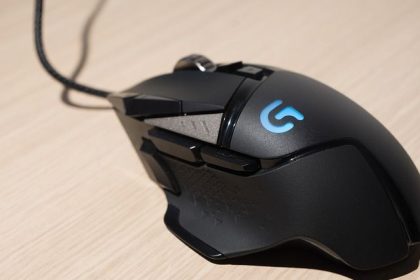
  • Logitech SetPoint – modify the layout of your keyboard and mouse

    Logitech SetPoint – modify the layout of your keyboard and mouse

    For configuring keyboards and mouse, Logitech offers SetPoint. You have the option to modify how the button presses are handled.
    To distinguish your mouse clicks or keyboard keys from the default actions, for instance, you can assign them functions.

    Although these two basic devices function quite well without a driver, you should try them and compare the results because there are some differences.

    Logitech SetPoint
    Photo: Logitech

    Customizable gaming controls via an app
    The majority of users will mostly use this application to configure their keyboard and mouse for gaming. You may make presets with the program that you can use with particular apps and games. By doing this, you can totally alter the configuration of your peripherals to suit your needs.

    The built-in app will show all the information required, including Caps Lock and Num Lock as well as the laptop battery status.

    With the application, you may configure settings to automatically take effect when a game or program is launched.
    With this setup, you won’t have to spend additional time setting up your keyboard and mouse configurations before you can start the game.
    Personalize the keyboard and mouse layout
    You can modify the layout of your keyboard and mouse using Logitech SetPoint’s essential settings. You can enter new data into the program, but you can also copy it from another source and paste it there.
    Additionally, you may configure your scrolling and other pointing buttons as well as Charms.
    The intuitive user interface of this program is another another plus. The app has a very clean appearance and ought to be easy enough to use for the majority of users.
    You can utilize the additional information and documentation to modify the settings however you see fit.

    Although configuring the application is a simple process, the developer made sure to include enough instructions in the program to ensure that all queries are addressed. The majority of the software’s advantages go to users with five-button mouse. This means that there are more features on your mouse than just the left, right, and middle clicks.

    Generally, this kind of mouse is created for gamers who want to play more effectively. Tilt-wheel mouse are another type of devices that can use SetPoint software. Typical applications that use them are Microsoft Excel and Microsoft Powerpoint, two classic Windows desktop programs.
    To sum up, Logitech SetPoint is an app which helps you modify the settings for your Logitech peripherals, such your keyboard and mouse.
    Because it automatically recognizes the games and runs the setting, it’s especially ideal for gamers.

    Functions and advantages of SetPoint:
    Hotkeys available for use
    F-keys that operate in your favor
    the lock keys being blocked
    Battery inspection
    Increasing the exclusiveness of structural features

    Download Logitech SetPoint app HERE

  • Xbox cloud gaming push with Logitech handheld

    Xbox cloud gaming push with Logitech handheld

    Logitech’s new Cloud G handheld will allow the Xbox maker to expand further into it and the handheld gaming market.

    Microsoft announced an addition to its cloud gaming service via Logitech’s upcoming handheld. Releasing in North America on October 17, the Logitech’s G Cloud (stylized CLOUD) comes with a pre-installed app for Xbox Cloud Gaming, allowing users to immediately use the service to play games.

    Xbox Cloud Gaming, previously known as Project xCloud, is a cloud gaming service provided by Microsoft that allows users to stream and play video games on their devices over the internet. It is available on Xbox Game Pass Ultimate and allows users to play games on their compatible devices, including Xbox consoles, Windows 10 PCs, and Android devices.

    To use Xbox Cloud Gaming, users need an Xbox Game Pass Ultimate subscription and a compatible device. Once they have these, they can access the Xbox Cloud Gaming library and stream games over the internet. The service is designed to allow users to play games on devices that may not have the hardware or storage to run them locally.

    Xbox Cloud Gaming is constantly evolving and improving, with new games and features being added regularly. It is a convenient way for gamers to access a wide range of games and play them on their preferred device.

    It is not uncommon for Microsoft to partner with other companies to expand and improve its services, including Xbox Cloud Gaming. In this case, it is possible that Microsoft has teamed up with Logitech to create a handheld device that is designed specifically for use with Xbox Cloud Gaming.

    A handheld device designed for use with cloud gaming would likely allow users to stream and play games on their devices more easily and conveniently. It could potentially have features such as a built-in controller, a large screen for display, and a long-lasting battery, among others.

    It is important to note that this information is purely speculation and there is no official confirmation that Microsoft and Logitech are working on a handheld device for use with Xbox Cloud Gaming. However, it is possible that such a device may be in development or may be announced in the future.

    Logitech’s handheld gives Microsoft another way to roughout 2022, Microsoft has alluded to various ways it plans on expanding its cloud gaming tech, from SmartTV integration to an Xbox-branded streaming stick. In April, CEO Satya Nadella stated that the service had reached over 10 million users since its launch in 2020.

    As for Logitech, its cloud plans were revealed in August, when it and Tencent entered a deal to create a handheld that could run multiple cloud gaming services. The device will also be able to access digital game stores such as Steam and NVIDIA’s GeForce Now.

    With handhelds such as the Nintendo Switch and Steam Deck proven to have high demand this year, it’s the right time for Microsoft to get in on the handheld market. In addition to Xbox’s cloud, bringing in GeForce and Steam is a good consolidation of the various cloud gaming services.

    “Handhelds are a natural next step in our cloud gaming evolution, and it’s great to see a world-class hardware leader like Logitech optimize Xbox Cloud Gaming for their new device,” wrote Xbox’s cloud gaming VP Catherine Gluckstein. “As we look ahead, we will continue to meet people on the devices they already own, breaking down barriers of entry to play.”

    Along with games in Xbox’s cloud library, the G Cloud comes with Xbox’s Remote Play function, allowing players to stream their entire Xbox library.

    Logitech G CLOUD Gaming Handheld

    ☆☆☆☆☆
    $349.99$299.99
    Get the best of cloud gaming right in your hands. The 7-inch full HD 1080p touchscreen, 12+ hour battery life, and lightweight portability mean an exceptional experience while you play hundreds of AAA video game titles. It also features integration with Xbox Cloud Gaming (Beta) and NVIDIA GeForce NOW, with access to more cloud services through the Google Play store app Remote Play.