Tag: samsung

  • Samsung Introduces ‘Game Portal’ on Its Website

    Samsung Introduces ‘Game Portal’ on Its Website

    Samsung Electronics announced that it plans to open Samsung Game Portal, an online store specializing in gaming, on Samsung.com in more than 30 countries around the world, starting with the U.S., the U.K., Germany, France, Italy, Spain and Brazil in late June.


    The Game Portal is a one-stop online store for gamers designed to significantly increase the convenience of browsing and purchasing products such as smartphones, TVs, gaming monitors and high-performance SSDs. It also provides customers with a variety of gaming-related content in one place, fine-tuned to their preferences and experiences.

    Samsung Game Portal
    Samsung Game Portal


    In 2021, Accenture, a leading global professional services company, published an illuminating gaming-related study. The study found that half of the gaming population are cross-platform gamers who use more than one device to play, spending an average of 16 hours a week gaming, as well as eight hours a week watching gaming-related video content and six hours a week participating in gaming-related communities.


    In response to these customer trends, Samsung has designed the Game Portal to provide an impressive variety of content, such as gaming product information, domestic and international expert reviews, product purchase benefits and offers, product utilization ideas that help users enjoy games more and game-related news.


    “Gaming has become an important part of consumers’ lifestyle, not just entertainment, especially for Millennials and Gen Z,” said Evelyn Kim, Executive Vice President of the D2C Center at Samsung Electronics. “We will implement various initiatives to provide customers with a superior gaming experience, from purchase to use, by providing an environment that makes it enjoyable and easy to purchase gaming-related products.”


    Notable products to be available on the portal are the Galaxy S23 Ultra, which is optimized for mobile gaming with its high-performance Snapdragon® 8 Gen 2 Mobile Platform for Galaxy and 5000mAh battery; the Neo QLED TV, which allows users to enjoy cloud gaming without a separate console through the Samsung Gaming Hub; and the Odyssey OLED G9 monitor, which provides an unparalleled immersive gaming experience with its 49-inch curved OLED screen. Another impressive offering is the 990 PRO SSD, which delivers sequential read and write speeds of up to 7,450 and 6,900MB/s for faster loading of PlayStation and DirectStorage PC games.


    To celebrate the launch of the Game Portal, Samsung is offering discounts on bundles of gaming devices, as well as a variety of regional purchasing incentives centered on its recently launched Odyssey gaming monitor and Neo QLED 8K products.


    The gaming industry is one of the few sectors that continues to grow. Given this trend, Samsung has been engaged in various activities to strengthen its leadership in the industry, including enhancing the competitiveness of its gaming-related products and services. Opening the Samsung Game Portal is a key move in this direction that paves the way for further growth. For more information, please visit https://www.samsung.com/game-portal.

  • Samsung The Premiere SP-LSP9T Triple Laser Short Throw Projector

    Samsung The Premiere SP-LSP9T Triple Laser Short Throw Projector

    Triple laser technology
    Samsung The Premiere SP-LSP9T Triple Laser Short Throw Projector provides spectacular home cinema viewing that is just similar to being in a theatre using a triple laser light source. Together with highly accurate colour precision and amazing contrast on a max 130-inch screen space, the Premiere is the world’s very first HDR10+ certified projector for realistic, brilliantly colored viewing.
    Larger and much better
    Get prepared for a complete new home cinema feel. Experience impressive fine detail from any viewpoint with the 130-inch wide screen, while crystal clear 4K resolution offers staggeringly sharp images and enhanced colour expression.Samsung The Premiere SP-LSP9TDetails even in bright light – 2800 ANSI Lumen
    Delight in perfectly lit shows, movies and video games with 2800 lumens of brightness so you can capture each and every detail.
    Real cinematic quality
    Experience movies as they’re recommended to be watched with Filmmaker Mode, the first-of-its-kind setting on a projector.

    Dive directly into room-filling sound
    Get incredible cinema-quality sound to match the stunning display with 40 watts of 4.2ch audio built in.
    Acoustic Beam
    Take your sound to new heights with the unparalleled immersive experience of The Premiere’s Acoustic Beam technology. With 22 holes to maximize left and right speakers, it delivers deep, balanced room-filling sound.
    Combines effortlessly into your space
    Make the most of your space with Samsung The Premiere’s sleek, compact form that works with any aesthetic.
    Flexibility to organise your space
    Place your ultra-short throw projector practically at any place. The Premiere can create a massive screen even when it’s positioned close to the wall, and special built-in sensors automatically reduce brightness when it detects anyone near.Samsung The Premiere SP-LSP9TBeatifully minimized
    Attractive from every single angle with a high quality fabric finish, Samsung The Premiere SP-LSP9T ultra-short throw projector is the fantastic mix of minimal design and exceptional engineering.

    More ways to enjoy Samsung The Premiere SP-LSP9T
    Get the same Smart service as a Samsung TV, with the included bonus of instant-on.
    Prepared to stream
    From YouTube to Netflix, Amazon Prime Video, Disney+ and more, stream what you like right out of the box.
    * Available services on the Smart service experience may vary based on region.
    * OTT service subscriptions must be purchased separately.
    * TV must be connected to a network.

    Smooth voice control Multiple Voice Assistants
    Bixby
    Do more with Samsung The Premiere SP-LSP9T with Bixby – all you need to do is ask. Photo: Samsung

    Amazon Alexa
    Just ask Alexa to change the channel, open applications, search for movies and shows, play music, control your smart home devices, and much more.Samsung The Premiere SP-LSP9T

    Simply tap to mirror
    Get content from your smartphone on the wall by simply tapping it to The Premiere. Samsung The Premiere SP-LSP9T price: 120″ – $3,499.99

    * Compatible devices only. Please see the product specifications or support page.
    * This service only will work when The Premiere and mobile are on.

    Win more games, have more control
    Get in the game without delay. Game Enhancer optimizes your settings to help you get the win.
    * Function accessibility may vary by game console.

    Welcome the movie theater right into your home, with the Samsung The Premiere SP-LSP9T ultra-short throw projector.

    • HDR  Yes

      4K Resolution  Yes

    • Projection System

      Resolution   3840 x 2160

      Light Source Type   Triple Laser

      Light Source Life   20000hrs

      Throw Ratio   0.189

      Screen Size   100~130′

      Digital Keystone Correction   Yes

      Eye Protection Mode   Yes

      Display Type   DLP

      Brightness (Nits)   2800(Peak)

      Noise (dB)   32dB(A) (Bright mode, Typical)

      Brightness   2800
      Contrast Ratio   1500:1/2,000,000:1 (Native/Dynamic)
      Pixel Resolution   3840 x 2160 (via pixel shifting)
      HDR Formats  HDR10, HDR10+, HLG
      Lumens  2000 – 2999
      Ultra Short Throw Projector   Yes
      Apple AirPlay   Yes
      BBC iPlayer   Yes
      Full Web Browser  Yes
      Netflix 4K Streaming   Yes
      Smartphone control   Yes
      TVPlus   Yes – Aerial only
  • Samsung The Serif QE55LS01T review – amazing QLED TV

    Samsung The Serif QE55LS01T review – amazing QLED TV

    A high-quality TV wrapped in a super stylish outfit: The Samsung The Serif QE55LS01T changes your TV expectations.
    All-round 360° design
    A timeless design. In profile, This Samsung 55 Inch TV, Serif model, forms a clear capital “I” shape. Its thin body widens at the top to form a flat surface like a small shelf. Versatile by design, The Serif allows you to make the most of your space. A TV designed to fit your home flawlessly and look beautiful from every angle. By Ronan & Erwan Bouroullec.Samsung The Serif QE55LS01T*Serif Design by Bouroullec*
    QLED technology
    The picture has an impressive vibe that I’ve never seen before on any TVs. The detail is amazing yes, but the color is what really shines.
    Hdr. This really makes the colors of movies and shows look like. Only a few titles will have this feature, so be sure to do your research. Klaus is on Netflix and uses HDR and is absolutely gorgeous.
    I have heard complaints about the remote control, but I have none; Contrary. It connects to devices such as DVD players and speakers that make the need for multiple remote controls almost obsolete. The design is robust and has a good weight and shape that complete the handle. The curve on the remote not only improves grip, but ensures that the sensor points to the right point. No more keeping the remote control high and angled for basic actions. The volume buttons have been called picky and safe, which are for starters. But once you get used to them, the benefits are clear. The volume is used with a button that performs all-in-one joystick-like audio up, down, and off options.Samsung The Serif QE55LS01TAs for the speed, it is very fast. They’ve had bad experiences in the past with smart TVs that work very slowly even in basic apps, but the response time is fast.
    The speakers on this TV unlike many thin 4K TVs are amazing. Due to slightly larger-width TVs for the most part, there is no compromise for sound. Upgrading to external speakers is not a necessity and you will find that the sound is crystal clear even in large volumes that this TV will definitely get.
    Authentic cinematic color made with over a billion colors and shades. Samsung’s QLED is certified to provide a 100% color volume. QLED technology, unlike others, is able to transform light into a breathtaking color without degradation over time.
    Ambient Mode(Serif)
    Turn the blank screen into a design piece with the Bouroullec Palette theme for Serif Ambient mode. Two exclusive models for The Serif. It automatically adapts to the light in your room, so you can easily make the big screen empty a thing of the past.Samsung The Serif QE55LS01T-NFC on TV
    Seamless connection to your phone. Listen to your favorite music via The Serif by simply placing your smartphone on the NFC link to stream music via Bluetooth.
    Stylish Stand
    The stylishly designed metal TV stand allows the Serif QE55LS01T to stay free and adapt to your space.
    TIZEN-powered smart TVs
    Discover more and more ways to enjoy TV. Only the #1 Smart TV brand it sells can give you access to the largest collection of 4K content and all your catch-up TV apps including Disney+ apps, Apple TV, NOW TV, and BT Sport, all in one place at the touch of a button, meaning you spend less time searching and more time watching the content you love.
    And it’s never been easier to enjoy TV. Quickly set up your TV using your smartphone. Discover new ways to multitask with Samsung Multi View. Watch your favorite TV show while commenting on social media or browse the internet via WiFi, all at once on the big screen – never miss another moment. And now, for the first time, you can use your favorite assistant to control your TV – and much more – thanks to built-in voice assistance and Samsung SmartThings.
    Quantum HDR based on your HDR10+
    Discover incredible details of the images as the filmmakers meant with Samsung HDR TV. Discover what’s lurking in the shadow of a horror movie, or witness the true beauty of a sun-filled landscape scene.
    Mobile view
    Easily connect your smartphone and mirror the screen to the TV. Discover new ways to multitask with Samsung Multi View saving your favorite TV show while commenting on social media, all at eleven o’clock on the big screen. Feed the levels of your new game by playing and checking the latest vlog. Split the screen and you won’t miss another moment.
    Samsung The Serif QE55LS01T Game Enhancer+
    Unlock the potential of the latest 8K gaming TECHNOLOGY TV with AMD FreeSync and VRR that offer game monitoring performance on your big screen. Never be caught by villains hiding in the shadows with dynamic black equalizers from Samsung technology, revealing all the best details in the darkest scenes. Overcome difficult levels using Samsung Multi View to watch the latest walk-through as you play, all at eleven o’clock on the same screen. Play as long as you want without screen burn worries – guaranteed. Only on Samsung QLED. Game Enhancer+ has its game consoles selected. Photo/Video:Samsung
    Experience sharper details and more accurate colors. By dividing the screen into small areas, the color, brightness and sharpness can be kept to the maximum even in the most varied, detailed and vibrant images.
    Make your TV to the center of attention, with the Samsung The Serif QE55LS01T


    If please note that this Smart TV presents third-party apps. These Apps can be modified or retired at any time. There may also be a delay in launching some of the featured apps. Adoption TV apps may vary by region.

    Brand   Samsung
    Colour   Cloud White
    QLED Yes
    Freesat HD Yes
    Apple AirPlay Yes
    4K Ultra HD Yes
    HDR Yes
    BBC iPlayer Yes
    Pixel Resolution 3840 x 2160
    Scart Sockets No
    Speakers Yes
    Power Consumption- Normal Use 103
    Energy Efficiency Rating A
    Packaging Dimensions WxHxD 1403 x 894 x 308
    Netflix 4K Streaming Yes
    Power Consumption – Annual 143
    Power Consumption – Standby 0.5
    Dimensions excluding stand WxHxD (mm) 1255 x 748 x 221
    Dimensions including stand WxHxD (mm) 1255 x 1237 x 483
    Maximum Stand Width (mm) 1051
    Panel Bit Depth 10 bit (8 + 2 FRC)
    HDR Format HDR10+, HDR10, HLG
    Quantum Dot Yes
    TVPlus Yes – Aerial and Satellite
    Analogue Tuner Yes
    USB Video Playback Yes
    USB Recording Yes
    Headphone Socket No
    Wireless Connection Yes
    Full Web Browser Yes
    ARC – Audio Return Channel Yes – eARC
    Touch Screen No
    Voice Activated TV Yes
    Quad Core Processor Yes
    Twin Tuners No
    HDMI 2.0 Yes
    Screen Resolution 4k_ultra_hd
    Panel Frequency (Hz) 50Hz
    Screen Size (measured diagonally in inches) 55
    Motion Processing MR120
    LED Backlight LED – Edge
    Stand Yes – Floorstand
    Wall Mount Required No
    Local Dimming No
    Camera No
    Gesture Control No
    Digital Audio Output Yes – Optical
    USB 2
    Weight (KG) 26.1/27.2 (Without/With Stand)
    NFC Yes
    Component No
    DLNA Compliant Yes
    Remote Control yes
    Bluetooth Yes
    Smartphone control Yes
    HDMI 4_HDCP2_2_4
  • 32″ Samsung Odyssey G7 Curved monitor-240Hz refresh rate, 1ms, QLED, 1000R…

    32″ Samsung Odyssey G7 Curved monitor-240Hz refresh rate, 1ms, QLED, 1000R…

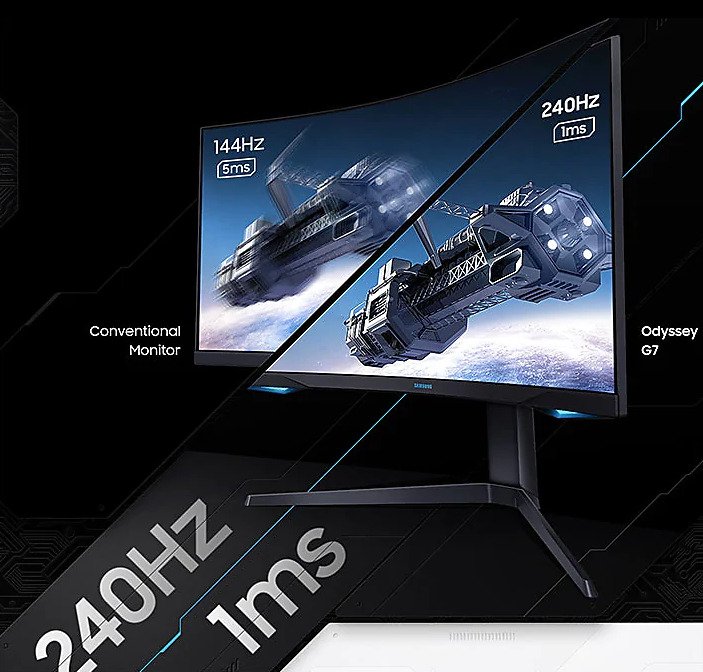
    The Samsung Odyssey G7 is a curved gaming monitor that was released in 2020. It features a 1000R curvature, which means that the curvature of the screen is 1000mm at the radius. This allows for an immersive viewing experience, as it wraps around your field of vision. The Odyssey G7 is available in two sizes: 27 inches and 32 inches. Both sizes have a QLED display with a resolution of 2560 x 1440 and a refresh rate of up to 240Hz. They also have a 1ms response time, which minimizes ghosting and blur in fast-paced games. The G7 supports AMD FreeSync Premium Pro technology, which helps to reduce screen tearing and stuttering by syncing the refresh rate of the monitor with the frame rate of the GPU. The G7 also has a high dynamic range (HDR) capability, which allows for more realistic and vibrant colors. It also has a USB-C port for charging and data transfer. Overall, the Samsung Odyssey G7 is a high-performance curved gaming monitor that offers an immersive viewing experience and excellent picture quality.

    With a curved screen size of 32″, Odyssey G7 is a real perfection of a monitor. Samsung not only produced a large monitor with a very impressive specification, but also created one with a reasonably beautiful design as the monitor can do. The monitor is all black with the Samsung logo under the screen and has a relatively thin bezel on top and sides. The V-bracket is all black. It sounds pretty simple, but the additional features are RGB lighting on the back and front. Rear lighting creates a pleasant glow behind the monitor, and front lighting is below the screen on each side. This may not be for everyone, but it improves the look above the usual monitor design.
    The stand has a lot of adjustment, with the overall adjustment height of 475 mm at a minimum of 590 mm at most. The support also tilts, pans and swirls. The stand is a bit bulky and extends 255 mm from the center of the monitor and 328 mm to the edges. The Samsung Odyssey G7 is, of course, compatible with vesa support and weighs just 6.48 kg and 8.21 kg with the stand.Samsung Odyssey G7 32 Curved Gaming Monitor

    The connections are not extremely generous with only 2 USB 3.0 ports (one of which is a super charging port). It has two versions 1.4 DisplayPorts and a single HDMI 2.0 port, but we would like to see another pair of USB slots. The ports are also facing down instead of backwards, which makes it a bit difficult when trying to connect anything, even if the monitor rotates so you can access them more easily this way. Fortunately, unlike the recent Acer monitors we reviewed, the Odyssey G7 doesn’t have an annoying fan.
    The Samsung Odyssey G7 has an excellent response time of 1 ms which is roughly the lowest you’ll find on most game monitors. Along with the results of the delay tests and G-Sync and Free-sync Premium Pro, this gives you a monitor that worked excellently during our ghostless or screen-free tests. During our game tests we had almost no problem and at 240Hz (not that our team could approach that with any recent game, of course) the monitor gives soft and silky images. The only problem we had is that with Adaptive Sync enabled and using G-Sync, you occasionally get a screen flicker. This was only presented in one of the different games we tried, but it was annoying when it appeared. With adaptive synchronization turned off, flickering has disappeared. At the time of writing Samsung is trying to fix this issue with a firmware update.Samsung Odyssey G7

    Although not 4K, we found that a good 1440P monitor with decent size is a perfect weakness between cost and performance. A 4K gaming monitor can be great, but many won’t have a PC that can make the most of it. In our opinion, 1440P 120/144/240Hz will offer a much better gaming experience than 4K 60Hz. PS5 support is fine, it takes 4K input and downscales it which is great news until the PS5 gets 2K support. But the monitor’s HDMI port is version 2.0 so you are limited to 4K@60hz (with or without HDR) due to HDMI 2.0 bandwidth. Theoretically 2K@120Hz without HDR should be possible but I have not been able to try the PS5 beta firmware and confirm.

    The quality of the display itself is excellent. With 125% sRGB coverage, colors actually appear in you along with crisp, clear text. The black levels are excellent, but since it is illuminated with the edge, unfortunately you get a slight bleeding from the light. With our full black test image this was particularly noticeable from the bottom of the screen with the top and sides to a lesser extent. You don’t notice it at all during games, but it might be a small problem watching movies.Samsung Odyssey G7This is a VESA-certified DisplayHDR 600, the monitor must have 10-bit processing, real-time contrast ratios with local attenuation, and the maximum luminance of 600 cd/m2. By setting HDR to Windows and correcting brightness levels, you can really see what Odyssey can do. If anything, we had to lower the brightness to save our burning retines. But, perhaps to keep the price low, it only has limited mitigation zones, so it may not compete with significantly more expensive FALD monitors.
    VESA Display HDR 600 is the lowest you would like to go on a monitor to consider it HDR (which even then is open to the topic). Display HDR 400, for example, is a certification that simply shouldn’t exist.
    Now, in the most important part of this monitor, the curve. With TVs, the curves were definitely just for design and were a fad that has now disappeared fortunately. They may look good sitting out there, but it didn’t have any real benefits when they’re in use. But with a PC monitor, where you’re sitting much closer and directly in front of it, a curved monitor allows for much better immersion.

    At 1000R, the Samsung Odyssey G7 has the curviest curve of all the monitors at this size. Most curved monitors in this size range have a 1800R curve, the increase in the 1000R curve here corresponds to the curvature of the human eye, which Samsung says gives maximum immersion and minimal eye fatigue.
    The 32-inch Samsung Odyssey G7 curved gaming monitor, available for around 630 pounds, offers the perfect package for the PC player. 1440P resolution, 1000R curved display provides an excellent gaming experience that adds another level of immersion to the game than a traditional flat monitor. Along with the 125% sRGB color space, VESA HDR 600 display, 1ms response time and 240 Hz refresh rate, plus other features like RGB lighting on the back and under the monitor, and G-Sync and Free-sync Premium Pro support, everything means you really get a significant amount for your money.Samsung Odyssey G7

    The display quality is excellent with excellent colors, brightness level, sharpness, complete absence of ghosts and a menu system that allows a good level of adjustment to get the image exactly as you want. Arrive pre-calibrated from the factory to an exceptionally good level so you don’t have any problems outside the box.

    It’s not all perfect though because there are a couple of problems. The main one is an intermittent flicker of the screen with G-Sync which hopefully will be fixed with a promised firmware update. The others are minor as the support excels a bit, so a redesign to reduce it would be welcome and could have been a bit more generous with USB ports. Photo:Samsung

    Overall, the Samsung Odyssey G7 offers the perfect balance of cost, performance, features and resolution. You can spend much more on a screen that totally sings and dances 4K FALD HDR, but then the G7 is about 1/3 of the cost of this. Also, once you have played for a few hours with the curved 1000R screen, you will never return to a flat screen or even curved 1800R. At this price there is nothing that matches in terms of specifications.Samsung Odyssey G7

    Samsung Odyssey G7 specs:

    • Display

      Screen Size (class)  31.5

      Screen Size (cm)  80

      Display Type  QLED

      Flat/Curved  Curved

      Screen Curvature  1000R

      Curvature  1000R

      Resolution   2,560 x 1,440

      Aspect Ratio   16:9

      Brightness (Typical)   350cd/m2

      Peak Brightness (Typical)   600cd/m2

      Brightness (Min)  300cd/m2

      Static Contrast Ratio  2,500:1(Typ.)

      Contrast Ratio Static   2,500:1(Typ.)

      Dynamic Contrast Ratio   Mega ∞ DCR

      HDR   VESA DisplayHDR 600

      Viewing Angle (Horizontal/Vertical)   178°(H)/178°(V)

      Response Time   1ms(GtG)

      Active Display Size (H x V)   697.344 x 392.256mm

      sRGB Coverage   Typ 125

      Color Support   Max 1.07B

      Color Gamut (DCI Coverage)  Typ 95%, Min 88%

      Screen Size (Class)   32

      Panel Type  VA

      Frame Rate     Max 240Hz

    • Power

      Type (Internal/External)  External Adaptor

      Power Supply Type   AC 100~240V

      Power Supply Spec.   AC 100~240V

      Power Consumption (Max)   140

      Power Consumption (Off Mode)   ≤0.3

      Max Stand By Power (DPMS)  ≤0.5

      Power Consumption (DPMS)   ≤0.3 W

    • Features

      HAS(Height Adjustable Stand)  120

      Wall-Mount (Size mm)   100 x 100

      Windows Certification   Windows 10

      Picture-In-Picture    Yes

      Eye Saver Mode   Yes

      Flicker Free   Yes

      Quantum Dot Color  Yes

      Gaming   Yes

      Off Timer Plus   Yes

      Screen Size Optimizer   Yes

      Black Equalizer   Yes

      Low Input Lag Mode   Yes

      Refresh Rate Optimizor   Yes

      Super Arena Gaming UX   Yes

      Picture by Picture (PBP)  Yes

      Refresh Rate   Max 240Hz

      Picture-By-Picture   Yes

      USB Super Charging   Yes

    • Dimensions (W x H x D)

      Set without Stand (inches)   27.96 x 23.41 x 12.04

      Set with Stand (inches)   27.96 x 17.29 x 7.37

      Package Dimension   31.73 x 10.71 x 20.47

    • Weight

      Package Weight   27.1

      Set Weight with Stand   14.3

      Set Weight without Stand   18.1

    • Accessories

      Power Cable Length  1.5 m

    • Inputs

      HDMI  1

      Display Port   2

      Headphones   Yes

      USB Ports  2

      Display Port Version   1.4

      HDMI Version  2

      USB Hub Version   3

    • Design

      Color   BLACK

      Tilt   -9 ~ +13

      Swivel   -15 ~ +15

      Pivot  -2 ~ +92

      Stand Type   HAS PIVOT (MORE THAN 100MM)

      Wall Mount  100 x 100

    • Operation Conditions

      Temperature  10~40 ℃

      Humidity  10~80,non-condensing %

    • Calibration

      Factory Tuning   YES

      Color Mode  High-Brightness/Custom/FPS/RTS/RPG/sRGB/AOS/Cinema/Dynamic Contrast

      Factory Calibration Report   Yes

    • Mechanical Specs

      Color  BLACK

      Stand Type  HAS PIVOT (MORE THAN 100MM)

      Power Cable Length  1.5 m

    • Accessory

      DP Cable  Yes

      USB 3.0 Cable   Yes

  • Review – Samsung HW-Q800T Soundbar, powerful cinematic sound

    Review – Samsung HW-Q800T Soundbar, powerful cinematic sound

    The Samsung HW-Q800T soundbar is a versatile 3.1.2 configuration that is very good for mixed use. Its overall audio playback is neutral and well balanced, making it suitable for a variety of content. It supports Dolby Atmos and engaging content, although it doesn’t provide the most immersive listening experience. On the plus side, there are a lot of sound customization features in the Samsung app, including a graphic equalizer, presets, and a dialog enhancement feature, so you can easily adjust the bar to suit your needs. Adaptive audio can also scan audio content in real time and adjust the sound of content optimization, but we don’t test it.

    The Samsung HW-Q800T soundbar is a 3.1.2 setup of Samsung’s 2020 line. This sleek and well-built configuration has two built-in speakers on the bar and a separate wireless subwoofer. It comes with Samsung Acoustic Beam technology that uses bar shooting speakers to help provide a more immersive listening experience. Its Q-Symphony feature also allows you to sync Samsung QLED TV speakers with the bar for a more cinematic sound, although we currently don’t test for it. Amazon Alexa Voice Assistant support is built into your design, and you can also mute the microphone when you’re not using it. Overall, its sound playback is very neutral and well-balanced ready to use, making it suitable for a variety of audio content. Although it can play engaging content and Dolby Atmos, unfortunately, it does not provide the most immersive listening experience. On the plus side, this bar has a lot of connectivity options and sound customization features.Samsung HW-Q800T soundbar

    The Samsung HW-Q800T soundbar is ideal for TV shows. This 3.1.2 configuration has a dedicated central channel, which helps make voices clearer and more accurate. Its sound profile is very balanced, especially in the mid-range, which is ideal for heavy dialogue content. It also has a dialog enhancement feature to help make the sound of the dialogue sharper. This soundbar can make noise without much distortion. If you want to stream content from your mobile device to the bar wirelessly, you can use Bluetooth and Wi-Fi connections.Samsung HW-Q800T soundbar

    The Samsung HW-Q800T soundbar is very good for music. Its neutral and balanced sound profile fits most musical genres, and it can reproduce the beats and hums found in heavy bass music thanks to its wireless sub. Fortunately, there’s also a graphic equalizer and presets available in the Samsung app, so you can easily customize the sound to your liking.Photo:Samsung
    The Samsung HW-Q800T soundbar is perfect for movies. It has a neutral and well-balanced sound reproduction, and has decent bass performances that can reproduce the beats and roars of action-packed scenes and movie scores. It supports Dolby Atmos content, but does not provide the most immersive listening experience. You also have to mix the surround content into stereo to play it, which doesn’t sound as natural or realistic. On the plus side, this bar can make noise, and there’s not much distortion when playing at a maximum volume. Current Price:$899.99.

    • General

      Color

      Black

      Number of Channels

      3.1.2

      Total Power (W)

      330W

      Center Speaker

      Yes

      Up-firing Speaker

      Yes

    • Special Features

      Compatible with SWA-9000S

      Yes

    • Features

      Wide Range Tweeter

      Yes

    • Audio Processing

      Dolby

      ATMOS

      DTS-X

      DTS:X
      DTS digital Surround

    • Audio Features

      Sound Mode

      Surround Sound expansion
      Game Pro
      Standard
      Adaptive

      Q-Symphony

      Yes

      Acoustic Beam Technology

      Yes

      Wireless Surround Sound Ready

      Yes

      Wide Range Tweeter

      Yes

    • Video Features

      4K Video Pass

      Yes

      HDR

      HDR 10+

    • Speakers

      Number of Speakers

      8

      Subwoofer Included

      Yes

      Subwoofer Type

      Wireless Active

    • AV Decoding Format

      WAV

      Yes

      MP3

      Yes

      WMA

      Yes

      OGG

      Yes

      FLAC

      Yes

      AAC

      Yes

      ALAC

      Yes

      AIFF

      Yes

    • Connectivity

      HDMI Out

      1

      HDMI Inputs

      1

      HDMI eARC

      Yes

      Optical Inputs

      Yes

      Wi-Fi

      Yes

      Bluetooth®

      Yes

      Bluetooth® Power On

      Yes

      One Remote Control

      Yes

      Voice Features

      Yes (Built-in)

      SmartThings App compatibility

      Yes

    • Power Consumption

      Stand-by Power Consumption (Main)

      0.45W

      Stand-by Power Consumption (Subwoofer)

      0.45W

      Operating Power Consumption (Main)

      28W

      Operating Power Consumption (Subwoofer)

      28W

      Free Voltage

      Yes

      Rating Voltage

      AC110-240V~ 50/60Hz

  • Smartwatch review Samsung Gear S3-superb battery

    Smartwatch review Samsung Gear S3-superb battery

    In stark contrast to most smartwatches, the Samsung Gear S3 has great battery life: charge it to 100% and it’ll last you almost five days. The first four days with normal operation and then, when it hits 5%, more than 24 hours of use in power-save mode. That’s fantastic stamina for any smartwatch, let alone one with a colour AMOLED display. Then there’s the aesthetics. The Samsung Gear S3 is available in a couple of flavours – the Classic and the Frontier – and both look stunning. The Frontier is a real looker, finished in smoky, gunmetal grey, with a burly rubber wristband (both large and small sizes are included in the box), butch knurled buttons, and an aggressively notched bezel that rotates with a light clicking action, just like on a dive watch.Samsung Gear S

    The difference is that this bezel isn’t simply for adornment or timing purposes; it’s part of the fabric of the way the watch works. Spin it and the watch face whirls away to reveal a galaxy of different notifications and widget screens. It’s also used to scroll through items in lists and alter settings, depending on whereabouts in the UI you fi nd yourself. The Gear S3 watch still has a responsive touchscreen, but I found myself using the bezel whenever possible because it leaves the screen free for reading. The 1.3in panel has a resolution of 360 x 360, and it’s topped with Corning’s wearable-specific scratch- and shatter-resistant Gorilla Glass SR+. It’s comfortably readable in most conditions at the default setting of seven and, handily, it automatically dims in low-light conditions, so it won’t annoy everyone in the cinema when you check the time. The problem with the Samsung Gear S3 is that it’s a bit beefy. At 46 x 12.9 x 49mm (including the lugs), it’s thicker than most smartphones, and I found that with some shirts it wouldn’t slip under the cuf s comfortably. If you have more slender wrists, you may prefer to stick with the Gear S2.

    There’s NFC, 4GB of storage for music, wireless charging via the WPC standard, and a dual-core 1GHz Samsung Exynos 7270 chip with 768MB of RAM. It only slowed down while playing Fruit Ninja – but that’s not what the S3 was made for. In every other respect, it responds smoothly and instantly to touchscreen dabs  and clicks of the bezel.

    But, the Samsung Gear S3 isn’t properly waterproof like the Apple Watch Series 2; it’s water-resistant and rated to the IP68 standard. This means that, although the watch can be submerged to a depth of 1.5m in freshwater for up to 30 minutes, you can’t take it for a swim. That sets the Samsung Gear S3 at an immediate disadvantage to the Apple Watch Series 2, which has a decent swim-tracking mode in addition to GPS and heart-rate monitoring. But the Samsung hits back with excellent automatic tracking and stats-packed activity monitoring. Walk briskly for a few minutes and the watch will quickly pick that up and log it as an activity. The same happens if you take it for a run and forget to manually hit start. It will also auto-pause when you stop to cross the road, and it reports a rich bank of data to your phone once you’re done, from the usual average speed, distance and average heart-rate data to the more unusual average and maximum cadence.

    It all feeds into the S Health app on your phone, which syncs the data and presents it in a more digestible manner. If you’re familiar with the app through owning a Samsung phone, there will be no surprises here: the app presents your goals at the top of the main page with a couple of key stats on graphs beneath (steps and sleep by default), with specifi c data, from your stress levels through SpO2 and floors climbed, encapsulated in a series of square panels below that.Note that Gear watches are no longer limited to working with only Samsung phones. Although the Gear S3 runs Samsung’s Tizen wearables OS, you can pair it on any modern Android phone via the Samsung Gear app.samsung Gear S

    The Gear S3’s Wi-Fi connectivity means you don’t have to be within Bluetooth range of your phone to receive notifications and make/receive calls, so if the phone rings you can answer even if you’ve left your phone by the bed. The speaker also allows the watch to double as an interactive fitness coach while you’re working out. It will gee you up when you start to fade and deliver timely audible info as you pound the pavement. The only problem is that the speaker isn’t loud enough to hear over the rush of breath from your lungs and the blood pounding in your ears, so you’ll have to use the Gear S3’s Bluetooth connectivity to hook up a pair of headphones instead. These new capabilities build on the Gear S2’s already-impressive collection. There’s an optical heart-rate monitor that continuously tracks your pulse during exercise and keeps tabs on your resting rate with spot checks during the day. There’s an altimeter/barometer and an associated app, keeping tabs on your altitude and atmospheric pressure. The fitness side of things is particularly strong, offering most tools that fitness fanatics need to log exercise and keep motivated. Notifications work just as well as on Android Wear watches. The big bonus, though, is that the Samsung Gear S3 combines all of those things with superb battery life and luxurious high-end design. It feels like a luxury watch and a high-end smartwatch combined. It’s a pleasure to use, to wear (as long as your wrists aren’t too slim) and to train with, and even at a price of $500, it’s now the Apple Watch alternative to beat. If you own an Android smartphone and you’re looking to invest in a smartwatch, you should put the Samsung Gear S3 at the very top of your list.

    $499 – www.samsung.com 1.3in 360 x 360 AMOLED display • dual-core 1GHz processor • 4GB memory • 768MB RAM • GPS • 802.11n Wi-Fi • Bluetooth 4.2 • heart-rate sensor • IP68 water and dust resistance • 380mAh battery • 1yr RTB warranty • Samsung Tizen 2.3.2 OS • 46 x 12.9 x 49mm (WDH) • 62g

    source:pcauthority