Tag: Convert

  • Hybrid app – convert and edit your videos

    Hybrid app – convert and edit your videos

    Hybrid app is a single, all-inclusive package that lets you edit and convert videos in addition to doing other things with the software.

    Videos can be converted into many media formats and modified in a number of ways, including by tagging, muxing, and performing other routine processes.

    Numerous Formats Are Supported
    The variety of media formats supported by this program is one of its outstanding features. Along with a few less practical but still widely used video formats, it will handle all of the most common ones. These comprise raw VC-1 and AVC files, formats that FFmpeg and MPlayer can decode, and various other formats such as x264, Xvid, VP8, x265, ProRes, and others.

    The application is more than capable of managing many encoding modes in addition to supporting the different formats. Every encoding style has easily configurable characteristics, like bitrate and constant rate factors.

    Hybrid app
    Hybrid

    It makes it compatible with several formats, including AVCHD and Blu-ray discs.

    With Hybrid program, audio extraction is also possible. Formats including MP3, OCG, AAC, FLAC, AC3, DTS, and others can be produced by it. Not just any extraction, though; it will support both the most and least common audio modes.
    Modes of Advanced Configuration
    Hybrid also has a lot to offer users who are more experienced. As we’ve already said, you may simply change the encoding option, which allows you to change the song, the bitrate, and the entropy coding mode. Additionally, you can create new photographs, adjust aspect ratios, crop images, and resize loaded images.

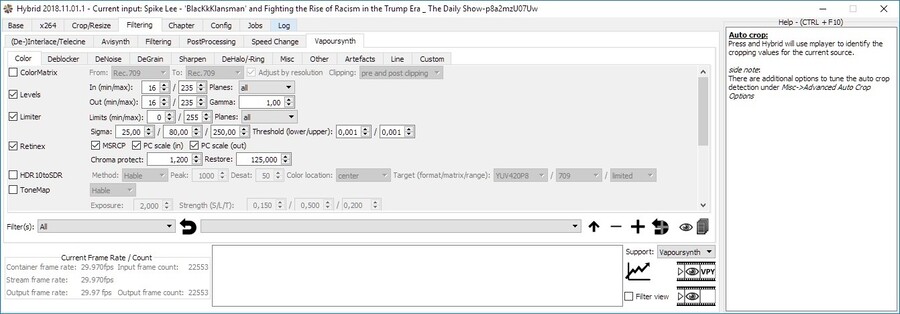
    You will have various other filtering functions in addition to all of these editing possibilities. Filtering options allow you to improve and modify your files before encoding. Additionally, you can use telecine, color correction, deinterlacing, etc.

    With the help of these features, you may easily yet effectively edit your photos to create significant and long-lasting changes.
    Include tags and subtitles
    Adding tags and subtitles to the videos is another helpful function of the program. Additionally, you can use the chapter editor to alter the video’s structure.

    Tasks that were formerly completed entirely by hand can now be automated.

    In summary, Hybrid app is a powerful tool that offers a plethora of video editing and encoding features. If you’re a more experienced editor, the program allows you to make extensive modifications in addition to simple adjustments. Both novice and expert users will love it, while experienced users will definitely find the software more helpful than those who are just starting out with editing. With Hybrid app, you can organize, edit, and convert your video content into a variety of media types all in one convenient package.

    Here’s a general feature list of Hybrid app

    tagging support for avi/mkv/mp4/mov
    chapter support for mkv/mp4/Blu-ray
    subtitle support for mkv/mp4/Blu-ray
    separated audio-, video-, filter- and ‘a/v-combi’-profiles
    an integrated bitrate calculator
    accepts raw VC-1, AVC, MPEG-2, MPEG-4 ASP input files
    manual&automatic creation&pass-through of chapters
    ability to encode single title/chapters
    a job/queue based processing system
    AAC/MP3/AC-3/Vorbis/Opus/FLAC/DTS/PCM/EAC-3 audio encoding using dcaenc/MEncoder/FFmpeg/Aften and different AAC-encoders
    supported aac encoders: qaac, FDK AAC, faac, fhg, neroaacenc
    filtering through Vapoursynth, Avisynth (Windows only) and some basic filtering through FFmpeg
    accepted input: avs and nearly everything that mplayer/ffmpeg can decode
    supported video output formats: MPEG-4 ASP (Xvid), MPEG-4 AVC (x264, qsvencc, nvencc, vceencc, ffmpeg nvenc), VP8/VP9 (vpxenc), ProRes (ffmpeg), MPEG-4 HEVC (x265, kvazaar, DivX265, nvencc, qsvencc, vceencc, ffmpeg nvenc), FFV1 (ffmpeg), UT video (ffmpeg), FFvHuff (ffmpeg), AV-1 (aomenc, rav1e)
    supported audio output formats: dts, ac3, ogg vorbis, mp3, aac, flac, pcm, opus, pass-through
    supported containers: mov/mp4/mkv/m2ts/webm/avi, Blu-ray or a AVCHD structure
    audio/video pass-through -> can be used for muxing, tagging, chapter editing
    a bunch of options to automate stuff

    Hybrid download page

  • VideoProc software – Convert, resize, edit large 4K videos, audios & DVDs

    VideoProc software – Convert, resize, edit large 4K videos, audios & DVDs

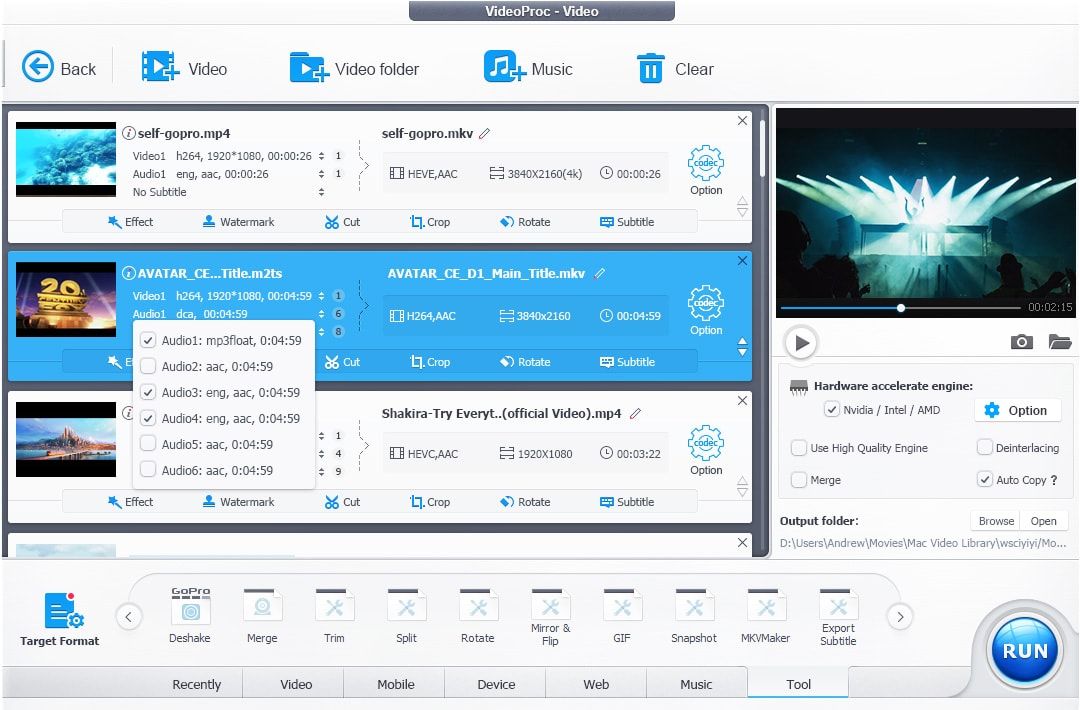
    VideoProc is a video editing software that allows users to process, edit, and convert videos on their computer. It can handle various video formats including 4K and 1080p, and it offers a wide range of editing tools, such as cropping, trimming, merging, and adding effects. Additionally, it also has features such as video compression, screen recording, and video stabilization. It supports a variety of input and output formats and can be used on both Windows and Mac computers. It allows to easily edit videos and also can be used to speed up the process of editing videos.

    Get a reliable 4K video editor
    Although there is a lot of software, which helps you achieve the optimal result of doing an awesome job when it comes to editing, VideoProc is by far one of the best editing software, which you can get your hands on.

    Why does VideoProc recommend video editing?
    It’s very simple, no other software can deliver good and fast results like VideoProc, and what they claim to provide 47 times real-time processing speeds is really true. All of these video editing software applications use something, which is called hardware acceleration.VideoProc

    What is hardware acceleration?
    It is the ability of any video processing software to use the basic force of graphics and CPU processors to render videos and assist in their conversion. Although each software uses hardware acceleration to provide video editing, VideoProc is still the only software on the market that provides complete hardware acceleration.

    In lay terms, hardware acceleration is supported during video encoding, decoding, and video processing. This process is quite rare and is not yet present in any other software, and is a tried and tested issue.

    Do you need full hardware acceleration?
    Does your laptop get really hot when editing videos? In that case, the software is not enabled for full hardware acceleration. With VideoProc software, the chances of your laptop heating being quite low and also offers an additional advantage of faster and better editing than other software applications.

    Most of these software can use CPU or GPU, which also, not at their optimal capacity, and therefore, sometimes, videos are often sloppier, and re-editing is necessary.

    All of these are distant problems if you use VideoProc as the software is very refined and editing is always easy and never problematic. You’ve already achieved full hardware acceleration!

    Easy – Video Editor & Converter
    When all the features are covered, the most important thought comes to mind – the software application must be complicated and the user interface may not be very easy. Well, in all honesty, VideoProc is one of the simplest software applications, you might come across.

    It’s highly balanced software if you’ve just started your video editing career. The basic options to add effect/watermark/subtitle to the video or cut, crop and rotate videos, followed by exporting the raw file, or even compressing, everything is covered with a click of the button.
    However, if you are an advanced editor, the advanced toolbox will target you and you can deshake, noise, merge, crop, split videos or export still image/video subtitles at will. It also supports the conversion of a wide range of formats such as 4K videos, Ultra HDvideo, DVDs, music, etc. Download VideoProc software HERE