Tag: pros and cons

  • Review of the 55-Inch LG OLED AI B4 4K Smart TV (2024)

    Review of the 55-Inch LG OLED AI B4 4K Smart TV (2024)

    The 55-inch LG OLED AI B4 4K Smart TV (2024) presents an exciting blend of cutting-edge display technology, advanced processing power, and a rich suite of smart features. Whether you’re a cinema enthusiast, a gaming aficionado, or simply someone looking to upgrade to a high-end smart TV, the B4 is designed to satisfy diverse viewing needs. This review covers every aspect of the LG OLED AI B4, breaking down its specifications, user experience, and value proposition.

    Display Quality: Exceptional OLED Performance

    OLED Brilliance and 4K Resolution

    The LG OLED AI B4 boasts a 4K OLED panel (3840 x 2160), offering sharp, ultra-high-definition visuals with incredible detail. OLED technology uses self-lit pixels, resulting in true blacks, vibrant colors, and a superior contrast ratio. This feature is especially evident in dark scenes, where OLED’s pixel-level dimming technology prevents any unwanted blooming or backlight bleed.

    LG OLED AI B4
    LG OLED AI B4

    HDR and Wide Color Gamut

    HDR support, including Dolby Vision, HDR10, and HLG, takes image quality to the next level. The TV’s wide color gamut ensures colors are not only accurate but also rich and realistic. Thanks to Dolby Vision, which adjusts brightness and contrast on a scene-by-scene basis, viewers can expect cinematic picture quality that closely mirrors the creator’s intent.

    AI-Powered Visual Enhancements

    The B4 is equipped with LG’s α8 AI Processor 4K, which enhances image processing with AI upscaling and brightness control. AI Genre Selection identifies the type of content being played—be it a movie, sports, or a game—and optimizes settings accordingly. Dynamic Tone Mapping Pro technology further improves contrast and details in bright and dark areas, making every frame lifelike and visually impressive.

    Refresh Rate and Motion Handling

    With a 120Hz native refresh rate, the TV supports smooth visuals for fast-paced scenes, whether in sports broadcasts or gaming. The OLED Motion technology helps minimize motion blur, ensuring viewers enjoy fluid and immersive experiences during high-motion content.

    The LG OLED AI B4 excels in delivering outstanding picture quality, thanks to OLED’s self-lit pixels, robust HDR support, and smart processing features. For users focused on display performance, this TV is a top contender.

    Gaming Performance: Tailored for Gamers

    High Frame Rate and Variable Refresh Rate

    With support for a 4K 120fps High Frame Rate (HFR) through HDMI, this TV is ideal for next-gen gaming consoles like the PlayStation 5 and Xbox Series X. The inclusion of Variable Refresh Rate (VRR) and compatibility with NVIDIA G-Sync and AMD FreeSync reduces screen tearing and stuttering, providing a fluid and responsive gaming experience.

    LG OLED AI B4
    LG OLED AI B4

    ALLM, HGIG, and Game Optimizer

    The Auto Low Latency Mode (ALLM) automatically minimizes lag when gaming, providing seamless transitions between gameplay and other TV functions. The HGIG (HDR Gaming Interest Group) mode enhances HDR gaming visuals by standardizing brightness, contrast, and color levels, giving players an immersive experience in high dynamic range gaming.

    The Game Optimizer and Game Dashboard features allow users to adjust gaming settings quickly, from VRR to black stabilizer and input lag reduction, directly from an on-screen menu without interrupting the gameplay. These features cater to serious gamers who want complete control over their gaming environment.

    The LG OLED AI B4 is equipped with advanced gaming features that make it a top pick for gamers seeking ultra-smooth, high-resolution gameplay.

    Smart TV Features: Powered by webOS 24

    Seamless Interface and Smart Features

    The LG OLED AI B4 runs on webOS 24, a user-friendly operating system with a sleek and intuitive interface. It comes loaded with popular streaming apps like Netflix, Amazon Prime Video, Disney+, and more, enabling users to access their favorite content with ease. The interface supports multiple profiles and customized recommendations based on viewing habits.

    ThinQ AI and Voice Control

    LG ThinQ AI is at the core of the smart experience, enabling the TV to integrate seamlessly with LG’s broader ecosystem and smart home devices. The B4 supports voice assistants such as Amazon Alexa (built-in) and can work with Apple AirPlay2. Users can also control the TV via the LG ThinQ app on their smartphones.

    Multi View and Family Settings

    Multi View allows users to split the screen, which is useful for keeping up with multiple sources or activities simultaneously. This feature, combined with Family Settings, ensures the TV remains family-friendly, with customizable settings for individual users.

    With its powerful smart features, the LG OLED AI B4 goes beyond traditional viewing, offering a tailored and interactive experience for every member of the household.

    Audio Quality: Immersive Sound Experience

    Dolby Atmos and AI Sound Pro

    The LG OLED AI B4 delivers an immersive audio experience with Dolby Atmos support, creating a 3D soundscape that pairs well with its high-quality visuals. This feature is especially impactful for movies and TV shows, where sound directionality adds to the overall cinematic experience.

    α8 AI Sound Pro and Clear Voice Pro

    LG’s α8 AI Sound Pro processor offers virtual 9.1.2-channel up-mixing, enhancing the soundstage by making audio feel more layered and immersive. Clear Voice Pro automatically detects dialogue-heavy scenes and clarifies voice output, ensuring that users never miss any critical lines due to background noise or low-quality audio sources.

    Bluetooth Surround and LG Sound Sync

    The TV is Bluetooth Surround Ready, allowing it to connect with additional Bluetooth speakers for a more robust sound setup. LG Sound Sync also enables compatibility with LG soundbars, providing a simplified setup that complements the TV’s built-in speakers.

    The audio features on the LG OLED AI B4 support an immersive viewing experience, although audiophiles may still consider a dedicated sound system to maximize sound quality.

    Connectivity and Port Selection: Extensive Options

    HDMI 2.1 and eARC

    The LG OLED AI B4 includes four HDMI inputs, all supporting 4K 120Hz, VRR, and ALLM, which is a boon for users with multiple gaming consoles or devices. HDMI 3 also features an enhanced Audio Return Channel (eARC), allowing high-resolution audio to be sent from the TV to an external sound system.

    Wireless and Wired Connectivity

    The TV supports Wi-Fi 5 and Bluetooth 5.1, covering essential wireless connectivity needs. Additionally, it includes Ethernet, USB, and RF inputs, ensuring it’s well-equipped for various use cases, from streaming to connecting external drives.

    Compatibility with Accessories

    The LG OLED AI B4 is USB Camera compatible, useful for video calls or other camera-based applications. Simplink (HDMI CEC) allows for control of compatible HDMI devices with a single remote, reducing clutter and simplifying device management.

    The LG OLED AI B4 is equipped with robust connectivity options, making it suitable for a wide range of users with various external device requirements.

    Accessibility and Usability: A Thoughtful Approach

    Accessibility Features

    The B4 includes high-contrast mode, grayscale, and invert colors to accommodate users with visual impairments. These features make it accessible to a broader audience, ensuring inclusivity without compromising on functionality.

    Magic Remote Control

    The included Magic Remote MR24 offers point-and-click navigation, voice control, and hotkeys for quick access to popular apps. Its ergonomic design and responsive performance enhance user experience, simplifying navigation and access to settings.

    LG OLED AI B4 Magic Remote MR24
    LG OLED AI B4 Magic Remote MR24 – images: LG

    With a focus on accessibility and ease of use, the LG OLED AI B4 provides an inclusive experience that meets the needs of a diverse audience.

    Energy Efficiency and Sustainability

    Energy Consumption

    The LG OLED AI B4 has a standby power consumption of under 0.5W, reflecting its efficiency when idle. This is a notable feature for eco-conscious consumers who prioritize energy-saving devices.

    Long-Term Software Support

    The security update support until 2028 demonstrates LG’s commitment to providing a secure and up-to-date experience over the TV’s lifespan. This ensures that users can continue to enjoy a secure smart TV experience even as technology evolves.

    The TV’s energy efficiency and long-term software support make it an attractive option for environmentally aware consumers who value sustainability.

    Design and Build: A Sleek Addition to Any Room

    Aesthetics and Build Quality

    The LG OLED AI B4 features a sleek and minimalist design, typical of LG’s OLED lineup. The screen is ultra-thin (45.9 mm without the stand), and the overall build quality feels premium. With narrow bezels, the display appears expansive, making the TV a statement piece in any room.

    Stand and Mounting Options

    The TV includes a compact stand measuring 1057 x 235 mm. The stand is stable and complements the TV’s slim profile without taking up excessive space. VESA mounting (300 x 200) is also supported, allowing users to wall-mount the TV for a cleaner setup.

    With a focus on elegance and minimalism, the LG OLED AI B4 is a stylish addition to any living room, suitable for both stand and wall mounting.

    Overall Performance and Value for Money

    The 55-inch LG OLED AI B4 4K Smart TV (2024) combines cutting-edge OLED technology with advanced AI processing, a comprehensive set of smart features, and gaming enhancements that are hard to beat in this category. Its picture quality, gaming performance, and smart functionality provide a compelling package, especially for users seeking a high-end viewing experience.

    In terms of price-to-performance, the LG OLED AI B4 offers significant value, delivering features typically found on more expensive models. However, while the built-in audio is solid, serious audiophiles may still find value in pairing the TV with a high-quality soundbar or surround sound system to truly unlock the potential of Dolby Atmos. Price: £899.00

    55 inch LG OLED AI B4
    55 inch LG OLED AI B4

    Pros and Cons Summary

    Pros:

    • Exceptional OLED picture quality with perfect blacks and vibrant colors
    • Comprehensive HDR support (Dolby Vision, HDR10, HLG)
    • Excellent gaming features (4K 120fps, VRR, ALLM, G-Sync/FreeSync compatibility)
    • User-friendly webOS 24 with ThinQ AI and multi-device compatibility
    • Enhanced sound quality with Dolby Atmos and AI Sound Pro
    • Versatile connectivity options (HDMI 2.1, eARC, Bluetooth 5.1)
    • Long-term software support and energy-efficient design

    Cons:

    • Audio output may not satisfy audiophiles without an external sound system
    • Limited to Wi-Fi 5 (newer TVs may offer Wi-Fi 6 or 6E)

    Final Verdict

    The LG OLED AI B4 4K Smart TV (2024) is a versatile and powerful TV that excels in nearly every category, from picture quality to gaming performance. It’s a standout choice for viewers who prioritize high-quality visuals, immersive audio, and cutting-edge smart TV features. At its price point, the LG OLED AI B4 offers exceptional value, making it a highly recommended choice for a wide range of users.

  • Receiver Review: StormAudio ISR Fusion 20 AV

    Receiver Review: StormAudio ISR Fusion 20 AV

    The StormAudio ISR Fusion 20 AV Receiver is a high-end audio-visual receiver designed for home theater enthusiasts who demand the highest quality audio and video performance. With a robust feature set, cutting-edge technology, and an emphasis on customization and integration, the ISR Fusion 20 stands out in the competitive field of AV receivers.

    Overview of the StormAudio ISR Fusion 20

    Design and Build Quality

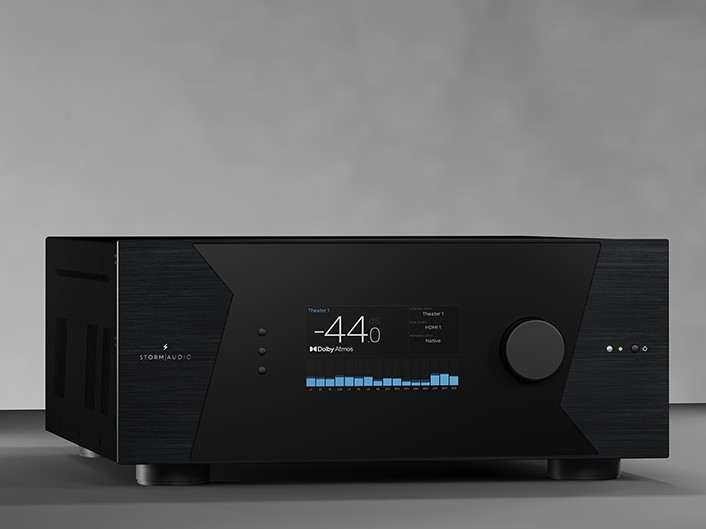
    The ISR Fusion 20 boasts a sleek and modern design with a focus on durability and elegance. Its chassis is made from high-quality materials, ensuring both aesthetic appeal and long-lasting performance. The front panel features a minimalist layout with a central display, flanked by control buttons and a large volume knob. Connectivity ports are conveniently located on the rear panel, providing a clean and uncluttered look.

    Stormaudio Isr Fusion 20
    StormAudio ISR Fusion 20

    Key Specifications

    • Channels: 20 channels of amplification
    • Power Output: 200 watts per channel (8 ohms)
    • Audio Decoding: Dolby Atmos, DTS Pro, Auro-3D
    • Video Support: 4K Ultra HD, HDR10, Dolby Vision, HLG
    • Connectivity: HDMI, USB, Ethernet, Wi-Fi, Bluetooth
    • Dimensions: 17.3 x 7.9 x 19.7 inches (W x H x D)
    • Weight: 55 lbs

    Features and Capabilities

    Audio Performance

    The ISR Fusion 20 is engineered to deliver exceptional audio performance. Its 20 channels of amplification provide ample power to drive large home theater systems, ensuring dynamic and immersive sound. The receiver supports the latest 3D audio formats, including Dolby Atmos, DTS Pro, and Auro-3D, creating a multi-dimensional audio experience that places you at the center of the action.

    • High-Resolution Audio: The ISR Fusion 20 supports high-resolution audio formats, including FLAC, ALAC, and DSD, ensuring that your music playback is of the highest quality.
    • Advanced Room Calibration: Equipped with Dirac Live, the receiver can analyze and correct room acoustics to deliver optimal sound performance tailored to your specific environment.

    Video Performance

    On the video front, the ISR Fusion 20 excels with support for 4K Ultra HD resolution and high dynamic range (HDR) formats such as HDR10, Dolby Vision, and HLG. This ensures that your video content is displayed with stunning clarity, vibrant colors, and deep contrast, making your home theater experience truly cinematic.

    • HDMI 2.1 Support: The receiver features HDMI 2.1 inputs and outputs, enabling support for the latest video standards and future-proofing your system for upcoming advancements.
    • 8K Ready: While primarily focused on 4K, the ISR Fusion 20 is also prepared for 8K video, ensuring compatibility with next-generation video sources.

    Connectivity and Integration

    The ISR Fusion 20 offers a comprehensive range of connectivity options to accommodate a variety of devices and setups.

    • HDMI Inputs/Outputs: Multiple HDMI inputs and outputs allow for easy connection of Blu-ray players, gaming consoles, streaming devices, and more.
    • Wireless Connectivity: Built-in Wi-Fi and Bluetooth support seamless wireless streaming from your favorite devices.
    • Network Capabilities: Ethernet connectivity enables integration with home networks, supporting streaming services and firmware updates.
    • Custom Installation Friendly: The receiver is designed with custom installers in mind, offering features such as IP control, RS-232, and advanced automation system compatibility.

      Stormaudio Isr Fusion 20
      StormAudio ISR Fusion 20

    User Interface and Control

    The ISR Fusion 20 features an intuitive user interface that simplifies setup and operation. The on-screen menu is clear and easy to navigate, providing quick access to settings and configurations.

    • Remote Control: A comprehensive remote control is included, offering full access to all functions and settings.
    • Mobile App: The StormAudio mobile app allows for convenient control from your smartphone or tablet, providing additional flexibility and ease of use.
    • Voice Control: Integration with voice assistants like Amazon Alexa and Google Assistant enables hands-free control of your AV system.

    Installation and Setup

    Unboxing and Initial Setup

    Upon unboxing the ISR Fusion 20, you’ll find the receiver itself, a remote control with batteries, a power cable, a user manual, and calibration microphone. The initial setup process involves connecting the receiver to your TV, speakers, and other devices.

    1. Positioning the Receiver: Place the ISR Fusion 20 in a well-ventilated area with adequate space for airflow to prevent overheating.
    2. Connecting Speakers: Connect your speakers to the corresponding terminals on the receiver’s rear panel. Ensure correct polarity for optimal sound quality.
    3. Connecting Sources: Connect your video sources (e.g., Blu-ray player, gaming console) to the HDMI inputs. Connect your TV to the HDMI output.
    4. Powering On: Plug in the power cable and turn on the receiver.

    Calibration and Optimization

    To achieve the best possible sound performance, use the included calibration microphone and Dirac Live software to analyze and optimize your room acoustics.

    1. Connect the Microphone: Plug the calibration microphone into the designated port on the front panel of the receiver.
    2. Launch Dirac Live: Follow the on-screen prompts to launch Dirac Live and begin the calibration process.
    3. Measure Speaker Distances: The software will prompt you to take measurements from various listening positions in your room.
    4. Apply Corrections: Once measurements are complete, Dirac Live will generate and apply corrections to optimize sound performance.

    Performance Evaluation

    Audio Quality

    The ISR Fusion 20 delivers outstanding audio quality across a wide range of content. Whether watching movies, playing games, or listening to music, the receiver produces clear, detailed sound with impressive dynamic range.

    • Movies: Dolby Atmos and DTS

      Pro support create a truly immersive experience, with sound coming from all directions, including overhead.

    • Music: High-resolution audio support ensures that your music is reproduced with stunning clarity and detail, making it a joy to listen to your favorite tracks.
    • Gaming: The receiver’s low latency and powerful amplification make it an excellent choice for gaming, delivering crisp, precise sound that enhances the gaming experience.

    Video Quality

    The video performance of the ISR Fusion 20 is equally impressive, thanks to its support for 4K Ultra HD and various HDR formats.

    • 4K Content: Whether streaming or playing physical media, 4K content looks sharp and vibrant, with excellent color accuracy and contrast.
    • HDR: HDR10, Dolby Vision, and HLG support ensure that HDR content is displayed with enhanced brightness, contrast, and color, providing a more lifelike viewing experience.

    Advanced Features

    Multi-Zone Audio

    The ISR Fusion 20 supports multi-zone audio, allowing you to enjoy different audio sources in different rooms simultaneously. This feature is ideal for homes with multiple entertainment areas, providing flexibility and convenience.

    • Zone 2/3 Outputs: Connect additional speakers to the Zone 2 and Zone 3 outputs to create separate listening zones.
    • Independent Control: Each zone can be controlled independently, enabling different audio sources and volume levels in each area.

    Customization and Expansion

    The ISR Fusion 20 is designed to accommodate a wide range of setups and configurations, with numerous customization options and the ability to expand your system as needed.

    • Modular Design: The receiver’s modular design allows for future upgrades and expansions, ensuring that your system can evolve with your needs.
    • Custom Presets: Save and recall custom presets for different listening modes, making it easy to switch between settings for movies, music, and gaming.

      Isr Fusion 20
      ISR Fusion 20 – images: StormAudio

    Maintenance and Troubleshooting

    Regular Maintenance

    To keep your ISR Fusion 20 performing at its best, regular maintenance is recommended.

    • Cleaning: Dust the exterior of the receiver regularly and ensure that ventilation openings are free from obstructions.
    • Firmware Updates: Check for firmware updates periodically to ensure that your receiver is up to date with the latest features and improvements.

    Troubleshooting Common Issues

    If you encounter issues with your ISR Fusion 20, refer to the troubleshooting section of the user manual. Common issues and their solutions include:

    • No Sound: Check speaker connections, ensure the receiver is set to the correct input source, and verify that mute is not enabled.
    • No Video: Ensure HDMI connections are secure, and check that the TV is set to the correct input source.
    • Network Issues: Verify that the receiver is connected to your network and check network settings.

    Pros and Cons of the StormAudio ISR Fusion 20 AV Receiver

    Pros

    1. Exceptional Audio Performance
      • High-Quality Amplification: With 20 channels of amplification delivering 200 watts per channel, the ISR Fusion 20 provides powerful and dynamic sound.
      • 3D Audio Support: Supports Dolby Atmos, DTS

        Pro, and Auro-3D, offering a truly immersive audio experience with sound coming from all directions, including overhead.

      • High-Resolution Audio: Supports formats such as FLAC, ALAC, and DSD, ensuring high-quality music playback.
    2. Superior Video Performance
      • 4K Ultra HD and HDR Support: Ensures stunning clarity, vibrant colors, and deep contrast for a cinematic viewing experience.
      • 8K Ready: Future-proofed for next-generation video standards.
    3. Advanced Room Calibration
      • Dirac Live: Provides precise room acoustic correction, optimizing sound performance tailored to your specific environment.
    4. Comprehensive Connectivity
      • HDMI 2.1: Multiple HDMI inputs and outputs, ensuring compatibility with the latest video sources and standards.
      • Wireless Connectivity: Built-in Wi-Fi and Bluetooth for seamless streaming from various devices.
      • Network Capabilities: Ethernet for integration with home networks, supporting streaming services and firmware updates.
    5. User-Friendly Interface
      • Intuitive On-Screen Menu: Easy to navigate, simplifying setup and operation.
      • Mobile App: Allows control from smartphones or tablets for added flexibility.
      • Voice Control: Compatible with Amazon Alexa and Google Assistant for hands-free operation.
    6. Customization and Expansion
      • Modular Design: Allows for future upgrades and system expansions.
      • Multi-Zone Audio: Supports different audio sources in multiple rooms simultaneously.
      • Custom Presets: Enables quick switching between different listening modes for movies, music, and gaming.
    7. Build Quality and Aesthetics
      • Durable Chassis: Made from high-quality materials, ensuring longevity and a premium look.
      • Sleek Design: Minimalist and modern design, with a clean and uncluttered appearance.

        ISR Fusion 20
        ISR Fusion 20

    Cons

    1. High Cost
      • Premium Price Tag: The advanced features and high performance come at a significant cost, making it a considerable investment compared to other receivers.
    2. Complex Setup
      • Detailed Calibration Process: While Dirac Live offers superior room correction, the calibration process can be complex and time-consuming for some users.
      • Advanced Features Require Knowledge: Fully utilizing all features and customization options may require a higher level of technical knowledge.
    3. Size and Weight
      • Large and Heavy: The receiver’s size and weight (55 lbs) might pose challenges for installation and placement, particularly in smaller spaces.
    4. Limited Availability
      • Specialized Product: As a high-end product, it might not be as readily available as more mainstream receivers, potentially requiring purchase from specialized retailers.
    5. Potential Overkill for Small Systems
      • Overpowered for Small Setups: The extensive feature set and high power output might be excessive for users with smaller or more basic home theater setups.
    6. Firmware and Software Updates
      • Infrequent Updates: Depending on the manufacturer’s update schedule, users might experience delays in receiving firmware and software updates.

    The StormAudio ISR Fusion 20 AV Receiver is a powerful and feature-rich option for serious home theater enthusiasts, offering top-tier audio and video performance, extensive connectivity, and advanced customization options. However, its high cost, complex setup process, and size may be drawbacks for some users. Weighing these pros and cons will help you determine if the ISR Fusion 20 is the right fit for your home entertainment needs.

  • Threads vs. Twitter: Navigating the Landscape of Social Media Conversations

    Threads vs. Twitter: Navigating the Landscape of Social Media Conversations

    In the ever-evolving realm of social media, platforms play a crucial role in shaping online conversations. Two prominent contenders, Threads and Twitter, offer distinct approaches to fostering community engagement. In this article, we’ll delve into the pros and cons of each, exploring the unique features that define their presence in the social media landscape.

    Twitter: The Pioneering Microblogging Platform

    Twitter, with its iconic 280-character limit, has been a trailblazer in the world of microblogging since its inception. Its brevity has become a hallmark, shaping the way users share information and engage in real-time conversations.

    Pros of Twitter

    1. Real-Time Updates

    • Twitter’s interface prioritizes real-time updates, ensuring that users stay abreast of the latest trends and news.
    • The platform’s immediacy facilitates quick responses and promotes timely interactions within the community.

    2. Global Reach

    • Twitter’s expansive user base provides a global stage for conversations, enabling users to connect with individuals from diverse backgrounds and cultures.
    • The platform’s reach makes it a powerful tool for disseminating information and fostering a sense of interconnectedness.

    3. Hashtags and Trends

    • The use of hashtags on Twitter allows users to categorize content and join larger conversations around trending topics.
    • Trends feature prominently on the platform, providing a snapshot of what the global community is currently discussing.Threads vs. Twitter

    Cons of Twitter

    1. Character Limit

    • The 280-character limit can be a constraint for users who want to express nuanced or detailed thoughts.
    • Complex discussions may be fragmented across multiple tweets, potentially diluting the depth of the conversation.

    2. Information Overload

    • The constant stream of tweets can lead to information overload, making it challenging for users to filter through and engage with content that aligns with their interests.
    • Important tweets may get buried in the timeline, diminishing their impact.

    3. Troll and Abuse Concerns

    • The open nature of Twitter can sometimes result in trolling and online harassment.
    • Twitter has implemented measures to address these issues, but they remain persistent challenges within the platform.

    Threads: Unveiling a Structured Approach to Conversations

    Threads, a newer entrant in the social media landscape, takes a different approach by allowing users to create connected sequences of tweets. This feature enables the construction of more extended narratives within the confines of the Twitter ecosystem.

    Pros of Threads

    1. Storytelling Capability

    • Threads empower users to craft cohesive narratives by stringing together a series of tweets.
    • This storytelling capability is particularly beneficial for conveying complex ideas, sharing experiences, or presenting step-by-step guides.

    2. Extended Engagement

    • With the ability to create longer-form content, Threads facilitate extended engagement, encouraging users to spend more time exploring and participating in discussions.
    • Users can provide comprehensive insights without the constraint of character limits.

    3. Easy Navigation

    • Threads are presented in a linear format, making it easy for users to follow the flow of conversation.
    • Readers can seamlessly scroll through a thread to grasp the context and evolution of a discussion.

    Cons of Threads

    1. Potential for Overwhelming Content

    • While longer-form content can be an asset, it also has the potential to overwhelm users, especially if the thread becomes too extensive.
    • Users may be deterred from engaging with threads that appear daunting due to their length.

    2. Limited Discoverability

    • Threads may not enjoy the same level of discoverability as standalone tweets, making it essential for users to actively promote their threads for broader reach.
    • Discovering relevant threads within the vast Twitter landscape can be a challenge.

    3. Dependency on the Twitter Ecosystem

    • Threads are intricately linked to the Twitter platform, and their full functionality may not be seamlessly replicated when shared or embedded outside the ecosystem.
    • This can limit the accessibility of threads beyond the immediate Twitter community.

    Conclusion

    In the tug-of-war between Threads and Twitter, the choice ultimately depends on the user’s objectives and preferences. Twitter’s real-time updates and global reach make it a powerhouse for immediate, concise interactions. On the other hand, Threads offer a structured canvas for more extensive discussions, allowing users to explore nuanced topics in depth.

    Whether you opt for the brevity of Twitter or the narrative richness of Threads, the key lies in understanding the strengths and limitations of each. As social media continues to evolve, these platforms will likely adapt and incorporate user feedback to refine their features, shaping the digital landscapes where communities thrive. As users, embracing the diversity of these platforms enables us to contribute meaningfully to the ongoing tapestry of online conversations.

  • Technics SA-C600 Receiver – All-in-One!

    Technics SA-C600 Receiver – All-in-One!

    If you’re currently on the lookout for a top-notch audio receiver, that seamlessly combines old-school vinyl charm with modern streaming versatility, the Technics SA-C600 might be the perfect addition to your audio setup. With its array of features, including compatibility, performance, design, streaming capabilities, and a reasonable price point of £899, this receiver promises to be a one-stop solution for your audio needs.

    Design: A Classy Blend of Old and New

    The Technics SA-C600 boasts a design that skillfully marries the classic aesthetics of yesteryear with a sleek and modern look. With its minimalist yet elegant appearance, it won’t be an eyesore in your living room. The Perspex plate that covers the CD player adds a touch of sophistication, and the controls are neatly laid out for easy access.

    One unique aspect of its design is the inclusion of a built-in MM phonostage, a testament to Technics’ legacy in turntables. This feature allows you to connect any MM cartridge-equipped turntable directly, eliminating the need for an extra phono preamp. The high-quality phonostage ensures a dynamic sound with minimal distortion.

    Technics SA-C600
    Technics SA-C600

    Performance: Technics’ Signature Sound

    When it comes to audio performance, Technics has always set a high standard, and the SA-C600EB is no exception. The receiver incorporates Technics’ proprietary technology, JENO (Jitter Elimination and Noise-shaping Optimization), which reduces distortion to a minimum. JENO optimizes the signal by minimizing jitter and delivering precise signal processing, resulting in unparalleled audio quality.

    To ensure the best possible sound, the Technics SA-C600 uses a twin power supply system. One supply is dedicated to the amplifier, while the other powers the rest of the system. This separation of power supplies minimizes background noise and distortion, providing a pristine audio experience.

    Streaming Music

    One of the standout features of the Technics SA-C600 is its extensive streaming capabilities. With built-in Chromecast, Apple AirPlay 2, and Bluetooth, it caters to a wide range of preferences. Chromecast is ideal for Android users, offering easy access to various music and podcast apps, all controllable from your smartphone. Apple AirPlay 2 allows wireless streaming from Apple devices, and Bluetooth is perfect for quickly connecting your friends’ phones or for backup when your Wi-Fi is down.

    Moreover, the SA-C600EB is compatible with popular streaming services like Spotify, TIDAL, Amazon Music, Deezer, and even Internet radio. This gives you access to an extensive library of music, ensuring you never run out of tracks to play.

    Space Tune: Tailor the Sound to Your Room

    The Technics SA-C600 takes customization to the next level with its Space Tune feature. By downloading the Technics Audio Centre app (available for Apple iOS only), you can fine-tune the sound to suit your room’s unique acoustics. Alternatively, you can choose one of the four presets – ‘Free,’ ‘Wall,’ ‘Corner,’ or ‘Shelf’ – to quickly tailor the sound to your liking. This flexibility ensures that you get the best possible audio experience, regardless of your room’s layout.

    Technics SA-C600 Network CD Receiver
    Technics SA-C600 Network CD Receiver

    Multi-room Compatibility: Connect and Play Everywhere

    The SA-C600 adapts seamlessly to multi-room setups, giving you the flexibility to enjoy your music throughout your home. You can choose to connect it with other devices using Apple AirPlay 2 or Chromecast speakers in the system. Additionally, the Technics Audio Centre app allows you to link up other compatible Technics devices using Chromecast, creating a cohesive multi-room audio experience.

    CD Player and DAB/FM Tuner

    While the Technics SA-C600 is packed with modern features, it hasn’t forgotten about the classics. The Perspex plate elegantly conceals a high-quality CD player that offers smooth, highly detailed playback. Thanks to Technics’ decades of experience in CD player technology, you can expect a super-smooth sound that brings out the best in your cherished CD collection.

    Furthermore, the built-in DAB/FM tuner ensures you have access to all your favorite local and national radio stations, giving you an extensive array of listening options.

    Versatile Connectivity: The Hub of Your Audio System

    In addition to its built-in streaming, radio, and CD player, the Technics SA-C600 serves as the hub of your audio setup. It features an array of inputs, including RCA analog, optical, and coaxial digital inputs, ideal for connecting your TV, game console, set-top box, or any other digital or analog source. Additionally, a USB-B interface at the rear allows streaming music from your PC, and a USB-A socket at the front is perfect for connecting USB memory devices.

    The Technics SA-C600 receiver offers a slew of unique features that set it apart from the competition. Here are some of the standout characteristics that make it a true audio masterpiece:

    1. JENO Technology: The inclusion of JENO (Jitter Elimination and Noise-shaping Optimization) technology is a testament to Technics’ commitment to sound quality. JENO reduces distortion to the absolute minimum, ensuring that your music is reproduced with impeccable precision and clarity.

    2. Twin Power Supply: The twin power supply system is a thoughtful addition that separates the amplifier’s power supply from the rest of the system. This design ensures that the amplifier’s circuitry doesn’t introduce noise into the system, resulting in a background so quiet that every note and detail in your music comes to life.

    3. Space Tune: The Space Tune feature, accessible through the Technics Audio Centre app, allows you to fine-tune the sound to match your room’s unique acoustics. Whether your room is spacious or snug, you can optimize the audio experience to your liking, making sure every corner of your space is filled with rich, immersive sound.

    4. Multi-room Compatibility: The SA-C600 seamlessly integrates with multi-room audio setups, offering two options for linking with other devices: Apple AirPlay 2 or Chromecast. This flexibility enables you to extend your music listening experience throughout your home effortlessly.

    5. Turntable Input: As an homage to their turntable heritage, Technics has included a built-in MM phonostage in the SA-C600EB. This allows you to connect any MM cartridge-equipped turntable directly to the receiver without the need for an additional phono preamp. With its dedicated power supply, the phonostage produces a dynamic sound with minimal distortion, preserving the warmth and authenticity of vinyl records.

    Technics SA-C600
    Technics SA-C600 – images: Technics

    6. Extensive Connectivity: The SA-C600EB serves as the central hub for your audio system, offering an array of inputs, including RCA analog, optical, and coaxial digital connections. This versatile array of inputs ensures that you can connect a wide range of devices, making it a versatile addition to your audio setup.

    Technical Details:

    • Power Output: 40 watts per channel (at 4 ohms), providing ample power to drive most speakers.
    • Frequency Response: Impressive range from 20 Hz to 90,000 Hz, ensuring that both the deepest bass and the highest treble frequencies are faithfully reproduced.
    • High-Resolution Audio: The SA-C600EB is capable of handling high-resolution audio, ensuring that you can enjoy your music in its most detailed and lifelike form.
    • Smartphone Control: You can control the receiver using your smartphone, offering a user-friendly interface for adjusting settings and selecting your favorite tunes.
    • Internet Radio Services: Access to internet radio services ensures that you have a world of music at your fingertips.

    The Technics SA-C600 receiver is a true masterpiece of audio engineering, blending the best of both classic and modern audio technologies. Whether you’re spinning vinyl records, streaming music, or enjoying your CD collection, this receiver delivers impeccable sound quality. Its unique features, such as JENO technology, twin power supply, and Space Tune, set it apart from the crowd, ensuring that your listening experience is finely tailored to your preferences and surroundings.

    The inclusion of multi-room compatibility, extensive connectivity options, and a dedicated phono input for turntables make it an incredibly versatile and complete audio solution. With a reasonable price of £899, the SA-C600EB offers excellent value for audiophiles and music enthusiasts alike. This receiver embodies Technics’ commitment to producing top-tier audio equipment, making it a fantastic addition to any music lover’s setup. Elevate your listening experience with the SA-C600EB and enjoy the best that both the past and the present have to offer in audio technology.

    The specifications for the Technics SA-C600 Network CD Receiver:

    Specification Technics SA-C600
    Output Power 60 W + 60 W (1kHz, T.H.D. 1.0%, 4Ω, 20kHz LPF)
    Load Impedance 4Ω-16Ω
    Frequency Response PHONO (MM): 20Hz – 20kHz (RIAA DEVIATION ±1dB, 8Ω)
    LINE: 20Hz – 80kHz (-3dB, 8Ω)
    DIGITAL: 20Hz – 90kHz (-3dB, 8Ω)
    Input Sensitivity / Input Impedance PHONO (MM): 2.5 mV / 47 kΩ
    LINE: 200 mV / 22 kΩ
    Analogue Input Terminal LINE x 1
    PHONO (MM) x1
    Digital Input Terminal Optical digital x1
    Coaxial digital x1
    USB-A x1
    USB-B x1 (PC)
    Analogue Output Terminal Sub Woofer x1
    Headphone Output Yes, Stereo Φ3.5 mm
    Disc Compatibility Audio CD, CD-R/CD-RW (CD-DA, Discs recorded and
    finalized on recording devices)
    USB-A iPod/iPhone/iPad
    Support Codec WAV: Yes (32, 44.1, 48, 88.2, 96, 176.4, 192, 352.8,
    384 kHz / 16, 24, 32 bit)
    FLAC: Yes (32, 44.1, 48, 88.2, 96, 176.4, 192, 352.8,
    384 kHz / 16, 24 bit)
    DSD: Yes (2.8 MHz, 5.6 MHz, 11.2 MHz)
    AIFF: Yes (32, 44.1, 48, 88.2, 96, 176.4, 192, 352.8,
    384 kHz / 16, 24, 32 bit)
    ALAC: Yes (32, 44.1, 48, 88.2, 96, 176.4, 192, 352.8,
    384 kHz / 16, 24 bit)
    AAC: Yes (32, 44.1, 48, 88.2, 96 kHz/16-320kbps)
    MP3: Yes (32, 44.1, 48 kHz / 16-320 kbps)
    PC(USB-B) USB Audio Class Specification
    USB 2.0 high-speed
    USB Audio Class 2.0, Asynchronous mode
    Support Codec LPCM: Yes (32, 44.1, 48, 88.2, 96, 176.4, 192 kHz /
    16, 24 bit)
    DSD: Yes (2.8 MHz, 5.6 MHz)
    DSD control mode: ASIO Native mode, DoP mode
    MQA Decoder Yes
    LAN(DMR) WAV: Yes (32, 44.1, 48, 88.2, 96, 176.4, 192, 352.8,
    384 kHz / 16, 24, 32 bit)
    FLAC: Yes (32, 44.1, 48, 88.2, 96, 176.4, 192, 352.8,
    384 kHz / 16, 24 bit)
    DSD: Yes (2.8 MHz, 5.6 MHz, 11.2 MHz)
    AIFF: Yes (32, 44.1, 48, 88.2, 96, 176.4, 192, 352.8,
    384 kHz / 16, 24, 32 bit)
    ALAC: Yes (32, 44.1, 48, 88.2, 96, 176.4, 192, 352.8,
    384 kHz / 16, 24 bit)
    AAC: Yes (32, 44.1, 48, 88.2, 96 kHz/16-320kbps)
    MP3: Yes (32, 44.1, 48 kHz / 16-320 kbps)
    Ethernet Interface LAN (100 Base-TX/10 Base-T)
    Wi-Fi IEEE 802.11 a/b/g/n/ac
    2.4 GHz / 5 GHz Band
    Chromecast built-in Yes
    AirPlay 2 Yes
    Bluetooth (Support codec) Yes (AAC, SBC)
    Tuner DAB/DAB+/FM
    Power Supply AC 220 V – 240 V, 50/60 Hz
    Power Consumption 46W
    Dimensions (W x H x D) 340 mm × 94 mm × 341 mm
    Weight Approx. 4.8 kg
    Accessories AC Cord, DAB Indoor Antenna, Remote Control,
    Batteries for Remote Control, Owner’s Manual
    The Technics SA-C600 Network CD Receiver is a compact, all-in-one audio system designed for audiophiles seeking versatility and high-quality sound in a single unit. Below is a detailed breakdown of its pros and cons, based on its features, performance, and user feedback.
    Pros

    1. Versatile Connectivity and Source Options:
      • The SA-C600 supports a wide range of music sources, including CD playback, DAB/DAB+ and FM radio, network streaming (Spotify Connect, Tidal, Deezer, Amazon Music, Qobuz), Bluetooth, AirPlay 2, Chromecast, and physical inputs like USB-A, USB-B, coaxial, optical, and analog RCA.
      • It includes a built-in moving magnet (MM) phono stage, allowing direct connection of a turntable without an external preamp, making it ideal for vinyl enthusiasts.
      • Supports high-resolution audio up to 32-bit/384kHz PCM and DSD 11.2 MHz via USB and LAN, as well as MQA files, ensuring compatibility with high-quality digital formats.
    2. High-Quality Sound Performance:
      • Utilizes Technics’ JENO Engine (Jitter Elimination and Noise-Shaping Optimization) for fully digital amplification, delivering precise signal transmission with minimal noise and distortion, preserving both high-resolution digital audio and the warmth of analog recordings.
      • Offers punchy, expressive sound with strong rhythmic drive, excellent dynamics, and detailed soundstaging, performing consistently across CD, streaming, and radio sources.
      • The Space Tune function optimizes sound for room acoustics with presets (Free, Wall, Corner, Shelf) or iOS-based auto-calibration, enhancing audio quality in various environments.
    3. Compact and Elegant Design:
      • Measuring 340 x 94 x 341 mm and weighing approximately 4.8 kg, the SA-C600 is compact, making it suitable for small spaces or desktop setups.
      • Features a sleek, minimalist design with a brushed aluminum top panel (available in silver or black) and a top-loading CD player with a manually operated lid, adding aesthetic appeal and functional beauty.
      • Incorporates design elements inspired by Technics turntables, enhancing visual cohesion when paired with compatible turntables like the SL-1500C.
    4. Ease of Use:
      • Comes with a well-laid-out remote control for easy operation, with direct access to key inputs like CD, radio, and Bluetooth.
      • The Technics Audio Center app simplifies setup and streaming, though it’s more functional when paired with Google Home or native streaming apps.
      • Optical input supports auto-on/off functionality, allowing seamless integration with devices like TVs without needing the remote.
    5. Robust Build and Noise Reduction:
      • Features a twin power supply circuit system, with separate power supplies for the amplifier and other circuits, minimizing interference and ensuring clean audio output.
      • The phono equalizer has a dedicated power supply and shielded construction to reduce noise, delivering high-fidelity vinyl playback.
      • Clean Powered Clock Generator, borrowed from Technics’ flagship SL-1000R turntable, enhances noise reduction for the JENO Engine.
    6. Value for Money:
      • Priced at approximately $999 / £899 / AU$1749, the SA-C600 offers a comprehensive feature set, making it a cost-effective all-in-one solution compared to separate components.
      • Received a What Hi-Fi? Award in 2024 for its performance as a compact, just-add-speakers system.

    Cons

    1. Limited Power Output:
      • Rated at 60W per channel into 4 ohms (40W into 8 ohms), the SA-C600 may struggle to drive power-hungry or less sensitive speakers, particularly in larger rooms. Some users noted limitations with demanding speakers.
      • Total Harmonic Distortion (THD) of 1% at 1kHz is not class-leading, potentially affecting audio purity with certain setups.
    2. Compromises in Build Quality:
      • Despite its premium appearance, some parts, like the top panel heatsink and side panels, are made of plastic, which may not feel as high-end as expected for a “Premium Class” product.
      • The small speaker binding posts may not accommodate larger spade connectors, limiting compatibility with some high-end speaker cables.
    3. Headphone Output Limitations:
      • The 3.5mm headphone jack and its drive circuitry can sound muddy at higher volumes or with headphones above 40 ohms, making it less ideal for headphone enthusiasts.
      • Compared to competitors like the Marantz PM7000N with a 6.3mm jack, the headphone output is less robust.
    4. Technics Audio Center App Shortcomings:
      • The app is functional but less responsive and has a more primitive interface compared to native streaming apps like Amazon Music or Spotify. Navigating large music libraries via the app can be cumbersome due to the single-line LCD display.
      • Space Tune’s advanced calibration is iOS-only, limiting accessibility for Android users.
    5. Missing Advanced Features:
      • Lacks support for aptX or aptX HD Bluetooth codecs, which could improve wireless audio quality.
      • Does not support SACD playback or advanced optical disc features, limiting its appeal for collectors of high-resolution discs.
      • No HDMI ARC or pre-out connections, reducing flexibility for integration with modern home theater systems or external amplifiers.
      • Not Roon-certified, which may disappoint users invested in the Roon ecosystem.
    6. Operational Quirks:
      • Switching between input modes without direct shortcuts on the remote can be tedious, requiring sequential scrolling.
      • The unit takes a bit longer to power on compared to some competitors, which may frustrate users seeking instant operation.
      • The CD drive’s longevity has been questioned by some users, though禁止
    7. CD Drive Concerns:
      • Some users have raised concerns about the longevity of the top-loading CD drive, as its mechanical design may wear over time with frequent use.
      • The manual sliding cover for the CD player, while elegant, may be less convenient for frequent disc changes compared to a traditional tray design.
    8. Speaker Pairing Considerations:
      • While the SA-C600 can drive a range of speakers, its performance is best with efficient speakers like the Technics SB-C600 or KEF LS50 Meta. Pairing with less sensitive or more demanding speakers may not yield optimal results, requiring careful speaker selection.

    Summary: The Technics SA-C600 is a highly versatile, compact audio solution that delivers excellent sound quality, a wide array of connectivity options, and a sleek design, making it ideal for audiophiles with limited space or those seeking a streamlined system. Its JENO Engine, Space Tune, and robust noise reduction features ensure high-fidelity playback across various sources. However, its power output may limit its performance with certain speakers, and some compromises in build quality, headphone performance, and app functionality may detract from its “premium” branding. Additionally, the lack of advanced features like aptX Bluetooth, SACD support, or HDMI ARC may disappoint users with specific needs. For best results, pair it with efficient speakers and a reliable network setup to maximize its potential.

  • Vizio P Series Quantum 2020 – Still a very popular TV at an affordable price

    Vizio P Series Quantum 2020 – Still a very popular TV at an affordable price

    The Vizio P Series Quantum is a 4K Ultra HD LED TV that was released in 2020. It is part of Vizio’s high-end P-Series line of televisions, which is known for its good picture quality and high-end features.

    Some of the key features of the Vizio P Series Quantum include:

    4K Ultra HD resolution: The TV has a resolution of 3840 x 2160 pixels, which provides four times the detail of Full HD.

    Quantum Color Technology: This technology delivers a wider color gamut, providing more vivid and accurate colors.

    HDR Support: The TV supports HDR10 and Dolby Vision, two of the most widely used HDR formats, which deliver improved contrast, brightness, and colors compared to standard dynamic range content.

    Smart TV features: The TV comes with Vizio’s SmartCast platform, which allows you to stream content from popular apps like Netflix, Hulu, and Disney+.

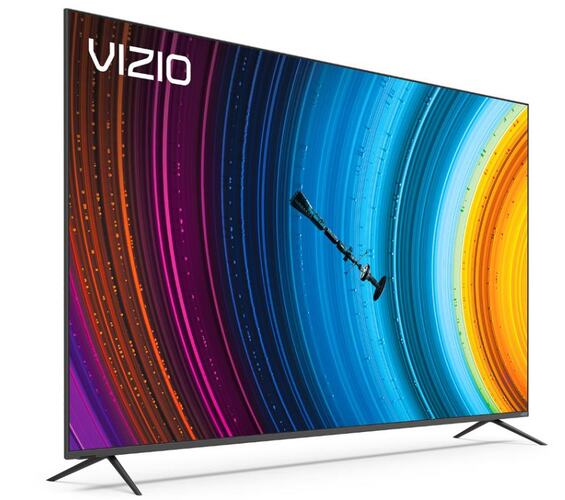
    Design: The TV has a sleek, modern design, with thin bezels and a sturdy stand.

    Vizio P Series Quantum 2020
    Vizio P Series Quantum 2020 photo

    For gaming, the Vizio P Series Quantum 2020 is fantastic. Fast moving scenes are crisp and silky smooth thanks to its fast response time and 120Hz refresh rate. It offers variable refresh rate technology to deliver an almost tear-free gaming experience, and it has a remarkably low input lag to make every action feel almost instantaneous. It is a good alternative for gaming in the dark because of its VA panel’s ability to produce deep blacks.
    For usage as a computer monitor, the Vizio P Series Quantum 2020 is an excellent TV. It supports the majority of standard resolutions and has a quick response time. In well-lit areas, it offers good visibility due to its superb handling of reflections and high brightness. Unfortunately, if you sit close to the screen, its low viewing angles cause images to look washed out at the corners. Additionally, even though it supports chroma 4:4:4, the firmware needs to be updated because it is currently a little problematic.

    For watching movies, the Vizio P Series Quantum 2020 is excellent. It has a high contrast ratio, which produces good picture quality, but full-array local dimming results in a lot of blooming and unpleasant clouding on our unit’s screen. On the plus side, it upscales low-resolution movies nicely and can get rid of judder in native apps and 24p sources.

    Vizio P Series Quantum 2020 pros and cons

    Pros of Vizio P Series Quantum:

    Picture Quality: The TV delivers high quality and sharp images with deep blacks and vivid colors.
    HDR Support: The TV supports HDR10 and Dolby Vision HDR formats, which enhances the overall picture quality.
    Smart TV Features: The TV has built-in smart features like streaming apps, voice control, and integration with smart home devices.
    Value for Money: The TV offers a good balance of performance and affordability compared to other high-end models.

    Cons of Vizio P Series Quantum:

    Limited Viewing Angles: The TV’s picture quality degrades significantly when viewed from off-center angles.
    No local dimming controls: The TV does not have local dimming controls, which may result in a less defined image quality in dark scenes.
    Limited HDR Brightness: The TV’s HDR performance may not be as bright as some other high-end models, reducing its impact in bright rooms.
    Limited Connectivity Options: The TV has limited connectivity options compared to other high-end models, including a lack of built-in Wi-Fi.

    About Vizio Quantum Color Technology

    Vizio Quantum Color technology is a feature included in certain Vizio TV models, including the P Series Quantum. It aims to deliver a wider color gamut and more vivid and accurate colors than standard displays. The technology uses quantum dots, which are tiny semiconductor particles that emit light, to enhance the color performance of the TV. The result is a display with a larger color palette, which can produce more lifelike and accurate images. Additionally, Vizio Quantum Color technology supports HDR (High Dynamic Range) content, which enhances the overall picture quality by providing more vivid and detailed images with a wider range of brightness and contrast. Overall, Vizio Quantum Color technology enhances the overall viewing experience by providing more vivid and accurate colors, making it ideal for watching movies, playing games, and streaming content.P Series Quantum 2020

    The best soundbar for Vizio P Series Quantum 2020

    The best soundbar for a Vizio P Series Quantum will depend on various factors such as personal preference, budget, and room size. Here are a few popular options that are compatible with the Vizio P Series Quantum:

    Vizio M Series Soundbar: Vizio’s own M Series soundbar is a good choice that is specifically designed to complement Vizio TVs. It delivers powerful and clear audio, with support for Dolby Atmos and DTS:X surround sound technologies.

    Sonos Beam: The Sonos Beam is a compact soundbar that delivers high-quality audio with clear vocals and deep bass. It’s easy to set up and offers seamless integration with other Sonos speakers for a multi-room audio setup.

    Bose Soundbar 700: The Bose Soundbar 700 is a premium option that delivers powerful and clear audio. It also has built-in Amazon Alexa and Google Assistant voice control, which allows you to control the soundbar and other smart home devices with voice commands.

    Samsung HW-Q90R: The Samsung HW-Q90R is a high-end soundbar that delivers immersive 7.1.4 surround sound. It supports both Dolby Atmos and DTS:X and has a sleek and modern design that matches well with the Vizio P Series Quantum.

    Ultimately, the best soundbar for your Vizio P Series Quantum will depend on your personal preferences, budget, and requirements. Consider your room size, audio preferences, and the features you want in a soundbar when making your decision.

    The Vizio P Series Quantum 2020 is a high-end TV that delivers good picture quality and a wide range of features, making it a good choice for those looking for a premium TV experience. The Vizio P Series Quantum 2020 current price: $1,698.00

  • Top 3 Free Android Emulators for Win & Mac

    Top 3 Free Android Emulators for Win & Mac

    BlueStacks is a popular Android emulator for Windows and Mac computers that allows users to run Android apps on their PC. It has a simple and user-friendly interface, and is compatible with most systems. It also supports multiple control options, including keyboard and mouse, and has built-in Google Play support. Additionally, BlueStacks has a feature called “Layercake” that enables it to run even the most demanding apps and games smoothly. With BlueStacks, you can enjoy a full Android experience on your computer, including access to the Google Play Store and the ability to sync apps and data with your Android devices. These are the three best free Android emulator Bluestacks alternatives:

    1. NoxPlayer: A free Android emulator that allows you to run Android apps on your PC. It has a simple interface and is compatible with most Windows and Mac systems.
    2. LDPlayer: Another free Android emulator that is known for its high performance and low resource consumption. It supports multiple control options and has built-in Google Play support.
    3. MEmu: A free Android emulator that is designed for gaming. It supports both Intel and AMD CPUs and has a built-in macro recorder for automating repetitive tasks.

    NoxPlayer is a free Android emulator for Windows and Mac computers that allows users to run Android apps and games on their PC. It has a simple and user-friendly interface, and is compatible with most systems. It also supports multiple control options, including keyboard and mouse, and has built-in Google Play support. Additionally, NoxPlayer has a feature called “Multi-Instance” that allows users to run multiple instances of the emulator at the same time, which can be useful for running multiple apps or games simultaneously. It also allows you to customize the emulator’s settings, including CPU and RAM usage, to optimize performance. Furthermore, NoxPlayer is known for its high performance and low resource consumption which makes it a great alternative for BlueStacks. With NoxPlayer, you can enjoy a full Android experience on your computer, including access to the Google Play Store and the ability to sync apps and data with your Android devices.

    NoxPlayer is a free Android emulator
    NoxPlayer______photo

    NoxPlayer pros and cons

    Pros of NoxPlayer:
    1. It’s a free Android emulator for Windows and Mac computers.
    2. It has a simple and user-friendly interface.
    3. It supports multiple control options, including keyboard and mouse.
    4. It has built-in Google Play support, allowing you to download and install apps and games directly from the Play Store.
    5. The “Multi-Instance” feature allows users to run multiple instances of the emulator at the same time.
    6. It allows you to customize the emulator’s settings, including CPU and RAM usage, to optimize performance.
    7. It’s known for its high performance and low resource consumption.

    Cons of NoxPlayer:

    1. It may have some compatibility issues with certain apps and games.
    2. Some users have reported occasional crashes or freezing.
    3. Some users have reported that the software may be resource-intensive on older or less powerful computers.
    4. Some users have reported that it may not work well with certain hardware configurations.
    5. The software may install additional unwanted software or ads.

    It’s worth noting that many of the cons are related to individual users’ experience, and may not apply to everyone, and also the cons can be subject to change based on the version of the software and the user’s computer specs.

    LDPlayer is a free Android emulator for Windows and Mac computers that allows users to run Android apps and games on their PC. It has a simple and user-friendly interface, and is compatible with most systems. It also supports multiple control options, including keyboard and mouse, and has built-in Google Play support. Additionally, LDPlayer has a feature called “Multi-Instance” that allows users to run multiple instances of the emulator at the same time, which can be useful for running multiple apps or games simultaneously. It also allows you to customize the emulator’s settings, including CPU and RAM usage, to optimize performance. Furthermore, LDPlayer is known for its high performance and low resource consumption which makes it a great alternative for BlueStacks. With LDPlayer, you can enjoy a full Android experience on your computer, including access to the Google Play Store and the ability to sync apps and data with your Android devices.

    LDPlayer also has some features that are designed for gaming, such as the ability to optimize the performance of games and support for gamepads and controllers. It also allows users to record and share their gameplay, which can be useful for content creators. Additionally, it has a feature called “Key-mapping” that allows users to customize the keybindings in games, making it more comfortable to play with keyboard and mouse.

    LDPlayer pros and cons

    Pros of LDPlayer:
    1. It’s a free Android emulator for Windows and Mac computers.
    2. It has a simple and user-friendly interface.
    3. It supports multiple control options, including keyboard and mouse.
    4. It has built-in Google Play support, allowing you to download and install apps and games directly from the Play Store.
    5. The “Multi-Instance” feature allows users to run multiple instances of the emulator at the same time.
    6. It allows you to customize the emulator’s settings, including CPU and RAM usage, to optimize performance.
    7. It’s known for its high performance and low resource consumption.
    8. It has features designed for gaming, such as the ability to optimize the performance of games and support for gamepads and controllers.
    9. It allows users to record and share their gameplay, which can be useful for content creators.
    10. It has a feature called “Key-mapping” that allows users to customize the keybindings in games, making it more comfortable to play with keyboard and mouse.

    Cons of LDPlayer:

    1. It may have some compatibility issues with certain apps and games.
    2. Occasionaly crashes or freezing.
    3. The software may be resource-intensive on older or less powerful computers.
    4. It may not work well with certain hardware configurations.
    5. Some users have reported that the software may install additional unwanted software or ads.

    MEmu is a free Android emulator for Windows and Mac computers that allows users to run Android apps and games on their PC. It has a simple and user-friendly interface, and is compatible with most systems. It also supports multiple control options, including keyboard and mouse, and has built-in Google Play support. Additionally, MEmu has a feature called “Multi-MEmu” that allows users to run multiple instances of the emulator at the same time, which can be useful for running multiple apps or games simultaneously. It also allows you to customize the emulator’s settings, including CPU and RAM usage, to optimize performance. Furthermore, MEmu is known for its high performance and low resource consumption which makes it a great alternative for BlueStacks. With MEmu, you can enjoy a full Android experience on your computer, including access to the Google Play Store and the ability to sync apps and data with your Android devices.

    MEmu also has some features that are designed for gaming, such as the ability to optimize the performance of games and support for gamepads and controllers. It also has a built-in macro recorder which allows users to automate repetitive tasks and actions, this could be useful for gaming and other purposes. Furthermore, it has a feature called “Multi-Instance” that allows users to run multiple instances of the emulator at the same time, this could be useful for running multiple apps or games simultaneously.

    MEmu pros and cons

    Pros of MEmu:
    1. It’s a free Android emulator for Windows and Mac computers.
    2. It has a simple and user-friendly interface.
    3. It supports multiple control options, including keyboard and mouse.
    4. It has built-in Google Play support, allowing you to download and install apps and games directly from the Play Store.
    5. The “Multi-MEmu” feature allows users to run multiple instances of the emulator at the same time.
    6. It allows you to customize the emulator’s settings, including CPU and RAM usage, to optimize performance.
    7. It’s known for its high performance and low resource consumption.
    8. It has features designed for gaming, such as the ability to optimize the performance of games and support for gamepads and controllers.
    9. Built-in macro recorder which allows users to automate repetitive tasks and actions.
    10. Has a feature called “Multi-Instance” that allows users to run multiple instances of the emulator at the same time.

    Cons of MEmu:

    1. It may have some compatibility issues with certain apps and games.
    2. Crashes or freezing.
    3. The software may be resource-intensive on older or less powerful computers.
    4. Some users have reported that it may not work well with certain hardware configurations.
    5. Some users have reported that the software may install additional unwanted software or ads.

    It’s worth noting that many of the cons are related to individual users’ experience, and may not apply to everyone, and also the cons can be subject to change based on the version