ASUS continues to dominate the monitor market in 2026 with an impressive lineup of gaming, professional, and productivity displays. Whether you’re a competitive gamer, content creator, programmer, or office user, ASUS offers a monitor that balances performance, image quality, and advanced features. This guide explores four of the best ASUS monitors available in 2026, covering their specifications, performance, advantages, disadvantages, and ideal use cases.
1. ASUS ROG Swift OLED PG27UCDM
Best Overall Gaming Monitor
The ASUS ROG Swift OLED PG27UCDM is widely considered one of the finest gaming monitors of 2026. It combines a stunning 27-inch 4K QD-OLED panel with a blazing-fast 240Hz refresh rate, making it ideal for both esports and immersive AAA gaming. Independent reviews consistently rank it among the top gaming displays available.
Key Specifications
- Screen Size: 27 inches
- Resolution: 3840 × 2160 (4K UHD)
- Panel Type: QD-OLED
- Refresh Rate: 240Hz
- Response Time: 0.03ms
- HDR Support
- Adaptive Sync
Performance
The monitor delivers exceptional color accuracy, perfect blacks, infinite contrast, and virtually instant pixel response. Motion clarity is outstanding, while 4K resolution provides razor-sharp images.
Pros
- Outstanding OLED image quality
- True 4K at 240Hz
- Extremely fast response time
- Excellent HDR performance
- Premium gaming features
Cons
- Expensive
- OLED burn-in remains a long-term consideration
- Requires a powerful GPU to maximize performance
Best For
- Competitive gamers
- High-end PC enthusiasts
- Streamers
- AAA gaming
2. ASUS ROG Swift OLED PG32UCDMR
Best Premium 32-inch Gaming Monitor
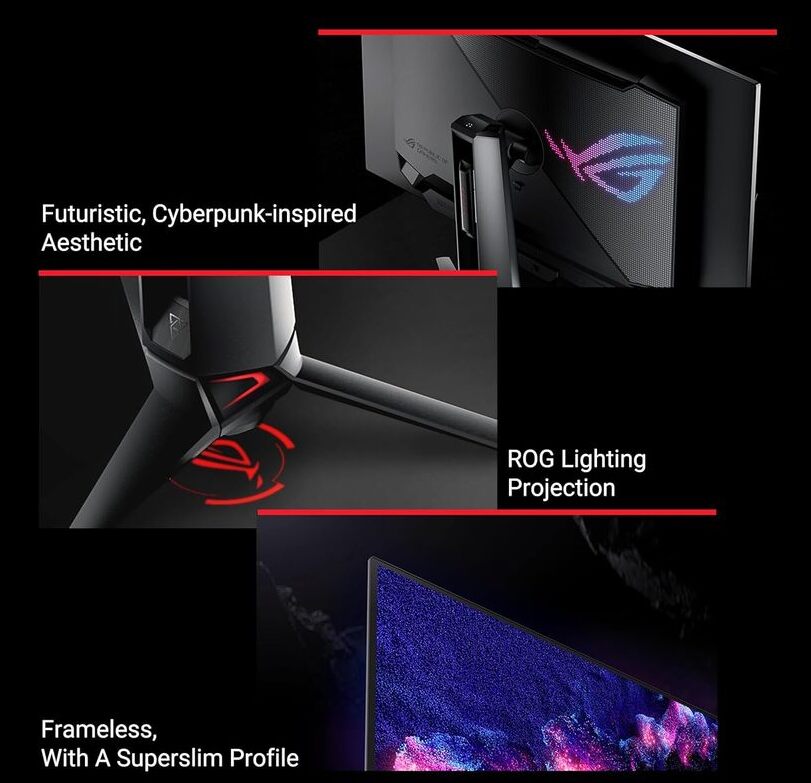
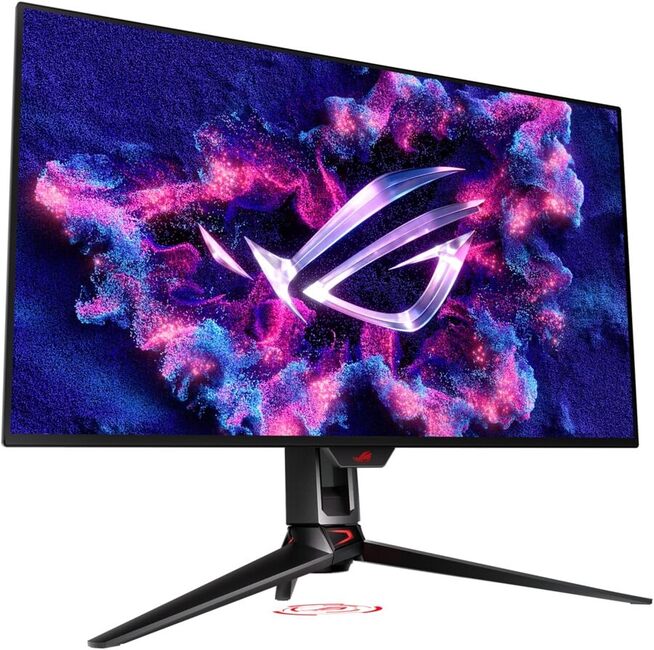
For users who want a larger screen without sacrificing speed, the PG32UCDMR offers a spectacular 32-inch 4K OLED experience at 240Hz.
Key Specifications
- 32-inch QD-OLED
- 4K UHD
- 240Hz refresh rate
- 0.03ms response
- HDR support
- G-SYNC and FreeSync compatibility
Performance
The larger display enhances immersion while maintaining exceptional motion clarity. Colors are vibrant, blacks are truly black, and HDR content looks stunning.
Pros
- Larger immersive display
- Exceptional contrast
- Excellent color reproduction
- Fast gaming performance
- Premium build quality
Cons
- High price
- Large desk space required
- OLED care is recommended

ASUS ROG Swift OLED PG32UCDMR
Best For
- Console gamers
- PC enthusiasts
- Single-monitor gaming setups
3. ASUS ProArt PA32UCDM
Best Professional Creator Monitor
The ProArt PA32UCDM is designed for professionals who require outstanding color accuracy for photography, filmmaking, graphic design, and video editing.
Key Specifications
- 32-inch 4K QD-OLED
- Factory color calibrated
- 99% DCI-P3
- Thunderbolt 4 connectivity
- HDR support
- Professional color management tools
Performance
This monitor delivers precise colors, uniform brightness, and exceptional HDR capabilities. It is one of the best displays for professional creative workflows.
Pros
- Industry-leading color accuracy
- Excellent HDR quality
- Wide connectivity options
- Premium build
- Ideal for creative professionals
Cons
- Very expensive
- Overkill for casual users
- Lower value for gaming-focused buyers
Best For
- Video editors
- Photographers
- Graphic designers
- Content creators
4. ASUS TUF Gaming VG27UQ1A
Best Value Gaming Monitor
The TUF Gaming VG27UQ1A offers impressive gaming performance at a much more affordable price than ASUS’s flagship OLED models.
Key Specifications
- 27-inch Fast IPS
- 4K UHD
- Up to 160Hz
- 1ms response time
- Adaptive Sync
- DisplayHDR support
What is Fast IPS panel?
A Fast IPS (In-Plane Switching) panel is an improved version of a standard IPS LCD display. It is designed to keep the excellent color accuracy and wide viewing angles of IPS while significantly reducing response times, making it ideal for gaming.
How Fast IPS Works
Like a regular IPS panel, Fast IPS uses liquid crystals that align parallel to the screen. The “Fast” designation means the panel has been optimized to switch pixels more quickly, reducing motion blur and ghosting during fast-moving scenes.
Key Features
- Fast response times: Typically 1 ms (GtG), compared to 4–5 ms on many traditional IPS panels.
- High refresh rates: Commonly available at 144 Hz, 165 Hz, 180 Hz, 240 Hz, and even higher.
- Excellent color accuracy: Produces vibrant, accurate colors, making it suitable for gaming, content creation, and everyday use.
- Wide viewing angles: Colors and brightness remain consistent even when viewed from the side.
- Low motion blur: Fast pixel transitions make moving objects appear sharper.
Pros
- Great color reproduction
- Wide viewing angles
- Fast response times for gaming
- Smooth performance with high refresh rates
- Better overall image quality than most TN panels
Cons
- Lower contrast than OLED or VA panels, so blacks appear more gray in dark rooms
- HDR performance is usually limited unless the monitor has advanced local dimming
- Can be more expensive than basic IPS monitors
Fast IPS vs. Other Panel Types
| Panel Type | Colors | Contrast | Speed | Best For |
|---|---|---|---|---|
| Fast IPS | Excellent | Good | Excellent | Gaming, mixed use |
| OLED | Outstanding | Perfect | Outstanding | Premium gaming, movies |
| VA | Very good | Excellent | Good | Movies, immersive gaming |
| TN | Fair | Fair | Very fast | Competitive esports (less common today) |
Who Should Choose a Fast IPS Monitor?
A Fast IPS monitor is an excellent choice if you want:
- Smooth gameplay with minimal motion blur
- Accurate colors for work and entertainment
- A display that balances gaming and productivity
- Better viewing angles than TN panels
In short, Fast IPS offers one of the best all-around experiences, making it a popular choice for gamers, students, professionals,
Performance
While it lacks OLED’s infinite contrast, the Fast IPS panel provides excellent color reproduction, strong brightness, and smooth gameplay, making it an excellent value.
Pros
- Affordable compared to premium OLED models
- Sharp 4K resolution
- High refresh rate
- Good gaming performance
- Excellent value for money
Cons
- Lower contrast than OLED
- HDR performance is limited
- Blacks are not as deep as OLED
Best For
- Budget-conscious gamers
- Students
- Everyday gaming
- Mixed productivity and entertainment
The 4 Best ASUS Monitors – Quick Comparison
| Monitor | Best For | Resolution | Refresh Rate | Panel |
|---|---|---|---|---|
| ASUS ROG Swift OLED PG27UCDM | Overall Gaming | 4K | 240Hz | QD-OLED |
| ASUS ROG Swift OLED PG32UCDMR | Premium Gaming | 4K | 240Hz | QD-OLED |
| ASUS ProArt PA32UCDM | Content Creation | 4K | 240Hz | QD-OLED |
| ASUS TUF Gaming VG27UQ1A | Best Value | 4K | 160Hz | Fast IPS |
Final Verdict
ASUS offers outstanding monitors for virtually every type of user in 2026.
- Best Overall: ASUS ROG Swift OLED PG27UCDM
- Best Premium Choice: ASUS ROG Swift OLED PG32UCDMR
- Best for Professionals: ASUS ProArt PA32UCDM
- Best Budget-Friendly Option: ASUS TUF Gaming VG27UQ1A
If gaming performance is your priority, the ROG Swift OLED series delivers class-leading speed and image quality. Creative professionals will appreciate the exceptional color accuracy of the ProArt series, while gamers seeking excellent value can confidently choose the TUF Gaming VG27UQ1A.
