Home Blog Page 139

Huawei’s next P40 series could be equipped with a 52-megapixel Sony IMX700 CMOS image sensor

0

Huawei’s next P40 series could be equipped with a vastly improved camera configuration, according to a new report.

GizChina said the P40 will be equipped with a 52-megapixel Sony IMX700 CMOS (1/133-inch) image sensor. It is a customized version of the new IMX686, which is reaching many flagship phones 2020. The report suggested that this sensor not only provides larger pixels, but also better images in low light conditions.Huawei P40

It is also said that the Huawei P40 series features a 16-pixel binning, which combines 16 adjacent pixels to form a 4.48 m “superpixel”. If it’s true, it will be the first smartphone to do so. In comparison, the Samsung Galaxy S20 Ultra offers a pixel size of up to 2.4m, combining nine adjacent pixels.

You can also expect an array of RYYB colors instead of the standard Bayer RGGB filter, allowing 40% more light and a more accurate color balance than what you see on most phones. The main camera will also be helped by an ultra-wide sensor, a variable telephoto lens and a 3D ToF sensor. The P40 could also have more ISOthan the P30 Pro, which can reach up to 4,09,600.

Finally, Huawei is likely to load its next flagship series with data intelligence-based shooting modes and video enhancements. We’ll probably know first, as the Huawei P range usually debuts in March and could very well appear in the coming weeks.   Source:GizChina

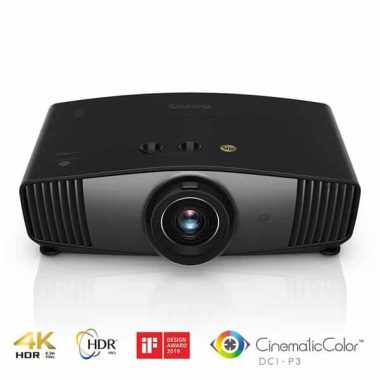
Single-chip DLP 4K projector BenQ W5700 – Superb motion

0

The BenQ W5700 is part of the CinePrime series of single-chip DLP projectors from the manufacturer that use Texas Instruments’ latest 0.47-inch DMD chip. This uses a quad flash (moving pixels) that tricks the eye into seeing an image of 8.3 million pixels on the screen. The DMD is 1920 x 1080 in resolution, but using this technique can give a pseudo 4K image on the screen and at a significantly lower cost than a native 4K chip.BenQ W5700

The BenQ W5700 is designed to be used in low-light cinemas and as such is intended more for home theater use than other 4K DLP projectors at this price. It comes with a number of image quality features and factory pre-calibration features, with a printed sheet telling you what the results are on the box. After seeing some BenQ projectors now, we can say that the sheet is the same in each box and not specific to the projector. However, it’s great that BenQ is taking this approach and trying to educate its customers towards accurate image quality.

The lens itself has a series of 11 very high-resolution elements that is structured in six groups that BenQ says will help with sharp 4K images from the W5700 across the screen. On each side of the central lens are the vents and exhaust and have been designed, like the lens, to reduce the light leakage from the frame and repel dust. The lens scrolling and zoom ratios used allow you to place the BenQ perfectly for the best possible image without the need for keystone correction. Keystone can destroy the image quality and fine line details when used, so being able to properly configure the W5700 is welcome.

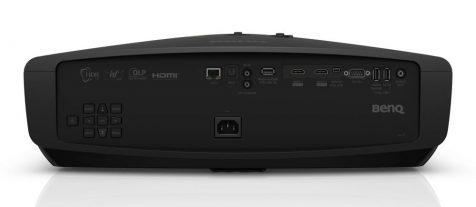
On the back, we have connections within a slightly recessed area that provides some cable handling when ceiling mounted. Wise connections we have a DIGITAL LAN and optical output, a 12V and IR trigger on, a ready USB 3.0 media playback port, two HDMI 2.0b inputs that support HDCP 2.2 and will take 4K 60P hDR signals, a mini USB power, RS232C port , this time 2.0 and round is a 3.5mm audio jack. The power outlet is located at the bottom center of the back plate and on the left side we have manual menu buttons in case you lose the remote control.BenQ W5700

The BenQ W5700 is a great single-chip DLP projector that is designed for home theater activities. It provides an accurate SDR image which is an excellent result for a DLP machine, as they usually have difficulty producing accurate colors at this price. It is pre-calibrated in the factory and BenQ should be congratulated for taking the accuracy of the image seriously at this end of the market.

HDR is a mixed fit on the BenQ W5700 in the same way we found the previously revised W2700. Any projector at this market level will have problems with HDR content and even the most expensive units on the market are unable to provide enough dynamic range and color to produce eye-catching HDR images. As mentioned earlier in the review, BenQ does its best with the content, but can’t produce 100% DCI-P3 as stated and found that using the projector without the extensive color filter was a much better experience. The BenQ W5700 is also able to reproduce 3D with its excellent movement providing a very convincing 3D experience. The game is also possible, but the input delay is a bit high at 55 ms.BenQ W5700-

Watching SDR and HDR content in best BenQ settings is a very good experience with some of the best SDR accuracy we’ve seen from a single-chip DLP projector. It’s not the brightest unit out there and is designed for slit rooms and home theater use, so it’s not suitable for ambient light or normal living rooms with white ceilings and walls. And this is the main difference between the W5700 and the W2700 in general, since in most other aspects they are very close to each other in terms of performance. Which of which you decide will certainly be reduced to the environment and use and there are also competing Epson models out there that offer slightly different performance parameters and technology at similar prices.

Overall, the BenQ W5700, although faulty like most other projectors in this area with HDR content, provides a decent account of itself with the use of mixed films in dim environments. We believe it is worthy of a demonstration if you are looking for a projector at this price for home theater use and it is recommended.   Photo:BenQ

Galaxy S20 series smartphones – 108 MP cam, video in 8K, fast 45W charging…

0

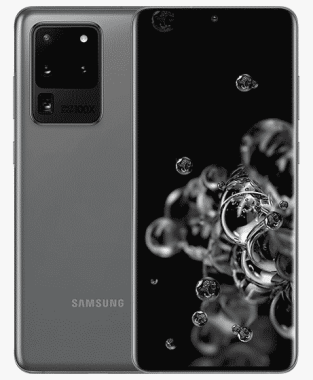
After a series of leaks and advances, Samsung finally unveiled its new main series of smartphones: the Galaxy S20.
During an event in the United States the company introduced the Galaxy S20, Galaxy S20+ and Galaxy S20 Ultra. All series that are expected to be available from March and that want to conquer users by the hand of various features.

First of all, Samsung says that all the devices in its new series will have 5G and although they will be able to perform functions with that technology, they will also be able to perform tasks without resorting to it.

Samsung Galaxy S20 UltraOn the other hand, the company also wanted to put an accent on the photography section and announced that the S20 and S20+ will have a 64MP main camera, while the S20 Ultra will present a 108MP main camera.
All equipment will have cameras complemented by a digital zoom powered by AI. In the case of the Galaxy S20 and S20+ the zoom will be up to 30X, but on the S20 Ultra will offer a Super Resolution Zoom up to 100X.
To close the camera theme, both the Galaxy S20 and Galaxy S20+ and Galaxy S20 Ultra will allow you to record videos in 8K.
Samsung also announced that all phones in its latest series will allow uploading 8K videos directly to YouTube thanks to a company alliance and video platform. All while the company also wants to win over video game fans with the promise that the 120Hz display of their new series will deliver a simpler gaming experience.
As for security, Samsung says its new series is the “safest devices they ever made” and will have Knox’s protection.
Finally, the entire Galaxy S20 series will include 25W fast charger and the S20 Ultra will also support super fast 45W charging.

Galaxy S20 series smartphones will begin to become available from March 6 and their prices will start at $999.99 and reach up to $1,599.99.

Specs Galaxy S20 Ultra :
StatusComing soon. Exp. release 2020, March 6
BODYDimensions166.9 x 76 x 8.8 mm (6.57 x 2.99 x 0.35 in)
Weight222 g (7.83 oz)
BuildGlass front (Gorilla Glass 6), glass back (Gorilla Glass 6), metal frame
SIMSingle SIM (Nano-SIM and/or eSIM) or Hybrid Dual SIM (Nano-SIM, dual stand-by)
Samsung Pay (Visa, MasterCard certified)
IP68 dust/water resistant (up to 1.5m for 30 mins)
DISPLAYTypeDynamic AMOLED 2X capacitive touchscreen, 16M colors
Size6.9 inches, 114.0 cm2 (~89.9% screen-to-body ratio)
Resolution1440 x 3200 pixels, 20:9 ratio (~511 ppi density)
ProtectionCorning Gorilla Glass 6
HDR10+
Always-on display
120Hz (up to FHD resolution)
PLATFORMOSAndroid 10.0; One UI 2
ChipsetExynos 990 (7 nm+) – Global
Qualcomm SM8250 Snapdragon 865 (7 nm+) – USA
CPUOcta-core (2×2.73 GHz Mongoose M5 & 2×2.60 GHz Cortex-A76 & 4×2.0 GHz Cortex-A55) – Global
Octa-core (1×2.84 GHz Kryo 585 & 3×2.42 GHz Kryo 585 & 4×1.8 GHz Kryo 585) – USA
GPUMali-G77 MP11 – Global
Adreno 650 – USA
MEMORYCard slotmicroSDXC (uses shared SIM slot)
Internal128GB 12GB RAM, 256GB 12GB RAM, 512GB 16GB RAM
UFS 3.0
MAIN CAMERAQuad108 MP, f/1.8, 26mm (wide), PDAF, OIS
Periscope 48 MP, f/3.6, 102mm (telephoto), 1/2″, 0.8µm, PDAF, OIS, 10x hybrid optical zoom
12 MP, f/2.2, 13mm (ultrawide), 1.4µm, AF, Super Steady video
0.3 MP, TOF 3D, (depth)
FeaturesLED flash, auto-HDR, panorama
Video3240p@30fps, 2160p@30/60fps, 1080p@30/60/240fps, HDR10+, dual-video rec., stereo sound rec., gyro-EIS & OIS
SELFIE CAMERADual40 MP, f/2.2, 26mm (wide), PDAF
FeaturesDual video call, Auto-HDR
Video2160p@30/60fps, 1080p@30fps
SOUNDLoudspeakerYes, with stereo speakers
3.5mm jackNo
32-bit/384kHz audio
Tuned by AKG
COMMSWLANWi-Fi 802.11 a/b/g/n/ac/ax, dual-band, Wi-Fi Direct, hotspot
Bluetooth5.0, A2DP, LE, aptX
GPSYes, with A-GPS, GLONASS, BDS, GALILEO
NFCYes
RadioFM radio (USA & Canada only)
USB3.2, Type-C 1.0 reversible connector
FEATURESSensorsFingerprint (under display, ultrasonic), accelerometer, gyro, proximity, compass, barometer
ANT+
Bixby natural language commands and dictation
Samsung DeX (desktop experience support)
BATTERYNon-removable Li-Po 5000 mAh battery
ChargingFast battery charging 45W: 100% in 74 min
USB Power Delivery 3.0
Fast Qi/PMA wireless charging 15W
Power bank/Reverse wireless charging 9W
MISCColorsCosmic Grey, Cosmic Black
ModelsSM-G988, SM-G988U

photo:Samsung

Business – Top 10 tips you need to know at the beginning

0

1. Love what you do

It’s a good idea to select an area you’re already interested in, for several reasons. You already have some knowledge and experience in this area which is invaluable and not necessarily start from scratch. If you choose an area that interests you already, it won’t necessarily feel like you’re working, especially when things get tough. No matter which area you have chosen you will definitely have rough patches, when this happens you are much more inclined to persevere because you have an attachment, a created interest and a passion. If you are not interested, you are much more likely to throw in the towel at the first sign of trouble.

2. Prepare a business plan

A business plan is not just something you need to prepare to show banks for a loan or investor. A business plan is necessary and useful, as it also serves as a guide to operate. It’s a great way to set goals, measure progress and results, and stay in line with spending. Organize and create a folder on your computer where you keep your business plan and other relevant documents that you’ll use regularly, such as an invoice template or sales documents.

3. Set realistic expectations

Don’t expect miracles at night. Searching the Internet you will find thousands of people who claim to have generated millions overnight with one scam or another. Authentic companies take time, care and persity. There’s nothing like easy money or money for anything, cliché, but true, if it was that easy everyone would. Know that there will be obstacles and difficulties to overcome from the beginning.

4. Just do it

The best way to gain knowledge and learn is to do so. You can read all the books, take all the courses, study and do research for years, but until you take the first step you will never know. It’s like learning to drive, you have an instructor by your side in each lesson with its safety pedals as a backup. You learn all the technicalities of driving, but real learning only begins when you venture on the road alone. Nothing and no one can prepare you for any eventuality. Research and educate yourself in the chosen field by all means, but there will never be an appropriate time to jump. Even if you take a small step into your company, the sooner you start, the sooner you’ll be on your way.

5. Ask yourself why

Find out why you want to do business for yourself. You need to have a good list of all the reasons before you start. This exercise can also be used as an indicator of the goal. If you’re looking to have more time for yourself, for example, your company might take up to a year if not longer before you can get some time for yourself and your family and if that’s your primary goal you may be discouraged as you start c onstruding i your business, when you realize that your free time is not only limited, but you have much less. Starting a new activity is not your typical 9-5, it’s more of a start when you wake up, it ends when your head hits the pillow. If you prepare for this, it won’t be a shock to the system.

6. Budget and finance

Trying to set up a business with very few start-up costs is not too difficult nowadays, especially on the Internet. You may be looking for an online business and the costs of a website are small and nothing, but once you have your own website, if you’re selling products or supplying a service that you need to advertise and while your outlay starts to be minimal that needs to be pre-empt. r continue with this during the life of your business. Need help managing things? Do you have marketing skills? Learning about marketing will be a key part of growing your business, you can hire someone, but if this puts a strain on your budget you may want to look at learning some key tips yourself.

7. Building the network

Networks are crucial in business, both online and in person. Every contact is a potential customer, or it can be someone who has advice or inspiration for you. You will be surprised by the number of successful entrepreneurs and business owners who are ready to give valuable advice and can point in the right direction for all kinds of services. There is a lot of owners of online support activities, you can read blogs, ask questions on forums, etc. and everything is free.

8. Learning to adapt

Be sure to set a realistic budget for everything from your Internet connection to billable hours or stock. Every penny counts. It doesn’t make sense to spend thousands of dollars on advertising if you don’t see a return, you may have to go back to the planning stages. That’s all part of your learning, so try strategies and don’t be afraid to adapt to time. There are all sorts of things that can affect a company’s growth and turnover, and if your company doesn’t respond to the market or technology, for example, it can cost you dearly.

9. Focus

It’s very easy to be diverted, there are so many ideas and new initiatives out there, so focusing on the goals you’ve set for the first time in your business plan are crucial. Focus on one task at a time. You can always take notes of ideas and projects that you want to take in the future, but stay focused, otherwise you may fall into the lack of delay, looking at many different ideas and at the end of the day it turns out that you have not achieved anything or you have actually done any job.

10. Believe in yourself

Self-confidence goes a long way, this is not an extravagant piece of advice this is a fact, if you do not believe in yourself and your product or service, then you can not expect someone else to do it. It may seem difficult especially when you start, but you have to learn to believe in yourself, this will affect every aspect of your business, from creating your business to networking. If you don’t believe what you’re doing, it will appear in everything you do.

If you believe it, you can do it!

Various Internet errors – Fix HTML Errors

0

Why does each error seem to have some sort of dark number instead of a real explanation of what just went wrong when you tried to visit a website or load your email? But numbers are the norm, and figuring out what’s wrong with your computer requires you to dig a little deeper than we might prefer. Interestingly, many errors have similar causes or – at least – similar solutions.

Error 400

When you receive a message that resembles “400:Invalid Request” or more specifically in “HTTP Error 400 – Invalid Request” you can trust what you see. The request you made was somehow imperfect. Writing a URL in the browser is a signal to your computer that you are requesting a page from another computer or server. When something goes wrong with the URL you typed, it can’t be loaded and gives you an error.

While a typo is certainly a great possibility for error 400, it may also be that the page you are trying to reach has been deleted, the URL has been copied improperly or is missing key elements. The website may have been updated as well.

Error 401

“401: Unauthorized” means you’re not the person the website expected to see when you tried to log in. Error 401 is a simple error – the virtual port was hit in the face by the security of the website. If you’re not signed in to a website that requires users to enter their username and password, you’ll see Error 401. If you tried to log in, but the website server did not recognize you, misspelled something or some other strange twist of fate, you will not be allowed to continue and you will also watch from the 401 error.

Error 403

When you receive a 403 error message, it means that you have attempted to access a part of a website that is absolutely forbidden.Who knows what the webmaster is trying to hide behind the virtual brick wall he just hit, but one thing is for sure – you won’t go any further with that particular URL. At least not now.

You can hit error 403 innocently enough, of course, but write something wrong in the URL or maybe just try to access the website at the wrong time of day.

Error 404

You may see no unique number of messages for error 404, but everyone will have something below the lines of “Error 404: Page Not Found”. You receive the 404 error message when you try to check out a Web page that is not actually present on the server.

In very general terms, Error 404 is supposedly your fault, but not all 404 error messages actually appear due to a user error. Pages could be on a website or you may have tried to get a page that the website owner downed or changed, and no one can blame you.

Error 408

Error 408 is a particularly frustrating obstacle on the Internet. Type the URL or click a link. And wait.  And then the site returns an error instead of the site you were trying to reach. This is error 408 – you have “Timeout”.

When you submit a request for a website and it doesn’t load fast enough, the server is given by when it’s given since it was discharged. Instead of uploading the site in question, cough up an error. Sometimes a hot-fix helps, but other times more drastic interaction is required. To refresh your browser, click the circular arrow next to the address bar.

SOLVING ERRORS

While there are many numbers attributed to the various Internet errors mentioned above, many will have the same solutions or similar solutions. When you’re not reaching for the website you’re trying to reach, solving the problem involves some of the breakdown techniques.

Check your Internet connection

Make a quick check that you’re getting full access to the Internet by pulling a search page and looking for something random. If you get results and you can click on those sites, you can traverse the faulty Internet from your list of possible problems. If you do not reach any new website, you would do well to restore your router and restart your computer to make sure it is fully connected to the Internet.

Check for obvious errors

Look at the address you just typed and look for obvious errors : long URLs are particularly difficult to type correctly. If you lose a letter or a point, you won’t go very far. Also check, especially in error 403 where passwords would be encrypted, that you do not have Caps Lock enabled. Also, verify that the numeric block is set as usual. If you find an honest error, just correct it and try again. The solution can be so simple.

Restart your computer

While it is presumably the Internet that gives you problems, not your computer, it never hurts to restart your computer. When you restart your computer, you can update some critical software or reset your connection to your router to make the Internet work correctly or at a faster rate. It’s an easy solution possible, and it’s worth a few minutes.

Refresh your browser

If you realize that you have a lot of Internet issues and see some issues arise, make sure that your Internet browser is fully up to date. Your browser is likely to update automatically as new versions become available, but if you’ve turned off the update or missed an update, you may get caught up in Windows Update for Internet Explorer and go to the menu Tools for Firefox and Chrome.

Update add-ons

If your browser is fully up-to-date, make sure commonly used add-ons are also up to date. Common plug-ins for websites include things like ActiveX and Flash. You can display a message on the website to update the plug-in, or you can update them manually by visiting the websites and downloading the infringed applications to update or install the plug-ins. Firefox offers a plug-in control page here too to get ideas about what might be the cause of the problem.

Come back later

Finally, if nothing else seems to work, you can always raise your hand and leave. But make sure you come back later. Often websites have their own problems that can cause these errors and just waiting five minutes will all you have to do to have things work properly again.

To fix HTML errors, you can use a tool like the W3C Markup Validation Service. This tool will analyze your HTML code and point out any errors that it finds. Once you have identified the errors, you can go back and fix them in your code. It’s important to fix these errors because they can cause issues with how your website is displayed in web browsers. To use the W3C Markup Validation Service, simply enter the URL of your website in the provided field and click the “Check” button. The tool will then analyze your HTML code and provide a report of any errors that it finds. From there, you can go back and fix the errors in your code to ensure that your website is properly displayed in web browsers.

How to change your Netflix password ?

0

netflix loading streaming issuesChange Netflix password from the desktop browser


Sign in to Netflix and make sure the primary account holder’s name is selected in the upper-right corner of the screen. If you forgot your password, go to the Reset password page and enter your account email address, then follow the instructions in your email.
Hover over your name in the upper-right corner, then choose “Your Account”.
Select the “Change password” link.
Type “Current Password”, “New Password”, and then type “Confirm New Password”.
If you want to start any device that uses Netflix outside of your account and require you to enter your new password the next time you use it, select the “Require all devices to sign in again with a new password” section.
Select “Save”.

Change Netflix password from the iOS and Android app

Sign in to the Netflix app. If you forgot your password, tap the “Forgot your password?” option
Select the menu button icon in the upper-left corner of the screen.
Scroll down and select “Accounts”.
This will open a browser page where you can select “Change Password”.
Type “Current Password”, “New Password”, and then type “Confirm New Password”.
If you want to start any device that uses Netflix outside of your account and require you to enter your new password the next time you use it, select the “Require all devices to sign in again with a new password” section.
Select “Save”.

How to reset your Netflix password:

  1. Go to the Netflix “Sign in” page and locate the “Need help?” option beneath the “Sign in” button.
  2. Select the “Email” option and enter your email address, then click “Email me.” Netflix will send you an email with instructions on resetting your password.
  3. Alternatively, you can choose the “Text message” (SMS) option. Enter your phone number and select “Text me.” Netflix will send you a text message with instructions for resetting your password.
  4. If you can’t recall your email or phone number and it has been a while since you last reset your password, there’s still hope. Look for the “I don’t remember my email or phone” option at the bottom (as shown in the image).
  5. You’ll have the option to enter your personal and payment details to reset your password. Netflix’s user interface is designed to make this process easy. Just follow the on-screen instructions, and you’ll have a new password in no time.

Turn off / Disable Safari suggestion on Mac, iPhone or iPad

0

Apple has included the *suggestions* feature in the Safari browser. This feature tries to display predictions about search queries, however, it is a function independent of suggested words and phrases. While this feature is enabled, Safari displays various suggestions, offering previews of interactive content for iTunes media, news, Wikipedia articles, weather forecasts, sports scores, App Store apps, and even nearby locations. This may seem like a useful feature, but unfortunately this is rarely the case. It’s often can’t accurately predict and can be annoying, as the content suggestions feature takes longer to load than saying simple words and phrase suggestions. It also consumes additional resources that may affect Safari’s performance.

The feature is available on macOS and iOS platforms. Fortunately, it is simply to disable this feature on both devices. Although some users report that ‘suggestions’ is a useful feature, others are disappointed and claim that it simply hinders the daily browsing experience. The actual value of this feature depends on your browsing habits and objectives. Therefore, we recommend that you try it first. If you find it low-use or annoying, follow the steps below to turn off Safari suggestions on your Mac or iPhone/iPad devices.

As mentioned, if you don’t want the feature, disabling Safari suggestions is quick and easy. Start Safari, click the menu bar at the top of the screen, and then select Preferences. Alternatively, use the Command and Comma keyboard shortcut (,) to access Safari preferences. Choose the Search tab from the menu at the top of the window. There are several features on the Search tab, such as “Include Search Engine Suggestions,” “Include Safari Suggestions,” “Enable Quick Find on Web Site,” “Preload First Shot in The Background,” and “Show Favorites.” The feature of interest is ‘Smart Search Field: Include Safari Suggestions’. Remove the check mark from the check box to turn off Safari suggestions. You can also remove the check mark from the check box next to “Include search engine suggestions” so that suggestions do not appear when you enter the search query. Once you have turned the desired features on or off, close the Preferences window and the settings will be saved and applied automatically. To make sure you’ve disabled Safari Suggestions, type a query in the URL field and check for pop-up suggestions. For example, you can enter the name of a famous person, a popular movie, or a location. If you’ve disabled Safari Suggestions, none of these queries will show interactive content.

Disable Safari suggestions on Apple mobile devices
Disabling suggestions on iOS devices is also easy, but you can’t do so through the Safari app. To turn off Safari suggestions, go to your iPhone/iPad settings and scroll down until you find Safari. Tap on it to access Preferences. Find the Search category. Below it, you should find similar options to the Safari for Mac feature (detailed above), such as “Search Engine Suggestions,” “Safari Suggestions,” “Quick Search on The Website,” and “Preload First Shot.” If you want to turn off Safari Suggestions, just turn off Safari Suggestions. Also consider search engine suggestions, however, if you turn off this feature, it will turn off autocomplete search queries in your mobile website’s browser. When you have finished editing, you do not need to ‘save’ or other buttons – just exit Settings and all settings will be saved automatically and applied to your browser. To make sure you’ve disabled the suggestions correctly, open the Safari mobile browser and start typing your query in the URL field and look for pop-up suggestions. For example, you might start typing the name of a famous person, a popular movie, or a place. If you’ve disabled Safari Suggestions, none of these queries will show interactive content.

Samsung Galaxy Tab S6 – a superior tablet on the market

0

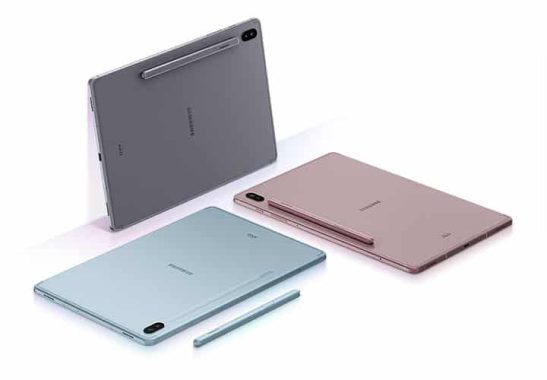
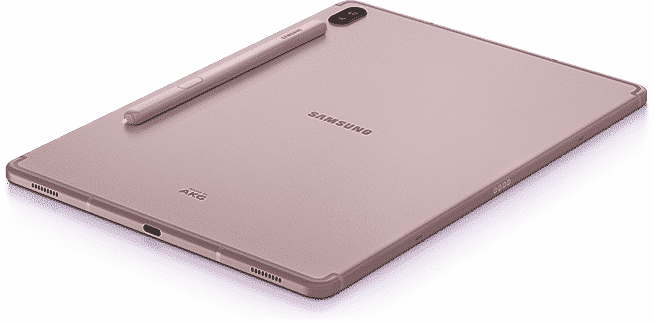
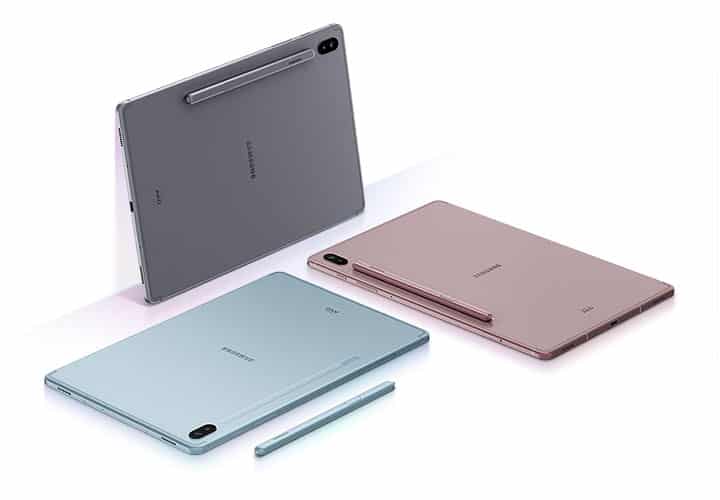
Like the S5e, the Samsung Galaxy Tab S6 uses a WQXGA Super AMOLED display (1,600 x 2,560) which is absolutely amazing. Samsung has always excelled with its screens, offering some of the most colorful image qualities for photos and videos. In addition, like the S5e, this tablet has four speakers (one at every corner) that offer a surround sound with Dolby Atmos technology. So the videos and music play great, as the audio resonates through the device.

The S6 tab also includes the same pen-specific apps/functions as Note 10, such as Screen Write, Translate, and Smart Selection. The S6 tab can also convert what you typed with the S pen into printed text.

The Galaxy Tab S6 is also a faster and more powerful device than its predecessor. With the Android version 9 (Pie), the tablet uses the Qualcomm Snapdragon 8150 mobile platform. It has an octa-core processor with the fastest core running up to 2.8 GHz. It comes with 6 GB of RAM and 128 GB of storage or 8 GB of RAM and 256 GB of storage, and can hold a microSD card up to 1 TB.

There is also a nano-SIM slot if you want to convert it to a phone and include the Samsung DeX desktop environment if you want to connect it to another monitor or computer and use it as a PC.

The Samsung Galaxy Tab S6 can be purchased from the company’s website and other retailers. Currently on sale, the 128GB model is available for US 699.99 dollars and the 256 GB model is 779.99 dollars.  photo:Samsung

Samsung Galaxy Tab S6  KEY SPECIFICATIONS:

OS
Android 9 (Pie) with One UI

Dimensions and weight
244.5 mm x 159.5 mm x 5.7 mm; 420 g

Display
10.5-inch 2,560 × 1,600 (WQXGA) Super AMOLED touchscreen

Chipset/CPU
Qualcomm Snapdragon 8150 Mobile Platform (1x 2.8 GHz, 3 x 2.4 GHz, 4×1.7 GHz)

Storage and memory
128 GB ROM/6 GB RAM or 256 GB ROM/8 GB RAM
MicroSD slot

Audio
Quad speakers
Dolby Atmos 3D surround sound

Cameras
Rear: 13 MP; f/2.0 aperture, 80-degree FOV (wide); 5 MP; f/2.2, 123-degree FOV (ultra-wide)
Front: 8 MP, f/2.0 aperture, 80-degree FOV (wide)

Battery
7,040 mAh

Ports, sensors and features
S Pen stylus (included)
Accelerometer
Fingerprint sensor
Gyro sensor
Geomagnetic sensor
Hall sensor
RGB light sensor
Nano-SIM slot
USB 3.1 Gen 1

Basic features of UV and DTG printers

0

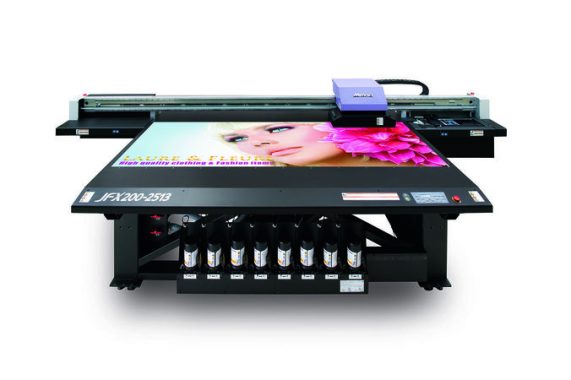
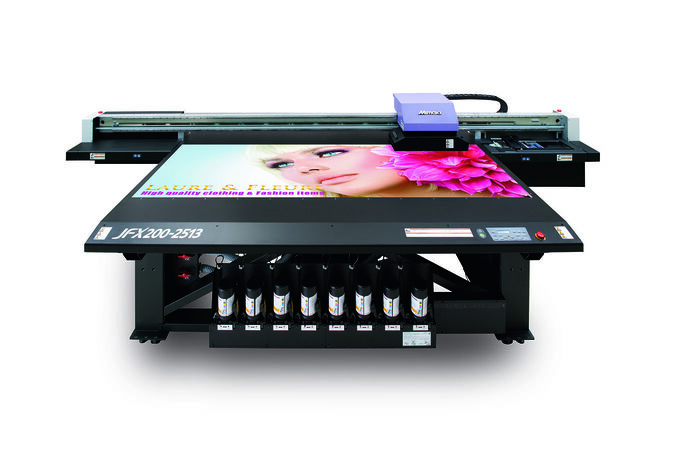
UV printers and DTG printers are both types of digital printers, which means they use digital technology to print onto various materials. UV printers use ultra violet light to cure or dry the ink as it is printed, while DTG (direct-to-garment) printers use inkjet technology to print directly onto fabric. These printers are often used for printing on T-shirts, as well as other textiles, and are popular in the fashion and apparel industry. They are also used for printing on other materials, such as plastic, metal, and wood.

We all need a printer almost every day. There was a time when you could visit the nearest internet café and print what you wanted. But now, you need it at home.

Children and even university students have to do so many homework in a year. It’s nice if you have it in your house. It’s even better if you have a UV printer or a DTG printer.

What exactly is the UV printer and the DTG printer? Let’s dive into the details of each of them in this post.

What is the UV printer?

As the name suggests, the UV printer uses ultraviolet light to dry the ink in its printing process. A UV light source is attached to the print cart, which can be followed by the print head. These can be used for instant ink polymerity.

These can be used to draw graphics on a variety of surfaces, including glass, plastic and even metal.

They are much better than traditional ones in terms of both performance and design. Here are some of the main benefits of using a UV printer:

Environmental safety: release of almost zero volatile organic compounds (or COVs). This makes them very environmentally friendly.
Higher production speeds: Ink heals instantly. No need to stay close to the coffee and wait for it to dry. In addition, printing with UV printers requires minimal work. These two factors allow you to do more things in less time.
Lower costs: The cost is much lower because you don’t have to finish, assemble, or use additional material to protect the ink. UV printers are printed directly on the substrate.

What is a DTG printer?

DTG printer means printer directed to clothing. With technological progress, the printing industry has shifted from using traditional printers to using DTG printers to printing patterns on t-shirts and other garments.

They are much better and more efficient than screen patterns because it takes less time and effort. These are made using high-definition printing technology that reduces ink consumption. This reduces the cost of printing again. It is estimated that the main players in the industry can reduce ink consumption by at least 30%!

These machines can print on multiple fabrics, from light to darkness. These are equipped with ink recirculation technology, which allows you to do more work than on-screen printers.

These can be used in a wide range of fabrics with cotton, lycra, polyester and viscosity. These can also be used to print on multiple garments at once. You can use these printers to print on any garment. You can print on towels, clothes, blankets, etc.

These printers are made with the latest printing technology that allows you to print on hinges, pockets and buttons. Even if display printers aren’t going anywhere, DTG printers are growing in popularity.

photo: pinterest

External SSD Samsung T7 Touch with fingerprint security reader

0

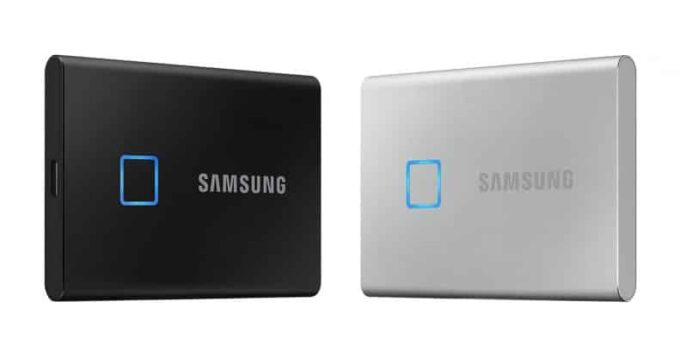
External drives are not too complicated. If you ever find yourself buying one, decide only if you want an SSD and make sure it’s a fast model with plenty of storage space. But Samsung is thinking out of the box with its latest SSD product. Expect potential buyers to have brain security when they’re looking for their next external storage device.ssd t7 touch

The Samsung T7 Touch external SSD uniquely offers a fingerprint reader so you can lock private files and folders with biometric authentication. It is a level of security that is especially useful if you do not have a laptop with a player. In terms of how fast the unit is, Samsung said it is looking at writing speeds of up to 1,000 MB/s and reading speed up to 1,050MB/s.

The concept behind the simple T7 Touch: Before you can access everything you’ve stored on the drive, you need to prove your identity with a fingerprint scan. Samsung said it can register up to four different fingerprints, so there is an option to share the unit with friends or colleagues. The T7 Touch also has a light to indicate when the transmission data has been connected.

Other features include an aluminum body – which makes it resistant up to two meters – as well as a single USB-C port, which works with a USB-C USB-C or USB-C to USB-A cable. It’s also “twice as fast as its predecessor,” the T5.

The T7 Touch will be released in January. The cost will be US 129.99 for the 500 GB model, USD 229.99 for 1 TB of storage, or USD 399.99 for the 2TB model.  Photo:Samsung