Home Blog Page 140

USB flash drive Transcend JetFlash 910 available in capacities up to 256GB

0

Media and storage manufacturer Transcend has announced a new line of high-performance, high-strength USB flash drives. The Transcend JetFlash 910 series delivers high performance and high capacity on a compact USB device.

The Transcend JetFlash 910 is built using the latest 3D NAND technology to provide reading speeds of up to 420 MB/s and 400 MB/s writes, with an impressive resistance level of 3000 P/E cycles to provide the MLC NAND flash equivalent. The JetFlash 910 is available in capacity of up to 256 GB, making it the ideal candidate for storing 4K and high-resolution video images or other large data files.All this storage is housed in a lightweight aluminum housing with a sanded finish for durability, providing a clean look, making it less likely to show signs of wear. The JetFlash 910 offers 10 times the lifespan of normal TLC flash drives and its superior data protection makes it perfect for storing important data. The high resistance also makes the JetFlash 910 suitable for write-intensive scenarios such as dashboard cameras and surveillance systems.

Transcend has equipped the JetFlash 910 with a USB 3.1 interface to reach transfer speeds of up to 420 MB/s, meaning large files up to 4GB will be transferred in just 15 seconds. The JetFlash 910 is preformatted in FAT32 file system format for maximum factory compatibility.

The device supports Transcend Elite, which is a free free free download data management software package compatible with Windows, macOS and Android. Transcend Elite provides backup, restore, data encryption, and cloud backup capabilities. The Transcend JetFlash 910 is currently available in 128GB and 256GB capacity versions and is supported by a limited five-year warranty from manufacturers.

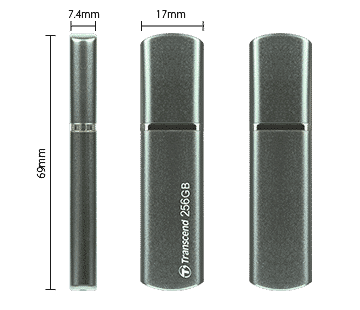
Dimensions69 mm x 17 mm x 7.4 mm (2.72″ x 0.67″ x 0.29″)
Weight11 g (0.39 oz)
Color
  • Midnight Green

Interface

USB Type
  • USB Type-A
Connection Interface
  • USB 3.1 Gen 1

Storage

Capacity
  • 128 GB/
  • 256 GB

Performance

Read Speed (Max.)420 MB/s
Write Speed (Max.)400 MB/s
Note
  • Speed may vary due to host hardware, software, usage, and storage capacity.

Warranty

Certificate
  • CE/
  • FCC/
  • BSMI
Warranty
  • Five-year Limited Warranty

SIP Phones – What You Need to Know ?

0

SIP phones are phones that use Open Standard Session Initiation Protocol (SIP) to manage and configure calls using other open standards called Real-Time Transport Protocol (RTP). These protocols are generically called voice over IP and therefore phones commonly refer most of the time as VoIP clients or VoIP phones. There are two main categories of SIP phones namely, software phones or SoftPhones and hardware or hardphone phones.

Hardware or HardPhone phones

A HardPhone is something that resembles normal phones and also behaves like one. However, on this SIP phone the hardware is made using IP-aware parts via IP. It will connect to IP networks via Wi-Fi or Ethernet. You’ll also get wireless phones on HardPhones. Wireless phones use DECT technology whereby phones connect to a base station using the DECT protocol. The base station connects to an IP PBX using the RTP and SIP transport protocols.

Software phones or SoftPhones

The function and nature of SoftPhone is evident by name. It is a software program that gives the functionality of a phone. Like a HardPhone, a SoftPhone uses RTP and SIP for voice delivery and call configuration. Any device such as desktop, tablet and smartphone can be used to run SoftPhone programs, as long as it has speakers and a microphone. The primary requirement is to connect IP to the SIP server or VoIP provider via IP PBX.

The benefits of switching to SIP phones

SIP phones are seen as the viable alternative to PBXs and allow businesses to scale quickly without adding costs. The following is a list of some other SIP benefits.

It is cheaper to set up and activate than the PBX. You’ll receive a multi-channel phone number that won’t stay busy if it contains the appropriate sales representatives.

Payment for phone calls is based on the base rate regardless of the subscriber’s location. SIP phones are even cheaper than installing phone lines. This makes it very convenient for medium and large companies that have many departments and branches in different locations.

SIP helps integrate data into calls along with analytics and CRM systems to create a highly efficient business. For example, SIP technology provides an opportunity to track calls. This helps you understand which advertising channels are bringing new customers. Therefore, better decisions are made for sales growth.
SIP can be a great choice for any company or startup that wants to optimize the workflow.  Photo:Amazon.co.uk

Tips to Buying Electronic Products Online

0

Buying products online is more common than ever now, as it’s hard to argue against the convenience it offers. Consumers save tons of time by shopping from the comfort of their homes or wherever they are. They no longer have to go down to the store, suffering through traffic and burning fuel on the road, to make a purchase.

It was pretty much the same with electronics, as people gained more confidence in buying such products online, even though they weren’t sure about it before. A big reason behind this has been flash sales or discounts at some festivals, with online e-commerce sites encouraging such sales through different campaigns. But, there are still things that can go wrong when you buy such products online, even in the best electronics stores. There are some things a consumer should keep in mind, to avoid accidents in the purchase of electronic products. Some of these are listed as follows:

Be sure to compare prices

Many of the time people are buying products online, they see a sales poster and they immediately rush to buy that item. It is possible, especially in the case of electronics, that the specific product may be on sale at a cheaper price on another website. Therefore, it can be useful for you to check prices on all major, reliable online websites that can be found. In addition, there are some websites that offer the same functionality, so visiting them could also be an option.

Track price history

Speaking of these price comparison websites, some of them also allow you to check the price history of a particular product and determine when it was at its highest point, or when it was further reduced. Using this information, you can find the best time to buy the product you want at the cheapest possible price.

Taking into account refurbished or used items

In some cases, people generally advised not to buy used or refurbished electronics, as they did not last long and most of the time, there were problems with the product. Such problems still exist today, but there are guarantees that give the user more confidence and confidence in the product. There are also certified items refurbished by the production company itself and it can be a big money saver for many people.

Search for reviews

If you have any doubts or concerns about a particular product, you can rest by looking at comments that can be found in abundance on the website. A general rule states that if a review of a particular product is difficult to find, it would be a wise decision to refrain from purchasing that product. Electronics is no different, as it seems that there are endless brands that launch all kinds of products every week. The best e-stores and websites as well, provide a rating system for products that can be helpful in determining customer satisfaction, which in turn can help other customers make an informed decision.

Netflix errors – try these basic troubleshooting tips

0

Netflix’s errors are often nebulous, and most subscribers have seen the famous message of screaming more often than they would like. These errors can be caused by anything from network issues, hardware or software issues, to problems on the Netflix side of the equation.

If you are lucky enough to have a real error code, you can use it to attack the problem head on. However, you can still fix most Netflix bugs by methodically troubleshooting, even if you’ve just received a general Netflix error message without a specific code.

Netflix troubleshooting tips
If you’re experiencing a general Netflix error, try these basic troubleshooting tips:

Try NETFLIX.COM ON A COMPUTER
If you’re having problems with a device other than a computer, visit Netflix.com on a laptop or desktop.
If you see the Netflix site error in Netflix.com, there’s a problem with the Netflix service and you’ll have to wait for them to fix it.logonetflix
VERIFY THAT your network supports VIDEO STREAMING
Some schools, hotels, and public Wi-Fi connections do not allow transmission.
If you do not have direct control over your modem or router, contact the person or department responsible for the network and ask if transmission is allowed.
Disable the unlock, proxy, or virtual private network (VPN) software.

Netflix blocks users who connect via proxy, VPN, and unlock servers to ensure that these services and programs are not used to bypass content that is blocked in the region.
If you’re in a region that has access to Netflix, but you’re using a VPN for privacy or work, you’ll need to turn it off to watch Netflix.

MAKE SURE THE INTERNET IS FAST ENOUGH TO STREAM VIDEO
If you have access to a web browser on your device, try accessing a website as a Netflix.com to make sure your Internet connection is working.
Check the connection speed.
Netflix recommends a minimum of 0.5 Mbps for streaming, 3.0 Mbps for standard definition videos, and 5.0 Mbps for high definition.
TRY A DIFFERENT INTERNET CONNECTION OR IMPROVE YOUR WI-FI SIGNAL
Even if your Internet connection seems fast enough, you may experience network problems.
If you’re connected over Wi-Fi, try connecting using Ethernet.
If you have access to a different Wi-Fi network, try connecting to it.
Bring the device closer to or closer to the device.

RESIGN YOUR DEVICES, INCLUDING TRANSMISSION DEVICE, MODEM AND ROUTER
Turn off each device and disconnect it for about a minute.
Reconnect and turn them back on.
For devices that have a sleep or standby mode, be sure to turn them off.

Security Tips: How to Prevent Phishing Attacks

0

Stay informed about phishing techniques – New phishing scams are developing all the time. Without being aware of these new phishing techniques, you might inadvertently fall prey to one. Keep your eyes peelfor news of new phishing scams. After learning about them as soon as possible, you will have a much lower risk of being caught by one. For IT administrators, ongoing security awareness training and simulated phishing are strongly recommended for all users to maintain security throughout the organization.

Think before you click! – You can click links when you are on trusted sites. When you click on links that appear in random emails and instant messages, however, it’s not such a smart move. Hover over the links you’re not sure about before you click them. They’re taking you where they’re supposed to take you? A phishing email may claim to be from a legitimate company and when you click on the link to the website, it may look exactly like the real website. The email may ask you to enter the information, but the email may not contain your name. Most phishing emails will start with “Dear Customer”, so you should be vigilant when encountering these emails. If in doubt, go directly to the source instead of clicking on a potentially dangerous link.
Install an Anti-Phishing Toolbar – Popular Internet browsers can be customized with anti-phishing toolbars. These toolbars run quick checks on the sites you are visiting and compare them with lists of known phishing sites. If you run into a malicious site, the toolbar will notify you to it. This is just another layer of protection against phishing scams, and it’s completely free.

Check the security ingescing of a site – It’s natural to be a little careful to provide sensitive financial information online. However, as long as you are on a secure website, you should not have any problems. Before you submit any information, make sure that the URL of the site starts with “https” and that there is a closed lock icon near the address bar. Also check the site security certificate. If you see a message that a particular website might contain malicious files, do not open the web site. Never download files from suspicious emails or websites. Search engines can also display some links that can lead users to a phishing website that offers low-cost products. If you make purchases on that website, cyber-criminals will access your credit card information.
Check your online accounts regularly: If you haven’t visited an online account for a while, someone might have a field day with them. Even if you technically don’t need to do so, check each of your online accounts on a regular basis. Get used to changing your passwords regularly as well. To avoid bank phishing scams and credit cards, you need to personally check your statements. Get monthly statements for your financial accounts and carefully review each item to make sure that no fraudulent transactions have been made without your knowledge.

Keep your browser up to date – Security patches are released for popular browsers all the time. They are released in response to the security loopholes that phishers and other hackers inevitably discover and exploit. If you normally ignore messages about updating browsers, stop. When an update becomes available, download and install it.
Use firewalls: High-quality firewalls act as buffers between you, your computer, and external intruders. You must use two different types: a desktop firewall and a network firewall. The first option is a type of software and the second is a type of hardware. When used together, they drastically reduce the chances of hackers and phishers infiltrating your computer or network.
Be wary of Pop-Ups – Pop-ups often pose as legitimate components of a website. Too often, however, they are phishing attempts. Many popular browsers allow you to block pop-ups; you can allow it on a case-by-case basis. If you manage to slide through the cracks, do not click the “Cancel” button; such buttons often lead to phishing sites. Instead, click the small “x” in the upper corner of the window.

Never provide personal information – As a general rule, you should never share personal or financially sensitive information on the Internet. This rule extends to the days of America Online, when users had to be constantly warned due to the success of the first phishing scams. If in doubt, go to visit the main site of the company in question, get their number and call them. Most phishing emails will direct you to pages where you need entries for financial or personal information. An Internet user should never make sensitive entries through the links provided in the emails. Never send an email with confidential information to anyone. Make it a habit to check the website address. A secure website always starts with “https”.

Use antivirus software – There are many reasons to use antivirus software. Special signatures included in antivirus software protect against known technological solutions and gaps. Just make sure you keep the software up to date. New definitions are added all the time, because new scams are also being dreamed up all the time. Antispyware and firewall settings should be used to prevent phishing attacks, and users must update programs regularly. Firewall protection prevents access to malicious files by blocking attacks. Antivirus software scans all files that arrive via the Internet to your computer. Helps prevent damage to the system.

In short, to summarize: How to Prevent Phishing Attacks?

Phishing is a type of cyber attack where the attacker tries to trick the victim into revealing sensitive information, such as login credentials or financial information, by posing as a trustworthy entity. To prevent phishing attacks, there are a few steps you can take:

  1. Be cautious of any unsolicited emails or messages that ask for personal information. Legitimate organizations will not ask for sensitive information through email or text message.
  2. Check the sender’s email address. Scammers often use fake email addresses that look similar to the address of a legitimate organization.
  3. Don’t click on links or download attachments from unknown sources. These could be malicious and contain viruses or malware.
  4. Use a reputable anti-virus and anti-malware software to protect your device from malicious software.
  5. Use strong, unique passwords for all of your online accounts, and change them regularly. Consider using a password manager to help you generate and manage strong passwords.
  6. Be wary of websites that have misspellings in the URL or that use a different domain than the organization they claim to represent. For example, a website that claims to be from your bank but has a URL that ends in “.com” instead of “.bank” could be a phishing site.
  7. If you receive a suspicious email or message, don’t respond to it. Instead, report it to the organization it claims to be from, and delete the message.

Screen Protector for your phone – the main advantages

0

Smartphones are a very expensive piece of kit, so it makes sense to take the right measures to protect your investment. The most vulnerable part is probably the touch screen which is easily affected by dust, scratches, chips or similar problems. One of the most effective ways to protect your screen is with a screen protector. They are useful for a variety of situations, such as scratch prevention, anti-glare and increased privacy.

Let’s take a look at some of the most enjoyable benefits of screen protector:

Break-resistant

The ability to protect the screen is certainly very attractive. A screen protection that relies on tempered glass can be very effective for protecting the screen in the event of a fall. Tempered glass is almost five times stronger than normal glass. Many modern touch screens are able to withstand scratches, but they are unable to withstand impact damage. In addition, this type of screen protector will feel like the original screen without bubble problems that look like with plastic alternatives.

Privacy

A very pleasant advantage is the ability to improve privacy and keep electronic data on the screen hidden from those nearby. A screen protector can be very effective in limiting the view so that only those directly in front can read the screen. For those nearby, the screen will appear blurry or masked to make sure it can’t be seen. They are a great choice for anyone with personal privacy as a priority or business users who want to keep their information confidential.

Reducing glare

Screen protection that controls glow-related issues usually has a matte finish. They can be very effective in minimizing problems with a mirror image and avoid squinting, which can lead to eye strain over time. In addition, the visibility of the display is greatly improved to make it easier to read in various light conditions.

Anti-fingerprints

Most fingerprint protectors rely on oleophobic coating to withstand fingerprint smudges and marks. The ability to repel skin oils means that the screen remains clean and easy to use even after heavy use. In addition, you do not need to clean the touch screen at regular intervals.

Antibacterial

Screen protection with antibacterial properties is a reliable option to prevent problems with mold and bacteria that can lead to problems such as smell and stains. The most effective options can prevent up to 99% of bacteria. They are particularly useful in environments such as schools or hospitals where cleaning is a major concern and bacteria are more likely to reproduce.

Tips to optimize Internet speed

0

Most of us depend on our Internet connection. Many use it for social media and news, some of us use it for work, and we all use it entertainment. Therefore, it is not only frustrating, but can also be debilitating when the previously high-speed Internet begins to flaunt. These tips help ensure efficient connections at all stages of the process, from installation to troubleshooting.

1) Do an in-depth investigation of the company’s offers. There are many factors to consider when selecting the best plan, such as compatible devices, users, and video streaming needs. An often overlooked concern is the size of a house. Larger homes with many walls or other obstructions will require a more powerful high-speed Internet service.

2) No matter how good the modem is a poor router can ruin everything. Invest in a good router with strong reviews to increase capacity and consistent connections to get the most out of the high-speed Internet.

3) Sometimes the solution is so simple it seems unlikely. Loose wires, dust gathering and overheating can lead to poor connections. All technological equipment must be stored in a controlled and clean environment to maintain a strong connection. A Wi-Fi amplifier can also help extend the reach of the router.

4) Protect the net to prevent nosy neighbors from jumping into the net and slowing it down. Most companies encourage private passwords when installing high-speed Internet, but they can be configured after installation.

5) Clean your browser, including history, cookies and old tabs. None of these factors will greatly affect speed, but information gathering can accumulate and gradually slow down the Internet.

6) The slowdown process is exacerbated when combined with a virus or malware. Hopefully, a good antivirus program will make sure that this is never a problem. Even then, it is important to install updates for the antivirus program as soon as they become available, as viruses also adapt constantly. To be sure, complete scans of your computer with anti-malware programs can identify suspicious programs and help you remove them.

7) Update your browser and choose the option that best suits your current needs. Like the above tips, an updated and optimized browser maximizes high-speed Internet processing. Most computers allow the installation of various browsers, so testing each with favorite programs and websites is a convenient way to do it. No matter the browser, just use the tools and plug-ins that are needed, and uninstall the ones that are simply taking up space.

8) Turn off your computer regularly. This gives the team a break from running and will improve the overall functionality of the computer. This downtime also allows the installation of updates.

None of these tips is very expensive or time-consuming. The main problem that people face is not investigating before making a decision. Even those who are not considered technologically advanced can do research and ask professionals for their opinion. Throughout the process, be cautious and download only things that are from trusted companies.

In short, to summarize: How to optimize Internet speed?

There are several ways to optimize your Internet speed. Here are a few steps you can take to improve your Internet connection:

  1. Restart your router: This can help clear any temporary issues that may be causing your connection to slow down.
  2. Check your Internet plan: If you are on a limited data plan, you may be experiencing slow speeds because you have exceeded your monthly data allowance. Contact your Internet service provider to discuss upgrading your plan or switching to a provider with better coverage in your area.
  3. Use a wired connection: A wired connection can be faster and more stable than a wireless connection. If possible, connect your computer directly to your router using an Ethernet cable.
  4. Turn off bandwidth-intensive applications: Applications that use a lot of bandwidth, such as streaming video or online gaming, can slow down your Internet connection. Close these applications when you are not using them or try to limit the amount of time you spend using them.
  5. Update your router’s firmware: Outdated firmware can cause performance issues and security vulnerabilities. Check with your router’s manufacturer to see if there are any updates available and follow their instructions for installing them.
  6. Move your router: The location of your router can affect the signal strength and speed of your Internet connection. Try moving the router to a different location and see if that improves your Internet speed.
  7. Use a Wi-Fi range extender: If you are having trouble getting a strong signal in certain parts of your home, a Wi-Fi range extender can help. This device amplifies the signal from your router, allowing you to get a better connection in areas that were previously out of range.

By following these steps, you should be able to improve the speed of your Internet connection and enjoy a better online experience.

Free image viewer software Vieas with basic editing features

0

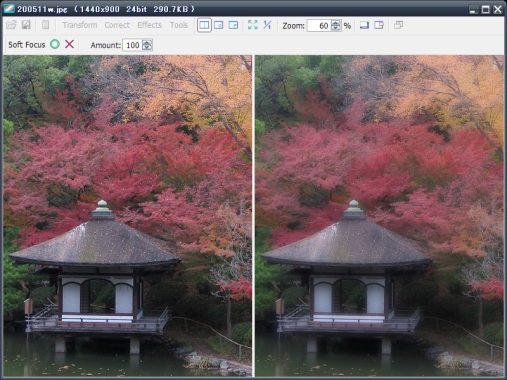
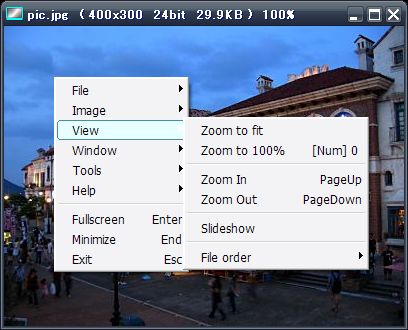
Vieas is a free image viewer software that allows users to view and edit images on their computers. It is a lightweight and user-friendly program that supports a wide range of image formats, including JPEG, PNG, BMP, GIF, and TIFF. Some of its key features include image resizing, cropping, and rotation, as well as support for image layers and image effects. Vieas also has a built-in slideshow function and allows users to view images in full-screen mode. It is available for download on the internet and is a popular choice among users who need a simple and reliable image viewer.

Vieas is a freeware image viewer software/application and made available by INAGAKI for Windows.

A fast and easy image viewer compatible with JPEG, PNG, TIFF, BMP, GIF.

Vieas is a handy and reliable image viewer that also includes basic editing features to help you improve your images.

Editing FunctionsCrop, Resize, Expand Canvas, Rotation, Mirror, Flip, Equalize, Correct (Histogram/Gamma/
Brightness/Contrast/Highlight/Shadow/Color Balance/Hue/Saturation), Replace Color,
Negative, Unsharp Mask, Blur, Soft Focus, Denoise, Effects (Color Filter/Mosaic/Diffuse/
Emboss/Edge Detection/Posterization/Oil Painting)

It can be used to crop, resize, and rotate images, adjust brightness and contrast, color balance, apply filters, and replace colors. In addition, you can generate the histogram of the image and count colors.

Features and specs:

  • Supports PNG, GIF, JPEG, TIFF and BMP
  • View slideshows
  • Fullscreen
  • Histogram
  • Editing functions (crop, resize, expand canvas, rotation, mirror, flip, equalize etc)
  • Count colors
  • Key customization
  • Multiple monitor support      Download Vieas free

Review – 7 laptops that you can buy Under $600

0

If you ask any laptop lover what he thinks when buying a laptop, he will tell you the best performance, design and feel within their budget. Although this may be the story of every laptop buyer, but all that shines is not gold. If your budget isn’t limited, you can get many options, but if your budget is less than 600 dollars, then finding those laptops can be difficult. To help you, we’ll look at 7 laptops that you can buy if your maximum budget is 600 dollars.

1. HP Pavilion 15 Touchscreen

You can buy this HP wLED-backlit portable corporate pavilion from 15.6 inches below 600 dollars. The

1366×768 pixel resolution is good to go at this price. Design is something anyone could fall in love with. The silver metal frame gives it a rich look. It features the eighth-generation Intel Core i5 Quad-Core processor that allows you to reach 3.4 GHz of RAM for multitasking power. Other features include Intel UHD Graphics 620 and Windows 10 operating system.

Even to store files, movies, games and other data, 1 TB of storage space on your hard drive is enough. The battery life is quite impressive which is 7 hours and 45 minutes.

2. Acer Aspire E15photo:Amazon

If you’re looking for a powerful portable setup with an exceptional design under 600 dollars, Acer Aspire E15 is the right choice for you. Obsidian’s black body along with the textured glossy lid has a 15.6-inch full HD widescreen with LED IPS display and 1920 x1080 pixel resolution. The handset works with the Windows 10 operating system and powered by the latest eighth-generation Intel Core i5 8250 U processor that reaches 1.6 GHz up to 3.4 GHz with Turbo Boost technology. The RAM 8GM is even better for the multitasking experience. You can store all essential data, music, movies, games and other files on 256 SSD cards. Speaking of battery life, it can last up to 15 hours.

3. ASUS VivoBook Flip R518UA

This line of mid-range laptops is equipped with Skylake hardware. This handset’s 15.6-inch screen can rotate to the back, making it one of a kind. Because of the convertible computer, it can be used as a normal laptop or even as a tablet. ASUS VivoBook Flip R518UA works on Intel Skylake Core i7-6500U CPU and has integrated Intel HD 520 – Nvidia GeForce GT 940M 2GB, 8GB DDR3L (4GB welded – 1 DIMM) is enough to store large data, files, movies and games. Ports include 1 USB 2.0, 1 USB 3.1, 2 USB 3.0, HDMI, SD card reader, Kensington lock and microphone/headphone. This is a good purchase under 600 dollars.

4. Lenovo ThinkPad E580

The easiest way to visualize how VPS works is to use the apartment analogy. Each virtual server, or “container”, on the computer is like a set of apartments. You can install any software you want or restart your own container without affecting the other containers on the machine, just as you can renew your suite without affecting others.

Lenovo ThinkPad E580 is a corporate laptop that can simplify your work and make you more productive. It costs less than 600 dollars, offers many features that make it difficult for us to believe its price. With solid performance, Lenovo’s Thinkpad has the best keyboard in the class that offers easy and fluid typing. It comes with 15-inch display, Intel Core i5-8250u processor, Windows 10 operating system and 8 GB of RAM that can be expanded up to 16GB. This lightweight and thin handset weighs just 4.7 pounds, making it easy to carry.

5. Dell Inspiron 14 5481photo:Dell
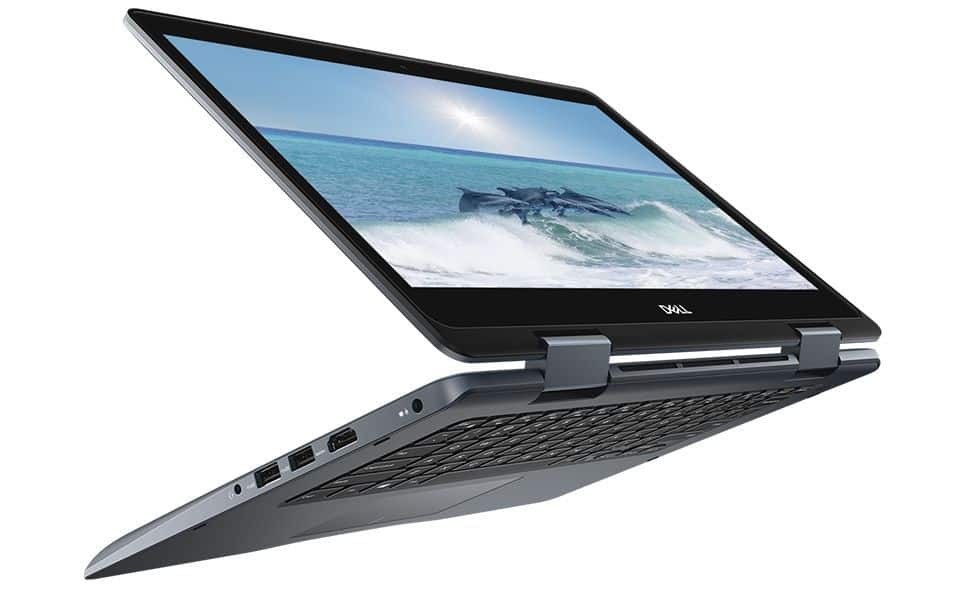
Dell also comes with a cheap notebook under 600 dollars and that is Dell Inspiron 14 5481. This 14-inch display and 1920 x 1080 pixel resolution laptop have a narrow bezel design with a camera on the screen. The full-size keyboard gives a good hand feel and supports two backlit levels. It has a multifunction port, two USB 3.1 ports, HDMI port, 3.5mm audio port, a USB 2.0 port and an SD card reader. Powered by Intel Core i5 -8265U processor, it comes with 128GB PCI have completed one, and working on the second only fix on the left. -E SSD, 8GB DDR4 2666 and 1TB HDD. Other features include GeForce MX130 2GB DDR, Intel UHD Graphics 620 graphics and 720p hd webcam.

6. HP Pavilion 17z high-performance laptop

This 17.3-inch HD backlit display with 1600 x 900 hp high resolution is a fully high-performance laptop.Powered by an updated Intel i5 Kaby Lake quad-core CPU, it combines with 8GB of RAM. The handset runs on the 64-bit Windows 10 operating system and comes with 1 TB of SATA hard disk storage that increases performance. 16GB of Intel Optane memory saves you a lot of data. The battery life is up to 5 hours and the laptop weight is 5.4 lbs. This is one of the best laptops under 600 dollars.

7. Toshiba Satellite Fusion 15 L55W-C5357

Toshiba’s 15 L55W-C5357 Satellite Fusion is a 2-in-1 hybrid series. This Full HD IPS touchscreen with a 15.6-inch LED backlight comes with IPS technology along with the fifth-generation Intel Core i5 processor. Featuring 8GB of RAM, it also has a small 128GB SSD. 1 TB of storage is good to go with. Other specifications include a 2.2 GHz Intel Core i5-5200U processor.

Windows 10 Home 64-bit, Intel Dual Band Wireless-AC 7265, Bluetooth 4.1, 720p built-in webcam and weight: 5.1 lbs.

I hope the list of these laptops under 600 bucks makes sense to you. In addition, you have options to make your next purchase.
The basic function of a Dash Cam

0

Discover the basic function of a dash cam and how it can benefit you. Learn about its features and how it can help in accidents, insurance claims, and monitoring driving habits. Find out if a dash cam is the right investment for you.

The basic function of a dash cam is to record your drive. Dash cameras are a unique device designed specifically for vehicles. Think of it as a surveillance camera for your vehicle. Below we explain the key features you would expect and find when buying a dash camera.

Photo: Amazon.co.uk

Dash cameras are built like a camera. It has a processor, image sensor, camera lens and other add-ons. When buying one, it is important to consider the type of processor you are using, this will determine the quality. Like computers, there are different types of processors. They range from the low end to the high end. This is the same for image sensors.

One of the main features that makes the dashboard cameras unique is the continuous loop recording feature. This feature is similar to that of surveillance cameras. Loop logging allows continuous recording regardless of memory capacity. This means that dash cameras are programmed to record non-stop in a loop overwriting the older footage when memory has reached its capacity. This allows the driver to never have to worry about removing the device and cleaning the memory.

Continuous recording records video in segments. When recording in segments of 1, 3 or 5 minutes, this ensures that if one segment of the video is corrupted, the other video files will not be compromised.

Another key feature is the g sensor. The g sensor acts as an accelerometer, measuring the forces acting on it during speed changes. This means that the g sensor measures the movement of the vehicle and responds accordingly by protecting images whenever the g sensor detects sudden or sudden movements. This feature is ideal if the vehicle is involved in an accident. The images involved will be locked and prevent them from being overwritten.

There are many other optional features that can come with a dash camera. These features may be useful, but they may not be necessary. Examples of additional features you can find are GPS, LDWS or Lane Departure Warning System, Wifi, FCWS or Front Collision Warning System and many more. Depending on your needs, find out if these additional features will benefit you or not.

Finally, the dashboard cams work through a dedicated power supply. This means that the device is always connected to the vehicle, either through cigarette outlet or wiring to the fuse box. Dash cameras only work a few minutes without a power supply. They are not intended to be removed and used outside the vehicle. Each time the vehicle is turned on, the dashboard cam automatically turns on and the recording begins. When the vehicle is turned off, the recording stops automatically.

Dash Cam – benefits

There are several benefits to using a dash cam in your vehicle:

  1. Evidence in case of an accident: A dash cam can provide video evidence of what happened in the event of an accident, which can be useful for insurance purposes and potentially for legal proceedings.
  2. Improved driving behavior: Some people may drive more cautiously when they know they are being recorded, which can help reduce the risk of accidents.
  3. Monitoring of your vehicle: A dash cam can provide peace of mind by allowing you to monitor your vehicle when it is being driven by someone else, such as a valet or a car service.
  4. Increased security: Dash cams can deter potential thieves and vandals, as they may be less likely to target a vehicle with a visible dash cam.
  5. Fun and interesting footage: Dash cams can capture interesting and unexpected moments that you may not have otherwise seen, such as a beautiful sunset or an animal crossing the road. You can even use the footage to create fun memories and share them with friends and family.

Is the dash cam footage a valid piece of evidence in court?

In general, dash cam footage can be used as evidence in court, but its admissibility will depend on the specific laws and rules of evidence in the jurisdiction where the case is being heard. In some jurisdictions, dash cam footage may be admissible as long as it is relevant to the case and meets certain requirements for authenticity and reliability. In other jurisdictions, dash cam footage may not be admissible unless it is accompanied by additional evidence, such as testimony from a witness who can verify the accuracy of the footage.

It is important to note that dash cam footage, like any other piece of evidence, can be challenged by the opposing party and its admissibility may be questioned by the judge. Factors that may affect the admissibility of dash cam footage include the clarity of the footage, the angle and distance from which the footage was recorded, and any tampering or alteration of the footage.

It is always a good idea to consult with an attorney if you are planning to use dash cam footage as evidence in a legal proceeding.

There are a lot of different options on the market. Dash cameras are a great device for everyday drivers.

Do you need a Dash Cam?
Whether or not you need a dash cam ultimately depends on your personal preferences and circumstances. However, there are several reasons why you might want to consider getting one:
  1. Insurance purposes: A dash cam can provide valuable evidence in the event of an accident, helping you prove who was at fault and potentially saving you from a lawsuit or higher insurance premiums.
  2. Protecting yourself from fraud: In some situations, other drivers or pedestrians may try to fake an accident to extort money from you. A dash cam can help you prove that no accident occurred, or that the other party was at fault.
  3. Monitoring your driving habits: Some dash cams can record data about your driving, such as your speed and location, which can be useful for improving your driving skills or proving your innocence in the event of a traffic violation.
  4. Capturing interesting events: Dash cams can also capture interesting or unusual events on the road, such as meteor showers, wildlife, or even meteor strikes.

Ultimately, whether or not you need a dash cam depends on your individual needs and priorities. However, if you do decide to get one, be sure to research different models to find one that fits your budget and offers the features you need.