While the Safari browser, native to Apple devices, may be suitable for many users, you might find…
Difference Between Wi-Fi 6 and Wi-Fi 7: Speed, Features & Performance
Last Updated on
Wi-Fi 6 vs Wi-Fi 7 Routers: A Deep Analysis of the Differences, Performance, Features, and Which One You Should Buy
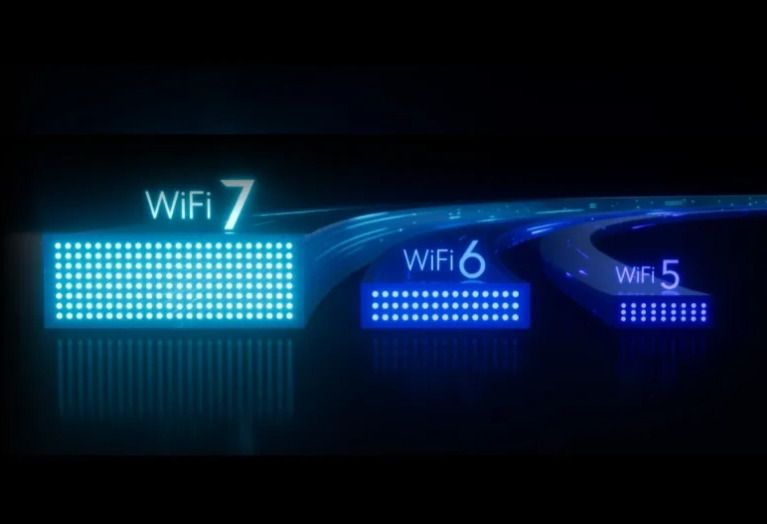
Wireless networking has evolved rapidly over the last few years. Wi-Fi 6 introduced major improvements in efficiency, capacity, and performance compared with older Wi-Fi 5 routers. Now, Wi-Fi 7 represents the next major step forward, promising dramatically higher speeds, lower latency, better performance in congested environments, and more intelligent use of multiple wireless bands.
However, the difference between Wi-Fi 6 and Wi-Fi 7 is not simply that “Wi-Fi 7 is faster.” The real differences involve how the wireless connection is organized, how multiple channels are used, how data is modulated, and how the router manages congestion and latency.
For many households, Wi-Fi 6 remains more than sufficient. For users with multi-gigabit internet, modern laptops, gaming PCs, high-end smartphones, large homes, multiple demanding devices, or a long-term upgrade strategy, Wi-Fi 7 can offer significant advantages.
1. The Basic Difference: Wi-Fi 6 vs Wi-Fi 7
Wi-Fi 6 is based on the IEEE 802.11ax standard, while Wi-Fi 7 is based on 802.11be, commonly known as Extremely High Throughput.
The most important difference is that Wi-Fi 6 focused heavily on improving efficiency. It was designed to allow more devices to communicate effectively with the same router, especially in busy environments such as apartments, offices, schools, and public spaces.
Wi-Fi 7 continues this approach but adds significantly wider channels, more advanced modulation, and the ability to combine multiple wireless links.
Wi-Fi 6 key technologies:
- OFDMA
- 1024-QAM
- MU-MIMO
- BSS Coloring
- Target Wake Time
- Up to 160 MHz channel width
- Operation across 2.4 GHz and 5 GHz
- Wi-Fi 6E extends the technology into the 6 GHz band
Wi-Fi 7 key technologies:
- Multi-Link Operation (MLO)
- 4096-QAM
- Up to 320 MHz channel width
- Enhanced MU-MIMO
- Multi-RU and preamble puncturing
- Operation across 2.4 GHz, 5 GHz, and 6 GHz
- Much higher theoretical throughput
The result is that Wi-Fi 7 is not merely a faster version of Wi-Fi 6. It is a more flexible wireless architecture.
2. Speed: Wi-Fi 7 Has a Major Theoretical Advantage
The most obvious difference between the two standards is speed.
Wi-Fi 6 can theoretically achieve extremely high aggregate wireless speeds, depending on the number of antennas, channel width, modulation, and spatial streams. However, typical consumer Wi-Fi 6 routers commonly advertise speeds ranging from approximately 1.8 Gbps to 10 Gbps of combined theoretical throughput.
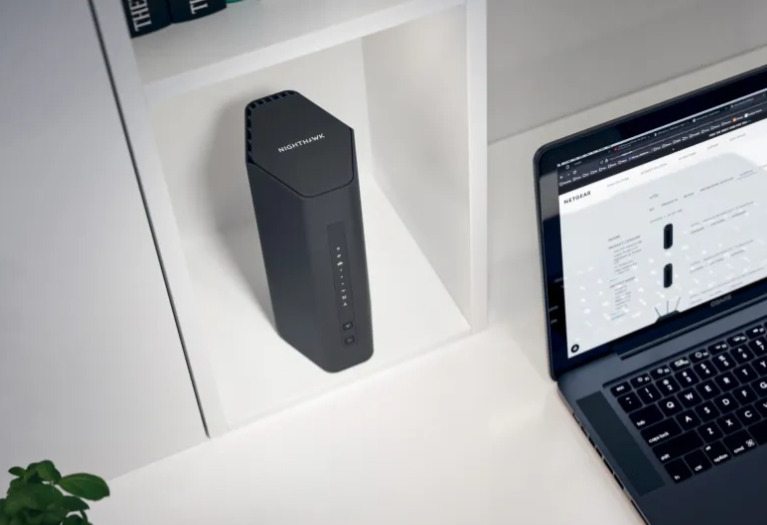
Wi-Fi 7 dramatically increases the ceiling.
The main reason is the combination of 320 MHz channels and 4096-QAM modulation.
Wi-Fi 6 uses 1024-QAM, which allows more data to be transmitted in each symbol compared with previous generations. Wi-Fi 7 increases this to 4096-QAM. Under ideal conditions, this can provide approximately 20 percent higher transmission efficiency.
However, the larger improvement comes from channel width.
A Wi-Fi 6 router can support channels up to 160 MHz wide. Wi-Fi 7 can support channels up to 320 MHz wide, effectively doubling the maximum channel width.
A wider channel can carry more data simultaneously. This is similar to comparing a two-lane road with a four-lane highway: more information can move at the same time.
In theory, Wi-Fi 7 can reach aggregate wireless speeds approaching tens of gigabits per second. However, real-world performance is always lower because of distance, interference, walls, client hardware, network overhead, and the capabilities of the connected device.
For example, a Wi-Fi 7 router does not automatically make an older Wi-Fi 6 smartphone operate at Wi-Fi 7 speeds.
The client device must also support Wi-Fi 7.
3. Multi-Link Operation Is Probably the Biggest Real-World Innovation
One of the most important features of Wi-Fi 7 is Multi-Link Operation, commonly called MLO.
Traditional Wi-Fi devices typically connect to one wireless band or one channel at a time. A device may connect to 5 GHz, for example, while another device connects to 2.4 GHz.
Wi-Fi 7 allows compatible devices to use multiple wireless links simultaneously.
For example, a Wi-Fi 7 laptop could potentially use the 5 GHz and 6 GHz bands together. Instead of relying on a single wireless connection, the device and router can intelligently distribute traffic across multiple links.
This creates several advantages.
Higher throughput
Data can potentially be transmitted through more than one band at the same time.
Lower latency
If one link becomes congested, traffic may be sent through another available link.
Better reliability
If interference affects one band, the connection may continue using another link.
Faster recovery
A device can switch or distribute traffic between links more intelligently than traditional single-band Wi-Fi.
This can be especially useful for online gaming, video conferencing, cloud applications, wireless virtual reality, and high-speed file transfers.
Wi-Fi 6 does not offer this same native multi-link architecture.
This is one of the reasons Wi-Fi 7 can feel more responsive even when the theoretical speed difference is not fully realized.
4. Channel Width: 160 MHz vs 320 MHz
Channel width has a major effect on wireless speed.
Wi-Fi 6 supports channels up to 160 MHz wide. This can provide excellent performance, particularly on the 5 GHz band.
Wi-Fi 7 doubles the maximum width to 320 MHz.
However, there is an important limitation: 320 MHz channels are primarily associated with the 6 GHz spectrum, where regulatory conditions permit them.
This means Wi-Fi 7’s maximum performance depends heavily on whether the 6 GHz band is available in your country and whether your router and client device support it.
The 6 GHz band provides more relatively clean spectrum than the crowded 2.4 GHz and 5 GHz bands. This makes it ideal for wide channels.
However, 6 GHz signals generally have shorter range and weaker wall penetration than lower-frequency signals.
Therefore, a Wi-Fi 7 router may deliver extraordinary performance when your device is relatively close to the router, but the connection may fall back to 5 GHz or 2.4 GHz as distance increases.
This is another reason why Wi-Fi 7 should not be judged solely by its advertised maximum speed.
5. 4096-QAM: More Data Per Wireless Signal
Another important difference is modulation.
Wi-Fi 6 introduced 1024-QAM. Wi-Fi 7 increases this to 4096-QAM.
QAM, or Quadrature Amplitude Modulation, determines how much information can be encoded into each radio signal.
Higher-order modulation allows more data to be transmitted within the same amount of radio spectrum.
However, higher modulation requires a stronger and cleaner signal.
In practical terms, 4096-QAM works best when your device is relatively close to the router and interference is limited.
Therefore, Wi-Fi 7’s 4096-QAM advantage is most noticeable in favorable conditions.
It is not a technology that guarantees a 20 percent speed increase throughout an entire home.
At longer distances, the connection may automatically use a lower modulation level to maintain stability.
6. Performance in Crowded Networks
This is where Wi-Fi 6 already performs extremely well.
Wi-Fi 6 introduced OFDMA, which allows the router to divide a wireless channel into smaller resource units and efficiently serve multiple devices.
Instead of allowing devices to compete for an entire channel, the router can allocate smaller portions of the channel to different devices.
This improves efficiency in networks with many connected devices.
Wi-Fi 7 improves this concept further through technologies such as Multi-RU and enhanced resource allocation.
One particularly important feature is preamble puncturing.
Suppose a wide channel contains a small section affected by interference. Older systems may be forced to avoid using the entire channel. Wi-Fi 7 can potentially ignore or “puncture” the problematic section while continuing to use the remaining clean spectrum.
This can improve performance in environments where interference is unpredictable.
For apartment buildings, offices, universities, and dense urban environments, these improvements can be more valuable than maximum theoretical speed.
7. Latency and Gaming Performance
Gamers often ask whether Wi-Fi 7 is significantly better than Wi-Fi 6.
The answer is: potentially, but not automatically.
Wi-Fi 7 can reduce latency through:
- Multi-Link Operation
- Better congestion management
- Wider channels
- More efficient resource allocation
- Faster use of alternative wireless links
For online gaming, however, your internet connection, ISP routing, server distance, and network congestion often have a greater effect than the Wi-Fi standard alone.
A Wi-Fi 7 router cannot eliminate latency caused by a distant game server or poor internet routing.
Nevertheless, inside the local network, Wi-Fi 7 can provide a more stable and responsive connection, particularly when multiple users are simultaneously streaming, downloading, gaming, or using cloud services.
For wireless virtual reality, high-resolution game streaming, and large local network transfers, Wi-Fi 7 has a particularly strong advantage.
8. Wi-Fi 6E Is an Important Middle Ground
Many buyers confuse Wi-Fi 6E with Wi-Fi 7.
Wi-Fi 6E is essentially an extension of Wi-Fi 6 into the 6 GHz band.
It provides access to additional spectrum and can offer excellent performance with less congestion.
A high-quality Wi-Fi 6E router can therefore be much faster and less congested than a basic Wi-Fi 6 router operating only on 2.4 GHz and 5 GHz.
However, Wi-Fi 6E does not include the full Wi-Fi 7 feature set.
It generally does not provide:
- 320 MHz channels
- 4096-QAM
- Full Wi-Fi 7 Multi-Link Operation
For users who want access to cleaner 6 GHz spectrum but do not need the latest technology, Wi-Fi 6E can still be a very attractive option.
9. Range: Wi-Fi 7 Is Not Automatically Better
One common misconception is that a Wi-Fi 7 router will always provide better range.
That is not necessarily true.
Wireless range depends on:
- Frequency
- Transmit power
- Antenna design
- Building materials
- Router placement
- Interference
- Client device capabilities
The 2.4 GHz band generally travels farther and penetrates walls better than 5 GHz and 6 GHz.
The 6 GHz band, despite offering exceptional capacity, usually has shorter effective range.
Therefore, a Wi-Fi 7 router may deliver much faster speeds near the router but rely on 5 GHz or 2.4 GHz for longer-distance coverage.
For a large home, a Wi-Fi 7 mesh system may be more important than simply purchasing a single extremely powerful router.
10. Hardware and Ethernet Ports Matter
A major mistake is to buy a powerful Wi-Fi 7 router while ignoring the wired network ports.
If your internet connection is only 500 Mbps or 1 Gbps, an expensive high-end Wi-Fi 7 router may not provide a noticeable internet-speed advantage.
However, Wi-Fi 7 becomes more valuable when combined with:
- 2.5 Gbps internet
- 5 Gbps internet
- 10 Gbps local networking
- NAS storage
- High-speed PC transfers
- Multiple high-performance wireless clients
Many modern Wi-Fi 7 routers include 2.5GbE, 5GbE, or 10GbE ports.
These ports are essential if you want to take full advantage of multi-gigabit wireless performance.
A router advertised with extremely high Wi-Fi speeds but only basic Gigabit Ethernet ports may create a bottleneck in certain network configurations.
11. Compatibility: Your Devices Matter More Than the Router
A Wi-Fi 7 router can connect to older Wi-Fi 6, Wi-Fi 5, and Wi-Fi 4 devices.
However, older devices will not suddenly gain Wi-Fi 7 features.
To experience the full benefits of Wi-Fi 7, you need compatible:
- Smartphones
- Laptops
- Desktop Wi-Fi adapters
- Tablets
- Gaming devices
- Mesh nodes
If most of your devices are Wi-Fi 5 or Wi-Fi 6, upgrading the router to Wi-Fi 7 may improve network management and provide future-proofing, but it may not dramatically increase the speed of those existing devices.
The greatest benefits appear when both the router and client support Wi-Fi 7.
12. Which Router Should You Buy?
Wi-Fi 6 is still the better choice for many people.
Choose Wi-Fi 6 if:
- Your internet connection is 1 Gbps or slower
- Most of your devices use Wi-Fi 5 or Wi-Fi 6
- You want excellent value
- You have a normal number of connected devices
- You do not need multi-gigabit wireless speeds
Wi-Fi 7 is more attractive if:
- You have multi-gigabit internet
- You own modern Wi-Fi 7 devices
- You transfer large files across a local network
- You use high-resolution wireless streaming
- You are a serious gamer
- You use wireless VR
- You live in a highly congested wireless environment
- You want a router that will remain modern for many years
The key question is not simply, “Which standard is faster?”
The better question is, “Will my network and devices take advantage of the additional capability?”
The difference between Wi-Fi 6 and Wi-Fi 7 is significant.
Wi-Fi 6 revolutionized wireless networking by improving efficiency, capacity, and performance in networks with many devices. It remains an excellent standard and is sufficient for the majority of households.
Wi-Fi 7 takes wireless networking further with 320 MHz channels, 4096-QAM modulation, Multi-Link Operation, improved spectrum utilization, and more advanced congestion management.
Its biggest advantage is not just raw speed. Wi-Fi 7 can make wireless connections more flexible, responsive, and resilient.
However, the benefits depend heavily on your environment and hardware. A Wi-Fi 7 router connected to older devices and a 500 Mbps internet connection may provide little practical improvement over a good Wi-Fi 6 router.
On the other hand, a Wi-Fi 7 router combined with modern Wi-Fi 7 devices, multi-gigabit internet, 6 GHz spectrum, and multi-gigabit Ethernet can deliver a dramatic improvement in wireless performance.
For most users today, Wi-Fi 6 remains the value champion. For enthusiasts, professionals, gamers, power users, and people building a long-term high-performance network, Wi-Fi 7 is the more advanced and future-ready choice.
Related Posts