Tag: IPS panel

  • Dell Alienware AW2723DF – awesome performance!

    Dell Alienware AW2723DF – awesome performance!

    Introducing the Dell Alienware AW2723DF, a remarkable 27″ gaming monitor that boasts a 1440p resolution, offering a high pixel density of 108.79 PPI on its 27″ screen, ensuring sharp details and text without the need for scaling.

    The 1440p resolution strikes a balance between sharpness and performance, making it less taxing on your CPU/GPU while still providing an immersive gaming experience. Though it may not match the razor-sharpness of 4K displays, the difference is hardly noticeable in games and videos.

    Dell Alienware AW2723DF
    Dell Alienware AW2723DF

    This monitor utilizes an IPS panel with a wide 95% DCI-P3 color gamut, delivering vibrant colors for an enhanced visual experience. The Creator mode allows you to adjust the gamut, providing flexibility when watching SDR content. Additionally, gamma adjustments and Uniformity Compensation further refine the display’s performance.

    Its IPS panel with wide viewing angles makes it suitable for color-critical work, although calibration with a colorimeter is recommended for optimal results. The monitor’s contrast ratio is decent at 1,000:1, although not as deep as VA panel monitors.

    The Dell AW2723DF supports both AMD FreeSync Premium Pro and NVIDIA G-SYNC Compatible, delivering excellent variable refresh rate (VRR) performance and tear-free gameplay at up to 280FPS. The monitor’s input lag is impressively low, around 2ms, ensuring a seamless and responsive gaming experience.

    In terms of HDR capabilities, the display achieves VESA’s DisplayHDR 600 certification, with 16 dimming zones. While HDR content appears better than SDR in some scenes, the overall HDR experience falls short compared to OLED or FALD displays.

    Navigating the OSD menu is made easy with the 5-way directional joystick beneath the bottom bezel. Notable features include Dark Stabilizer, on-screen timers, refresh rate tracking, Picture in Picture, Picture by Picture, and AlienVision, which adds visual enhancements for gaming.

    The stand offers great adjustability, including height adjustment, swivel, tilt, pivot, and VESA mount compatibility. The monitor’s robust build includes customizable AlienFX RGB lighting elements and a headset hanger.

    Connectivity options are extensive, with DisplayPort 1.4 with DSC for 1440p 280Hz 10-bit color, two HDMI 2.0 ports, a headphone jack, audio line-out port, and a quad-USB 3.0 hub.

    Dell Alienware AW2723DF
    Dell Alienware AW2723DF – images Dell

    The Dell Alienware AW2723DF is available in the price range of $600 to $650. Overall, it stands as an outstanding gaming monitor, boasting vibrant image quality and smooth performance, though some might find better alternatives within this price range.

    SpecificationDetails
    Diagonal Viewing Size27 inches (68.47 cm)
    Active Display Area (HxV)596.74 mm x 335.66 mm (23.49″ x 13.21″)
    Panel TypeFast IPS Nano Color
    Display Screen CoatingAnti Glare
    Maximum Preset Resolution2560 X 1440 at 144Hz (HDMI 2.0) / 2560 X 1440 at 280Hz (overclock) (DP 1.4) / 2560 X 1440 at 240Hz (native) (DP 1.4)
    Viewing Angle178° vertical / 178° horizontal
    Pixel Pitch / PPI0.23 mm x 0.23 mm / 109 PPI
    Contrast Ratio1000:1 (typical)
    HDR SupportabilityVESA DisplayHDRâ„¢600
    Aspect Ratio16:9
    Backlight TechnologyLED edgelight system
    Brightness450 cd/m2 (typical); 600 cd/m2 (peak)
    Response Time (typical)1ms (gray to gray) in Extreme Mode
    Connectivity2 x HDMI (ver 2.0), 1 x DP (ver 1.4), 2 x USB 3.2 Gen1 downstream ports (front bottom), 2 x USB 3.2 Gen1 downstream ports (rear), 1 x USB 3.2 Gen1 upstream port (rear), 1 x Headphone-out port (bottom), 1 x Audio line-out port (rear), Security Lock Slot based on Kensington Security Slot
    NVIDIA® G-SYNC® CompatibleYes, supports NVIDIA® G-SYNC® Compatible with up to 280Hz refresh rate
    AMD Free-Syncâ„¢ Premium ProYes, supports AMD Free-Syncâ„¢ Premium Pro with up to 280Hz refresh rate
    VESA AdaptiveSync DisplayYes, supports VESA AdaptiveSync Display with up to 280Hz refresh rate
    AlienFX LightingYes, 3 zones (Alien Head, Screen size phazor graphic, Power button)
    Preset OSD ModesCreator, FPS, MOBA/RTS, RPG, SPORTS, and 3 customizable game modes
    Additional OSD ModesPIP/PBP, Console Mode, AlienVision
    Stand AdjustabilityHeight adjustable stand (110 mm), Tilt (-5° to 21°), Swivel (-20° to 20°), Pivot (-90° to 90°), Built-in cable-management
    Low Blue LightYes, ComfortView Plus (TÜV Rheinland certified – Low Blue Light Hardware Solution)
    Flicker-freeYes
    ID Color VariantLunar Light
    Color Gamut95% DCI-P3 (typical), 100% sRGB
    Color Depth1.07 billion colors
    Color AccuracyDelta E < 2 (sRGB min.), Delta E < 3 (DCI-P3 typical)
    Dimensions (with stand)406.25 mm ~ 516.25 mm (H) x 606.60 mm (W) x 268.02 mm (D)
    Dimensions (Panel Only)354.29 mm (H) x 606.60 mm (W) x 67.00 mm (D)
    Weight (Panel Only)5.71 kg (12.58 lb)
    Weight (with packaging)12.64 kg (27.86 lb)
    Compliance StandardsRoHS-compliant, arsenic-free glass, and mercury-free for the panel only, BFR/PVC Reduce monitor (excluding external cables)
    Flat Panel Mount InterfaceVESA (100 mm x 100 mm)
    Temperature RangeOperating: 0°C to 40°C (32°F to 104°F), Non-operating: -20°C to 60°C (-4°F to 140°F)
    Humidity RangeOperating: 10% to 80% (non-condensing), Non-Operating: 5% to 90% (non-condensing)
    Altitude RangeOperating: 5,000 m (16,404 ft) max, Non-Operating: 12,192 m (40,000 ft) max
    Voltage Required100 VAC to 240 VAC / 50 Hz or 60 Hz +/- 3 Hz/1.5 A (typical)
    Power Consumption (Operational)0.3 W (Off Mode), 0.4 W (Standby Mode), 22.1 W (On Mode), 105 W (Max)
    Audio OutputNo
    What’s IncludedMonitor, Stand riser, Stand base, Power cable (varies by country), 1 x DisplayPort (DP to DP) cable, 1 x Mini-DisplayPort to Display Port (mDP to DP) cable, 1 x HDMI Cable, 1 x USB 3.2 Gen1 (5 Gbps) upstream cable, Factory calibration report, Quick Start Guide, Safety Information, Alienware sticker
  • ASUS ROG Strix XG27UQR Monitor Review

    ASUS ROG Strix XG27UQR Monitor Review

    The ASUS ROG Strix XG27UQR is a high-performance gaming monitor that offers impressive specifications and features. With its 27-inch IPS panel and 16:9 aspect ratio, this monitor delivers stunning visuals and a smooth gaming experience. Let’s delve into its various aspects and features in detail:

    Display: The monitor boasts a True Resolution of 3840×2160, providing sharp and detailed visuals. The panel size of 27 inches offers a good balance between screen real estate and desktop space. The 90% DCI-P3 color space coverage ensures vibrant and accurate colors, enhancing the visual quality.

    Panel Type and Viewing Angle: Featuring an IPS (In-Plane Switching) panel, the ASUS ROG Strix XG27UQR offers wide viewing angles of 178 degrees horizontally and vertically. This ensures consistent color reproduction and image quality, even when viewed from different angles.

    ASUS ROG Strix XG27UQR
    ASUS ROG Strix XG27UQR

    Brightness and Contrast: The monitor has a maximum brightness of 400cd/m², with a typical brightness of 350cd/m². This allows for excellent visibility in well-lit environments. With a contrast ratio of 1000:1, the monitor provides a good range of dark and light shades, resulting in more defined images and videos.

    Response Time and Refresh Rate: Gamers will appreciate the 1ms MPRT (Moving Picture Response Time) of this monitor, which reduces motion blur during fast-paced gaming sequences. Additionally, the 144Hz refresh rate ensures smoother gameplay and enhances the overall gaming experience.

    HDR and Color Accuracy: The ASUS ROG Strix XG27UQR supports HDR10, which provides a wider dynamic range and more realistic colors. The monitor also boasts a color accuracy rating of △E≦2, ensuring accurate and precise color reproduction.

    Video Features: The monitor includes several features that enhance the gaming experience. The Trace Free Technology minimizes motion blur, while the Low Blue Light feature reduces eye strain during extended gaming sessions. The Shadow Boost feature enhances visibility in dark scenes, allowing gamers to spot enemies or details more easily. Extreme Low Motion Blur further reduces ghosting and motion blur for crisp visuals.

    Connectivity: The ASUS ROG Strix XG27UQR offers multiple connectivity options, including two DisplayPort 1.4 DSC ports, two HDMI 2.0 ports, a headphone jack, and a USB hub with two USB 3.2 Gen 2 Type-A ports and two USB 3.0 ports. This allows for easy connection to various devices and peripherals.

    Design and Adjustability: With its sleek and stylish design, the monitor complements any gaming setup. It features a non-glare display surface, reducing reflections and glare. The monitor is also adjustable, offering tilt (+20° to -5°), swivel (+25° to -25°), and height adjustment (0-100mm) options for optimal viewing comfort. It is VESA wall-mountable with a 100x100mm pattern.

    Additional Features: The ASUS ROG Strix XG27UQR incorporates ASUS’s Aura Sync lighting effect, which can be synchronized with other compatible Aura Sync devices to create an immersive gaming environment. It also includes a Kensington lock for added security.

    It excels in customization and gaming features. In addition to G-Sync and FreeSync compatibility, it boasts Asus’s Extreme Low Motion Blur (ELMB) technology, reducing motion blur without adaptive sync. An integrated FPS meter bypasses software limitations, working in any game, while a tool helps align multiple displays with precision. It also includes Shadow Boost/Black Equalizer and on-screen reticles for games lacking them.


    ASUS ROG Strix XG27UQR
    ASUS ROG Strix XG27UQR

    Accessories: The monitor comes with various accessories, including a color pre-calibration report, DisplayPort cable, HDMI cable, power adapter, power cord, quick start guide, ROG sticker, USB 3.0 cable, warranty card, and certificates for TÜV Flicker-free, TÜV Low Blue Light, VESA DisplayHDR 400, and G-SYNC compatibility.

    Pros of the ASUS ROG Strix XG27UQR:

    • High-quality visuals: The monitor’s 4K UHD resolution and IPS panel deliver sharp and detailed visuals with accurate colors, making it ideal for gaming, multimedia, and content creation.
    • Fast response time and high refresh rate: With a 1ms MPRT response time and a 144Hz refresh rate, the monitor ensures smooth and fluid motion, reducing blurring and ghosting during fast-paced gaming.
    • HDR support: The HDR10 compatibility enhances the monitor’s dynamic range, providing more lifelike and vibrant colors, deeper blacks, and brighter highlights, resulting in an immersive viewing experience.
    • Adaptive-Sync technology: The monitor supports VRR (Variable Refresh Rate) technology, including AMD FreeSync and G-SYNC compatibility, which reduces screen tearing and stuttering for a smoother gaming experience.
    • Wide viewing angles: The IPS panel offers excellent viewing angles of 178 degrees horizontally and vertically, ensuring consistent colors and image quality from different viewing positions.
    • Adjustable stand and VESA mount compatibility: The monitor features a versatile stand that allows for tilt, swivel, and height adjustment, enabling users to find the most comfortable viewing position. It is also VESA mount compatible for additional mounting options.
    • Connectivity options: The monitor provides multiple input ports, including DisplayPort 1.4 DSC and HDMI 2.0, allowing for flexible connectivity to various devices.
    • Gaming-focused features: The ASUS ROG Strix XG27UQR includes features such as Trace Free Technology, Low Blue Light, Shadow Boost, and Extreme Low Motion Blur, which enhance gaming performance and visuals.

      ASUS ROG Strix XG27UQR
      ASUS ROG Strix XG27UQR – images: Asus


    Cons of the ASUS ROG Strix XG27UQR:

    • Limited color space coverage: While the monitor offers a decent 90% coverage of the DCI-P3 color space, some professional users who require a wider color gamut may find it lacking.
    • Price: As a premium gaming monitor with high-end features, the ASUS ROG Strix XG27UQR may have a higher price point compared to other monitors in its category.
    • Lack of built-in speakers: Unlike some other monitors, this model does not have built-in speakers, requiring users to rely on external speakers or headphones for audio output.
    • Limited HDR performance: While the monitor supports HDR, its HDR performance may not match that of higher-end monitors with higher peak brightness and local dimming zones.

    The ASUS ROG Strix XG27UQR offers a superb gaming experience with its high-resolution display, fast response time, adaptive sync technology, and gaming-oriented features. However, it may not be the ideal choice for professionals requiring extensive color accuracy or users looking for built-in speakers.

  • ViewSonic VP2756-4K monitor – Specs & Review

    ViewSonic VP2756-4K monitor – Specs & Review

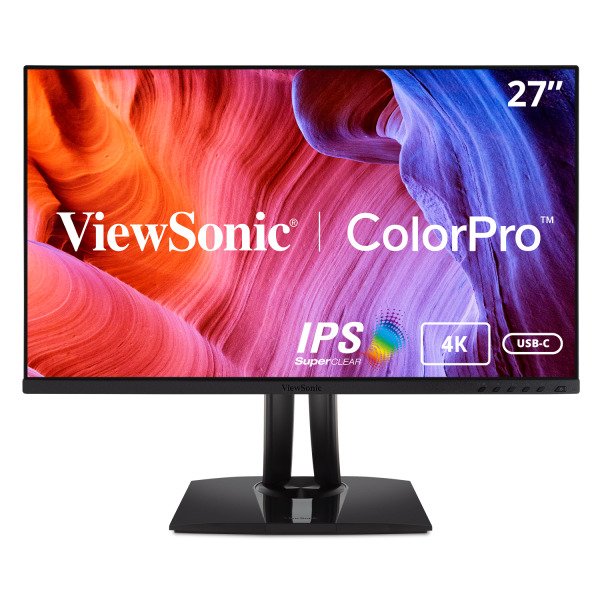
    The ViewSonic VP2756-4K UHD monitor, designed to give unmatched color accuracy essential for professional applications, shows off your work in the vibrant, realistic color it deserves. The VP2756-4K offers a nearly seamless viewing experience that is perfect for multi-monitor setups thanks to its SuperClear® IPS panel and stylish 3-sided frameless design. The VP2756-4K has a USB-C port that enables single-cable connectivity for the transfer of video, audio, and 60W of power. Each of our monitors is factory calibrated to give an excellent Delta E <2, helping to ensure accurate, uniform color, so you can be sure that what you see on screen is what your customers and clients will see as well.

    With a high-grade 10-bit panel and more than eight million pixels on the screen, the Pantone Validated VP2756-4K monitor is packed with features and offers up to 300% higher pixel density than other Full HD displays on the market. Additionally, the 27-inch display maximizes your creative productivity with a full range of swivel, pivot, tilt, and height adjustments, enabling the most comfortable placement.

    ViewSonic VP2756-4K monitor
    ViewSonic VP2756-4K monitor

    The most recent model in ViewSonic’s Pantone Validated professional line offers remarkable features, such as enhanced ergonomics to give personalized comfort, along with high-quality color delivery. In order to provide our customers with an effective workflow, the new displays are made to increase productivity while responding to industry standards.
    The ViewSonic VP2756-4K is quite compact at 27 inches, however the base is rather substantial when compared to the size of the monitor. The stand has a beautiful design and is pre-attached to the display panel. The stand allows for a great deal of movement, including swivel, pivot, tilt, and height adjustments. Everything is simple and easy to use.ViewSonic VP2756-4K monitorThere are many desktop monitors available, but not all monitors are created equal, and as soon as you start looking for display panels with true color, your options become limited. This is where the recently released ViewSonic VP2756-4K Pantone Validated ColorPro Monitor fits in, especially if you’re on a tight budget.
    A standard ViewSonic OSD menu system is included with the VP2756-4k, and it can be accessed using the buttons on the bottom bezel. However, the ViewSonic VP2756-4k features ViewModel for ‘Mac’, ‘Designer’, and ‘Photographer’, which further open up to creative modes like CAD/CAM, animation, video editing, and so on. When digging deep into the settings, there are various modes that can be found on other monitors as well.

    Photojournalists and photo editors can use presets like Portrait, Retro, Landscape, etc. with particular parameters. These presets modify gamma, sharpness, and other factors in addition to color and contrast, and the result is truly remarkable. If preset modes are not your preference, you can also manually adjust the fine settings.
    A near-seamless viewing experience is provided by the Pantone monitor’s Energy Star 8.0, EPEAT Silver with Super Clear® IPS (3840 x 2160) resolution panel, and stylish 3-sided frameless design. The HDMI, DP in, USB 3.2, and USB-C interfaces on the display make it easier to connect to other devices. Professionals appreciate the monitor devices because they offer a single-cable solution and quicker data, audio, and video transfer is made possible by USB-C.ViewSonic VP2756-4K monitor

    A powerful 10 bit (8 bit Plus A-FRC) IPS panel that can display images in 4K quality at 3840 x 2160 pixels is included with the ViewSonic VP2756-4K. The panel offers 178-degree horizontal and vertical viewing angles, a static contrast ratio of 1000:1, a brightness level of 350 cd/m2, a response time of 5 ms, and a brightness level of 350 cd/m2. This monitor is 100% sRGB color space compliant and has been Pantone validated for use by professionals in the image and video industries. But from what we could tell, it only encompasses around 80% of the DCI-P3 color range and roughly 78% of the Adobe RGB color space. Additionally, the monitor is factory-precalibrated, allowing it to provide superb color accuracy and a great viewing experience right out of the box.

    There are plenty of connectors on the rear of the display, including two HDMI 2.0, one DisplayPort 1.4, two USB-A, one USB-B, and one USB-C port. By the way, the USB-C port supports Power Delivery, so you can turn on your MacBook by simply plugging it into the monitor. The additional USB ports can be used to connect graphic tablets and to calibrate the monitor’s colors using a colorimeter. Not least, it’s important to note that the ViewSonic VP2756-4K monitor has two built-in speakers, each with a 2 Watt power rating.
    We really value the superb port variety because it enables you to utilize the monitor as a kind of docking station. Owners of MacBooks will undoubtedly enjoy that the USB-C connector supports PowerDelivery because it makes it simple to turn on their gadget by simply plugging it into the monitor.ViewSonic VP2756-4K monitor

    Also, the adjustment possibilities are great. Depending on how you like to use the monitor, you may adjust the height of the monitor by approximately 5.12 inches (13 cm) and rotate the screen into either a landscape or portrait position.  Photo: ViewSonicViewSonic VP2756-4K monitorRegarding features and color accuracy, the ViewSonic VP2756-4K is a fantastic monitor. It provides more performance for less money than the competition, making it a great option for videographers and photographers both as well as anyone who prioritizes image quality over all other considerations.

    ViewSonic VP2756-4K Pantone Validated ColorPro Monitor price: $399.99

    ViewSonic VP2756-4K specs:

    Size27″
    Panel TypeIPS-Type LCD
    TouchscreenNo
    Resolution3840 x 2160
    Aspect Ratio16:9
    Pixels Per Inch (ppi)163 ppi
    FinishAnti-Glare / Matte
    Hardness Rating3H
    Maximum Brightness350 cd/m2
    Contrast Ratio1000:1
    Dynamic Contrast Ratio20,000,000:1
    Variable Refresh TechnologyNone
    Bit Depth / Color Support8-Bit+FRC (1.07 Billion Colors)
    Response Time5 ms (GtG)
    Viewing Angle (H x V)178 x 178°
    Backlight Lifespan30,000 Hours
    Inputs / Outputs
    Inputs/Outputs1 x HDMI 1.4 Input
    1 x DisplayPort Input
    1 x USB Type-C Input/Output
    2 x USB Type-A Output
    1 x USB Type-B Input
    Built-In SpeakersYes, 2 x 2 W
    Media Card ReaderNone
    Multi-Input Support (PIP/PBP)None
    Power
    Power Consumption122 W (Maximum)
    42 W (Typical)
    39.5 W (Eco)
    37.5 W (Eco)
    AC Input Power100 to 240 VAC, 50 / 60 Hz
    Power Adapter TypeInternal
    USB Power Delivery60 W (via USB Type-C)
    Environmental
    Operating Temperature32 to 104°F / 0 to 40°C
    Operating Humidity20 to 90% (Non-Condensing)
    CertificationsICES-3(A), CEC, FCC, cTUVus
    *as per Manufacturer
    Physical
    Height Adjustment5.1″ / 130 mm
    Rotation Adjustment180° (-90 to 90°)
    Swivel Adjustment60°
    Tilt Adjustment-5 to 21°
    Max Arm Extension LengthNone
    Mounting-Hole Pattern100 x 100 mm
    Lock SlotYes, Kensington
    Dimensions (W x H x D)24.1 x 21.3 x 8.5″ / 612.1 x 541.0 x 215.9 mm (with Stand)
    24.1 x 14.3 x 2.1″ / 612.1 x 363.2 x 53.3 mm (without Stand)
    Weight15.1 lb / 6.8 kg (with Stand)
    9.8 lb / 4.4 kg (without Stand)