USB Type-B connectors, officially known as Standard-B connectors, are square-shaped connectors with slight rounding or a large square protrusion on the top, depending on the version.
With the exception of USB4, Type-B connectors are supported by every USB version, including USB 3.0, USB 2.0, and USB 1.1. There is also a second type of Type-B connector called Powered-B, which exists only in USB 3.0.
USB 3.0 Type-B connectors are often colored blue, while USB 2.0 Type-B and USB 1.1 Type-B connectors are usually black. However, manufacturers have the freedom to choose any color for USB Type-B connectors and cables.

You’ll typically find USB Type-B receptacles on larger computer devices such as printers and scanners. Occasionally, Type-B ports can also be found on external storage devices like optical drives, floppy drives, and hard drive enclosures.
Type-B plugs are typically found at one end of a USB A/B cable. The USB Type-B plug is inserted into the Type-B receptacle on the printer or another device, while the USB Type-A plug is connected to the Type-A receptacle on the host device, such as a computer.
USB Type-B Compatibility
The Type-B connectors in USB 2.0 and USB 1.1 are identical, which means that a USB Type-B plug from one USB version will fit into the Type-B receptacle of both its own and the other USB version.
USB 3.0 Type-B connectors have a different shape compared to previous versions, so the plugs are not compatible with those receptacles. However, the USB 3.0 Type-B form factor was designed to allow previous USB Type-B plugs from USB 2.0 and USB 1.1 to fit with USB 3.0 Type-B receptacles.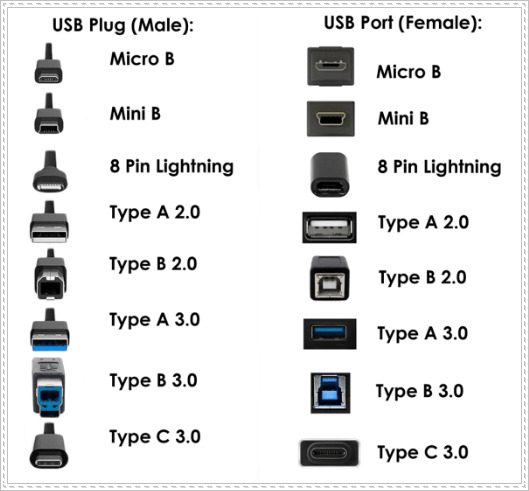
In other words, USB 1.1 and 2.0 Type-B plugs can physically fit into USB 3.0 Type-B receptacles, but USB 3.0 Type-B plugs are not compatible with USB 1.1 or USB 2.0 Type-B receptacles.
USB 3.0 Type-B connectors have nine pins, which is more than the four pins found in previous USB Type-B connectors. This increase in pins enables faster USB 3.0 data transfer rates. To accommodate the additional pins, the Type-B shape had to be modified slightly.
There are two types of USB 3.0 Type-B connectors: USB 3.0 Standard-B and USB 3.0 Powered-B. The plugs and receptacles of both types have the same shape and follow the defined physical compatibility rules. However, USB 3.0 Powered-B connectors have two extra pins to provide power, totaling eleven pins.
It’s important to note that the compatibility between Type-B connectors from different USB versions does not imply anything about their speed or functionality.