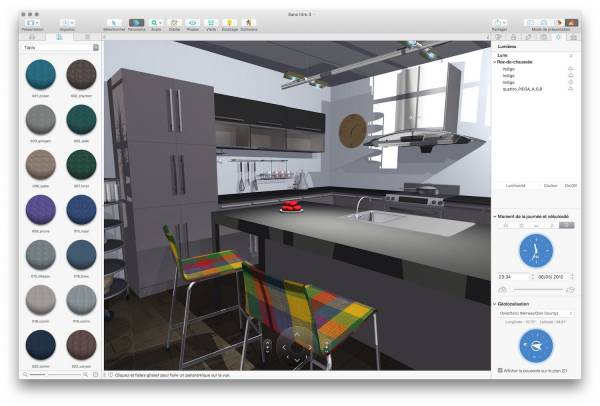
Live Home 3D, a vibrant creation from BeLight Software, has carved a unique niche in the home design world, inviting dreamers and doers alike to shape spaces with a blend of simplicity and sophistication. Available across Mac, Windows, iOS, Android, and even the futuristic Apple Vision Pro, this software transforms abstract ideas into vivid 2D floor plans and immersive 3D renderings. Its magic lies in its versatility, serving as a playground for homeowners, a toolkit for professionals, a canvas for interior enthusiasts, and a gateway to augmented reality adventures. In this 1300-word exploration, we’ll journey through the diverse fields of use where Live Home 3D shines, showcasing how it empowers users to craft everything from cozy nooks to sprawling estates with flair and precision.
Residential Design: Building Your Vision
For those dreaming of a new home or reimagining an existing one, Live Home 3D is like a magic wand for domestic aspirations. Picture yourself sketching out a sunlit family room or planning a two-story extension— the software makes it feel as natural as doodling, yet delivers results that rival architectural blueprints.
Start with intuitive floor plan tools: drag to create walls, curves, or entire rooms, snapping them into place with satisfying precision. Toggle to 3D, and your sketch springs to life, complete with customizable lighting, shadows, and textures. The built-in library bursts with thousands of objects—think sleek quartz islands or plush sectional sofas—paired with an array of materials from weathered oak to glossy tiles. For those craving more control, advanced features (available in the Pro version) let you sculpt intricate rooflines—gabled, hip, or shed—while terrain tools shape outdoor spaces with slopes, ponds, or winding paths.
Imagine a young couple planning their first home: they draft a cozy bungalow on a tablet during a coffee date, tweak the porch on a laptop at home, and later stroll through a virtual version on their phone to check if the dining nook feels right. The software’s cross-device syncing makes this seamless, ensuring ideas flow wherever inspiration strikes. Export options elevate the experience—crisp images, panoramic views, or smooth walkthrough videos—perfect for sharing with builders or debating paint colors with friends. Add in geolocation features to simulate sunlight at your exact latitude, and you’re not just designing; you’re forecasting how morning light will dance across your breakfast bar. Affordable (with a free tier and Pro upgrades under $100), it’s a gateway to turning whims into reality without breaking the bank.
Zooming into smaller spaces, Live Home 3D becomes a master of interior alchemy, transforming blank rooms into personalized havens. Whether you’re an apartment renter craving a chic bedroom or a design buff plotting a living room glow-up, this software delivers tools that feel both playful and powerful.
Begin with pre-built room shapes, then dive into furnishing with a drag-and-drop library of beds, lamps, or quirky accent chairs. Want a specific vibe? Tweak materials—swap out a bland wall for a textured brick finish or drape a sofa in velvet. The side elevation view is a hidden gem, letting you align shelves or artwork with pixel-perfect accuracy, ensuring your space isn’t just pretty but practical. For those with a knack for precision, measurement tools calculate square footage for rugs or paint, keeping budgets in check.
Picture a freelancer redoing their studio apartment: they scan the space with their phone’s LiDAR, overlay a virtual bookshelf, and adjust its size to fit the actual wall, all in augmented reality. This AR feature is a revelation, letting you “see” your design in your real-world space before buying a single throw pillow. Sharing is effortless—send a 3D render to a friend for input or export a video tour to pitch a client. The offline rendering engine churns out photorealistic visuals with soft shadows and gleaming surfaces, no cloud subscription needed. It’s a tool that makes interior design not just accessible but addictive, turning late-night Pinterest binges into tangible plans.
For professionals, Live Home 3D is a secret weapon, streamlining workflows in real estate, office planning, and beyond. Its speed and polish turn ideas into client-ready presentations faster than you can say “open house.”
In real estate, it’s a staging superstar: furnish vacant condos virtually, export as interactive tours, or share AR models for buyers to explore on their phones. Office designers love its precision—draft open-plan layouts or cubicle grids, then walk clients through 3D renders to test flow and function. Measurement reports and elevation views bridge the gap to construction, providing builders with clear specs. While not a full CAD replacement, its hybrid 2D/3D workflow pairs beautifully with heavier tools for quick mockups.
Imagine a realtor showcasing a fixer-upper: they whip up a modernized interior, export a video tour, and close a deal without a physical visit. Or a startup founder designing a co-working space, importing custom furniture models to nail the vibe. The software’s file-sharing options—zipped projects or cloud links—keep teams in sync, while VR exports (for headsets like Oculus) offer immersive pitches that wow stakeholders.
The actual successor to Live Interior 3D, Live Home 3D can make the technique of designing a unique house or interior
deceptively easy and fast.
If you have existing plans for your dream home, it’s simple to import scans of
existing 2D floor plans and make a detailed 3D model, full with home furniture and all the
trimmings, or start from scratch using the software’s intuitive applications to throw up virtual
walls, windows, and much more.
The Room tool makes it really easy to draw a complete living space, then attach it to any part
of the house. There’s even an amazing drawing tool for adding rounded walls in a
couple of mouse clicks.
The user interface is set out in a comfortable and logical tabbed style, which turns what
could be a rather daunting task into a whole lot of drag-and-drop fun. One place where
there’s still room for improvement is how Live Home 3D handles elements – organising
layers gets to be a challenge as houses grow in size, and there’s no way to easily search for
the one you want to modify.
The user interface becomes what could be a daunting task
into a total bunch of drag-and-drop fun.
Although Live Home 3D handles standard landscape design, it’s not particularly adept
at it, especially if your planned home is on anything other than flat ground. It’s much
better at sprucing up digital homes with a collection of over 1,500 objects, which can be
decorated with more than 2,100 different built-in materials; if that’s not enough, an
optional Extras Pack offers more than 600 more materials for £7.99.
When your home is modelled, you can take a virtual 3D walkthrough of it,export the project to social networks,or even share 360-degree panoramas straight to Facebook.
The app’s programmer gives detailed video tutorials to assist you get started, and there’s
a free trial edition to get a flavour of the software before you make a decision.
There’s also a Live Home 3D Pro version (£52.99), if you want to tinker with structures taller than two stories or
require a lot more complicated roof,balcony, or porch designs. For most home uses,though,
the basic version is more than enough.
Adjustable Lighting
Easily change the brightness and color of any light fixture to achieve the desired scene. Efficiently plan lighting in your home by changing the time of day and house geolocation.
Real-Time 3D Environment
• Walk through your 3D interior design.
• Beautiful physically based materials provide realistic interior renderings.
• Add and move furniture and other objects, and apply materials.
• Set multiple cameras to view the house or its interior from different angles.
• Achieve natural lighting by setting up true geolocation, daytime and overcast.
• Adjust light fixtures throughout the house to achieve a realistic lighting scene.
• Create corner windows and complex openings.
• Soft and natural shadows.
Discover more freedom while recording video, thanks to the advanced camera settings. Get higher resolution results suitable for commercial purposes. Share snapshots up to 16384 × 16384 px, Ultra HD video walkthroughs and 360-degree panoramas with a resolution of up to 8192 × 4096 px.
3D Models and Materials
• 2,000+ furniture and other models for diverse home design styles.
• Import thousands of free models from the Trimble 3D Warehouse.
• 2,100+ supplied materials.
• Set the exact size of a material tile to know how much material is needed for your house renovation project.
Roofs and Dormers
• Roof Assistant with 12 roof templates.
• Add segments to fully customize the roof.
• 16 dormer templates.
Export and Share the Result
• Share your home interiors to Facebook, Twitter, Vimeo or YouTube.
• Export 3D views of the house or an apartment to JPEG, TIFF, PNG and BMP.
• Share 360° Panorama JPEG images to Facebook.
• Render a realistic home interior and outdoor walkthrough videos.
• Create Stereo 3D Video, 360° Video and even Stereo 3D 360° Video.
• iCloud support.
The Standard Features In-App purchase unlocks save and export options
The Live Home 3D Pro Features In-App purchase unlocks:
• Save and export options.
• Unlimited floor levels.
• Terrain editing tools for outdoor home design.
• Advanced Material Editor.
• Elevation view.
• Custom-shaped roofs.
• Polygonal-based Block tool for drawing balconies, porches and more.
• FOV (field of view) and parallel camera projection.
• Export the entire house design or several objects to USDZ, SCN, SCNZ, FBX, OBJ or 3DS format.
• Export quality extended to Ultra HD for movies and 360° Panoramas, and to Hi-res (16,000 x 16,000) for still shots.
• Light editor
Live Home 3D’s strength is its chameleon-like adaptability, serving novices sketching a studio or pros pitching a penthouse. Its intuitive interface, vast object library, and free offline renders make it a joy to use, while AR/VR capabilities push it into futuristic territory. Minor hiccups—like occasional export glitches or a learning curve for advanced terrain tools—don’t dim its shine. Compared to cloud-locked competitors or pricier CAD giants, it offers unmatched value, blending fun with function.
In the end, Live Home 3D is more than software—it’s a spark for imagination, turning fleeting ideas into spaces you can see, feel, and share. From backyards to boardrooms, it’s a tool that invites everyone to design their world, one bold stroke at a time.