Home Blog Page 131

Digital Camera Under $100 – Sony DSC-W800 Review

0

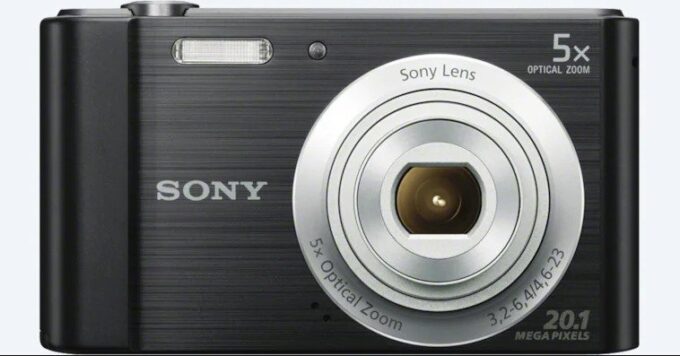
The standout feature of the Sony Cyber-shot W800 camera is its user-friendly interface, with an intelligent auto mode, multiple scene modes, panoramic shooting, and a P mode. For even easier use, there is an “Easy” mode that enlarges the icons. The camera has a 5x optical zoom lens, equivalent to 26mm to 130mm, and a 20mp CCD sensor. However, high-speed continuous shooting is not impressive, and the maximum resolution for video recording is 720p (1280×720 pixels).

Sony DSC-W800 camera has face detection autofocus and a built-in flash, which makes portraits and flash photos better than some smartphones with just an LED light. The screen is functional, with a 2.7-inch screen and a resolution of 230K dots. Electronic image stabilization is available, and the camera weighs only 125g with battery and memory card, making it very light.

The camera has a plastic body, with a metal effect on the front, and a plastic tripod socket underneath. It uses SD or Sony Memory stick cards and takes a Sony lithium-ion rechargeable battery. The memory card slot is next to the battery slot.

The zoom control uses buttons, and the shutter release button is on top next to the on/off power button. On the back is a 4-way controller with a middle OK button. The Menu button brings up on-screen controls giving you quick access to photo settings, and you can access the more advanced menus at the bottom.

Images taken at lower ISO settings and in bright conditions give reasonable results, but as soon as the light drops, and the ISO speed increases, image quality suffers, with poor results at ISO1600 and above. The camera struggles to focus in low light, but the AF assist lamp helps. The Sony DSC-W800 camera has a DRO (Dynamic Range Optimization) option to improve the dynamic range captured by the camera, boosting shadows.

The Sony Cyber-shot W800 doesn’t have Wi-Fi, Bluetooth, or NFC, but at this price point, that’s not surprising. It’s a good value for those who want a simple point-and-shoot camera that offers a 5x optical zoom lens. The camera is a reasonable option for those on a budget of £70 who don’t want to buy a digital camera secondhand.

Entry-level cameras are often overlooked as an option for potential buyers due to the abundance (and increasing quality) of smartphone cameras. However, don’t be fooled: there are still plenty of features accessible only in a standalone camera, and those looking to take their first steps in the world of photography will appreciate accessing those features for less than 100 dollars with Sony’s DSC-W800.

It features a 20.1 megapixel sensor and an optical zoom lens 5 times, which means you can, with a little patience, take great photos in many conditions. Combine this with SteadyShot image stabilization, USB charging and an easy-to-use 360-degree panoramic mode, and Sony has put together an attractive package for beginners looking to get their wordings.Sony DSC-W800

Design: Pocket-perfect
The Sony DSC-W800 comes with a highly pocket-sized design that takes away no excuse not to take it with you. It’s 3.8 inches wide and 0.82 inches deep, and weighs a lean 4.2-ounce with battery and memory inside, it’s even lighter and smaller than most modern smartphones. The only downside to this featherweight design is that we found that the camera was a bit inconvenient when handling it. This is a remarkable compensation, in our view, but certainly noteworthy.

The buttons and controls, on the other hand, feel as robust as we would expect. The only weak point was the video recording button, which is a bit melancholy positioned and difficult to press.
A familiar drawback for a camera so size conscious, of course, is that anyone with bigger hands will have trouble holding it and using it comfortably. While this can be difficult for older adults, it certainly makes it an ideal camera for children, who will benefit not only from the size, but from the affordable controls and the prevailing price.

When you initially set up the camera, simply plug in the battery and connect the cable included in the only external port to start charging. The device contained enough load from the box to start using and testing the camera immediately, but its mileage may vary.

Since the battery is small, the camera can achieve a full charge very quickly, but this, of course, comes with the disadvantage of being rated only for 200 shots or 100 minutes of continuous use. In our tests, this was suitable for short jets, but a diligent load was definitely required before taking it out for use.Sony DSC-W800
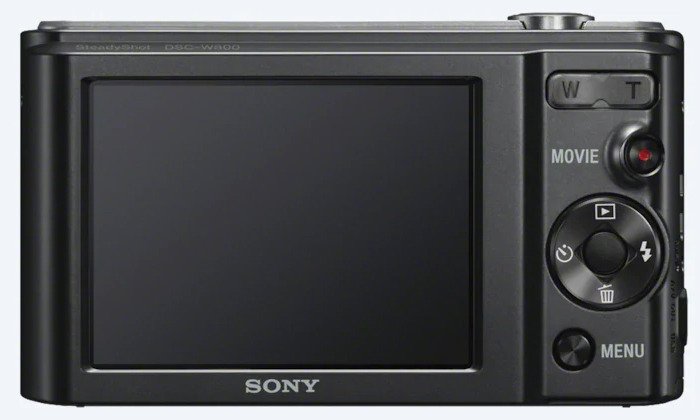
Photo Quality: No Big Surprises
We don’t sweeten it: you’re paying about 90 bucks for a camera, and you’re getting that level of photo quality. Buyers familiar with the latest camera alternatives that cost three to ten times more might surprise the somewhat unpleasant image quality. That said, with a little patience and the right equipment (advice: get a tripod), you can definitely take good photos.

As with most cameras at the lower end of the price spectrum, Sony’s DSC-W800 will provide much better results in brightness conditions. Autofocus delays in lower lighting conditions and newer sensor technology allow you to open the shutter for longer in moderate and dim lighting situations. Simple English: Wait 1 to 4 seconds to take a good photo inside at night without using the flash.
One last item of the note: the 2.7-inch (4:3) /230,400-point screen on the back of the camera is not a very high resolution and the photos you are taking with the camera will be much better when removed from the camera and computer.

Video quality: fine but not cool
Like other cameras at this price, the video quality is a bit of a later idea. A 1280 x 720 video recording resolution falls below Full HD (1920 x 1080) and is difficult for anyone who wants to use this device primarily for video purposes. Those hoping to make the jump to the video will better serve savings for a camera that offers at least 1080p, if not 4K recording capacity.

Price: Friendly wallet for a reason
With less than 100 dollars, Sony’s DSC-W800 gives you everything you can reasonably expect to receive in a new camera at this price. It will be difficult to find a cheaper alternative that is worth considering, so if spending more is not really an option, you don’t need to look too far. Photo:Sony

What we like
Smart, easy-to-use design
20.1 megapixel sensor
Direct and untied controls
Very convenient
Better removable battery for product longevity

What we don’t like
Slow Autofocus Performance
Less than the quality of the stellar image
720p video resolution
Limited manual controls

Sony DSC-W800 Specs:

  • Product Name   DSC-W800
  • Product Brand   Sony
  • Price   $88
  • Weight   8.8 oz.
  • Product Dimensions   2 x 2.1 x 0.9 in.
  • Color   Black
  • Compatibility    Windows, macOS
  • Max Photo Resolution    20.1MP
  • Max Video Resolution     1280 x 720
  • Shutter speeds shortest1/1500sec
    Shutter speeds longest2sec
    Bulb modeNo
    Exp modes
    • Scene modes
    Metering
    • Multi Pattern
    ISO sensitivity100 – 3200
    White balance
    • Auto
    • Outdoors/Daylight
    • Cloudy
    • Incandescent
    • Fluorescent
    • Flash
    Exposure Comp+/-2
    Shooting Options
    Continuous shooting0.52fps
    Video
    Movie modeYes
    Video Resolution
    • 1280×720 HD 720p
    Video FPS30fps
    Stereo SoundNo
    Optical Zoom with VideoNo Data
    Other Features
    Image StabilisationNo
    Interface
    HDMINo
    USBUSB 2
    Wi-FiNo
    Storage
    Card Type
    • SD
    • SDHC
    • Memory Stick (Sony)
    • SDXC
    File Type
    • JPG
    Power Source
    Battery TypeLithium-Ion
    Battery Life (CIPA rating)200shots
    Box Contents
    Box ContentsNo Data
    Dimensions
    Weight125g
    Width96.8mm
    Height55.5mm
    Depth20.8mm

What is satellite navigation system?

0

The satellite navigation system, also known as “sat nav”, is a system operated by a company or country to provide information on geospatial positioning. These technical terms simply mean a specific position above or above the ground in the 3D presentation. It is a system that has evolved over the years and can now get so many details from navigation. For example, when you have a good system in the car, you will be able to tell where you are in detail. Now you can also pinpoint longitude, latitude, speed and altitude, as well as timely information depending on where you are.satellite navigation system

How does that work

The satellite navigation system has a receiver that works to locate all the details within a few meters for commercial systems. High-end systems provide accurate information in an inch. Satellites emit a signal containing orbital data and the exact time of transmission. This data is transmitted in the data message form and overlaps in the code that serves as the synchronization reference. The satellite has an atomic clock that it uses to obtain the most accurate frequency and time standard, thus maintaining the synchronization of other satellites that could be in the constellation. Compares the transmission time with the reception time, which is measured by the internal clock, measuring the flight time of the satellite.

The satellite receiver measures other satellite signals at once using triangulation to determine a location. Triangulation is a process of measuring angles and points to determine location. Satellite locations are included in the transmission and with the time of the flight signal you can calculate the distance. The satellite navigation receiver calculates the location of the terrain. The accuracy of the location is improved by the number of satellites that can be tracked.

Advantages of satellite navigation

With more developed and detailed satellite navigation systems, it has become more difficult for people to get lost. The system can be used to make sure you know where you are when you have it installed in your car. This allows you to find your way, even when you are visiting a place for the first time. This technology can also be used to manage a fleet. You can see exactly where your vehicle is and sometimes even get to know if you are moving or standing.

Get the best out of it

There are several types of satellite navigation systems to choose from. The best satellite browser is the one that suits your preferences and your monitoring needs. With so many options, you can be sure to find an option that matches all your needs. There are also a lot of vendors that you can look to to get the best satellite browser for your needs. Always look at the features and what you can enjoy with your satellite navigation in relation to the most important needs you have. It is the best way to get the best satellite navigation module for your car to enjoy the benefits.Photo:Pixabay

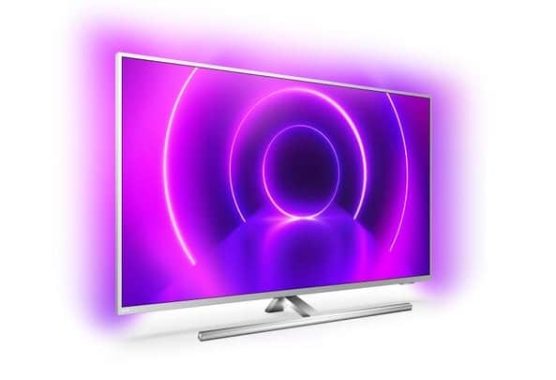
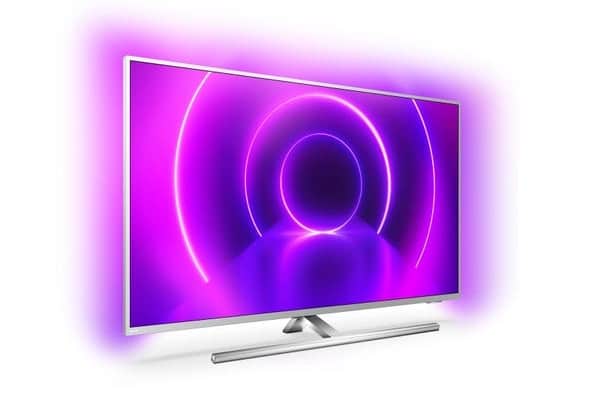
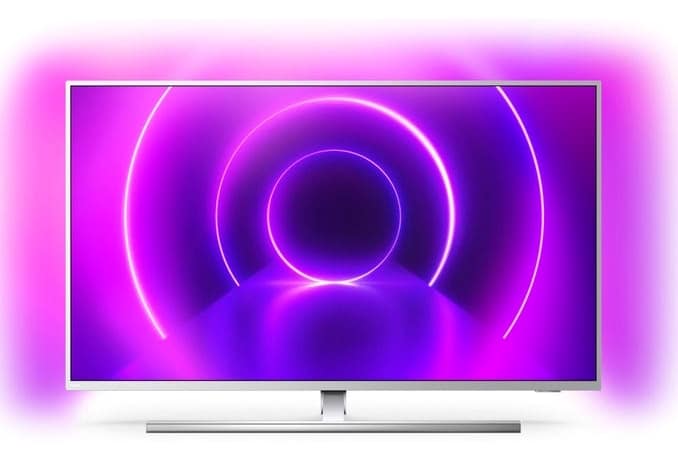
Philips 50PUS8555 50 inch 4K Ultra HD HDR – 3-sided ambilight

0

Discover the incredible difference Ambilight makes with the Philips 50PUS8555.

3-sided ambilight for a unique view
Unique in Philips, Ambilight technology expands the image’s presence, providing a more immersive and immersive experience. With smart LEDs around the top and sides of the TV, the color of the image is projected into the room, in real time. The color, vitality and emotion go beyond the screen and into your living room to give you a visual experience beyond the ordinary.Philips 50PUS8555

Philips P5 Perfect Picture Engine offers stunning image quality
With enormous processing power, the philips P5 Engine offers the best possible image, whatever the source. Enjoy the deepest blacks and brightest whites, the brightest and brightest colors and natural and realistic skin tones. You can also get Philips’ smoother and sharper images with incredible detail and depth, in sports, in film or any other genre, at any time and from any source.

Optimized HDR with HDR10
For a very high-quality image, HDR10 offers scene-by-scene HDR mastering for the truest and most accurate HDR imaging technology to date. With HDR10, each scene is optimized, which means that the maximum amount of detail is displayed, even in the brightest or darkest moments. The Philips 50PUS8555 also supports standard HDR10 and HLG formats.

Dolby Vision for dramatic images
In addition to being compatible with HDR10, this Philips 50″ TV is also compatible with Dolby Vision, a leading format in Hollywood and cinemas around the world. Dolby Vision also adjusts the image to take full advantage of the features of each screen and presents an image optimized for each scene in specially mastered content.

Compatible with Dolby Atmos
With Dolby Atmos decoding, this 50-inch Philips TV has the potential to deliver a more immersive sound with a truly cinematic feel. Other sound improvements include Clear Dialogue for improved voice, night mode to reduce dynamic volume, and bass enhancement for richer sound.Philips 50PUS8555

Android TV for Smart TV
In a complicated world of recovery TV, Android TV makes sense of everything. Using a clear and intuitive interface, Android lets you easily switch between Netflix, Amazon Prime, YouTube and many other services. Android allows you to pick up where you left off in the last series or check out new movie releases, all without getting lost in complicated menus.

Voice control with Google Assistant built in and working with Alexa
Working through the built-in Android system, Google Assistant helps you find content, apps and even compatible smart home device controls, such as the Philips Hue lighting system. All of this is available with simple voice control. Alternatively, connect your Amazon Echo or Alexa-like device and use voice commands via Alexa.

Elegant design – with s girth support
With its metallic-finished bezel, the Philips 50PUS8555 exudes quality. The rotating support allows you to get the perfect viewing angle, avoiding annoying reflections in the room.

Practical, remote QWERTY
Flip the remote control and you’ll find a handy QWERTY keyboard. Perfect for entering passwords or entering text in search engines and websites, this thoughtful feature saves you a lot of time compared to using a shared numeric keypad.Philips 50PUS8555

Fully connected
Four HDMI jacks make it easy to connect a Blu-ray player, a game console, a TV set-off, and another device. All sockets are hdmi 2.0 with HDCP 2.3, so this TV is compatible with UHD Blu-ray players and 4K HDR streaming services. Other connections include dual USB jacks, with registration on a compatible USB device. Start an optical connection for a soundbar/base plus headphone jack and you have everything you need from the new TV.Photo:Philips

Be wrapped in the image, with the Philips 50PUS8555.

Brand Philips
4K Ultra HD Yes
HDR Yes
BBC iPlayer Yes
Pixel Resolution 3840 x 2160
Scart Sockets No
Speakers Yes
Panel Bit Depth 10 bit (8 + 2 FRC)
Screen Size 50
Motion Processing 2000 PPI
LED Backlight LED – Edge
Power Consumption- Normal Use 86
Stand Yes – Swivel
Wall Mount Required VESA – 300 x 200
Energy Efficiency Rating A
Local Dimming No
Camera No
Gesture Control No
Packaging Dimensions WxHxD 1240 x 785 x 160
Netflix 4K Streaming Yes
Power Consumption – Annual 126
Maximum Stand Width (mm) 750
HDR Format Dolby Vision, HDR10+, HDR10, HLG
Analogue Tuner Yes
USB Video Playback Yes
USB Recording Yes
Headphone Socket Yes
Wireless Connection Yes
Full Web Browser Yes
Power Consumption – Standby 0.3
ARC – Audio Return Channel Yes
Touch Screen No
Voice Activated TV Yes
Quad Core Processor Yes
Twin Tuners No
HDMI 2.0 Yes
Screen Resolution 4k_ultra_hd
Panel Frequency (Hz) 50Hz
Dimensions excluding stand WxHxD (mm) 1120 x 659 x 125
Dimensions including stand WxHxD (mm) 1120 x 681 x 254
Digital Audio Output Yes – Optical
USB 2
Weight (KG) 13.9/16.9 (Without/With Stand)
Component No
DLNA Compliant Yes – SimplyShare
Remote Control yes
Smartphone control Yes
HDMI 4_HDCP2_2_4

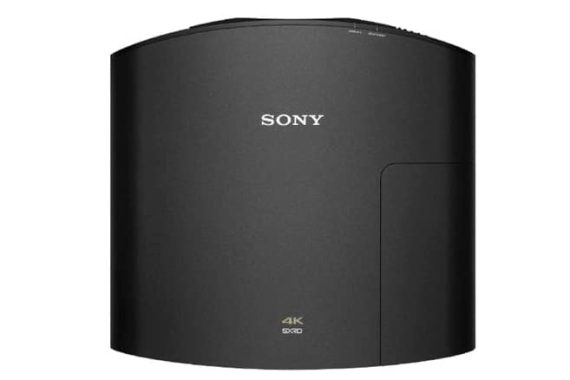
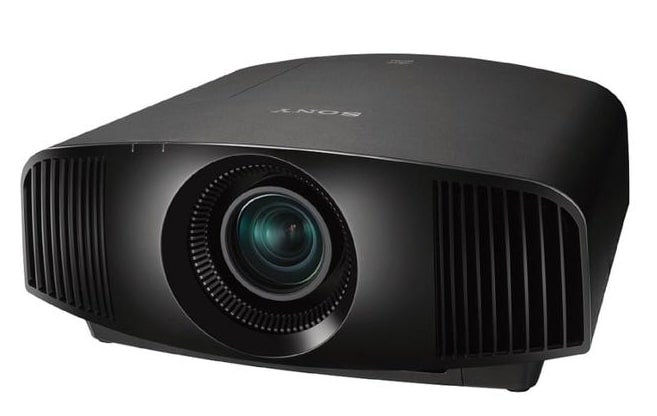
Sony VPL-VW270ES SXRD Projector HDR 4K HD with PS4 Pro

0

Sony VPL-VW270ES – Native 4K UHD resolution for maximum detail
Thanks to its huge experience in all aspects of entertainment, Sony is now able to bring the details of 4K Ultra HD resolution to the home theater. Simply put, projecting in this resolution gives details and realism that is impossible to achieve with conventional Full HD resolution. The 4K UHD resolution is four times higher than that of the more conventional Full HD 1920 x 1080 projectors and is a difference that can be easily seen on a large projection screen.Sony VPL-VW270ES

SXRD panels for vivid image quality
Sony uses advanced sXRD panels (Silicon X-tal Reflective Display) with an incredibly fast response speed of just 2.5 milliseconds. This gives the VPLVW270ES smooth and smooth movement which is faster and more stable than typical LCD TVs. Another advantage over TVs is the increase in panel resolution by 4096 x 2160. This ensures that movies can be viewed in panoramic formats, such as CinemaScope and American Vista, with much less of the image taken from the black bars.

Creating the super resolution of reality
Watching a 4K signal from a source like UHD Blu-ray, Netflix or Amazon Prime is impressive, but the Sony VPL-VW270ES still excels with other resolutions, too. Exclusive Reality Creation technology analyzes images up to the pixel level. It uses powerful pattern matching algorithms developed over years of film production to improve image sharpness without increasing digital image noise. It also extends existing Full HD Blu-ray movies and DVDs to almost 4K quality.Sony VPL-VW270ES

HDR for the most vivid image quality
Get the most out of today’s BLU-ray and UHD streaming services with High Dynamic Range. HDR video offers an extended range of brightness that offers more realistic, high-contrast images and bright colors. Compatible with HDR10 and HLG (Hybrid Log-Gamma) formats. Sony’s home theater projectors reproduce the color and contrast that is true to the director’s creation.

Motionflow 4K makes it soft
Whatever you’re looking at, you’ll enjoy liquid smoothness during action scenes that move quickly with Motionflow. This innovative technology creates and inserts additional frames between the original frames, first comparing key visual factors in subsequent frames and then calculating each fraction of the missing action.

Changing lens for easy installation
Simplify installation with vertical and horizontal lens movement, providing a wider range of Sony VPL-VW270ES projector positioning possibilities. This makes it easy to place the projector in your room and allows for a wider range of screen size options.Sony VPL-VW270ES

Select from nine calibrated image modes
Quickly adjust the image based on the settings displayed or played. Choose from nine calibrated image modes, including two theatrical movie modes, digital cinema, reference, TV, photos, game, bright cinema and bright TV. An advanced Tone Saturation Value (HSV) color adjustment tool gives you even more control.Photo:Sony

See more details than ever before, on the big screen, with Sony’s VPL-VW270ES Projector.

Brand Sony
Colour Black
4K Ultra HD Yes
HDR Yes
Pixel Resolution 4096 x 2160
Contrast Ratio NA
Brightness 1500
Number of 3D Glasses Included None
3D TV Yes – With optional glasses
Carry Bag No
Maximum Screen Size 300
Projection Technology SXRD
Fan Noise 26dB
Lens Shift Vertical: +85% -80% Horizontal: +/-31%
Projector Technology sxrd
Lumens less_2000
Weight (KG) 14
Remote Control yes
Dimensions HxWxD (mm) 205 x 496 x 464
HDMI 2_HDCP2_2_1
Throw Ratio   1.37 – 2.83:1
Power Consumption-    Normal Use 390
Power Consumption –    Standby 0.4/1
HDR Format    HDR10, HLG

Building online community – important tips

0

Building an online community is an important way to build your business online. Online communities usually consist of an information area, members area with a board, maybe a chat room and then some members only resources such as a membership directory, checklists, white papers, eBooks and more.

Determine the technology that will be used

online community
Photo:Pixabay

One of the most important aspects of starting an online community is the choice of the technology you will use to build it. There are many options to choose from. Base your choice on your technical knowledge, budget, and the features you want the community to offer.

Choose the niche you’ll focus on

It’s best if the online community you create is based on a target audience and not too widespread. Just as you focus on a niche with your business, focus on the same niche with the community.

Create community-specific content

Once you have a community, it’s important to create community-specific content on a regular basis. Consistency is key to attracting new members and keeping former members satisfied and interested.

Regularly invite new people

You want the new regular members to appear because it keeps the group fresh and brings new questions, thoughts, and conversations.

Be attractive and attentive to your members

Your personality will be demonstrated through the ability to participate regularly in discussions with the community. Let them see how loving you are.

Making it easier for others to promote the community

Start a reference club or affiliate program that allows community members to promote the group to others. Reward them for bringing new members.

Interview members on a regular basis

A great way to add content to the community is to choose a special member every month to highlight and interview. You can do these interviews in podcast form and also put them on iTunes, for another way to promote your community.

Interview with experts in your niche

A great advantage for your community is to be able to learn from vectors, agitators and other experts within your niche.

Promoting community members

From time to time they allow group members to promote their offerings with an annual sale of fires that allows them to benefit from the entire shared community.

Keep the conversation going

Don’t let the community die. Keep the conversation going; volunteers to monitor the group and contribute to the content and discussion.

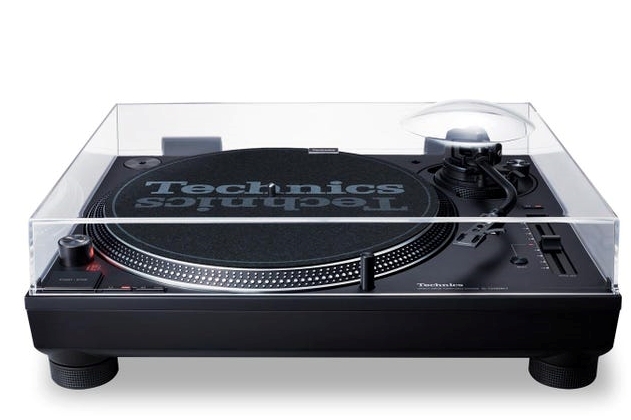
Technics SL1210MK7 Direct Drive Turntable

0

Perfectly refined, the Technics SL1210MK7 continues to set the standard for others to follow.

Legend of the seventh generation
From the disco era to today’s super-clubs, the Technics SL1210 (and similar sl1200) has been and remains the heart of the most professional DJ gigs. Known worldwide for its robust build quality, reliability and precise and stable sound, the SL1210 is a living legend. Now in the form of MK7, it is capable as always and of great value to the engineering involved. Technics SL1210 MK7

High torque and direct drive
Using Technics’ famous and expensive direct drive system, the Technics SL1210MK7 offers a couple of class-leading torques for a super stable ride and fast start/stop action. When you need to precisely control the mix, this is still the standard setter.

The logical solution would seem to be a straightforward Ortofon MM pickup with a replaceable pin, but as sound quality is more important to us than the drop mat’s ability to resist scratches, we also tried a costly motorbike pickup. The Technics arm’s light pickup housing was fitted with a 7.6 gram lightweight Audio Technica AT-OC9XSH, and the combined mass was precisely within what one can afford before the resonant frequency ended up where it shouldn’t have.

Improved engine without core
Based on the technology of the G and GR reference models, the MK7 uses a new coreless engine design. This involves removing coggings that can affect other direct transmission covers. Cogging is an instability in the speed of travel, which gives an inconsistent tone. With the SL1201MK7, you get the same stability as the solid pitch that has always been a hallmark of these Technics covers.

Vibration-resistant
The SL1210 turntables have always been built robustly and the Technics MK7 is no different. Although not as solid as the more expensive GR model, it still outperforms its rivals at the same price. The rigid mold-to-be-era aluminium frame features hybrid legs, anti-resonace coating and insulation. These not only help to keep the lid firmly in place, but also absorb vibrations, avoiding pen omission and distortion of sound.

Optimization settings
Lift the plate and there are a range of user settings. From a microswitch desk you can select 78 rpm, reverse play and even adjust the initial torque and braking speed – get this cover to work exactly as you want. Technics SL1210 MK7

More tone control
A new ‘x2’ button doubles the range of the tone control from s/- 8% to s/-16%. This additional range makes it even more flexible as a mixing tool and even more practical in the studio than ever before.

Classic Toasar
The tone arm of the MK7 is a classic S-shaped design that tracks accurately and is easy to handle. It also offers a wide range of settings, including VTA (Vertical Tracking Angle), weight and distortion, making it ideal for a wide range of different cartridges and even different slipmat thicknesses. The detachable head makes the exchange of cartridges a quick and easy process.

Connecting your cables
Instead of using static cables like the SL-1210 of the past, the SL-1210 MK7 has PHONo RCA terminals. These allow you to choose the length and quality of the cable that is worthy of a coverage of this standard.

Matte black style and new strobe lighting
Finished in matte black throughout, the MK7 has stealth style. The strobe color is adjustable between red and blue. There is also a bright LED pop-up light to make an accurate tail in dark lighting. Photo:Technics

A living legend who remains a class leader, the Technics SL1210MK7 is the cover to go to the vinyl mix. When looking to purchase a better turntable, a Technics SL1210MK7 might not be the first option that comes to mind. After all, it was constructed there with consideration for contexts other than the teak sideboard in the living room. as a DJ player only. If you want the best sound in this class, a Rega, Pro-Ject, or even the excellent SL-1500C is a better option. But because the Technics SL1210MK7is so expertly made, it can be a great substitute for anyone who is worried about sound quality, including amateur DJs and others. Nevertheless, with a superior pickup to a cheap Ortofon or Audio Technica.

Moreover, significant enhancements were made to the magnetic force of the rotor magnets, and the gap between the coreless stator and rotor magnets was carefully optimized. As a result, the torque performance of the turntable now matches that of the SL-1200MK5 model. Additionally, a unique feature of the MK7 is that the platter can rotate in the opposite direction when both the speed selector button and Start/Stop button are pressed simultaneously.

The tonearm of the MK7 is designed in an S-shape and crafted from lightweight yet highly rigid aluminium material. Its gimbal suspension construction includes a meticulously machined housing and a “high-precision bearing” in the bearing section.

Technics SL1210MK7
Technics SL1210MK7 – photos: Technics

To minimize unwanted vibrations, the platter incorporates a two-layer structure with a layer of deadening rubber covering the entire back surface. The chassis, on the other hand, is made of aluminum die-cast and utilizes a two-layer construction with ABS mixed with glass fiber for added strength. The insulator is equipped with a spring and rubber components to enhance isolation.

Setting up the MK7 is a straightforward process, aided by its responsive anti-skate mechanism and well-balanced tonearm. Both turntables boast a powerful high torque motor suitable for precise cueing of records. However, the MK7 distinguishes itself with superior stability and accuracy in pitch adjustment. Users of the MK2 model, who are constrained by internally wired connections, can expect an enhanced sound quality from the MK7, surpassing that of the RP7000.

Although facing formidable competition, Technics’ MK7 remains a premium turntable that provides exceptional value for money and continues to set the standard for direct drive DJ turntables. The expanded functionality, including greater pitch adjustment, robust build quality, and detachable interconnects, offer substantial benefits that enhance both the audio quality and usability of the deck.

Turntable section

Type  –  Direct Drive Manual Turntable

Turntable Speeds  – 33-1/3, 45 rpm (with switch 78 rpm)

Starting Torque  –  0.18 N・m / 1.8 kgï½¥cm

Build-up Characteristics  –  0.7 s. from standstill to 33 1/3 rpm

Wow And Flutter  –  0.025 % W.R.M.S.

Turntable Platter  –  Aluminium diecast – Diameter : 332 mm – Weight : Approx. 1.8 kg (Including slipmat and slipsheet)

Tonearm Section

Type  – Universal Static Balance

Effective Length  –  230 mm

Overhang  – 15 mm

Tracking Error Angle –  Within 2° 32′ (at the outer groove of 30 cm record)

Within 0° 32′ (at the inner groove of 30 cm record)

Offset Angle  –  22°

Arm-height Adjustment Range   –  0 – 6 mm

Stylus Pressure Adjustment Range   – 0 – 4 g (Direct Reading)

Head Shell Weight  Approx. –  7.6 g

Applicable Cartridge Weight Range

(without auxiliary weight)
5.6 – 12.0 g
14.3 – 20.7 g (including head shell)

Head Shell Terminal Lug

1.2 mmφ 4-pin terminal lug

Terminals

Audio Output  – PHONO (Pin Jack) x 1, EARTH TERMINAL x 1

General

Power Supply  – AC 110 – 240 V, 50 / 60 Hz

Power Consumption – 8 W – Approx. 0.2 W (Standby)

Dimensions (W x H x D)  – 453 x 169 x 353 mm

Weight – Approx.   –  9.6 kg

Accessories

Turntable, Slipmat, Slipsheet, Dust cover, EP record adaptor, Balance weight, Head shell, Screw set for cartridge, PHONO cable, PHONO earth lead, AC power supply cord, Owner’s Manual

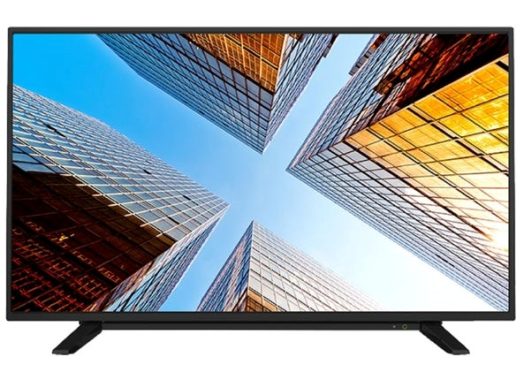
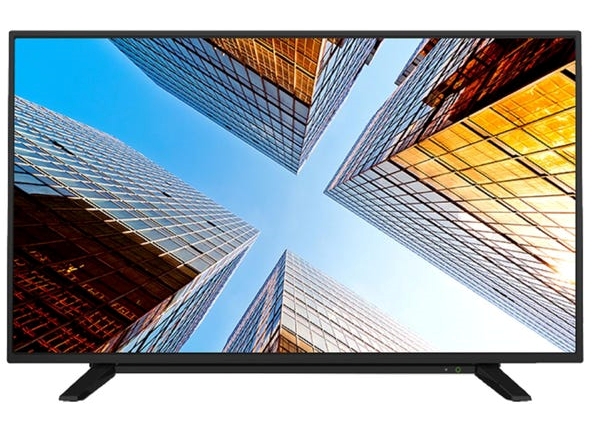
TOSHIBA 50UL2063DB 4K UHD TV with great TRU Picture technology

0

With its smartest technology and brightest image, the Toshiba 50UL2063DB is a cut above.

Toshiba TRU Technology Image with 4K UHD resolution for clarity
Toshiba’s TRU Picture technology encompasses a number of innovations for a more detailed and real-life picture. The 4K UHD resolution is four times higher than the conventional 1920 x 1080 Full HD, helping to give this TV exceptional clarity. Thanks to Toshiba’s 4K UHD Upscaler, even standard FHD signals can be extended to clarity and detail close to 4K, providing your Blu-rays with a new life contract.Toshiba 50UL2063DB

Get the most out of your vision with HDR
This Toshiba 50-a-year TV supports HDR10 and HLG for the best color realism possible. In addition to expanding the range of colors, HDR also offers brighter whites and darker blacks, helping to give this TV impressive contrast levels. HDR10 and HLG formats are covered. HDR10 is widely used in Sony and Microsoft CONSOLE game UHD. HLG (Hybrid Log Gamma HDR) is a standard user-generated and broadcast format that is a widely used standard for transmitting 4K signals.

Dolby Vision for dramatic images
Dolby Vision optimizes the HDR format to simply deliver the sharpest and most accurate images possible. Dolby Vision-equipped TVs decode generic HDR content and content encoded specifically in Dolby Vision, a leading format in Hollywood and theaters. Dolby Vision also adjusts the image to take full advantage of the features of each screen and presents an image optimized for each scene in specially mastered content.

Smart TV: Watch what you want, when you want
Connect to your Internet center via Ethernet or wi-fi and you have a full range of smart TV options at your fingertips. These include BBC iPlayer, Amazon Prime Video, YouTube and Netflix. With an open web browser, you also have access to browse the web, just like you would on a PC, laptop, tablet or smartphone. Toshiba’s smart app gives you easy control from your smartphone or tablet.Toshiba 50UL2063DB

Connect to your Echo or Google Assistant device at voice control
In addition to the smart application, you can also control this Toshiba TV with voice control. Simply connect any Echo or Google Assistant device (sold separately) to enjoy voice control via Alexa or Google. Change the volume, channel or on/off, all just asking.

Freeview Play for easy access to TV
The Toshiba 50UL2063DB also features Freeview Play. This combines catch-up television, on-demand services and live TV to make it easier to watch what you want, whenever you want. It is subscription-free and compatible with existing broadband services, while BBC iPlayer, ITV Player, All 4 and Demand 5 are available without having to open specific apps, providing effortless scrolling TV (requires a broadband internet connection with a minimum speed of 2Mbps).

Connect everything, including older components
With three HDMI jacks, the 50UL2063DB is ideal for connecting the set-top box, the UHD Blu-ray player and the game console. For older components, this 50-inch Toshiba TV includes composite inputs, components (via VGA) and VGA, perfect for connecting an older PC. A private headphone jack listening is also standard. Throw an optical connection to a soundbar/base and you have a cheap TV that easily combines (or beats) with more expensive models for connectivity.

Two USB inputs, including USB recording
With two USB sockets, you can connect a couple of media devices. With a convenient two-way USB, the 50UL2063DB is also ideal for plugging in a suitable HDD device and recording live TV.

Find out what’s on your smartphone on the big screen, with Screen Mirroring
The 50UL2063DB also offers screen mirroring via Miracast. This allows you to see what’s on your phone or tablet, on the big screen – wirelessly (requires a cellular wi-fi network and miracast certified smartphone – you may need to update your firmware). Photo:Toshiba

See a more real picture with the Toshiba 50UL2063DB.

Toshiba 50UL2063DB specs:

Brand Toshiba
4K Ultra HD Yes
HDR Yes
BBC iPlayer Yes
Pixel Resolution 3840 x 2160
Brightness 350
Scart Sockets No
Speakers Yes
Packaging Dimensions WxHxD 1215 x 780 x 154
Dimensions excluding stand WxHxD (mm) 1129 x 655 x 81
Dimensions including stand WxHxD (mm) 1129 x 710 x 245
Screen Size 50
Power Consumption- Normal Use 71
Stand Yes – Fixed
Energy Efficiency Rating A+
Netflix 4K Streaming Yes
Power Consumption – Annual 103
Power Consumption – Standby 0.5
Quad Core Processor Yes
Twin Tuners No
HDMI 2.0 Yes
Screen Resolution 4k_ultra_hd
Panel Frequency (Hz) 50Hz
Motion Processing 2000 TPQ
LED Backlight LED – Direct
Wall Mount Required VESA – 200 x 200
Local Dimming No
Camera No
Gesture Control No
Maximum Stand Width (mm) NA
Panel Bit Depth NA
HDR Format Dolby Vision, HDR10, HLG
Analogue Tuner Yes
USB Video Playback Yes
USB Recording Yes
Headphone Socket Yes
Wireless Connection Yes
Full Web Browser Yes
ARC – Audio Return Channel Yes
Touch Screen No
Voice Activated TV Yes
Digital Audio Output Yes – Optical
USB 2
Component Yes – Via VGA
DLNA Compliant Yes
Remote Control yes
Smartphone control Yes
HDMI 3_HDCP2_2_3
Weight (KG) 10/10.5 (Without/With Stand)

Apart MA30 – Stereo Mixing Amplifier

0

Ideal for compact positions, Apart MA30 is a medium-sized mix amplifier with full-size capabilities.

Mix amplifier
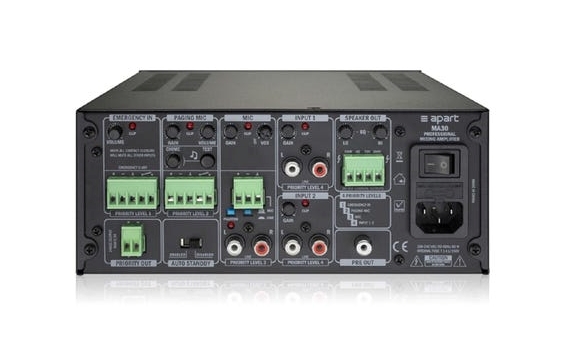
The Apart MA30 is a compact amplifier for mixing microphone with music. Ideal for commercial applications with the need for music and voiceover, this amplifier allows you to seamlessly switch between the two. The unit comes with a microphone/line input and two stereo inputs, mono added. On the back, you’ll find a four-tiered smart priority system from left to right for audio routing, an emergency input, a bell paging microphone, and a 24 VDC override output.Apart MA30 Stereo Mixing Amplifier

Line Speaker System Output
Designed to work with line speakers, the MA30 is the perfect partner for Apart’s corresponding installation line speakers. Working with 70-100-volt systems, the MA30 emits up to 30 watts in a 100-volt line system, enough for average volume levels in smaller, intimate places.

Compact size
This half-width and height 2U unit takes up minimal space in a computer rack. For more sophisticated systems, two amplifiers can be placed side by side in a single 2U rack space. This includes rack fasteners. Photo:Apart

Mix voice and musice with the Apart MA30.Apart MA30 Stereo Mixing AmplifierBrand Apart

Power Output – Watts per CH 30 x 1 (4 ohms)
Dimensions WxDxH (mm) 216 x 250 x 89
Analogue RCA Inputs 2
Microphone Input 2
Pre Output Yes
Weight (KG) 2.4
Freq Response (Hz) 60 – 20,000

Review – Google Pixel Buds 2 – great design, nice case, good sound quality…

0

Google introduced the true wi-fi version of its Pixel Buds headphones in October 2019, but it wasn’t till April 2020 that these in-ears released in the US, followed by a wider launch in July 2020 in some other regions.

Selecting up on a well-known form aspect and with an option to flex its smart skills, the Pixel Buds wants to provide you a Google headphones practical experience to exceed other true wireless headphones.
Design and comfort
Charging case included
Colours: white or grey
IPX4 water-resistance
Three ear tip sizes
Google has maintained some of the style and design that it used earlier on its wired Pixel Buds – with a rounded body of the headphone which sits in your outer ear, while the silicone tip attaches directly into your ear canal. It’s created to sit flush in the ear rather than hang out such as the Apple AirPods do and it’s a nice look. There is simplicity in the design and style that we just like, from the silky sleek surface of the Buds themselves thru to the soft-touch feel of the case.The case is like a ideal pebble, so smooth that you will simply want to caress it all the time – it’s a lot better than many of the low-priced plastic cases you will find on rival products.Google Pixel Buds 2

It’s the exact same finish on the soft domed touch surface of the Buds, which support a wide range of taps and swipes to control the headphones. Managing the music is simple enough once you get used to these commands, allowing play/pause, skip, volume up/down, as well as triggering Google Assistant – even though the slightest touch will register, so you need to be very careful.

There are 3 sizes of silicone ear tips to support you find the ideal fit, while there is a small rubber promontory, sticking up just like a raised pinky that’s designed to hook straight into the top of your ear and give extra stability. It’s fixed on the body of the buds, so you can not remove it.Google Pixel Buds 2

The Buds 2 generally are not the most comfy earbuds that we’ve used, but a lot will depend on the size and shape of your ears. Getting the right tip will achieve a snug and pretty secure fit, but we can’t help feeling that the additional support has been added due to the fact the weight does not sit in the ear quite as well as some others – and there’s a lot of touch functionality that might mean you’re prodding these ‘buds more often than some others.

In reality, we found the Buds 2 pleasant enough, but we’ve never found that top rubberized support to really do anything for us. It’s worth adding that we’ve never really got on with other headphones offering additional ear support in this way, so we’re not surprised.

Sound quality and performance
Adaptive Sound
Some distortion on calls
5 hour battery life/24 hours total
There’s no active noise cancellation (ANC) in these headphones; as such these ‘buds are designed to let some of the outside world in to reduce that sense of isolation. Google instead uses something it calls Adaptive Sound – which is designed to change the volume as you move from quiet places to noisy places and vice-versa. It’s a system designed to reduce the need to change the volume manually.

However, we didn’t detect a big difference – and moving from a quiet side street to walking along a main road, it was clear that we needed to turn the volume up manually, mainly because a lot of traffic noise was coming through.
If you have a Google Pixel phone then it will natively control the Pixel Buds 2 at a system level, but other Android phone users will be required to download an application. There’s not a huge range of control within this app, but you can control Google Assistant notifications and preferences, as well as get a guide to all the supported touch controls.

There is no method to change the sound profile of these headphones and there’s no custom sound tuning – which is quite common on a wide range of other headphones. We always like the option to fine-tune though.

Where the Pixel Buds really show off is in the range of Google Assistant smart functions that are supported. Press-and-hold a ‘bud (you can use either) and Google Assistant will fire up, tell you the time and start to relay your messages and notifications to you.

That will mean you don’t have to fish your phone out of your pocket and you can compose replies via voice – although, as with all things, this needs to be used with caution to make sure you’re sending the right message to the right person.

Of course you get all the normal Google Assistant functions too, allowing you to access all the other information that Google has access to – and pulling on those things that you’ve previously setup in your account.
The Google Pixel Buds 2 gives you a very mixed practical experience. Used as smart true wireless headphones there’s plenty to like, shown at their best when out and about, using Google Assistant to play your music from Spotify, acquiring your notifications read aloud so you don’t have to get your phone out of your pocket.

But these are pricey headphones and the absence of proper active noise cancellation (ANC) and relatively very poor isolation from external sounds brings things down a notch. Google Assistant is very capable, but the system is prone to being complicated, or getting confused when there’s a blip in reception, so it’s not all as smooth as the case these ‘phones come in.Photo:store.google

If you’re searching for an attractive set of smart true wireless headphones – and deep Google Assistant integration is top notch of your list – then the Google Pixel Buds 2 offer a good deal. On top of that, the simplicity of pairing for Android users can’t be overstated. But there is no escaping that there are much better choices out there.

For

  • Nicely designed
  • Great case
  • Wireless Qi charging
  • Good sound quality
  • Deep Google Assistant integration
  • Fast pairing a bonus for Android users
Against

  • Poor external sound isolation
  • No active noise-cancellation (ANC)
  • Assistant experience inconsistent
  • 5 hour battery life is below average

Monochrome Laser Printer Lexmark B2236dw review

0

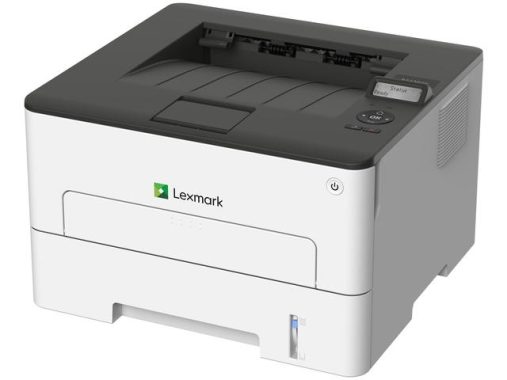
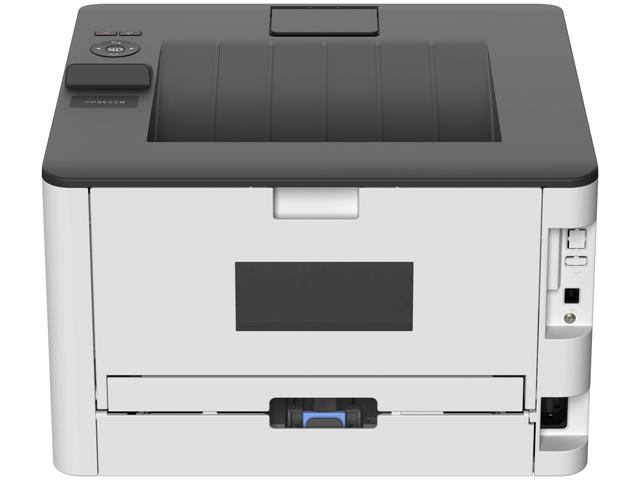
Lexmark B2236dw is a monolaser printer and, as such, can print only in black ink and has no scanning functions. That said, its simple design is quite compact and can easily fit into a small shelf or table. With its high-performance black toner cartridge, you can produce a large number of black text documents at an affordable cost for printing. It also has a fast printing speed, which is ideal for printing work reports or academic articles at the door as fast as possible. There is also a single manual character sheet so you can print in thicker media. Although some may find this printer very limiting, it is efficient, fast and convenient, making it a suitable option for those who only deal with black-and-white documents.Lexmark B2236dw

The Lexmark B2236dw offers a straightforward set of connectivity options. It includes standard interfaces such as Ethernet, Wi-Fi, and USB 2.0 for connecting to a single PC. In terms of mobile connectivity, it supports Apple AirPrint, Mopria, and Lexmark’s Mobile Print app. These features allow you to wirelessly connect your mobile devices to the printer either over a local area network (LAN) or the internet.

When it comes to security, the B2236dw provides robust features considering its class. You can implement connectivity restrictions to control access to functions or the printer itself. This allows you to manage user and department access. Additionally, you can assign PINs to sensitive documents and prevent unauthorized access by locking out users after a certain number of failed login attempts.

The output quality of the Lexmark B2236dw is impressive. Text, including decorative and less common fonts, is well-shaped and legible. Even at small point sizes, standard fonts remain clear and readable without the need for magnification. Grayscale graphics are free from banding or streaking, and even the tiniest of hairlines print evenly and without breaks.

Furthermore, embedded grayscale photos exhibit good detail and a sufficient range of shades of gray, resulting in relatively attractive test images. Although it’s not designed for high-quality photo printing, this entry-level monochrome laser printer delivers satisfactory text, graphics, and image output suitable for most monochrome business applications.

The Lexmark B2236dw is sub-couple for student use. It has an exceptionally low printing cost and you can print an entire 30-page article in just under a minute. It also has a variety of wireless connectivity options, including Wi-Fi through the router or via Wi-Fi Direct. However, you do not have a scanner, which can be a bit frustrating if you need to copy pages from textbooks.
Lexmark B2236dw is bad for family use. Since this printer is a monochrome printer, it does not produce photos well and your images have a lot of bands for them. There is also no scanner, which is predictable from a separate laser printer. However, if your family only needs to print black text documents, the toner cartridge produces a good number of pages before it needs to be replaced and its cost per print is also very convenient.

The Lexmark B2236dw is disappointing for use in small offices or at home. With its efficient toner cartridge, you can produce many pages before you have to replace the toner. You can quickly print a 30-page form in just under a minute, and manual single-sheet power can support slightly thicker media. However, there is no scanner, which can be a problem if you need to copy the modules.Lexmark B2236dw

The Lexmark B2236dw is great for black-and-white printing. It is very convenient as it has a low cost per print and can produce many pages before the toner cartridge needs to be replaced. High-yield cartridges are also available, which is nice. This printer can also print up to 35 pages per minute. Photo:Lexmark

The Lexmark B2236dw has an excellent monochrome cartridge system. The black toner cartridge can print a high page yield before it needs to be replaced, and higher-yielding cartridges are available, which is nice. The drum unit is also separated from the toner, so there is no need to replace it when replacing the cartridge. Note that the drum unit has yet to be replaced generally after 12,000 impressions.

General Specs

Part no.18M0135
Print Technology
  • Monochrome Laser
Workgroup Size
  • Small Workgroup
Display
  • 2-line All Points Addressable (APA) monochrome LCD display
Media Sizes Supported
  • A6, Oficio, 7 3/4 Envelope, 9 Envelope, JIS-B5, A4, Legal, A5, Letter, B5 Envelope, Statement, C5 Envelope, Executive, Universal, DL Envelope, Folio, 10 Envelope
Included Paper Handling
  • Integrated Duplex, Single-Sheet Manual Feed, 150-Sheet Output Bin, 250-Sheet Input
Standard Ports
  • 802.11b/g/n Wireless, USB 2.0 Specification Hi-Speed Certified (Type B), Ethernet 10/100BaseTX (RJ-45)
Size (mm – H x W x D)
  • 215 x 355 x 333 mm
Weight
  • 6.8 kg
Packaged Size (mm – H x W x D)
  • 312 x 418 x 443 mm
Packaged Weight, kg
  • 9.62 kg

Printing

Print Speed
  • Up to:
  • Black: 34 ppm1 (A4)
Print Speed Duplex
  • Up to:
  • Black: 17 spm1 (A4)
Time to First Page
  • As fast as:
  • Black: 7.9 seconds
Print Resolution
  • Black: 2400 Image Quality, 300 x 300 dpi, 600 x 600 dpi, 1200 Image Quality
Duplex
  • 2-sided:
  • Integrated Duplex
Printable Area
  • metric: 5.0 mm of the top, bottom, right and left edges (within)

Paper Handling

Media Types Supported
  • Paper Labels, Card Stock, Plain Paper, Envelopes, Refer to the Paper & Specialty Media Guide
Number of Paper Inputs
  • Standard: 2
  • Maximum: 2
Paper Input Capacity
  • Standard: 251 pages 75 gsm bond
  • Maximum: 251 pages 75 gsm bond
  • 251 pages 75 gsm bond
Paper Output Capacity
  • Up to:
  • Standard: 150 pages 75 gsm bond
  • Maximum: 150 pages 75 gsm bond
Paper Weight Range Supported
  • gsm:
  • 60 – 105 gsm (Standard Tray)
  • 60 – 200 gsm (Multipurpose Feeder)
Recommended Monthly Page Volume
  • 250 – 2500 pages2
Maximum Monthly Duty Cycle
  • Up to:
  • 30000 pages per month3

Cartridges & Imaging

Laser Cartridge Yields
  • up to:
  • 1,2004-page Cartridge
  • 3,0004-page High Yield Cartridge
  • 6,0004-page Extra High Yield Cartridge
Imaging Unit Estimated Yield
  • Up to:
  • 12000 pages, based on 3 average letter/A4-size pages per print job and ~ 5% coverage5
Cartridge(s) Shipping with Product
  • 7004-page Black Starter Return Program Toner Cartridges
Replacement Cartridges:
  • Product functions only with replacement cartridges designed for use in a specific geographical region. See www.lexmark.com/regions for more details.

Hardware

Processor Speed
  • Dual Core, 1.0 GHz
Memory
  • Standard: 256 MB
  • Maximum: 256 MB
Hard Disk
  • Not Available
Printer Languages
  • Standard:
  • PCL 5e Emulation, PCL 6 Emulation
Fonts and Symbol Sets
  • 2 PCL bitmap fonts, OCR-A, OCR-B scalable PCL 5e fonts, For more information, refer to the Technical Reference., 84 scalable PCL fonts, 3 of 9 scalable PCL 5e fonts in Narrow, Regular and Wide
Touch Screen Display
  • No

Connectivity

Direct USB
  • No
Ethernet Network
  • Yes
Wireless
  • Yes
Network Protocol Support
  • TCP/IP IPv6, TCP/IP IPv4, AppleTalkâ„¢, TCP, UDP
Network Printing Methods
  • LPR/LPD, FTP, Microsoft Web Services WSD, Enhanced IP (Port 9400), IPP 1.0, 1.1, 2.0 (Internet Printing Protocol)
Network Management Protocols
  • DHCP, APIPA (AutoIP), mDNS, IGMP, WINS, DDNS, SNMPv3, SNMPv1, SNMPv2c, Telnet, NTP, ICMP, HTTP, DNS, ARP, HTTPs (SSL6/TLS), Finger
Network Security
  • IPSec, SNMPv3, 802.1x Authentication: MD5, MSCHAPv2, LEAP, PEAP, TLS, TTLS

Supported Operating Systems

Microsoft Windows Operating Systems Supported
  • Windows 10, Windows 8.1, Windows 8, Windows 8 x64, Windows 7 x64, Windows Server 2016, Windows 8.1 x64, Windows 7