Home Blog Page 148

Advice to Help You Buy a Laptop Power Charger

0

Theoretically speaking, a laptop computer charger must withstand the test of time. But, actually, they don’t last that long. For example, they can be damaged or stolen. If the charger does not work, you will not be able to charge or use your laptop. Therefore, it is important that you get a new one from a nearby office supply store or an electronic or computer shop. You can also buy them online. Here are some tips that can help you opt for the right one.

Do not opt for a universal power Charger

While the universal charger is a good choice, it might not work for your satisfaction. This type of laptop charger is compatible with a large number of models, but its components are not able to meet the specific power requirements of some laptops. The problems are usually related to the adjustment, peaks of power, price, and tension. So It’s best to get a brand.

tips to help you buy a laptop power charger
photo: Pixabay

Do not buy a solar charger

Solar chargers are eco-friendly and efficient. There is a difference between these and the OEM models. Although they can be safely used with most types of machines, we cannot say for sure if they can work with all models.

Don’t go for a cheap unit

Buying a cheap charger is not a good idea, as it will not resist the test of time. Moreover, the economical models tend to overheat the equipment due to the inconsistency of the power inputs. Therefore, they cannot be considered a good solution.

Don’t opt for another brand

If you choose a different brand charger , it will most likely not fit. Due To low or high voltage, it can cause problems even if you can connect it to the device.

Go for the recommended laptop charger

Be sure to opt for the appropriate type of charger. You can get this kind of information from a number of different places such as the bottom of your laptop, old box charger, and the manufacturer’s website. If you’re buying online, the unit specs can help you get this information.

Opt for an OEM laptop charger

Ideally, most of the experts suggest that you get an original equipment manufacturer unit (OEM), as it is designed for the type and model of the computer that you own. It Can be difficult to opt for the OEM unit. So It is better to order online. Often, online stores have a wide selection of products that can be purchased at competitive prices.

Choose a generic laptop charger if you cannot get an OEM

If you want to buy a charger that is not designed for your model, make sure that the device you want to buy is safe. They are usually compatible and safe to use. Even If a generic unit can help you save a lot of money, you may not have enough energy. Therefore, it is advisable to discover the energy needs of the charger before obtaining a unit.

Here are some TOP tips to help you buy a laptop power charger:

  1. Compatibility: Ensure that the power charger you purchase is compatible with your laptop model. Check the specifications of your laptop or the original charger for information on voltage, wattage, and connector type. Match these details with the charger you plan to buy.

  2. Brand and Quality: Opt for chargers from reputable brands or manufacturers. While they may be slightly more expensive, they typically offer better quality, safety features, and longer lifespan. Low-quality chargers may damage your laptop or pose safety risks.

  3. Research and Read Reviews: Before making a purchase, research different charger options and read reviews from other users. Look for feedback on reliability, durability, and compatibility. This information can help you make an informed decision.

  4. Warranty and Customer Support: Check if the charger comes with a warranty. A warranty provides protection in case of defects or malfunctions. Additionally, ensure the seller or manufacturer offers good customer support, should you encounter any issues.

  5. Price and Value: Compare prices from different sellers or websites to get the best deal, but don’t compromise quality for a significantly lower price. Consider the overall value, including the charger’s quality, warranty, and customer support, rather than solely focusing on the price tag.

  6. Genuine vs. Third-Party: While genuine chargers from the laptop manufacturer are often recommended, they can be more expensive. However, third-party chargers can be a viable option if they are from a reliable brand and meet the necessary specifications. Be cautious when purchasing third-party chargers to ensure they are safe and reliable.

  7. Safety Features: Look for chargers with built-in safety features such as over-voltage protection, over-current protection, and short-circuit protection. These features can safeguard your laptop from power surges or potential damage.

  8. Portability: Consider your usage requirements. If you travel frequently or need a charger for on-the-go use, choose a lightweight and compact charger that is easy to carry. Some chargers come with detachable cables, which can further enhance portability.

  9. Energy Efficiency: Energy-efficient chargers can help reduce power consumption and save electricity. Look for chargers with high energy efficiency ratings, such as ENERGY STAR certified products.

  10. Purchase from Reliable Sources: Buy your laptop power charger from reputable sources such as authorized dealers, official websites, or well-established online retailers. This reduces the risk of purchasing counterfeit or low-quality products.

Remember to prioritize safety, compatibility, and quality when buying a laptop power charger. Taking the time to research and make an informed decision will ensure you find a charger that meets your needs and protects your laptop.
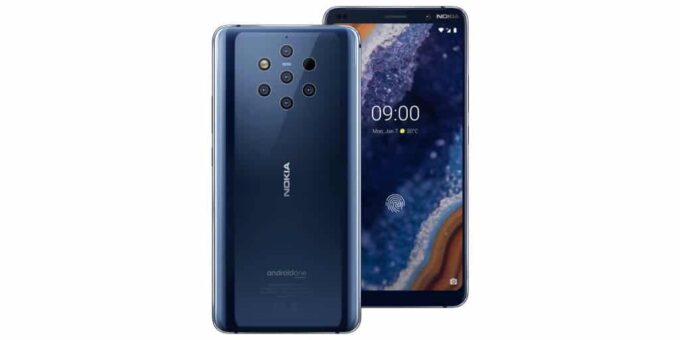
5 Zeiss cameras,$699 price tag – Nokia 9 PureView

0

Back before his rebirth, Nokia’s biggest claim to fame in smartphones was the camera that drew attention to the Lumia 1020. Now, the company announced another device aimed at the photography market with the Nokia 9 PureView which does not host two, not three, but five cameras in the rear.

The camera is by far the biggest novelty of the Nokia 9 PureView. The device has five Zeiss cameras on the back that are built in conjunction with Light, the company that made that crazy camera with 16 individual modules. The 5 Cameras of the PureView are made of 2 RGB color sensors, which you will find in other devices, and also 3 monochromatic black and white sensors, all 12MP and have the same focal length.

Where companies like Samsung use additional sensors to capture different types of shots, Nokia is using all those extra lenses to capture more detail and more depth. Apparently, these extra lenses make it possible to capture much more light, as well as more than 1200 levels of depth in each shot. This makes it possible to create a realistic-looking bokeh in these images with Lightroom or Google photos.

As For how much this device works as a typical smartphone, it is what you would expect from any other flagship Android, since last year. The Nokia 9 PureView runs on top of the 845 Snapdragon chipset from last year’s admired, and the company says that this device is the first to make the most of the camera capabilities of that processor. Photo:9to5google

The best Products To Sell On Amazon

0

There are numerous products that can be successful when selling on Amazon, and the best ones can vary based on factors such as market trends, competition, and personal interests. However, here are some product categories that have generally performed well on Amazon:

  1. Electronics: Popular electronics items like smartphones, tablets, headphones, and smart home devices often have high demand on Amazon.

  2. Home and Kitchen Appliances: Products such as kitchen gadgets, home organization items, and small appliances like coffee makers and air fryers are commonly sought after by Amazon customers.

  3. Health and Personal Care: Items like fitness equipment, supplements, skincare products, and personal care gadgets can be profitable on Amazon.

  4. Baby Products: Baby clothes, toys, nursery items, and safety gear are consistently in demand on Amazon.

  5. Books: Both physical books and e-books sell well on Amazon. Niche or specialized books can be particularly successful.

  6. Fashion and Accessories: Clothing, shoes, jewelry, and accessories have a large market on Amazon. Identifying a unique or trendy niche can help stand out in this competitive category.

  7. Home Improvement and Tools: Tools, home improvement supplies, and DIY products are popular choices for Amazon shoppers.

  8. Sports and Outdoor Equipment: Fitness gear, camping supplies, cycling accessories, and outdoor recreation products have a strong market on Amazon.

  9. Pet Supplies: Products such as pet food, grooming tools, toys, and accessories are consistently sought after by pet owners.

  10. Beauty and Personal Care: Makeup, skincare products, haircare items, and beauty tools are often top sellers on Amazon.

Remember, thorough market research, understanding customer needs, and analyzing competition are crucial when choosing products to sell on Amazon. Additionally, it’s important to consider factors like product sourcing, pricing, and marketing strategies to maximize your chances of success. Sell On Amazon

About some apps available to assist you in selling products on Amazon

There are several apps and tools available to assist you in selling products on Amazon. These tools can help with various aspects of your Amazon business, such as product research, inventory management, pricing optimization, listing optimization, and more. Here are a few popular Amazon seller apps:

  • Jungle Scout: Jungle Scout is a comprehensive product research tool that helps you find profitable product ideas, analyze market trends, and estimate sales potential on Amazon.

  • Helium 10: Helium 10 offers a suite of tools for Amazon sellers, including product research, keyword research, listing optimization, inventory management, and competitor analysis.

  • AMZScout: AMZScout provides tools for product research, niche analysis, keyword tracking, and sales estimation. It also offers a Chrome extension that provides valuable data while browsing Amazon.

  • Sellics: Sellics is an all-in-one Amazon seller software that covers product research, keyword optimization, PPC management, competitor monitoring, and sales analytics.

  • SellerApp: SellerApp offers features for product research, listing optimization, keyword tracking, inventory management, and PPC advertising management.

  • FeedbackWhiz: FeedbackWhiz helps manage customer feedback, reviews, and seller feedback. It provides automated email campaigns, review monitoring, analytics, and order tracking.

  • InventoryLab: InventoryLab offers inventory management, accounting, and listing capabilities. It helps you track and manage your inventory, calculate profits, and create shipment labels for FBA (Fulfillment by Amazon).

These are just a few examples, and there are many more Amazon seller apps and tools available in the market. When choosing an app, consider your specific needs, budget, and the features that align with your business goals. Be sure to read reviews, compare pricing plans, and take advantage of free trials to find the app that works best for you.

Pricing your products competitively on Amazon is essential to attract customers and maximize your sales. Here are some strategies to determine the best price for the products you sell on Amazon:

  1. Research the Market: Conduct thorough market research to understand the price range of similar products in your category. Analyze the pricing of your competitors, including best-selling products and those with high customer ratings.

  2. Consider Your Costs: Calculate all your costs associated with sourcing, manufacturing, packaging, shipping, and Amazon fees. Ensure that your pricing covers these expenses while leaving room for a reasonable profit margin.

  3. Utilize Amazon’s Tools: Take advantage of Amazon’s pricing tools and features, such as the “Automate Pricing” tool or third-party repricing software. These tools can help you adjust your prices automatically based on market conditions, competitor pricing, or desired profit margins.

  4. Monitor and Adjust: Regularly monitor your product’s performance and adjust your prices accordingly. Track the demand, competition, and customer reviews to identify opportunities for price optimization.

  5. Offer Competitive Pricing: Aim to offer prices that are attractive to customers compared to similar products. Consider pricing your products slightly lower than your competitors, especially if you’re new to the market, to gain visibility and win over potential customers.

  6. Leverage Promotions and Discounts: Strategically use Amazon’s promotional tools, such as Lightning Deals or Coupons, to offer temporary discounts and attract more buyers. These promotions can help increase your product’s visibility and generate sales.

  7. Test Different Price Points: Experiment with different pricing strategies, such as offering bundle deals, volume discounts, or tiered pricing options. Testing different price points can help you determine the optimal price that maximizes your sales and profitability.

  8. Customer Value: Take into account the perceived value of your product by customers. If your product offers unique features, superior quality, or additional benefits, you might be able to justify a higher price point.

The pricing is a dynamic aspect of selling on Amazon, and it’s important to regularly evaluate and adjust your prices based on market conditions and customer feedback. Keep an eye on your product’s performance metrics and make data-driven decisions to optimize your pricing strategy.

HP Spectre x360 review – Beautiful 2-in-1 laptop

0

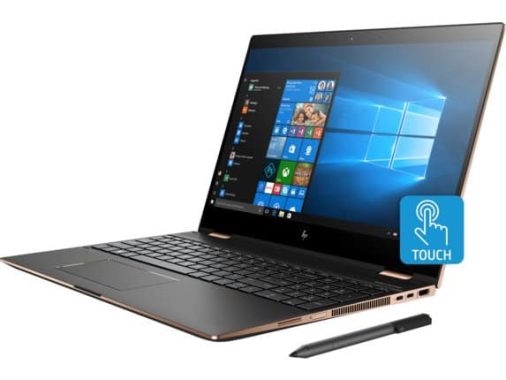
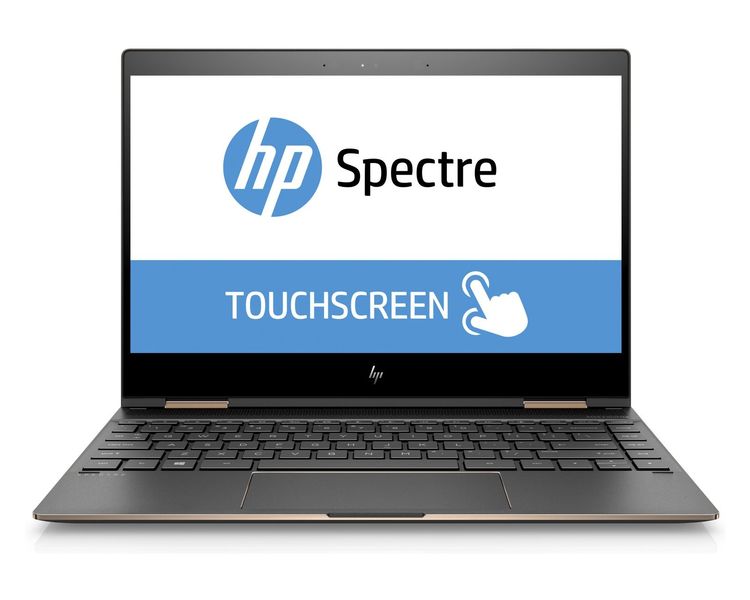
Like other laptops in the HP Premium range, the HP Spectre X360 is a beautiful 2-in-1 laptop that can keep up with the best Ultrabook on the market. If you’re wondering how we got here, it’s the HP backup product and re-evaluating its alignment, resulting in a new chasses, backed by more powerful components and a stylus included.

With the HP Spectre X360 2018, HP has improved many of the buttons and even just the design, going up to include a microSD card reader. Therefore, it’s not hard to see why the HP Spectre X360 is one of the best 2-in-1 laptops on the market, even on the disappointing battery life and an uncomfortable keyboard.

An Elegant Silver-plated aluminium enclosure wraps the entire chassis, divided only by bright buttons or speaker grids. The material is something like the oldest designs of Spectre, so it’s likely to show some wear and tear over time.

There is a microSD card slot, a 3.5 mm headphone jack, a 3.1 USB port, and an integrated light power button on the left side of the laptop. On the right, you’ll find the HP Spectre X360 fingerprint sensor, two USB-C Thunderbolt 3 ports, and a Rocker volume.

This X360 Spectre is not exactly and overflowing with doors, but having both USB type A and USB-C is a welcome approach to get rid of the pain of living that dongle life. Any of the Thunderbolt 3 ports can be used to charge the HP Spectre X360.

With a measurement of 12.04 x 8.56 x 0.53 inches (30.6 x 21.8 x 1.36 cm) and a weight of 2.78 lbs (1.26 kg), the X360 Spectre is lightweight and compact.

HP is proud of the lifetime of the X360 spectrum battery. On the website, it has up to 16 hours of use. Although this might be the case with a minimal workload, we couldn’t get there.

Both our video loop playback reference and our actual test resulted in a battery life of less than 8 hours, or about half of what HP claims.

Eight hours are enough to spend a whole day working, no doubt-not to mention all the flights across the United States, Australia and western Europe. But, you’re not going to be able to work a whole day and then go home and dock a bit of Netflix without before driving out the HP Spectre X360 charger.

At first, we were a bit desconceradosed by the fingerprint sensor. It Looks more like a power button, or a kind of covered door, than a biometric scanner.

However, putting the fingerprint sensor on the side of the frame is a great idea and makes it easy to access, no matter how you’re using the HP Spectre X360. When you are in portable mode, quickly rest your finger on the side feels totally natural. At the same time, in tablet mode, the fingerprint sensor is still available to access your account.

The same can be said for the power button and volume controls, both of which are readily available regardless of how the X360 Spectre is used.

It’s amazing that this software is still pushing consumers so disrespectful. Users should not be reminded every two hours to enroll in a service.

HP Spectre X360 is a fine looking laptop. Its smooth appearance with shiny reflections calls it practically. The fingerprint sensor hidden on the side is convenient for use in any mode, and the pencil is included in the box.

The HP Spectre X360 is a strong machine full of surprises. Between a conveniently placed fingerprint reader and a touchpad that is large and sensitive, to a rather strange column of keys, there is much to appreciate and just a little displeasure.

The Overall performance is strong, and is a 2-in-1 laptop of reasonable degree, especially when compared to the competition. Including an HP pen is a good touch, saving the end user some money.

We have no problem recommending the HP Spectre X360 to those on the market for a 2-in-1 that has enough battery to get through a day’s work, and can keep up with everyday use. photo:HP

HP Spectre x360 specs:

CPU: 1.8GHz Intel Core i7-8550U (quad-core, 4MB cache, up to 4GHz)
Graphics: Intel UHD Graphics 620
RAM: 8GB DDR3
Screen: 13.3-inch FHD (1,920 x 1,080) touch panel (WLED, IPS)
Storage: 256GB SSD (PCIe, NVMe, M.2)
Ports: 2 x Thunderbolt 3 (USB-C), 1 x USB 3.1, 1 x microSD, 1 x 3.5mm audio jack
Connectivity: Intel 802.11 b/g/n/ac Wi-Fi, Bluetooth 4.2
Camera: HP TrueVision FHD IR webcam
Weight: 2.78 pounds (1.26 kg)
Size: 12.04 x 8.56 x 0.53 inches (30.6 x 21.8 x 1.36cm; W x D x H)

Important tips to earn money from YouTube

0

There are several ways to earn money from YouTube. One way is to become a YouTube partner and have ads placed on your videos. When viewers click on these ads, you earn a share of the revenue. You can also earn money through sponsored videos, where a company pays you to feature their product in your video. Additionally, you can sell products or merchandise related to your channel, or offer paid memberships to your channel for exclusive content.

You can earn money from YouTube by satisfying all YouTube standards.
For the new YouTuber and also for the old YouTuber, if you’re a new user, now you have to complete 1000 subscribers 4000 hours watch time to enable monetization on your channel.

Try this four ways, basically:

  1. Advertising revenue. When there’s an ad on a video Watch page, the creator of that video shares that ad’s revenue with YouTube. YouTuber cannot discuss advertising rates, but it is generally acknowledged that it is between $1 from 1,000 views, up to a few dollars for 1,000 views. Many Youtubers also do sponsored or branded content, where they share or discuss a paid product. This can be very profitable, but there is also the risk of drowning your authentic relationship with your audience.
  2. Merchandising. Many creators of YouTube sell T-shirts or mugs with logos or jokes inside. There are companies designed for niche creators who try to make merch for their audience.For Some YouTuber, this may be a greater source of revenue than the ads, but for the most part it’s a relatively small business.
  3. Auxiliary products. Many Youtubers are able to use their existing audience as an activation energy for other projects-from musical journeys to makeup lines and books. Because Many of these projects have better established business models (as people usually expect to pay for books), this can also be a big problem.
  4. Subscription fees. This is an emerging business model, but I think a very promising one.This reduces the influence of advertisers and makes creators respond directly to their audiences. However, it requires a percentage of viewers to choose to pay.

I suspect most Youtubers make the most of their money from the ads, but I think advertising is likely to be reduced as a percentage as a source of income, which I think is mostly good news. I Think advertising is an important part of the financing of our online experiences, but in the end it could be said that the Internet is healthier when it addresses the needs of its human users rather than the needs of its corporate Sponsors.

Use a good thumbnail, title and describe

When you produce a video and you upload it, keep thinking about a good title and make a good thumbnail for it.

Because every time your video exists on YouTube, it indicates the thumbnail of your video and the title of the video, so if the title and the thumbnail of your video are not good, then people will see a lot of work and if the title and the thumbnail are good so , in front of which will go your video, of course you’ll see it once and if your video is good then will be able to see it completely.

Using good titles and thumbnails, you can also complete the watch time of 4000 hours on your channel as quickly as possible.

If you want to complete 4000 hours watch time asap, then upload the trendy video in the first place. With trending video, I mean, the video that is most discussed now or is not noisy (News) is in the last interactive that people are watching and I like best, make the video as soon as possible and upload it because while you create a video on the disk news discussion, people watch that video as people want to know about that news, so they will see your video finished and that’s why you get a good watch time.

When you apply good labels, you can get a watch time of 4000 hours as quickly as possible

The most important thing is that you do the best video. As long as you don’t make good videos, one of the previous methods I said won’t work for you.

Make your own video so that every time someone sees your video, you can’t stop it without watching your video.

That is, in the theme of which the video is made, whichever is the most important or what is the most important point, save it for the last, which is said at the end of his video.

So every time someone watches your video, then for that point, they watch your full video.

You can get a lot of views this way, but you will not always be seen to be helpful.

If you’re going to buy watch time, make sure you’re really getting watch time, and that watch time really lasts.

YouTube will filter fraudulent views and release them, decreasing the watch time at the time of display, and can also penalize your channel if they think of buying bad views.

Use The final screen and the tabs

Screen end-use screen and tabs in all your videos.

This is on YouTube, they will know well what the final screen and the cards are and what they do not know about them, I tell them that the use of the final screen, after uploading the video, 20 seconds to the end of their video is made for.

Inside the final screen you can put your first uploaded video so that if someone watches your video, then your old video also appears on the video screen and if you like a video of those videos, then you can also click on it and apply the LO Go of your channel for That people can subscribe to their channel by clicking on it.

With The final screen and tabs, you can also complete the clock time of 4000 hours on your channel as soon as possible.

After uploading the video, share as much as possible, in Facebook, Twitter, Instagram, etc. So that your video can win more people until your video reaches the logo.

You won’t get views and you won’t get watch time until you get the view. You Can have a good advantage this way, but there is no special advantage, but you still have to share your videos as you will never gain the advantage in this way.

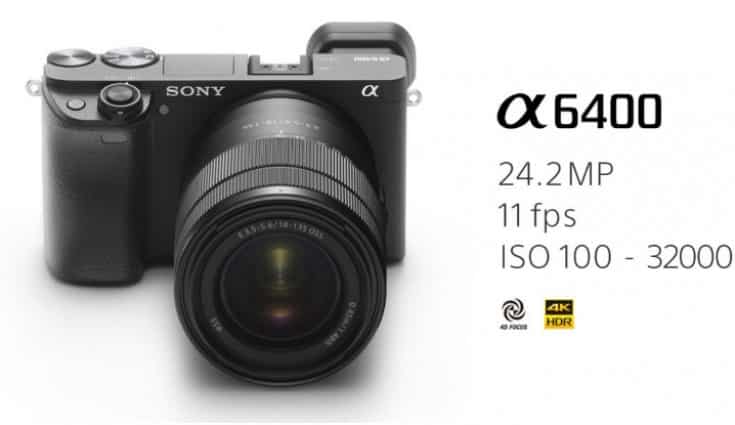
Sony A6400 – impressive capabilities and specifications

0

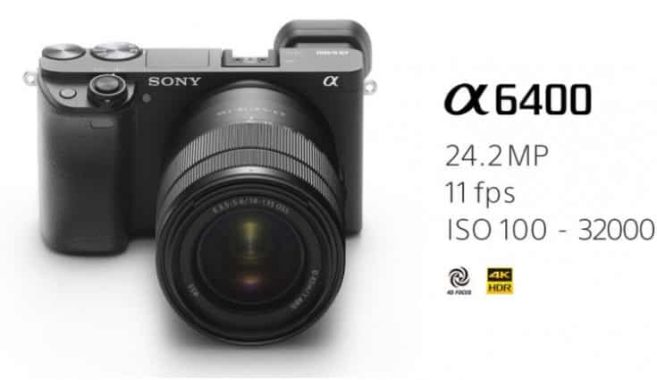
The Sony A6400 camera occupies a kind of ground medium between its a6500 first-line model and the economical and ultra-economical A6000. It Has an APS-C size sensor and is aimed at the budget-conscious and enthusiastic photographer. However, it inherits some of the great features of the entire Sony chassis line.

By Replacing the a6300, A6400 title updates are available in the form of auto focus enhancements. It Has the same BIONZ X processor that is in the full-frame A9 model, also providing enhancements to Eye AF and subject tracking.

The A6400 also has a good set of specs for the price point for those who are interested in the video. You can record 4K movies in full pixel-free reading of binning for higher-quality footage. There is also a range of different formats to meet the needs of different video-graphers, as well as a 3.5 mm door that can be used to connect an external microphone. Slow Motion video Capture is available in Full HD.

The key enhancements to the A6400-and the reason why you can go for it on the size of the A6000-are for auto focus performance.

It looks very well with sport and action, and although the form factor is probably not one you want to wear with the extra long sports lenses, for a relatively close up action, it’s a dream.

The new real-time AF function hangs in the target and keeps it pressed for a sharp focus on most shots in a burst of 11 fps. It is best to deal with when the subject is following a reasonably predictable model, but it is very impressive at this price point.

For Now, Eye AF is confined to human subjects. He is also a great interpreter and particularly useful for photographing moving portraits. A firmware update will see that Eye AF expanded to animal subjects in the summer-we can see that this is even more useful because (most) animals do not take kindly direction. This should make the A6400 an excellent choice for Safari and others, especially for those who remarie at the price of Sony’s full frame models.

In low light, the focus is slower, sometimes taking a second or two to set the target. Leaving the AF Assist lamp on for help, but if you need to turn it off in a discrete configuration, then you might find that you need to be a bit more patient with the camera. It Seems obvious that the promised speed of the “world’s fastest” will only apply when conditions are optimal, but it is still rare to show a false focus confirmation.

In General, the image quality is very good, and the camera is skilled in producing beautiful images in a number of different lighting conditions.

The dynamic range is decent, offering beautiful colors that remain on the right side of the realistic. In artificial lighting conditions, the A6400 adapts well to produce precise colours using the automatic adjustment of the white balance. In general, multi-use metering works well to produce balanced exposures, which only require you to move to the exposure compensation knob in extreme contrast situations.

In well-lit conditions, the detail is excellent, with a good degree of sharpness and a fantastic overall impression when displayed in the normal size of print and Web. Looking at 100% reveals some smoothness of the image in places, but no more than you would expect from an APS-C sensor.

With higher ISOs, the images remain usable in most of the sensitivity scale. In ISO 6400 You can see more smoothing image than you would probably want, but if the image is likely to be used quite small then it is still more than workable.

Unfortunately, the Sony A6400 has no image stabilization in the body. Therefore, if you use stabilised non-image lenses, you need to use higher shutter speeds and superior ISOs to avoid blurring. If you are someone who likes to make a lot of low light shooting, you may want to turn your attention to the a6500 instead.

In Addition to the frustrations, the Sony A6400 delivers the merchandise in a wide range of situations. It’s especially impressive when it comes to autofocus tracking, so it’s the perfect interpreter all-round for fans who like to shoot a variety of topics.

SONY seems to invest all its time and energy to improve performance without putting so much thought on how to use the camera. The complicated buttons and a touch-sensitive screen use result in a camera that is more uncomfortable to use than it should be and could be improved without too much effort. On the positive side, being able to customize the controls to your favorite way of working is a bonus. Photo:Sony

PDF Documents – Tips & Tricks – add comments to a PDF document

0

One of the most durable features of Adobe Acrobat is the ability to add comments to a PDF document. In Acrobat, comments refer to almost all of the notes and drawings that you can place in PDF pages to provide comments to the author of the document or to write notes that are useful to you when reviewing documents. Let’s look at some ways to add Acrobat comments to a PDF.

Comment Tools

Acrobat provides several comment and markup tools designed for various commenting tasks. In Acrobat DC, select Comment in the Tools panel to display the Comment toolbar with annotation and comment tools. In Acrobat XI, these tools are located in the comments panel on the right side of the document window. Acrobat’s comment tools are divided into two types of Review options:

Annotations are comments that appear on the page as predefined icons. These include Sticky Notes, a text highpoint, virtual rubber stamps, and a good collection of text annotation tools for cross-checking, pointing out, and more.
The drawing marks are comments whose purpose is to draw something on the page, usually to draw attention to a particular element of the page. These include circles, arrows, and free-form drawings.
You can add comments to any PDF file unless the security has been applied to the document to prohibit comments. Security settings include the option to allow comments and fill in form fields, even if the default is to avoid any changes when security is enforced.
Acrobat Feedback Shortcuts

Try these handy keyboard shortcuts with Acrobat’s commenting tools:

To Add a sticky note: [CTRL] + 6
To Hide All comments: [CTRL] + [SHIFT] + 8
To View All comments: [CTRL] + 8
To print a document with a comment summary: [CTRL] + T

Tricks with drawing tools
Create Fantastic looking designs with these simple tricks:

To draw Straight lines or arrows (vertical, horizontal, or 90 degrees): press and hold the [SHIFT] key while drawing with the line or arrow tools.
To draw a Perfect Circle: press and hold [SHIFT] when you draw with the Oval tool.
To draw a square: press and hold [SHIFT] when you draw with the rectangle tool.
Tips for customizing your comment tools
Want to change the default appearance of the tools you use most often? Did you Know there are 17 different types of sticky notes? Do you want to quickly add an Acrobat comment from a toolbar? Try These tips to customize the appearance and behavior of Acrobat’s comment options:

To Change the default comment preferences: Press [CTRL] + K to open the Preferences dialog box or click Edit > preferences. Select options in the comments category; These include the character type, author name, and Acrobat Comment-pop behavior.
To Display the Property bar: Press [CTRL] + E or select View > Show/Hide > Toolbar > Show Property Bar. This gives you a quick way to change the appearance of the selected item. Click More in the property bar to learn more options. You Can also find properties when you right-click the comment icon in the comments list or in the document.
To Change the default properties of a specific Acrobat comment tool: In the document, right-click a comment icon that you want to continue to use. Then Click Properties, and then select Default Tool properties.
To View specific comments: The first line of options in the Comments list includes tools for searching, sorting, filtering, and customizing the list.
Summarize comments
Printing a document with comments has a major drawback. Acrobat does not print comment annotation text except for text boxes. All other types of comments are printed simply as icons. For other options, print the document summary.

To Print a summary:

In The Comment List toolbar, click the Options menu (shown on the right).
Select Print with summary of comments
Or
Press [CTRL] + T.
Or
Select file > Print or [CTRL] + P.
Click Summarize Comments. Confirm the creation of the summary, and then print the document.
To Customize the comment summary:
In The Comment List toolbar, click Options
Choose Create Comment Summary.
Customize for the type of summary you want.
Select The Create Comment Summary button to create a new document with the comment summary.
Other Comment Options
Acrobat also includes a comment List panel to review existing comments. For a quick response, simply right-click a comment and choose the answer instead of saturating the list with additional entries. This list can also be printed with the PDF (See the shortcuts above).

Depending On which Adobe Acrobat services are installed and available in your organization, you may have several options for sending a PDF for other users to review. The most common option is an email review. Unfortunately, unlike the change-tracking features in Microsoft Word and Excel, review of comments cannot be easily integrated into the PDF document. Instead, it would update the original source files to reflect the new changes.

Tips – How to Get the Best Sound Quality in Your Car

0

Your car could be a great place to enjoy in your favorite music, but many of you still tolerate the dubious sound quality you would never tolerate with your Home Theater system. There are also some who try to assemble sophisticated sound systems in their vehicles, but a single installation error can prevent the audio system from achieving its full potential.

In this post, I have collected some tips on how to get the best sound quality in the car. These tips could be used for simple factory system upgrades to more advanced configurations. I hope after reading this, you’ll never have to endure the bad quality of sound in your car again. It may surprise you that even the simplest improvements to your car’s audio system can produce noticeable results.

Photo:Pixabay
  • Consider replacing the car’s speakers

While car audio systems have improved considerably over the years, some manufacturers still use relatively cheaper speakers and amplifiers that do not offer the best sound quality. You can feel significant improvements by mounting a better set of aftermarket loudspeakers. Probably also get a tighter bass and more clarity.

  • Download music files with superior quality

Downloading higher-quality music files will not save you memory space on your music player. However, be careful not to compress your music files too much, as you will lose the high and low frequency information that makes an interesting song. In a car sound system, you will be able to tell if something is definitely missing.

It is a well known fact that the higher the bitrate, the better the sound. So if you are playing music through an iPod, or your smartphone, you need to use a bit of compression, but don’t use it too much. Another option is to transmit the music, where you can explore the settings to improve the sound quality. You may want to try to get a main unit of Android car that offers a wide range of music applications.

  • Integrated Digital-Analogue converter Bypass

The DAC does not provide the same performance as the DAC of your car, in which case an advanced converter would normally do the job correctly. You’re lucky if you can connect your music player to a stereo via USB because you can bypass the DAC of the device properly. But you will have to confirm whether the practical search information is available on the stereo unit.

  • Get a car amplifier

An independent amplifier is able to provide cleaner energy than your built-in stereo car and you’ll notice the big difference in terms of sound quality. No matter what genre you listen to, whether it’s pop, rock or even classical music. Getting an amplifier to your car’s audio system is essential to getting a better sound in your car.

It is also advisable to first know the difference between the volume level and the amplifier level. You may find yourself annoyed by an unpleasant and distorted sound when you set the amplifier level too high.

  • Add an Equalizer

You’ll need an equalizer to get rid of the treble, mid-range and low peaks. It is integrated into the receiver or can be mounted on a processor on the dashboard or near the amplifiers. An equalizer will offer different points for frequency response settings and can kill spikes and improve bass response.

  • Buy or build a sub-box

Another great way to improve your car’s audio system is to get a subwoofer. If you are building one, just make sure it has been properly sealed because the air leaks can significantly damage the overall performance of the sub. To add, make sure you create a box with the correct internal volume for the subwoofer you chose.

The purchase of a subwoofer, on the other hand, allows you to balance the lower octave of your favorite music. With this addition, you will be able to listen to your favorite melodies in a new light. It will also help in helping your full range speaker as well.

Now that you’ve learned some new tips on how to better improve the sound quality of your car’s audio system, now it’s up to you to make it happen. If you follow these tips, you will never need to put the poor sound quality of your stereo ever again. After all, listening to your favorite music while driving brings the experience to a whole new level.

Submit Articles to Directories for Better Page Ranking & More Traffic

0

There are several effective ways to drive traffic to your website and increase your page ranking. But if you want something that is very profitable, and I would recommend the marketing element. and use it for years (since I started doing business online), and I can say it’s really worth it and energy if you’re not familiar with the term, let me explain you first. It is a marketing strategy on the Internet, where articles are written and distributed to ezine, directories and blogs: The goal is to educate your readers when you are trying to establish your experience in your field at the same time. You can use the anchor text and links in your author box, so interested parties can simply click on the links and they will go to your sales page or website: This will help you boost your web traffic and ultimately their sales .

Here are the necessary steps at a time when marketing is done. Follow this tips and I can guarantee that you will enjoy more traffic to your website at no time all:

Choose your subjects wisely. Do not waste your time writing, topics that will serve your purpose: attract the right kind of Focus on the audience on topics related to your niche and sell the product to ensure that your topics are interesting and useful for your audience to Destination. If you sell dietary programs, for example, it is wise, if you adhere to problems that are related to weight loss and keep fit. This kind of topics will encourage you to show your knowledge of your industry and help you to attract the attention of people who are Bridge odds to buy from you.

Producing high quality objects to make a conscious effort to exercise each of your objects are great. Always remember that your articles will introduce you and your online business Arena, so it is better to make sure that they leave a positive impression on their readers: they must be well written, very interesting to read, they are subject to change, Unique, and just this point.

Use this attractive resource. The resource box or the author’s box is where you can talk about your product, you and your website. This is also the place where we enter the URL of your site: make it attractive. A higher click rate is automatically translated into a larger page view and opportunities to make sales.

Distribute your articles. It lists under the most popular directories and blogs that are relevant topics for your articles. These are the best places to send your articles to receive such disclosure is required for your site. Depending on the sites selected with their articles are published online in 7-15 working days.
Article Submission Sites:
IdeaMarketers.info
SearchWarp.com
HubPages.com
eHow.com
ArticleRich.com
evernote.com
goarticles.com
thefreelibrary.com
wattpad.com
livejournal.com

A few tips when choosing a good Domain Name

0

A domain name is the address that people use to access your website on the internet. It’s important to choose a good domain name that is easy to remember and represents your brand or business well. Some tips for choosing a good domain name include:

  • Make it short and memorable.
  • Use keywords that describe your business or brand.
  • Avoid using numbers or hyphens, as they can be difficult to remember.
  • Consider using a .com extension, as it is the most widely recognized and trusted by users.
  • Check to make sure the domain name is available before registering it.

Once you’ve chosen a domain name, you can register it through a domain name registrar. This will allow you to use the domain name for your website and prevent others from using it.

A domain not only can drive traffic to your website, it can also become the name that people remember when they think about a particular product or idea. It may happen to become a recognized brand and make a lot of money for the person who owns it. However, the truth is that the domain can play a critical role in the success of its website. But how do you choose a good domain name when all the good ones are already taken? There are thousands of websites, and whenever you think of a good domain name for your own website, it ends up being taken, or too close to another person.

So far more than 100 million domains have been registered, and the process will not stop anytime soon. Finding good domain names is going to be more difficult as the days go by. Some of the steps to help you get a domain are discussed here.

If you are wondering about the techniques that will help you identify good domain names, read.

It is a known fact that people tend to remember things that are simple and short. Good domain names are short. Always select a short domain name for the Web site. The domain name must be less than 15 characters. As for the number of words, the single word domains are gold, the two words are good, the domains of three words are average, and above that is usually a bad idea.

Most users don’t have time to mark sites. They simply store the domains of their favorite websites and type them when they want to visit one. If your domain is complex and it’s hard to remember, you will lose these visitors along the way. Using a complicated domain name can interfere with the user’s desire to store the name.

Your domain name must not contain words that are hard to write. The use of words that have complicated spelling may result in the user landing elsewhere. To simplify the user experience, do not use unknown strange words or those that have a complicated pronunciation.

A domain extension. COM enjoys the highest popularity in the world. Also, most people tend to remember this domain extension. Except in special cases, the use of domain extension. COM can be a great idea. A simple and memorable domain name can dramatically improve your site’s traffic. Therefore, before deciding on a domain name, pay attention to all of these factors.

Do not contain scripts or numbers

You must avoid the domain name with script (-). If you confuse the visitors who have used the script sign. The dash sign becomes a complex domain name and not easily memorable domain names. They suffer the same problem from domains that do not use an extension. COM or with a complex spelling.

Many visitors will come to your site through search engines and through direct links on other websites. I mean, they’il come if the domain they see is attractive. Having a descriptive domain name will give visitors an idea of what their site is about even before they enter. If the related keywords are present in the domain, it might also help the search engine’s classification.

The most important thing to remember when choosing a domain is to make sure you choose one that will be reflective of you for the next few years.