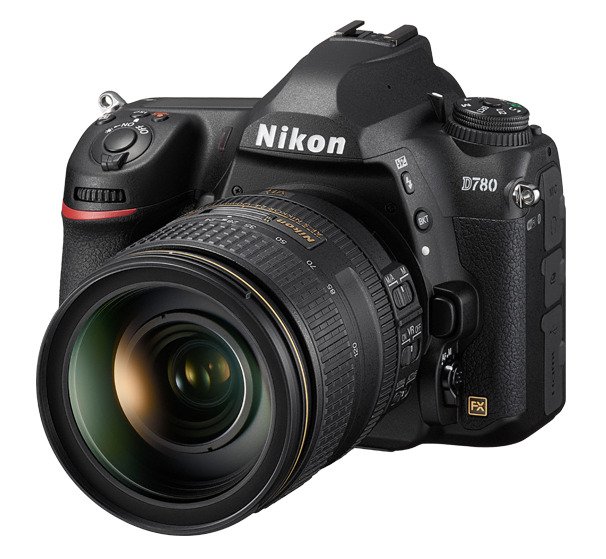
The Nikon D780 is a full-frame DSLR designed for photographers who want excellent image quality, reliable autofocus,…
MSI MPG 321URX QD-OLED Review: 4K 240Hz Gaming Monitor with Low Input Lag
Last Updated on
The MSI MPG 321URX is designed with gamers in mind, featuring a sleek black plastic build. Its stand has a square base, and the back of the monitor is accented with RGB lighting. Despite being made entirely of plastic, the monitor feels sturdy, and the back panel shows minimal flex, ensuring solid build quality.
Its ergonomics are quite good. The height adjustment is excellent, allowing for easy positioning for extended gaming sessions. The stand also offers a decent swivel range, making it convenient for screen sharing. Additionally, a built-in cutout in the stand helps with cable management.

When it comes to performance, you can achieve the maximum refresh rate at 4K resolution using either DisplayPort or HDMI. However, both require Display Stream Compression (DSC) to function at peak performance. Most modern GPUs support DSC on at least one of these connections. While you can disable DSC from the monitor’s settings, doing so will result in a lower resolution or refresh rate. If you’re looking for an OLED monitor with an even higher refresh rate, the ASUS ROG Swift OLED PG32UCDP offers a 1080p mode at 480Hz.
Comparison with Other Monitors
The MSI MPG 321URX is an excellent choice for both PC and console gamers. Its 4K resolution delivers sharp visuals, and the 240Hz refresh rate ensures smooth and responsive gameplay. In dark rooms, the monitor produces deep blacks and bright highlights, enhancing contrast and making small details stand out. Like other 32-inch 240Hz OLED monitors, such as the ASUS ROG Swift OLED PG32UCDM and the Gigabyte AORUS FO32U2P, it also includes productivity-focused features like a USB-C port with 90W power delivery and a built-in KVM switch. One of its standout advantages is its reduced VRR flicker compared to most OLED monitors, making it ideal for users sensitive to this issue. However, it lacks Dolby Vision support, so if that’s a priority, you might prefer alternatives like the Dell Alienware AW3225QF.
For those considering other options, the Samsung Odyssey OLED G8/G80SD S32DG80 and the MSI MPG 321URX QD-OLED both offer 32-inch 4K displays with 240Hz refresh rates. If USB connectivity is important, the MSI is the better pick, thanks to its 90W USB-C power delivery and KVM switch. On the other hand, the Samsung model is a better choice for those who want TV-like functionality, as it includes a remote and integrated apps like Netflix. The Samsung also performs better in rooms with high ambient light due to its matte screen, which helps prevent deep blacks from appearing purple under bright conditions.
Comparing the ASUS ROG Swift OLED PG32UCDM and the MSI MPG 321URX QD-OLED, both monitors offer 32-inch 4K displays with 240Hz refresh rates. The ASUS model has an edge for most users, as it supports Dolby Vision for improved HDR content and features black frame insertion (BFI) to reduce motion blur. It also includes three USB-A ports with higher data transfer speeds. However, if VRR flicker is a concern, the MSI model is the better option, as it experiences significantly less flickering.
The MSI MPG 321URX delivers exceptionally low input lag, especially when running at its maximum refresh rate. With firmware version FW.011, the input lag remains unaffected whether Display Stream Compression (DSC) or Variable Refresh Rate (VRR) is enabled or disabled. However, an earlier firmware version caused noticeable input lag at 120Hz and 60Hz when DSC was active, as well as significant lag when using VRR at those refresh rates with DSC turned off.

For Mac users, the MSI MPG 321URX QD-OLED is fully compatible with macOS. If you’re using a MacBook, closing the laptop’s lid smoothly transfers windows to the monitor, and reopening it restores them to their original positions, regardless of the connection type. VRR functions properly, though HDR content may appear slightly oversaturated.
MSI MPG 321URX QD-OLED – Additional Features
Priced at $899.99, the MSI MPG 321URX QD-OLED includes several features designed to enhance the user experience. A built-in KVM switch allows for seamless switching between multiple devices while using the same keyboard and mouse.
Like other OLED displays, this monitor incorporates several measures to reduce the risk of permanent burn-in from static elements over time. Additionally, MSI provides a 3-year burn-in warranty for added peace of mind.
- Pixel Shift: Slightly shifts the image by a few pixels to prevent prolonged exposure of individual pixels to the same content. Users can adjust the setting to ‘Slow,’ ‘Normal,’ or ‘Fast.’
- Multi Logo Detection: Automatically dims static elements, such as logos, that remain on-screen for extended periods.
- Panel Protect: Initiates a pixel refresh cycle to mitigate burn-in risk. A reminder appears every four hours of usage, prompting the user to run the cycle, which only takes a few minutes. However, this message may pop up at inconvenient times, such as during gameplay. Users can extend the activation interval to 16 hours, though doing so may slightly increase burn-in susceptibility.

MPG 321URX QD-OLED : images; MSI
Other Notable Features
Beyond its core gaming and productivity capabilities, the MSI MPG 321URX QD-OLED offers additional enhancements:
- Mystic Light: A customizable ambient lighting system that syncs with other Mystic Light-compatible devices for a cohesive RGB setup.
- HDMI CEC Support: The monitor adheres to the HDMI CEC standard, allowing it to automatically power on when a compatible device, like a gaming console, is turned on.
- Smart Crosshair & Optix Scope: These features provide on-screen crosshairs and zoomed-in scope overlays, improving visibility of enemies in games. Since they are applied at the hardware level, they remain undetectable by in-game anti-cheat systems, giving players a subtle competitive edge.
Overall, the MSI MPG 321URX QD-OLED delivers an impressive combination of high-performance gaming, productivity-enhancing features, and protective measures against burn-in, making it a well-rounded choice for both casual and competitive gamers.
Related Posts