The Nikon D780 is a full-frame DSLR designed for photographers who want excellent image quality, reliable autofocus,…
TCL QM7 TV: A Mid-Range Mini-LED Marvel with Unmatched Value
Last Updated on
The TCL QM7 (model QM751G for 2024, QM7K for 2025) is a mid-range 4K QLED TV that aims to deliver premium performance at a budget-friendly price. Positioned between TCL’s high-end QM8 and budget-oriented Q6 in the 2024 lineup, the QM7 leverages quantum dot and mini-LED technology to offer vibrant colors, high brightness, and solid contrast. With a robust feature set tailored for gamers, movie enthusiasts, and casual viewers, it competes with brands like Hisense, Samsung, and LG in the crowded mid-range market. This detailed, unbiased review explores the QM7’s design, picture quality, audio performance, smart features, gaming capabilities, and potential drawbacks, drawing on technical insights, user feedback, and professional evaluations to provide a comprehensive assessment.
Design and Build Quality
The TCL QM7 sports a sleek, modern design that balances aesthetics with functionality. Available in five sizes—55, 65, 75, 85, and 98 inches—it caters to various room sizes and budgets. The 65-inch model, a popular choice, measures 56.9 x 32.9 x 2.8 inches (without stand) and weighs approximately 45.9 pounds, making it sturdy but manageable with two people for setup. The 98-inch version swaps the central pedestal stand for dual feet to support its massive size, which may impact placement options.
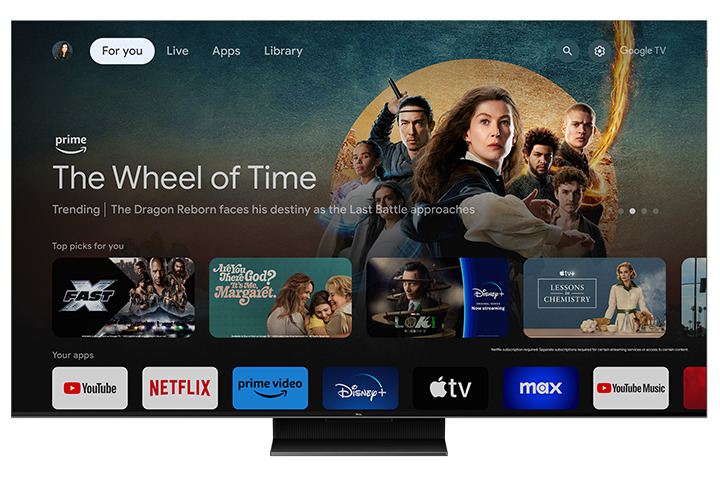
The TV features slim chrome bezels and a brushed-metal strip around the edges, giving it a premium look that belies its price point. This design choice may pose challenges for placing a soundbar directly in front, especially on smaller media consoles. The rear panel has a checkered pattern with a centrally mounted Onkyo subwoofer, contributing to its 2.1 audio system. Cable management is facilitated by a removable plate on the stand, allowing tidy routing of HDMI and power cables.
Ports are conveniently located on the right side, including four HDMI inputs (two HDMI 2.1 supporting 4K at 120Hz and 144Hz, one with eARC, and two HDMI 2.0 at 60Hz), two USB ports, Ethernet, coaxial, AV-in, optical audio, and a headphone jack. The inclusion of a dedicated eARC port ensures gamers don’t sacrifice high-performance HDMI 2.1 ports for audio setups, a thoughtful touch. A backlit remote with dedicated app buttons (Netflix, Prime Video, YouTube, etc.) and a built-in microphone for Google Assistant enhances usability, though its large, utilitarian design feels less premium than the TV itself.
Pros:
- Sleek, modern design with slim bezels
- Sturdy central stand (except 98-inch model)
- Comprehensive port selection with dedicated eARC
- Effective cable management
Cons:
- Pedestal stand may obstruct soundbar placement
- Remote feels clunky and less refined
- 98-inch dual-foot stand limits placement flexibility
Picture Quality
The TCL QM7’s picture quality is a standout feature, driven by its quantum dot-enhanced mini-LED panel and TCL’s AIPQ PRO processor. With up to 1,500 dimming zones (depending on size) and a claimed peak brightness of 2,400 nits (2,600 nits for 55/65-inch, 3,000 nits for larger sizes), it delivers vibrant colors, deep blacks, and impressive HDR performance for its class.
Brightness and Contrast
The QM7 excels in bright environments, with real-world brightness exceeding 1,500 nits in HDR content, making it ideal for sunlit rooms. Its mini-LED backlight provides precise control, minimizing blooming around bright objects against dark backgrounds, though some blooming is noticeable compared to premium models like the TCL QM8 or Hisense U8N. Black levels are deep for a QLED, but not as inky as OLEDs, and shadow detail is excellent, particularly in Dolby Vision mode.
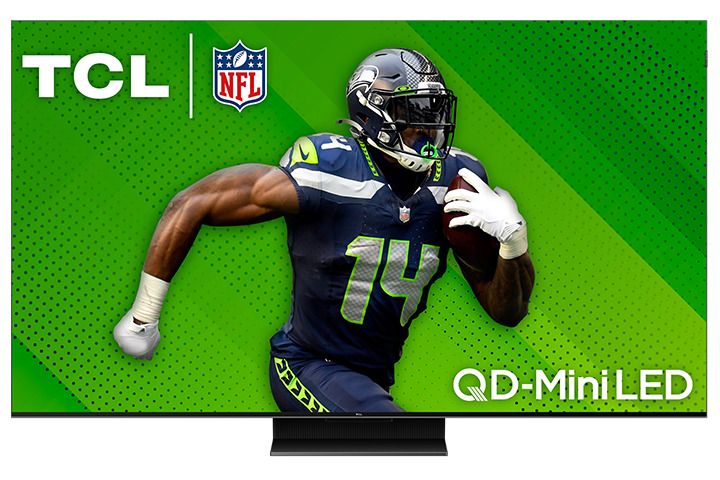
In testing, the QM7 handles high-APL (average picture level) scenes, like bright beach shots, with strong highlight detail, though luminance drops slightly when the entire screen is lit. For darker rooms, its contrast and local dimming enhance immersion, as seen in films like Star Wars: Ahsoka, where starry skies pop against deep blacks. However, a firmware bug tying SDR and HDR brightness settings has been reported, requiring manual adjustments or a power cycle to resolve, though TCL has issued fixes for some units.
Color Performance
The QM7’s quantum dot layer ensures vivid, mostly natural-looking colors with a wide gamut, covering most HDR formats (Dolby Vision, HDR10, HDR10+, HLG). Colors pop in vibrant content like Deadpool & Wolverine, but pre-calibration HDR accuracy is subpar, with slight over-brightening of blacks and midtones. Calibration can improve accuracy, though most users won’t notice without a side-by-side comparison. Gradient handling shows minor banding in grays but is smooth across other colors.
Upscaling and Processing
The QM7’s AIPQ PRO processor handles low-resolution content well, smoothing artifacts in low-bitrate streams and upscaling DVDs or 1080p content with minimal loss of detail. However, fine text or intricate patterns may appear less sharp. Motion performance is solid, with minimal stutter in fast-paced scenes, though those sensitive to judder may notice it in 24fps content.
Viewing Angles
A significant drawback is the QM7’s mediocre off-axis viewing. Colors and contrast degrade when viewed from extreme angles, making it less ideal for large families or wide seating arrangements. For optimal performance, viewers should sit close to the center.
Pros:
- High brightness (1,500+ nits) for bright rooms
- Vibrant, mostly accurate colors with quantum dots
- Deep blacks and minimal blooming for a QLED
- Strong upscaling and motion handling
- Supports all major HDR formats
Cons:
- Mediocre off-axis viewing angles
- Subpar pre-calibration HDR accuracy
- Occasional blooming in high-contrast scenes
- Firmware bug affecting SDR/HDR settings
- Minor banding in gray gradients
Audio Performance
The QM7’s 2.1 Onkyo audio system, featuring a rear-mounted subwoofer, delivers surprisingly robust sound for a flatscreen TV. With 50W of power (40W for the QM7K), it produces clear mids and highs, filling small to medium-sized rooms effectively. Dialogue is crisp, and the system supports Dolby and DTS advanced audio formats via eARC, ensuring compatibility with external soundbars or receivers.
However, the subwoofer’s bass output is underwhelming, lacking the depth needed for cinematic explosions or music-heavy content. While adequate for casual viewing, audiophiles or home theater enthusiasts will likely pair the QM7 with a soundbar or surround system for a fuller experience. User reviews praise the built-in audio for its clarity but often recommend external audio for larger rooms or immersive setups.
Pros:
- Clear mids and highs for dialogue
- Decent volume for small/medium rooms
- Supports Dolby/DTS audio formats
- eARC port preserves HDMI 2.1 inputs
Cons:
- Weak bass from subwoofer
Not ideal for large rooms without external audio
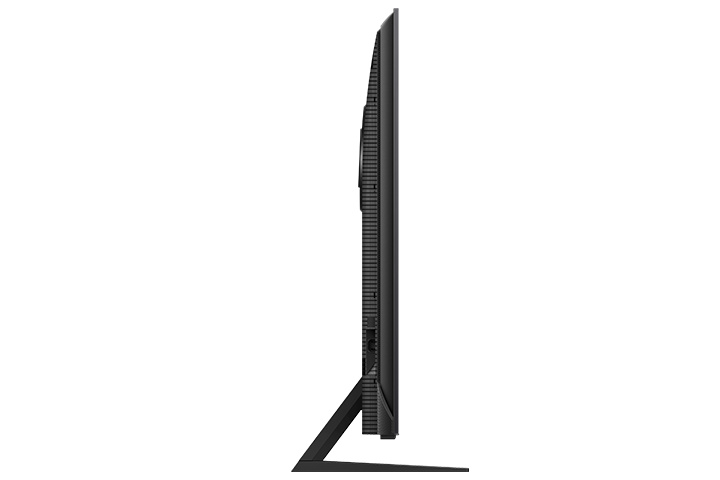
TCL QM7 – images: TCL
Smart Features and Interface
The QM7 runs Google TV (version 12 on the QM7K), offering a snappy, intuitive interface with access to major streaming apps (Netflix, Prime Video, YouTube, Disney+, etc.). The platform supports Google Cast and Apple AirPlay for seamless streaming from mobile devices. Hands-free voice control via Google Assistant, plus compatibility with Alexa and Apple HomeKit, adds versatility for smart home integration.
Navigation is responsive, with the AIPQ processor ensuring quick app launches and menu transitions, outperforming competitors like the Hisense U7N in speed. The “Continue Watching” row and personalized recommendations enhance usability, though some users report occasional glitches, such as app crashes or sluggish cursor movement. The TCL Home tab is unobtrusive, allowing users to focus on Google TV’s core interface.
Pros:
- Fast, intuitive Google TV interface
- Broad app support and casting options
- Hands-free voice control with Google Assistant
- Smart home compatibility (Alexa, HomeKit)
Cons:
- Occasional software glitches
- Google TV less preferred by some vs. Roku
Gaming Performance
The QM7 is a gamer’s delight, earning praise as one of the best gaming TVs in its price range. Its two HDMI 2.1 ports support 4K at 120Hz and 144Hz, plus 1080p at 240Hz (288Hz on QM7K), catering to consoles (PS5, Xbox Series X) and high-end PCs. Variable Refresh Rate (VRR) with AMD FreeSync Premium Pro ensures tear-free gameplay, while Auto Low Latency Mode (ALLM) minimizes input lag.
In Game Mode with “Game Master” enabled, input lag is low—8.1ms at 120Hz, though a bug occasionally requires a power cycle to maintain this performance. The Game Master overlay provides quick access to settings like refresh rate and picture modes, with options like “FPS” for optimized gaming visuals. Titles like Call of Duty: Black Ops 6 and Star Wars: Jedi Survivor look sharp and responsive, though the TV’s viewing angle limitations may affect multiplayer setups.
Pros:
- Low input lag (8.1ms at 120Hz)
- HDMI 2.1 with 4K/144Hz and VRR
- Game Master overlay for quick settings
- AMD FreeSync Premium Pro support
Cons:
- Viewing angle limits multiplayer setups
- Occasional input lag bug requiring power cycle
- Not all HDMI ports are 2.1
Value and Competition
Priced at $499 (55-inch), $699 (65-inch), $999 (75-inch), and higher for larger sizes, the QM7 is frequently discounted, often dropping below $1,000 for the 65-inch model. This makes it a compelling value compared to pricier OLEDs (e.g., LG C4) or premium QLEDs (e.g., Samsung QN90D), which cost $600–$1,000 more. Its closest rival, the Hisense U7N, offers similar performance at a lower price but has slightly more blooming and a less refined design.
The QM7’s combination of mini-LED brightness, gaming features, and HDR support rivals more expensive TVs, but its viewing angles, HDR accuracy, and software quirks prevent it from matching premium models like the TCL QM8 or Sony BRAVIA 7. For budget-conscious buyers prioritizing picture quality and gaming, the QM7 is hard to beat, especially on sale.
Pros:
- Exceptional value, especially on sale
- Premium features at mid-range price
- Competitive with pricier QLEDs
Cons:
- Loses to premium models in accuracy and viewing angles
- Hisense U7N offers similar performance for less
User Feedback and Reliability
Customer reviews praise the QM7’s vibrant picture, gaming performance, and value, with many comparing it favorably to LG and Samsung models. Users appreciate its brightness in well-lit rooms and ease of setup, though some report issues like dead pixels (requiring exchanges) or reflections on the glossy screen. Longevity is a concern, as TCL’s track record is less established than Sony or Samsung, but early feedback suggests solid build quality.
Pros:
- High customer satisfaction for price
- Vibrant, bright picture widely praised
- Easy setup and intuitive interface
Cons:
- Occasional reports of dead pixels
- Glossy screen prone to reflections
- Unproven long-term reliability
The TCL QM7 (QM751G/QM7K) is a stellar mid-range TV that punches above its weight, offering vibrant colors, high brightness, and robust gaming features at a budget-friendly price. Its mini-LED backlight and quantum dot technology deliver impressive HDR performance, making it a great choice for bright rooms, casual viewing, and immersive gaming. The Google TV interface is snappy and feature-rich, while the Onkyo audio system provides decent sound for everyday use.
However, the QM7 isn’t flawless. Mediocre viewing angles limit its appeal for wide seating arrangements, and pre-calibration HDR accuracy could disappoint purists. Software glitches, including a persistent SDR/HDR brightness bug, and occasional input lag issues in Game Mode require workarounds. Compared to the Hisense U7N, it’s slightly pricier but offers a more refined design and interface.
For budget-conscious buyers seeking a feature-packed TV under $1,000 (especially on sale), the TCL QM7 is an excellent choice, rivaling sets twice its price. Those needing perfect blacks, wide viewing angles, or flawless software may want to consider pricier OLEDs or the TCL QM8, but for most, the QM7 strikes a near-perfect balance of performance and value.
Related Posts