
The Xerox WorkCentre 5024 monochrome multifunction printer has a compact design to
save the space. If you have any existing printer and looking for a perfect MFP replacement but don’t want spare more space,then this will ft easily. The single device packs power and
performance into a compact size. Copy, print, scan or fax in a small footprint while delivering output in paper sizes up to A3.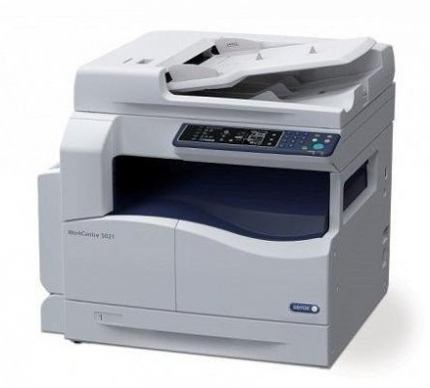 The WorkCentre 5024 has print speeds of up to 24 pages per minute. You can scan hard copy documents in color directly to your desktop for efficient workflows. The new, interactive user interface gives you more opportunities to choose the settings you
need to do your best work. Quickly and easily print monochrome documents, reduce or enlarge the size of your document, select text or graphics mode or set the output to one or two-sided. You can even fine-tune how light or dark you wish your final output to
be so your documents always match your job’s specifications.
Use the Layout Options feature to create complex documents such as booklets and posters using multiple paper types and settings. Keep more high-value jobs in-house and eliminate the hassle and expense of sending work out to a print shop.
There is no complex system to setup the machine. Simply plug-in USB cable to your PC or laptop and plug-in the power. It comes with a bundled software but unfortunately, it only supports to Windows OS x32 bit, if you have a PC with 64-bit configuration. Thankfully you can use third party apps to scan and print from 64 bit PC.
We tested WorkCentre 5024 printing capability, in our standard ISO test with 5% ink coverage, i printed 5 A4 pages in about 17 sec with the first page out in 8 seconds. The test included text pages, graphics pages and pages with mixed content for both black and white and color. The output quality is excellent and text looked sharp and detailed. The print quality of the image comes with good amount of details. 
The optical resolution of the scanner is 600 dpi. With a scanning frequency of 18
pages per minute mono and 4 ppm color (at resolutions up to 200 dpi), the scanner fulfilled my expectations. It scanned an image in 38.21 sec with a whole lot of details and vibrant colors.The depth of output color is commendable and sharp. To copy any document it takes only 10 sec. Drivers for Xerox model 5024 download here
| pcquest.com photo:xerox |