Adapter app is a impressive video converter, featuring a ideal environment for converting multiple file formats. Cropping videos and changing image formats or converting audio files from .wav to .mp3 has never been less difficult.
Video export configurations are saving your precious time by figuring out the greatest functions for your files by themselves. To convert any kind of media type, you can allow the program to choose if you are not sure of the format you want to convert. Choose the audio format or video type and after that just click convert.
From here, the Adapter converter software does all the work for you. On the other hand, the enhanced settings offer even more possible choices, which includes multiple channels, video and audio encoder, and all types of rates meant to facilitate and mix up your project. Photo: Macroplant
Adapter will make group conversion of a breeze. Just drop a set of images, songs, or movies into the queue, choose your output configurations, hit convert – finished. Use image batch conversion to arranged multiple images to the same height, convert TIFFs to JPGs, insert watermarks and much more. Simply compress groups of WAV files to MP3 or transcode your movie collection to work on your iPhone, Android or some other device.
The Resolution Control takes attention of the file level of quality, fitting it to be appropriate with the media. Furthermore, Time Cropping helps cut out unwanted material or grab different segments while accepting multiple conversion formats.
This program is so fantastic that one can convert and import the created files to iTunes, iPhone, or iPad, which means it satisfies all need and saves your valuable time.
Adapter is a 100% free software. Compared with some other free applications, Adapter is light and portable and comes with a absolutely spam free installer that does not install toolbars or gunk up your PC. Adapter will not add ridiculous watermarks to your output. There are no limitations or restrictions on Adapter software.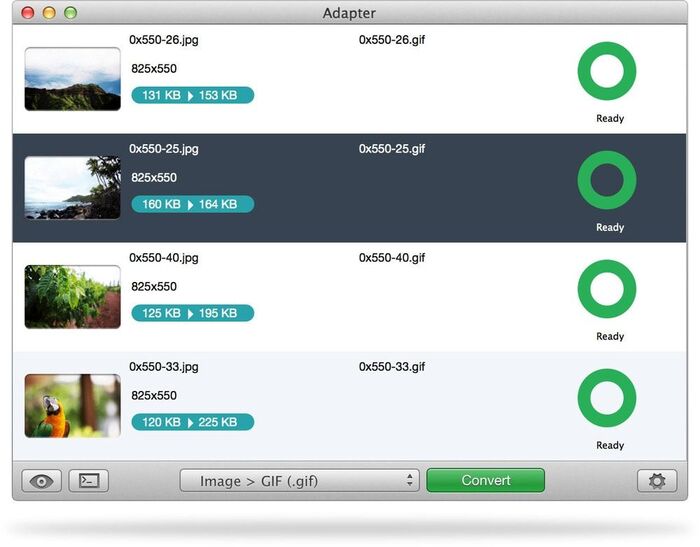
Using this totally free multimedia files converter means caring about methodical final results technology can offer.
Adapter software capabilities and advantages:
capture images from video files
support for .flv to .mp4, .flv to .mp4, .flv to .avi and .flv to .mov formats
batch conversion
create iPhone ringtones
output filesize estimation
Adapter software free DOWNLOAD