Home Blog Page 155

Instagram grow up – More than 1 billion active users

0

Instagram said on July that it now has more than 1 billion active users, as it has revealed a new long-format video feature in an attempt to attract “Creators” like those on YouTube. It becomes the fourth platform of Facebook to reach the brand of billions of users, including the social network of the same name with more than 2 billion users, and messaging applications WhatsApp and Messenger. Instagram, who had about 800 million users since September, surpassed rival social networks like Twitter and Snapchat and was gaining younger users, although Facebook has seen declines in the youth segment.

The executive Director of Instagram, Kevin Systrom, announced the milestone in revealing the new video application known as IGTV. We now have a community of 1 billion users,” Systrom said to the event in San Francisco. “Since our launch in 2010, we have looked in amazement at how the community has flourished and grown. “As Facebook has moved deeper into the video, Instagram will become a direct competitor to YouTube with IGTV.

IGTV will allow any user to upload long-form videos and also include “video channels ” “creators “, similar to a Google-owned format used by YouTube that led to a series of “stars ” from YouTube. “Anyone can be a creator-you can upload your own IGTV videos to app or Web to start your own channel ” Systrom said.

Built for Smartphones

Systrom said IGTV is built to be used on a smartphone, and increases the time for videos from the previous limit of one minute. “The way we’re watching the video is changing,” Systrom told the event. He added that IGTV is “Built for the way they actually use the phone, so the videos are full screen and vertical “. The launch comes amid a change in video viewing habits away from traditional television to online platforms, including Netflix and Hulu, and with more people watching both professional content and users on services like YouTube .

According to the research company e-marketer, 181.7 million Americans will see video content on their smartphones at least once a month this year, 6.1 percent for over a year. Product Manager Ashley Yuki said the event that IGTV “is a platform open from the first day, so that everyone can become a creator “. For deploying IOS and Android applications, IGTV will allow any user to upload video up to 10 minutes long, with the limit for larger accounts at one hour. Systrom described the new app as “a separate space, a space dedicated to enjoy video without being distracted “.

Facebook acquired Instagram in April 2012 for a combination of cash and shares worth about $1 billion at the time. Since then he has become a strong growth engineer for Facebook in terms of users and ad revenue. While Facebook does not offer any detailed revenue breakdown, e-marketer estimates that Instagram will generate $5.48 billion in net revenues from US ads this year, 70.4 percent compared to last year and counting for more than a quarter some of Net revenues of Facebook Mobile ads. Facebook is also increasing its video offerings with original shows and this week announced new formats, including interactive game programs, questionnaires and polls.

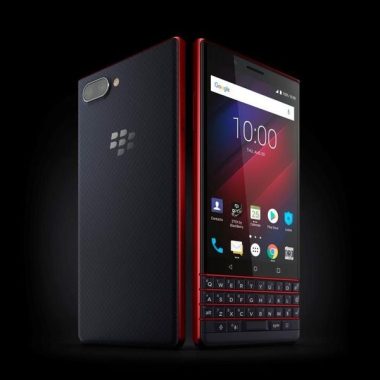
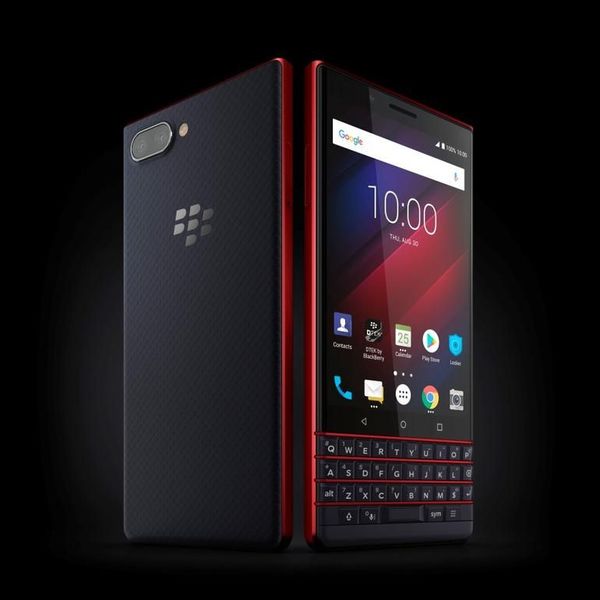
BlackBerry KEY2 LE with physical keyboard,Android 8.1 Oreo and Qualcomm® Quick Charge™ 3.0

0

The newest smartphone in the BlackBerry family the BlackBerry Key2 recently launched with a modern look and feels to accommodate the busy communicators.

The BlackBerry Key2 specs:

· A lightweight poly-carbonate frame and a newly designed soft new texture that provides better grip in hand to prevent drops.

· A full-HD, 2.5 D screen

· Three color options: Slate, Champagne and Atomic.

· With the similar size of the BlackBerry key series, the BlackBerry Key2 you are thinner and clearer.

· It has a redesigned keyboard with keys that are 10 percent larger than those described on the BlackBerry keyone. Designed for precision and accuracy, the physical keyboard includes the speed key that allows direct access to a set of features on the device at any time, without having to go back to the home screen or search in a folder of Application to access the applications, contacts and functions you use and communicate with the majority. The Speed button is complemented by 52 customizable shortcuts, so you can program each key so that instantly contacts and applications used more.

· A dual rear camera (13MP + 5MP) with new capture experiences including portrait mode

· An 8 megapixel front-facing camera that comes with LCD Flash and new capture modes, such as Wide self (Panorama of self) and facial beauty, offering new self-catching improvements. You can also learn more about the world around you with the camera integration of Google Lens ™, which can help you quickly access more information about milestones, buildings, books and more simply by pointing the camera at the object.

· A productivity feature called BlackBerry Hub that brings all messages to a consolidated location, including email, text, and messages from almost any social media account, including WhatsApp ®.

· To help manage personal and professional life, dual personal accounts allow users to manage personal and professional social media profiles separately in applications like Facebook ® and Instagram ™, and in the Dual SIM variant of the BlackBerry Key2 le.

· The BlackBerry KEY2 LE comes with 4GB of memory and in both storage variants of 32 GB and 64 GB-with both offers expandable MicroSD support storage. It is powered by a Qualcomm ® Dragon processor and an efficient battery that delivers up to 22 hours of mixed use to get through the busiest days and often the next day. In addition, the Qualcomm Quick Charge ® 3.0 allows a charge of 50 percent in about 36 minutes. BlackBerry Key2 also comes with a charge charging mode and simultaneous memory of the battery that will learn from the daily load habits and calendar appointments to advise when to load so you have the battery power is necessary when you need it the most.

· More privacy for users to check

Locker allows users to manage shared information in the cloud, such as photos and documents. Provides a personal space on the device for storing private applications and sensitive documents. Firefox Focus ™, the Mozilla ® privacy Browser, is used to prevent crawlers and automatically remove navigation sessions when the application closes. The BlackBerry Key2 also includes the Dtek ™ update from the BlackBerry application that brings new exam features for Proactive security checks to easily identify and mitigate potential security risks, such as access to Unwanted data from an application downloaded to your smartphone.

BlackBerry® KEY2 LE Specifications:

  • 100% Android™
  • Access to over a million apps on Google Play
  • Impact resistant Corning® Gorilla® Glass
  • Iconic U shape with physical keyboard
  • 22 hours mixed use battery
  • SizeHeight 150.25mm
  • Width 71.8mm
  • Depth 8.35mm    Photo:BlackBerry

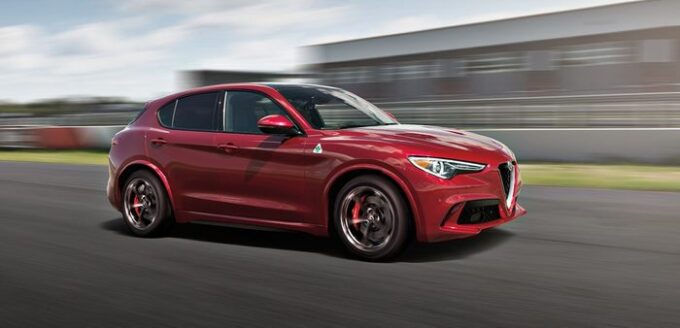
Alfa Romeo Stelvio Quadrifoglio ultimate performance

0

Launched last year as model 2018, the Alfa Romeo Stelvio can be a bit latecomer to the SUV and crossover segment, but, however, proved to be worth the wait, and especially so on top of the four-leaf dog costume. The Alfa Romeo Gambit in high performance or the “Super” End of the SUV segment, the Quadrifoglio is an object so that a high-ride four-wheeled vehicle can become a “sporty” vehicle. Not only a straight performer, the agile and committed management of Stelvio Quadrifoglio allows you to more effectively distribute your power on the road and through the winding roads.

Elegant and anxious

The reinterpretation of the iconic legacy of the Italian motor vehicle of 108 years of a modern Super SUV, the Stelvio Quadrifoglio bears the name of the Stelvio Step Mountain Stage of the historic Mille Miglia Race, and the traditional brand Four-Leaf Clover Racing Charm Luck as emblem. Lighter and with better specific power and weight power than the main competitors such as the Mercedes-AMG GLC63 and the Porsche Macan Turbo, the Stelvio Quadrifoglio has also released the world’s fastest 7 minutes, 51.7-Second SUV lap time in the benchmark Circuit of the Nurburgring of Nordschleife, last September, and a year after his sister super Saloon Giulia Quadrifoglio.

An elegant, practical and fast Super SUV that combines pure power and devastating effects management capabilities, the design of Stelvio Quadrifoglio is meanwhile elegantly curved and urgently sporty without being openly brutal or aggressive. Tense, protruding and anxious for subtle curvatures, sharp lines, sporting details and a flowing roof, the Stelvio Quadrifoglio sits with an athletic impulse and presents the rear cabin and the libertine tailgate with prominent rear spoiler. The front views are dominated by their honeycomb grille as a shield, slender LED eyebrow headlights and the main hunger and Gill-like side shots. Other insinuating details in its amazing performance include Big hole drain pipe patio and large leagues staggered.

Responsive and urgent

Under its long vents and bonnet, the Stelvio Quadrifoglio is powered by the Alfa Romeo engine, developed by Ferrari, Twin Turbo 2.9 liter V6. Producing BHP 503in 6500rpm and 443lb/ft along a broadband and accessible 2500-5000rpm, the Stelvio Qudrifoglio is willing to low-end, versatile in the medium range and fiercely anxious towards its limit 7400rpm. Wide, versatile and charismatic the Stelvio Quadrifoglio is, unlike many turbo engines, both urgently high acceleration but sensitive to the minimum fast spooling of the speed engine. Thanks to two simple Turbo moving, placed between the banks of the cylinder for short circuits gasflow and the anxious response of arrest, the intermediate range of Stelvio Quadrifoglio is, in the meantime, inexorably abundant.
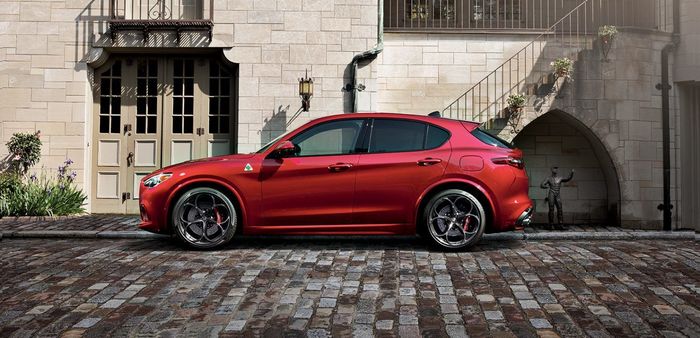
With four-wheel drive traction, 45R20 285/40r20 Wide front and rear tyres, the Stelvio Quadrifoglio, supercar-like, stops at 100 km/h in only 3.8-seconds, and is capable of a maximum of 283km/h. Grumpy and growling, the stilt-leaf of the Stelvio is viscerally fast moving, with a broad and muscular mid-range of the Torque band’s subscription to an urgently progressive energy accumulation. Driving through a slippery, fast and smooth 8-speed automatic gearbox, the four-leaf sprocket changes, however, becomes agile, quicker and concise when in dynamic driving mode or race, during which throttle response, firmness Shock absorber and note extractor adopt a more sporty and more focused profile.

Rear wheel drive By default for efficiency, handling and agility, the integral traction system of the Stelvio Quadrifoglio, however, reapportions variable up to 50 percent power to the front wheels when they are Additional traction and grip required. Meanwhile, a limited-slip electronic differential distributes power from one side to the other along the rear axle for agility and even more traction. The result is a machine that comes neatly in the corners, is balanced and compromised along and comes out with claw-like hold the road as it puts the energy to the asphalt with the maximum effect. Meanwhile, the large 350mm caliper’s front disc piston 6 and 350mm, 4 rear brake pistons proved tirelessly and effectively capable.

Guided by the large and historical Balocco of Alfa Romeo, the Stelvio Quadrifoglio has been particularly skilled in the demanding circuit of the Langhe, narrow, winding and fast. Precise and anxious to become angles, the Stilfleaf’s agility is aided by selective brake carriers.

The direction is meanwhile accurate, fast, well-charged and communicative for an SUV, otherwise as a gradient sensation as the lightest, rear-driven Giulia Qudrifoglio Salon. Agile, tidy and buttoned through the Langhe, the Quadrifoglio could be led to kick its wide tail in Race mode. But to avoid understeer, tighter, flatter angles are better taken by rotating the weight back and forth.

Seated, sporty and spacious

Seated and entrusted through the high heights of the Langhe, fast straights and zigzags, including corners abruptly dipped immediately followed by sharp slopes, the configuration of the masterful suspension of four-leaf clover and adaptive shock absorbers makes Feel like a smaller, lower and thinner machine. Superbly flat through the corners despite its driving height and weight 1830kg the lateral control of the Stelvio is tense, while the vertical control has remained seated and buttoned up in dives, ridges and bounces. Stable and refined at speed, both through winding paths and in high-speed straights, the sporting skills of the Stelvio simply deny their SUV designation and defy expectation.

Luxuriously sporty inside, the leather and carbon fibre cabin of the Stelvio Quadrifoglio presents an alert position, implying and versatile with driver-centric instrumentation, logical designs and well-adjustable steering wheel with part mounting in Aluminium pallet Change column. The seats are comfortable and supportive, while the optional carbon fiber backbone sports seats are lighter and provide more lateral support.

A practical SUV in terms of maneuverability, starting space and convenience and security systems, the Stelvio cabin was well packaged. Well complacent in general, the front and back height of the Stelvio was unexpectedly good for the taller riders, given its libertine roof. This was particularly so in the specification of the solar non-roof.

Alfa Romeo Stelvio Quadrifoglio TECHNICAL SPECIFICATIONS:

Engine: 2.9-litre, twin-turbocharged, in-line V6-cylinders

Bore x stroke: 86.5 x 82mm

Compression ratio: 9.31:1

Valve-train: 24-valve, DOHC, direct injection

Rev limit: 7400rpm

Gearbox: 8-speed automatic, four-wheel-drive, electronic limited-slip rear differential

Ratios: 1st 5.0; 2nd 3.2; 3rd 2.143; 4th 1.72; 5th 1.313; 6th 1.0; 7th 0.823; 8th 0.64

Reverse/final drive: 3.456/3.7

Power, BHP (PS) [kW]: 503 (510) [375] @6500rpm

Specific power: 174BHP/litre

Torque, lb/ft (Nm): 443 (600) @2500-5000rpm

Specific torque: 207.5Nm/litre

0-100km/h: 3.8-seconds

Top speed: 283km/h

Fuel consumption, urban/extra-urban/combined: 11.7-/7.5-/ 9-litres/100km

CO2 emissions, combined: 210g/km

Fuel capacity: 64-litres

Wheelbase: 2818mm

Track, F/R: 1622/1675mm

Overhangs, F/R: 866/1018mm

Ground clearance: 200mm (approximately)

Wading depth: 480mm

Aerodynamic drag co-efficient: 0.34

Cargo volume, min/max: 499-/1600-litres

Weight: 1830kg

Weight distribution, F/R: 53.8/46.2 per cent

Steering: Electric-assisted rack & pinion

Turning circle: 12.1-metres

Suspension, F/R: Double wishbone/multi-link, active dampers

Brakes, F/R: Ventilated discs, 360 x 32mm/350 x 28mm

Photo:Alfa Romeo

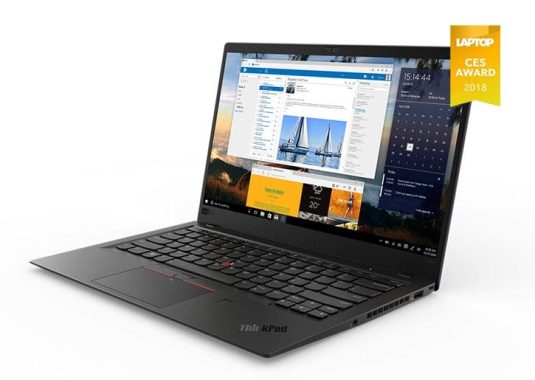
Powerful system with a bigger screen – Lenovo ThinkPad X1 Extreme

0

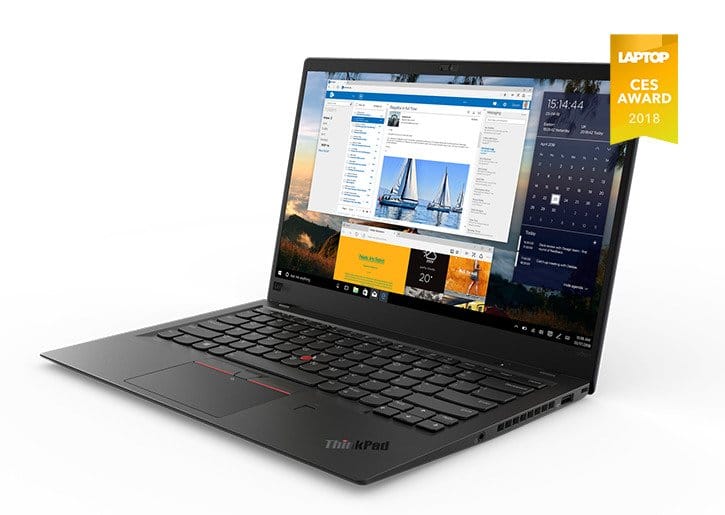
If you liked the look, feel and light weight of the X1 carbon, but want a more powerful system with a bigger screen, the next Lenovo ThinkPad X1 Extreme could be your answer. Because in September for an output price of $1,859, the X1 Extreme offers a 15-inch screen that is up to 4k resolution, a CPU that climbs to core I9 and NVIDIA GTX 1050 ti dedicated graphics.

The Raven-Black mobile workstation weighs only 3.76 pounds with its base-level display, 1080p. This is about half a pound lighter than the Dell XPS 15 and a quarter of a pound less than the 15 MacBook Pro. This weight jumps up to 4.04 pounds when you choose the optional touch screen, 4k.

Considering the packing components inside, the X1 Extreme is only 0.72 inches thick. Although not as subtle as some competitors, it leaves room for two full-sized, USB-type-to-ports, dual-beam 3-port, an SD card reader and HDMI output.

We have not had the opportunity to test the 4k screen, but if it is something like the 2k HDR panel on the X1 Carbon, it will be one of the best screens on the market. Lenovo claims that, like the High-end carbon display, the Extreme panel will support Dolby Vision HDR and reach up to 400 brightness lice. It will also add touch capabilities, rather than displaying the carbon-HDR lacks. The default, the 1080p panel promises 300 brightness lice.

In addition to the high-end screen, the X1 Extreme Packs NVIDIA GTX 1050 TI graphics with 4GB of video memory. The GPU uses NVIDIA’s MAXQ technology, which allows it to run cooler and quieter (read: Less fan noise), but also limits performance a bit.

The system is powered by a 6-core, 45-watt Intel H Series processor. It will be available with Core i5, Core i7 and-over the year-core I9. The end also supports up to 64 GB of RAM.

The Lenovo laptop has room for two NVMe M. 2 storage units. You’ll be able to do this with two 1TB drives in a RAID 0 or RAID 1 Array, which is one feature we’ve seen mostly just on game laptops before.

Creative professionals and high end users who want the same svelte chassis as X1 Extreme, but need a NVIDIA Quadro professional card and the Intel Xeon CPU should look at the ThinkPad P1, which will start at $1,949.

ThinkPad X1 Tech Specs:

Processor
  • 8th Gen Intel® Core™ i5-8250U Processor (6M Cache, 1.6 GHz, 3.4 GHz max)
  • 8th Gen Intel Core i5-8350U Processor (6M Cache, 1.7 GHz, 3.6 GHz max), vPro™
  • 8th Gen Intel Core i7-8550U Processor (8M Cache, 1.8 GHz, 4.0 GHz max)
  • 8th Gen Intel Core i7-8650U Processor (8M Cache, 1.9 GHz, 4.2 GHz max), vPro
Operating System
  • Windows 10 Home 64-bit
  • Windows 10 Pro 64-bit – Lenovo recommends Windows 10 Pro.
Display
  • 14″ FHD IPS (1920 x 1080), Anti-Glare, 300 nits
  • 14″ FHD IPS (1920 x 1080), Anti-Glare, 300 nits, Touch
  • 14″ WQHD IPS (2560 x 1440), Anti-Glare, 300 nits
  • 14″ HDR WQHD IPS with Dolby Vision™ (2560 x 1440), Glare, 500 nits
Graphics
Intel UHD Graphics 620
Memory
16GB max / 2133MHz LPDDR3, memory soldered to systemboard, no SO-DIMM socket
Webcam
  • Standard: 720p HD camera with ThinkShutter
  • Optional: IR camera* – required for Windows Hello and facial recognition, but it does not have ThinkShutter
  • Both with dual array microphone
*IR camera option is available only on X1 Carbon Gen 6 Black with FHD display
Storage
  • Some: M.2 SSD / SATA: 128GB
  • Some: M.2 SSD / PCIe NVMe OPAL2: 256GB / 512GB / 1TB
Optical drive
None
Dimensions (W x D x H)
323.5 x 217.1 x 15.95 mm
Weight
Starting from 1.13 kg
Case colour
  • Black
  • Silver
Battery
3-cell (57 Wh), integrated
Battery life1
Up to 15 hours
AC adaptor
65W 3-pin USB-C, supports RapidCharge
Keyboard
Backlit keyboard
Fingerprint reader
Match on Chip (MoC) touch fingerprint reader
Audio support
Stereo with Dolby® Audio™ Premium
Wireless LAN
Intel Dual Band Wireless-AC 8265, Wi-Fi 2×2 802.11ac + Bluetooth® 4.2*
*Bluetooth® 4.2 capabilities limited by Windows OS
Wireless WAN
Integrated global mobile broadband LTE-A (optional)
NFC
None
Ports
  • 2 x USB 3.0 (1 x AlwaysOn)
  • 2 x Thunderbolt (x4 Gen3)
  • 1 x HDMI
  • 1 x 4-in-1 micro SD card reader (SD, MMC, SDHC, SDXC)
  • Combo audio/microphone jack
  • CS18 side docking connector

photo:Lenovo

Ultimate Addons for Visual Composer V3.16.25 Free download

0

ULTIMATE ADDONS FOR VISUAL COMPOSER V3.16.25


This plugin adds several premium elements in your Visual Composer on top of the built-in ones given by WPBakery. Every single element in the package is crafted with utmost attention to details and a simple objective to provide you an ultimate experience. We’ve put a lot of time and care to ensure that all the elements are flexible so that they will open limitless possibilities for you, while maintaining simplicity at the core.
This plugin is the addon for Visual Composer Page Builder.

Addon Elements –

Icons – You can use this element to integrate a simple icon (font & image, both kinds) in your page and use it as you want. Or you can utilize Visual Composer grids and display a list of logos of your clients, partners, sponsors, etc.

Info Box – Perhaps, the most popular trend right now, Info Boxes truly make your website stand out helping you highlight the important things you have on offer.

Info List – Traditional HTML lists are boring, aren’t they? This elements simply re-imagines the lists. You may take an opportunity and utilize it’s cool design to show some process or simply highlight your most popular / related products, services & features.

Flip Box – This element combines the power of “Info Box” & “Call to Action” block altogether. On the front, it would look like a normal Info Box but as visitor hovers on the block, it flips with a cool CSS3 effect and shows a Call to Action section, provoking him to take a call.

Counter – Want to show your milestones, achievements and any other numeric statistics with animated numbers? This element will help!

Interactive Banner – Many times, image banners come in handy as they are very convenient and obvious way to deliver your message precisely. This element will display those image blocks in a nicer & interactive way.

Modal Popup Box – This is one of the very useful element that can go on any website. Create modal popup boxes and embed anything you wish inside the popup box through easy WYSIWYG editor.

Timeline – Display a timeline in a Facebook style or simply showcase your features, process or highlights little creatively. We have taken special efforts with custom JavaScript & CSS codes to make it as perfect as possible.

Extended Google Maps – Visual Composer comes with Google Maps element by default. But our Extended Googles Maps element uses latest APIs and allows you to do more with it. Upload marker images, write custom HTML in map info box and control everything that goes with map.

3.16.25 – 22-Aug-2018
– Improvement: Added Modal on menu option in Debug setting.
– Improvement: Added Description color option for Flip Box.
– Improvement: Updated YTplayer JS library for YouTube video.
– Improvement: Updated fancy text element code for WPML compatibility.
– Fix: Content visibility issue on mobile device in Advanced tab on accordion mode.
– Fix: CSS duplication issue on resize in dual button element.
– Fix: Timeline position issue in RTL condition.
– Fix: Advanced carousel show slide issue in tab and mobile.

3.16.24 – 28-may-2018
– Improvement: Updated registration form popup for updater with GDPR Compliance.
– Improvement: Changed license to GPL v2.

3.16.23 – 15-April-2018

– Improvement: Added post/page title select option for headings.
– Improvement: Added div, paragraph and span tag options with heading tags for Timeline.
– Improvement: Added custom JS option on click of the advanced button.
– Fix: Advanced Tabs accordion issue on default active tab.
– Fix: Set false to PauseOnFocus in advance carousel settings.
– Fix: Flipbox visibility issue while using custom height option.

Version 3.16.22

Improvement: Updated page builder name as WPBakery Page Builder instead of Visual Composer.
Improvement: Added div, paragraph and span tag options with heading tags for package title and for subheading in Info table.
Improvement: New registration form popup for the updater.
Improvement: Added div, paragraph and span tag options with heading tags for list item title in Info list.
Improvement: Added Focus on select option on advanced carousel.
Improvement: Improve UI.
Fix: Rel Attribute option space issue.
Fix: Icon not uploaded due to server issue.
Fix: Advanced tab JS causing issue in IE.
Fix: Flipbox module animation issue in Mozilla Firefox browser.
Fix: Info circle item animation issue in different Browsers while initial load.

3.16.21 – 3-January-2018
– Improvement: Added div, paragraph and span tag options with heading tags for package title and for subheading in Price Box.
– Fix: Conflict with venus theme function name.
– Fix: Counter in Module’s list have different name on page element list.
– Fix: Dual button height issue on First loading with Advanced Tab.
– Fix: Advanced Tabs ID does not work in URL.
– Fix: HTML validation error in counter element.
– Fix: RTL issue in effect 18 of ihover element.
– Fix: Rel Attribute option is not working in advance button.
– Fix: Space issue in anchor tag attribute.
– Fix: Change the labels from optimized to combined in script & style tab and separator instead of seperator in heading element.

Version 3.16.20

Hello Everyone!

We are back with an update!

I am here to present to you the Ultimate Addons for Visual Composer version 3.16.20. Like a few recent versions, this version too comes with a few improvements and fixes. But, again, you can’t afford to miss this. The things we’ve worked on are those requested by users like you.

Let’s take a quick look at the changelog here:

Improvement: Added div, paragraph and span tag options with heading tags for title in Info-banner.
Improvement: Update WPML xml file for Compatibility.
Fix: Advanced Tab Active Tab option issue.
Fix: WPBakery Page Builder map element has issue with advanced tabs.
Fix: Fancy text issue with special character(&) in string.
Fix: Info circle connector alignment issue in RTL condition.
Fix: Info circle item animation issue in Safari Browser.
Fix: Modal Box – Close Modal On Overlay Click and ESC not working when selector option is used.
Fix: Info-circle border not applied properly in safari browser.
Fix: Interactive banner2 link redirect issue in touch devices.
Fix: Toggle button issue while using Visual Composer starter theme.

Apart from this update, we’ve also tested the Ultimate Addons for Visual Composer and made sure that it works great with the latest WordPress version 4.9.

Version 3.16.19

Improvement: Added info list border type option.
Improvement: Optimize plugin code and improved performance.
Improvement: Added padding option for info-circle item.
Improvement: Added time delay option for redirecting the links on touch devices in interactive banner2.
Fix: Info circle clipped at bottom / top is not working properly.
Fix: Info circle image alignment issue.
Fix: Advanced Tab content height issue on First loading with animation style.
Fix: Anchor tag link and tooltip issue in Just Icon.
Fix: Anchor tag link issue in Icon.
Fix: Timeline issue without timeline item disappear.
Fix: JS error in row background.
Fix: Smooth Scroll issue in Chrome Browser.
Fix: Dual button getting collapse in Advanced Tabs.

3.16.18 – 20-September-2017
Security Fix: A cross-site scripting (XSS) vulnerability was discovered in html links, WordPress core has patched it’s vulnerability in 4.8.2 release and we’ve also fix it for Ultimate Addons for Visual Composer.

3.16.17 – 13-September-2017

– Improvement: Added modal Close icon design feature.
– Improvement: Added modal popup close on ESC key.
– Improvement: Added hover color option for button in Modal.
– Improvement: Added modal hide feature on page load for mobile/tablet devices.
– Improvement: Advance Tab navigation icon for accordion updated.
– Fix: Need to change CSS for pan style in Info banner element.
– Fix: Info circle responsive issue.

3.16.16 – 29-August-2017
– Improvement: Advanced Tab ID is now editable.
– Improvement: Link markup condition for team element need improvement.
– Improvement: Added image alignment option for image in image separator.
– Fix: Row separator tilt left right issue.
– Fix: Info-Circle does not include image in description area.
– Fix: Info-Circle animation not working properly.
– Fix: Hosted video background height issue.
– Fix: Video background placeholder images do not show up after video completes.
– Fix: Timeline right side item spacing issue.
– Fix: Timeline has html markup issue and point issue.
– Fix: Scripts Loading issue in Carousel.
– Fix: Scripts Loading issue in Fancy text.

3.16.15 – 16-August-2017
– Improvement: Added tag options for titles in Flipbox.
– Improvement: iHover style addition.
– Fix: Info List icon position in RTL should not change.
– Fix: Fancy text slide up effect is not working in the Advanced tab.
– Fix: Advanced carousel dot navigation color option is not working.
– Fix: Dual button getting collapse in expandable section.
– Fix: Carousel loading issue in tabs.
– Fix: Interactive banner-2 title alignment issue.
– Fix: iHover style not working in Internet Explorer.

3.16.14.1 – 11-August-2017
– Fix: Element converting into text-blocks.

3.16.14 – 1-August-2017
– Improvement: Added div, paragraph and span tag options with heading tags for title in modules.
– Improvement: Interactive banner added Title tags option.
– Improvement: iHover – added Title tags option.
– Improvement: Compress plugin images.
– Fix: Timeline issue with the link.
– Fix: Info box alignment issue with icon at right with heading.
– Fix: Dual button font size and line height option not working.
– Fix: Hotspot RTL Compatibility.
– Fix: Just icon tooltip text is not working.
– Fix: Fatal error for redeclaration class in modules.
– Fix: Advanced tabs scroll issue while click on tab.

July 18, 2017 – Version 3.16.13

– Improvement: Optimize all the plugin code.
– Improvement: Provide filters for theme authors to disable enqueing google fonts in front end.
– Fix: Flipbox flip not working on some of the websites.

May 04, 2017 – Version 3.16.12

– Fix: PHP Warning in font manager appearing on front end for some users.

April 11, 2017 – Version 3.16.10

– Fix: Google Fonts Manager loading fonts with http instead of https in the preview.
– Fix: Google Fonts URL returning 404 if the generated URL had duplicate ‘|’ character.
– Fix: JavaScript error on WooCommerce v3.0 product pages.
– Fix: Option disable parallax on mobile not working.
– Fix: Info list aligning besides each other instead of one below other.

March 07, 2017 – Version 3.16.9

– Fix: Token invalid error appearing for some users when activating the license. We apologize for the inconvenience.
– Fix: Dual button icon images not aligned to center.
– Fix: Dual button second button linking to the first buttons link.
– Fix: Dual button first button background size option not working when “Design your own” option is selected.
– Fix: Advanced Tabs causing Javascript errors on pages with anchors with # links.
– Fix: Advanced button “rel” option not working.
– Fix: Some users having issues with appear animations not triggering correctly when the row/element is in the viewport.[sociallocker]Download here[/sociallocker]

DEMO: https://codecanyon.net/item/ultimate-addons-for-visual-composer/6892199

VLC Media Player Android app – how to fix lagging problems

0

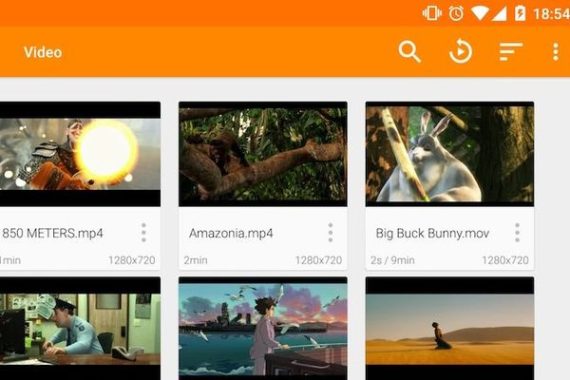
VLC is one of the most popular media players from the fact that you can play multiple media files with ease and no need for a converter. It works on Android smartphones, Tablet PCs, Windows laptops, even in your MacBook. Android users usually take advantage of this application because of its good features they are free to install.

Using my Android smartphone, I am able to play almost all media files easily without needing multiple third-party applications or converters to view my videos. But lately, I’ve experienced some delays while playing my files. It was bearable the first few seconds, but it ended up being irritating to the eyes and ears, especially since I really wanted to watch this video smoothly to figure it out! So I tried some quick fixes like Force Stop the VLC Media Player application and reboot the phone but in vain. I thought it might be a problem with the video, but when you play several files, it did the same! And try my video on another phone I had no problem.

It turns out it was the VLC Media Player application on my phone that had a problem. Fortunately, I found a solution on how to fix the lagging problem of VLC Media Player on my Android phone. It’s simple and easy, almost anyone can do it!

So here’s how to fix your VLC Media Player from your Android phone lagging problems:

Photo:VLC

It always starts with the reboot of the Android phone. Once restarted, try playing the video. If it works, then great! If VLC Media Player still has a lag problem, go to step 2.
Go to applications from installation. This may be under a different name depending on your Android phone. Once you are in the Apps section, go to all the applications installed from the drop-down screen. Then select VLC.

Clear cache and data then reboot your Android phone. Check if the video now works well.
If the lagging problem persists, the solution may be to disable hardware acceleration. All you have to do is open VLC Media Player and go to the menu by clicking on the three lines in the top left corner of the application.
Go to Settings. Then click Hardware Acceleration. Now, marked. Once this is done, close the application and reboot the phone. Check the videos if it works smoothly.

If VLC Media Player still has a lagging problem, try updating the latest version of the application or reinstalling it.
And here we go! Hopefully now you will be able to run your videos without problems with the lag problem of VLC Media Player. If your videos are still late, it is better to check another application similar to VLC, or contact the developers of VLC Media Player to solve the problem. But chances are that there will be more problems with video playback Once you try all these solutions. If the problem persists and something like this happens in the normal media player of the Android phone, it may be the phone that has a problem and will need to be reviewed by the manufacturer.

How to Fix the Problem of VLC Not Showing Subtitles ?

A lot of VLC users may experience issues while playing video files with VLC and they quite often complained that VLC was unable to show the subtitles of the videos, even more, they can not discover solutions for the issues in lacking the general knowledge of VLC. Well, the factors behind the problems are different. If you have been also confused by such an issue, in this article, you will be provided with a lot of solutions to solve it with ease.

The primary reasons for the failure of showing subtitles on VLC media player fall to the following points. In the 1st place, the subtitles are not correctly encoded on your personal computer. In details, occasionally if the subtitles are not using the precise format or codec, such as UTF-8 text encoding, it will result in the failure of showing on VLC. Next, if you have not set the appropriate font in VLC, you may still not be able to play the subtitle in VLC then because the wrong font may not be compatible with player settings. Last of all, another probable reason for the problem that VLC subtitles not showing is that the subtitle files you have downloaded are damaged which can’t be accepted by VLC, and perhaps any other media players. Moreover, with respect to some reviews, it is said that the problem of VLC subtitles not showing is frequently seen with Chinese, Japanese, Korean and Arabic SRT subtitles. After acquiring the main three possible reasons for this issue, now we are going to fix the problems correctly.

Utf-8 is a multi-byte encoding used to solve international characters, which works by using 8 bits (one byte) for English and 24 bits (3 bytes) for Chinese. For BBS with more English characters, UTF-8 is used to save space. In addition, if foreigners visit your GBK web page, you will need to download Chinese language pack support. This does not occur when browsing pages encoded in UTF-8. It can be accessed directly. So, if the subtitles are encoded as UTF-8, in almost all cases, the subtitles can be simply accessed with. How to make absolutely sure the subtitles are encoded as UTF-8? Well, it is pretty easy for you to check whether the subtitles are encoded as UTF-8 or not. You can open the subtitle files in Notepad. If the Notepad can clearly identify the subtitles, usually they are encoded as UTF-8. If not, it is quite possible that they are not encoded in UTF-8. In this way, what you need to do is to use a third party file converter to transfer the file to UTF-8 format so that can be shown on VLC after that.

Some of you may be a bit confused about switching the subtitle font in VLC so as to activate the subtitles in VLC media player. Why can the font of the subtitles impact the showing matter? Well, just think about that if you have set the subtitles in very large font size, how can your VLC playing panel hold up to the large size of the font on the screen? If it is not suitable with such large-sized subtitles, then the subtitles will not be shown in the correct way in VLC media player. In such a case, you need to check the subtitles font and set them properly. How to use Unicode font in VLC? The setting ways are quite simple. You only need to open VLC media player and select “Tools” on the top menu column to choose “Preferences”. In the bottom left corner of the “Preferences” panel, you can see 2 options under “Show settings”: “Simple” and “All”. Then click “All” to show more preferences settings, including “Subtitles/OSD” item. Under it, you can set the specific font. Once you have set it properly, click “Save” to make it work correctly. Lastly, restart VLC and you can properly display all the subtitles in VLC.

According to the 3rd possible causes for the not showing issue in VLC, you need to check whether your subtitles have been broken. The most secure method for this problem is to download or set the subtitles on your pc once again to make sure all the subtitles are in correct order and can be completely compatible with VLC media players without any issues. Or, you can try to download another subtitle for the videos instead of downloading the same previous one because some virus or damage will be applied to the subtitles over the Internet.

How to put subtitles in VLC? How to open subtitles in VLC? The solutions to these two questions must be placed in front of another essential question. That is how to download subtitles and make sure the subtitles downloaded are in the proper order or conditions. After you have downloaded the correct subtitles, you can simply just click “Add Subtitle File” under the “Subtitle” option on the top menu of VLC media player to import the subtitles to VLC. After that, you can take pleasure in the video files with subtitles efficiently.


Create strong password – password generator software

0

Creating un-hackable passwords is the essence of online security. You want to keep hackers away from the files and the door that keeps them away is a strong password. That’s why today I’m going to share some tips to create safe and secure passwords. Suggestions include one of the most effective ways to create secure and secure passwords with the use of an password generator. This is the newest method in creating passwords that will definitely protect the information you have from the hands of malicious hackers.

To create a password that is strong, while it is also easy to remember, use at least eight characters in the minimum. You don’t need a very long password that you can’t remember after you’ve created them. Eight characters should be enough to give your password a security boost. Passwords that have more characters can be strong, but the risk of forgetting them is generally greater.

Photo:pinterest

Complex passwords are commonly characterized by their length, such as random they are making it difficult for hackers to guess correctly. By basing these two features, your name as a passphrase is always a bad idea. The same with other random things about you things like your favorite character in a movie or the name of your first love.

As new security measures develop, cyber criminals are always finding a new way to overcome these new systems. They are always willing to find the vulnerabilities of the current security system. And when they do, they are always ready to exploit them.

You must be cautious enough before using any of this software. Attackers can falsify these generators at times making it so easy for them to have their passwords. You need to know if you can rely on the software or not.

By applying these tips you should be able to create secure passwords. These sentences must be enough to make the hackers surrender. And when they do, your private information will remain private. You will be enjoying a safer presence on the Internet.

But if you want much more complete password phrases for a much higher level of security, you might implore the use of key generators. They provide keys with the use of algorithms that will surely create random keys that might be impossible to duplicate.

Key generators are used by big names in different industries because they know they are objected to more attacks. They know that the risk is so great for them and that a data gap could topple their business. They are willing to invest more in their safety because the weight of the possible loss is much higher than the resource they are spending for security.

A loss of data causes huge damage to companies and personalities. Protect yourself from malicious attacks by using password phrases that are quite difficult for malicious people to break. This is the first step in preventing hackers from accessing sensitive files. Companies are investing a lot in their data security, because they know they can lose everything when their private files are exposed to the wrong hands. They are developing almost un-hackable passwords generators to respond to this concern. Try here

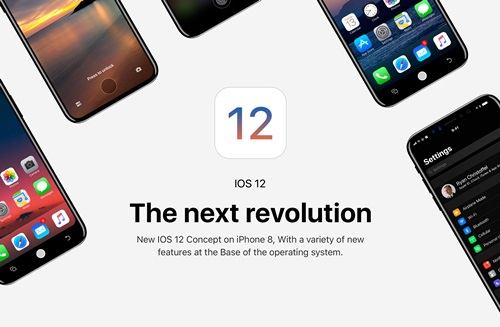
IOS 12 BETA – How To Install On Your IPHONE AND IPAD

0

Because through the Apple beta software program, anyone can get IOS 12 to their iPhone or IPad right now. Here’s how:

1. Make sure the device is compatible. If you already have IOS 11 running, it will be. (In short, you need an IPhone 5s or later, a 6th generation ipad touch, any ipad Pro, a mini ipad 2 or newer, or a 5th generation ipad or newer.)
2. Support the device in which you intend to install the beta in case of emergency. Or not, but in this case don’t say I’m not warning you.

photo:Apple

3. Go to Beta. Apple.com on its device and register for the program. Or if you’re already registered, sign in using your Apple ID.

4. Click the ‘ Start ‘ link and scroll down to get the introductory section of the IOS page. Click ‘ Register your IOS device ‘.

5. Since you have already supported your device (correct?), click on ‘ Download Profile ‘. You will be prompted to download a profile that will be installed in the configuration.

6. Once the profile is installed, you will be prompted to reboot. Try this, go to Settings > General > Update the software and you’ll see the current beta available for download. That’s it: Your last chance to go back.

7. Make sure the device is connected to a power source. Click Download and install, OK, and-once downloaded the huge Installer-install now. Depending on the speed Wi-Fi and how many lucky stars are hidden on your person, you need to rocking the IOS 12 in half an hour or so.

If you decide that you have made a terrible mistake at some point, connect your device to iTunes and restore it from the back-up you’ve taken, even if you keep in mind any data other than cloud added to your device, because that point will be lost forever.

Alternatively, if you are happy with the beta, but want to get off the train pre-release software when the final version of IOS 12 yomps on, you can do. Install the final version of IOS 12 (before the start of the next beta series), then go to Settings > General > Profile, touch the installed profile, and then click Remove Profile.

In the end, Apple installs the feedback application along with the beta version. Use it when you find bugs, to make your bit to make them a better place. And to tell Apple that the control center on the IPad is now started from the wrong place.

Latest budget SSDs – some of the best

0

The Crucial MX500 is our new 1TB SATA Drive of choice. The combination of the sweet point of characteristics, value, guarantee and performance deserves the highest marks. There are a few better SATA SSD performance and none that offer the value that makes the MX500. Many manufacturers of 1TB units will be forced to reduce prices to compete. Of course, if you’re chasing the final performance, then the NVMe drives remain the only real option. The NVMe variants should really allow the 64-layer 3d NAND micron to shine, but it is basically to reveal such drive again. 2018 promises to be an exciting year in SSD space.

Intel 750 SSD 1.2TB is easily the fastest consumer drive unit we’ve ever tried, and by a big margin. It’s not that good at sequential performance, as Intel has focused on Random read/write, it’s much more useful in the real world, but it still brings the package with a sequential read result of 693MB/sec, and a write speed of 737MB/sec (the Pro 8 50 Makes 511MB/sec and 478MB/sec, respectively. In the 4k test QD16, which reflects the performance of the Real World application, we see the 750 record a reading speed of 528MB/sec and 979MB/sec, compared to 850 Pro 378mb/sec and 341MB/sec. The tests of ioPS were performed in another league, with a performance reading around 40% faster than a 850 Pro at 135,074 ioPS, and a reading speed of almost 300% faster up to 250,536.
Considering its excellent performance, data protection and competitive pricing, there is simply no alternative for those who want the absolute best SSD on the market in terms of random reading/writing performance, and not too Bad in the sequential transfers are.

Biostar G300 SSDs are aimed at enthusiasts and players, especially those of the esports Arena. The new units are thin, only 6.8 mm, and the promise of Biostar 10 percent better performance than their competitors thanks to the super-fast NAND Flash Memory. Within the curved, screw-free case there is a six-layer PCB for durable and stable operation, and each unit comes with a three-year warranty.
Full Features:
Model: Gaming G300
Size: 100 * 70 * 6.8 mm
Weight: 50g
Storage media: Super Speed NAND Flash
Operating Voltage: DC 5v
Operation Temp: 0 ℃ (32 ℉) to 70 ℃ (158 ℉)
Operating systems: Windows OS/Linux OS/Mac OS
File formats: FAT16/32, NTFS, Ext2/ext3, Reiser FS
Units are now available in 120, 240, and 480GB capacity, for $US 44, $US 66, and $US 140 respectively.

OCZ Vertex 100 GB SSD is a very fast performer also, with an average reading speed of 223.8 MB/s, random access of 0.1 MS and a strong burst speed of 246.5 MB/s. Although not the biggest unit in history, reaching only 93.16 GB when formatted in NTFS, the performance is the best we’ve seen from any SSD so far. We filled the unit with unnecessary data until it burst into seams, and observed a small but significant performance drop: a decrease of 201.5 MB/s average reading, slightly higher than 258.1 MB/s burst and a little slower 0.2 MS Access random.

It’s not unusual for a unit to go back a bit when it’s full, and for blithe performance in your hand it’s definitely a great option for an operating system drive. Just a great pity for the price.