Home Blog Page 156

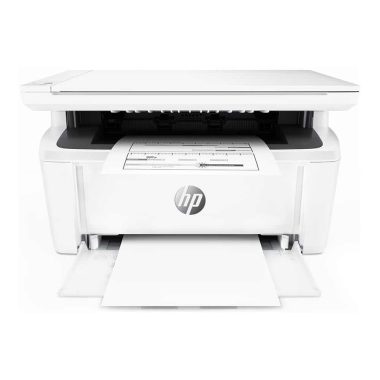
LaserJet Pro M28w – ultra-compact printer, copier and scanner

0

Laser printers have dropped price very significantly in recent years, but they still tend to be too expensive and too cumbersome for home offices. However, if you don’t need to print in color, mono lasers can be very compact in fact.

In fact, HP claims that its new LaserJet Pro M28w is the smallest ‘ in its class ‘ Laser printer – which, in this case, means a mono-only multi-function laser printer with integrated scanner and copier, and USB and Wi-Fi connectivity. That makes it best choice for home users or office executives who need a fast, mono high-quality printer/scanner that takes as little space as possible.

The LaserJet Pro M28w we examine here costs £115 if you buy directly from HP, but you can save a few pounds if you hunt around for other online retailers. In the US, you’ll find it at Walmart for us $109.99.

If you don’t need Wi-Fi, then you can opt for the USB version only, called the M28a, which costs £97 of Amazon.co.uk.

There are also two M15 models, which are simple mono laser printers without scanners. The M15a only provides USB connectivity for about £70, while the M15w adds Wi-Fi to £79. In the United States, all these printers are completely new, with the M28w showing as “soon ” on the HP website, and the US $99 M15w currently out of stock.

The M28w really surprised us when it arrived as it is really extremely compact. It just stands 198mm High, 360m wide and 264mm deep and is certainly small enough to sit on a desk near a computer in a small office or in a free room at home.

There is a 150 sheet paper tray at the base of the printer, while the outgoing mail has 100 sheets, and the recommended output of 1000 sheets per month must be much more than people will need.

The printer provides USB and Wi-Fi connectivity, with Apple print support for IOS devices and Google Cloud print for everyone else. There is also an HP Smart application that can be used for printing and scanning from IOS and Android devices as well.

Although there are a couple of signs of cost reduction. The small one-inch LED control screen is not really useful, although the HP software works well and provides all the features you need to control the print or scan from your PC or MAC. There is no automatic duplex (double-sided printing) or-even if there is a manual duplex option available for occasional use.

Compact design and quick printing, high quality HP LaserJet Pro M28w make it a good option for some kind of small business or home Office. However, expensive toner cartridges mean that operating costs are higher than average, so the printer will be more suitable for occasional use when you really need high quality text documents.

Specs HP LaserJet Pro M28w:
A4 mono laser printer
600dpi print resolution
1200dpi scanner/copier
150-sheet paper tray
Connectivity: USB, Wi-Fi, with Apple AirPrint, Google CloudPrint support
Dimensions: 198x360x264mm
Weight: 5.4kg

photo:HP

DSLR Camera – How to Shoot at Night?

0

Taking dramatic pictures of the night with your digital SLR camera is easier than you might think! With a bit of patience, practice, and some tips, you can take spectacular photos throughout the night.

Turn off the flash for night photography
If you leave the camera in auto mode, you will attempt to shoot the pop-up flash to compensate for the low light. All this will be achieved is an “over-lighted” in the foreground, with a background that has been immersed in the dark. Using any of the other camera modes will override this issue.

Use a tripod
You will have to use long exposures to get great shots at night and this means that you will need a tripod.

If the tripod is a bit fragile, hang a heavy bag from the middle section to prevent it blowing through the wind. Even the slightest amount of wind can shake the tripod during exposure and may not be able to see a soft blur on the LCD screen. ERR on the caution side.

photo:Pixabay

Use the self-timer
Simply pressing the shutter button can cause the camera to shake even with a tripod. Use the camera’s self-timer feature, in combination with the mirror lock feature (if you have this in your DSLR) to avoid blurry photos.

A remote shooting or shooting is another option and a good investment for any photographer who takes long exposures regularly. Make sure you buy one that is dedicated to your camera model.

Use a long exposure
To create great shots at night, you need to let the light dim environment to reach the image sensor and this will require a long exposure.

A minimum of 30 seconds is a good starting point and the exposure can be extended from there if necessary. At 30 seconds, any moving object illuminated in its grip, like cars, will turn into light-style paths.

If the exposure is very long then it may be out of the camera shutter speed range. Many DSLRs can go up to 30 seconds, but it can be. If you need longer exposure, use the BULB setting (B). This will allow you to keep the shutter open until the shutter button is pressed. A shot is essential for this and usually include a block so you don’t have to really hold the button all the time (just don’t lose it in the dark!).

It should be taken into consideration that the camera will take longer to process and process these long exposures. Be patient and let him process an image before attempting to take the next one. Night photography is a slow process and you also want to see the screenshot on the LCD screen so you can adjust the next exposure to perfect the shot.

Switch to Manual focus
Even the best cameras and lenses have a hard time with auto focus on low light and it’s probably going to be better to change your lens to manual focus.

If you also have trouble finding something to focus on in the dark, use the distance scale on the target. Calculate to what extent a subject is standing or meters, then use a flashlight to see and correct that measure on the target.

If the only subject is too far away, set the target to infinity and stop until the target is gone (a minimum of f/16) and everything should fall into focus. You can always check on the LCD screen and adjust the next shot accordingly.

Increase the depth of field
A great depth of field is the best for night shots, especially when photographing buildings and illuminated structures. A minimum of F/11 should be used, even if f/16 and above are even better.

Remember that this also means that less light is allowed on the target and you will need to adjust the shutter speed accordingly.

For every f/stop move you make, your exposure will double. If you’ve shot at F/11 for 30 seconds, then you’ll need to expose for a full minute while shooting at F/16. If you want to go to F/22, then your exposure would be 2 minutes. Use the phone timer if the camera does not reach these times.

Watch your ISO
If you have set the shutter speed and aperture, and still don’t have enough light in the picture, you may want to consider the ISO setting. This will allow you to shoot in lower light conditions.

Remember, however, that a higher ISO will also add noise to your image. The noise makes its greatest appearance in the Shadows and the night photography is full of shadows. Use the lowest ISO you can get away with!

Have spare batteries available
Long exposures can quickly drain the camera’s batteries. Be sure to bring spare batteries if you are going to do a lot of night shots.

Experiment with shutter and aperture mode priority
If you want to help you learn how you go along, consider experimenting with these two modes. AV (or a-priority aperture mode) allows you to choose the aperture, and the TV (or S-shutter priority mode) allows you to choose the shutter speed. The camera fix the rest.

This is a great way to learn the camera exposes the images, and will help you achieve the correct exposure.

What’s the best book scanning service?

0

You can use Adobe Scan-Scan anything in an instant.

Easily capture shapes, images, and notes. Go beyond the documents to scan receipts, business cards, even slate discussions. Adobe Scan automatically captures and cleans the image.

Get the text that you can work with.

Your scans are not only perfect for the image. With built-in optical character recognition (OCR), they are also easy to search, highlight and comment. Because Adobe Scan recognizes text when it transforms each scan into a high-quality and versatile adobe PDF file.

Now, your documents have the Power PDF.

Once your documents become Smart PDF’s available in Adobe Document Cloud, they are easy to find and share from anywhere. You can easy find keywords, add comments, sign or send for review because Adobe Scan works perfectly with Adobe Acrobat.

Camscanner

What an incredible application. It is so easy to use, with the beautiful quality of the image conversion on the digitized copy in black and white. We can also this set of images in a PDF file.

I am an engineering student in Portugal and as our mantra is to study a day before the exams, this tool helps us to study comfortably even if we do not have books (because many times people borrow and do not return promptly or in some Cases we don’t even have books.

So this application we need a lot because it is easy to use, convenient, fast and gives the best output.

Which is the one of the best social media tool?

0

There are tons of various social media tools, some that do a lot of important tasks and some that are very specific. I used enough to be in marketing, but below are three of my favorites to date and because they are great. Also, you choose depends on your needs and goals with social media.

Sprout Social

Sprout Social offers a suite of social media management features, including scheduling posts, monitoring conversations, analyzing performance, and providing customer support. It also provides in-depth analytics and reporting capabilities. Here are some key advantages of Sprout Social:

Social Media Scheduling and Publishing: Sprout Social allows you to schedule and publish posts across various social media platforms, including Facebook, Twitter, Instagram, LinkedIn, and Pinterest. You can plan your content in advance and publish it at the best times for maximum reach and engagement.

Social Media Monitoring and Engagement: Sprout Social provides robust monitoring capabilities, allowing you to track mentions, comments, and messages across all your social media profiles. You can respond to messages, engage with your audience, and manage your social media conversations from a single dashboard.

Analytics and Reporting: Sprout Social offers in-depth analytics and reporting features to measure the impact and performance of your social media efforts. You can track key metrics, such as engagement, follower growth, impressions, and clicks, and generate customizable reports to analyze your data.

Social Listening: Sprout Social enables you to monitor social media conversations and trends related to your brand or industry. By listening to what people are saying about your brand, competitors, or specific keywords, you can gain valuable insights and make data-driven decisions.

Customer Relationship Management (CRM) Tools: Sprout Social includes CRM functionality, allowing you to manage and track customer interactions and engagements. You can view customer profiles, history, and notes to better understand and nurture your relationships with your audience.

Collaboration and Team Management: Sprout Social provides collaborative features that allow teams to work together efficiently. You can assign tasks, collaborate on content creation, and streamline your social media workflows.

Sprout Social offers different pricing plans based on your specific needs, with features varying between plans. They offer a 30-day free trial for new users to explore the platform and determine if it meets their requirements.

Buffer

Probably one of the most reconizable names in the social media space, so I’m not going to delve into it as it should be very familiar to you. However, the platform is easy to use to program social media messages and plan. They also write some of the best social media content on the Web to date.

The company is also very transparent about its business, even owning up to mistakes. It’s refreshing and intriguing. Also, you can use the tool for free or upgrade for more features (not too expensive).

socialMedia

Hootsuite

Hootsuite is a comprehensive social media management tool that allows you to schedule posts, manage multiple social media accounts, monitor mentions and analytics, and collaborate with team members. Some key features of Hootsuite include:

Social Media Scheduling: Hootsuite enables you to schedule posts in advance for multiple social media platforms, such as Facebook, Twitter, Instagram, LinkedIn, and YouTube. You can plan and publish your content at optimal times to reach your audience effectively.

Content Calendar: Hootsuite provides a visual content calendar that gives you an overview of your scheduled posts, making it easier to plan and organize your social media strategy. You can drag and drop content to adjust publishing dates and times.

Social Media Monitoring: Hootsuite allows you to monitor and engage with conversations happening on your social media profiles. You can keep track of mentions, comments, and direct messages, and respond to them directly from the Hootsuite dashboard.

Analytics and Reporting: Hootsuite provides detailed analytics and reporting features to help you measure the performance of your social media efforts. You can track engagement metrics, follower growth, post reach, and more, and generate reports to share with your team or clients.

Team Collaboration: Hootsuite offers collaboration features that allow you to work with your team more efficiently. You can assign tasks, provide access to specific social media accounts, and collaborate on content creation and scheduling.

App Integrations: Hootsuite integrates with a wide range of apps and platforms, including Google Drive, Dropbox, Slack, Trello, and more. These integrations make it easier to streamline your workflow and connect Hootsuite with other tools you use.

Hootsuite offers various pricing plans, including a free plan with limited features and paid plans with additional functionalities and support. The paid plans are suitable for businesses and organizations with more extensive social media needs.

BuzzSumo

BuzzSumo is a content discovery tool that helps you find popular and trending content in your industry. It allows you to analyze content performance, identify influencers, and monitor mentions of specific keywords or topics.

Meetedgar

This is a tool that I would like to use and prove more to myself, but the concept of this is simple: one of the most effective strategies is recycling social media updates, but doing that meant saving them all on a spreadsheet GR Walk and ridicule and manually load them into programming tools by Ing over and over and over again. But Meetedgar works for you. It also supports and has some other features, so do this a useful social tool to have.

EveryoneSocial

EveryoneSocial is a social sales and employee promotion platform designed to help your employees share content in their social accounts, making it easier for employees to get involved with buyers through Growing variety of digital channels.

It can be used to program social media messages, monitor/social listening, host field or marketing materials sales, increase employee engagement, and more. You can also view the data reports and the commitment. The tool essentially transforms the workforce into vendors, vendors, and recruiters that help lead, WEB traffic, brand visibility, and more.
New Fujifilm XF10 Compact Camera with 24.2-Megapixel APS-C Sensor

0

Fujifilm XF10 has recently been introduced with a huge 24.2-megapixel APS-C sensor. Keeping ‘pocketability’ despite the big image sensor, the brand-new compact camera weighs 280 gr and includes a touch-supported LCD panel. Fujifilm has provided its amazing colour reproduction technology and there is a wide-angle, 18.5mm Fujinon fixed lens with an f/2.8 optimum aperture. The camera arrives as the successor to the Fujifilm X70 that was launched in 2016 with a 16-megapixel APS-C X-Trans II sensor together with an 18.5mm prime lens with a f/2.8 aperture. It will go on sale in the US at some time in August with a selling price tag of $499.95.

Photo:Fujifilm

Comparable to the mirrorless Fujifilm X-100, the Fujifilm XF10 has a 24.2-megapixel APS-C sensor with a primary colour filtration system, supported by an 18.5mm Fujinon lens that has an f/2.8 aperture and operates with a Digital Tele-Converter feature that allows users choose focal lengths of 35mm or 50mm (35mm equivalent focal length). The new model does not contain a tilt screen, flash hot-shoe, or an aperture ring that were featured on the X70. Rather, Fujifilm has offered a PASM dial and a touch-supported LCD display. A preloaded ‘Square Mode’ is furthermore accessible to enable shooting in a square format with a 1:1 aspect ratio. In addition, there are 11 variations of Film Simulation Modes and 19 different versions of Advanced Filters, such as the freshly added ‘Rich & Fine’ and ‘Monochrome (NIR)’.

Along with enabling still photography, the Fujifilm XF10 offers 4K video recording assistance and has a dedicated Multi Focus Mode that is promoted to instantly synthesise consecutively shot images while switching the area of focus with 4K resolution. Likewise, there is 4K Burst function that lets consumers capture as many as 15 shots per second. A High-Speed HD Video function is also available to enable shooting of fast-moving subjects in slow motion. The innovative function requires UHS Speed Class 3 or higher memory cards. Additionally, there is Bluetooth LE (low energy) connectivity that can leveraged to transfer photos and videos wirelessly using the ‘Fujifilm Camera Remote’ application.

The Fujifilm XF10 comes with a lithium polymer battery that is claimed to provide power for as many as 330 still frames. The camera weighs 278.9 grams with its battery and a memory camera and measures 112.5×64.4x41mm.

New Time Of Macro Managing Electronic Devices

0

Computer is manufactured in separate parts. Like a human body each part has a significant role to play. This machine cannot fully function without any of the parts not working properly. The main reason why the machineries were huge in size back in olden day was the wiring of their parts was done externally.

The technological advancement in electrical engineering in making the devices smaller is called electronics. In order to shrink the mass we have to connect the parts internally. This is achieved by connecting using liquid metal like mercury or copper on a circuit board. Devices are not only smaller in size but they consume less power. Mostly the type of power used is DC current. This has created a revolution in the field of engineering.

pixabay

The device does not work if motherboard is broken. There is no way that we can attach. The only option is to replace the circuit. The blueprint or the design can be obtained on a transparent paper which helps us to reconstruct the appliance as many times as we want. There are printed motherboards available in the market which makes lot easier in constructing a circuit.

The circuit layout always looks similar for various devices, however they carry different functions. This we can understand when they take shape into an apparatus. Television is a gadget we love watching our favorite movies.We can say a circuit is a electrical network which carry a path for current. Electronic components are capable of performing amplification, computation and data transfer.

Hard drive is designed to store the information or data permanently. The power supply unit ensures the electricity is supplied to all the parts of the computer. Apart from computer the chips are present in our mobile phones, tablets and other day to day gadgets. There are micro and macro chips according to the size.

It is an amazing experience of human interaction with computer. The art of making a machine intelligent enough to design a product on its own without human intervention is known as artificial intelligence. We can also make computer to design large machines which is known as computer aided manufacturing or CAM.

Technology has significantly changed the way we look at life today. Imagining how people were living in the absence of technical knowledge. Every work has to be done manually which was a tiresome process.

What we think was impossible is possible now. The technological revolution has completely taken humans into a new dimension altogether. This change has increased the morale and confidence of a man to the skies. There is a vast difference in the social and economic status now compared to the earlier days.

Producing at large quantities is a crucial aspect in any business. With the increase in population the demand is increasing hence we have to look at ways to increase the supply maintaining the same cost. Today every commodity in the market is produced in mass within no time. This is achieved from automation. This process has increased the production ten folds.

Top quality wireless charging power bank – YOOLOX

0

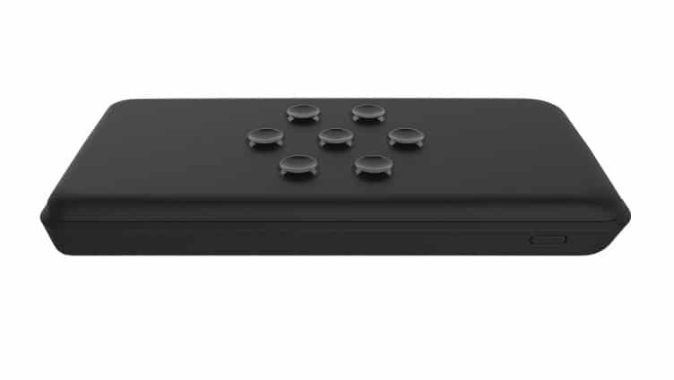
YOOLOX is a wireless charging power bank with long lasting and top quality suction parts. It is created to operate with almost all mobile devices available on the marketplace. Even if your mobile phones have plastic-type surfaces and flat rubber, this wireless power bank can work reliably.

The capabilities of the YOOLOX wireless charging power bank are:

QI Wireless Charging – The approved standard of wireless charging
Charge-Through Function – To simultaneously charge your mobile units and the power bank itself
Quick Charge 3.0 – For Android devices, it boosts the charging speed up to 2 times
Power Delivery 3.0 – For iPhones, it improves the charging speed up to 2 times
Soft-Touch Surface – To make sure your phone does not get damaged
Suction pads – To maintain your gadgets in the correct position
Compatibility – Google: Google Nexus 4 and up; Samsung: Galaxy S6 and up, Galaxy Note 7 and 8; Apple: iPhone SE 2, 8, 8 Plus, and X; Others: Microsoft Lumia 950; Nokia Lumia 735, 830, 920, 930, and 1520; HP Elite x3; YotaPhone 2; Sony Xperia XZ2; and LG Optimus G Pro

YOOLOX comes with Li-Polymer battery technology, 500 charging series, and 5V/1A QI wireless output. It additionally provides QC 3.0 authorized chip output USB Type A and C and Input USB Type C. As for their input micro USB, it is QC 2.0 certified chip.

As for its charging period and capacity, the YOOLOX 10K has a charging time of up to 5 hrs and 10, 000 mAh capacity whilst the 16K charges for 6 hours with 16, 000 mAh. If you are questioning on the opportunity whether this wireless charging power bank can charge your mobile phone and the power bank at the same time, it can easily. With its pass-through or charge-through features, it can charge your gadgets at the same time, making it practical mainly because only one external power adapter is required.

Photo:YOOLOX

How really does an electric powered car work?

0

Precisely how an electric powered car works

Aside from the unusual lick of blue color – electric cars look very similar to typical cars from the outside and that is because they share a lot of the exact same parts. From a distance it is quite easy to confuse a Nissan Leaf with a standard Nissan Micra, for instance. Under the surface, nevertheless, it is a totally different story.

Whenever you fill up a petrol- or diesel-engine vehicle, you take it to the gas station and load it up with fuel. This fuel features kept chemical energy and the vehicle keeps it in a reservoir prepared to be used and combusted by a petrol or diesel motor.

photo:pixabay

Batteries
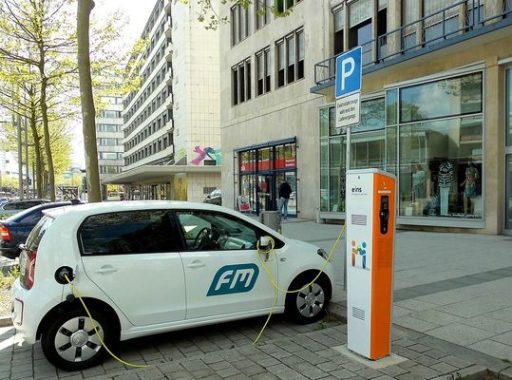
To charge an electric powered car, you use electric energy, which then fills up Lithium-ion batteries in the car. These types of batteries are much just like the ones you would find in your own laptop or smart phone – just much larger – and save electric energy so it is prepared to be used at a moment’s notice.

You will commonly find fuel tanks in many areas of standard cars, but most electric vehicles put their battery packs at the bottom part of the cars, between the wheels. Simply because they are so weighty, keeping the batteries under the car reduces its centre of gravity, making it more flexible to drive.At the time the electrical power is stored in batteries, it’s used for a number of things. The majority of the electricity moves to a controller which judges exactly how much battery power to let through, but it really does this in a way that imitates driving a fossil-fuel engine.

When a controller just used an on/off position, it’d be almost extremely hard to preserve a continuous speed. To fight this problem, the controller smartly turns the electricity on and off approximately 15,000 times per second, based on the throttle position. Therefore, if the pedal is three-quarters of the way straight down, the controller will pulse so that it’s on three-quarters of the time period, and off for one 1 / 4.

Electric motor and regeneration
At least one engine is used to turn electric energy directly into kinetic energy and better performance electric cars such as the Tesla Model S usually have a motor unit per axle for four-wheel-drive.

Nevertheless, it does not simply all go on speed. Air conditioning, warmed seats and interior lights almost all take from the exact same pool of energy and that is why you will find the variety of an electric car generally feels shorter in cold weather conditions – the vehicle is just exactly the same, but you are asking for much more from it.
At first this may look like completely one-way traffic, but electric cars have a technique up their sleeves. Many models feature something known as regenerative braking, which re-captures power you’d generally waste when slowing down, and puts it back again into the battery. The electric motor correctly takes on the part of a generator when you are not on the gas and re-charges your batteries. In simple fact, lifting-off the accelerator will basically lead to the car to slow down, practically like engine braking.

Charging
When it’s moment to fill up, electric powered cars require to be charged up again and you can use an application such as PlugShareZap Map or Chargemap to locate your closest station. Nevertheless, just like smartphones, there are various types of connector, from Chademo to Mennekees, and you will need to check out your car is suitable. Electric power stations can offer chargers with anything from 3kw to 50+kw hours, and that converts to charging times of 4 hours to 30 minutes – if you have got a Tesla or a fast-charger.

Of course, you can certainly always get a charger installed at your house, but it’ll cost you. The range you can travel in an electric car is increasing every year, but it’s still really worth preparing forward if you aim to do nearly anything more than 80 miles in one trip. And with an ever-growing network of chargers, is actually much easier than ever to prepare your journey all-around a charging stop.

Ashampoo Photo Optimizer 7 – one-click image optimization software

0

Ashampoo Photo Optimizer 7 provides a wide range of fast and simple corrects, which includes several one-click optimizations tools.

Best parts include a full user interface upgrade – for example brand new dark style look to accompany the increasing number of applications wearing the eye-friendly look, “significantly improved” optimization tools and numerous additional adjustments and enhancements.Edition 6, which was used by a cut-down free of charge version, launched with the promise of much better one-click optimization, and Photo Optimizer 7 repeats the state – with nearly four years of improvement period behind it, the new formula claims a lot more in-depth analysis.

Special developments include better modification of light, washed-out colours from digital’s trend towards colder, bluer shades, as well as the capability to correct exposure and inappropriate colour temperatures.

The software is also currently capable to incorporate white-colored balance modification and contrast pass on directly into its one-click tool.

Ashampoo is excited to stress just how its programmed correction tool is guided and enhanced with opinions from over 5,000 Ashampoo users who provide ratings for improvements to guideline future growth.

The system as well unveils an overhauled consumer interface. Apart from offering it a modern look to much better complement Windows 10, the program has been updated with the assurance that almost any feature is now no more than 2 clicks away. This has been realized in aspect by eliminating almost all nested menus.

A dark concept has also been used to minimize eye pressure.

Very good program Photo Optimizer 7 at the same time unveils many tools for enhancing portraits, like as red-eye removal (auto and manual), tooth whitening and skin impurities.

Lastly, the software gives you a wide range of image export choices, from e-mail and 100 % free online storage space to PC backgrounds and prints.

Ashampoo Photo Optimizer 7 is readily available right now as a free demo download for Personal computers running Windows 7 or later. The full edition goes for $39,.95, but can right now be bought for $19.99. Active consumers can upgrade for $9.99.

Photo&video: Ashampoo