Home Blog Page 162

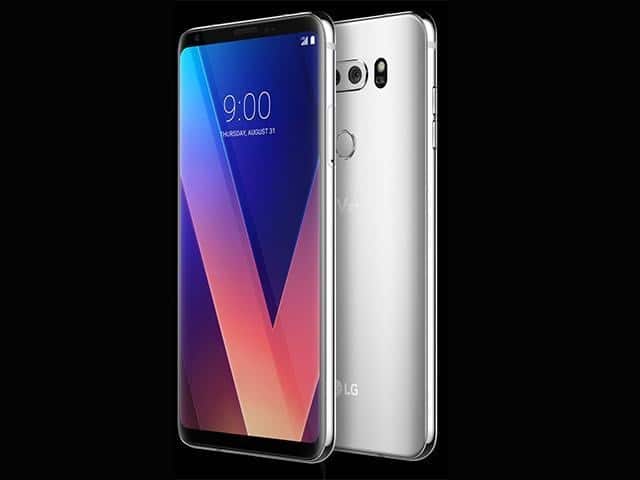
LG V30+ specifications-3,300mAh battery,6-inch OLED,4GB RAM…

0

The LG V30 +, like the V30, boasts a 6-inch FullVision OLED display with an aspect ratio of 18: 9. The smartphone is powered by the Qualcomm Snapdragon 835 octa-core processor matched with 4 GB of RAM and 128 GB of memory internal. One of the highlights of the LG V30 + is the dual-camera configuration that includes a standard 16-megapixel angular lens combined with a 13-megapixel wide-angle lens. In front there is a 5 megapixel front camera for selfies and video calls. Equipped with a 3.300 mAh battery, the LG V30 + also includes fast charging and wireless charging function.

photo>LG

LG V30+ FULL SPECIFICATIONS 

GENERAL

  • Device Type/Smartphone
  • Dual Sim Capability/Yes, Nano SIM
  • Input Mechanism/Touchscreen
  • 2G Network TechnologyGSM-850/900/1800/1900 MHz
  • 3G Network TechnologyWCDMA-B1/B2/B4/B5
  • 4G Network Technology/LTE-B1/B2/B3/B4/B5/B7/B12/B20/B38/B39/B40/B46/B66/B71
  • Sales Package/Charger, Quick Start Guide, Stereo Ear Microphone, USB Data Cable
  • Availability/Available 2017, 18th DecemberNETWORK
  • Network Type/GSM, WCDMA, LTE
  • Network Capability/2G,3G,4G

DATA

  • GPS/YES
  • Bluetooth/v5.0
  • Wi-Fi/802.11 a/b/g/n/ac
  • USB/YES
  • Infrared Port/NO

DISPLAY

  • Display Size/6.0-inches
  • Display Resolution/(2880 x 1440) Pixel
  • Display Technology/OLED display

MEMORY

  • Internal Memory/128GB, 4GB RAM
  • SD Card Presence/Capacity/Yes, up to 2TB

TECHNICAL PLATFORM

  • OS/Android 7.1.2 (Nougat)
  • Processor/Qualcomm Snapdragon 835 Octa-Core 2.35GHz Processor

CAMERA

  • Camera resolution/Dual camera, 16MP standard + 13MP wide-angle
  • Camera Video Features/Video Recording
  • Secondary Camera/5MP, aperture f/2.2

SIZE AND WEIGHT

  • Size /(L by B by T)151.6 * 75.4 * 7.3 mm
  • Length/151.6
  • Breadth/75.4
  • Thickness/7.3
  • Form Factor/Candybar
  • Weight/157.9 gm

OTHERS

  • Java Support/NO
  • Accelerometer/YES
  • Games Support/YES

MULTIMEDIA

  • Music Player/YES
  • Video Player/YES
  • Radio/NO
  • Loudspeaker/YES
  • Youtube Player/YES

BATTERY

  • Battery Type/Non-Removable
  • Battery Life – Talk Time/Up to 26 hours
  • Battery Capacity/3300mAh

PERSONAL AND BUSINESS PRODUCTIVITY

  • Calendar/YES
  • Calculator/YES
  • Alarm/YES
  • Clock/YES
  • Phonebook/YES

MESSAGING

  • SMS/SMS (threaded view), MMS
  • EMAIL/Email, Push Email

Free Blender software-Create 3D printed models,animated films&more

0

Blender is a powerful and versatile 3D creation software that is free and open-source. It offers a wide range of features and capabilities, making it a popular choice among artists, animators, and game developers. Here are some more details about Blender:

  1. Features: Blender offers a comprehensive set of tools for 3D modeling, animation, rigging, simulation, rendering, and compositing. It also has advanced features such as physics simulations, fluid simulations, and a powerful video editor.
  2. Interface: Blender has a unique and customizable interface that can take some time to get used to, but allows users to optimize their workflow and create a personalized workspace.
  3. Open-source: Blender is free and open-source software, which means it can be used, modified, and distributed freely. This has helped to create a large and active community of developers and users who contribute to the software’s development.

Blender is a great open source software used to make a wide variety of 3D-related productions. It can easily develop 3D printed models, interactive apps, visual effects, computer animated films, video games and much more.

The 3 DIMENSIONAL computer graphics software allows you to create a wide range of visual productions. The software natively supports favorite image, audio, and video formats. Many formats contain JPEG, PNG, AVI, Quicktime, MPEG, and Autodesk (.DXF). The application functions a photo-realistic rendering engine that provides GPU and CPU rendering, HDR lighting assistance, and a permissive license to link with external program. It offers a huge array of animation tools that enable you to bring your masterpieces to life. You can create models, give them textures, create pose-able figures from the models, and then simply animate all of them.You can create 3D games within the app, with the capability to port your models to third-party game engines. Blender software furthermore allows you to execute simple video edits, create real looking simulations and apply camera effects. In addition to all of its native features, Blender is remarkably extensible, which allows you to customize the application to your desires.

Blender is a flexible software that can be used to make 3D video games, visual effects, 3D models, animated films, and a lot more. It supports many of the popular graphics formats and gives you the ability to add features to the program through tools. However, Blender will not offer you the same efficiency as high end 3D modeling and animation applications, it is a good substitute.

Blender also comes along with a built-in Video Editor.The Video Editor lets you to perform basic actions such as video cuts and splicing, as well as more sophisticated tasks like video covering up.

Video Editor

The Video Editor contains:
Live preview, luma wave-form, chroma vectorscope and histogram displays
Audio mixing up, syncing, scrubbing and waveform visualization
Up to 32 slots for including video, images, audio, scenes, masks and effects
Speed control, adjustment layers, transitions, keyframes, filters and much more.

Blender includes also: Photorealistic Rendering, Realistic Materials, Fast Modeling, impressive set of rigging tools,Animation toolset,Sculpting, Fast UV Unwrapping, Full Compositor, Camera and Object tracking, Library of Extensions….

Here are some more details about Blender:

  • Add-ons: Blender has a large library of add-ons created by the community that adds additional functionality and features to the software.
  • Learning resources: Blender has an extensive library of documentation, tutorials, and online resources, making it easy for new users to get started and learn the software.
  • Limitations: While Blender is a powerful and versatile tool, it does have some limitations. For example, its sculpting and dynamics simulation capabilities are not as advanced as other software like ZBrush or Houdini. Additionally, its user interface can be overwhelming for new users, and its real-time rendering capabilities are not as advanced as other software like Unreal Engine.

Overall, Blender is a powerful and versatile 3D creation software that is accessible to a wide range of users, thanks to its free and open-source nature. While it does have some limitations, it offers a comprehensive set of tools and features, making it a popular choice among artists and animators.

Totally free to use for any purpose.

Photo: Blender

Free VideoPad Video Editor-Optimization,effects,Audio Tools…

0

VideoPad is a free edition of a well-known video editing suite ideal for beginners. With that mentioned, it does include a bunch of easy-to-use options and effects fantastic for those starting out a occupation in video editing, no matter whether it be for YouTube or making private DVD presentations for the friends and family.

The software could not be simpler if you look at rivalling products. VideoPad Free Version contains support for some of the most popular video compression forms and can create some awesome looking end videos with the superb effects and transitions integrated.

The general layout of VideoPad looks rather pro and can easily be compared to some of the paid options out there for end consumers. Even if you are a expert, VideoPad might contain some features you would find helpful for effective edits.

Regrettably, though, as a free version of a paid product, it has been stripped down quite a little bit and the transition effects amount to Three at writing this. The full edition available from NCH might have a lot more to provide, if you’re searching for a full video editing package.

VideoPad Video Editor Free can edit videos and convert video formats.

VideoPad Video Editor Free capabilities and features:
Edit video from any kind of camcorder
Full collection of transitions and effects
Creates DVD, HD and YouTube videos
Import and mix audio tracks
Record narrations for videos
Use sound effects from the free library
Drag and drop video clips for simple and easy video editing
Apply effects and transitions, modify video speed and more
One of the most effective video stream processors on the current market.

Supported Input Formats
VideoPad supports just about any video input device including DV based or HDV camcorders.
Import Video – avi, mpeg, wmv, divX, Xvid, mp4, mov, vob, ogm, H.264, RM and more
Import Images – bmp, gif, jpg, png, tif and more
Import Audio – wav, mp3, m4a, mid, flac, aac, wma, au, aiff, ogg, raw, dvf, vox and more
Supported Output Formats
Burn to Disc – DVD, CD, Blu-ray or HD-DVD
Export Video File – avi, wmv, mpg, 3gp, mp4, mov, mkv, gif, YouTube, iPod, PSP, Mobile Phone
Upload to YouTube – save your login credentials to upload videos directly to YouTube, Facebook or Flickr from VideoPad

Video Editing Software Anyone Can Use-VideoPad Video Editor <a style="color: #ffcc99;" href="http://www.nchsoftware.com/videopad/index.html">DOWNLOAD</a>

Photo:NCH software

MX Player for Android (J2 Interactive) free – very good choice

0

J2 Interactive MX Player is a totally free Android application used to play videos. It is mainly used to enjoy movies, TV shows, and various other video.

MX Player supports a wide variety of well-known video formats, such as MP4, WMV, WEBM, F4V, FLV, MKV, VOB, MOV, and 3GP. It as well supports a significant amount of subtitle formats including SubRip, VobSub, SAMI, MPL2, and MicroDVD. A few of its most noteworthy functions are its hardware acceleration with the HW+ decoder, multi-core decoding, and assistance of subtitle gestures.


photo:J2 Interactive MX Player

Pros and cons MX Player for Android:

Here are some pros and cons of using MX Player for Android:

Pros:

Wide format support: MX Player supports a wide range of video formats, including popular formats such as MP4, AVI, and MKV, as well as less common formats.

Multiple audio tracks and subtitles: MX Player allows you to select and switch between multiple audio tracks and subtitles, making it a great choice for watching foreign language films.

Hardware acceleration: MX Player supports hardware acceleration, which means it can take advantage of your device’s hardware to decode and play videos more smoothly and efficiently.

Gesture controls: MX Player offers gesture controls for playback, including pinch-to-zoom and swipe controls for seeking and volume.

Customizable user interface: MX Player allows you to customize the user interface with different themes and skins, and you can also adjust the playback speed and audio sync.

Cons:

Ads: The free version of MX Player includes ads, which can be annoying for some users.

Bloatware: MX Player comes bundled with additional apps and software, some of which may not be necessary or useful.

No network streaming support: MX Player does not support streaming videos from online sources, such as YouTube or Netflix.

Limited features in free version: Some of the advanced features, such as subtitle gestures and custom codecs, are only available in the paid version of MX Player.

Compatibility issues: Some users have reported compatibility issues with certain devices and video formats, which can cause playback problems.

MX Player is used to watch videos on an Android device as it supports numerous popular video and subtitle formats. While it does not offer you a lot of other features than the ones listed, it is still a top quality option for any Android consumer exploring to play its supported formats.

Key Features:
Plays the WMV, FLV, MP4, MOV, and 3GP video formats
Opens the SRT, SUB, SSA, and MPL subtitle formats
Offers hardware acceleration and multi-core decoding

Supported File Types:.MP4 – MPEG-4 Video File .3GP-3GPP Multimedia File .ASS-Aegisub Advanced Substation Alpha File .F4V-Flash MP4 Video File .FLV-Animate Video File .IDX-Movie Subtitle File .MKV-Matroska Video File .MOV-Apple QuickTime Movie .MPL-MPL2- Subtitles File .PJS-Phoenix Subtitles File .SMI-SAMI Subtitles File .SRT-SubRip Subtitle File .SSA-Sub Station Alpha Subtitle File .SUB-Subtitle File .TXT-Plain Text File .VOB-DVD Video Object File .VTT-Web Video Text Tracks File .WEBM-WebM Video File .WMV-Windows Media Video File. Download this great player on this link .

CPU fan control & Measure the temperature with ASUS Fan Xpert

0

In case you overclocking your ROG PC or ASUS motherboard, then it’s generally good to understand the condition of your system in terms of fan speed, CPU and motherboard temperatures and voltage configurations. Using ASUS Fan Xpert, you are supplied with a variety of methods to test all these.

The primary interface of ASUS Fan Xpert is quite fine, providing you fast access to a number of tools for your system. It varies from system details including CPU speed, temperature and much more.

photo:rog.asus.com

The most important reason for having Fan Xpert is basically controlling the CPU fan, which can help you deal with overclocking a CPU. It gives a few of temperature values in order to present you whether fan speed really should be enhanced, primarily to defend the lifetime of your PROCESSOR and some other components.

You can ASUS Fan Xpert to discover a fine balance between CPU speed if you’re overclocking and fan speed to always keep your system cool adequate to function correctly.

In general, ASUS Fan Xpert is a superb tool to have installed if you’re searching for a solution to control the physical fan on your PC and provides all of the information and facts and diagnostics to get a good stability while protecting your system.

ASUS Fan Xpert characteristics and features:
Controls fan speed on Republic of Gamers systems
Can choose between different fans installed
Can enable or disable fan settings
Includes info about clock settings and voltage
Displays CPU, motherboard temperatures
Displays CPU fan speed in rpm
ASUS Fan Xpert is licensed as Freeware for Windows (32-bit and 64-bit) operating system / platform from hardware diagnostic software without limitations. ASUS Fan Xpert FanXpert V1.07.01 is available to all software users as a free download.

ASUS Fan Xpert Download
Freeware Hardware Diagnostic Software
Major release: ASUS Fan Xpert FanXpert V1.07
Free Software Download
Compatibility with this software may vary, but will generally work good under Microsoft Windows 10, 8, 8.1, 7, Vista and XP on either a 32-bit or 64-bit setup. A separate x64 edition may be offered from Asus.

The best way to uninstall Asus fan control:

In case you want to uninstall Asus fan control , then you can do so by using Command Displayed in the Registry. A registry is a location where all the configuration settings of Windows, along with info, are placed. This also contains the command to uninstall a software or application.

You can check out this procedure with Asus fan control as well, but it is a quite unsafe method. If you make any sort of mistake and remove the incorrect information, then the OS is most possible to crash. It might become hard for you to take it back from deletion.
To perform this method, follow the tips given listed below:

Hold Windows + R together, and then Run command
When the command box opens, type Regedit in the box and then click OK
You have to run and locate the registry key for the Asus fan control
You will notice an uninstall string on the next window, double mouse click on it, and also copy Value Data
Once again hold Windows + R keys, and run the Command; paste the value data that you simply copy and click on OK
Follow what comes on the screen and then simply uninstall Asus fan control


Surf the internet anonymously with Betternet – free and easy

0

Whenever you really want a safe and anonymous connection to the web, you may and really should download a software well-known as Betternet to obtain this. Betternet has been especially created for people who would like to be connected to the net without getting tracked. This is perfect for persons who want to connect to specific sites without constantly owning their IP address logged or can just be a protection measure that you take into place while using Wi-Fi hot spots. This unique software is excellent for a wide range of different individuals, and it is secure more than enough for you to use on a daily basis, if that is something that you would just like to do.

Betternet is a software that has been designed to enable you to surf the internet anonymously. There are a wide range of various reasons for why people would want to surf the online world without simply being monitored at all. One reason is simply because they might like to visit certain websites that they do not always want the owner tracking them on. You might as well be using a Wi-Fi hotspot, and it may often be a security problem if you frequently have your own IP address logged. It is usually a great strategy for you to surf the internet anonymously using a program such as Betternet that can benefit you in a wide range of several methods.

A lot of consumers who are using this incredible program are discovering it to be amazingly advantageous in their own lifestyles. Being capable to browse the web without being tracked is something that a lot of people today are enjoying each and every single day. You can have an anonymous solution to browse the internet as often as you would like using a secured and simple program. It is really easy to get the hang of using this program as well, because all you need to do is download it to your PC and begin using it as often as you might like.

Advantages-Betternet
The main benefit to using a program such as Betternet is that it will allow you to browse anonymously no matter exactly where you happen to be. You can be using a Wi-Fi hot-spot and get easy access to this program. You will also be able to use this specific program also on your home personal computer, if this is a thing that you would like to do yourself. The program requires up very little space on your pc and can easily help you to browse more anonymously in a secure and trustworthy way. This is why so many people have downloaded this software and regularly use it on a daily basis so that they have greater ease of surfing around without always having their personal unique IP address monitored by the owner of the site. Betternet-Privacy for all devices and platforms you can download here

Indigo Renderer – Realtime editing and 3D rendering application

0

Glare Technologies Indigo Renderer is a cross-platform 3D rendering software used to make photorealistic pictures. It is accessible as a standalone app or a tool for other 3D CAD applications such as Blender, Revit, 3DS Max, Maya, Cinema 4D, and SketchUp.

Photo:Indigo Renderer

Here are some of the pros and cons of Indigo Renderer:

Pros:

  1. Realistic rendering: Indigo Renderer uses physically-based rendering algorithms to simulate the behavior of light in a scene, resulting in highly realistic images with accurate lighting, shadows, and reflections.
  2. User-friendly interface: The software has a user-friendly interface that is easy to use and navigate, making it accessible for both beginners and advanced users.
  3. High-quality materials: Indigo Renderer comes with a large library of pre-built materials, including metals, plastics, and fabrics, that can be easily applied to objects in a scene.
  4. Fast rendering: Indigo Renderer is optimized for speed and can render images quickly, even on lower-end hardware.
  5. Cross-platform support: Indigo Renderer is available for Windows, macOS, and Linux, making it a versatile option for users across different operating systems.

Cons:

  1. Limited animation capabilities: While Indigo Renderer can produce stunning still images, it is not optimized for animation, and rendering animations can be time-consuming.
  2. Expensive: Indigo Renderer is a premium rendering software, and its high price point may be prohibitive for some users.
  3. Steep learning curve: While Indigo Renderer has a user-friendly interface, its advanced features and rendering techniques may require some time and effort to master.
  4. Limited third-party plugin support: Indigo Renderer has limited support for third-party plugins, which may limit its compatibility with other software and workflows.
  5. Limited output formats: Indigo Renderer has limited output formats, and users may need to use third-party software to convert images to their desired format.

Indigo Renderer functions a real-time croping and editing and rendering environment that enables you to fine-tune elements and get quick final results. You can select from a wide variety of tools, such as bump mapping, atmospheric simulation, and aperture diffraction to produce your authentic graphics. As well, the software offers physically appropriate camera optics to create effects such as Depth of Field and bokeh.

Indigo Renderer is GPU more rapid which gives important speedups without image decrease. If you need to render possibly even faster, the application lets you to control your network and the application’s integrated animation and render queue assist to use all the pc systems on your network to render an animation.

Inigo Renderer is a expert program for simulating light flow to produce purely natural looking pictures. It specializes in creating lighting effects, such as refractions, reflections, caustics, and spectral, to produce your images arrive to life. Glare Technologies Indigo Renderer is a top quality software that will support you create images that can trick even the sharpest of eyes.

Indigo Renderer Specifications:

GPU Acceleration
Accelerate your renders using either CUDA or OpenCL supporting GPUs.
Advanced hybrid mode makes the most of your GPU’s onboard memory.

Realtime Scene Editing
Interactive editing of materials, including dynamically compiled shaders.
Realtime camera movement, depth of field adjustment, etc.
Works seamlessly with network rendering and GPU acceleration.

Integrated Network Rendering
Render a single image efficiently across multiple machines.
Included Network Manager load balances slaves among masters across a network.

Support for Complex Geometry
Support for extremely large meshes.
Instancing support – A mesh can be repeated in a scene thousands of times with little additional memory usage.
True displacement mapping for highly detailed surfaces.

High Performance
Written in SSE-optimised C++ for optimum performance.
Multi-threaded to take full advantage of multi-core CPUs.
GPU acceleration delivers a large performance boost.
Efficiently parallelises over any other render nodes in the network.

Cross Platform
Windows 2000, XP, Vista, Windows 7, Windows 8 support. (32 and 64 bit)
Mac OS X 10.6 – 10.9 support. (32 and 64 bit)
Linux support. (32 and 64 bit)

Indigo 3.0 presents real-time scene editing and enhancing – now you can tweak your materials, and the results will be shown almost immediately.You can tweak materials, camera location, camera f-stop and focal length, all in real-time, along with both a ray-traced and OpenGL preview.

Indigo Renderer 4 comes with a powerful new feature – an entirely new GPU rendering core that uses an OpenCL-based engine to deliver industry-leading performance on both Nvidia and AMD graphics cards. With a modern GPU, it can render images and animations about 10 times faster than before, and adding more GPUs can produce stunning 4K content with ease.

In addition to the GPU rendering core, Indigo Renderer 4 offers other exciting new features, including RGB colour curve editing, adaptive resolution during real-time editing, and camera movement to maintain smooth frame rates. The performance and usability of the software have been enhanced, making it more user-friendly and efficient.

Indigo Renderer 4
Indigo Renderer 4

The plugins for 3D modelling applications that support Indigo Renderer have also been significantly improved. A particularly useful feature is the real-time preview rendering/interactive photorealistic rendering (IPR) in 3ds Max and Cinema 4D, which allows for rapid editing with full Indigo quality.

Indigo Renderer is an unbiased, physically-based GPU and CPU renderer that aims to provide ultimate image quality. Its user-friendly interface and minimalistic settings allow users to focus on lighting and composition, producing high-quality images and animations quickly and easily.

For more information on Indigo Renderer 4, please visit the Indigo 4 Stable release page at https://www.indigorenderer.com/indigo4.

Subdivision and displacement has also been significantly enhanced, with much better UV mapping behavior and assistance for combined triangle+quad works. This drastically improves the quality of sub-divided meshes compared to initial triangulating them and then implementing triangle-based sub-division.

Download great Indigo Renderer software here

TuxGuitar application – compose music using a lot of useful features

0

“Great software! Simple to use and configure. A lot of useful features.”-just one of comments about this great app. TuxGuitar is a great open source application used to compose music. The app offers a wide variety of composition tools and also lets users to develop plugins for the software to add efficiency.TuxGuitar will save music compositions in the .TG file and allows you to import and export .GTP, .GP3, .GP4, .GP5 and .MID files. TuxGuitar as well supports the import of .PTB and .TEF files and export to .LY and .TXT files. A range of functions come with the application that help you in composing music, which includes a tablature editor, a score viewer, a multitrack display, and the capability to control the duration of notes and tempo of your music.

photo:TuxGuitar

The program is extensible, also, allowing you to include features via user-created plugins. You can set up support for extra formats, modify the sound output system, and much more.

TuxGuitar is a practical and simple-to-use application for composing music. It supports many tablature formats and a wide range of features for composing music. TuxGuitar is one of the best application on the market. Visit and download TuxGuitar.

Very useful 3D modeling software Trimble SketchUp

0

Trimble SketchUp is a 3D modeling software that can be used in architecture, interior design, video game design, and mechanical technological innovation. There is a free edition available known as SketchUp Make, as well as a professional version called SketchUp Pro.

Photo:Trimble SketchUp

SketchUp is created to have an instinctive user interface that is simple and easy to understand and use. To create a 3D object all you need to do is sketch a shape and after that pull the shape straight into a 3D form. You can also discover tons of pre-designed models in SketchUp’s 3D Warehouse that may be imported in your work.More than modeling, SketchUp offers a lot of other functions to help with your efficiency. You can create precise tabular reviews, primarily based off of the metadata saved in your models. You can as well run area and volume calculations of individual or groups of surfaces and models.

Trimble SketchUp is a 3D program that is really helpful for a wide range of modeling requires. If you are intrigued in 3D design or are searching for a new modeling software, it is absolutely worth trying out. It is significantly more affordable compared to other 3D programs and the free version lets you to get a feel for precisely how it works, before you make a choice to upgrade to pro version.

Create 3D models with an easy to use interface
Push and pull surfaces to turn 2D images directly into 3D forms
Simply turn models into drawings and export them as PDF, CAD, and image files
Import a lot of formats such as DXF, DWG, 3DS, and KMZ

Download this great modeling software – visit Trimble SketchUp website.

How to fix a lot of Netflix streaming issues

0

How to fix: Netflix freezes, stops responding, or gets stuck loading, but device isn’t frozen!?

If you’re experiencing issues with Netflix freezing, not responding, or getting stuck while loading on your device, but the device itself isn’t frozen, here are a few troubleshooting steps you can try:

  • Check your internet connection: Ensure that your device is connected to the internet and that your internet connection is stable. You can try accessing other websites or streaming services to verify if the issue is specific to Netflix or if it’s a broader connectivity problem.netflix loading streaming issues
  • Restart your device: Sometimes, simply restarting your device can resolve temporary glitches. Turn off your device completely, wait for a few seconds, and then turn it back on.
  • Clear the Netflix app cache (mobile devices): On mobile devices, cached data can sometimes cause issues. Clearing the cache for the Netflix app can help. Go to your device’s settings, find the app settings, locate Netflix, and then clear the app cache. Note that this process may vary slightly depending on your device’s operating system.
  • Force quit and relaunch Netflix: If Netflix is unresponsive, you can force quit the app and then relaunch it. On most devices, you can do this by accessing the app switcher or recent apps screen and swiping or closing the Netflix app. Then, reopen Netflix and see if the issue persists.
  • Update the Netflix app: Make sure you have the latest version of the Netflix app installed on your device. Outdated versions can sometimes lead to compatibility issues. Visit your device’s app store (such as Google Play Store or Apple App Store), search for Netflix, and install any available updates.
  • Check for device firmware/software updates: Ensure that your device’s operating system is up to date. Manufacturers often release updates that include bug fixes and performance improvements. Check for any available system updates and install them if necessary.
  • Try using Netflix on a different device: If the issue persists on a specific device, try accessing Netflix on a different device, such as a computer, smartphone, or another streaming device. This can help determine if the problem is isolated to the original device or if it’s a broader issue.
  • Reset your device’s network settings: If the issue persists across multiple devices, resetting your network settings can be beneficial. This process will vary depending on your device, so consult the user manual or search online for instructions specific to your device.
  • Contact Netflix support: If none of the above steps resolve the issue, reach out to Netflix support. They can provide further assistance and troubleshoot the problem from their end.

By following these steps, you should be able to resolve most common issues with Netflix freezing, not responding, or getting stuck while loading on your device.

How to fix: Can’t sign in to Netflix?

If you’re unable to sign in to Netflix, you can try the following steps to troubleshoot the issue:

  • Verify your login credentials: Double-check that you’re entering the correct email address and password associated with your Netflix account. Make sure there are no typos or errors. If you’re unsure about your login details, you can use the “Forgot password?” option on the Netflix sign-in page to reset your password.
  • Reset your Netflix password: If you’re unable to remember your password or suspect that it may have been compromised, you can reset it. Visit the Netflix sign-in page and select the “Forgot password?” option. Follow the instructions provided to reset your password. Afterward, try signing in again with the newly created password.
  • Check your internet connection: Ensure that your device has a stable internet connection. You can try accessing other websites or using other internet-dependent apps to verify your connection. If you’re using a mobile device, consider switching between Wi-Fi and mobile data to see if that resolves the issue.
  • Clear browser cache and cookies (web browser): If you’re trying to sign in to Netflix using a web browser, clearing the cache and cookies can help resolve login issues. Access your browser’s settings or preferences, locate the option to clear browsing data, and select the options to clear cache and cookies. Restart your browser and try signing in to Netflix again.
  • Try a different browser or device: If you’re experiencing trouble signing in using a particular browser, try using a different browser (e.g., Chrome, Firefox, Safari) to see if that resolves the issue. Alternatively, you can attempt signing in using a different device, such as a smartphone or tablet.
  • Disable browser extensions or plugins: Some browser extensions or plugins can interfere with the login process. Temporarily disable any extensions or plugins you have installed and attempt to sign in again.
  • Restart your device: Sometimes, a simple restart can resolve temporary glitches. Turn off your device completely, wait for a few seconds, and then turn it back on. Afterward, try signing in to Netflix.
  • Contact Netflix support: If you’ve exhausted all the above steps and still can’t sign in to Netflix, it’s advisable to reach out to Netflix support for further assistance. They can provide specific guidance based on your account and help resolve the issue.

By following these troubleshooting steps, you should be able to address common issues preventing you from signing in to Netflix.

How to fix: Netflix says ‘Sorry, we can’t find an account with this email address.’?

If you’re receiving the message “Sorry, we can’t find an account with this email address” when trying to sign in to Netflix, here are a few steps you can take to address the issue:

  • Double-check your email address: Make sure you are entering the correct email address associated with your Netflix account. Check for any typos or errors in the email address you’re using to sign in.
  • Try another email address: If you’re certain that you’re entering the correct email address but still receive the error message, it’s possible that you may have used a different email address to create your Netflix account. Try using any other email addresses you commonly use or have used in the past.
  • Check for multiple Netflix accounts: It’s possible that you have multiple Netflix accounts associated with different email addresses. If you have more than one email address, try signing in with each of them to see if you can locate your Netflix account.
  • Verify your account status: If you haven’t used your Netflix account for a while, it’s possible that your account may have been canceled or deactivated. Contact Netflix support to verify the status of your account and request assistance in reactivating it, if necessary.
  • Contact Netflix support: If you’ve tried all the above steps and still can’t find your Netflix account, it’s best to reach out to Netflix support directly. They have access to account information and can help you locate your account or provide further assistance in resolving the issue.

When contacting Netflix support, provide them with any relevant information, such as the email addresses you’ve tried and any other account details you remember. This will help them in their investigation and troubleshooting process.

Remember to avoid sharing personal or sensitive information with anyone other than official Netflix support channels.

How to fix: Netflix Error NW-2-5 Netflix has encountered an error. Retrying in [X] seconds?

The Netflix error code NW-2-5 typically indicates a network connectivity issue between your device and the Netflix servers. Here are some steps you can take to resolve this error:

  • Check your network connection: Ensure that your device is connected to the internet and that your internet connection is stable. You can try accessing other websites or streaming services to verify if the issue is specific to Netflix or if it’s a broader connectivity problem.
  • Restart your devices: Begin by restarting your streaming device (smart TV, game console, streaming box, etc.) and your modem/router. Turn off each device, wait for about 30 seconds, and then turn them back on. Wait for them to fully restart and reconnect to the internet before testing Netflix again.
  • Move your streaming device closer to the router: If you’re using Wi-Fi to connect your streaming device, try moving it closer to your router. This can help improve the Wi-Fi signal strength and stability, potentially resolving the NW-2-5 error.
  • Check for firmware updates: Ensure that your streaming device and your modem/router have the latest firmware or software updates installed. Manufacturers often release updates that address connectivity issues and improve performance. Refer to the device’s user manual or the manufacturer’s website for instructions on updating the firmware.
  • Connect directly to the modem: If possible, connect your streaming device directly to your modem using an Ethernet cable. This eliminates any potential Wi-Fi issues and provides a more stable and reliable connection.
  • Disable VPN or proxy: If you’re using a VPN or proxy service, temporarily disable it and try accessing Netflix again. Some VPNs or proxies may interfere with the streaming service and cause connectivity issues.
  • Check DNS settings: Verify that your device’s DNS settings are configured correctly. By default, most devices use automatic DNS settings provided by your internet service provider (ISP). If you’ve manually changed these settings in the past, try reverting them to the default or automatic configuration.
  • Contact your internet service provider: If the issue persists, it’s possible that your internet service provider is experiencing network problems or there’s an issue with your specific connection. Contact your ISP’s support to inquire if there are any known issues or to request assistance in troubleshooting your connection.

If none of the above steps resolve the NW-2-5 error, it’s recommended to contact Netflix support directly. They can provide specific guidance and troubleshoot the issue further from their end.