Home Blog Page 164

Basic Things You Must Do Before You Submit To Article Directories

0

With modern communication technology comes the popularity of information-based marketing, which is one of the oldest and most effective techniques in getting targeted prospects to sites and converting them into buyers. This is why article writing, submissions and publications are also getting popular.
There are already many tools that people can

Engin_Akyurt / Pixabay

use to make the process of distributing their articles more easily. Though this is invaluable in getting the contents more exposure, which is only half of the story.
Let us take a look first at the common mistakes that some people make before submitting their contents to article directories:
Confusing the reason to promote the articles with the reason to write them.
In article writing, there are three key benefits why you are promoting them; branding, lead generation and promotion, which are all part of your optimization efforts.
But there is only one reason why you write an article, and that is to inform your audience. If the article is not focused on this primary and most important purpose, it will fail to achieve the three promotion benefits because no one will be interested in reading them.
You need to figure out first how to get people to read what is in your article, then make them click on your resource box. You can achieve this by producing better contents.
– Failing to maximize the promotional opportunities of article marketing.
You may know already that your articles can help you generate additional links back to your site. But do you know that you can get more visitors and better search engine results from that same articles?
Mention keywords at strategic places. Just be sure not to overdo them. Some are even using anchor texts which is also an effective method. But it is important to know that majority of the directories are not able to support this.
Remember that is not only about the links back to your site. Part of doing well in your article marketing is getting picked up by publishers with a large number of audiences and gaining the ability of leveraging other brands because of the quality of your work. Better search engine results also are great benefits.
But these things do not put much money in your pocket. There are other factors that can turn your article marketing efforts into an opportunity that can boost your earnings. Not just increase the number of visitors to your site.
Start out with a plan and see to it that your article will serve the function that you intended it to have.
Publishing content that does not help your readers.
Maybe in the process of writing articles, you are thinking that all that is you wanted is links back to your site. And any visitors it can generate are fine.
Not all article banks and directories are going to accept your content automatically. Oftentimes, they have some guidelines and specifications on the articles that they are accepting.
You can double the number of sites you can submit to by writing articles that the directories want to share with other people. All it takes is one publisher with a hundred thousand readers to increase your potential audience overnight.
Write the articles that publishers want in their publications if you want your article marketing to work the most effective way for you. This also means you have to obey the standard guidelines, spell checks, researching on a good topic and even hiring a writer to produce a good content on your behalf.
In the end, it is all really a matter of choice on your part. You can start getting a little exposure from increased links back but on a very basic level. Or enjoy massive exposure from a little extra time making quality contents.
It will be your choice. You may not be aware of the fact that an article submitted on directories is not meant to have the same level of exposure as highly-targeted content ones geared on a narrow group of people.
Learn the difference between these two and it will surely help you know what kinds of articles to write and to submit.

Get lost photos back again-Recover Photos from Digital Camera

0

With the improvement of the software technologies, a large amount of photo recovery programs may help to get lost photos back again. If you don’t fully understand which one to pick, you can check out MiniTool Photo Recovery – a read-only and specialized software which is professional in getting back deleted photos. Created by MiniTool Solution Ltd., MiniTool Photo Recovery can help to simply and successfully recover lost photos, without getting any problems to the authentic files.

From the primary interface of MiniTool Photo Recovery, you can see this pro photo recovery software is capable to recover photos from various types of digital cameras, SD card, USB drive, pc hard drive, etc. Much more significantly, it can directly recover lost photos right from your digital camera. In different words, you can connect your digital camera to the personal computer, and then launch MiniTool Photo Recovery, scan the SD card, and lastly save all necessary pics.This pro photo recovery program can easily deal with almost all photo loss problems. It can recover deleted photos, may recover lost photos from formatted memory card,USB drive, pc hard drive, recover photos from RAW SD card, etc. Right here, we create a simple table to help you know more information about this professional photo recovery software.
MiniTool Photo Recovery is a smart solution for us to recover lost, and deleted photos without affecting the original data mainly because of its outstanding performance and high protection.

It provides wizard-like interfaces and easy operations to help users efficiently and easily recover lost photos from digital cameras and numerous storage devices, such as hard disk, SD card, USB disk without any issues.

It can instantly save the scanning results. If you want to look for lost photos from the scanning drive once again, you can directly load the Previous Recovery Result, and then immediately save needed photos without having any kind of damage to the unique data.Even though digital camera photo loss is inevitable, we can efficiently recover lost or deleted photos from digital camera, without affecting the original data as long as we use MiniTool Photo Recovery. Now, if you are still suffering digital camera photo loss, you can try using the professional and specialized photo recovery software to recover lost photos from different types of digital cameras.
If you have any kind of question or suggestion(or you want to download this great tool) about digital camera photo recovery,go to official website.

Recoverable file TypesGraphics & Picture
JPG, TIFF/TIF, PNG, BMP, GIF, PSD, CRW, CR2, NEF, ORF, RAF, SR2, MRW, DCR, WMF, DNG, ERF, RAW, etc.
Audio & Video
MOV, MP4, M4A, 3GP, 3G2, WMV, ASF, FLAC, SWF, MP3, MP2, M2TS, MKV,MTS, WAV, AIF, etc.
Supported DevicesDigital Cameras, Memory Cards (SD Cards), USB Drive, Internal & External Hard Drives, and other Portable storage devices
Supported Data Loss Scenarios
  • Delete photos instead of saving by pressing a wrong button
  • “Shift + Delete” file without backup
  • Accidentally format the device
  • The drive or memory card is not formatted. Do you want to format it now?
  • Unexpected shutdown
  • Virus or Malware infections
  • Windows re-installation
  • Corrupted and damaged drive
  • Etc.
Supported OSsWindows 10/8/7 along with Windows Server 2003/2008/2012, etc.

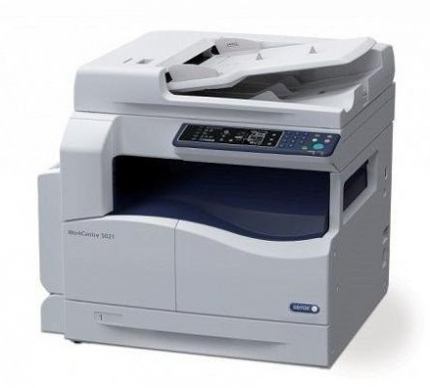
Xerox WorkCentre 5024 multifunction printer-excellent print

0

The Xerox WorkCentre 5024 monochrome multifunction printer has a compact design to
save the space. If you have any existing printer and looking for a perfect MFP replacement but don’t want spare more space,then this will ft easily. The single device packs power and
performance into a compact size. Copy, print, scan or fax in a small footprint while delivering output in paper sizes up to A3.
The WorkCentre 5024 has print speeds of up to 24 pages per minute. You can scan hard copy documents in color directly to your desktop for efficient workflows. The new, interactive user interface gives you more opportunities to choose the settings you
need to do your best work. Quickly and easily print monochrome documents, reduce or enlarge the size of your document, select text or graphics mode or set the output to one or two-sided. You can even fine-tune how light or dark you wish your final output to
be so your documents always match your job’s specifications.

Use the Layout Options feature to create complex documents such as booklets and posters using multiple paper types and settings. Keep more high-value jobs in-house and eliminate the hassle and expense of sending work out to a print shop.
There is no complex system to setup the machine. Simply plug-in USB cable to your PC or laptop and plug-in the power. It comes with a bundled software but unfortunately, it only supports to Windows OS x32 bit, if you have a PC with 64-bit configuration. Thankfully you can use third party apps to scan and print from 64 bit PC.

We tested WorkCentre 5024 printing capability, in our standard ISO test with 5% ink coverage, i printed 5 A4 pages in about 17 sec with the first page out in 8 seconds. The test included text pages, graphics pages and pages with mixed content for both black and white and color. The output quality is excellent and text looked sharp and detailed. The print quality of the image comes with good amount of details.

The optical resolution of the scanner is 600 dpi. With a scanning frequency of 18
pages per minute mono and 4 ppm color (at resolutions up to 200 dpi), the scanner fulfilled my expectations. It scanned an image in 38.21 sec with a whole lot of details and vibrant colors.The depth of output color is commendable and sharp. To copy any document it takes only 10 sec.
 Drivers for Xerox model 5024 download here

pcquest.com photo:xerox


Samsung Unveils ADT-Monitored DIY Security and Home Automation Solution Powered by SmartThings

0

Samsung, a global leader in home automation, and ADT LLC, the leading home and business security provider, together announce a new professionally monitored, self-installed life safety solution powered by the SmartThings platform. With the intelligence and connectivity of Samsung and the unmatched professional monitoring of ADT, the Samsung SmartThings ADT home security system is the safest, easiest, and most flexible DIY security and smart home solution available for families today.

Consisting of a Home Security Starter Kit and Home Safety Expansion Pack, the new solution from Samsung and ADT gives consumers the ability to create a safe and secure home and grow their connected home ecosystem as their needs evolve – all backed by ADT professional monitoring with no long-term contract.

The product is available for pre-order starting today on BestBuy.com and Samsung.com. On October 29, the product will be available in Best Buy stores as well as BestBuy.com, Samsung.com and SmartThings.com.

Without redirection, go directly to this news businesswire

Wireless charging tech vital for EV uptake

0

By 2025, more than 37 million electric vehicles (EVs) will be on the road worldwide, Navigant Research predicts. With the announcement from the UK that sales of petrol and diesel cars will be banned from 2040, it could be that we will see this figure rise as people start buying EVs ahead of that date so they aren’t left with an unsellable asset.

The interesting aspect is that this shift to EV’s is happening not only because EVs are becoming more economically viable, but, as in the UK and France, because the health concerns of operating petrol and diesel driven vehicles can no longer be ignored.

ev
pixabay

To help alleviate any concerns of operating an EV, extending their range is critical. After all, most consumers and fleet owners don’t want to constantly worry about running out of power, so for them the easiest way to avoid that drawback is to stick with conventional vehicles in the short term.

Our work in department of electrical and computer engineering at the University of Auckland is all about removing the plug-in and range anxieties associated with owning an EV.

While advances in battery technology will help with this concern and the sales barrier it creates, less obvious is the work we are doing on another aspect that’s equally important for making EVs mainstream: wireless charging. Instead of plugging in their vehicles, drivers can simply park as usual, but over a coil placed on the ground or buried in it, and the charging process happens automatically.

Without redirection, go directly to this news newsroom nz

Top browsers review-speed,unique features,security…

0

Some of the major browsers available in the market.Take a look.

Firefox
Mozilla developers are always offering products that represent the open web
concept. They always try to keep the standards of their product and versions.
Firefox, Mozilla’s web browser, has always upheld these standards and has given a
true mobile experience to its users.
All the features in Firefox are fairly standard, and their security features always keep
the users in a safe place. Also, the user can easily sync this mobile browser with their
desktop versions of Firefox and the home panel for the app is customizable with the
user’s choice. Adding to this, the swiping gestures and simple interfaces that Firefox
has work well in smartphones and tablets, which gives a very pleasant experience to
its users.

pixabay

Chrome
Since 2008, after the first release, Chrome has gradually gained the largest market
share in global Internet usage. The browser upholds Google’s reputation for
innovation and industry dominance. In the beginning, the Chrome browser got
many ideas from other browsers, but now, other browsers are inspired by Chrome.
Google Chrome’s best features are simplicity and speed, which is better than other
browsers. The browser has earned many awards for its minimum loading time and
seamless navigation.

Google Chrome offers many security features to its users to keep them safe from
malware and phishing. Its auto-update feature ensures the installation of all the
latest security fixes with ease. When a user navigates to a website that contains
malware or phishing, this browser displays a warning.
Safari
Known for its natural ease of use, Safari is Apple’s lightweight and smooth web
browser. Since 2007, Safari has become the most favorite browser in the mobile
world. The Safari browser is quick and simple to use. However, it does not have the
customization option that a large number of clients look for in a browser nowadays.
Each and every browser has some unique features, and Safari does too. Safari is
amazingly quick. It takes less than two seconds for the program to load and even less
time to navigate interfaces on the site. Safari offers various features to users, such as
tabs, spellcheck, and a secret key administrator. However, customizing the browser
is a bit diffcult. Also, Safari additionally needs parental and zoom controls.
One other main benefit that Safari has is its security features. The browser provides
security from a wide range of malware and phishing sites.

Internet Explorer
When compared to other browsers, Internet Explorer has been the longest in the run.
It was the most popular browser in the past, but it was suppressed by others because
of its lack of security and features. However, recently Microsoft has placed a heavy
focus on enhancing the security and features to give more options to users.
Internet Explorer may be not the fastest browser on the market, but Internet Explorer
has many new features such as tabbed browsing and most visited sites based on
browsing history that works great with the touchscreen. Also, the browser provides
a variety of add-ons for a fully customized browsing experience. The add-ons are
categorized into four groups such as accelerators, search providers and
toolbars. In each category, the user can find many downloads, and most of them
are free.
Internet Explorer has had an awful run in the past; many hackers attacked Windows
OS because of its larger market share, and it has affected Internet Explorer very badly.
However, the latest version of the browser had included effective updates and patches
to reduce those loopholes, and the browser provides a very user-friendly interface.

Opera mini
As we have mentioned in the previous section, if you have a limited mobile data
package, every byte you download is really important. If that person is you and,
if you don’t care about the fancy features that conventional browsers offer, you
should go with Opera Mini.
In the context of Opera Mini, the browser has a best image compression mechanism,
and auto-play videos are disabled by default. This will save you 90 percent data
compared to other browsers.
On the surface, Opera mini doesn’t have a lot of variations compared to Opera’s main
version or any other browser. However, when you try to download an image-heavy
site such as Facebook or Tumblr, you will notice the difference. The images that you
are downloading from these sites look blurry compared to other browsers, but you
will save a massive amount of mobile data.

packtpub

Methods That Simply Protect you against smartphone addiction

0

When you take a look at your smartphone for THIRTY secs and access some apps for no good reason then you should think for. If the mobile phone is the first top priority of your life, you need to back off right now. Let’s find out some successful methods to prevent this addiction so that you can concentrate on your happiness.

Modify Notifications Settings:

In fact, smartphones are developed to check notifications frequently. Therefore, it’s very evident people get addicted to it quite easily and faster.Even wanting you rarely can stop checking out those notifications. Definitely, you can stop notifications alert by going into particular application info on Android. Go to Options and head to Notification center. So, make certain you’re turning off those app’s notifications those are truly not important.Remove Unnecessary Applications:

Your smartphone is rich with many applications like FB, messenger, games and much more. But every you have on your phone is seriously necessary? So, get rid of out all those unnecessary apps for now. Therefore, it will not only give you some free time, but also free space on your device.

Set a Limit For Mobile phone Usage:

A limitation in almost everything is required. So, set the length of time to use your smartphone. For example, while you’re having your meals, when you’re with your close friends or you’re in social events. You’ve to decide when you will use the mobile phone and when you won’t.

Turn Off Phone Before Going To Rest:

Many of us go to bed with the mobile phone in their hands. We check out our social apps or websites, play games and listen to music for hours in the smartphone just before going to sleep. But, using electronic devices before bed is really dangerous to our health. It will be a much better move if you simply switch off your phone or continue to keep it on silent mode, keep it far away from the bed and it will also allow you a much better good night sleep.Use Third-Party Applications:

There are a lot of apps available on Play Store to manage mobile phone consumption. So, you can enable Rescue Time and App Detox functions on your smartphone. Such apps are going to monitor your usage and place limit when needed. One of my preferred Android apps called BreakFree available on Google Play Store. It offers you information about your usage and applications which are using most of the time. For iOS users, this type of app is going to come shortly on iTunes.

Don’t Buy High-class Mobile phone:

A high-class device may be a trend these days. But there is hardly any need to get all those feature-rich mobile phones which are also complicated to use. You simply go for a smartphone which satisfies up with your requirements neither the mobile phone which will probably confuse you and seeks your precious time.

Toyota will use the Nvidia’s artificial intelligence platform

0

Japanese car maker Toyota Motor Corp. will use Nvidia’s artificial intelligence technology in its self-driving vehicle systems it plans to develop over the next few years.

The announcement was made by Nvidia chief executive Jensen Huang in his opening keynote at the company’s GPU Technology Conference in San Jose, reports Reuters.

Toyota will use the Nvidia’s Drive PX artificial intelligence platform, which fuses incoming data from the car’s hardware, such as cameras and radar, and uses artificial intelligence to help the car understand and react to its environment.

Source: Shutterstock

“We’re talking about not just development now but the introduction of vehicles into the market,” Nvidia’s senior director of automotive Danny Shapiro told Reuters. “Now we have the biggest (auto-maker) in Japan using our Drive PX platform.”

Nvidia is known for designing graphics processing chips for the gaming industry, but has branched out into the automotive sector creating the “brain” of self-driving cars.The company also has partnerships with Audi and Mercedes. Audi is working with Nvidia to bring a product to market by 2020 while Mercedes and Nvidia are working to bring a car to the market in the next 12 months.

Last year, Toyota set up a US-based Toyota Research Institute to focus on AI and robotics. The company is simultaneously developing full self-driving cars while also working on what it calls *guardian angel* – partially autonomous technology that may still require involvement from drivers.

How To Protect Your Files From Ransomware ?

0

You have probably heard of viruses and malware. These dangerous pieces of software can make their way into your computer and wreak havoc. Malware authors are intent on stealing your data and disrupting the proper functioning of your digital devices.

Then there is ransomware. This is crafted by cyber-criminals for extorting data from innocent users, and is rapidly becoming a threat to individuals, small business and corporate users alike.

While the concept of ransomware has existed for more than 20 years, it wasn’t until 2012 that several key technological advances aligned and allowed it to flourish.

Now ransomware has evolved. It combines file encryption, it uses “dark” networksto conceal the attacker, and uses crypto-currencies, such as Bitcoin, to prevent law enforcement from tracing the ransom payment back to the attacker’s den.For a small upfront cost and with low risk of getting caught, ransomware developers can net good returns: industry estimates range from 1,000% to 2,000% return on investment.crime ransomware

There have been many reports of Australian businesses paying ransoms. Even the authorities aren’t safe, with several police departments in the US having paid ransoms in order to recover files. And we’ve even seen reports that FBI experts have advised victims to “just pay the ransom” if they need their data.

The biggest concern with ransomware is the rate at which it is adapting to combat security protections. We recently examined the evolution of ransomware and found that ransomware developers are learning from their mistakes in previous versions. Each generation includes new features, and improved attack strategies.

We also found that over 80% of recent ransomware strains were using advanced security features that made them difficult to detect, and almost impossible to “crack”. Things don’t look good for end-users; ransomware is increasingly using advanced encryption, networking, evasion and payment technologies. The developers are also making fewer mistakes and writing “better” software.

It’s not a stretch to imagine a ransomware developer currently working on ways to attack even corporate databases, or versions that lay low while they identify all of your backup disks.

Ransomware – How To Protect Yourself ?

Here are some tips you can take to protect your files from ransomware:

  1. Keep your operating system and software up to date with the latest security patches.
  2. Use a reputable antivirus program and keep it updated.
  3. Use a firewall to block incoming connections from suspicious IP addresses.
  4. Create regular backups of your important files and store them offline or in the cloud.
  5. Use strong, unique passwords for all your accounts and enable two-factor authentication whenever possible.
  6. Be cautious when opening emails or clicking on links from unknown sources.
  7. Avoid downloading files or visiting websites from untrusted sources.
  8. Use an anti ransomware software and keep it updated.
  9. Educate yourself about the latest ransomware threats and how to protect yourself from them.
  10. Be prepared to act quickly if you do become a victim of ransomware by having a response plan in place.

There are several software options available to protect against ransomware. Some popular options include:

  1. Malwarebytes Anti-Ransomware: This software uses advanced behavioral analysis to detect and block ransomware before it can encrypt your files.
  2. Norton Anti-Ransomware: This software uses a combination of signature-based detection and behavioral-based detection to protect against ransomware.
  3. Trend Micro Ransomware File Decryptor: This software can help decrypt files that have been encrypted by certain types of ransomware.
  4. Kaspersky Anti-Ransomware Tool: This software uses machine learning techniques to detect and block ransomware attacks.
  5. Bitdefender Anti-Ransomware: This software uses behavioral-based detection and machine learning algorithms to detect and block ransomware.
  6. Windows Defender: Windows defender is a built-in anti-malware software that also includes anti-ransomware features and is included in all Windows operating system.

It’s important to note that no software can guarantee 100% protection against ransomware, so it’s important to use a combination of different security measures.

Recovering files from ransomware is impossible without the attacker’s approval, so you need to avoid data loss in the first place. The best thing you can do is practice good digital security:

Don’t fall prey to social engineering or phishing, which is where an attacker attempts to have you reveal sensitive information to them. If you receive a suspicious email from your grandma or work colleagues, ask yourself whether it’s unusual before you click. If you’re not sure, contact the sender via a different medium, such as giving them a phone call, to cross-check

  • Don’t install any software, plugins or extensions unless you know they’re from a reputable source. If in doubt, ask and only rely on trusted download sources. And certainly don’t be tempted to pick up USB sticks found on your pathway
  • Update your software regularly to ensure you are always running the latest versions
  • Important documents need to be treated like valued possessions. Grab a hand full of USB keys and rotate your backups daily or weekly, and don’t leave USB keys plugged in (current malware strains can scan removable USB disks). Having multiple copies means the adversarial effort on holding you for ransom is pretty much worthless.

HP Enterprise to slash 10 percent global jobs

0

As part of its efforts to cut costs at the company, HP Enterprise is reportedly laying off 5,000 workers globally. According to reports, the layoffs will affect about 10 percent of HPE’s workforce, including employees both in the U.S. and abroad.

Further, reports noted that the Palo Alto, California-based company, which currently hires 50,000 workers, is set to start making the cuts before the end of the year.The company, which focuses on servers, software, and consulting services for businesses, has offices around the world, including in China, Brazil, and Switzerland.

In 2015, it split from Hewlett Packard to become a separate company headed by CEO Meg Whitman. jobs global

Over the last two years as an independent organization, HPE has already undertaken several rounds of layoffs. The major restructuring was announced in June 2016 after several of the company’s veterans left.The company had then consolidated its sales organization.

Earlier this month, in a call with analysts, Whitman said the company is benefiting from growing demand across key areas of the business.

She however said that she’s pushing to cut “layers” in the organization and become more efficient.

She added, “With fewer lines of business and clear strategic priorities, we have the opportunity to create an internal structure and operating model that is simpler, nimbler and faster.”

Chief Financial Officer Tim Stonesifer had then stated that the company is targeting $1.5 billion in savings over a three-year period.

Argentina Star