Home Blog Page 4

Top 4 Less Known Browsers You Should Try

0

Discover the best less known browsers that outperform mainstream options in speed, privacy, and customization. Explore Vivaldi, Brave, Waterfox, and Pale Moon in this detailed review.

Top 4 Less Known Browsers That Deserve Your Attention

When people think of web browsers, they usually imagine the big names — Chrome, Firefox, Safari, Opera, or Edge. These giants dominate the market, but they don’t always offer the best balance of speed, privacy, features, and resource usage. Outside of the mainstream ecosystem, there are several less known browsers that outperform major competitors in specific areas. Some are focused on privacy, others on customization, and some aim to deliver the lightest, fastest browsing experience possible.

In this comprehensive review, we explore the 4 best less known browsers that genuinely deserve more recognition. Each one brings a unique philosophy to the web, and depending on your needs, they may outperform even the most popular options.

– Vivaldi – The Most Customizable of All Less Known Browsers

Overview

Vivaldi is one of the most advanced yet surprisingly less known browsers on the market. Created by former Opera employees, it carries the spirit of the old Opera browser—powerful features, deep customization, and a focus on user control. Unlike mainstream browsers that simplify the interface to appeal to casual users, Vivaldi goes in the opposite direction, giving you tools, options, and settings you won’t find anywhere else.

Key Features

 Extreme Customization

You can change almost everything:

  • Tab appearance, placement, stacking & grouping

  • Custom themes

  • Keyboard shortcuts

  • Mouse gestures

  • Complete rearrangement of UI elements

No other browser allows this level of personalization.

Vivaldi is fast,
Vivaldi browser

 Tab Stacking & Vertical Tabs

If you keep tons of tabs open, Vivaldi is a dream. With:

  • Vertical tabs (very space-efficient)

  • Tab stacks (group multiple tabs into one)

  • Two-level tab bar

This is arguably the best tab management system in any browser.

 Built-in Tools

Vivaldi eliminates the need for many extensions:

  • Screenshot tool

  • Notes app

  • Built-in email client (Vivaldi Mail)

  • Ad blocker

  • Tracker blocker

  • Translation tool

This makes it both powerful and secure.

Performance

Vivaldi is fast, but heavy. The abundance of features means it uses more RAM than minimalist browsers. Still, it’s more efficient than Chrome in multi-tab scenarios thanks to its smart memory handling.

Privacy

Very strong:

  • No tracking

  • No profiling

  • End-to-end encrypted sync

  • Based in Norway (GDPR-friendly)

Who Should Use It

  • Power users

  • Multitaskers

  • Researchers

  • Anyone who wants a browser they can mold exactly to their workflow

Final Verdict

If customization, flexibility, and productivity are your priorities, Vivaldi is hands-down the best among less known browsers available today.

– Brave Browser – The Privacy-Focused Challenger with Speed Advantages

Overview

Brave has grown rapidly, but compared to Chrome or Edge, it’s still one of the less known browsers among the general public. Brave stands out because it eliminates ads and trackers by default, making it significantly faster and more private than mainstream options.

Key Features

 Built-in Ad & Tracker Blocking (Default)

Unlike Chrome, Firefox, or Edge:

  • No extensions required

  • Ads blocked at the network level

  • 300% faster page loading in many cases

It reduces data usage, improves battery life, and eliminates common annoyances.

 Brave Shields

Brave Shields control:

  • Script blocking

  • Fingerprint protection

  • Cookie blocking

  • HTTPS upgrades

  • Cross-site tracker blocking

You can adjust every setting per site or globally.

 Brave Rewards (Optional)

Users can opt in to see non-intrusive ads, earning Basic Attention Tokens (BAT). Some love it, some ignore it, but it’s a unique concept.

 Private Tor Windows

Built-in Tor integration offers:

  • Anonymous browsing

  • Encrypted traffic routed through Tor nodes

This feature alone sets Brave apart from 99% of browsers.

Performance

One of the fastest browsers available. By removing trackers and bloated ad scripts, Brave often loads pages significantly quicker than Chrome.

Privacy

Top-tier:

  • Zero tracking

  • No user profiling

  • Based on open-source Chromium

  • Built-in fingerprinting protection

Who Should Use It

  • Privacy-conscious users

  • People who want fast browsing without add-ons

  • Chrome users who want a familiar interface but better security

Final Verdict

Brave combines speed, privacy, and quality-of-life features that make it one of the strongest less known browsers for everyday users.

– Waterfox – A Lightweight, Open-Source Browser Focused on Freedom

Overview

Waterfox is a fork of Firefox that strips out unnecessary components, telemetry, and bloat. It’s one of the less known browsers, but it has a loyal following among open-source enthusiasts who want a fast, privacy-friendly alternative to Mozilla Firefox.

Key Features

 Support for Classic Firefox Add-ons

Waterfox uniquely supports:

  • Old XUL Firefox extensions

  • New WebExtensions

  • NPAPI plugins

This allows you to run powerful add-ons no longer usable in regular Firefox.

Waterfox – A Lightweight, Open-Source Browser

 Lightweight Performance

Waterfox is:

  • Extremely fast

  • Memory-efficient

  • Minimalistic

  • Free of ads and tracking

It feels like Firefox before it became heavy.

 No Telemetry

Waterfox collects zero user data by default.
No tracking, no usage stats, no personalization.

 Open-source and transparent

Anyone can inspect the code for privacy or security reasons.

Performance

Because it removes bloat, Waterfox is:

  • Faster at startup

  • Smoother with multiple tabs

  • Better with older hardware

It is ideal for users who want a lightweight Firefox-based browser.

Privacy

Very strong:

  • No telemetry

  • Optional privacy-focused search integrations

  • Open source ensures trust

Who Should Use It

  • Open-source enthusiasts

  • Older PC / low-RAM laptop users

  • Firefox fans who miss old features

  • Anyone who wants more control over privacy

Final Verdict

Waterfox is one of the most efficient less known browsers, perfect for users who want Firefox-like customization with better speed and zero tracking.

– Pale Moon – A Classic, Speedy Browser for Power Users

Overview

Pale Moon is one of the less known browsers that focus on efficiency, customization, and a classic interface. Built from earlier Firefox source code (before the big Quantum rewrite), it preserves old design principles while keeping the browser fast and lightweight.

This makes it ideal for users who dislike modern, simplified browser UIs.

Key Features

 Support for Legacy Add-ons

Pale Moon supports:

  • Old Firefox XUL/XPCOM extensions

  • Custom Pale Moon add-ons

  • Themes that modify the entire UI

This allows extreme customization that modern browsers do not offer.

 Lightweight and Fast

Because Pale Moon avoids:

  • Telemetry

  • Heavy multi-process architecture

  • Modern UI bloat

…it runs extremely fast, even on low-spec systems.

 Classic Interface

If you miss:

  • Full menus

  • Status bars

  • Traditional toolbar customization

Pale Moon offers a refreshing return to classic browser design.

 Independent Development

Although based on old Firefox code, Pale Moon is independently maintained, with its own:

  • Security patches

  • Rendering engine (Goanna)

  • Add-on ecosystem

This makes it a unique browser, not just a clone.

Performance

Very fast, especially for:

  • Older PCs

  • Lightweight web browsing

  • Users who keep many tabs open

Pale Moon can run smoothly on systems as old as 10-year-old laptops.

Privacy

Good overall, but not as advanced as Brave or Waterfox.
However:

  • No telemetry

  • No data selling

  • Fully open-source

Who Should Use It

  • Fans of classic Firefox

  • Users with older or low-end hardware

  • People who want a fast, stable browsing experience

  • Customization enthusiasts

Final Verdict

Pale Moon is a stable, fast, and customizable entry among less known browsers, especially for those who prefer traditional interface design.

Comparison: Which Less Known Browser Should You Choose?

BrowserBest ForStrengthsWeaknesses
VivaldiPower users, multitaskersCustomization, tab tools, productivity featuresSlightly heavy
BravePrivacy lovers, speed-focused usersFastest browsing, built-in protectionRewards system not for everyone
WaterfoxOpen-source fans, lightweight needsNo telemetry, add-on freedomSmaller development team
Pale MoonClassic UI lovers, old hardwareVery fast, traditional menusOld codebase, fewer modern features

Why Less Known Browsers Matter

Many users stay with Chrome or Edge simply because they come preinstalled or have strong brand recognition. But less known browsers often provide:

  • Better speed

  • Stronger privacy

  • Higher customization

  • More stability on older devices

  • Tools that replace dozens of extensions

  • Control over your own data

In many ways, they represent the true spirit of the early web—flexible, open, and user-focused.

If you’ve only used mainstream browsing options, exploring less known browsers can significantly transform your daily internet experience. Vivaldi gives unmatched customization, Brave offers cutting-edge privacy and speed, Waterfox delivers a lean open-source experience, and Pale Moon preserves the classic browser design with modern stability.

Whether you’re a power user, a privacy enthusiast, or someone with older hardware, at least one of these excellent less known browsers will match your needs better than Chrome or Edge ever could.

Best Free Popcorn Time Alternatives for Movies & TV

0

Here’s an in-depth guide on 5 best free alternatives to Popcorn Time — solutions that let you stream movies and TV shows for free, legally, using ad-supported or open-source platforms.

Popcorn Time once captured the imagination of millions by offering a slick, Netflix-style interface over torrent content. While its popularity was driven by convenience and a vast library, its reliance on unlicensed content caused serious legal and ethical concerns. If you’re looking for legal, safe, and free alternatives to Popcorn Time that still deliver a great streaming experience, there are excellent options out there.

Below, we’ll explore five of the best free Popcorn Time alternatives — each with a different flavor, from on-demand streaming to live TV and media center solutions. Whether you prioritize legality, ease of use, or breadth of content, there’s something here for you.

1. Stremio

What Is Stremio?

Stremio is a powerful media center application that allows you to stream content from various sources, both local and online. It supports add-ons (some official, some third-party) that enable access to a wide variety of content.

Why It’s a Great Alternative

  • Modular Add-on System: With Stremio, you can install add-ons to customize where you stream from — similar to how Popcorn Time scrapes different torrent sources.

     watch all favorite TV shows
    stremio photo
  • Real-Debrid Support: For even smoother playback, Stremio supports Real-Debrid (and other “debrid” services), which helps it fetch high-quality links from multiple sources.

  • No Ads in Core App: According to its developers, Stremio itself doesn’t push ads in the app — your experience depends mostly on the add-ons you choose.

  • Cross-Platform: Works on Windows, macOS, Linux, Android, iOS, and even on devices like the Steam Deck.

  • Library & Sync: You can build a library of what you want to watch, and your watch history syncs across devices, making Stremio feel like a modern, central streaming hub.

Things to Be Careful About

  • Not all add-ons are “official.” Some third-party add-ons aggregate pirated content, which introduces legal risk. As one guide warns: “stick to the official ones … many unofficial Stremio add-ons … can get you in legal hot water.”

  • Using Real-Debrid or similar services may require payment for those specific services (though Stremio itself remains free).

2. Kodi

What Is Kodi?

Kodi is an open-source media center software designed to run on a variety of platforms. Originally built for organizing and playing local media, Kodi has evolved into a very extensible tool through its extensive add-on ecosystem.

Why Kodi Works as a Popcorn Time Alternative

  • Highly Customizable: You can install a variety of add-ons to access legal streaming content, live TV, network TV, and more.

  • Media Library Management: Kodi excels at organizing your local media — but with the right add-ons, it can also browse and stream online content.

  • Device Flexibility: Available on Windows, macOS, Linux, various TVs, Android, and more.

  • Community-Driven and Open Source: Because Kodi is open-source, there’s a strong community, constant updates, and transparency.

Drawbacks to Consider

  • Setup Complexity: Kodi’s flexibility comes at a cost — you’ll probably spend time picking, installing, and configuring add-ons.

  • Add-on Legality: Just like with Stremio, not all Kodi add-ons are legal. You need to be careful and choose reputable, licensed sources.

  • Ad Burden: Some free add-ons may show ads, depending on how they’re monetized.

3. Plex

What Is Plex?

Plex started as a media-server solution, letting you serve your locally stored movies, music, and photos to all your devices. Over time, it has grown to include a free, ad-supported streaming service with on-demand content and live TV channels.

Why Plex Is a Strong Alternative

  • Free Library + Live Channels: Plex offers a large library of on-demand movies and TV shows, and also hundreds of live TV channels — all free, supported by ads.

  • Cross-Device Support: Works on almost every platform: desktops, mobile, smart TVs, streaming boxes, etc.

  • Personal Media Integration: If you already have a collection of your own movies or shows, Plex can integrate them seamlessly, giving you a unified “Netflix + my library” feel.

  • Legal and Licensed: Plex sources its ad-supported content from legitimate partners — so it’s a safe, legal way to stream.

Trade-Offs

  • Ads: Because it’s free, you’ll encounter commercials — though Plex generally keeps them reasonable.

  • Library Size: While growing, the free catalog may not have all the latest blockbuster hits (compared to major paid services).

  • Premium Features: Some Plex features (like DVR, advanced server features) require a paid Plex Pass.

4. Pluto TV

What Is Pluto TV?

Pluto TV is a Free Ad-Supported Streaming Television (FAST) service. It’s very “TV-like”: you pick a live channel (like news, sports, movies, or thematic channels) or browse on-demand titles.

Why Pluto TV Is a Great Option

  • Live TV + On-Demand: Offers 100s of live “channels” plus thousands of on-demand movies and shows.

  • No Subscription: Completely free, no credit card or sign-up required for many features.

  • Wide Device Support: Available on web, mobile devices, smart TVs, and streaming devices.

    Pluto TV is a Free Ad-Supported Streaming Television
    Pluto TV photo
  • Constantly Updated: The content library is refreshed regularly, and there are curated channels covering many genres.

  • Legal & Licensed: Backed by Paramount Streaming and other partners, Pluto TV’s content is fully licensed.

Things to Watch Out For

  • Ads Are Frequent: As with all ad-supported services, expect periodic commercial breaks.

  • Regional Restrictions: Availability and content can vary significantly by country.

  • Channel Repeats: Some users report that certain movies or shows recur often.

5. Popcornflix

What Is Popcornflix?

Popcornflix is a completely free, ad-supported streaming service for movies and TV shows. It doesn’t require a subscription, and many titles stream in HD or even 4K.

Why It’s a Good Popcorn Time Alternative

  • Truly Free and Instant: No sign-up, no credit card — just visit the site or open the app and start watching.

  • HD & 4K Content: Many of its titles are available in high-definition, and a portion streams in 4K.

  • Wide Platform Support: Works on phones, tablets, computers, smart TVs, and streaming devices.

  • Licensed Library: Popcornflix is operated by Screen Media Ventures, meaning its content is legally licensed.

  • Simple, Clean Interface: The UI is straightforward and user-friendly — very easy to navigate.

Limitations

  • Limited Latest Releases: You may not find very recent blockbusters because of licensing limitations.

  • Ad Interruptions: While ads are part of the experience, they are generally shorter and less frequent than on traditional TV.

  • Region Availability: Like many free streaming platforms, some content may be region-locked depending on where you are.

Comparison Table

Here’s a quick comparison of the five alternatives to show how they stack up:

PlatformType of ContentBusiness ModelDevices / PlatformsStrengths
StremioOn-demand + local mediaFree (some debrid services paid)Desktop, Mobile, TVModular add-ons, Real-Debrid support
KodiLocal media + add-onsOpen-source / freeDesktop, TV, MobileHighly customizable, many add-ons
PlexOn-demand + live channels + personal mediaFree with ads / Paid passDesktop, Mobile, Smart TVsUnified media + streaming, legal content
Pluto TVLive TV + On-demandFree, ad-supportedWeb, Mobile, TV DevicesLive TV feel, many channels, licensed shows
PopcornflixOn-demand movies & TVFree, ad-supportedBrowser, Mobile, TV DevicesHD/4K quality, no signup, simple UI

Which One Should You Choose?

Your choice depends on what you value most:

  1. If you want something very similar to Popcorn Time (with torrent-like sources):
    Go for Stremio. It’s the closest in terms of flexibility and content variety — but be mindful of which add-ons you use.

  2. If you want a fully customizable media hub for your own files + streaming:
    Kodi is the most powerful option.

  3. If you want licensed, legal content without worrying about add-on legality:
    Plex is a very safe pick, especially if you already have your own media collection.

  4. If you’re looking for “free TV” with channels and live programming:
    Pluto TV is designed for that cable-like experience, but for free.

  5. If you want a pure, no-frills movie streaming experience:
    Popcornflix is simple, clean, and entirely free — perfect for casual streaming.

Considerations & Tips

  • Legal & Safe Usage: Always choose alternatives that rely on legally licensed content. Kodi or Stremio add-ons may skirt legality depending on what you install — know the source.

  • Ad Tolerance: Free services mean ads. If you don’t mind occasional commercial breaks, these platforms are very viable.

  • Regional Restrictions: Some services may not be available in all countries. Check whether Pluto TV, Tubi, or Popcornflix operate in your region.

  • VPNs: While legal streaming services don’t necessarily require VPNs, using one can provide you extra privacy — especially if you’re using add-ons that check multiple sources.

  • Performance: For smoother playback, ensure you have a stable internet connection. For 4K content (e.g., on Popcornflix), you’ll need more bandwidth.

While Popcorn Time was once a go-to for its user-friendly interface and access to torrent-based content, the legal ambiguities make it a risky choice. Fortunately, there are several free and legal alternatives that deliver excellent streaming experiences — without the legal pitfalls:

  • Stremio for flexibility through add-ons,

  • Kodi for full media center control,

  • Plex for a mix of personal media and licensed content,

  • Pluto TV for a live-TV experience, and

  • Popcornflix for simple, on-demand free movies.

Each of these platforms brings something unique to the table, proving that you don’t need to rely on Popcorn Time to enjoy a rich library of films and shows for free. Give them a try, and find the one that best fits your viewing style and needs.

Poco F8 Ultra: The Next-Gen Flagship Contender

0

Here’s a detailed news about new Poco F8 Ultra with the Snapdragon 8 Elite Gen 5 — based on the latest leaks and reports.

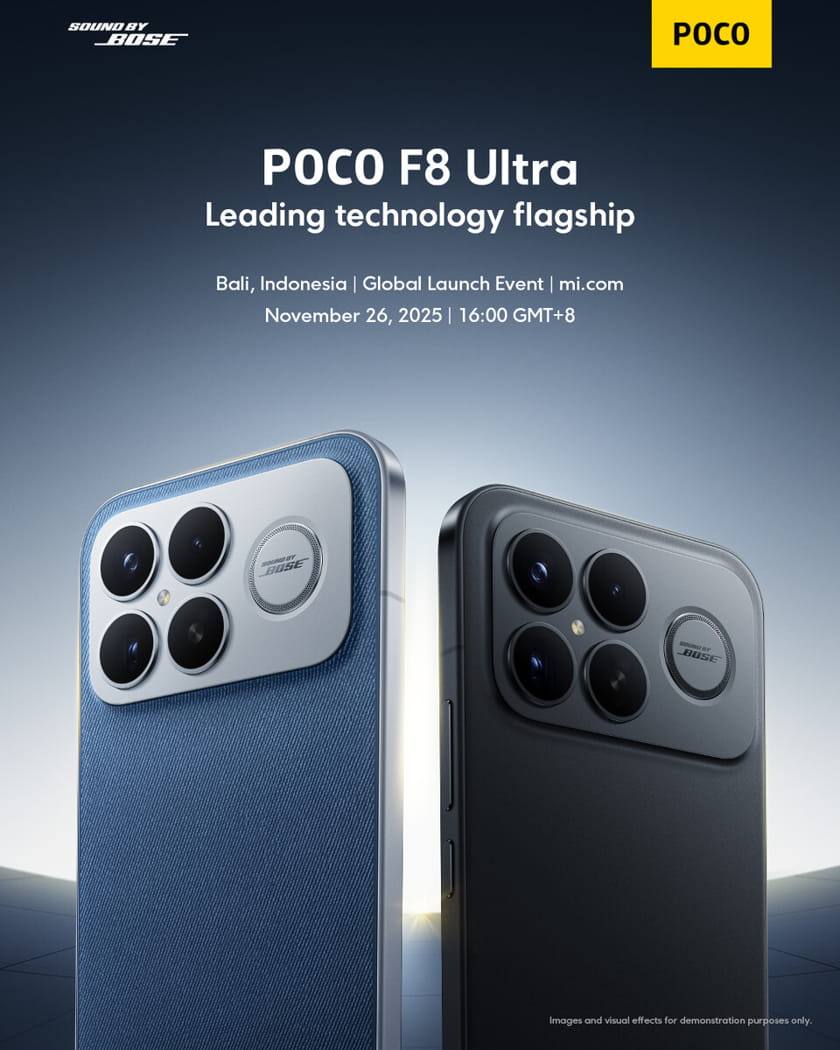
Poco has officially confirmed that the F8 series, including the F8 Ultra, will be launched globally on November 26, 2025, in Bali, Indonesia. The F8 Ultra is expected to be one of the two “Ultra/Pro” variants — likely positioned as the top-tier performance model. It is widely believed to be a rebranded version of the Redmi K90 Pro Max, adapted for the global Poco lineup.

Poco F8 Ultra: Key Specifications & Features

1. Chipset & Performance

  • The phone is confirmed (via Geekbench) to run on the Qualcomm Snapdragon 8 Elite Gen 5.

  • In the Geekbench listing, the F8 Ultra (model number 25102PCBEG) paired this SoC with 16 GB of RAM.

  • Benchmark scores: ~3,327 in single-core and ~9,872 in multi-core.

  • It’s expected to run HyperOS 3, based on Android 16.

  • The chipset likely uses a TSMC 3 nm process (as per Snapdragon 8 Elite Gen 5 architecture) and includes an Adreno 840 GPU.

    new Poco F8 Ultra
    new Poco F8 Ultra – photo

2. Display

  • Reports suggest a 2K-resolution OLED panel, likely LTPO to enable adaptive refresh rates.

  • Refresh rate is expected around 120 Hz, based on leaks.

  • According to some sources, the panel might be very bright, hinting at high peak luminance.

3. Memory & Storage

  • Variants: 12 GB or 16 GB of LPDDR5X RAM, according to leaks.

  • Storage: Potentially 256 GB, 512 GB, or even 1 TB, likely using fast UFS 4.0.

4. Cameras

  • Rear: Triple camera system, rumored to be 50 MP + 50 MP + 50 MP (main + ultra-wide + periscope).

  • Front: A 50 MP selfie shooter is also mentioned in leaks.

  • The primary rear sensor is rumored to support OIS (optical image stabilization).

5. Battery & Charging

  • Leak sources suggest a large battery in the ~7,000 mAh range.

  • Charging: Expected 100W wired fast charging plus 50W wireless charging.

  • Some reports even mention a possible 7,500 mAh capacity.

6. Build, Design & Durability

  • Frame: Rumored aerospace-grade aluminum, giving it a premium feel.

  • Back: Could be glass (matte or glossy) with anti-fingerprint coating.

  • IP Rating: Some leaks claim IP68 or higher (possibly IP69) water/dust resistance.

  • Security: In-display ultrasonic fingerprint sensor is expected.

  • Audio: There may be enhanced stereo speakers and better haptics.

7. Software & Features

  • As mentioned: HyperOS 3 on top of Android 16.

  • Connectivity: With the Snapdragon 8 Elite Gen 5, 5G support is a given.

  • AI/Performance: The Gen 5 chip is expected to deliver strong on-device AI performance (given the NPU improvements in modern Snapdragon chips).

  • Audio tuning is expected to come from Bose, according to multiple reports.

Strengths & Potential

  • Performance Powerhouse: With the Snapdragon 8 Elite Gen 5 and up to 16 GB RAM, the F8 Ultra could handle everything from heavy gaming to productivity workloads.

  • Big, Bright Display: If the LTPO OLED rumor holds, the phone would balance smoothness and efficiency well.

  • Long Battery Life + Fast Charging: A ~7,000 mAh battery plus 100W wired is a compelling combo.

  • Flagship Photography: Triple 50 MP setup, including a periscope lens, could give strong versatility.

  • Premium Build: Aluminum frame + IP rating (if real) + high-end materials = flagship feel.

  • Software Experience: HyperOS 3 on Android 16 should bring modern UI, features, and optimizations.

Risks & Challenges

  • Thermal Management: High-performance chip + big battery + fast charging = potential heating issues; Poco will need strong cooling.

  • Actual Battery Efficiency: While capacity is large, the Gen 5 chip’s power draw in real-world use will determine how long it lasts.

  • Competition: The F8 Ultra may compete with other high-performance flagships — Poco needs to justify its value.

  • Price Sensitivity: Depending on regions, storage/RAM variants, and local taxation, the final price may vary and impact adoption.

  • Durability: Leaks suggest IP68 or better, but until certified, it’s not guaranteed.

  • Software Support: While HyperOS is modern, long-term update commitments are still a concern for many buyers.

Why This Matters

  • The Poco F-series has traditionally targeted performance-focused users who want flagship-level chips at a more aggressive price. The F8 Ultra seems to double down on that strategy by adopting one of Qualcomm’s top-tier chips.

  • By using the Snapdragon 8 Elite Gen 5, Poco is positioning this device not just as a “budget flagship” but as a true high-performance contender, potentially threatening more expensive flagship lines.

  • The inclusion of a large battery + fast charging + a high-end SoC could make the F8 Ultra a go-to for power users, gamers, and productivity-focused users alike.

The Poco F8 Ultra — powered by the Snapdragon 8 Elite Gen 5 — is shaping up to be a powerhouse. If the leaks hold true, Poco may have a very compelling flagship: high performance, premium build, large battery, and versatile camera. Its success will hinge on how well the company balances performance with thermals, battery life, and price.

Given the confirmed November 26 launch and the strong leaks, this is a smartphone to watch closely. For performance enthusiasts and Poco loyalists, the F8 Ultra could be a very exciting next option.

Spec Sheet Comparison: Poco F8 Ultra vs. OnePlus 15 vs. Xiaomi 17

Here’s a breakdown of the (leaked) specs for the three Snapdragon 8 Elite Gen 5 phones, showing where each one shines and where there may be compromises.

FeaturePoco F8 UltraOnePlus 15Xiaomi 17
ChipsetSnapdragon 8 Elite Gen 5 (SM8850-AC)Snapdragon 8 Elite Gen 5Snapdragon 8 Elite Gen 5
RAM & Storage OptionsLeaked: up to 16 GB LPDDR5X12 GB / 16 GB (LPDDR5X) + UFS 4.1 (256 / 512 GB / 1 TB)Up to ~16 GB (reporting varies)
DisplayRumored 6.9″ 2K OLED / LTPO (leaks)6.78″ LTPO AMOLED, 1.5K, up to 165 Hz refresh in gaming / dynamic modes6.3″ (for base), LTPO / super-sunny OLED in some reports
Rear CamerasLeaks: 50 + 50 + 50 MP (wide + “periscope” + ultra-wide)Triple 50 MP: main + ultra-wide + 3.5× periscope (telephoto)Triple 50 MP (based on spec comparisons)
Front (Selfie) Camera~32 MP (leaked)32 MP (as per leaks)~50 MP, per some spec sheets
BatteryLeaked / rumored: ~6,500 mAh for Ultra (some leaks say lower than K90 Pro Max)7,300 mAh Si-Carbon battery (OnePlus calls it “third-gen glacier”)7,000 mAh in the base 17 model
ChargingReported / expected: 100 W wired + 50 W wireless (based on K90 Pro Max equivalence)120 W wired, 50 W wireless (leaks)100 W wired, 50 W wireless (as per confirmed 17-series details)
Build & DurabilityLeaks: possibly premium frame, IP-type rating (rumored)Reported IP66 + IP68 + IP69K on some leaksIP68 rating mentioned in some sources
AudioBased on its Redmi K90 Pro Max roots: Bose-tuned audio (2.1 speaker system)High-quality stereo, but less “subwoofer-style” than K90 / Poco; focus more on performance than audioStandard flagship-level stereo; no specialized subwoofer reported
SoftwareHyperOS 3 (Android 16) — because globally it’s a rebranded Redmi K90 Pro Max.OxygenOS 16 / ColorOS 16 (depending on region) on Android 16HyperOS (Xiaomi) on Android 16 (for 17 series)
Strengths / Key Differentiators– Very high value “performance flagship” (Poco tradition)
– Huge screen
– Possibly very good camera setup + performance
– Likely aggressive price (relative to “full flagships”)
– Massive battery + ultra-fast wired charging
– Extremely high refresh rate screen especially in burst / gaming mode
– Flagship SoC + high RAM options for gaming / performance
– Build tuned for “power users”
– More compact base model (6.3″) for users who don’t want a giant phone
– Well-balanced performance + camera
– Proven Xiaomi / HyperOS experience + strong brand support

Analysis & Trade-Offs: Which One Might be Best for You

  • If you want a big, performance-oriented phone at (potentially) lower “flagship” cost → the Poco F8 Ultra is very compelling. Based on its K90 Pro Max spec heritage, it could offer flagship-level performance with a large screen and very solid camera hardware.

  • If battery life + fast charging + gaming is a priorityOnePlus 15 stands out. Its 7,300 mAh battery is very large, and the 120 W wired + 50 W wireless charging means you can top up really fast.

  • If you prefer a more compact form factor (or value Xiaomi’s software / ecosystem) → the base Xiaomi 17 (6.3″) may be more attractive. Plus, it’s likely to share a lot of the same internal performance benefits as the other two, given that it also uses the same Snapdragon 8 Elite Gen 5 chip.

  • On the camera front, all three are promising, but the Poco / Redmi roots suggest the F8 Ultra might lean more “performance-first” rather than camera-flagship (though 50MP triple is nothing to sneeze at).

  • Thermals will be something to watch: high-performance Snapdragon 8 Elite Gen 5 phones are powerful, but with high clocks + big batteries, managing heat is always a trade-off.


– Poco F8 Ultra: Likely the best “bang for performance” play, especially if you’re willing to take a slightly bigger device and you like Poco’s value-focused philosophy.

– OnePlus 15: A beast for endurance + power — great for gamers, power users, or anyone who hates being close to the charger.

– Xiaomi 17: More balanced, more compact (in the base model), and a more mainstream flagship feel, especially for Xiaomi fans.

Guide & Top Picks: DDR5 Gaming Motherboards

0

Top DDR5 Gaming Motherboard Recommendations for 2025

The DDR5 gaming motherboard market has matured significantly in 2025, offering gamers exceptional performance options across multiple price points. Based on comprehensive testing and analysis, here are the leading DDR5 gaming motherboards currently available:

Premium Performance Leaders

MotherboardSocketChipsetDDR5 SpeedPrice RangeKey Features
ASUS ROG Strix X870E-E Gaming WiFiAM5X870E8000+ MT/sHigh-end192GB capacity, PCIe 5.0, WiFi 7
MSI MAG X870E Tomahawk WiFiAM5X870E8400 MT/sMid-high256GB capacity, excellent VRM cooling
ASUS ROG Maximus Z890 HeroLGA1851Z8909200+ MT/sPremium22+1+2+2 VRM design, Intel flagship

Mid-Range Value Champions

The mid-range segment offers exceptional value for DDR5 gaming builds:

AMD Options:

  • MSI MAG B850 Tomahawk Max WiFi: Features 8400 MT/s DDR5 support, 256GB capacity, and delivers excellent gaming performance with the 7800X3D achieving 242 FPS.
  • ASRock X870 Steel Legend: Supports DDR5 up to 8000+ MT/s with robust build quality and comprehensive connectivity options.

Intel Options:

  • MSI MAG Z890 Tomahawk WiFi: Supports DDR5 up to 9200+ MT/s with 256GB capacity and comprehensive PCIe 5.0 support.
  • MSI MAG B860 Tomahawk WiFi: Mid-range Intel option with strong DDR5 performance and value proposition.

DDR5 Technology Advances and Gaming Performance

Performance Improvements in 2025

DDR5 technology has delivered significant gaming performance improvements over DDR4. Testing results demonstrate substantial gains in modern gaming titles:

  • Cyberpunk 2077: DDR5 systems achieve over 230 FPS with high-end configurations, with excellent 1% low performance ensuring smooth gameplay.
  • Counter-Strike 2: DDR5 platforms deliver over 770 FPS, showcasing the memory’s impact on esports gaming.

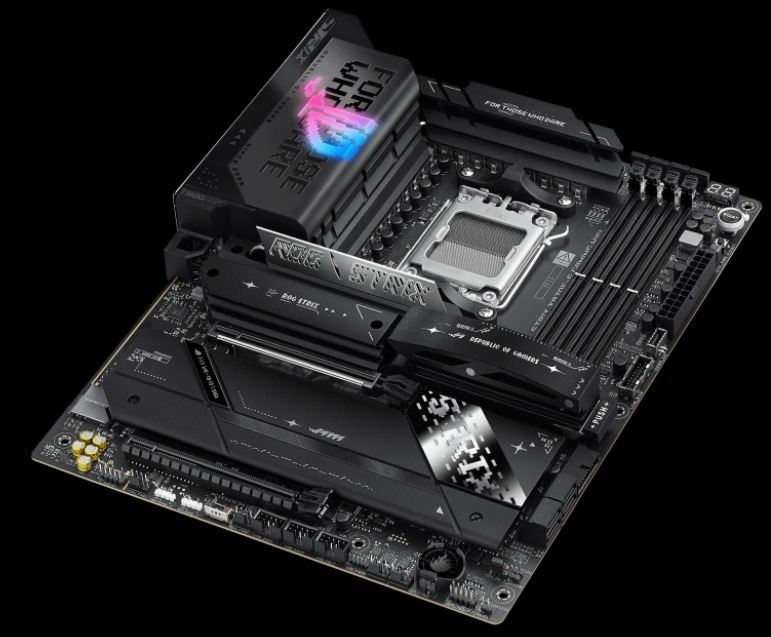
    ROG STRIX X870E-E GAMING WIFI - DDR5 gaming motherboard
    DDR5 gaming motherboard – ROG STRIX X870E-E GAMING WIFI

Key DDR5 Features for Gaming

Speed and Bandwidth: Modern DDR5 gaming motherboards support speeds ranging from 5600 MT/s (JEDEC standard) up to 9200+ MT/s with overclocking, providing significantly higher bandwidth than DDR4 .

Capacity Scaling: Latest motherboards support up to 256GB DDR5 capacity, with some premium boards supporting 192GB, enabling future-proof gaming configurations.

Efficiency Improvements: DDR5 operates at lower voltages while delivering higher performance, contributing to overall system efficiency and reduced heat generation.

Market Trends and Pricing Analysis

2025 Market Outlook

The global motherboard market, valued at $12.32 billion in 2025, is projected to reach $13.65 billion by 2032, with a CAGR of 1.5%. The gaming motherboard segment specifically shows stronger growth driven by DDR5 adoption.

The Gaming Motherboard Market, valued at $12.88 billion in 2025, is experiencing significant growth fueled by DDR5 technology adoption and enhanced gaming performance requirements.

DDR5 Pricing Trends

DDR5 prices have seen fluctuations throughout 2025, with reports indicating 3-8% price increases in Q3 2025 due to supply-demand tensions. However, overall DDR5 adoption costs have decreased compared to early 2024, making DDR5 gaming builds more accessible.

Chipset Comparison and Selection Guide

AMD AM5 Platform Options

ChipsetFeaturesTarget AudienceDDR5 Support
X870EFull feature set, PCIe 5.0, WiFi 7Enthusiasts, high-end gamingUp to 8400+ MT/s
X870Balanced features, PCIe 5.0Mainstream gamingUp to 8000+ MT/s
B850Essential gaming featuresBudget-conscious gamersUp to 8400 MT/s
B650Previous generation valueEntry-level DDR5 gamingUp to 6400+ MT/s

Intel LGA1851/1700 Platform Options

800-Series (Latest):

  • Z890: Flagship chipset with full DDR5 support up to 9200+ MT/s
  • B860: Mainstream option balancing features and cost
  • H810: Entry-level with basic DDR5 support

700-Series (Previous Generation):

  • Z790: Mature platform with excellent DDR5 support and value
  • B760: Budget-friendly option for DDR5 gaming builds

Essential Features for DDR5 Gaming Motherboards

VRM Design and Power Delivery

Modern DDR5 gaming motherboards feature robust VRM designs to support high-performance CPUs and memory overclocking:

  • Premium Boards: 18+2+2 to 22+1+2+2 phase designs for flagship processors
  • Mid-range Options: 14+2+1 to 16+2+1 configurations for balanced performance
  • Enhanced Cooling: Advanced heatsink designs and thermal management for sustained performance

Connectivity and Expansion

PCIe 5.0 Support: Essential for future GPU and storage compatibility, with latest motherboards offering multiple PCIe 5.0 slots.

Storage Options: Multiple M.2 slots with PCIe 5.0 support enable high-speed SSD configurations for gaming libraries.

Network Connectivity: WiFi 7, Bluetooth 5.4, and high-speed Ethernet ensure optimal online gaming performance .

Compatibility and Upgrade Considerations

CPU Compatibility

DDR5 motherboards require compatible processors:

  • AMD: Ryzen 7000 and 9000 series (AM5 socket)
  • Intel: 12th gen and newer (LGA1700/1851)

DDR5 is not backward compatible with DDR4, requiring a complete platform upgrade

Future-Proofing Benefits

DDR5 gaming motherboards offer significant future-proofing advantages:

  • Extended memory capacity support (up to 256GB)
  • Higher speed headroom for future memory modules
  • Advanced connectivity standards preparation
  • Support for next-generation processors

Installation and Build Considerations

EZ DIY Features

Modern DDR5 gaming motherboards incorporate user-friendly installation features:

  • Quick-release mechanisms for GPUs and M.2 SSDs
  • Pre-installed I/O shields
  • Clear component labeling and documentation
  • Debug displays for troubleshooting

Thermal Management

Effective cooling solutions are crucial for DDR5 gaming performance:

  • Enhanced VRM heatsinks for sustained overclocking
  • M.2 heatsinks for storage temperature control
  • Optimized airflow designs for overall system cooling

Buying Recommendations by Budget

High-End Gaming ($300-500+)

  • ASUS ROG Strix X870E-E Gaming WiFi for AMD builds
  • ASUS ROG Maximus Z890 Hero for Intel systems
  • Focus on premium VRM designs and extensive features

Mid-Range Gaming ($150-300)

  • MSI MAG B850 Tomahawk Max WiFi for AMD
  • MSI MAG Z890 Tomahawk WiFi for Intel
  • Balance of performance and value with essential gaming features

Budget Gaming ($100-200)

  • Previous generation B650 boards for AMD
  • B760 options for Intel 12th/13th gen
  • Basic DDR5 support with room for future upgrades

DDR5 gaming motherboards have reached maturity in 2025, offering exceptional performance improvements over DDR4 platforms. The technology provides substantial gaming performance gains, future-proofing capabilities, and enhanced system efficiency. Whether building a high-end enthusiast system or a budget-conscious gaming rig, DDR5 motherboards now offer compelling options across all price segments, making the transition from DDR4 both practical and beneficial for modern gaming applications.

7 Top VR PC Games Under 1GB

0
Virtual Reality (VR) has revolutionized gaming, plunging players into immersive worlds that traditional screens simply can’t replicate. You’re not just controlling a character—you are the character, moving, reacting, and feeling every moment.
But first, what exactly are VR games? They’re interactive experiences designed for VR headsets, using motion tracking and spatial audio to create a convincing alternate reality. Swing a sword, aim a gun, or cast a fishing line—your real-world movements translate directly into the game, making everything feel startlingly lifelike.

VR Game Genres at a Glance

VR spans a wide range of styles to suit every mood:

  • First-Person Shooters (FPS): Heart-pounding combat where every bullet and dodge feels personal.
  • Puzzle & Adventure: Brain-teasing challenges wrapped in rich narratives and discovery.
  • Simulations: Lifelike recreations of driving, flying, or managing complex systems.
  • Exploration: Vast digital landscapes filled with secrets and wonder.
  • Horror: Pulse-racing tension that exploits VR’s intimacy to maximum scare factor.


The Best VR PC Games Under 1GB

Island Time
Stranded after a shipwreck, you awaken on a tiny desert island with nothing but wits and whatever washes ashore. Scavenge for food, craft primitive tools (spears from driftwood, anyone?), and fend off wildlife while managing hunger and resources. The longer you last, the more the island reveals—hidden caches, rare materials, and new crafting possibilities. Your only companion? A sarcastic crab named Carl, who dishes out survival tips with a side of sass.

Island Time
Island Time VR game – photo
Vrkshop
Step into a judgment-free woodworking paradise. Armed with authentic hand tools—saws, chisels, clamps, and a rainbow of lumber types—you’re free to tackle guided projects or go rogue in sandbox mode. Measure twice, cut once, then admire your handiwork. The real magic? Steam Workshop integration lets you browse community creations, download blueprints, or upload your masterpieces. Pro tips: master the cloning tool for rapid prototyping and organize your pegboard like a true craftsman.
Undead Development
Part fortress builder, part zombie apocalypse simulator. Scour abandoned buildings for weapons, ammo, and barricade materials, then transform any structure into a death trap. Nail furniture to windows, reinforce doors with scavenged planks, and get creative—mount axes to rifles, rig bear traps to baseball bats, or create spiked barricades. Waves of undead test your engineering nightly. With multiple maps, endless loot combinations, and a physics-based nailing system, every defense feels uniquely yours.
Catch & Release
Escape to a pristine alpine lake surrounded by towering pines and jagged peaks. This isn’t just fishing—it’s mindfulness in VR. Row your boat to hidden coves, select the perfect lure, and battle trophy fish that fight back with realistic physics. Between casts, crank up the radio, skip stones across mirror-smooth water, or simply soak in the scenery. Success demands patience: read the water, tire out your catch, and time that final reel-in perfectly. Pure relaxation with just enough challenge.
Fruit Ninja VR
The arcade classic explodes into 3D mayhem. Dual-wield katanas to dice flying fruit in spectacular slow-motion combos, now with depth, distance, and physics. Classic, Zen, and Arcade modes get VR-exclusive arenas, while new additions include: rhythm-based slicing to thumping soundtracks, long-range archery with explosive fruit bows, and reflex-testing whack-a-fruit mini-games. Earn blades with special effects (pixel art, frost trails, fire) and unlock secret areas across the vibrant world of Fruitasia.

Fruit Ninja VR
Fruit Ninja VR – photo
Prison Boss VR
Live the clandestine life of a jailhouse entrepreneur. From the confines of your 6×8 cell, master 11 black-market crafts: roll cigarettes with precise gestures, ferment prison hooch in hidden containers, bake contraband cookies. Trade with a daily visitor whose prices fluctuate like the stock market. Reputation unlocks cell upgrades—furniture, hiding spots, better tools—but guards patrol regularly. Three modes (Story, Arcade, Boss) span four unique prisons, with 80+ jobs and a swinging jazz soundtrack setting the speakeasy mood.
The Thrill of the Fight
Boxing, distilled to its raw, physical essence. No button-mashing—just you, your fists, and opponents who punch, weave, and counter with authentic technique. The physics engine tracks every jab, hook, and uppercut with 1:1 motion, while smart simplifications keep matches flowing without frustration. Dodge by actually moving your head; block by raising your guard. Matches are won through stamina, strategy, and real sweat. Requires a 2m x 2m play space and rewards physical movement—no teleportation or joystick crutches here.
All games confirmed under 1GB installed size and compatible with major PC VR headsets.

Quick Picks – VR PC Games <1GB

Game
Genre
Size
Short Desc
Island Time
Survival
~1GB
Shipwrecked on a tiny isle; craft, fish, survive with crab pal Carl.
vrkshop
Woodworking
<1GB
Free-build with realistic tools; Steam Workshop sharing.
Undead Development
Zombie Builder
<1GB
Scavenge, nail traps/weapons, defend bases from hordes.
Catch & Release
Fishing Sim
<1GB
Rowboat on alpine lake; realistic casts, fights, chill vibes.
Fruit Ninja VR
Arcade Slicer
<1GB
Dual blades dice flying fruit; modes, combos, global battles.
Prison Boss VR
Crafting Tycoon
~1GB
Jail contraband empire: roll smokes, brew hooch, dodge guards.
Thrill of the Fight
Boxing
<1GB
Physics punches, dodges; climb ranks in sweaty ring bouts.


Top 3 Android TV boxes for 2026 — in-depth review

0

Transform your regular television into a powerful smart entertainment hub with the Android TV Box. Designed for speed, clarity, and convenience, this compact device lets you stream movies, shows, music, and games in stunning 4K Ultra HD quality. Powered by the Android TV operating system, it gives you seamless access to Google Play Store, YouTube, Netflix, Disney+, Prime Video, and thousands of other apps.

With built-in Google Assistant and voice control, you can easily search for your favorite content, control smart home devices, or get updates — all hands-free. The Android TV Box supports Wi-Fi and Bluetooth connectivity, ensuring fast streaming and smooth performance.

Whether you’re watching live sports, playing Android games, or exploring the latest streaming platforms, the Android TV Box delivers a fast, fluid experience with vibrant colors, rich sound, and an intuitive interface that’s easy for everyone to use.

Key Features:

  • Android TV OS with Google certification

  • 4K Ultra HD streaming with HDR10 support

  • Built-in Google Assistant and Chromecast

  • Dual-band Wi-Fi & Bluetooth connectivity

  • HDMI, USB, and Ethernet ports for versatile connections

  • Access to thousands of apps via Google Play Store

  • Compact design and energy-efficient performance

If you want raw performance, longevity and the best home-theatre features, get the NVIDIA SHIELD TV Pro. If you want the smoothest Google-native experience, smart-home integration and a current, supported Google device, the Google TV Streamer (4K) is the no-nonsense pick. If value and certified streaming (Netflix/Disney+/AV1) matter, the MECOOL KM9 Pro Max gives the best bang for your buck.

1) NVIDIA SHIELD TV Pro — the performance & home-theatre king

What it is (essentials)

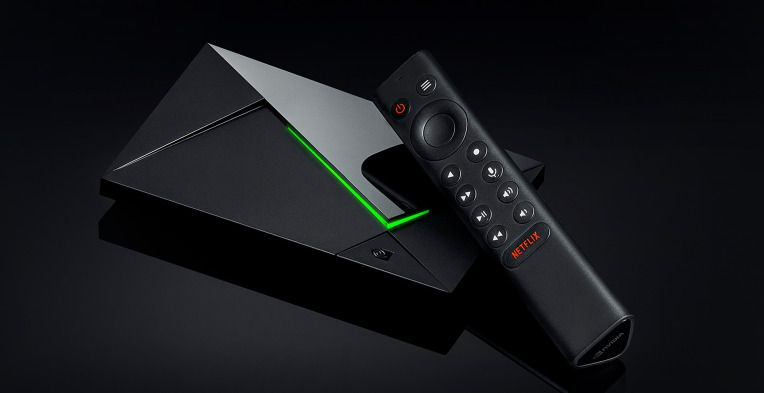
The SHIELD TV Pro is NVIDIA’s high-end Android-TV/Google-TV family member aimed at enthusiasts: Tegra X1+ SoC, AI upscaling, wide codec support, Plex/Emby power-user features and GeForce NOW/cloud gaming. It’s the box that still sets the bar for AV fidelity and advanced features.

NVIDIA SHIELD TV Pro

Standout specs & features

  • SoC & graphics: NVIDIA Tegra X1+ (real-world fluid UI and GPU headroom for advanced upscaling).

  • AI upscaling: real-time enhancement of HD to near-4K for many sources — useful for older Blu-rays and streaming.

  • Video/audio: Dolby Vision + HDR10, Dolby Atmos passthrough, accurate frame-rate matching.

  • Ports: Gigabit Ethernet, USB 3.0 (useful for network shares, Plex server storage), reliable remote and controller support.

  • Software & ecosystem: Nvidia maintains a good update cadence for SHIELD and it’s the easiest device for cloud gaming (GeForce NOW) and local game streaming (GameStream).

Real-world performance

UI navigation is snappy, and the Tegra X1+ still outperforms nearly every cheap Amlogic/Realtek box in decoding overhead and sustained playback. The SHIELD excels when you want lossless audio passthrough to an AVR and accurate frame-rate switching (important for cinephiles). AI upscaling works best on well-lit, constant scenes — it sharpens edges, reduces blur and often makes 1080p content feel less soft when stretched to 4K. Reviews from AV-focused sites and SHIELD’s own spec pages consistently show that it remains the reference among Android boxes.

Pros

  • Best audio/video support and home-theatre features.

  • Strong community, proven longevity and frequent third-party apps that support it.

  • Excellent for local media servers, Kodi, Plex, Emby and high-bitrate files.

Cons

  • Price: it’s at the premium end (often ~$150–$200 at retail).

  • Not the newest SoC design — it’s a mature, refined platform rather than bleeding-edge silicon (but that maturity is why it’s stable).

  • Some advanced features (like AV1 hardware decoding) aren’t native if your SHIELD is an older revision; check the model year.

Who should buy it?

Buy SHIELD if you want the best AV experience, plan to use cloud/local gaming, or run a home-server/HTPC workflow. If you’re an enthusiast who demands accurate audio passthrough and long firmware support — this is the box to beat.

2) Google TV Streamer (4K) — the modern Google device with smart-home + Google ecosystem

What it is (essentials)

In 2024–25 Google retired the old Chromecast dongle line and introduced the Google TV Streamer (4K) as the next-generation, more powerful Google device. It’s Google’s answer to people who want a first-party Google experience with better performance, more storage and built-in smart-home (Thread/Matter) capabilities. This is the device Google pushes now as “the” Google TV reference.

Standout specs & features

  • CPU & memory: newer processor and more RAM/storage than the older Chromecast family (Google lists expanded storage and a faster SoC on the official product page).

  • AV: 4K with Dolby Vision and Dolby Atmos support; built-in Google TV UI and Google Assistant.

  • Smart home: Thread border router + Matter support (useful if you have a smart-home ecosystem and want the Streamer to act as a hub).

Real-world performance

The Streamer is the easiest choice for users who want a tightly integrated Google experience — profile management, recommendations across services and a polished remote. Performance is a step up from older Chromecast dongles and the Streamer’s extra storage is noticeably helpful for installing apps and handling OTA updates. Some early reviews called out that it isn’t dramatically faster than the last Chromecast, but the improved smart-home features and the new form factor are genuine wins for many.

Google TV Streamer
Google TV Streamer

Pros

  • Best first-party Google experience and long-term compatibility with Google services.

  • Solid smart-home integration (Thread/Matter).

  • Good 4K HDR support and an ergonomically updated remote (find-my-remote features, programmable buttons).

Cons

  • Not the rawest performer for gaming or heavy local transcoding compared to SHIELD.

  • Price point is higher than some budget boxes (but it’s positioned as official Google hardware).

  • A few early firmware quirks were reported by power users (Google rolled fixes in OTA updates).

Who should buy it?

If you live inside Google’s ecosystem, use Google Photos, Nest devices and want a manufacturer-backed Google TV device with smart-home hub features, this is the most straightforward pick. It’s also the most “future-proof” if you care about first-party updates from Google.

3) MECOOL KM9 Pro Max — the best value certified Google TV box

What it is (essentials)

MECOOL has carved a niche delivering Google-certified boxes at aggressive prices. The KM9 Pro Max is one of the best mid-range Google TV boxes in 2024–2026: Google/Netflix certified, AV1 decoding, HDR10+/AFR and good real-world UI optimization. Several outlets praised it as a near-Shield experience for a fraction of the price.

Standout specs & features

  • System & codecs: Google TV based on Android 12 (officially certified), AV1 hardware decoding, HDR10+, Dolby audio (implementation varies by firmware).

  • Memory & storage: commonly configured at 2GB RAM / 32GB storage (enough for typical streaming and a handful of apps).

  • Connectivity: Wi-Fi 5 dual-band, 10/100M Ethernet on many SKUs, and an intuitive bundled remote.

    MECOOL KM9 Pro Max
    MECOOL KM9 Pro Max

Real-world performance

The KM9 Pro Max punches above its weight. UI responsiveness is impressive for a device with 2GB RAM because MeCOOL optimizes the launcher and Google TV build. It supports Auto Frame Rate (AFR) and is generally certified for Netflix 4K and Disney+ where supported — a big plus for buyers who care about native streaming certification. Reviewers repeatedly noted that for day-to-day streaming it feels very close to higher-end boxes.

Pros

  • Unbeatable price/performance ratio; often heavily discounted.

  • Official Google certification + Netflix/Disney+ certifications make it usable for subscription HD/4K.

  • AV1 support (improves bandwidth efficiency and future-proofs streaming).

Cons

  • Build quality and long-term firmware support are not at NVIDIA/Google levels — check the seller and warranty.

  • Ethernet is 10/100 on many models (not Gigabit), so cadence for large local 4K files is reduced unless you use Wi-Fi or USB storage.

  • Some advanced audio formats and niche passthrough behaviours can be inconsistent across firmware versions.

Who should buy it?

If you want certified 4K streaming without paying SHIELD/first-party prices, or need AV1 for future-proofing, the KM9 Pro Max is an excellent choice. It’s ideal for living rooms where streaming is the primary use and heavy gaming/local transcoding are not priorities.

Important buying caution: malware & uncertified boxes (a short security note)

One of the biggest hidden risks in the Android TV box market is uncertified, cheap devices with firmware that contains malware or backdoors. Security researchers, Google and the FBI warned about the “BADBOX 2.0” operation that infected millions of uncertified Android-based devices (cheap TV boxes, projectors, picture frames) through preinstalled or malicious setup apps; Google has taken legal action and Play Protect measures to disruptive effect. The practical advice: buy devices that are Google-certified (or from reputable vendors), avoid random no-name boxes from untrusted sellers, and keep firmware/Play Protect turned on.

Quick comparison (practical checklist)

  • Best AV + gaming: NVIDIA SHIELD TV Pro — AI upscaling, best passthrough and GeForce NOW.

  • Best Google ecosystem + smart-home hub: Google TV Streamer (4K) — official Google device, Thread/Matter, polished Google TV.

  • Best value / certified streaming: MECOOL KM9 Pro Max — Google/Netflix certified, AV1, great price.

Practical buying tips (what to check before you buy)

  1. Certification: Look for Google Certified and Netflix 4K labels if you need official app support and DRM (Widevine L1). Certified devices get better support and fewer streaming issues.

  2. Codec support: AV1 is now standard for future streaming efficiency — prefer boxes with AV1 hardware decode. (KM9 Pro Max and many modern boxes include AV1.)

  3. Ethernet & HDMI: If you stream high-bitrate local files, prefer Gigabit Ethernet and HDMI 2.1 (or 2.0b minimum) depending on your TV/receiver. SHIELD has GigE and USB3; many budget boxes do not.

  4. Software updates & community: A device with an active community and proven update track is simpler to keep secure and compatible. SHIELD and Google Streamer have the best track record here.

Which one Android TV Box to pick?

  • If you’re building a high-fidelity living room (AV receiver, TrueHD/DTS-X, want game streaming and local media), buy the NVIDIA SHIELD TV Pro. It’s the most dependable, highest-capability box for enthusiasts.

  • If you want the cleanest Google experience, smart-home integration, and an official Google device, choose the Google TV Streamer (4K). It’s the simplest long-term pick for users in the Google ecosystem.

  • If your budget matters and you still want certified 4K streaming + AV1 support, go for the MECOOL KM9 Pro Max — it gives the best price/performance for straight-up streaming.

AMD Threadripper 9000 Series: Ultimate Zen 5 CPU Guide

0

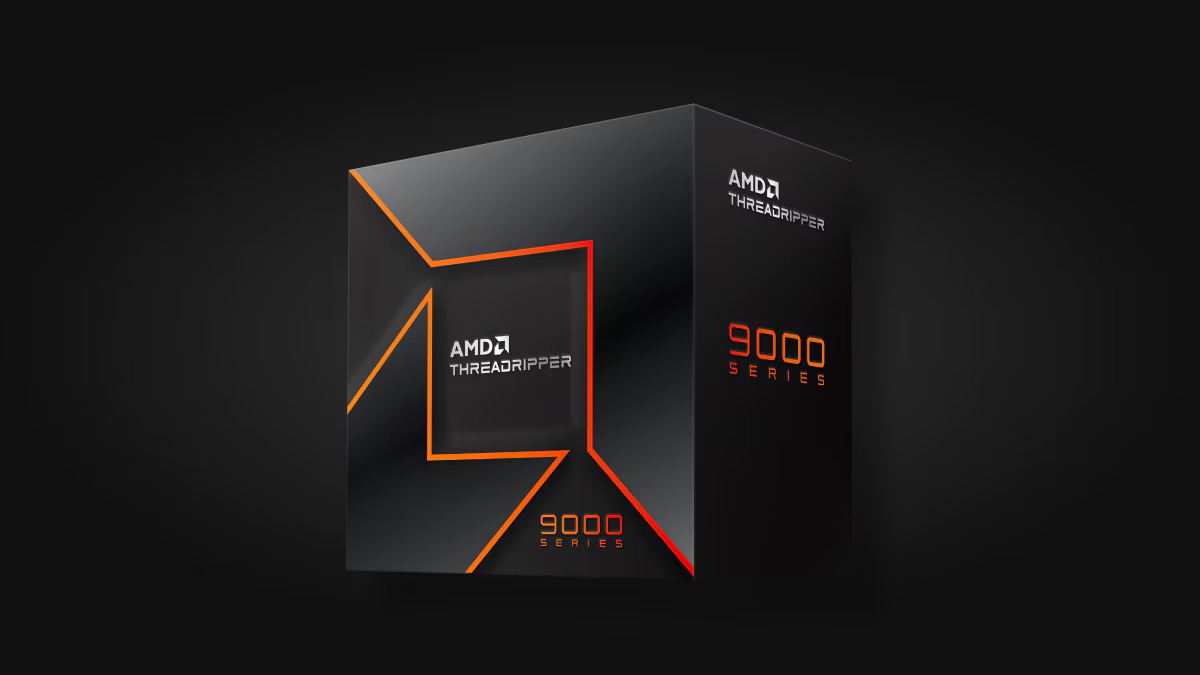
The AMD Threadripper 9000 series brings HEDT and workstation computing back into focus. Built on the Zen 5 architecture, these CPUs deliver extraordinary multi-thread performance, cutting-edge platform features, and the bandwidth modern creative and AI workloads demand.

Next-Gen Zen 5 Architecture

Threadripper 9000 CPUs use AMD’s 4 nm Zen 5 design, offering higher IPC and improved power efficiency. Depending on the model, users can access up to 96 cores and 192 threads, making them ideal for rendering, simulation, code compilation, or local AI workloads.

Threadripper 9000
Threadripper 9000 & Threadripper PRO – images: AMD

Two Platforms: TRX50 vs WRX90

TRX50 (sTR5 socket) targets high-end desktop and prosumer creators. It supports quad-channel DDR5 memory and up to 80 PCIe 5.0 lanes, perfect for multi-GPU and NVMe RAID setups.

WRX90 (sWRX9 socket) powers the Threadripper Pro 9000WX series. It doubles memory channels to eight, adds ECC DDR5 support, and expands connectivity to 128 PCIe 5.0 lanes, delivering true workstation bandwidth for engineers, AI developers, and VFX professionals.

In 3D rendering, video editing, and software compilation, Threadripper 9000 cuts render and build times dramatically. Studios using CPU renderers such as Arnold or V-Ray can see near-linear scaling up to 96 cores. AI developers also benefit from vast I/O and memory bandwidth for data preprocessing and multi-GPU inference pipelines.

While mainstream Ryzen processors are still excellent for gaming, the Threadripper 9000 excels in parallel compute workloads where every core counts.

Platform Highlights

  • Memory: DDR5 6400 MT/s (TRX50), octa-channel ECC DDR5 (WRX90)

  • PCIe 5.0 lanes: 80 (HEDT) / 128 (Pro WX)

  • TDP: ≈ 350 W — requires high-end cooling

  • Overclocking: Supported; robust VRM motherboards recommended

For builders, the platform provides freedom to design extreme systems — multi-GPU AI rigs, ultra-fast NVMe RAID arrays, or heavy compute nodes.

Cooling and Power Recommendations

Due to its 350 W power envelope, Threadripper 9000 requires a 360 mm AIO or custom water loop. Combine that with a 1000 W+ PSU for single-GPU systems, or 1600 W+ for multi-GPU workstations. Proper airflow and BIOS tuning ensure stable sustained boosts during long renders.

AMD’s Threadripper 9000 series marks the company’s return to high-end desktop (HEDT) and workstation dominance with Zen 5 microarchitecture, massive core counts, and platform improvements aimed squarely at creators, engineers, and AI developers. Whether you’re rendering photoreal scenes, compiling enormous codebases, training or fine-tuning models, or driving multi-GPU workstations, Threadripper 9000 offers a platform designed to remove bottlenecks and accelerate real-world workflows. Below is a complete, SEO-friendly deep dive into what the 9000 series brings, how it compares to alternatives, and practical guidance for buying and building around it.

What is the Threadripper 9000 series?

The Threadripper 9000 family is AMD’s latest lineup of HEDT and workstation processors based on the Zen 5 core, spanning both consumer HEDT Threadripper SKUs and the higher-capability Threadripper Pro WX workstation SKUs. The HEDT family targets high-end desktop users (TRX50 platform) with up to 64 cores/128 threads, while the Pro WX family scales even higher — up to 96 cores/192 threads — with more memory channels and increased PCIe lanes for dense GPU and storage configurations. These CPUs are built to tackle massive multi-threaded workloads and heavy I/O demands.

AMD Threadripper 9000

Key headline specs (what matters most)

  • Microarchitecture: Zen 5 (4nm process) — higher IPC and efficiency than prior Zen generations.

  • Core counts: HEDT Threadripper models up to 64 cores / 128 threads; Threadripper Pro WX models up to 96 cores / 192 threads.

  • Memory: HEDT TRX50: quad-channel DDR5 (up to DDR5-6400); Pro WRX90: octa-channel DDR5 ECC on Pro WX parts (greater capacity and bandwidth for datasets and large scenes).

  • PCIe: Up to 80 PCIe 5.0 lanes on HEDT models (optimized for multi-GPU + NVMe), and up to 128 PCIe 5.0 lanes on Pro variants for very dense I/O.

  • Power envelope: Typical package TDP around 350 W — high power, so plan cooling and VRM accordingly.

These headline numbers underline AMD’s positioning: raw parallel compute plus platform bandwidth rather than incremental single-thread cache tweaks.

Platform breakdown — TRX50 vs WRX90

Understanding which platform you need is critical:

  • TRX50 (sTR5 socket) — Targets HEDT builders and creators. Typically offers quad-channel DDR5, up to 80 PCIe 5.0 lanes, and works with consumer-class workstation motherboards geared for prosumers who still want a powerful desktop experience. Best for creators who need high core counts combined with workstation-level I/O without stepping fully into enterprise pricing.

  • WRX90 (sWRX9 socket) — Threadripper Pro WX — Enterprise/workstation platform: octa-channel DDR5 ECC, more PCIe lanes (up to 128), and higher memory capacity limits. Ideal for VFX studios, simulation engineers, and AI teams who need the absolute maximum memory bandwidth and I/O density. Pro WX models are often sold through OEM workstation channels.

Real-world performance — where Threadripper 9000 shines

Threadripper’s strengths show up in workloads that can parallelize:

  • 3D rendering and ray tracing — CPU-bound renderers (e.g., CPU V-Ray, Arnold) scale almost linearly with core count; the 64- and 96-core options dramatically cut render times. Review benchmarks and studio tests show large multi-core lead over mainstream desktop CPUs and strong competitiveness versus Intel’s server/workstation parts in multi-threaded rendering.

  • Video encoding & transcoding — When multiple high-bitrate timelines or simultaneous encodes are required, extra cores provide clear throughput advantages. Note: GPU acceleration still matters for many codecs, but CPUs determine how many concurrent streams you can process without GPU saturation.

  • Compiling large codebases — More cores shorten full-build times for huge projects or when parallel compilation is used.

  • Local AI model fine-tuning & inference — The Pro WX variants, with their memory capacity and PCIe lanes, are particularly useful for inference pipelines and multi-GPU model training or finetuning where fast CPU pre/post-processing and I/O are crucial. AMD highlights Threadripper 9000’s suitability for AI development.

Benchmarks from independent labs show that while single-thread performance is competitive, the real advantage is throughput on highly parallel tasks. For workloads limited by GPU compute or by single-thread latency, the uplift will be smaller.

Power, thermals and cooling — plan for it

A 350 W TDP and the thermal density of up to 64 or 96 cores mean cooling and power delivery are not optional details — they’re companions in any build:

  • Cooling: High-end AIO liquid coolers (360 mm) or custom-loop water cooling is recommended for consistent sustained boost; extreme overclocking has already been seen with LN2 in labs. Also ensure case airflow supports heat rejection from radiators.

  • Motherboard VRMs: Look for professional-grade VRM designs with robust phases and heatsinks. Pro-class motherboards for WRX90 often include heavier-duty VRMs by default.

  • Power supply: Large builds with multiple GPUs plus a 350 W CPU demand high wattage PSUs (1000 W+ depending on GPU count). Factor in headroom for peak power draw and overclocking.

Comparing Threadripper 9000 to alternatives

  • vs mainstream desktop Ryzen (e.g., Ryzen 9 desktop parts): Threadripper scales to far higher core counts, wider memory channels, and far more PCIe lanes. For single-thread workflows, a Ryzen desktop CPU may be more cost-efficient, but for heavy multi-threaded throughput the Threadripper wins.

  • vs Intel workstation/server parts: AMD’s 96-core Pro flagship competes directly with high-core-count Intel Xeon W and server SKUs. In many multi-threaded benchmarks AMD often leads on price-to-performance and memory bandwidth, although Intel sometimes posts similar results in specific workloads. For creators and studios balancing cost vs performance, Threadripper Pro’s core/memory balance is compelling. Independent reviews and AMD’s own comparisons highlight strong multi-thread leadership.

Who should buy a Threadripper 9000?

  • Studios and professional content creators needing dramatic cuts in render farms or local render times.

  • Engineers and simulation teams that rely on high memory bandwidth and massive parallel compute.

  • AI developers who run local fine-tuning, inference, or multi-GPU workstation tasks requiring high CPU-driven I/O throughput.

  • Enthusiasts building extreme workstations where single-system concurrency (many VMs, many encode streams, massive local storage arrays) is required.

If your primary tasks are gaming, single-threaded applications, or a limited number of GPU-accelerated creative workloads, a high-end desktop Ryzen 9 or mainstream HEDT part may provide better value.

Build and configuration tips

  1. Choose platform with future needs in mind: If you expect to expand to many GPUs or need ECC and massive RAM, invest in WRX90 and Pro WX. If you’re a creator who needs high cores but don’t need ECC or octa-channel RAM, TRX50 can be more cost-effective.

  2. Prioritize cooling and case airflow: Use at least a 360 mm AIO or custom loop for sustained workloads. Overprovision fan curves for long render sessions.

  3. Memory speed vs capacity: Balance DDR5 speed and capacity by workload — for many pro workflows, capacity and channel count matter more than pushing the highest clock rates. Pro WX’s ECC DDR5 and octa-channel layout is optimized for this.

  4. PSU margin: Size your PSU for worst-case: CPU + peak GPU draw + 20–25% headroom. Multi-GPU workstation builders should budget 1600 W+ depending on cards.

  5. BIOS and driver updates: Since Threadripper 9000 is a new platform generation, keep motherboard BIOS and chipset drivers updated for stability and performance fixes post-launch. AMD and vendors are actively releasing microcode and firmware updates.

FeatureAMD Threadripper 9000Intel Xeon W9-3495XAMD Ryzen 9 9950X
ArchitectureZen 5 (4 nm)Sapphire Rapids (10 nm)Zen 5 (4 nm)
Max Cores / Threads96 / 192 (Pro WX)56 / 11216 / 32
Memory Channels4 (HEDT) / 8 (Pro)82
PCIe 5.0 Lanes80 / 12811224
TDP≈ 350 W≈ 350 W170 W
Target UsersCreators, engineers, AI devsEnterprise workstationsGamers & prosumer creators


Pricing and Availability

AMD launched the Threadripper 9000 series in mid-2025, with HEDT models starting around $1,499, and the top-end Pro WX 96-core versions surpassing $10,000 in enterprise channels. Expect full platform bundles with high-end TRX50/WRX90 motherboards and premium DDR5 kits.

For professionals whose workflows scale with cores, memory bandwidth, and I/O — absolutely. AMD has positioned the Threadripper 9000 family to outperform prior HEDT generations and to challenge server-class options in the workstation space. The platform is not for every user, but for those who need it, Threadripper 9000 removes many architectural bottlenecks that used to constrain creative and engineering workloads. If you’re building a workstation for heavy multi-threaded tasks, local AI development, or a multi-GPU render machine, Threadripper 9000 belongs at the top of your shortlist.

GIGABYTE Unveils GAMING A16 PRO & GAMING A18 Laptops

0
GIGABYTE has launched its latest gaming powerhouses, the GAMING A16 PRO and GAMING A18, now available worldwide as part of the 2025 GAMING Series. These laptops blend cutting-edge performance with sleek, portable designs, boasting up to NVIDIA® GeForce RTX™ 5080 Laptop GPUs and GIGABYTE’s innovative GiMATE AI Agent. Offering over 12 hours of battery life, these slim machines deliver robust power and immersive experiences tailored for gamers and creative professionals.

GAMING A16 PRO
GAMING A16 PRO
Designed for versatile gaming and AI-driven tasks, the GAMING A16 PRO and GAMING A18 incorporate advanced features like NVIDIA DLSS 4, NVIDIA Studio, and compatibility with NVIDIA NIM microservices. The proprietary GiMATE AI Agent introduces seamless “Press and Speak” functionality, allowing users to fine-tune performance, adjust cooling, manage privacy settings, and more. Both models sport WQXGA 165Hz displays with a 3ms response time, Dolby Atmos® audio for rich soundscapes, and an enhanced keyboard with larger keycaps and 1.7mm key travel for precision and comfort. A MUX Switch optimizes GPU performance for dynamic needs.
The GAMING A16 PRO is crafted for gamers seeking high performance in a lightweight package. Its WINDFORCE Infinity EX cooling system, paired with a Frost Fan featuring 158 asymmetric blades, ensures efficient heat dissipation at up to 115W GPU power. Housed in a chassis under 20mm thick and weighing just 2.3kg, it also includes a 180° lay-flat hinge for flexible use in collaborative settings.
The GAMING A18, meanwhile, offers the same high-end specifications in a bolder 18-inch form factor. Weighing 2.8kg with a 20mm slim profile, it features a surround-vent cooling system for sustained thermal efficiency during long sessions. The larger display enhances immersion, making it perfect for gaming enthusiasts and productivity-focused users who value expansive screen space.

GAMING A16 PRO and GAMING A18
GAMING A16 PRO and GAMING A18 – images: GIGABYTE
Both laptops support Type-C PD 3.0 fast charging and deliver all-day battery life, striking a balance between power, portability, and endurance. Availability may vary by region, depending on local retailer and e-tailer schedules.

2025 Subaru Forester Review – Price, Specs, Features

0

The Subaru Forester has long been one of the most well-rounded and budget-friendly compact SUVs on the market, offering strong value and dependable performance. For 2025, Subaru introduces the sixth-generation Forester — a refreshed and refined model that builds on its predecessor’s strengths while adding thoughtful updates inside and out.

Although Subaru markets the 2025 Forester as a completely new model, the changes are more evolutionary than revolutionary. It retains the solid foundation of the 2024 version but introduces enough refinements to keep it competitive in an increasingly crowded SUV segment.

Rugged New Styling and Subtle Exterior Changes

At first glance, the 2025 Forester looks familiar, but several key design tweaks set it apart. The SUV now wears a bolder, more rugged-looking front fascia, with a redesigned grille and sharper headlights that emphasize its adventurous personality. The side doors feature a simpler, more sculpted surface, which contrasts nicely with the muscular fenders. Around back, the liftgate maintains its overall shape, but the taillights have been reimagined and now sit lower beneath redesigned roof pillars, giving the vehicle a broader, more stable stance.

Dimensionally, Subaru hasn’t made drastic changes. Both passenger space and cargo capacity have grown slightly, maintaining the Forester’s reputation for practicality and spaciousness.

2025 Subaru Forester

Interior Comfort and Technology Upgrades

Inside, the cabin feels instantly recognizable to Forester fans, but several key enhancements make it more inviting. The most noticeable upgrade is the new 11.6-inch vertical infotainment display, which includes navigation, Apple CarPlay, and Android Auto. The base model retains a 7.0-inch touchscreen, but even that setup benefits from Subaru’s latest software and interface improvements.

Subaru also redesigned the front seats to provide better long-distance comfort and improved support. Cabin insulation has been upgraded as well, resulting in a noticeably quieter ride.

Stronger Structure and Improved Ride Quality

The 2025 Forester’s underlying structure is now 10% stiffer, thanks to enhanced welding techniques and increased use of structural adhesives. This rigidity improves safety, comfort, and handling precision. The suspension has been retuned to balance comfort with control, all while preserving the Forester’s class-leading 22 cm of ground clearance.

Another welcome addition is a new steering rack derived from the performance-oriented Subaru WRX, delivering sharper response and better feedback on the road.

Powertrain and Performance

Under the hood, the familiar 2.5-liter four-cylinder engine remains. It produces 180 horsepower and 178 lb-ft of torque, paired with a continuously variable transmission (CVT). Drivers can also use available paddle shifters to manually engage eight simulated gear ratios for a more connected driving feel.

Fuel efficiency is rated at 9.1 L/100 km in the city, 7.2 on the highway, and 8.2 combined — strong numbers for an all-wheel-drive SUV.

Subaru has confirmed that a hybrid variant is in development but isn’t expected until the 2026 model year.

Subaru Forester review
Subaru Forester 2025 – images: Subaru

Symmetrical All-Wheel Drive and Off-Road Capability

True to Subaru tradition, all 2025 Foresters come standard with Symmetrical All-Wheel Drive. The system includes active torque vectoring, which lightly brakes the inside front wheel during turns to enhance cornering stability.

Every trim above the base version adds a hill-descent control mode, which automatically maintains a steady speed when descending steep grades — a valuable tool for off-road or winter driving conditions.

Safety, Technology, and Driver Assistance

Safety remains one of the Forester’s strongest points. Subaru’s Eyesight Driver Assist suite comes standard across all trims. It includes forward collision avoidance, pedestrian and cyclist detection, and a rear-seat reminder system.

Higher trims unlock more advanced safety tech, such as blind-spot monitoring, rear cross-traffic alert, lane-change assist, a 360-degree camera system, and reverse automatic braking. A new addition for 2025 is automatic emergency steering, which can help avoid collisions at speeds under 80 km/h.

Also available is the updated Emergency Stop Assist system — an expansion of adaptive cruise control that intervenes if the driver becomes unresponsive, bringing the vehicle safely to a halt.

Pricing and Features

The base 2025 Subaru Forester starts at $34,900, including destination fees. Standard equipment includes roof rails, remote keyless entry, and a clever “welcome lighting” system that illuminates the front door handles via LEDs in the side mirrors when unlocking at night.

Dual-zone automatic climate control is standard as well, optimized to prioritize occupied seats for better efficiency.

Optional upgrades include a hands-free power liftgate, which opens or closes with a simple wave of your foot under the rear bumper — perfect for when your hands are full with groceries or gear.

The 2025 Subaru Forester might not be a ground-up redesign, but the cumulative updates make it feel fresher, more refined, and more capable than ever. With its combination of all-weather confidence, practicality, and value, it continues to be a top choice for drivers seeking a dependable, go-anywhere compact SUV.

Subtle yet meaningful enhancements to comfort, safety, and design ensure that the latest Forester remains one of the most well-rounded vehicles in its class — a true testament to Subaru’s philosophy of continuous improvement.

2025 Subaru Forester – A Smarter, Stronger, and More Refined Compact SUV

The 2025 Subaru Forester builds on one of Subaru’s most successful formulas — combining safety, practicality, and all-weather capability in an affordable package. This sixth-generation Forester isn’t a full redesign, but Subaru has made enough smart updates to keep it competitive against rivals like the Toyota RAV4, Honda CR-V, and Mazda CX-50.

Bold New Styling with Practical Design

At first glance, the 2025 Subaru Forester looks more rugged and athletic than before. Subaru redesigned the front end with a larger grille, sharper LED headlights, and a tougher bumper design that gives it a more adventurous look. The side panels feature clean, sculpted lines that emphasize the SUV’s stance, while the rear gets a wider liftgate and restyled taillights positioned below reshaped roof pillars.

Although the dimensions and cargo space haven’t changed drastically, the Forester still offers one of the most versatile and spacious cabins in its class — perfect for families and outdoor enthusiasts alike.

Cabin Upgrades and Advanced Infotainment

Inside, the 2025 Forester interior feels familiar but upgraded. A new 11.6-inch vertical touchscreen now dominates the center console, offering built-in navigation, Apple CarPlay, and Android Auto. The base trim still comes with a 7-inch display, but it also benefits from improved software and faster response times.

Subaru redesigned the front seats for better long-distance comfort and support, while additional insulation and acoustic glass make the cabin noticeably quieter.

Stronger Platform and Smoother Ride

Subaru has reinforced the Forester’s body structure, making it 10% stiffer than before thanks to better welding and more structural adhesives. This results in improved crash safety, reduced vibration, and a more stable feel on uneven roads.

The suspension has been retuned for a smoother, more composed ride without sacrificing off-road ability. The 22 cm of ground clearance remains unchanged, keeping the Forester one of the most capable small SUVs for dirt roads and snow.

The steering system also gets a notable upgrade — it now uses the WRX-inspired steering rack, delivering sharper handling and a more confident driving experience.

Powertrain and Performance

Under the hood, the 2025 Subaru Forester carries over the reliable 2.5-liter four-cylinder boxer engine. It produces 180 horsepower and 178 lb-ft of torque, paired with a continuously variable transmission (CVT) that includes paddle shifters for eight simulated gear ratios.

Fuel economy remains efficient for its size — rated at 9.1 L/100 km in the city, 7.2 L/100 km on the highway, and 8.2 L/100 km combined.

Subaru is also preparing a Forester Hybrid, expected to arrive in the 2026 model year, offering better fuel efficiency and lower emissions.

All-Wheel Drive and Off-Road Systems

Every 2025 Forester features Subaru’s Symmetrical All-Wheel Drive, ensuring consistent grip and stability on wet, icy, or uneven terrain. The system includes active torque vectoring, which lightly brakes the inside front wheel during turns for more precise cornering.

Higher trims also add hill-descent control, maintaining a steady speed when descending steep hills — ideal for off-road adventures.

Safety and Driver Assistance

Safety continues to be a Subaru hallmark. The 2025 Forester includes the latest version of Subaru’s EyeSight Driver Assist Technology as standard. This system features adaptive cruise control, lane-keeping assistance, pre-collision braking, and pedestrian/cyclist detection.

Upgraded trims add features such as:

  • Blind-spot detection with rear cross-traffic alert

  • 360-degree surround-view camera

  • Lane-change assist

  • Reverse automatic braking

  • Drowsy-driver alert system

  • Automatic emergency steering (active below 80 km/h)

A new Emergency Stop Assist system has been introduced for 2025. It activates automatically if the driver fails to respond to alerts, bringing the vehicle to a controlled stop — a safety innovation rarely seen in this price range.

Pricing and Trim Options

The 2025 Subaru Forester price starts at $34,900 (including destination fees). Standard features include roof rails, keyless entry, and LED welcome lighting that illuminates the door handles at night.

The dual-zone climate control system has been improved to direct airflow primarily toward occupied seats, enhancing both comfort and energy efficiency.

Available upgrades include a hands-free power liftgate, which can be opened or closed with a simple foot motion under the bumper — a thoughtful convenience when your hands are full.

A Smarter, More Capable Everyday SUV

While the 2025 Subaru Forester doesn’t reinvent the wheel, it builds on what owners already love — dependability, comfort, safety, and real-world usability. Subaru’s steady, incremental improvements have made this SUV even more refined and appealing.

From its tougher styling and advanced safety systems to its quiet, comfortable ride, the new Forester remains a standout in the compact SUV market. Whether you’re commuting daily or exploring off the beaten path, the 2025 Subaru Forester continues to deliver all-season confidence and value.

How to Fix Wi-Fi and Bluetooth Not Working After Sleep in Windows 10

0

If your Wi-Fi and Bluetooth stop working after Windows 10 wakes from sleep, that’s a common power management issue. It usually happens because Windows is turning off network adapters to save power or due to outdated drivers.
Here’s a complete fix guide — go step by step:

Step-by-Step Fix for Wi-Fi and Bluetooth Loss After Sleep

STEP 1: Disable Power Saving for Network and Bluetooth Adapters

  1. Press Windows + X → select Device Manager.

  2. Expand Network adapters → right-click your Wi-Fi adapter → Properties.

  3. Go to the Power Management tab.

  4. Uncheck: “Allow the computer to turn off this device to save power”

  5. Click OK.

  6. Repeat the same for your Bluetooth adapter (under Bluetooth section).

STEP 2: Change Power Plan Settings

  1. Press Windows + R, type control, and press Enter.

  2. Go to Hardware and Sound → Power Options.

  3. Click Change plan settings next to your selected plan.

  4. Click Change advanced power settings.

  5. Expand Wireless Adapter Settings → Power Saving Mode.

    • Set both On battery and Plugged in to Maximum Performance.

  6. Expand USB settings → USB selective suspend setting → Set both to Disabled.

  7. Click Apply → OK.

    fix Wi-Fi Bluetooth after sleep Windows 10
    photo: pixabay

STEP 3: Update or Reinstall Drivers

  1. Open Device Manager again.

  2. For both Wi-Fi and Bluetooth adapters, right-click → Update driver
    Search automatically for drivers.

  3. If no update is found:

    • Visit your laptop or motherboard manufacturer’s website.

    • Download and install the latest Wi-Fi and Bluetooth drivers manually.

  4. Reboot your PC.

STEP 4: Reset Network Stack (if still broken)

Run these commands in Command Prompt (Admin):

netsh winsock reset
netsh int ip reset
ipconfig /release
ipconfig /renew
ipconfig /flushdns

Then restart your PC.

STEP 5: Disable “Fast Startup”

  1. Go to Control Panel → Power Options → Choose what the power buttons do.

  2. Click Change settings that are currently unavailable.

  3. Uncheck Turn on fast startup (recommended).

  4. Save and reboot.

STEP 6: Check BIOS / UEFI Power Settings (optional)

If nothing else works:

  • Enter BIOS/UEFI (press Del, F2, or Esc during boot).

  • Look for Power Management or Advanced → make sure Wake from USB, Wireless LAN, and Bluetooth are enabled.

After these steps:

Your Wi-Fi and Bluetooth should reconnect automatically after sleep or hibernation.

Here’s a PowerShell script that automatically applies the key fixes (disables power-saving for network and Bluetooth adapters, adjusts power plan, and disables USB selective suspend).

Instructions

  1. Copy the script below into Notepad.

  2. Save it as:
    Fix-WiFi-Bluetooth-Sleep.ps1

  3. Right-click the saved file → Run with PowerShell (choose Run as Administrator when asked).

  4. Restart your PC afterward.

PowerShell Script

# Fix Wi-Fi and Bluetooth Lost After Sleep in Windows 10

Write-Host “Applying fixes… Please wait.`n” -ForegroundColor Cyan

# Disable power saving for all network and Bluetooth adapters
$adapters = Get-WmiObject Win32_NetworkAdapter | Where-Object { $_.PhysicalAdapter -eq $true }

foreach ($adapter in $adapters) {
try {
$devicePath = “HKLM:\SYSTEM\CurrentControlSet\Enum\” + ($adapter.PNPDeviceID -replace ‘\\’, ‘\’) + “\Device Parameters\”
if (Test-Path $devicePath) {
Set-ItemProperty -Path $devicePath -Name “PnPCapabilities” -Value 24 -ErrorAction SilentlyContinue
Write-Host “Disabled power saving for: $($adapter.Name)”
}
} catch {
Write-Host “Skipped: $($adapter.Name)”
}
}

# Set Wireless Adapter Power Saving Mode to Maximum Performance
powercfg /setacvalueindex SCHEME_CURRENT SUB_WIFI POWER_SAVING_MODE 0
powercfg /setdcvalueindex SCHEME_CURRENT SUB_WIFI POWER_SAVING_MODE 0

# Disable USB Selective Suspend
powercfg /setacvalueindex SCHEME_CURRENT SUB_USB USBSELECTIVE SUSPEND 0
powercfg /setdcvalueindex SCHEME_CURRENT SUB_USB USBSELECTIVE SUSPEND 0

# Apply and save settings
powercfg /setactive SCHEME_CURRENT

# Disable Fast Startup
$regPath = “HKLM:\SYSTEM\CurrentControlSet\Control\Session Manager\Power”
Set-ItemProperty -Path $regPath -Name “HiberbootEnabled” -Value 0

Write-Host “`n All fixes applied successfully! Please restart your PC.”

What it Does

  • Turns off Windows power-saving on all Wi-Fi and Bluetooth adapters.

  • Sets Wireless Power Saving Mode → Maximum Performance.

  • Disables USB Selective Suspend.

  • Turns off Fast Startup (which often breaks drivers after sleep).