WebllenaWebllena
  • Home
  • Reviews
  • Tips
  • Software-App
  • IT Info
    • Privacy Policy
  • Car-Tech News
  • Communication
    • Web-marketing
  • Blog
Reading: Transform Your Mobile into a Wireless Mic with WO Mic
Share
Font ResizerAa
WebllenaWebllena
Font ResizerAa
  • Home
  • Reviews
  • Tips
  • Software-App
  • IT Info
  • Car-Tech News
  • Communication
  • Blog
Search
  • Home
  • Reviews
  • Tips
  • Software-App
  • IT Info
    • Privacy Policy
  • Car-Tech News
  • Communication
    • Web-marketing
  • Blog
Follow US
© 2026 Webllena.com All Rights Reserved.
Webllena > Blog > Software-App > Transform Your Mobile into a Wireless Mic with WO Mic
Software-App

Transform Your Mobile into a Wireless Mic with WO Mic

Last updated: August 19, 2025 11:42 AM
Admin
Share
SHARE

WO Mic empowers you to transform your mobile device into a wireless microphone, seamlessly integrating it with your computer for activities such as gaming, streaming, or online conversations.

Recognizing the significance of a reliable microphone for computer chat sessions, WO Mic ensures that you can engage with friends even if you currently lack a dedicated mic. By downloading and installing WO Mic, your mobile device instantly becomes a versatile wireless microphone, facilitating communication with friends, colleagues, or gaming companions.
WO Mic
WO Mic photo

Utilizing WO Mic extends beyond mere chatting, as the application allows your mobile device to serve as a microphone for various applications. Compatible with communication platforms like Skype and video games with built-in audio communication setups, the application operates through USB, wireless, or Bluetooth connections, offering flexibility even without specific hardware.

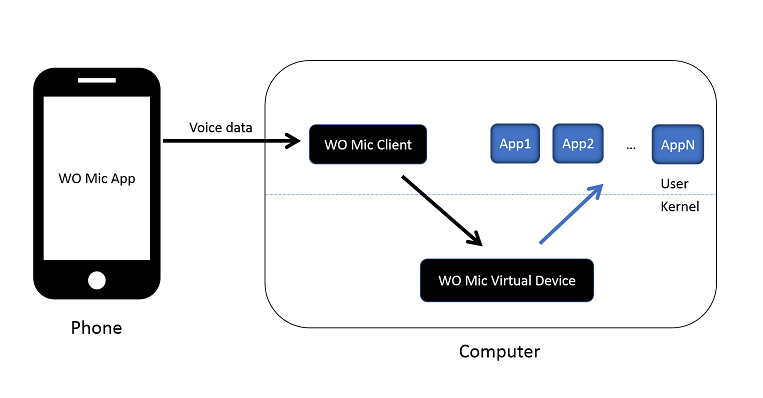
To configure WO Mic for optimal performance, installation is straightforward but requires some initial setup. Once installed, the application collaborates with corresponding mobile device software to capture your voice through the phone’s microphone and transmit it to your computer. The three components—WO Mic App on your phone, WO Mic Client on your computer, and WO Mic Virtual Device in kernel space—work seamlessly to emulate a real microphone, providing audio data to applications like Sound Recorder.

Notable features of WO Mic include its cost-free wireless microphone functionality, compatibility with various PC programs, minimal latency, user-friendly configuration, and support for multiple connection methods: USB, Bluetooth, Wi-Fi, and Wi-Fi Direct. The audio format is set at 48000 sampling rate, 16 bits per sample, and mono channel.

WO Mic stands out as a versatile solution that effortlessly transforms your mobile device into a microphone, catering to diverse needs such as communication, recording, voice remote control, and more. With millions of users relying on its capabilities daily, WO Mic remains a reliable and accessible tool for enhancing your computer-based audio experiences.


Download WO Mic app HERE

Share This Article
Facebook Pinterest Copy Link
Share
Previous Article Safari browser Unveiling the Top iPhone Browsers for Seamless Mobile Experience
Next Article ADATA SD810 External SSD Fast and Fearless – ADATA SD810 External SSD Makes Powerful Debut
Leave a Comment Leave a Comment

Leave a Reply Cancel reply

Your email address will not be published. Required fields are marked *

Latest News

Emotiva XMC-2
Emotiva XMC-2 – 16 Channel AV Processor
Reviews
March 1, 2021
Nikon D780
Nikon D780 Tech Specs – real pro DSLR camera
Reviews
May 31, 2022
outdoor 4K TV - SunBrite SB-V3-55
Weatherproof outdoor 4K TV – SunBrite SB-V3-55-4KHDR-BL
Reviews
November 17, 2023
Technics SU-G700M2
Impressive Technics SU-G700 M2 Stereo Amplifier
Reviews
August 19, 2022

You Might also Like

KMPlayer is an excellent free media player
Software-App

How to Use KMPlayer: A Complete Guide

April 7, 2026
WPS Office for Android
Software-App

WPS Office for Android – free, all-in-one office suite

January 16, 2026
Software Data Cable
Software-App

Send all your files wirelessly with Software Data Cable

January 1, 2026
Download Huawei HiSuite
Software-App

HiSuite software – Easy connection to Huawei Android devices

December 25, 2025
Follow US
© 2026 All Rights Reserved. Webllena.com
Welcome Back!

Sign in to your account

Username or Email Address
Password

Lost your password?