Home Blog Page 110

Linux web hosting – Questions and Answers

0

Why Linux web hosting?

Linux web hosting refers to hosting websites on a server running the Linux operating system. Linux is a popular choice for web hosting due to its stability, reliability, and security. It is also an open-source operating system, which means that the source code is available for anyone to view and modify. This allows for a large and active community of developers and users who contribute to the development and improvement of Linux.

Linux is not a proprietary OS. It is the favourite operating system among web hosting providers. The good point of using the open source operating system means that web hosting service providers do not have to pay a large sum for the purchase of Windows licenses or any other proprietary operating system. In addition, it is also used because web hosting providers prefer this because it allows more customizations to server features and user options. Hosting providers offer shared Linux web hosting and typically have a low cost compared to Windows hosting for obvious reasons.
cPanel based on Linux hosting
For most web designers, Linux is the primary type of hosting. Most developers rely on the cPanel to control hosting and various features it offers. Using cPanel, it becomes easy to manage all development efforts in one place. There are two interfaces in the cPanel.
User interface
Web Host Management
With the help of cPanel, you can publish websites, manage your domain, and perform other tasks. For example, you can create email accounts, store files, and do much more. If you have opted for Linux web hosting, it will not automatically offer the cPanel. It’s third-party software. But because of its popularity among webmasters, hosting providers include it in their hosting plan.

Linux
Photo: Pixabay

Comparison with Windows hosting
Comparing performance, stability, security and ease of use will not provide a clear indication of the best performance. The main reason why many web administrators use the Linux platform is the type of files and functions they expect to use. If your web site uses the ASP.NET or MS-Access or MS-SQLSERVER, hosting must be based on the Windows platform.
If the website makes use of other types of files such as php, Perl, WordPress, MYSQL, these work best on the Linux-hosting platform. While the files are still running on the Windows web hosting server, but the Linux platform is designed to work well with these types of data.
Both platforms use HTML files and read them in the same way. This means that most websites will not show any performance issues if they are hosted on the Windows-based platform of Linux-based web hosting. The difference are in Linux compared to Windows and different types of files. But when it comes to price, Linux is a popular choice among hosting providers because it allows them to offer low-cost services.
Web hosting users can choose the hub they need when selecting. Most hosting providers offer Linux and the Windows-based web hosting package. But which one is better? Now, let’s find the answer to this question.

The difference between the two options is in the features and benefits offered to users. Choosing one instead has less to do with compatibility and ease of use. Native users think that using a system on their home computer other than their web hosting provider can cause compatibility issues. However, it could render your website unusable, however, your fear is unfounded. You don’t need anything from the web host to run your home computer. Features running on the Linux website must be created to run on the Linux website. These are not the same applications that run on your home computer. This means that the user does not have to use Linux on their home computer.

For users who have used Windows on their home computer, you might think that you should get the Windows hosting account to avoid compatibility issues. However, this is not correct. The web hosting account running on Windows doesn’t mean you’ll encounter the same USER INTERFACE. The web host server does not look like your home computer regardless of which operating system you use. The user interface of the Linux hosting account will be the same as the Windows account.

Shared Linux web hosting is first and best choice if you are using PHP, MySQL, or other similar technologies intended to run on Linux. It has almost nothing to do with the home computer operating system.

Tips: Fix YouTube Premium not Playing in Background

3

YouTube Premium is an fantastic application that Google has brought for users who want to get rid of ads in videos. It also allows users to play videos in the background. But, for some users, it just doesn’t work. But you can fix it very easy.
Recently, Premium YouTube has been preferred among a good number of users. If you buy Youtube Premium ($9.99/month), you’ll also have access to google play’s free premium music. That’s a good thing. But, a large number of users listen to music on YouTube and buy a Premium plan due to the ability to play videos in the background of a smartphone. But many things can prevent you from enjoying this installation.Many things can cause this problem. For example, if you’re traveling to a new country where the youtube network isn’t available, you may not benefit from it at most. Therefore, you may notice that YouTube Premium is not playing in the background. If not, there may be other reasons that may prevent you from playing videos when you minimize or turn off your smartphone screen. Photo: Youtube
How YouTube Premium doesn’t play in the background problem
The solutions are simple. If you know the reason, you can fix the problem quickly. However, here are some tips that can help.
1. Enable Youtube background playback
If you’re a newcomer to the world of YouTube Premium, you might not consider anything that you can manually turn on or off the background playback feature. However, if it is disabled, you will not be able to play videos in the background even if you are a Premium subscriber. So, what can you do? Follow these steps:YouTube Premium
Step 1: First open the YouTube app on your smartphone and tap the profile icon. Then go to Settings.
Step 2: Now tap Background & Download. There, tap playback in the Background Playback section and choose Always On or Headphones or External Speakers.
From now on, you should not face any other problems.
2. Delete Cache & Date
Sometimes, it can work surprisingly. You can delete the cache and date only from your YouTube app on your smartphone. To do this, just go to Settings on your Android phone and then go to Applications. Then search for YouTube and tap Clear Cache and Clear Date. For Samsung phones, you may need to take advantage of the storage space to get the clear date option.
However, doing these things can fix Youtube Premium don’t play in the background issue.
3. Use VPN:
I’ve already said that all Premium features, including background playback, may not be available if you’re traveling to a Youtube Premium country without support. In that case, the only solution is to use a VPN connection to bypass the geo-restriction. It will allow you to play videos in the background. There are many free and premium VPN services. But I don’t recommend using free VPNs. Because they are slow and insecure. However, you might want to consider PureVPN, NordVPN, VyprVPN, or any other popular premium service.

This problem occurs to users when their Youtube premium subscription is ended. Nevertheless, YouTube sends an e-mail or notification when this happens, so users can bring up to date their subscription plan package properly in time. Additionally, YouTube as well has an auto-renew system for YouTube premium regular monthly subscription payments, which you can switch on for a smooth practical experience. This will let you know the present status of your membership. 1st, check if it is expired. If you find that your subscription is run out, then renew the membership to use the feature with no any issue.

YouTube sets out many updates on a regular basis to make confident we as a user are having the finest experience ever. However, if you don’t update your applications often, you will miss out on brand-new features, or active features may possibly stop functioning. So make sure you are using the updated App with the recent OS on your device.

YouTube Premium is quite expensive, and even soon after buying YouTube premium, it’s not sure whether you will be having all the features as the application can quit and many bugs and software problems can appear as well. A lot of MOD applications can give you accessibility to YouTube premium for free and all its fully extended functions such as background music play and not any advertisements. YouTube Apk – What’s In The YouTube APK MOD Premium:- No need to uninstall official YouTube App, can install as a secondary YouTube.
YouTube APK MOD Premium Offline & Background Play -No Ads-

To summarize:

There are a few reasons why YouTube may not be playing in the background on your device:

  1. You may not have the YouTube Premium subscription, which is required to play videos in the background.
  2. You may have an older version of the YouTube app that does not have the option to play videos in the background.
  3. Your device may not support background playback, or this feature may have been disabled in the device’s settings.
  4. Your device may be in power-saving mode, which can prevent background playback.

To fix this issue, you can try the following steps:

  1. Check if you have a YouTube Premium subscription. If not, you can sign up for a free trial or purchase a subscription.
  2. Update the YouTube app to the latest version.
  3. Check your device’s settings to see if background playback is enabled.
  4. Turn off power-saving mode on your device.

If none of these steps work, it may be a temporary issue with the app or your device, and the problem should resolve itself in a short amount of time. If the issue persists, you may want to contact YouTube or the manufacturer of your device for further assistance.

There are a few ways you can contact YouTube for assistance with a problem or issue you are experiencing:

  1. Visit the YouTube Help Center: https://support.google.com/youtube/?hl=en
  • The Help Center is a comprehensive resource that contains information on a variety of topics, including how to use YouTube, troubleshooting issues, and more. You can search for a specific topic or browse through the available categories to find a solution to your problem.
  1. Use the YouTube Contact Form: https://www.youtube.com/contact_us
  • If you are unable to find a solution to your problem in the Help Center, you can use the Contact Form to send a message to YouTube’s support team. You will need to provide your email address and a description of the problem you are experiencing.
  1. Contact YouTube through social media:
  • YouTube has an active presence on social media platforms such as Twitter and Facebook. You can reach out to them on these platforms for assistance with an issue you are experiencing.
  1. Contact YouTube through their Creator Support team: https://support.google.com/youtube/contact/yt_creator_support
  • If you are a YouTube creator and have a problem or issue with your channel or content, you can contact the Creator Support team for assistance.

Note that YouTube’s support team may not be able to provide immediate assistance, but they will do their best to resolve any issues you are experiencing as soon as possible.

Important: Background play is available only on YouTube Premium.

• YouTube Videos
Simple way to watch videos from the site and use its features.
• Extended Privacy
Does not use the YouTube API nor the Google Play Services.
• Background Player
Use other apps with no hassle while it plays your favourite songs. You can as well listen to your music offline. This is ideal for long trips or journeys, and even when you ae studying or at the fitness center, with no accessibility to WiFi and no additional way to take pleasure in music.
Furthermore, songs can be played in the background. This is a wish come true when it comes to YouTube Music.
• Download Media
Simply download YouTube videos or audio to your device.
• Subscriptions
Never miss new content from your favourite channels.
• History
Go back in time and enjoy your favourites again.
• Open Source
How it works is not a secret. Go and check it on GitHub.
• YouTube Premium [Free] download here or here

Unlocker tool – unlock and delete locked files on your PC

0

Unlocker is a mini and lightweight, but powerful application that allows you to take complete control over files and folders, which will help you unlock files and and destroy various processes.
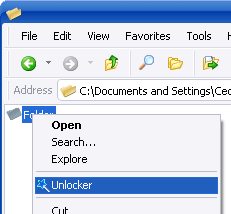
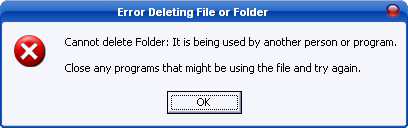
Working with Windows is, more often than not, simple sailing. But sometimes, you come across small problems that keep repeating themselves, which can sometimes really make you feel dissatisfied and angry. If you are a serious Windows user who has been using it for years now, surely you have already encountered the problem “Cannot delete the file: Access is denied”.UnlockerThis issue occurs when one of the files or folders is locked. And the best way to fix this problem and unlock these files is to use Unlocker, a little, but very powerful program that helps you exactly with this irritating situation. It allows you to take control of your files and folders and you will be able to decide permissions for them.
Unlock files and remove errors
If you are tired of these errors that do not allow you to use your files the way you want, you need to consider this utility. It will help you make sure that you can delete the files again and use them as you wish. Unlocker is considered the best file of its kind, and rightly so: it is a tiny program, easy to use and extremely effective.
In addition to unlocking files and folders, you will be able to keep your PC running smoothly and free of potential errors and locks, which could occur quite often. In these cases, you will be able to kill the processes that are causing this errors. This program will help you to unload DLLs, delete index.dat files, and manipulate locked files.
Access locked files
If you have locked files or folders on your PC, you can’t do much with them. You won’t be able to move them, delete them, rename them, or any other action, for that matter. Unlocker software is the solution to that problem.UnlockerUnlocker is a little and compact application that will help you unlock and delete files and stop processes that could cause your computer to freeze.
Features and benefits of Unlocker application:
delete locked files with just 2 clicks
easily accessible from the context menu
Small size

Unlocker tool Download

HP X24ih monitor – VRR, 144Hz, 1ms, Low input lag…

0

The quality of the construction is decent. It has a basic plastic body, but the plastic in the stand looks a bit cheap. There is nothing premium about its construction, but at the same time, there are no obvious loose parts or gaps in the construction. The stand also supports the monitor well.
Ergonomics is not remarkable. This variant has height adjustment, but there is an X24i model that doesn’t have it and may not have the ability to rotate even in portrait mode.
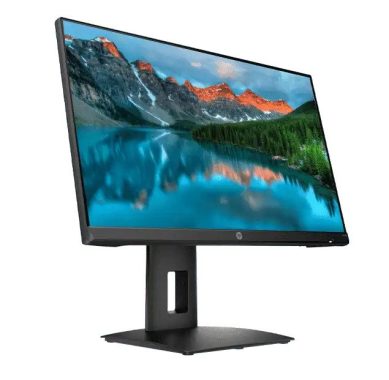
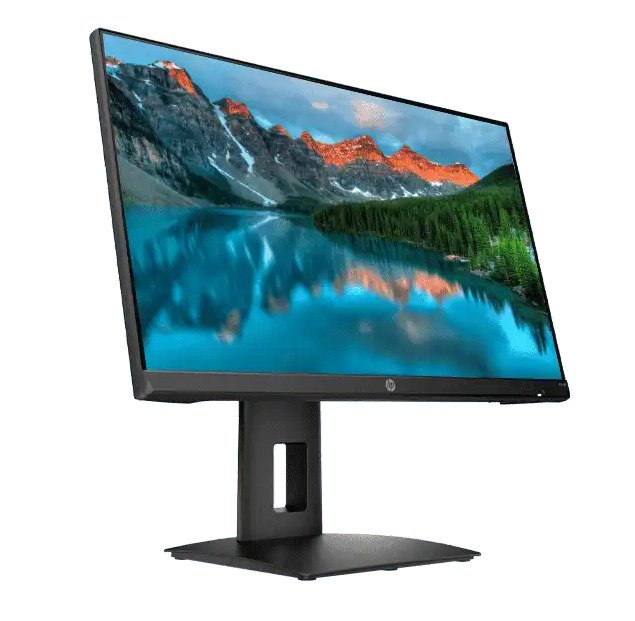
The back of the HP X24ih monitor has a simple design with glossy diagonal straps. There is basic cable management through a cutout on the stand. Because the X24i variant does not have a hole in the housing, it does not offer any cable management.HP X24ihAlthough the HP X24ih is a gaming monitor, it has a more office-oriented design with an all-black body. There are bright stripes on the back to add some style. The stand has a curved top plate.
The Hp X24ih monitor is ideal for gaming. It has a high refresh rate of 144 Hz with native FreeSync support to reduce screen tearing. The input delay is extremely low and the response time is simply amazing, resulting in smooth movement. We can say, X24ih not the best choice for darkroom games as it has a low contrast ratio that makes blacks gray.
The HP X24ih is a remarkable monitor in general. It is ideal for gaming, as it has a high refresh rate, VRR support, incredible response time(1ms) and very low input delay. It is also good for use in the office thanks to its high maximum brightness, good reflection management and wide viewing angles. However, it’s only decent for content creators thanks to its 24-inch resolution and 1080p screen, and its low contrast ratio translates to blacks that look gray.HP X24ih-The HP X24ih monitor is very good for use in the office. It has wide viewing angles, high maximum brightness and good reflection management. Unfortunately, its ergonomics are not evident, as it does not offer any rotating adjustment. Its low resolution of 1080p and small 24-inch display may not be good enough for multitasking, but it should be a good choice if you need a secondary monitor.HP X24ih--The HP X24ih is decent for media consumption. It has wide viewing angles if you want to watch videos with some friends. Unfortunately, it has a low contrast ratio, so blacks look gray when viewed in the dark. In addition, 1080p resolution and 24-inch display may not be the ideal choice if you want an immersive viewing experience.
HP X24ih is decent for content creators. It has wide viewing angles, which is great if you need to share the screen with a colleague or customer. Unfortunately, its 24-inch display is not ideal for multitasking, and 1080p resolution does not allow you to view images and videos in detail.

Even though the HP X24ih is a budget monitor, the build quality is excellent because there are no obvious problems or downsides. You would know that it is quite sturdy because the extra weight we mentioned may be the result of additional chassis reinforcing. Additionally, we didn’t detect any trembling from the stand, so if you’re playing furiously, you won’t be knocked out by a wobbly screen.

The HP X24ih’s OSD button layout is a drawback that is still present on budget monitors. For many people, it’s not a significant problem, but using tiny buttons as opposed to joysticks is always more challenging and time-consuming. The majority of users won’t care, but those that frequently prefer to adjust and calibrate their settings won’t.

24-inch 1080p monitors continue to hold a strong reputation as the de facto benchmark for productive work and competitive gaming. While some people may find it overly crisp, gamers can routinely experience high framerates. Although some may view 1080p monitors as being out of date, they deserve praise for their continued popularity.
With a few additions, the HP X24ih monitor renders 100% of the sRGB gamut, making both video games and movies look colorful and realistic. The default deltaE average is 2.35, making it appear balanced and functional right out of the box. While the screen appears a little bit cooler than specially calibrated sRGB monitors for editing, it is not distracting or apparent while playing games.

HP X24ih-HP X24ih is a excellent entry-level gaming monitor. It has an refresh rate of 144 Hz with FreeSync Native Variable Refresh Rate (VRR) support to reduce screen tearing. Its response time is simply amazing, so the fast motion content looks fluid without almost any motion blur. Its IPS panel offers wide viewing angles, ideal for cooperative games, but that means it has a low contrast ratio, so it’s not the best choice for darkroom games. If you want to use it in a well-lit room, it becomes bright enough to combat glare and has good thought management. Unfortunately, its 24-inch display and 1080p resolution can be too limiting for those looking for an immersive gaming experience and doesn’t support HDR.

The HP X24i monitor is equipped with an IPS panel, ensuring precise, consistent, and vibrant colors that cover the entire sRGB color space. Thanks to the wide viewing angles inherent in IPS technology, users experience minimal shifts in brightness, contrast, gamma, or color regardless of their viewing angle.

Featuring a peak brightness of 350 nits, the HP X24i performs admirably even in well-lit environments. The contrast ratio, approximately 1,000:1, falls within the expected range for IPS panel monitors. In dark rooms, however, blacks may appear slightly grayish when compared to monitors with VA panels boasting a contrast ratio of around 3,000:1. Despite this, VA panels have their drawbacks, including contrast/gamma shifts and slower pixel response time.

One notable drawback in dark settings is IPS glow, characterized by visible glowing around the screen corners, particularly noticeable when displaying dark content in a dark room with a high brightness setting. Adjusting the brightness or introducing ambient lighting can mitigate this issue. It’s important to note that the severity of IPS glow, like other defects such as backlight bleeding or dead pixels, varies among individual monitor units, but in most cases, it remains manageable or even negligible.

Moving on to display specifications, the Full HD resolution on the 23.8″ viewable screen results in a pixel density of 92 PPI (pixels per inch). This provides a satisfactory amount of screen real estate and sharp details for text and images. The clarity is notably superior to that of a 27″ monitor with the same resolution. Additionally, the 1080p resolution is not overly demanding on the CPU/GPU, allowing for a high frame rate in games with a decent graphics card.

In essence, the HP X24i is a straightforward budget 1080p 144Hz 1ms IPS gaming monitor that excels in image quality and performance. The HP X24i monitor is priced at $230, aligning with the current market rates for 24″ 1080p 144Hz IPS monitors. While it lacks some non-essential gaming features and sports a plain design that may not appeal to all gamers, it caters to those who prioritize excellent visual performance and smooth gameplay over flashy aesthetics.

Photo:HP

HP X24ih monitor specs:

Product number13L82AA
Display typeIPS
DISPLAY SPECIFICATIONS
Laptop Size23.8″
Display area (metric)527.04 mm x 296.46 mm
Aspect ratio16:9
Resolution (native)FHD (1920 x 1080)
Resolutions supported1024 x 768; 1280 x 1024; 1280 x 720; 1280 x 800; 1440 x 900; 1600 x 900; 1680 x 1050; 1920 x 1080; 640 x 480; 720 x 400; 800 x 600
Pixel pitch0.274 mm
Brightness350 nits
Contrast ratio1000:1 static
Response time1ms GtG (with overdrive)
Display scan frequency (horizontal)30-167 kHz
Display scan frequency (vertical)48-144 Hz
Onscreen controlsExit; Information; Management; Power control; Input control; Menu control; Gaming; Image; Color
Display featuresOn-screen controls; Low blue light mode; Anti-glare
VESA mount100 mm x 100 mm (bracket not included)
Tilt-6 to +23°
CONNECTIVITY
Display Input Type1 HDMI 2.0; 1 DisplayPortâ„¢ 1.2
DIMENSIONS AND WEIGHT
Dimensions without stand (W x D x H)54.08 x 5.25 x 32.58 cm
Dimensions with stand (W x D x H)54.08 x 21.8 x 48.99 cm
Display height110 mm
Weight6.05 kg
POWER AND OPERATING REQUIREMENTS
PowerInput voltage 100 to 240 VAC
Power Consumption Description46 W (maximum), 38 W (typical), 0.5 W (standby)
Operating temperature range5 to 35°C
What’s in the box : Monitor;   HDMI cable; Warranty card; QSP; Product notice; AC power cable

Format Factory tool – Convert all popular media files

0

To convert media files, you will need to use a file conversion tool. There are many different tools that you can use for this purpose, and some of the most popular ones include FFmpeg, Format Factory, HandBrake, and Adobe Media Converter.

To use a file conversion tool, you will first need to download and install it on your computer. Once it is installed, you can use the tool to open the media file that you want to convert. From there, you can choose the desired output format and settings, and then start the conversion process.

It is important to note that different tools may have slightly different steps for converting media files, so it is best to refer to the documentation or instructions for the specific tool that you are using.

Format Factory is a tool that will help you to convert media files: video, audio, and photo files to other formats. The tool also includes the ability to copy DVDs and CDs, create ISO files, but also join them.
Using multiple media files requires the use of programs that allow you to transform them from one media format to another. The problem comes when you have incompatible files that won’t go well together because of the format. The great news is that various programs will help you overcome this problem.
Format Factory app helps you convert media files to other formats, allowing you to use your files effectively.
It works on almost all Windows operating systems and has support for a wide variety of formats, presenting itself as an option to convert file formats.

Format Factory
photo:pcfreetime

Supports different types of formats
With this software, one of the main things is that you can transform a wide variety of formats. Versatility is the key to this type of application. Fortunately, Format Factory has extensive support for almost all types of formats. You will be able to transform audio and video formats such as MP3, AVI, 3GP, MKV, MOV, MMF, AMR, M4A, MP2, ICO, TIF, PCX, TGA and many more.
Advanced and easy-to-use features
This fantastic program also has several other features besides converting the formats of its files. It can also be used as a DVD and CD tearing tool. You will also be able to generate ISO files with Format Factory, which is very welcome when working with these files.
All features of the program are perfectly organized in the menu on the left side of the tool.
You can merge files in the same format, which allows you to zoom in on your files.
Format Factory is an superb and useful tool to convert almost all file formats and make sure you can copy CDs and DVDs and create ISO files.
Features and benefits of Format Factory:
Convert all popular media files (video, audio, image)
Restore corrupted video and audio files
Reduce the size of media files
Image converting options: zoom, rotate/flip, labels
Fast DVD Ripper

Format Factory Download

Chedot – free, fast and safe browser

0

Chedot is a free browser for Windows that has a cache of useful features available. The software allows you to download files at a high speed, almost doubling the speed. The application also has other useful features, such as a built-in antivirus, faster page loading, and secure calling features.
Download up to times faster
Using Chedot browser is a great way to speed up downloads, whether it’s files for a project or a new game. It is worth installing the browser only for this feature, as it can increase the speed up to twice. However, this internet download manager still requires a decent online connection and doesn’t always work as it should when set up.

Free Web Browser Based on Chromium

Having the greatest software system is a crucial component of selecting a fantastic web browser. This is the primary reason the Chedot brand chose a well-known and cutting-edge software platform for its initial browser. Utilizing an established software program is made possible by the Chedot’s chromium web browser. You may accomplish this through the platform using the Chedot browser, which also ensures a great user experience. The chromium-based platform is responsible for features like distinctive icon architectures, an eye-catching UI, and quick loading times.

Quick loading of web pages
Along with an increase in download speed, Chedot browser loads web pages faster than many alternative browsers. This difference in buffer time is very noticeable when watching online videos or uploading PDF documents. However, this upload speed will not affect browser-based games or uploading social media posts.ChedotFree downloads
Chedot has another download tool that allows you to get videos and music for free. Although this feature is useful, the file size can become large. Fortunately, this download size is countered by the increase in download speed.
Antivirus
In addition to being a good browser with any feature, Chedot includes an antivirus that keeps you safe while browsing online. This feature is extremely useful, but you should not replace your regular antivirus software. Unfortunately, this prevention tool is not of great quality like other products.
For this software to work in conjunction with Windows Defender or other alternatives, you must set an exception for the application in the settings. This solution is boring, but ensures that the equipment is protected.
Safe and secure browser
Chedot uses more than just antivirus to keep your online presence safe. The app has its own tools that support any call and message made away from prying eyes. This privacy and security tool is another unique feature that you should have available.

The Chedot browser is a great way to access the internet, as you have seen. You may browse the internet with confidence thanks to the app’s many modern features. Despite using the Chromium platform, this browser is distinct from the others you may have encountered.

advantages

based on the Chromium platform for operating systems.
a user-friendly and adaptable browser system.
Additionally, a strong VPN system free of IP leaks is included.
The browser is compatible with a wide range of operating systems.
Some drawbacks

It is still a relatively new browser.
More browser themes would be helpful.

Chedot is a practical browser with many features that sets it apart from alternatives. However, other popular applications, such as Opera, Chrome and Firefox, are more reliable. The software is a great option to install if you download a lot of files from the Internet. Photo: Chedot

Download now

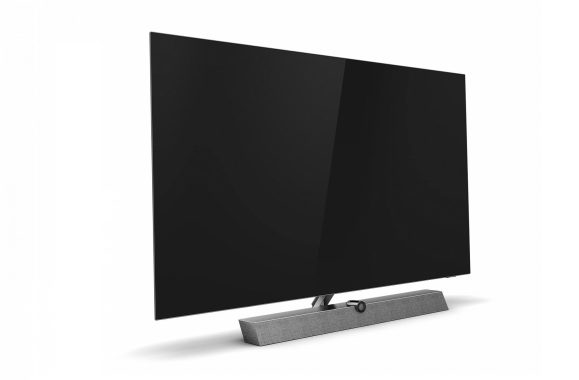
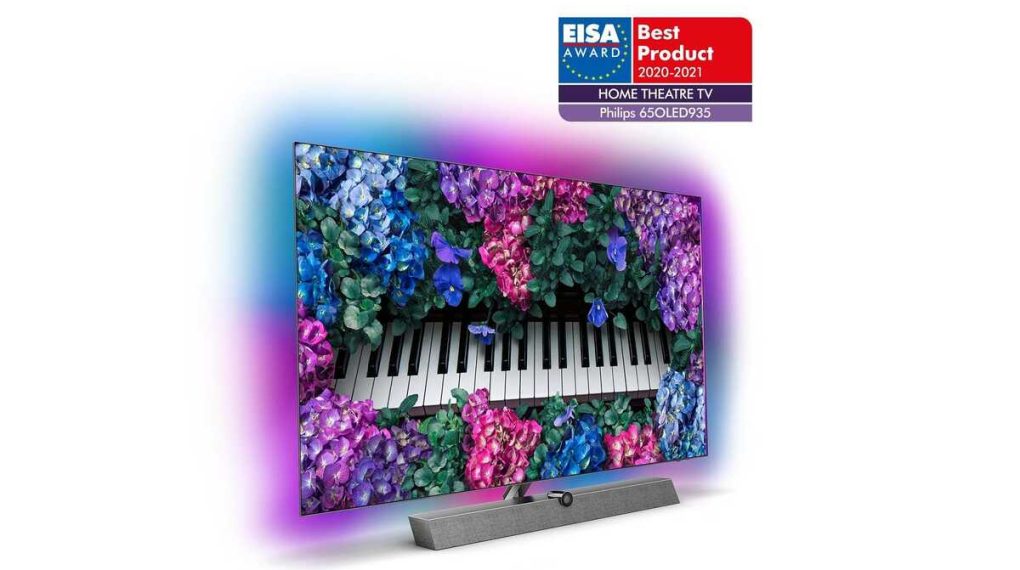
Powerful & elegant TV – Ambilight Philips 65OLED935

0

Expanded vision with 4-sided Ambilight
This unique Philips technology enjoys its ultimate incarnation, with 4-sided Ambilight. Using smart LEDs throughout the TV, the color of the image is thrown into the room, in real time. Colour, liveliness, and excitement move beyond the screen and into your living room to bring you an over-the-ordinary viewing experience, with this stunning 65-inch Philips TV.

OLED+ for the definitive image, whatever the source
With individual pixel attenuation, OLED delivers industry-leading image quality. Deeper blacks and improved colors offer amazing contrast that allows you to enjoy the purest and most realistic image. Philips’ OLED+ maximizes the potential of OLED by being compatible with all major HDR formats. Whether it’s HDR10+ or Dolby Vision of games or movies, or HLG from TV, Philips plays it.

Unveiling presentation, with P5 AI Perfect Picture Engine
The P5 AI Perfect Picture engine is the “brain” behind the image and even “thinks” similarly to us. The powerful processor uses deep learning AI algorithms to get the most realistic images possible. Maximizing detail, color realism and smooth movement, the P5 AI engine optimizes OLED and Ambilight for brilliant performance.

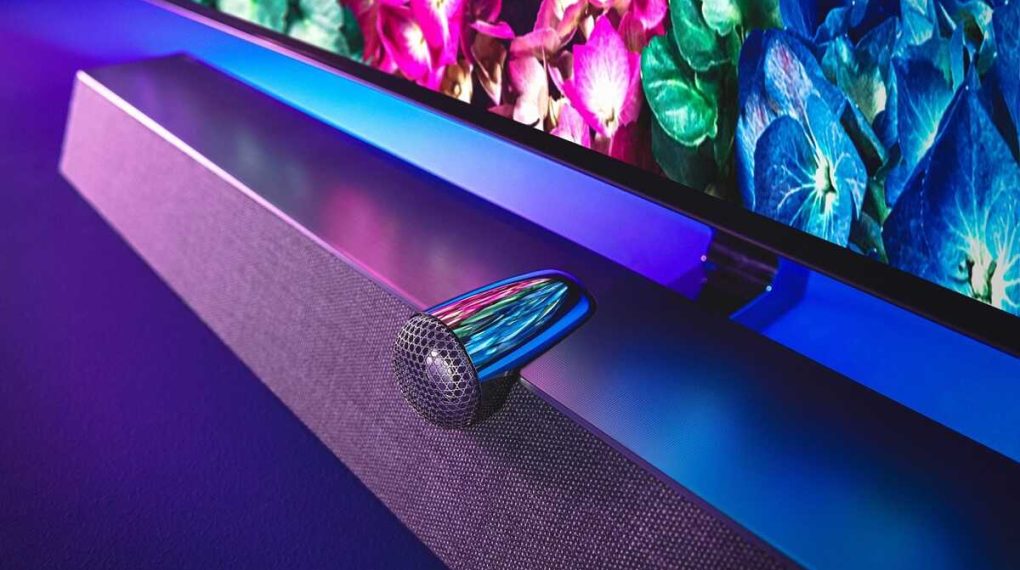
Sound to match – with Bowers & Wilkins 3.1.2 speaker system
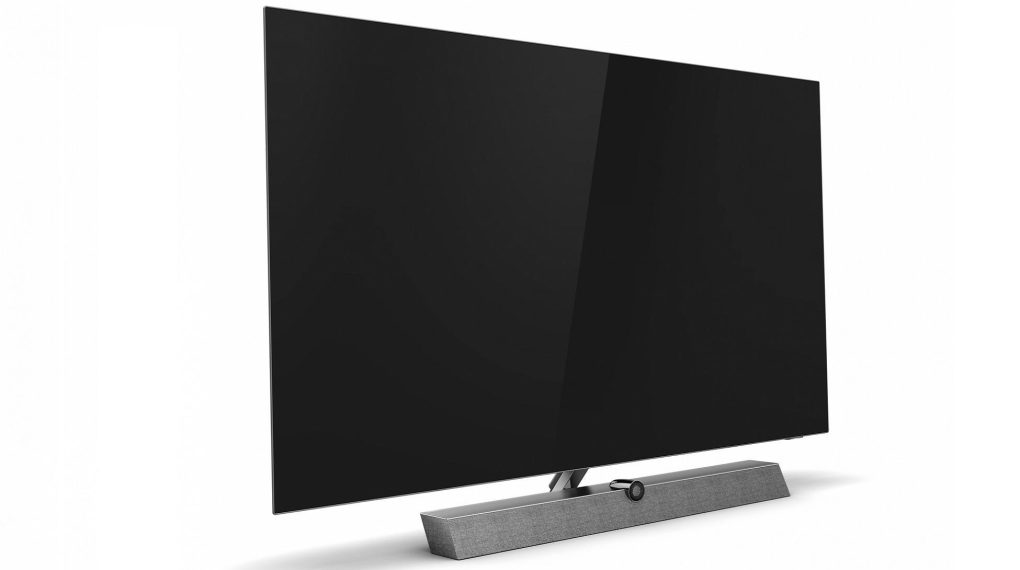
While most TVs put the sound a second away, the Philips 65OLED935 puts it right there with the picture. Featuring an array of supreme sound speakers, Bowers & Wilkins, this 65-inch Philips OLED is in a class apart from its rivals. A built-in subwoofer offers the thrill of an action movie, while up-firing speakers create a truly immersive sound. With a powerful 70-watt amplifier on board, the capable speaker system gets the grunt it needs for a sound that fills the room. Photo: Philips

Clearer dialogue
If you’ve ever struggled to hear the dialogue, this TV could help. Instead of sharing speech with left and right audio channels, which also handle the soundtrack and special effects, the dialogue has its own dedicated center speaker. This not only makes it clearer and easier to follow, but also locates the sound firmly on the image you see on the screen, helping to alleviate any lip sync issues.

Dolby Atmos – with upward sound
With a built-in Dolby Atmos processor, up-to-the-top power speakers are used to provide true Dolby Atmos sound. Dolby Atmos creates a high channel, giving the true feeling of flight or stormy weather that is above you. Just like in the best cinemas, Dolby Atmos has revolutionized the way we now feel totally immersed in the soundtrack.

Android TV for smart TV
In a complicated world of TV catches, Android TV makes sense to everything. Using a clear and intuitive interface, Android allows you to effortlessly switch between Netflix, Amazon Prime, YouTube and many other services. Android allows you to pick up where you left off in the latest series or take a look at the new movie releases, all without getting lost in complicated menus.

Voice control with Google Assistant built-in and works with Alexa
Working through the built-in Android system, the Google Assistant helps you find compatible content, apps, and even control compatible smart home devices, such as the Philips Hue lighting system. All this is available with a simple voice command. Alternatively, connect amazon echo or a similar Alexa device and use voice commands via Alexa.

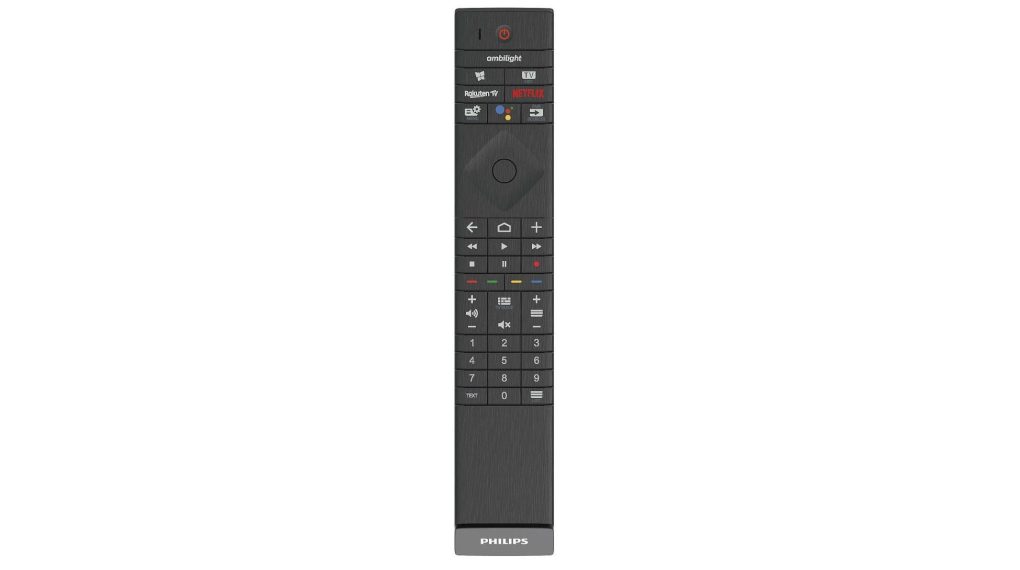
Philips 65OLED935 – Beautiful design – up to the remote control with leather backrest
Shaped from high-quality materials and style to a premium standard, the Philips 65OLED935 stands out from the crowd. The lines contrast beautifully with the warm, wool-based Kvadrat fabric. The quality of the design also extends to the remote control, which features a tactile finish supported in Muirhead leather and backlit keys.

Fully connected
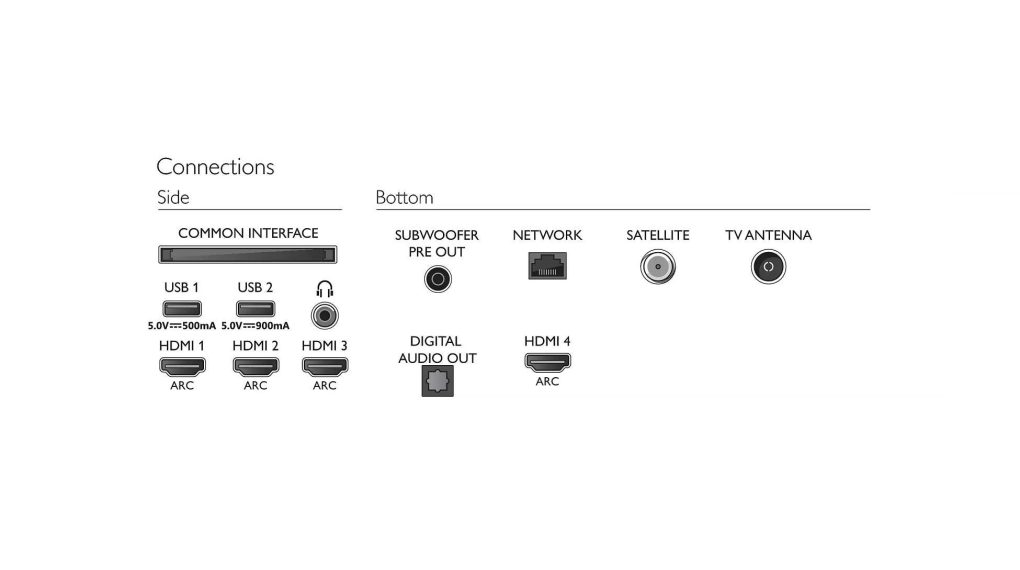
Four HDMI sockets make it easy to connect a Blu-ray player, game console, TV set-top box, and other device. All sockets are in HDMI 2.0 version with HDCP 2.3, making this TV compatible with UHD Blu-ray players and 4K HDR streaming services. Other connections include two USB sockets, with recording on a compatible USB device. Create an optical connection for a soundbar/base plus a headphone jack and you have everything you need from your new TV.

Enjoy maximum sound and vision, from an elegant TV, with Philips 65OLED935.

Transfer Music From a PC to an iPhone Without iTunes Discovered

0

There is no doubt that there are many music service platforms and one of them is the iTunes music streaming giant. But think about when the user won’t have a stable internet connection, that’s when users start thinking about how to stream music. Of course you can simply add tracks to your iDevice by integrating it into a PC or MAC via iTunes, but think about it, it’s far from convenient. That is exactly what we will explore and figure out how to transfer music from a PC to an iPhone without actually using iTunes.

Add music to your device via the iCloud drive and Google Play Music Manager.

iPhone
Photo:Pixabay

iCloud Drive is an extremely useful service in a situation like this. If the user has stored their music library on their Mac or PC or even on an external hard drive and prefers to manually manage their songs, they can use iCloud Drive to add tracks to their iDevices. But it is essential to clarify that iCloud does not consent to uploading content for which the user has express permission to copy both actions. Saving music doesn’t actually give you the right to upload it as you wish and also for personal fun, this could mean that the user’s account is banned. Therefore, users must remain vigilant.

How to transfer tracks using the iCloud drive

On the user’s Mac, open Finder and switch to the iCloud drive. There you chose File > New Folder or press Shift+Command+N and a new untitled folder will be created that the user must name as “Music” to simplify recognition later. Open the folder and locate the songs that the user wants to reach on the user’s iDevice and drag the necessary tracks to the music folder.

After that, the cloud service will detect the song and automatically start the upload process. Users are notified if they want to make sure their songs prefer to stay accessible at the original access points/folders, they need to copy and paste them into the music folder instead of dragging them.

Once the songs are uploaded, your music will be available for access via iCloud on iDevice. Then proceed to access the file app and go to the iCloud drive and switch to the music folder and open it, then the user will be able to see the tracks uploaded through their MAC’s.

How to transfer songs using Google Play Music Manager

This method could mean a little more time than the previous method. But it is still the best option in my opinion personal. I’m sure everyone knows that Google Play Music is also one of the music giants. And it’s also a great name on cloud services that allows you to store up to 50,000 free songs to boot.

Just download and install Google Play Music Manager and log in.

Click upload songs to Google Play and locate the music folder from which the user wants to upload songs and wait for the process to finish, but users are advised to exercise patience because if the files considered too large, it takes longer to upload them.

Install and open the administrator from iDevice and sign in with a Google account, once the upload process is complete, the user can start playing music and then download music to the device to listen offline as well.

Hardware Identify – useful software for hardware identification

0

Hardware Identify is a freeware software that displays a list of the various hardware devices installed in the system without the need for specialist knowledge.
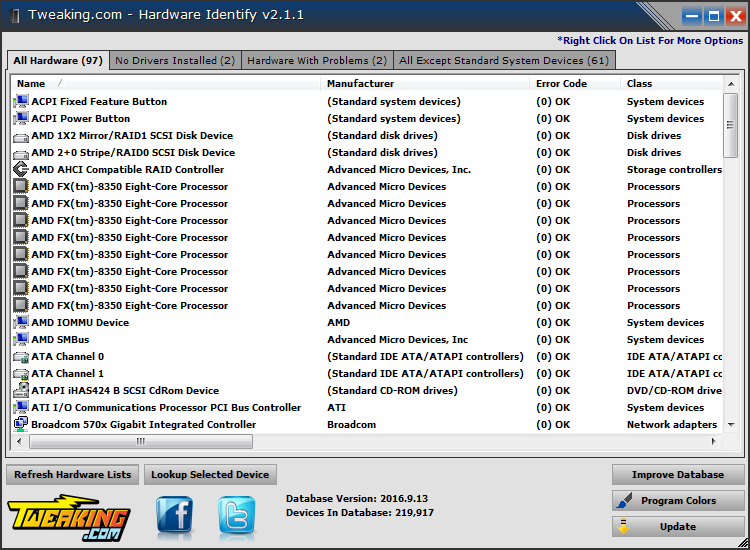
Using Hardware Identify is simple and scans your PC in seconds, displaying a list of connected/installed components in a list. The list contains several details, such as manufacturer, error codes, item class, installed driver version along with other potentially useful details. Right-clicking an item gives google the name or hardware ID. You can also copy all items based on different criteria to the Clipboard.
Included with hardware with installed drivers, Hardware Identify software can also display items that have not yet been installed; this can be useful when trying to find drivers for unknown components. Copying specific data doesn’t necessarily provide a purpose for novice users, but it can be quite useful when seeking technical support via email.Hardware Identify

Identify installed hardware

Hardware Identify is able to scan the entire system and extracts information about all components that come out, with or without installed drivers. The collected data is presented in a list that shows the component name, manufacturer, error code, class, driver version, and ID.
You can select one or all of the items from the list, save them to the Clipboard, and from there, copy the information wherever you want to create a report, or add it to a support request. Photo: Tweaking.com

Search for hardware drivers
Hardware Identify software is not able to automatically search for the necessary drivers, but it can help you with the following best. With a simple right-click on an item in the list, you’re presented with the ability to google the driver by name or component ID.
It’s really not something to ensure that you’ll find the exact drivers you need, but it’s definitely a quick and accessible way to find them.

In total, Hardware Identify is a useful software with a basic purpose and does so smoothly. If you need specific details about the components or hardware connected to your PC, hardware identification should be useful.

Hardware Identify Download

Some other programs for identifying hardware on the computer

There are several software programs that you can use to identify hardware on your computer. One popular program is called CPU-Z, which is a free system information utility that provides detailed information about the hardware components in your computer. Other similar programs include Speccy, HWiNFO, and AIDA64. These programs can provide information about your CPU, motherboard, memory, graphics card, and other hardware components.

Recommendation – HWiNFO

HWiNFO is a hardware information and diagnostic tool that provides detailed information about the hardware components in your computer. It can provide information about your CPU, motherboard, memory, graphics card, and other hardware components, as well as details about your system’s temperatures, voltages, and fan speeds. HWiNFO is available as a free download for Windows, Linux, and DOS. It is a lightweight program that runs quickly and efficiently, making it a good choice for users who need to quickly gather information about their computer’s hardware.

Video conferencing or one-to-one video communication – benefits!

0

What is video conferencing?

VC is also known as video conferencing, which is defined as conducting meetings in two or more locations with the help of audio and video streaming. Basically, video conferencing uses some special devices that include webcams, PCs, and high-speed Internet connectivity. While at VC, those who actively participate in the meeting can see, hear, and communicate with each other, despite their real-time geographic location. So let’s discuss some of the benefits of video conferencing:

Benefits of video conferencing that are as follows:

Video calls with numerous participants:
Video conferencing is a type of technology that allows you to hold meetings with numerous correspondents, who are in various places while watching them live and communicating in real time. It is one of the regular video calls, which is usually a one-to-one video communication.
Previously, video calls were comfortable and also very expensive and even had complex equipment and need experience, but now you can easily carry them in your pocket. In addition, you can participate and organize video conferencing sessions on your smartphone and mobile phone device, as well as on your computer with basic hardware knowledge and also proper Internet connectivity.

Benefits of Video Conferencing
photo: Pixabay

You should know that video conferencing requires higher bandwidth than simple video calls. According to the expert, a common estimate for a session with a high-quality video will be 1 Mbps for each participant. Let’s say that if high definition video quality considers it a minimum value. In addition, each participant needs to have the same connectivity arrangements, and when they don’t reach, they risk missing a few sessions and even messing with all the collective experience. Some of the free video conferencing apps are Skype and Google Hangouts.

No trip required:
Traveling can cost a lot of money and also takes a long time to meet people. Let’s say you need to hold an essential meeting for your respective company with several people who are spreading around the world to a different place. By taking all these people to one place, you need to consider many factors such as travel expenses, availability of in-flight seating, visas, availability of participants’ schedule time, and also accommodation and so on.
With video conferencing, you can manage and conduct the meeting with all attendees in an hour from remote locations around the world. Each participant only needs to have mandatory equipment and requirements; currently all these things are considered basic devices and are also all available in front of the screen at the selected time. Your pre-meeting organization can be completed by email or IM.

Join your mobile workers:
Your employees can be distributed throughout the city or country if they are mobile employees. They are actively associated with you through your mobile devices. You can impressively control this existing mobile communication for video conferencing with your employees. In addition, the visual nature of video conferences allows you to properly control the activities and positions of your employees, which should be more fussy about your duties or doubtful about your honesty. He’s going to love this kind of meeting because it allows them to stay away from the office.

Useful for teleworking:
Video conferencing is also considered an important method in terms of teleworking, i.e. work away from the office or working from home. Let’s say that if your company has an open schedule and your employees or colleagues work from home, one way to reduce the lack of interaction within employees, and up-to-end reports are video conferencing.

Organize meetings regardless of time:
Online meetings are free from the big obstacle to travel expenses and restrictions and can be organized more frequently. Video conferences allow you to meet people every day from anywhere in the world or the number of times in a day. It also allows your business to run smoothly faster.
With the video conference, participants will no longer make excuses regarding the location and travel; they just need to break free in an hour and a meeting date. This simply implies that you can quickly schedule the video conference meeting. And you can also squeeze anyone with a strict schedule.