Smartphones keep most of our lives now in photos, videos, music and more, and Samsung’s latest technology will make sure they can store even more. The Korean manufacturer has announced that it has created the first integrated 1TB Universal Flash Storage Chip (EUFS) for smartphones, allowing future phones to have internal storage capabilities similar to laptops.
“It is expected that 1TB Eufs will play a key role in incorporating a notepad-like user experience to the next generation of mobile devices” said Cheol Choi, executive vice president of Sales and marketing, Samsung memory.
1TB eUFS
Samsung has already started producing in-series the chip, which claims to have read speeds up to 1,000 Mbps, almost doubling the sequential read speed of a typical 2.5-inch SATA SSD and faster than the previous Samsung’s 512 GB chip. According to reports, a device with the 1TB chip can store 260 10 minutes and 4k video, a huge amount that dwarfs the capabilities of current smartphones with low-capacity eufs chips. 1TB chips will also have the same package size as your 512 GB counterpart, so smartphones won’t have to be magnied to fit the chips.
The new Samsung smartphone, the Galaxy Note 9, is maximized for 512 GB of internal memory. However, users can insert a 512 GB MicroSD card to increase the smartphone’s overall memory to 1TB. But with these new chips, those who require more and more storage space and do not want to spring for an additional SD card will have an additional option (and probably expensive).
Samsung 1TB eUFS
Although mass production is already underway, there is still no word when smartphones will include these new Samsung 1TB chips. However, there are rumors that Samsung could put the new chip on its next Galaxy S10 smartphone, and that device should be revealed next month.
Powered by the company’s fifth-generation V-NAND, the new Universal Flash Storage offers 20x more storage than a 64GB internal memory and 10x the speed of a typical microSD card for data-intensive applications.
UltraViolet, one of the first digital home entertainment services, announced that it will close on July 31. This gives users only a couple of months to back up and safeguard their existing libraries.
The cloud-based Box Office service has acted as a bridge for users to blow up hardware to digital space, offering redeemed codes within DVDs and blue rays for the best of both worlds. These films could be seen on multiple devices and shared with up to five people in total. In general, the service managed to accumulate more than 30 million users with access to more than 300 million movies and TV shows.
CREDIT: COURTESY OF DECE
The Ultraviolet has been a product of the digital entertainment content ecosystem (dece LLC), a collaborative group consisting of film studios, electronics manufacturers, resellers and more. It is this collaboration that allows libraries to continue to thrive. By linking an account to as many resellers as possible, a user maximizes access to their library. If a company’s rights to a film fall, another retailer could potentially guarantee continued access.
To do this, users simply have to log on via the Myuv.com portal and select resellers on the right side. From there, clicking on a listed retailer should link your account. Ultraviolet recommends that users do not click on the linked libraries in order to preserve access to the library.
Not surprisingly, the ultraviolet has begun to decline in recent years, as Disney has launched its competitor in 2017, films dubbed everywhere. This has more features, with the ability to connect to ITunes, Amazon and Google Play, but is not available outside the United States. In combination with the improvement of streaming services, ultraviolet sales had been quite successful.
In general, users should still be able to purchase and access content as they always have, as long as they are connected to retailers. No new content will be made available on 31 July, but items already purchased on the market can redeem content through these same retailers. Things are subject to copyright however, which means that the days are perhaps counted for the ultraviolet libraries.
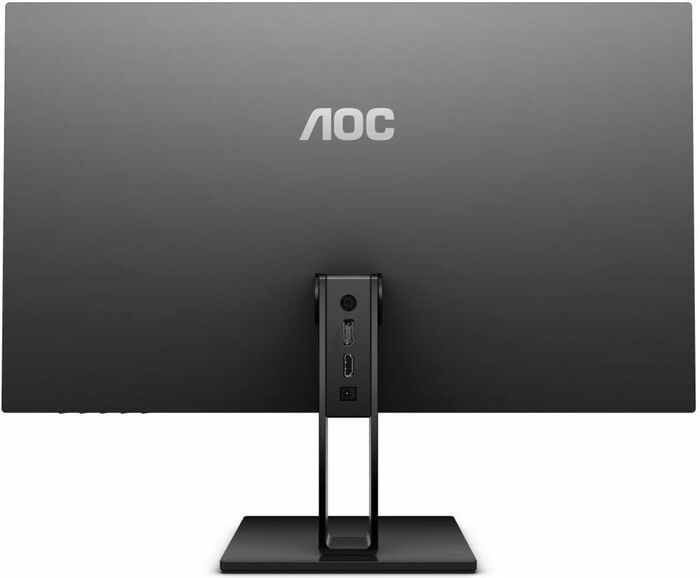
The AOC 27v2q is a monitor with a (at first glance) very simple premise: it is very thin. The LCD panel is only 7.9 mm on its upper edge and expands to 18mm on its lower edge. In combination with extraordinarily narrow frames around the screen, this makes a very impressive-looking device.
It also has a list of features that should appeal to a wide selection of buyers. The 27-inch screen has a resolution of 1920 x 1080 pixels, uses an IPS-type LCD for good display angles and color accuracy, and will get some modest game credentials as well.
AOC 27V2Q
A maximum refresh rate of 75hz is quite a bit of success on the 60 Hz screens, while a response time of 5 MS is a bit better than some IPS displays. There is also freesync support.
AOC 27v2q specifications:
Screen size: 27-inch, 16:9 aspect Native resolution: 1,920 x 1,080 Refresh rate: 75Hz Panel type: IPS, 6-bit+FRC Contrast ratio: 1,000:1 native Brightness: 250cd/m2 Response time: 5ms grey-to-grey Adaptive sync: Fresync Display inputs: DisplayPort, HDMI USB hub: No Audio: No speakers, 3.5mm headphone port Tilt: Yes Raise: No Swivel: No Pivot: No VESA: No
As with the LCD panel, it is 27 inches from one angle to the other and has a resolution of 1080p. This can be a bit of a dough point for some buyers, as a higher resolution 1440p is common for a screen this size and is the size/resolution you would normally opt for. The largest number of pixels allows a sharper image and a larger desktop area to work on.
However, some users are satisfied, or prefer actively, a lower resolution, so let’s leave the process to you. As a reference, a 27-inch screen with a 1440p resolution has a pixel density of 110ppi, whereas here is 82ppi.
AOC 27V2Q
Meanwhile, using an IPS panel should ensure good viewing angles and better color reproduction compared to the cheaper TN panels, although the high contrast is your own, you may prefer to look for a VA panel. The panel uses 6-bit color processing with FRC, so it won’t offer the true chromatic fidelity of the 8-bit panels, but it should be good for general use if you’re looking for a professional quality screen for editing pictures and videos , this will not be an ideal option.
With a native refresh rate of 75hz, the 27v2q delivers a slight increase in game performance compared to standard BOG screens. You will also get freesync to eliminate screen ripping and park when used with AMD graphics cards.
Starting with our subjective impressions of the initial image quality as soon as you shoot the AOC 27v2q it is obvious that you are receiving a decent quality screen. The colors are catchy but precise, there is a decent level of contrast and the viewing angles are good.
There are only two obvious disadvantages. The first one is the resolution. Low pixel density means that you can clearly see every single pixel from a normal viewing distance-a retina display is not.
There are only two obvious disadvantages. The first one is the resolution. Low pixel density means that you can clearly see every single pixel from a normal viewing distance-a retina display is not. The other problem is the IPS brightness. This is where the backlight of the screen shines through a bit, so for a slightly washed, gray-looking image. This tends to be visible only when you see the screen from a certain angle, so that sometimes you can see in the corners of a screen when you sat down at a normal viewing distance. This is also the case here, but the extent to which it shines is greater than better quality panels.
The AOC 27v2q is a great entry-level monitor. It offers an elegant design, good image quality and a suitable gaming performance at a very competitive price( £170 ).
You can hardly buy a IPS screen cheaper than this and yet you still get a large 27-inch screen size, a refresh rate of 75hz and yet that impressive slim design.
Compared to the more expensive IPS displays, the fine chromatic fidelity is not so good, but in general it still offers a more than satisfactory image with a good balance of color, angles of vision and contrast.
Similarly, switching to the game screens right 144hz makes a big difference to your overall gaming experience, but once again you’re going to pay a significant chunk more.
There are only a few caveats to recommend this screen. The first is the basic support, which does not offer the height or adjustment of the rotation, and you can not actually remove the original media and replace it with a more capable one, too. The other drawback to mention is the remarkable brightness IPS present with this panel.
However, for £170 we can not expect a perfect screen, and in general the AOC 27v2q affects a good balance of performance, aesthetics and price.
Pro:
Slim and elegant Design. Good overall image quality. Low price. 75hz better than 60hz for Gaming. Against:
Basic gaming performance. Low brightness. Single resolution 1080p photo: AOC
The D-Link water sensor is intelligently designed and has all the important advantages to making it an effective flood detector.
The only real weakness of D-Link is that it is based on being connected, which means that the power outages are the Achilles heel.
The D-Link water sensor is,maybe,one of the best flood sensors on the market. If you are thinking of buying such a device, this should be the first option in your list, especially if you do not yet use a Smart-Home hub.
The design behind the leak detectors is really very cool: essentially, most sensors have two or three metal probes that, when they come into contact with water, detect greater conductivity and set an alarm. It’s an elegant solution to the old flood problem.
D-Link Wi-Fi water sensor
But D-Link adopts an even more creative approach. Instead of using probes, the D-Link’s Wi-Fi water sensor uses a cable with long wires and interwoven embedded in it. You can run the cable along the edge of the basement, say, and if the water touches everywhere, twisted wires detect greater conductivity and set an alarm.
The greatest force of D-Link is also a weakness, however. It doesn’t need batteries, but if the power goes off at the same time as a flood, it can’t do anything. Of course, battery-dependent devices will not be able to communicate with their hubs if power is off, but it can sound at least an audible alarm. It is not so with D-link.
Here are the D-Link water sensor specs:
Water detection Audible alarms and alerts for mobile devices Includes a cable to extend the detection field No battery needed Works with IFTTT
Total cable length of 4.8 feet: •Extension cable: 3.2 feet (RJ11 cable) •Water sensing cable: 1.6 feet Extension cable can be replaced or extended with standard RJ11 cable
Alarm Sound •One alarm sound built-in to device
Alarm Volume •70dB
Features •Alarm will sound and LED will blink red when water is detected •Receive mobile push notifications when leak is detected
Mobile App mydlink® Home app for iPhone, iPad, and Android smartphones and tables Requires iOS 7 and above or Android 4.0 or above Compatible devices •Wi-Fi Siren (DCH-S220) •Wi-Fi Smart Plug (DSP-W110) •Wi-Fi Smart Plug (DSP-W215) •Wi-Fi HD Camera (DCS-935L)
General
Wireless •802.11n/g wireless Frequency Range •2.4GHz to 2.4835GHz Maximum Operating Range •Within wireless coverage from existing Wi-Fi network •Two internal antennas
LED •Status •Warning •Buttons •Wi-Fi Protected Setup (WPS) •Reset
Minimum Requirements •Smartphone or tablet (iOS 7 or above; Android 4.0 or above) •Router with Wi-Fi and Internet connection •One available power outlet (125V AC)
Physical Indoor or Outdoor Use •Indoor use only
Dimensions •2.56 x 2.56 x 2.07 inches
Weight •3.53 ounces Power •Input: 125V AC, 50/60 Hz
Temperature •Operating: 32 to 104 °F •Storage: -4 to 149 °F
Humidity •Operating: 10% to 90% non-condensing •Storage: 5% to 95% non-condensing
Certifications •FCC •UL
While the D-link does not have the same ability to measure the temperature and humidity of the most expensive units, it is compensated by integrating with IFTTT. This allows users to creatively connect the D-Link sensor to their smart LEDs, phone applications or even an intelligent switch with an alarm. This is a great approach to allow users interested in troubleshooting DIY the freedom to link the D-link into a much larger system than integrated gadgets.
If you are looking for a flood sensor connected this season, the D-Link device is one of the best on the market.
Pros/AVG has received a perfect score to block malware threats.
Cons/Vulnerability Scanner must be installed separately.
Verdict/AVG AntiVirus for Mac is a free security program that is highly effective in protecting against Mac and Windows malware, plus it comes with some additional security tools like spam filters and phishing blockers.
We wanted to check AVG AntiVirus for Mac because it is one of two Mac security programs that we tested that is offered free of charge.AVG had no problems blocking malware samples. In fact, while most other MAC security programs quarantine every single threat as their file opened, AVG has acknowledged our test folder as infected with malware and quarantined the whole thing before each file have the Ability to download or open. It has captured 95 percent of Windows threats, losing a couple of infected files that should have been easy to recognize.
AVG AntiVirus is a pretty simple program that we solve quickly. Each tool has a great icon, so it’s easy to get to where you need to go. When a tool is not enabled, it appears as red until it is enabled. In fact, we found that AVG AntiVirus for Mac was much easier to install and use than AVG for Windows.
Because it is a free program, AVG does not have as many security tools as the MAC payment security software. For example, you do not have a personal firewall or password manager. It also has no parental control or safe banking tools. It has both anti-phishing tools and spam filters. AVG AntiVirus offers a free vulnerability analysis that examines the MAC for any weakness, such as unused or outdated software, and helps them strengthen them against hackers and snoops. But you need to download this separately from the MAC security program. Although there are not many additional features, it is more than what you will find in Comodo Antivirus for Mac, the other free software we have tried.
AVG AntiVirus for Mac has some ads that are displayed asking you to purchase additional AVG programs that work together with the Internet security software. This is typically for the VPN program, a tool that makes you invisible online so that it cannot be monitored by adware and the browsing history is not registered.
The only other real complaint about AVG AntiVirus is its 24/7 Live support is only offered to users who purchase an antivirus solution or pay for Premium support. You can access the AVG search support items, frequently asked questions, and community forums where you can connect with other AVG users for help.
Overall, we enjoyed AVG AntiVirus for Mac. Even if you get rid of some important security tools, you feel it’s worth considering. It does a great job of protecting Mac and Windows malware and is an easy-to-use program.
The huge variety of cyber-threats these days means that an antivirus software is not an option-it is a necessity. Keeping your equipment protected with the best possible tools is extremely important. The best antivirus protection for you and your family should be complete, but easy to use. Although there are free antivirus software, they only offer the most basic protection.
The ideal safety product must include multiple levels of protection to keep your PC safe from modern computer threats, including malware, rootkits, and even ransomware, as well as viruses. You don’t want hackers to have remote access to your computer or smartphone without you knowing it. Rootkits are a type of stealth malware and are not easy to detect. The free basic antivirus software is not always able to detect it.
Another thing to keep in mind when looking for the best antivirus protection is the system requirements. If you don’t have a powerful PC, an antivirus software could make the system slow. You don’t want all your resources to be used by the program. Read the minimum system requirements before installing any type of computer security software. You need to provide protection without causing conflicts with other programs running on your PC.
The updated protection is also essential. An ideal security solution should be kept regularly updated by all new malware and virus threats. Hackers and identity thieves never stop, so anti-virus protection should not be interrupted. To get the best antivirus protection, you need a product that is automatically updated daily-preferably in the background without monopolizing system resources.
The usability of the best antivirus protection
Usability is also important. The documentation must be provided to help you understand how the tools work. The software interface should be easy to navigate-even for those who are not particularly knowledgeable about the computer. A good product must have control elements that are easy to understand and use.
If you use the Web a lot, you are vulnerable to web threats. For this reason, an ideal security product must have a Web security module to prevent malicious websites from appearing. When the malware is treated in the browser, it will not reach your PC. Adware is another common problem in Web browsers. Although it is not always as malicious as malware, it can still be very annoying as it corrupts PC performance and makes it more vulnerable to other threats.
A GPS receiver, simply known as a GPS, is a device that allows the user to find their exact location for any reason. Today, these receivers can also do a wide variety of useful things as well. This article will discuss the basic features of a standard GPS receiver and places where people can buy one.
The following are the basic features of a GPS as well as showing the user its precise location:
The ability to give instructions.
Today, a standard GPS can give the user’s addresses to their destination. All the user has to do is to introduce their destination to the receiver and guide it there either through visual or vocal instructions. Some receivers can also decide for the user that the route has less traffic so that it reaches its destination faster than if it had taken its usual route.
photo:Pixabay
The ability to guide you to the petrol station, restaurant, or any other general location.
If the user needs fuel for his car, he can just get into his GPS the question “where is the nearest petrol station? “And he’ll be driven there. It is almost the same procedure if the user wants to go to the nearest hospital, police station, restaurant, or any other general place where the user has to go.
Now that we have discussed the basic features of a GPS, here are the places where people can buy one:
Electronics Stores
Most, if not all, electronics stores sell GPS. These stores usually sell the best quality receivers with some models that have additional gadgets thrown in the package, but the high quality comes with a high price. Some GPS models sold in electronics stores are quite expensive, so it is not advisable for one on a limited budget to buy a GPS here.
Internet
The Internet is a great place to buy a GPS. You can compare the models, look at the reviews, and check the prices with a single click. Shopping on the Internet eliminates the waste of time and effort to go to the store and wondering what others think about the GPS they are planning to buy, among other tasks.
Some supermarkets
GPS has reached a strong demand that large supermarket chains have started to sell in all their establishments. Although it is very tempting for one to buy your GPS here as it is convenient and he can buy it while doing his shopping at the same time, he should think twice before buying here as the GPS units sold in supermarkets are usually low Quality and break easily.
These are just the basic features and places where you get a GPS receiver. A lot of models have additional features built into them that can really enhance the day-to-day travel experience of their user.
Asus TurboV EVO is a software utility designed for overclocking and monitoring Asus motherboards.
Beginner or enthusiastic, TurboV EVO meets overclockers of any level. Intelligently push systems to faster and more stable clock speeds with automatic adjustment. Turbo Key increases performance with a simple touch, while Turbov offers additional advanced options for breaking logs!
Asus TurboV is a program that will allow you to overclock the processor on some ASUS motherboards. This OC tool allows you to establish new ambitions in the OC phase with an advanced, easy-to-use interface, which allows you to overclock without exiting or restarting your operating system. The program includes a autotuning feature that allows the user to find the most stable configuration by clicking on a button. During this process, the application tests different scenarios by changing the CPU voltage and other parameters. You can see the status of the operation and decide whether you want to keep the settings.
Overclocking is typically a sensitive operation addressed by experienced users, requiring you to change various parameters and find the optimum combination. You must change the settings manually and remember each change to restore the previous configuration if your system becomes unstable.
ASUS TurboV EVO can help you try different combinations in less time and save the values of the parameters in a profile that you can load with just a few clicks. Although manual adjustment is not recommended for occasional users, you can gain experience by testing different CPU or memory voltage values.
The application interface is easy to understand and allows you to adjust the voltages of the motherboard and apply different profiles with minimal effort. The user can also change the bus profile or the speed via a remote control connected via the Turbokey function.
Overclocking and monitoring – Asus TurboV EVO
Here is some more information about overclocking and monitoring with Asus TurboV EVO:
Overclocking: Overclocking is the process of increasing the clock speed of a computer’s central processing unit (CPU) or other components, such as the graphics card, to increase their performance beyond their default settings. Asus TurboV EVO provides a range of tools to help users safely and effectively overclock their systems, including:
CPU Ratio Setting: This feature allows users to adjust the ratio between the CPU clock speed and the base clock speed to increase the overall performance of the CPU.
Voltage Control: Voltage controls allow users to adjust the amount of power supplied to the CPU and other components, which can increase their performance but also increase the risk of overheating or damage to hardware if used incorrectly.
Memory Timing Control: This feature allows users to adjust the timing of their system’s memory, which can increase its performance.
Stress Testing: Asus TurboV EVO includes a built-in stress-testing feature that can help users determine if their system is stable after overclocking.
Monitoring: Asus TurboV EVO also includes a range of monitoring features that allow users to keep an eye on their system’s performance and health. These features include:
Real-time temperature monitoring: The software monitors the temperature of the CPU, GPU, and other components in real-time, which can help users identify overheating issues.
Fan control: Asus TurboV EVO allows users to adjust the fan speed of their system to maintain a healthy temperature range.
Voltage monitoring: The software also monitors the voltage levels of the CPU and other components to ensure they are functioning correctly.
System information: Asus TurboV EVO provides users with detailed information about their system’s hardware, including the CPU model, clock speed, and temperature, as well as the model and speed of the memory and graphics card.
Here are some pros and cons of ASUS TurboV EVO:
Pros:
User-friendly interface: The software has a user-friendly interface that makes it easy for users to access and use all of its features.
Comprehensive overclocking tools: The software provides a comprehensive set of overclocking tools, including voltage controls, CPU ratio settings, and advanced monitoring features.
System stability testing: Asus TurboV EVO includes a built-in stability testing feature that can help users ensure their system is stable after overclocking.
Compatible with most Asus motherboards: The software is compatible with most Asus motherboards, which makes it accessible to a wide range of users.
Real-time monitoring: The software provides real-time monitoring of system temperature, fan speed, and voltage levels, which can help users optimize their system’s performance.
Cons:
Limited compatibility: The software is only compatible with Asus motherboards, which limits its accessibility to users with non-Asus systems.
Complex overclocking features: The software includes advanced overclocking features that may be too complex for beginners to use.
Potential system instability: Overclocking can potentially cause system instability, which can result in data loss or damage to hardware.
Not updated frequently: The software is not updated frequently, which may cause compatibility issues with newer hardware or operating systems.
Overall, Asus TurboV EVO can be a useful tool for experienced users looking to overclock their Asus system. However, beginners should exercise caution when using the software and be aware of the potential risks involved with overclocking.
Compliance and licensing
ASUS TurboV EVO is licensed as freeware for Windows (32-bit and 64-bit) operating system/platform driver without restriction. ASUS TurboV EVO 1.02.34 is available for all software users as a free download here.
Many online companies start off with a limited budget of expenses and think they can’t pay for advertising. The good news is that now there are many more options to start online advertising than even a few years ago. Even better, there is no strong learning curve to be able to use them and get a good return on your investment.
Paid ads cost, but they are scalable, so when an effective ad is produced, you can increase your spending to show your ads even more, for more traffic and benefits.
Photo:Pixabay
PPC Networks
PPC means pay-per-click. As the name say, you only pay if someone clicks on your ad. There are two major PPC networks.
Google AdWords
This is the most well-known network. View ads on the results pages of your search engines and in a number of other sites. Some of the sites are owned by ordinary people who want to earn money from their website, so join the Google AdSense program. However, the system is not easy to use. It is so complete, there are online courses to teach you how to use the system.
Bing
Bing, from Microsoft, merged with Yahoo’s PPC ads several years ago in an effort to compete with Google. Even though you can’t get Bing traffic as much as you do from Google, Bing’s ad program tends to be less expensive and easier to use.
Social networks
There are a number of social media sites that you can use for online advertising like. Their advertising programs are very segmented and are easier to use than Google. Ads are more activated by matching your ads with the interest that people have indicated or displayed through their tastes and content they interact with.
Facebook
Facebook ads offer a difficult rivalry of Google AdWords because their online advertising rates are cheaper, the system is much easier to use, and the traffic of the website can be much more highly segmented. You can get the same amount of traffic cents on the dollar as compared to Google once you learn the system quite simply. You must have a corporate Facebook page to run the ads. And all your ads will have to have an image.
Ads Marketplace
There are also advertising areas like Buysellads or Chitika, where you can connect to different sites that take advertisements. The goal here would be to find a substantial website that corresponds to the niche or industry in which you are working so you can get “qualified traffic,” i.e., the most likely people who are interested in what you have to sell.
Finding ways to make money online usually results in a load of junk, such as receiving payments to read emails or full surveys; or pay money to buy unnecessary e-books and courses for that magic formula. You should ignore all that “easy way to make money online” nonsense. Remember that if it looks too good to be true, then it probably is.
So how do you build a business and make money online ? Basically there are three ways that are: affiliate marketing, selling your product or offering a service. I will go through these options with you so you can choose the one that is right for you.
AFFILIATE MARKETING
If you do not have a product to sell or a service to offer affiliate marketing is a good place to start. The general idea behind affiliate marketing is that you promote the product of another person and that (the provider) you pay a commission. The provider will provide a Web page that you can promote, which is commonly known as “Gateway “. This way the seller knows which affiliate got the sale because they can track which “Gateway ” The order came through. The seller deals with all processing and deliveries of the order, focusing on the promotion of the Gateway page.
Search for affiliated companies using Google and scan the listings of everything it says “Top paid affiliate programs” or something like that. Look for the products you think you can offer on your website or blog. Some companies offer different sizes of banners that you could put on your website that could result in a sale if one of your visitors clicks on the banner and makes a purchase. Look at what the product is and offers a lot of commissions.
Note: Some companies offer a “Network marketing ” option that is often called a pyramidal scheme. I am not suggesting that these companies should be avoided, but I would suggest that you be very careful, especially if you are asking for a membership fee. If you are unsure of a company I recommend you enter a search term like “(scam company name) ” and see what the public says. There are many people who use the line “is (company name) a scam ” as part of their corporate review in order to promote it. Be sure to read as much as possible from other people.
Sell your Product
Your own product could be something you create, like a book or a piece of software. You can earn a good income if you can write or program. Information Marketing is very popular as people often try how to do something. Maybe you can make luxury jewelry and want to teach others how to do it. If you have a good knowledge of something or an ability, then you can share it with the world through an ebook. Amazon allows you to send your book to them and will offer it for sale on their websites.
Basically everything you can create can be sold online either through you or through a retailer that is willing to stock the product for you. I remember selling the games I programmed at the Atari ST through the PD libraries as Licenceware where I was paid a commission. Of course, the product doesn’t have to be something you did. You can buy and sell items via EBay and Amazon. There are wholesalers who offer bulk products that can be sold on the market or in a car startup sale. You can also take the cheap stuff from the auto-start sales and get a profit on them.
Everyone likes to eat so if you can cook or bake you can sell food. Of course, you need to make sure you have the health and hygiene certificates you need before you start. Only the other day I was looking for Halal cakes and the two places I found were wholesalers who require me to buy pie palette. Well, since I don’t have a big freezer or a fridge, that’s not good for me. So an idea would be to buy directly from the vendor and sell them on the market, or in small quality for the locals if you have a car or a van.
According to the data published on https://opencuny.org/valiuym-10mg-for-sale/, Valium quickly causes addiction. When a person gets used to relieve convulsive syndrome or anxiety attacks with this drug, he/she starts to fear a new episode in the interictal period. Therefore, patients often take Valium believing that it’s the only thing that can help them. At a certain stage, patient can no longer imagine his/her life without this medication.
The general idea is to offer products that people want. There was a story about a Muslim woman who loved to eat prepared dishes. However, there are no halal versions, so started online business of selling halal prepared meals. With Islam officially religion in the growing world fasted could have a good market there for Halal foods. After all there are many people who are limited to their local food and may want to eat other meat products other than kebab or curry. Another popular trend at the moment is retro-gaming. The younger generation is interested in the old computer games.