ASUS announced the ProArt LC 420, the first all-in-one (AIO) cooler in the ProArt line. Expertly integrating premium tech into an elegantly understated design, the ProArt LC 420 is made for creators who seek high performance, low noise and chic style. It’s powered by a performant three-phase motor pump and Noctua IndustrialPPC fans, and an illuminated meter on the pump cover provides live system stats in the signature minimalist ProArt manner for real-time information at a glance. With subtle and graceful aesthetics that add a touch of refinement to your setup, the ProArt LC 420 is cool, quiet and classy — the perfect trifecta for any and all content creators.
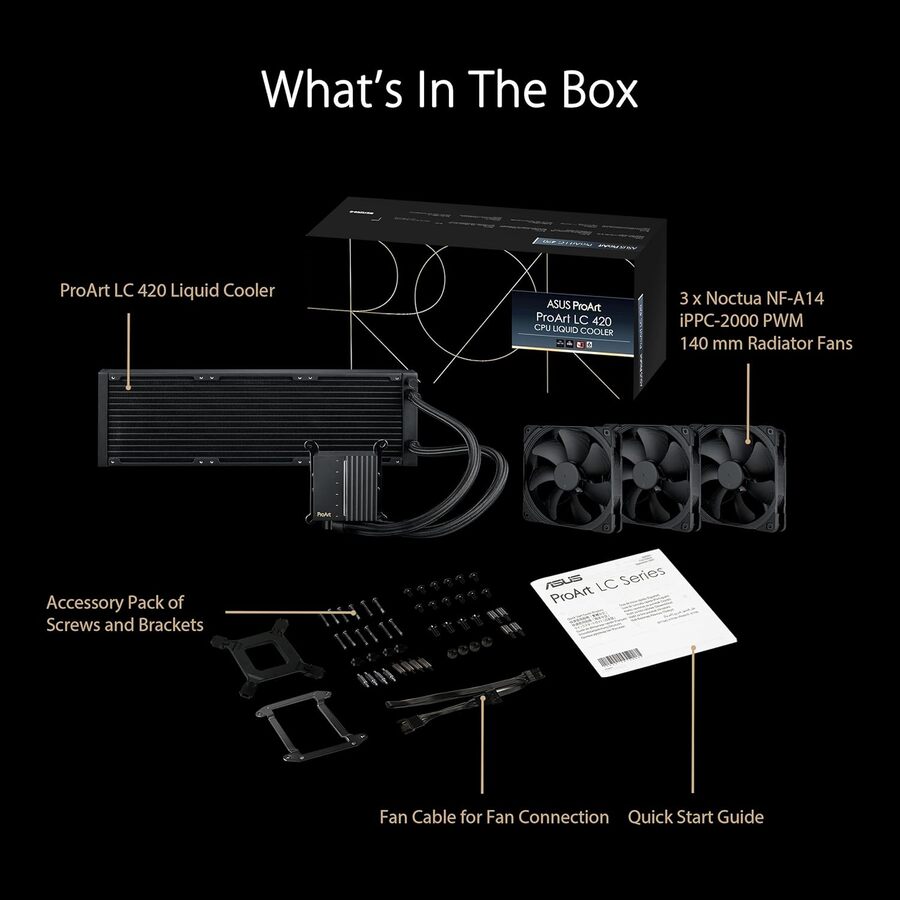
ProArt LC 420 all-in-one CPU liquid cooler with illuminated system status meter and three Noctua NF-A14 industrialPPC-2000 PWM 140mm radiator fans
Premium performance
As one of the few 420 mm AIO coolers on the market, the ProArt LC 420 can deliver some of the most powerful cooling available. And with its three renowned Noctua NF-A14 industrialPPC-2000 PWM 140 mm radiator fans, airflow can be delivered quietly.
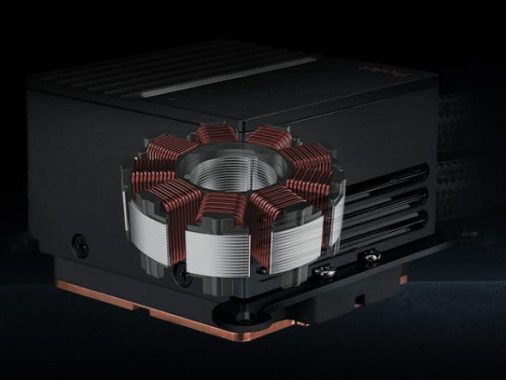
Advanced three-phase motor offers excellent cooling capability and quieter operation.
The synergy of high performance and low noise extends to many other elements of the ProArt LC 420. A premium three-phase motor pump ensures a smooth and steady transfer of heat to the radiator, while being acoustically tuned to blend into the background. And the radiator itself is thicker than usual, creating extra coolant storage so that the fans and motor do not have to work as hard.
A 420 mm AIO cooler is also designed to scale to a large chassis, so the ProArt LC 420 also features 450 mm of reinforced, sleeved tubing that offers durability and flexibility for a variety of setups.
ProArt style
Instead of featuring RGB lighting that could distract a creator from their work, the Asus ProArt LC 420 cooler includes only a minimalist illuminated meter on the pump cover, separated into segments that represent different levels of fan speeds, temperature readings, or system loads. With this subtly illuminated meter, a user can check their system’s cooling performance with a quick glance. These settings can be found within Armoury Crate.
The ProArt LC 420 cooler is designed to complement other components in the ProArt family, including motherboards, graphics cards, displays and more, empowering professional creators to design an entire system geared towards premium performance, tuned acoustics, and refined looks.
ProArt LC 420 CPU AIO Cooler
——————————————————————– | Model | ProArt LC 420 | ——————————————————————– | Water Block | Dimensions | 78 x 78 x 49 mm | | Block Material | Copper | ——————————————————————– | Radiator | Dimensions | 456 x 140 x 30 mm | | Material | Aluminum | ——————————————————————– | Tube | Type | Sleeved Rubber tube | | Length | 450 mm | ——————————————————————– | Fan | Model | Noctua NF-A14 IndustrialPPC 2000 PWM Fan | | Size | 3 x Fan Slots (140mm) | | Dimensions | 140 x 140 x 25 mm | | Speed | 800 – 2000 RPM +/- 10% | | Static Pressure | 4.18 mmH2O | | Air Flow | 107 CFM / 182.5 m3/h | | Noise | 31.5 dB(A) | | Control Mode | PWM/ DC | ——————————————————————– | Special Features | AURA Sync Support| Yes | ——————————————————————– | Compatibility | Intel | LGA 1700, 1200, 115x | | AMD | AM5, AM4 | ——————————————————————– | Package Content | – CPU Liquid Cooler (pre-applied thermal compound) | | – 1-to-3 Fan Splitter Cable | | – Accessory Pack of Screws and Brackets | | – Quick Start Guide | ——————————————————————– | Warranty | 6 years | ——————————————————————– | Note | ProArt LC Series | | | 90RC00N0-M0UAY0 | | | 90RC00N0-M0AAY0 | | | 90RC00N0-M0CAY0 | | | 90RC00N0-M0TAY0 | | | 90RC00N0-M0JAY0 |
In the ever-evolving world of printers, finding a reliable and cost-effective solution can be a daunting task. The Epson EcoTank ET-2840 printer, priced at $249.00, emerges as a compelling option for users seeking compatibility, performance, print quality, and savings on replacement ink. Let’s dive into the details of this Special Edition printer that promises to redefine your printing experience.
Design and Build
The Epson EcoTank ET-2840 boasts a sleek and compact design that won’t hog precious desk space. With dimensions of 14.8″ x 22.8″ x 10.0″ during operation and a mere 14.8″ x 13.7″ x 7.0″ for storage, this all-in-one printer is engineered for convenience. Weighing in at 9.5 lbs, it strikes a balance between sturdiness and portability.
EcoTank ET-2840 Special Edition
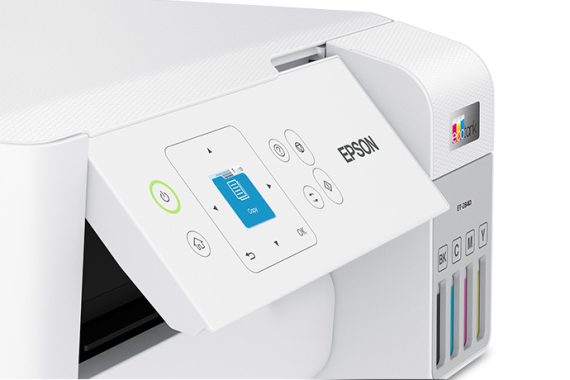
The 1.44″ Color LCD display on the front panel adds a touch of modernity to the design, providing an intuitive interface for easy navigation and setup. The printer’s minimalist appearance doesn’t compromise on functionality, making it an excellent addition to any home or office setup.
Compatibility
One of the standout features of the Epson EcoTank ET-2840 printer is its broad compatibility. Whether you’re a Windows enthusiast or a dedicated Mac user, this printer has you covered. Compatible with Windows 11, Windows 10, Windows 8, 8.1, Windows 7, Windows Vista, and Mac OS X 10.9 – 12.0x, it also extends its support to Chromebook™ Print and Scan ver.89 or later.
The inclusion of mobile printing options, such as the Epson Smart Panel app for iOS® and Android™, Epson Email Print, Epson Remote Print, Hands-Free Voice-Activated Printing, Apple® Airprint®, and Mopria®, ensures that you can seamlessly print from a variety of devices. This versatility is a definite plus, catering to the diverse tech landscape.
Performance
Under the hood, the Epson EcoTank ET-2840 printer is powered by 4-color (CMYK) drop-on-demand PrecisionCore® inkjet technology. The maximum print resolution of 4800 x 1200 dpi delivers crisp and vibrant prints, meeting the demands of both text and image-based documents. The ISO print speeds of 15.0 ppm (black) and 8.0 ppm (color) ensure efficiency without sacrificing quality.
The first page out time (FPOT) is an impressive 9 seconds for black and 15 seconds for color prints, making it a reliable choice for users who need documents in a hurry. The automatic reduction and enlargement features for copying (25% – 400%) enhance the printer’s versatility, accommodating various document sizes.
When it comes to print quality, the Epson EcoTank ET-2840 printer excels. The 4-color ink system produces prints with a remarkable level of detail and color accuracy. The maximum scan resolution of 9600 dpi interpolated ensures that scanned documents and photos retain their sharpness and clarity.
Whether you’re printing business reports, colorful presentations, or family photos, this printer consistently delivers professional-looking results. The inclusion of Epson ScanSmart® and the ability to output in various formats such as PDF, JPEG, PNG, TIFF, Multi-TIFF, and BMP add flexibility to your scanning and printing tasks.
Savings on Replacement Ink
The Epson EcoTank ET-2840 printer sets itself apart from traditional inkjet printers by adopting an innovative ink tank system. The printer comes with 4 individual ink bottles (Cyan, Magenta, Yellow, and Black), and the initial package includes 3 bottles of 522 Black (65 mL) and 1 bottle each of 522 Cyan, Magenta, and Yellow (65 mL).
The replacement ink bottles, specifically the 522 Black ink bottle (65 mL) with a yield of 4,300 ISO pages and the color (Cyan, Magenta, Yellow) ink bottle (65 mL) with a yield of 7,300 ISO pages, contribute to substantial savings in the long run. This printer is a game-changer for those tired of constantly replacing expensive ink cartridges.
Epson strongly recommends the use of genuine ink to ensure optimal print quality and performance. While the upfront cost of the printer may seem higher, the savings on replacement ink make it a cost-effective choice over time, especially for users with moderate to heavy printing needs.
Price and Value
Priced at $249.00, the Epson EcoTank ET-2840 printer positions itself as a mid-range option in the market. Considering its features, performance, and the included ink bottles with high yields, the price is justified for users looking for a reliable and cost-efficient printing solution.
Epson EcoTank ET-2840 printer
The 2-year limited warranty adds an extra layer of confidence, and Epson’s reputation for quality and durability further reinforces the value proposition. When you factor in the savings on replacement ink and the printer’s robust features, the Epson EcoTank ET-2840 becomes a compelling investment for both personal and professional use.
Connectivity and Software
The Epson EcoTank ET-2840 offers versatile connectivity options, including Hi-Speed USB and Wi-Fi® 4 (802.11 b/g/n). Wi-Fi Direct® provides a convenient wireless printing solution for users who prefer cable-free setups. The rear feed accommodates up to 100 sheets of paper, while the output capacity is 30 sheets.
The printer supports a range of paper sizes, from legal and A4 to letter and executive. Additionally, the ability to print on various paper types, including Ultra Premium Photo Paper Glossy, Bright White, Premium Photo Paper Semi-Gloss, and more, caters to diverse printing needs.
The inclusion of Epson Connect™ solutions, such as Epson Email Print and Epson Remote Print, enhances the printer’s convenience, allowing users to print from anywhere. The compatibility with Windows, Mac, and Chromebook™ adds flexibility to your printing workflow.
Unique Features
The Epson EcoTank ET-2840 Special Edition Printer comes with some unique features that set it apart in the market. The inclusion of the Epson Smart Panel app for mobile devices adds a layer of convenience, allowing users to monitor and control the printer from their smartphones.
The Hands-Free Voice-Activated Printing feature is a welcome addition for users who want a hands-free printing experience. By supporting voice commands, this printer aligns with the growing trend of smart home technology integration.
The manual 2-sided (duplex) printing feature adds an eco-friendly touch, allowing users to save on paper costs and contribute to environmental sustainability. The user-defined maximum paper size of 2.2″ x 3.4″ – 8.5″ x 47.2″ provides flexibility for various printing needs.
In the realm of printers, the Epson EcoTank ET-2840 Special Edition stands out as a versatile and cost-effective solution. Its compatibility with a wide range of operating systems, mobile printing options, and innovative ink tank system make it a strong contender in its price range.
The printer’s performance, print quality, and savings on replacement ink contribute to a compelling value proposition. With a thoughtful design, user-friendly interface, and unique features like Hands-Free Voice-Activated Printing, the Epson EcoTank ET-2840 printer earns its place as a reliable companion for both home and small office environments.
User-Friendly Software
The Epson EcoTank ET-2840 printer is not just about hardware; it also boasts user-friendly software that enhances the overall experience. The Epson Smart Panel app, available for both iOS® and Android™ devices, simplifies the printing and scanning process. With an intuitive interface, users can effortlessly navigate through various functions and settings, ensuring a hassle-free printing experience.
The inclusion of Epson Connect™ solutions, such as Epson Email Print and Epson Remote Print, adds another layer of convenience. These features allow users to print documents and photos from anywhere, providing flexibility for individuals on the go.
Moreover, the compatibility with popular mobile printing standards like Apple® Airprint® and Mopria® ensures that users can seamlessly integrate the Epson EcoTank ET-2840 into their existing mobile workflows.
Environmental Considerations
In addition to its economic advantages, the Epson EcoTank ET-2840 also champions environmental sustainability. The manual 2-sided (duplex) printing feature encourages users to reduce paper consumption, contributing to a greener printing practice. This is a thoughtful addition for users conscious of their environmental impact.
The printer’s low power consumption in standby and sleep modes further aligns with eco-friendly practices. With power consumption figures as low as 0.8 W in sleep mode and 0.2 W when powered off, the Epson EcoTank ET-2840 demonstrates Epson’s commitment to energy efficiency.
Monthly Duty Cycle and Reliability
The Epson EcoTank ET-2840 printer is built to handle a monthly duty cycle of up to 5,000 pages, with a recommended monthly page volume of up to 800 pages. This robust capacity positions the printer as a reliable workhorse for small offices and home users with moderate to high printing needs.
The printer’s build quality, adhering to safety standards such as UL60950-1 and CSA C22.2 No. 60950-1, instills confidence in its reliability. The 2-year limited warranty, provided with registration in the U.S. and Canada, further assures users of the product’s durability and the manufacturer’s commitment to customer satisfaction.
EcoTank ET-2840 Special Edition – Final Thoughts
In conclusion, the Epson EcoTank ET-2840 Special Edition Printer is a well-rounded printing solution that successfully addresses key concerns for users—compatibility, performance, print quality, and savings on replacement ink. Priced at $249.00, it strikes a balance between affordability and advanced features.
The printer’s sleek design, user-friendly interface, and versatile connectivity options make it an attractive choice for a variety of users. Whether you’re a student printing assignments, a professional crafting presentations, or a family printing cherished memories, the Epson EcoTank ET-2840 caters to diverse printing needs.
The inclusion of innovative features, such as Hands-Free Voice-Activated Printing, manual 2-sided printing, and the Epson Smart Panel app, adds a layer of sophistication to the user experience. These features, combined with the printer’s eco-friendly considerations, make it a standout option in its category.
If you’re in the market for a reliable, cost-effective, and feature-rich printer, the Epson EcoTank ET-2840 Special Edition Printer is worth serious consideration. Its blend of performance, convenience, and sustainability makes it a valuable addition to any workspace. Say goodbye to the hassles of frequent ink replacements and welcome a new era of efficient and high-quality printing with the Epson EcoTank ET-2840 printer.
Since its debut in 1991, Linux has become the backbone of the internet, dominating the digital landscape. As the preferred operating system for web-facing computers, Linux is renowned for its robust security. However, despite its widespread use, security and confidentiality concerns persist. To fortify your Linux server against potential threats, consider implementing the following top-tier security tips:
1. Strong and Unique Passwords:
Use passwords with a minimum length of 10 characters, including upper and lowercase letters, numbers, and special symbols.
Avoid using the same password for multiple users or systems.
Configure password expiration for enhanced security.
Employ password managers with features like two-factor authentication and cloud storage.
2. SSH Key Pairs:
Create SSH key pairs as a more secure alternative to traditional username and password logins.
SSH keys provide heightened security through encryption used by both the server and the computer.
Mitigate the risk of malicious and brute-force attacks on your server.
photo: pixabay
3. Regular Software Upgrades:
Perform regular software patches to address emerging vulnerabilities and prevent exploitation.
Utilize command lines and update managers like Ubuntu Update Manager for timely updates.
Keep your Linux system secure by using commands like ‘apt-get update’ for updates.
4. Avoid Unnecessary Software:
Exercise caution when adding new software to your server.
Remove obsolete software to reduce potential security threats.
Use tools like Red Hat Package Manager to review and filter installed packages.
5. Check and Close Open Ports:
Monitor open ports to prevent exposure of network architecture information.
Identify and close unused ports to thwart potential attacks.
Leverage commands like netstat to determine listening ports and connections.
6. Disable Booting from External Devices:
Prevent potential physical attacks by disabling the ability to boot from external devices.
Mitigate the risk of unauthorized access via USB thumb drives and other external media.
7. Security Audits:
Conduct regular security audits to identify and address evolving threats.
Enhance security by closing gaps revealed during audits and staying ahead of potential vulnerabilities.
8. Enable Firewall:
Secure your server from unauthorized access by configuring and regularly inspecting the firewall.
Use tools like iptables to filter incoming, outgoing, and forwarded IP packets.
9. Create and Maintain Regular Backups:
Implement a robust backup strategy using tools like Rsync.
Schedule regular backups to safeguard critical data in the event of unforeseen incidents.
Utilize Rsync options for flexibility, such as excluding specific files from backups.
Whether you’re a casual user or demanding maximum performance from your new computer, understanding the significance of CPU cores is essential before delving into the world of tech options.
CPU cores, the linchpin of processing power, play a pivotal role in determining the range of software your device can handle simultaneously. Making informed decisions about the number of cores you need can save you time, frustration, and future expenses. However, determining the optimal core count for your specific needs can be a challenging task.
In this comprehensive guide, we dissect the importance of CPU cores for various computing tasks and provide insights into selecting the ideal CPU for your requirements. It’s crucial to note that while core count is a key consideration, the clock speed of your cores also influences overall performance.
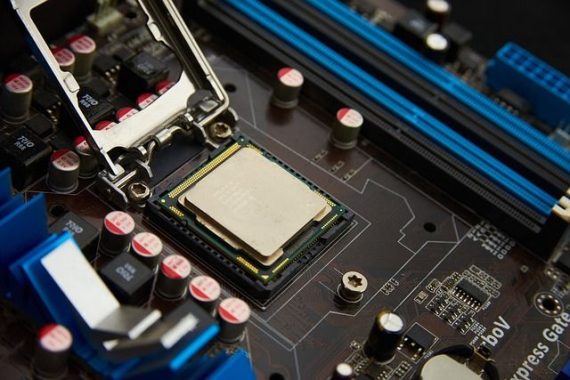
photo: Pixabay
Understanding CPU Cores:
The central processing unit (CPU) is the brain behind your computer, executing tasks through applications and delivering instructions to access information stored in RAM.
CPU cores are the intricate pathways within a processor, comprised of billions of microscopic transistors. For those keen on multitasking, a minimum of two cores is necessary to ensure efficient task handling.
Historically, CPUs started with a single core in 1971 when computers primarily executed one task at a time. However, the demand for running multiple programs concurrently led to the introduction of CPUs with more cores.
As of the latest Intel® Core™ processors, now in their 10th generation, the increasing number of cores enhances the computer’s ability to handle numerous tasks simultaneously.
Determining the Number of Cores:
Different computing tasks demand varying resources, with the number of cores being a primary determinant of smooth program execution. Here’s a breakdown based on core count:
1 Core: While it’s rare to find a modern computer with just one core, a single-core system limits you to running only one program at a time.
2 Cores: Ideal for budget users, dual-core processors can handle basic tasks like email, document creation, and music playback. However, resource-intensive activities such as video editing may overwhelm the system.
4 Cores: Quad-core CPUs strike a balance, enabling video rendering and gaming at lower resolutions alongside routine tasks. Professionals in video editing, graphic design, and similar fields benefit from additional cores, along with dedicated GPUs and increased RAM.
6 Cores: Hexa-core processors are suitable for more complex tasks, including video and audio editing. They provide ample power for advanced gaming and multitasking, making them a choice for streamers and media professionals.
8 or More Cores: Octa-core CPUs cater to pro gamers, video editors, and engineers. Professionals using power-intensive software like VR or AutoCAD find these CPUs optimal for their needs. Customization options often include octa-core CPUs, making them a prudent choice for future-proofing your computer.
Deciding on Your CPU:
CPU vs. GPU: Both the CPU and GPU must collaborate for optimal performance. CPUs excel at logic-based tasks, handling a broad array of tasks swiftly. In contrast, GPUs specialize in rendering high-resolution images and videos, crucial for gaming and video rendering.
Cores vs. Threads: Processors use simultaneous multithreading (hyper-threading on Intel processors) to split cores into virtual threads. Threads enhance power for specific programs, with most processors offering twice as many threads as cores.
Overclocking: While overclocking can boost CPU processing time, it comes with risks. Be cautious, as overclocking can void warranties and accelerate component wear.
CPU Speed: Also known as clock speed, CPU speed determines how quickly the CPU retrieves information from RAM. A higher CPU speed enhances overall performance, particularly for gaming and video editing. Aim for a speed of 3.5 GHz to 4.0 GHz for optimal results.
Choosing Between CPU Speed and Core Count: The decision between higher CPU speed and more cores depends on your usage preferences. Higher CPU speed loads applications faster, making it suitable for users running multiple programs simultaneously. On the other hand, more cores enable smoother multitasking and program switching.
Consider your specific needs, whether it’s running processor-intensive games or managing multiple software applications. Newer processors generally offer improved efficiency, and freeing up storage space enhances overall performance.
Cost Considerations: Price plays a pivotal role in determining the number of cores for your laptop or desktop. Balancing multiple cores and high CPU speed can be expensive, so weigh your options based on the applications you run. For video games and editing, prioritize CPU speed, while multitasking benefits from additional cores.
Understanding the intricate relationship between CPU cores, speed, and your specific computing needs is crucial for selecting the optimal processor. Whether you’re a casual user or pursuing a professional gaming or editing career, making an informed choice ensures your computer meets your expectations without breaking the bank.
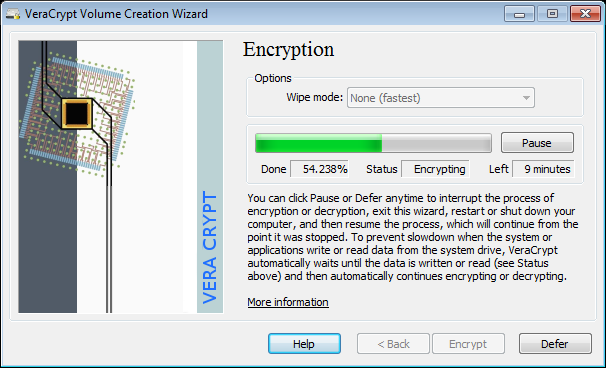
VeraCrypt stands as an open-source disk encryption solution crafted for Windows, Mac, and Linux operating systems. Its purpose lies in empowering users to generate a virtual encrypted disk within a file, with centralized management of drive mount operations. As concerns over security mount among computer users, safeguarding files and data becomes progressively paramount. Computer thieves target personal data and passwords for identity theft, posing a significant risk for businesses safeguarding customer data. Encryption tools like VeraCrypt serve to secure files, allowing access only to authorized individuals possessing the correct code. Furthermore, the tool is available for download and use free of charge.
VeraCrypt operates as an open-source disk encryption solution, accommodating Windows, Mac, and Linux operating systems. Its functionalities extend to creating virtual encrypted disks in files and managing drive mount operations through a unified portal. Organizations find value in this application for automatically encrypting partitions, entire drives, and various storage devices, including USB flash drives and hard drives. VeraCrypt equips IT professionals to safeguard encrypted algorithms utilized for partition encryption against cyber threats. Additionally, the application provides a comprehensive array of features, encompassing analytics, data backup, system monitoring, automated testing, and parallel computing.
VeraCrypt empowers IT teams to identify and address system vulnerabilities and diverse security issues. The application, accessible for free, ensures support through documentation, FAQs, forums, and other online resources.
Key Features of VeraCrypt
1. Open Source Security Backup: VeraCrypt’s open-source nature enables continual enhancement by developers, fostering the addition of features. The on-the-fly encryption capability ensures automatic encryption of files as they are written to the drive, securing the entire hard drive.
2. Comprehensive Encryption with User Manuals: While highly secure, VeraCrypt requires a certain level of computer proficiency for installation and usage. Despite this, it stands out as a robust and free tool with a detailed user manual and forum support.
Pros and Cons
Advantages:
Swift encryption of entire volumes.
Extensive user manual and forum support.
Drawbacks:
Not user-friendly for beginners.
Slower operational speed.
Numerous security experts advocate for VeraCrypt to secure sensitive files due to its ability to provide military-grade encryption. Boasting an open-source, free, and cross-platform nature, VeraCrypt accommodates basic file protection needs while offering advanced features for those seeking heightened file security.
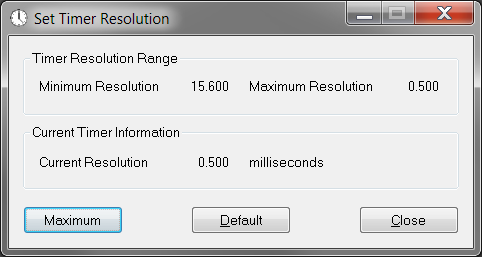
Enhance your gaming experience by adjusting the default timer resolution on your Windows PC with Timer Resolution app. The standard timer on Windows fluctuates between 10 and 25 milliseconds, which may not be ideal for gamers who seek precision and detail in their gameplay.
These minute details can significantly impact your accuracy in games utilizing this mechanism. Timer Resolution allows you to modify your Windows PC’s timer resolution in seconds, ultimately boosting the Frames Per Second (FPS) for the games you’re engaged in and providing you with a competitive edge.
Timer Resolution photo
The effectiveness of this utility often hinges on the capabilities of your CPU. If your CPU is sufficiently powerful, it can address a substantial portion of the performance concerns.
Setting the timer resolution is straightforward with this tool, enabling you to customize it to your advantage during gameplay. This adjustment is particularly noticeable in online First Person Shooter (FPS) games like Fortnite, where every second and detail holds significance, influencing your overall accuracy.
While the default timer resolution typically ranges from 10 to 25 milliseconds, Timer Resolution allows you to make nuanced changes that can make a substantial difference in FPS games and other genres.
The tool’s intuitive interface allows you to control the timer using buttons or convenient hotkeys. You can further enhance efficiency by customizing hotkeys for specific actions within the application, tailoring the experience to your preferences.
In summary, Timer Resolution app proves especially beneficial for gamers seeking to fine-tune their default timer resolution for a slight FPS advantage. Whether starting, pausing, or defining round time, this high-accuracy stopwatch timer for Windows can achieve 1ms timers, catering to the demands of games that require precision and rapid reactions. Elevate your gaming performance with Timer Resolution and gain an edge in the world of competitive gaming. Download Timer Resolution app HERE
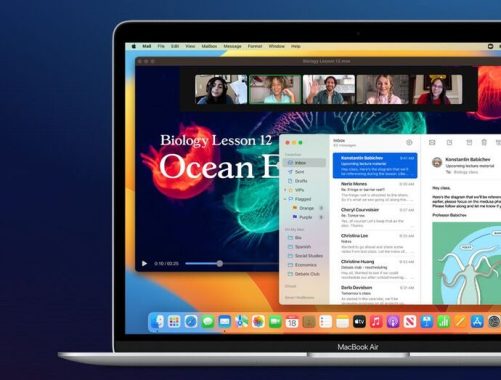
With authorization, you can use Bluetooth File Exchange to browse the Public folder on the device, retrieve files from the device, and transmit files to the device when your Mac is linked to a Bluetooth® enabled device, like a phone. However, you can easy transfer files between Macs or between a Mac and another Bluetooth-enabled device using the following steps:
Enable Bluetooth:
Make sure Bluetooth is turned on for both your Mac and the device you want to send files to.
Pair Devices:
Ensure that your Mac is paired with the other Bluetooth device. You may need to go to “System Preferences” > “Bluetooth” and pair the devices if they are not already paired.
If you’re transferring files between Macs and both are running macOS Lion (10.7) or later, you can use AirDrop. Open a Finder window and click on “AirDrop” in the sidebar. Make sure AirDrop is set to “Everyone” or “Contacts Only” in the AirDrop window. Drag and drop the file onto the icon of the Mac you want to send it to. Bluetooth File Exchange (Mac-to-Device):
On your Mac, go to “Applications” > “Utilities” > “Bluetooth File Exchange.” Choose “Send File” or “Send Folder” from the “File” menu. Select the file or folder you want to send. Choose the Bluetooth device you want to send the file to.
How to enable Bluetooth Sharing on Mac?
You can enable file sharing over Bluetooth using the following steps:
Open System Preferences:
Click on the Apple logo in the top-left corner of your screen. Select “System Preferences.” Go to Sharing Preferences:
In the System Preferences window, click on “Sharing.” Enable Bluetooth Sharing:
In the Sharing preferences pane, you will see a list of services on the left. Look for “Bluetooth Sharing” in the list. Check the box next to “Bluetooth Sharing” to enable it. Configure Bluetooth Sharing Options (Optional):
Click on the “Options…” button next to “Bluetooth Sharing” to configure specific options. Here, you can choose the folder where incoming Bluetooth files will be saved and set permissions for who can send files to your Mac. Please note that the availability of certain options may vary depending on your macOS version. Also, keep in mind that Bluetooth file sharing might have limitations depending on the types of devices you are trying to connect and the file types you are trying to transfer.
Please note that the steps and options might vary depending on the macOS version you are using. Additionally, improvements or changes may have been made in subsequent macOS updates. Always refer to the latest documentation for your specific macOS version.
In the midst of ongoing controversies surrounding TikTok, parents are increasingly seeking ways to enhance oversight and control over their teenagers’ activities on the popular social media platform. While TikTok has faced security concerns, including bans in certain regions, the latest developments offer parents a significant update to its Family Pairing functionality, providing a higher level of control that many users may not even be aware of.
Tackling Security Fears and Parental Concerns TikTok, owned by the Chinese company ByteDance, has encountered security fears, leading to actions such as the UK banning it from government phones. Concerns about cybersecurity and hacking have prompted debates, with the parent company consistently denying any security risks associated with the app. However, parents, particularly those of minors who form a significant user base, are increasingly alarmed by the app’s influence on their children.
photo: pixabay
Empowering Parents with Family Pairing – In response to parental concerns, TikTok has introduced various tools over the years to empower parents and enhance the safety of teenagers on the platform. The central hub for these controls is the Family Pairing functionality, enabling parents to connect their accounts with their children’s, granting them the ability to control specific settings remotely. This includes features such as disabling direct messages, setting screen time limits, and activating Restricted mode to filter out potentially inappropriate content. Additionally, TikTok implements automatic content restrictions based on age brackets.
Enhanced Video Filtering for Parents – The latest update to Family Pairing introduces a valuable tool for parents: the ability to filter specific videos on their children’s accounts using keywords. TikTok collaborated with experts, including the Family Online Safety Institute, to strike a balance between empowering families and respecting young people’s rights in the online world. The app now allows parents to filter content based on keywords, providing an additional layer of control over the viewing experience.
Transparency and Trust in Families – In a bid to foster transparency and trust within families, TikTok has chosen to let children see the keywords their parents have filtered. This move, aimed at maintaining open communication, raises the question of whether it might lead to more discussions and disagreements within families regarding what is deemed appropriate conduct.
Setting Up Video Filtering in Family Pairing For parents eager to take advantage of the video filtering feature, the process is straightforward:
In the TikTok app, tap Profile at the bottom.
Tap the Menu button at the top.
Tap Settings and privacy.
Navigate to Content Preferences and select Filter video keywords.
Add keywords and specify the feeds to filter.
Save your settings to confirm.
Parents can filter hashtags directly from videos in the For You or Following feed:
Press and hold on the video or tap the Share button and select Not interested.
Tap Details to view hashtags on the video.
Choose the hashtags to filter.
Confirm your selection by tapping Submit.
To manage filtered keywords:
In the TikTok app, tap Profile at the bottom.
Tap the Menu button at the top.
Navigate to Settings and privacy.
Go to Content Preferences and select Filter video keywords.
Delete or edit keywords as needed.
With these enhanced parental controls, TikTok aims to provide families with the tools they need to create a safer and more controlled online environment for their teens.
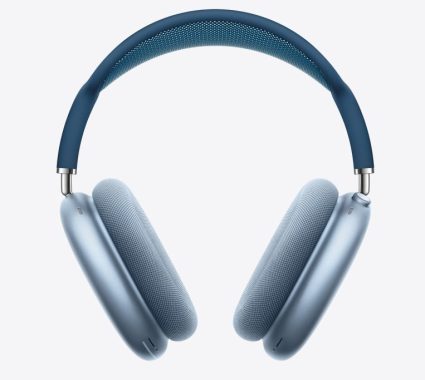
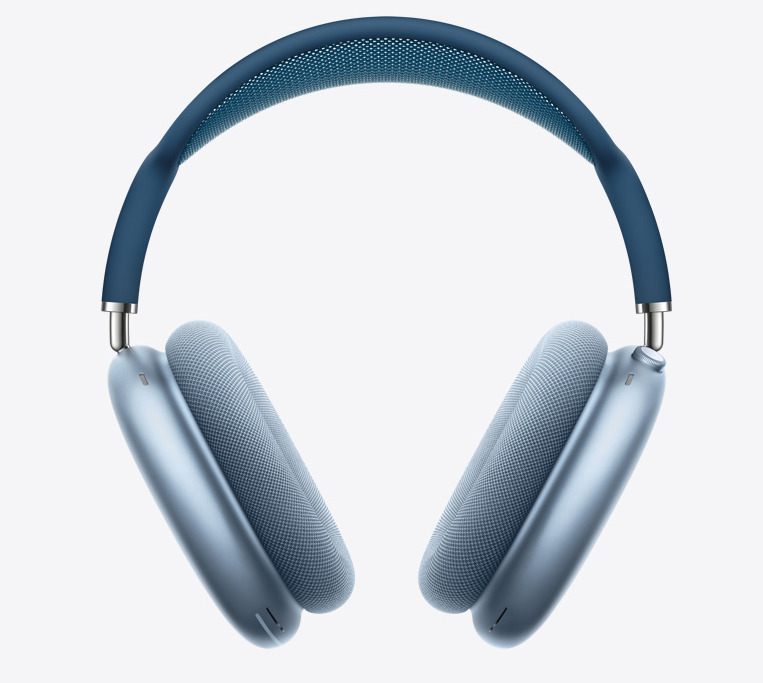
AirPods Max not charging? Here are some basic solutions to resolve the issue before resorting to a visit to the Apple Store or contacting Apple Support.
Verify Authenticity: Confirm if your AirPods Max are genuine by referencing the Identify Your Airpods page on the Apple site. Counterfeit products often exhibit charging issues due to subpar construction and battery quality.
Check Battery Level: Ensure your AirPods Max aren’t already at full battery capacity by examining the battery level on your connected iOS device. A full charge prevents further charging.
Battery Health Concerns: Unlike some Apple devices, there’s no software option to check the battery health of AirPods Max. If they’ve undergone extensive charging cycles or experienced overcharging or heat, the battery may degrade. Apple’s warranty may cover manufacturing defects in this case.
Allow Time for Charging: If your AirPods Max have been unused for a while, give them time to charge. The batteries may be too depleted for the quick charge feature to function immediately.
Confirm Charging Source: Ensure you’re using a compatible charger; not all chargers work equally. Stick to original Apple chargers or certified lightning cables to prevent charging issues.
Try Different Chargers: Test your AirPods Max with chargers from other Apple devices to identify whether the problem lies with the charger or the headphones.
Inspect Charging Port and Cable: Clean the charging port and cable connectors to remove debris and prevent wear and tear. A lint-free cloth can be used for this purpose.
Examine the Smart Case: If your AirPods Max are equipped with a smart case, ensure they are correctly positioned in it. The smart case activates an ultra-low-power mode that can impact charging.
Check Charging Status Light: Monitor the status light when charging. A green light indicates a full charge, while amber signifies ongoing charging. No light suggests a charging issue.
Power Cycle Your AirPods Max: Restart your AirPods Max by holding the noise control button and the digital crown until the status light flashes amber. Wait a few minutes before turning them back on.
Update Your Firmware: Ensure your AirPods Max firmware is up to date. Periodic updates can resolve software issues, including charging problems.
Reset Your AirPods Max: If all else fails, perform a factory reset by holding the digital crown and noise control button for 15 seconds. This clears potential software glitches causing charging problems.
Dealing with charging issues in your AirPods Max can be frustrating, but these troubleshooting steps can often resolve the issue without the need for a costly replacement.
As an expert in audio technology, I had the pleasure of delving into the Yamaha ATS-1090 soundbar, a sleek and powerful addition to the audio landscape. Let’s break down its key features and performance aspects.
Compatibility and Inputs: The Yamaha ATS-1090 boasts a comprehensive range of inputs, making it a versatile companion for your home entertainment system. With one HDMI input and output supporting TV ARC, a digital optical input, and a subwoofer output, this soundbar ensures seamless connectivity. The 4K pass-through capability, supporting HDR10 and HLG, enhances its compatibility with modern high-resolution content.
Performance and Quality: The ATS-1090 doesn’t compromise when it comes to performance. The drivers, including front L/R speakers and built-in subwoofers, deliver a robust output power of 120W. This comprises 30W per channel for the front L/R speakers and an impressive 60W for the built-in subwoofers. The result is a rich, immersive audio experience that elevates your movies, music, and games.
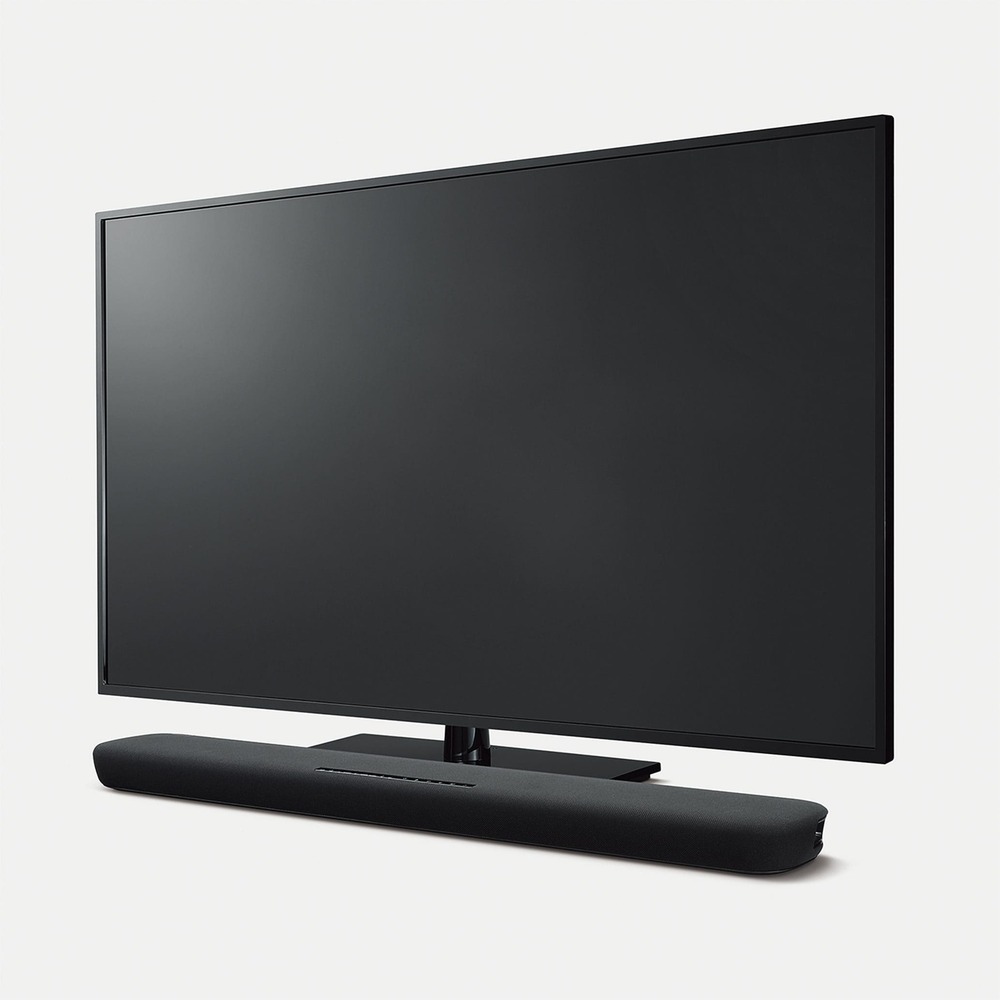
Yamaha ATS-1090 soundbar
Energy Efficiency: Yamaha demonstrates a commitment to energy efficiency with the ATS-1090. The soundbar consumes a modest 30W during operation, and in standby mode, it minimizes power consumption to as low as 0.2W (HDMI control off, network standby off). This thoughtful design aligns with the demand for eco-friendly audio solutions.
Design and Dimensions: Sleek and versatile, the ATS-1090 is designed to complement your entertainment setup. Whether installed in front of a TV or mounted on a wall, the soundbar’s dimensions (35″ x 2-1/8″ x 5-1/8″) and weight (7.5 lbs) make it a discreet yet impactful addition to your living space.
Sound Technology and Surround Modes: Yamaha’s sound engineering prowess shines through with the incorporation of DTS Virtual:X™ technology. The virtual surround capability creates an expansive soundstage, enhancing your listening experience across various modes—Music, TV program, Movie, Sports, and Game. The Compressed Music Enhancer further ensures optimal sound quality, especially for Bluetooth® streaming.
Audio Formats and Connectivity: Supporting a range of audio formats, including Dolby Digital, Dolby Pro Logic II, and DTS Digital Surround, the ATS-1090 accommodates diverse preferences. Built-in music streaming services, Wi-Fi connectivity, and Bluetooth® (Version 4.2) with a communication range of approximately 33 feet add layers of convenience to your audio experience.
Additional Features: The Yamaha ATS-1090 comes with the Sound Bar Controller app for easy and intuitive control. While lacking a learning function and wireless subwoofer, its front surround system and absence of MusicCast Surround may be trade-offs for some users.
Price: Priced competitively at $219.95, the Yamaha ATS-1090 soundbar strikes a balance between affordability and premium features, making it an attractive choice for audio enthusiasts seeking quality without breaking the bank.
The Yamaha ATS-1090 proves to be a satisfactory option for music enthusiasts. Its default sound profile leans towards a bass-heavy and dark tone, occasionally obscuring voices. However, the simplicity of this soundbar limits the extent of sound customization, allowing only for the adjustment of subwoofer volume without the ability to fine-tune bass or treble settings. Notably, it lacks in low-bass reproduction, particularly evident in genres like EDM and hip-hop, where the expected thump and rumble are somewhat subdued.
Yamaha appears to cater to users who may be new to soundbars, ensuring a straightforward setup process. The YAS-109 prioritizes user-friendly adjustments, avoiding potentially detrimental changes to audio quality. For instance, the various sound modes—Movie, TV, Music, and Sports—offer subtle shifts in the EQ, providing a user-friendly experience without the risk of ruining the audio. This approach is advantageous for novice consumers, preventing accidental speaker damage due to mode selection.
The compact remote complements the overall simplicity, featuring all necessary buttons for input selection, volume control for mids/tweeters and subwoofer, sound mode selection, and an Amazon Alexa button. While the remote is serviceable, control feedback is only satisfactory, making it somewhat challenging to gauge speaker and woofer settings at a glance. Adjusting volume with the TV remote is not entirely seamless, requiring multiple presses before a noticeable change in decibels occurs.
In terms of movie performance, the Yamaha ATS-1090 falls into the middle ground. Its 2.2 configuration lacks the immersive feel provided by multichannel audio formats like Dolby Digital, as it must downmix 5.1 surround sound into stereo for playback. This results in a less clear and realistic audio experience. Additionally, the soundbar does not support Dolby Atmos content, and the absence of low-bass impact is noticeable in action scenes, where the expected rumble accompanying large explosions is somewhat subdued.
The Yamaha ATS-1090 soundbar delivers a harmonious blend of compatibility, performance, and quality. With its sleek design, powerful audio output, and thoughtful features, it stands as a commendable option in the realm of soundbars. Whether you’re a cinephile, music lover, or avid gamer, the Yamaha ATS-1090 promises to elevate your audio experience to new heights.