Home Blog Page 30

Introducing Audacity Portable 3.0.0: A Revolutionary Leap in Audio Editing

0

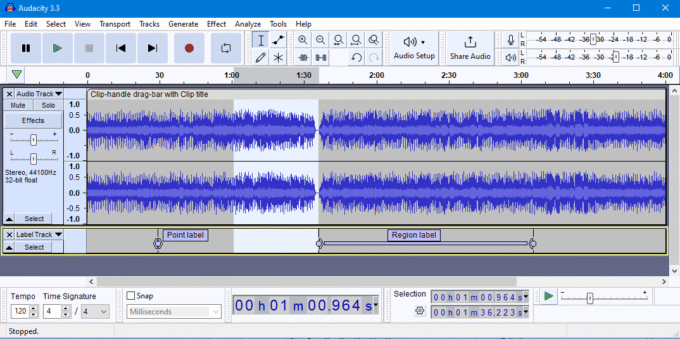
Audacity Portable stands as a versatile, user-friendly, and multilingual audio editing and recording software available for Windows, Mac OS X, GNU/Linux, and various other operating systems. This free tool empowers users to record, play, import, and export an array of audio file formats, including WAV, AIFF, AAC, MP4, Ogg Vorbis, and MP3, offering a seamless and dynamic editing experience. With features such as Cut, Copy, Paste (with unlimited Undo), multitrack mixing, and a range of effects, Audacity Portable caters to both basic and advanced audio editing needs.

One of the standout features is its FLAC support, enabling high-quality audio processing. The program boasts a built-in amplitude-envelope editor, customizable spectrogram mode, and a frequency-analysis window, making it an ideal choice for audio analysis applications. Audacity Portable also comes equipped with built-in effects like Bass Boost, Wahwah, and Noise Removal, in addition to supporting VST plug-in effects.

Audacity Portable
Audacity Portable

Whether you’re a home user or a professional seeking top-notch audio editing capabilities, Audacity Portable 3.0 is the go-to solution. Its robust set of features includes recording from a microphone or mixer, advanced editing with unlimited Undo and Redo commands, digital effects for pitch adjustment, background noise removal, frequency alteration, vocal removal, and the creation of voice-overs for podcasts. The software also supports plug-ins such as LADSPA, Nyquist, VST Audio Unit, and VAMP analysis plug-ins.

What’s New in Audacity 3.0.0:

This major update brings a significant shift in the way Audacity projects are saved. The previous ‘pile of files’ storage format has been replaced by a more streamlined approach using the open-source database SQLite3. The new .aup3 file format now encapsulates both project data and coordination in a single file, ensuring a more reliable project structure.

This transition has led to enhanced project editing speed, as there are fewer files to manage. However, project closure may take slightly longer due to additional processes involved. Audacity 3.0.0 primarily focuses on this format change, prioritizing stability over additional feature updates.

Notable Improvements:

  1. Noise Gate Enhancement: The Noise Gate effect has undergone improvements, ensuring cleaner and more precise audio results.
  2. Label Sounds Analyzer: A new analyzer, ‘Label Sounds,’ has been introduced to label sounds and silences within the audio, enhancing the user’s ability to navigate and manage audio content.
  3. Macro Import/Export: Users can now import and export macros, facilitating a more efficient workflow.
  4. Tool and Analyzer Shortcuts: Two new commands have been added, allowing users to quickly access the last-used tool or analyzer with customizable shortcuts.

Experience the next level of audio editing with Audacity Portable 3.0.0. Download your copy today and unleash the full potential of your audio projects. Download HERE

Unlocking Netflix’s Hidden content: Tips for Ultimate Viewing Pleasure

0

Netflix, with its vast array of series, movies, and programs, holds a treasure trove of entertainment. Unbeknownst to many users, there are hidden features and shortcuts that can enhance your Netflix experience and help you discover content you might otherwise miss.

Accessing Netflix’s Hidden content

Navigating Netflix’s extensive catalog can be challenging, but did you know there are hidden categories that offer more refined searches? By logging in on your computer and typing the following URL (https://www.netflix.com/fr-en/browse/genre/83), replacing ’83’ with the desired code from the list below, you can explore more specific genres:

Action & Adventure (1365)

  • Classics Action & Adventure (46576)
  • Action comedies (43040)
  • Action thrillers (43048)
  • Adventures (7442)
  • Comics and Superhero Movies (10118)
  • Westerns (7700)
  • Spy Movies (10702)
  • Martial Arts Movies (8985)
  • War & Action Movies (2125)
  • Asian Action Movies (77232)

    How to access hidden content? - netflix
    photo: pixabay

The great classics of cinema (31574)

  • The classics of comedy (31694)
  • Classical dramas (29809)
  • The classics of Science Fiction & Fantasy (47147)
  • The Thrillers (46588)
  • Black Film (7687)
  • Great war movies (48744)
  • The great epics (52858)
  • Silent cinema (53310)
  • Westerns (47465)

Cult movies (7627)

  • Series B Movies (8195)
  • Kitchampy Movies (1252)
  • Horror movies (10944)
  • Sci-Fi and Fantasy Movies (4734)
  • Cult Comedies (9434)

Comedy (6548)

  • Black comedies (869)
  • Comedy from abroad (4426)
  • Political comedies (2700)
  • Comedy about sport (5286)
  • Stand-up (11559)
  • Comedy for Teenagers (3519)
  • Satires (4922)
  • Romantic comedies (5475)

Romance (8883)

  • The great classics (31273)
  • Romantic comedies (5475)
  • The most famous (502675)
  • Eccentric (36103)
  • Independent movies (9916)
  • Foreign cinema (7153)
  • Dramas (1255)
  • Erotic (35800)

Science Fiction & Fantasy (1492)

  • Classics (47147)
  • Cult movies (4734)
  • Action Movies (1568)
  • With extraterrestrials (3327)
  • Fantasy (9744)
  • Adventure Movies (6926)
  • Dramas (3916)
  • Horror movies (1694)
  • Thrillers (11014)

Thrillers (8933)

  • Action Movies (43048)
  • Classics (46588)
  • Crimes (10499)
  • Independent Thrillers (3269)
  • Gangster Movies (31851)
  • Psychological thrillers (5505)
  • Political Thrillers (10504)
  • Mysteries (9994)
  • Science Fiction Thrillers (11014)
  • Spying Thrillers (9147)
  • Erotic thrillers (972)
  • Supernatural Thrillers (11140)

Cartoons (7424)

  • Adult Cartoons (11881)
  • Action Cartoons (2653)
  • Animated comedy series (9302)
  • Animated dramas (452)
  • Science Fiction Cartoons (2729)
  • Horror cartoons (10695)
  • Fantasy heroic cartoons (11146)
  • Animated series (6721)

Children’s and Family Movies (783)

  • 0 to 2 years films (6796)
  • 2 to 4 years films (6218)
  • 5 to 7 years films (5455)
  • 8 to 10 years films (561)
  • Films from 11 to 12 years old (6962)
  • Children’s documentaries (10659)
  • Movies based on children’s books (10056)
  • Cartoons (11177)
  • Disney (67673)
  • Children’s TV programs (27346)
  • Tales around animals (5507)

Music (1701)

  • For children (52843)
  • Country & Western / Folk (1105)
  • Jazz (10271)
  • Latin Music (10741)
  • Urban & Dance Concerts (9472)
  • Concerts Worldwide (2856)
  • Rock & Pop Concerts (3278)
  • Musical comedies (13335)
  • On stage (55774)

Series & TV Shows (83)

  • Classics (46553)
  • Cult series (74652)
  • British series (52117)
  • Korean series (67879)
  • Mini-series (4814)
  • Cooking and travel (72436)
  • War (25804)
  • Science & Nature (52780)
  • Action & Adventure (10673)
  • Crimes (26146)
  • Comedy Films (10375)
  • Documentary (10105)
  • Dramas (11714)
  • Horror (83059)
  • Mystery (4366)
  • Science Fiction & Fantasy (1372)
  • Reality TV (9833)
  • Children’s Programs (27346)
  • Teen Programs (60951)

These detailed categories go beyond the usual start menu, making it easier to find programs. Plus, marking shows with ‘+My List’ allows you to save favorites for easy access on your TV.

Accessing Geo-Restricted Content

Expand your viewing horizons by using a VPN to access region-specific content. By changing your location, you can enjoy series and movies available in other countries, offering a broader selection. Check out recommended VPN services for an enhanced Netflix experience.

Useful Shortcuts for PC App Users

For those using the Netflix PC app, mastering keyboard shortcuts can elevate your viewing pleasure:

  • F key: Full-screen playback
  • Spacebar or Enter: Pause or resume playback
  • Up/down arrows: Adjust volume
  • Left/right arrows: Navigate playback
  • M key: Mute video
  • Ctrl + Shift + Alt + Q: View technical audio and video information

Disabling AutoPlay

While AutoPlay is convenient, it can lead to unintentional binge-watching. Disable it easily by accessing your profile, clicking on Account, selecting ‘Playback Settings,’ and unchecking ‘Play the next episode automatically.’

Clearing Playback History

Maintain your privacy by managing your playback history. Hide all or selectively delete content to ensure your viewing habits remain private, although be aware that this may impact Netflix’s recommendation algorithms.

Downloading Offline Content

Take your favorite shows on the go by downloading Netflix originals for offline viewing. Simply select the content, click the download icon, and enjoy it without using data.

Additional Netflix Hacks

  • IMDb Ratings for Netflix: Install the Chrome extension to see Metacritic, Rotten Tomatoes, and IMDb ratings for movies and series, helping you make informed choices.
  • Teleparty: Watch Netflix with friends remotely using this Chrome extension, complete with a chat feature for discussing the movie in real-time.
  • Language Reactor: Enhance your language skills by installing this Chrome extension, providing dual subtitles and a popup dictionary while watching movies.

Unearth the full potential of Netflix with these tips and tricks, transforming your viewing experience into an enriching and personalized adventure.

Setting Up WhatsApp Across Multiple Devices with a Same Number

0

WhatsApp enthusiasts can rejoice as the long-awaited multi-device mode enhancement has finally arrived, allowing users to seamlessly use the same WhatsApp account on multiple devices simultaneously. This significant update, introduced by WhatsApp in January 2023, aims to simplify daily messaging for users who navigate between various devices, enabling them to maintain a unified WhatsApp experience across smartphones and computers.

Historically, WhatsApp was tethered to a single smartphone, limiting users who owned multiple devices or desired a single WhatsApp account for all their conversations and contacts. However, with the introduction of the multi-device mode, users can now associate up to four additional devices with a single WhatsApp account, breaking free from the constraints of having the primary device nearby and connected to the internet.

WhatsApp
WhatsApp – photo: Pixabay

While the initial rollout focused on computers using the Desktop version of WhatsApp or the WhatsApp Web online service, Meta, in a blog post on April, 2023, announced a groundbreaking expansion. Users can now utilize their WhatsApp account on up to four different devices, including multiple smartphones, thanks to a new function. This feature, following a brief beta testing phase, is gradually being made available to the global public in the weeks to come. Note that on tablets, access to WhatsApp Web must be through a browser in “computer version” since there is no dedicated mobile application.

The enhanced multi-device mode brings a host of benefits, allowing users to seamlessly switch between phones without the need to log out. Conversations can be picked up where they left off, and each paired device operates independently with end-to-end encryption for personal messages, media, and calls. Additionally, if the primary device remains idle for an extended period, WhatsApp automatically disconnects all paired devices. The synchronization of chat history across devices further enhances the user experience.

Meta has also introduced an alternative method for linking WhatsApp accounts to other devices. Instead of scanning a QR code, users can now enter their phone number on WhatsApp Web to receive a one-time code on their smartphone, streamlining the activation process on additional devices.

How to use WhatsApp on multiple devices with the same number?

For those eager to explore this multi-device functionality, here’s a step-by-step guide:

  1. Ensure that the WhatsApp app on your primary smartphone is updated to the latest version.
  2. Launch WhatsApp and navigate to the Settings menu (three dots on Android or the gear on iPhone).
  3. Access the Connected devices menu and activate the function by pressing the OK button.
  4. Tap “Connect device” and proceed to the device you wish to link to your WhatsApp account.
  5. Follow the provided instructions to link the new device to your account, whether it’s a smartphone, computer, or tablet.
  6. For tablets, use a web browser and select the “PC version” display option.
  7. Follow the standard procedure to scan the QR code displayed on the screen for successful linkage.

Whether you’re connecting a tablet or another smartphone, this straightforward process ensures a smooth and unified WhatsApp experience across all your devices. Embrace the freedom of multi-device connectivity and elevate your messaging experience with WhatsApp.

Victrola 370B 7-in-1 Nostalgic Belt Drive Turntable Review

0

In the age of sleek digital music, the Victrola 370B 7-in-1 Nostalgic Belt Drive Turntable stands as a charming testament to the enduring allure of vinyl and the vintage era. This multifaceted turntable seamlessly marries nostalgia with contemporary conveniences, offering a diverse range of playback options that cater to audiophiles of all tastes. Priced at $269.99, the Victrola 370B is more than just a record player; it’s a versatile entertainment hub that takes you on a journey through time.

Victrola 370B
Victrola 370B

Design and Build Quality: A Vintage Gem

The Victrola 370B immediately captures attention with its retro-inspired design, reminiscent of classic record players from the mid-20th century. The carefully crafted hardware and corner edges add a touch of elegance, making it a standout piece in any room. The 12-inch fully automatic platter, driven by a DC Servo Motor, not only enhances the aesthetic appeal but also ensures smooth and consistent playback.

One of the standout features of the design is the nostalgic rotary dial for the FM radio, harking back to a time when tuning in meant more than just pressing a button. The turntable’s overall build quality is commendable, and it feels like a durable piece of equipment that can withstand the test of time.

Compatibility: A Melody for Every Medium

The Victrola 370B truly shines when it comes to compatibility, offering a harmonious blend of old and new media formats. Whether you’re dusting off your cherished vinyl collection, playing a cherished cassette tape, or spinning the latest CD release, this turntable has you covered. The addition of Bluetooth connectivity expands its capabilities further, allowing seamless streaming from any Bluetooth-enabled device within a 33-foot radius.

The 3.5mm AUX input is a thoughtful touch for those who want to connect external speakers, enhancing the flexibility of your audio setup. The inclusion of a headphone jack for private listening adds a personal touch to the listening experience.

Performance: Where Nostalgia Meets Precision

The Victrola 370B’s performance is a symphony of precision and nostalgia. The belt drive system ensures minimal motor noise, preserving the purity of your music. The 3-speed turntable supports 33 â…“, 45, and 78 RPM records, catering to a wide range of vinyl collections. The 35-decibel signal-to-noise ratio delivers excellent sound clarity, allowing every note to resonate with authenticity.

Victrola 370B 7-in-1

A notable feature is the USB encoding capability, allowing you to digitize your vinyl records and preserve them in a modern digital format. This thoughtful addition combines the warmth of analog sound with the convenience of digital archiving, making it an excellent choice for those who want to bridge the gap between eras.

Unique Features: Technological Flourish

The Victrola 370B doesn’t just rest on its vintage laurels; it incorporates modern technology to enhance the overall user experience. The Bluetooth connectivity, with a range of up to 33 feet, liberates your music from cables and lets you curate playlists effortlessly. The FM radio with the rotary dial provides a charming throwback to the past, reminding us of a time when tuning in was a tactile experience.

The inclusion of a cassette deck on the right side adds an extra layer of versatility, allowing you to relive the heyday of mixtapes or play your favorite cassettes with ease. The turntable’s moving magnet cartridge offers a high-output delivery, and the ability to replace the stylus ensures that your investment will continue to deliver premium sound quality over time.

Price: A Sound Investment

Priced at $269.99, the Victrola 370B 7-in-1 Nostalgic Belt Drive Turntable offers an excellent balance between affordability and functionality. Considering the diverse range of media formats it supports, the build quality, and the incorporation of modern features like Bluetooth connectivity, the price tag feels justified. It’s not just a record player; it’s a comprehensive entertainment center that brings together the best of the past and the present.

Victrola 370B 7-in-1
images: Victrola 370B

Conclusion: The Victrola 370B Symphony

In the grand symphony of audio playback devices, the Victrola 370B 7-in-1 Nostalgic Belt Drive Turntable takes center stage with its impeccable blend of vintage charm and modern functionality. From the retro design that transports you to a bygone era to the cutting-edge features that cater to contemporary tastes, this turntable is a versatile performer.

Whether you’re a vinyl enthusiast, a cassette tape nostalgist, or someone who appreciates the convenience of Bluetooth streaming, the Victrola 370B invites you to savor the richness of your music collection. It’s not just a piece of equipment; it’s a bridge between generations, offering a delightful journey through the evolution of audio technology. For $269.99, the Victrola 370B is not just a purchase; it’s an investment in the enduring magic of music.

How many megapixels do you really need on your phone?

0

How many megapixels should your smartphone have? Beyond the alluring marketing strategies employed by manufacturers concerning megapixel counts, it’s essential to evaluate your current phone’s megapixel specifications and determine your actual needs.

Manufacturers often place significant emphasis on the megapixel count when promoting smartphones, showcasing options ranging from 12MP to 200MP. However, deciding on an adequate number of megapixels can be challenging amid the marketing tactics. So, apart from the manufacturer’s promotional strategies, what is the megapixel count of your current phone, and how many megapixels do you truly require?

Despite manufacturers creating a simplistic perception that more megapixels equate to better photo quality, this notion is debunked when comparing devices like the Samsung Galaxy S20, S21, and S22 Ultra, boasting 108MP sensors, with the Apple iPhone 13 Pro Max and Pixel 5, equipped with 12MP and 16MP main cameras, respectively.

How many megapixels
photo: pixabay

The argument that higher megapixels guarantee superior camera performance collapses, highlighting the significance of understanding how megapixels influence camera and image quality. To comprehend this, it’s crucial to delve into what megapixels represent.

Megapixels, composed of millions of individual pixels, are the building blocks capturing light on a camera’s image sensor. Pixel size, distinct from megapixel count, plays a pivotal role in image quality. Larger pixels capture more light, enhancing image quality, while smaller pixels may compromise it.

However, pixel size and megapixel count are not synonymous. Manufacturers face a choice between installing fewer large pixels or more smaller pixels on a camera sensor. The sensor size, determining the number and size of pixels, is crucial. Larger sensors accommodate larger pixels, contributing to enhanced image quality.

While more megapixels provide higher resolution and detail, it doesn’t automatically guarantee better photos. The decision to prioritize megapixels should consider factors like sensor size, lens quality, software capabilities, and technological advancements like pixel binning. Brands such as Leica and Zeiss often offer quality lenses, and advanced software from companies like Samsung, Apple, and Google can optimize high-megapixel cameras.

Higher megapixels prove advantageous for printing large images or facilitating digital zoom. However, the pursuit of more megapixels should be accompanied by an understanding of the underlying technology. The latest flagship phones may boast impressive megapixel counts, but it’s essential to scrutinize the overall technological prowess before making purchase decisions solely based on megapixel numbers.

While a higher megapixel count can offer benefits in terms of resolution and detail, it is not the sole determinant of a smartphone camera’s performance. The underlying technology, sensor size, lens quality, and software optimization play equally crucial roles.

When evaluating whether more megapixels are necessary for your smartphone, consider the following factors:

  1. Sensor Size: A larger sensor allows for the accommodation of more and larger pixels, contributing to better image quality. Assess the balance between megapixel count and sensor size.
  2. Lens Quality: A high-quality lens, often associated with reputable brands like Leica and Zeiss, is essential for capturing sharp and clear images. Megapixels alone cannot compensate for a subpar lens.
  3. Software Optimization: The efficiency of the camera’s software, as demonstrated by companies like Samsung, Apple, and Google, can maximize the potential of a high-megapixel camera. Look for devices with advanced imaging software that complements the hardware.
  4. Pixel Binning Technology: Some smartphones utilize pixel binning, a technology that combines adjacent pixels to simulate larger pixel sizes. This can enhance low-light performance and overall image quality.
  5. Usage Needs: Consider your specific use cases. If you frequently print large images or heavily rely on digital zoom, a higher megapixel count may be beneficial. However, for everyday photography and social media sharing, a moderate megapixel count with superior overall camera features might suffice.

Remember that the pursuit of more megapixels should not overshadow the importance of a holistic approach to smartphone camera technology. An informed decision considers a combination of factors to ensure that the camera meets your photography preferences and requirements.

In essence, while the latest flagship smartphones may showcase impressive megapixel counts, it’s essential to look beyond the numbers and evaluate the overall camera system. Prioritize devices that offer a well-balanced combination of sensor size, lens quality, software capabilities, and innovative technologies to ensure a satisfying photography experience.

Comparing Oura Ring and Whoop: Superior Health Trackers

0

In the dynamic realm of health and fitness tracking, the Oura Ring and Whoop emerge as frontrunners, catering to the preferences of fitness enthusiasts. Both devices provide comprehensive insights into health, sleep, and overall fitness, prompting a closer examination to discern which one takes the lead.

Oura Ring Unveiled:

The Oura Ring is a sleek health tracking device worn on the finger, armed with infrared sensors, LEDs, temperature sensors, and a 3D accelerometer. It meticulously monitors sleep patterns, activity levels, heart rate, and body temperature to generate a holistic overview of your well-being.

Oura Ring
Oura Ring photo source

Key Features of the Oura Ring:

  • Sleep Tracking: Detailed insights into sleep cycles, total sleep time, and interruptions.
  • Activity Monitoring: Tracking daily steps, calories burned, and long-term activity trends.
  • Heart Rate Monitoring: Continuous monitoring at rest and during physical activities for cardiovascular insights.
  • Body Temperature: Measurement throughout the day for health and hormonal change tracking.
  • Readiness Score: A comprehensive score considering sleep, activity, and physiological data for daily preparedness.
  • App Integration: Syncs seamlessly with a smartphone app for personalized recommendations.

Whoop Unveiled:

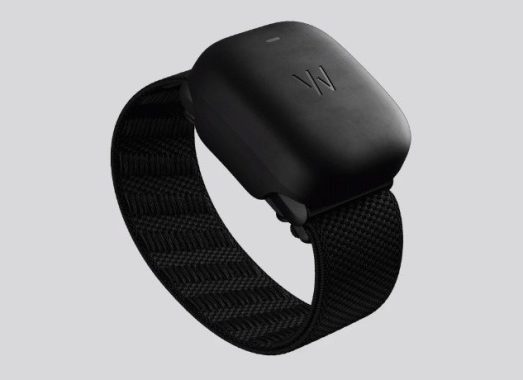
Whoop, in the form of a wearable strap, emphasizes performance optimization and recovery. This system, favored by athletes and fitness enthusiasts, delivers a comprehensive approach to health tracking through its accompanying smartphone app.

Whoop
Whoop photo source

Key Features of Whoop:

  • Strain Tracking: Measures daily physical strain from activities, workouts, and movement.
  • Recovery Monitoring: Assesses recovery using sleep quality, heart rate variability (HRV), and respiratory rate.
  • Sleep Tracking: Continuous monitoring of sleep patterns, disturbances, and sleep stages.
  • HRV Tracking: Evaluates autonomic nervous system balance and stress levels for readiness insights.
  • Strain Coach: Offers personalized recommendations for workout strain based on recovery status.
  • Subscription-Based Service: Operates on a subscription model covering hardware and app access.

Choosing Between Oura Ring and Whoop:

The decision between Oura Ring and Whoop hinges on individual health and fitness tracking needs, preferences, and priorities. Each device boasts unique features and advantages.

Whoop Might Be the Ideal Choice If:

  • Athletic Performance: It excels in optimizing athletic performance with detailed strain tracking and personalized workout recommendations.
  • Community and Challenges: Engage in fitness challenges, progress sharing, and learning within an active user community.
  • Recovery Emphasis: Strong focus on recovery to prevent overtraining and enhance rest and sleep for improved performance.
  • Subscription Model: Regular updates and platform improvements under a subscription model.

Oura Ring Might Be the Ideal Choice If:

  • Sleep Tracking: Precision in monitoring and improving sleep quality is a primary goal.
  • Comfort and Design: Discreet and comfortable design, suitable for those averse to wrist-worn devices.
  • Non-Athlete Use: Tailored for general well-being, making it suitable for a broader audience.
  • Longer Battery Life: Boasts a longer battery life compared to the Whoop Strap, requiring less frequent charging.
  • No Subscription Fee: No ongoing subscription fees post-purchase, with upfront payment for hardware and a free-to-use app.

In summary, for those prioritizing athletic performance and recovery tracking, Whoop may prove superior. Conversely, if sleep tracking and general well-being are paramount, coupled with a preference for no subscription fees, the Oura Ring emerges as the likely choice.

Quishing Attacks: Understanding QR Code Phishing

0

Quishing, short for QR code phishing, is a deceptive technique employed by cybercriminals to exploit QR codes and compromise user information and devices. As this form of attack gains prevalence, it becomes imperative for individuals to grasp its workings and adopt protective measures. In this article, we explore what Quishing entails, its potential threats, and practical steps to safeguard oneself against such attacks.

What is Quishing?

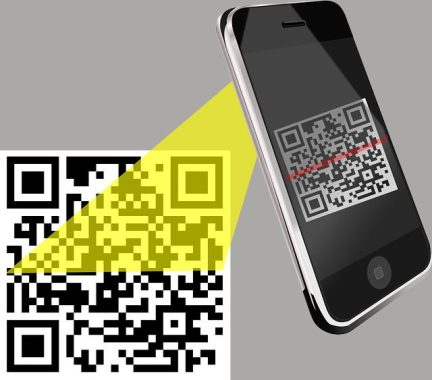
Quishing, synonymous with QR code phishing, leverages QR codes to execute phishing schemes. The primary objective remains consistent with traditional phishing attacks: acquiring sensitive information, injecting malware, or manipulating users into visiting malicious websites. Particularly noteworthy is the surge in Quishing incidents during the pandemic, as QR codes have become an integral part of everyday transactions and interactions.

Quishing Attacks
photo: Pixabay

Understanding Quishing Tactics: The modus operandi of Quishing involves the meticulous planning of QR codes designed to appear innocuous. Hackers utilize various online tools for QR code generation, making it easier for them to create deceptive codes. These malevolent QR codes may redirect users to fraudulent payment gateways, malicious links, or compromised document archives. Cybercriminals strategically place these codes in high-traffic locations such as restaurants, malls, parks, and airports, often concealing them in fake posters, flyers, or advertisements.

Implications of Quishing: The insidious nature of Quishing lies in its potential to catch victims unaware. Users may inadvertently fall prey to this attack without immediate realization, underscoring the critical need to comprehend its implications:

  • Phishing Websites: Scanned QR codes can lead users to websites meticulously designed to mimic legitimate platforms, coercing them into divulging personal information such as phone numbers, emails, or credit card details.
  • Malware Attacks: QR codes may harbor malware, ransomware, or Trojans capable of auto-installing upon scanning. This can lead to unauthorized access, data theft, and surveillance of user activities.
  • Social Media Compromise: Beyond device compromise, QR codes may facilitate the hijacking of social media accounts. This can result in unauthorized activities such as sending emails or messages on platforms like Instagram and WhatsApp.

Protective Measures Against Quishing: Given the rising threat of Quishing attacks, adopting proactive measures becomes paramount for users seeking to secure their digital presence:

  1. URL Preview: Before accessing a QR code’s destination, preview the URL on your device. Be wary of shortened URLs and prioritize links with the HTTPS protocol for enhanced security.
  2. Destination Verification: After visiting a website, scrutinize the URL for signs of a scam, including misspellings, poor language, or low-resolution images. Avoid sites that create a sense of urgency or demand immediate action.
  3. Built-in QR Scanner: Use the QR scanner integrated into your phone’s camera app to minimize risks associated with third-party scanning tools. This ensures a more secure scanning experience, reducing the likelihood of falling victim to a Quishing attack.

As QR codes continue to permeate various aspects of daily life, the threat of Quishing attacks persists. By understanding the mechanics of these attacks and implementing vigilant practices, users can fortify their defenses against QR code phishing, safeguarding personal information and devices from potential compromise. Stay informed, stay vigilant, and stay secure in the face of evolving cyber threats.

Fast and Fearless – ADATA SD810 External SSD Makes Powerful Debut

0

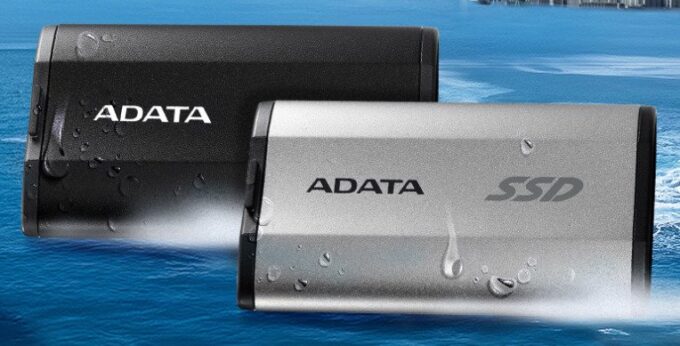
ADATA Technology Co., Ltd., the world’s leading memory brand, has launched its latest ADATA SD810 external SSD, featuring triple IP68 waterproof, dustproof, and MIL-STD shockproof protection. The drive is equipped with a USB 3.2 Gen2 x2 transmission interface with a read/write speed of up to 2000MB/s and adopts the mainstream Type-C interface. In addition to supporting the latest series of iPhone 15 smartphones, it is also perfect for photographers or video creators who work outdoors on a regular basis. The SD810 external SSD delivers fast transfer and backup of large audio and video files while guarding against accidents and allaying the challenges of harsh working environments to perfectly protect your precious files.

ADATA SD810 external SSD
SD810 external SSD – images ADATA

2000MB/s fast transfer in a cool aluminum case

The SD810 external SSD supports the USB 3.2 Gen2 x2 high-speed transmission interface with read/write speeds up to 2000MB/s. In order to prevent the high temperatures generated by high-speed transfer from affecting performance and stability, the body of the SD810 is constructed from aluminum alloy and its unique structure improves heat dissipation to maintain stable transfer performance even during continuous operation. Users can also edit and access large files directly on the SD810, increasing work efficiency. In addition, the SD810’s elegant aluminum body is smaller than a credit card, making it lightweight, space-saving, and very convenient to carry whether you are working or traveling.

Industry leading MIL-STD shockproof, IP68 waterproof and dustproof

The ADATA SD810 external SSD has passed strict IP68 waterproof and dustproof testing. It completely prevents the ingress of dust and can be submerged in water more than 1-meter-deep for up to 60 minutes. The SD810 possesses the highest transmission speed at its IP protection level among comparable external SSDs in the market. The SD810 also meets the MIL-STD-810G 516.6 impact resistance standard. Even when dropped from a height of 1.22 meters, the SD810 remains intact and delivers powerful protection against accidents and environmental challenges.

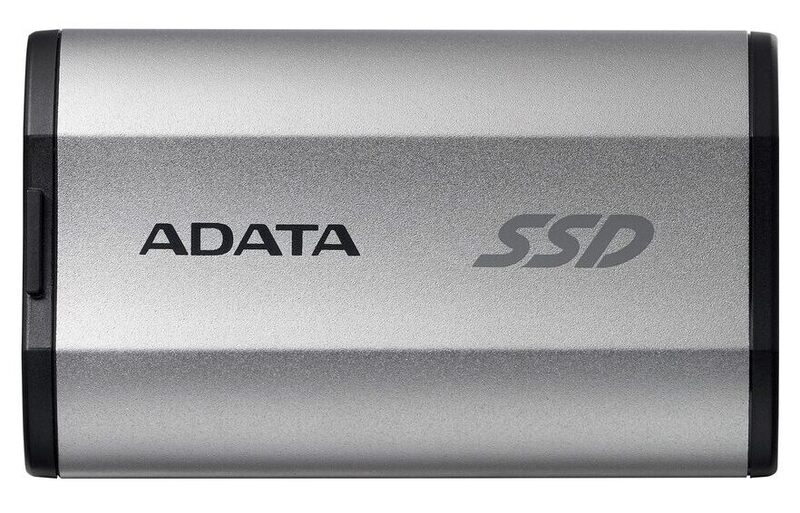
ADATA SD810 external SSD

ADATA SD810 External SSD

Multi-platform and iPhone 15 series support

The SD810 external SSD utilizes a USB Type-C port, allowing it connect to different operating systems, computer platforms, and game consoles such as Android, Mac OS, and Windows. It also supports the latest iPhone 15 series and is ready to transfer high-definition images and high-quality audio and video anytime, anywhere. Furthermore, the SD810 can connect to the latest generation game consoles. Games that do not fit on the console can be stored in the ADATA SD810, greatly expanding players’ game libraries and adding more colorful entertainment to their lives. The ADATA SD810 external SSD is now on sale through global channels. It is available in obsidian black and meteorite silver and four capacities: 500GB, 1000GB, 2000GB, and 4000GB.

The ADATA SD810 External SSD is a compact, budget-friendly storage solution that has garnered attention for its blend of portability, durability, and performance. Designed for users needing fast and reliable external storage, it supports USB 3.2 Gen 2×2 (20Gbps) and comes in capacities from 500GB to 4TB. Below is an analysis of its pros and cons, offering a balanced perspective for potential buyers.

ADATA SD810 External SSD pros and cons

Pros
  1. Impressive Speed for the Price: The SD810 delivers read and write speeds up to 2,000 MB/s when connected to a USB 3.2 Gen 2×2 port, making it one of the faster external SSDs in its price range. It excels in everyday tasks like transferring large files or running games, with benchmarks like PCMark 10 showing strong performance compared to competitors. For instance, it copied a 3.3GB file in about three seconds during testing, ideal for gamers or content creators needing quick access to data.

  2. Rugged and Portable Design: With an IP68 rating, the SD810 is dustproof and can withstand submersion in up to 3 feet of water for 30 minutes (with the port cover closed). Its brushed aluminum chassis, available in Obsidian Black or Meteorite Silver, is both lightweight (1.5 ounces) and durable, surviving drops and shocks. Measuring just 0.5 x 1.7 x 2.9 inches, it’s pocket-friendly, perfect for on-the-go users like photographers or videographers.

  3. Broad Compatibility: The drive is formatted in exFAT by default, ensuring compatibility with Windows, Mac, Linux, Android, and gaming consoles like Xbox One and PS5. It includes both USB-C to USB-C and USB-C to USB-A cables, a thoughtful addition for users with older devices, enhancing its versatility without requiring extra purchases.

  4. Cost-Effective: Priced at around $80 for 1TB and $300 for 4TB (often discounted), the SD810 offers excellent value compared to rivals like the Crucial X10 Pro, which costs $15–$20 more. Its five-year warranty matches industry standards, providing peace of mind for long-term use.

Cons
  1. Limited Sustained Write Performance: The SD810’s Achilles’ heel is its SLC cache, which fills up after about a minute of continuous writing, dropping speeds to as low as 250 MB/s—akin to hard drive performance. This was evident in tests with a 450GB file, where it slowed significantly after 250GB, making it less suitable for professionals handling large, sustained data transfers, such as video editors.

  2. USB 3.2 Gen 2×2 Dependency: To achieve its advertised speeds, the SD810 requires a USB 3.2 Gen 2×2 port, which is rare on most modern PCs and absent on current Macs (limited to 10Gbps). Users without compatible ports or expansion cards will see reduced performance, limiting its appeal for those with older or incompatible systems.

  3. No Hardware Encryption: Unlike competitors like the Crucial X10 Pro, the SD810 lacks hardware-based encryption, which could be a drawback for users prioritizing data security. This omission may deter professionals handling sensitive information.

The ADATA SD810 is a compelling choice for budget-conscious users seeking a rugged, portable SSD with strong everyday performance. Its speed, durability, and compatibility make it ideal for gamers, students, or casual users. However, its limited sustained write speeds and reliance on specific USB ports may frustrate professionals or those without modern hardware.

Transform Your Mobile into a Wireless Mic with WO Mic

0

WO Mic empowers you to transform your mobile device into a wireless microphone, seamlessly integrating it with your computer for activities such as gaming, streaming, or online conversations.

Recognizing the significance of a reliable microphone for computer chat sessions, WO Mic ensures that you can engage with friends even if you currently lack a dedicated mic. By downloading and installing WO Mic, your mobile device instantly becomes a versatile wireless microphone, facilitating communication with friends, colleagues, or gaming companions.

WO Mic
WO Mic photo

Utilizing WO Mic extends beyond mere chatting, as the application allows your mobile device to serve as a microphone for various applications. Compatible with communication platforms like Skype and video games with built-in audio communication setups, the application operates through USB, wireless, or Bluetooth connections, offering flexibility even without specific hardware.

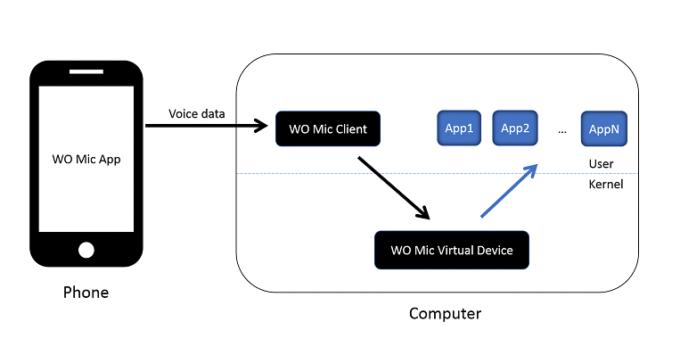
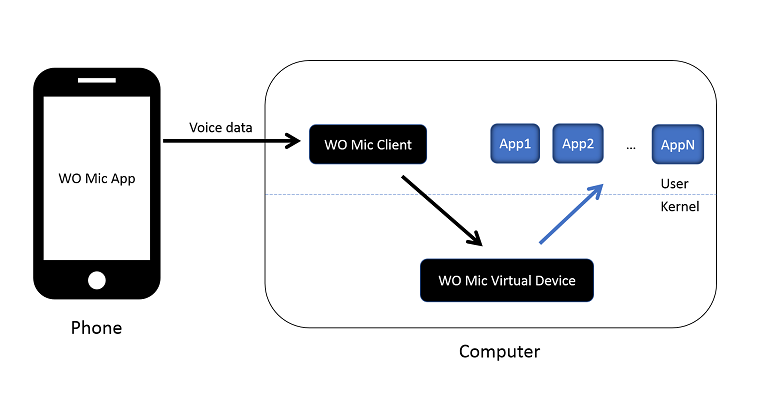
To configure WO Mic for optimal performance, installation is straightforward but requires some initial setup. Once installed, the application collaborates with corresponding mobile device software to capture your voice through the phone’s microphone and transmit it to your computer. The three components—WO Mic App on your phone, WO Mic Client on your computer, and WO Mic Virtual Device in kernel space—work seamlessly to emulate a real microphone, providing audio data to applications like Sound Recorder.

Notable features of WO Mic include its cost-free wireless microphone functionality, compatibility with various PC programs, minimal latency, user-friendly configuration, and support for multiple connection methods: USB, Bluetooth, Wi-Fi, and Wi-Fi Direct. The audio format is set at 48000 sampling rate, 16 bits per sample, and mono channel.

WO Mic stands out as a versatile solution that effortlessly transforms your mobile device into a microphone, catering to diverse needs such as communication, recording, voice remote control, and more. With millions of users relying on its capabilities daily, WO Mic remains a reliable and accessible tool for enhancing your computer-based audio experiences.

Download WO Mic app HERE

Unveiling the Top iPhone Browsers for Seamless Mobile Experience

0

While the Safari browser, native to Apple devices, may be suitable for many users, you might find another option that better suits your preferences. Given the plethora of third-party choices accessible for iOS, determining the most suitable one can be challenging. Below is a compilation of the finest iPhone browsers to assist you in making an informed decision.

Safari – As previously mentioned, Safari serves as the default browser on the iPhone. Despite this, Apple consistently enhances Safari to compete effectively with other popular browsers such as Chrome and Firefox. Safari synchronizes all open tabs through iCloud, allowing for seamless browsing across various Apple devices. The browser also supports extensions, enabling further customization and improvement of the user experience.

Safari browser
Safari browser – images: Pixabay

Microsoft Edge – Despite its association with Internet Explorer, Microsoft Edge has evolved significantly and is now a robust competitor in the browser landscape. Supported by Chrome, it offers a platform akin to Google Chrome, with the added advantage of the Microsoft Copilot feature—an AI-powered chatbot leveraging OpenAI’s GPT-4 for advanced search queries and image generation.

Google Chrome – Chrome stands out as the most popular alternative to Safari for iPhone users. Its widespread availability across major operating systems facilitates seamless synchronization of bookmarks, history, and open tabs. Chrome introduces features like voice control, data-saving mode, intuitive gestures, and the ability to relocate the address bar to the bottom, making it a versatile and widely embraced iOS browser.

Mozilla Firefox – For those cautious about Google’s Chrome project, Mozilla Firefox provides a trustworthy, feature-rich alternative. Firefox Sync enables the synchronization of tabs, bookmarks, and passwords, with additional privacy features like default tracker blocking and a Private Browsing mode that doesn’t store browsing information.

Opera – Although less popular than Chrome or Firefox, Opera offers a compelling alternative for iPhone users. Notable features include a built-in ad blocker, VPN, My Flow for text and file sharing between devices, and unique features like a cryptocurrency wallet and Aria browser AI.

Brave – Brave is a fast and secure browser that prioritizes privacy by blocking trackers and pop-ups. It boasts quick navigation, the ability to create PDF files from websites, and a self-curated multi-chain wallet for cryptocurrency enthusiasts. Based on Chrome, Brave allows seamless syncing of browsing sessions across different operating systems.

Firefox Focus – Firefox Focus is a specialized, privacy-focused version of Firefox. It strips away features like tab switching and bookmarks to prioritize user privacy. While not recommended as a primary browser, it serves as an excellent choice for highly sensitive activities, ensuring a minimalistic and secure browsing experience.

DuckDuckGo – For users seeking enhanced privacy, DuckDuckGo provides a privacy-focused browsing experience on iOS. Although it lacks cross-device synchronization, it ensures privacy by default with private tabs and easy data clearing options. While not as convenient as other browsers, DuckDuckGo is a solid choice for privacy-conscious users.