Home Blog Page 29

Finlands second quantum computer has been completed

0

Finland has achieved a noteworthy technological milestone with the successful completion of its second quantum computer, a collaborative effort between VTT, a prominent research organization, and the Finnish quantum technology company, IQM Quantum Computers. This state-of-the-art 20-qubit quantum computer underscores Finland’s robust national technological prowess and its capacity to expand quantum computing solutions for tackling increasingly intricate problems.

The development of this quantum computer signifies a significant advancement in quantum technology, showcasing the nation’s high level of domestic technological proficiency and effective collaboration among industry stakeholders. Finland is now well-positioned to establish an entirely new industry focused on quantum technology, indicating substantial growth potential in this field.

Photo: VTT
quantum technology – Photo: VTT

“Finland is currently a global frontrunner in quantum technology. Investing in this area allows us to maintain this position. The scaling up of quantum computers provides Finnish businesses with the opportunity to further refine their expertise and technology, leading to exportable products, attracting international talent and investments. The economic benefits will extend into the future, with innovations benefiting Finland through intellectual property rights and tax revenues,” stated Antti Vasara, CEO of VTT.

Critical advancements in scaling up quantum bits (qubits) have been achieved in the development of the new quantum computer, resulting in increased computational power and enhanced capabilities for solving more complex problems. These advancements encompass improvements in integration methods and signaling. The project has also concentrated on refining manufacturing and packaging methods, enabling a greater number of qubits to be placed on a single chip and facilitating their electronic signals at temperatures close to absolute zero.

“While the current quantum computer boasts 20 qubits on a single chip, our manufacturing method allows for scaling the number of qubits even further. This marks a significant developmental direction as we aim to build larger and more efficient quantum computers,” explained Pekka Pursula, Research Manager at VTT.

Expressing pride in this achievement, Dr. Jan Goetz, CEO and Co-founder of IQM Quantum Computers, emphasized the significance of this milestone for their team and the entire European quantum ecosystem. He highlighted IQM’s commitment to advancing the strategic European agenda by fostering collaboration, attracting investments, supporting ecosystem expansion, and enhancing competitiveness.

The new quantum computer is located in Otaniemi at the national micro and nanotechnology facility, Micronova, which also hosts Finland’s first quantum computer. Initiated in 2020, the national project aimed to build a functional 5-qubit quantum computer, showcasing Finland’s quantum computing expertise. The overarching goal is to construct a 50-qubit quantum computer by the end of 2024.

“The completion of the quantum computer is a crucial step towards achieving the project’s ultimate goal of a 50-qubit quantum computer. The development work will continue in collaboration with IQM, and our objective is to upgrade the 20-qubit quantum computer to a 50-qubit quantum computer by the end of 2024,” stated Pursula.

Looking ahead, with additional government funding, efforts will be directed towards even larger goals. The quantum computer will be scaled towards 300 qubits, bringing Finland closer to realizing quantum advantage—a significant stride toward harnessing the power of quantum computing for practical applications.
source

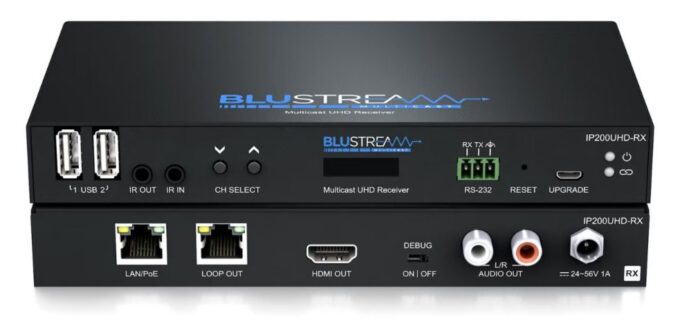
Blustream IP200UHD-RX – IP Multicast UHD Video Receiver

0

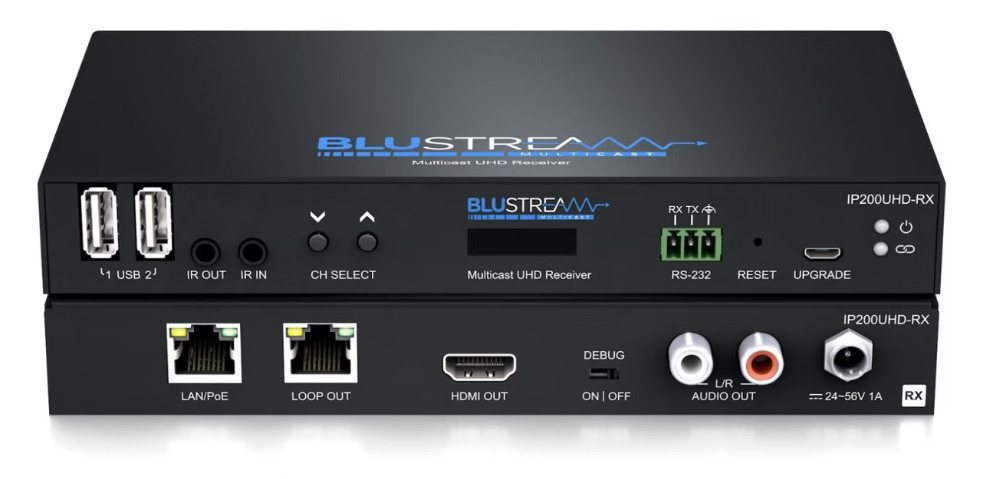
In the ever-evolving landscape of home entertainment, finding the right balance between compatibility, performance, price, and quality is paramount. The Blustream IP200UHD-RX, with its enticing blend of features, aims to be the linchpin of your home network’s 4K UHD video distribution. Let’s dive into a detailed exploration of its compatibility, performance, price point of £565, and the quality it promises.

Compatibility: Navigating the Network Landscape

One of the standout features of the Blustream IP200UHD-RX is its compatibility with various systems. The UHD Multicast distribution system operates seamlessly over a 1 GB network, offering a versatile solution for homes with diverse networking setups. Whether you’re a tech aficionado with an elaborate home network or a casual user with basic networking knowledge, the IP200UHD-RX caters to both ends of the spectrum.

Blustream IP200UHD-RX

The HDMI connectivity at HDCP2.2, coupled with support for a wide range of formats including Dolby TrueHD, Dolby Digital Plus, and DTS-HD Master Audio transmission, ensures that your audio-visual experience remains top-notch. This broad compatibility extends to its ability to loop through Ethernet, accommodating virtually unlimited network sizes. This feature is particularly beneficial for those with extensive multi-room systems, eliminating the need to compromise on network size for the sake of seamless video distribution.

Performance: Elevating Your Home Entertainment

The true test of any home entertainment device lies in its performance, and the Blustream IP200UHD-RX rises to the occasion. Transmitting a 4K UHD signal up to 100 meters over a single CAT cable, the device impresses with its extended range. The virtually latency-free transmission ensures that you won’t miss a moment of your favorite content, even in a multi-room setup.

The advanced signal management capabilities of the IP200UHD-RX add a layer of sophistication to your entertainment hub. Independent routing of IR, RS-232, USB/KVM, audio, and video signals allows for a tailored and efficient setup, catering to the unique demands of your multimedia ecosystem. Additionally, the HDCP 2.2 compliance and advanced EDID management contribute to a seamless and secure transmission, ensuring that your content is displayed with the utmost clarity and integrity.

For those who revel in the intricacies of video wall setups, the IP200UHD-RX does not disappoint. It seamlessly integrates into such configurations, requiring only a 1 GB network switch to unlock a whole new dimension of visual storytelling within your home.

Price Point: Balancing Budgets and Aspirations

At a price point of £565, the Blustream IP200UHD-RX positions itself as a competitive player in the market. Considering the array of features it brings to the table, this device strikes a commendable balance between affordability and functionality. While it may not be the most budget-friendly option on the market, the investment aligns with the performance capabilities and advanced features it offers.

Blustream IP200UHD-RX
Blustream IP200UHD-RX – images: Blustream

The versatility of the IP200UHD-RX also plays a role in justifying its price. With four operational modes – Matrix distribution, Video wall, One-to-one HDMI extender, and One-to-many HDMI extender – the device adapts to different scenarios, making it a versatile addition to your home entertainment arsenal. This flexibility adds inherent value, making the IP200UHD-RX a smart investment for users who seek adaptability and future-proofing in their technology purchases.

Quality: Craftsmanship That Speaks Volumes

When it comes to the quality of a home entertainment device, the devil is often in the details. The Blustream IP200UHD-RX, with its sleek design and robust construction, exudes a sense of craftsmanship that speaks volumes about its build quality. The inclusion of a mounting kit further emphasizes the attention to detail, allowing users to seamlessly integrate the device into their existing setups.

The video upscaling and downscaling capabilities contribute to the overall quality of the viewing experience. Whether you’re watching a classic film in standard definition or indulging in the latest blockbuster in 4K UHD, the IP200UHD-RX ensures that the visual fidelity remains uncompromised.

The incorporation of Power over Ethernet (PoE) further exemplifies the commitment to quality. PoE functionality allows users to power the Blustream IP200UHD-RX directly from a PoE switch, streamlining the setup process and eliminating the need for additional power sources. For those instances where a PoE switch is unavailable, a local power supply option is available, showcasing the adaptability of the device to various scenarios.

Conclusion: Elevate Your Home Entertainment Experience

In the Blustream IP200UHD-RX, compatibility, performance, price, and quality converge to create a compelling solution for 4K UHD video distribution. Whether you’re a tech enthusiast looking to push the boundaries of your home network or a casual user seeking a reliable and future-proof device, the IP200UHD-RX caters to diverse needs.

At £565, it positions itself as a mid-range option, offering a commendable balance between features and affordability. The advanced signal management, extended range, and versatile operational modes make it a versatile addition to any home entertainment setup.

In the ever-evolving landscape of home entertainment, the Blustream IP200UHD-RX stands as a testament to the possibilities of seamless, high-quality video distribution. Elevate your home entertainment experience with this sophisticated device that brings together the best of compatibility, performance, price, and quality.

Experience the seamless distribution of 4K UHD video throughout your home network with the Blustream IP200UHD-RX. As a crucial component of Blustream’s UHD Multicast distribution platform, this video receiver ensures virtually latency-free transmission over a 1 GB network.

Key Features:

  1. Advanced UHD Video Distribution: The IP200UHD-RX leverages Blustream’s cutting-edge UHD Multicast distribution system, utilizing multiple modules for the distribution of 4K UHD video over a 1 GB network with minimal latency.
  2. Extended Range and Connectivity: Transmit a 4K UHD signal up to 100 meters over a single CAT cable, delivering stunning visuals directly to a multi-room TV. The HDMI connection ensures high-quality video reception.
  3. Wide Format Support: Enjoy a versatile multimedia experience with support for various audio formats, including Dolby TrueHD, Dolby Digital Plus, and DTS-HD Master Audio transmission. Video output supports up to 4K 30Hz UHD.
  4. Ethernet Loop-Out: Seamlessly extend your network with the Ethernet loop-out feature, enabling connectivity to an extensive network for complex multi-room systems.
  5. Dedicated Audio Output: Benefit from dedicated audio output with RCA phono outputs for an enhanced audio experience.

Blustream IP200UHD-RX Specifications:

  • Video Input Connectors: 1 x LAN RJ45 connector
  • Video Output Connectors: 1 x HDMI Type A, female
  • Audio Output Connectors: 2 x RCA L/R Analog audio
  • Ethernet Port: 1 x LAN RJ45 connector (video extension)
  • RS-232 Serial Port: 1 x 3-Pin Phoenix connector
  • USB/KVM Port: 2 x USB – Type A
  • IR Input Ports: 1 x 3.5mm stereo jack
  • IR Output Ports: 1 x 3.5mm mono jack
  • Firmware Update (MCU): 1x Micro-USB
  • Mounting Kit Included
  • Dimensions (W x D x H): 190mm x 114mm x 25mm
  • Shipping Weight: 0.8kg
  • Operating Temperature: 32°F to 104°F (0°C to 40°C)
  • Storage Temperature: -4°F to 140°F (-20°C to 60°C)

With its impressive features, the Blustream IP200UHD-RX is a reliable choice for those seeking high-quality, multi-room 4K UHD video distribution within their home network.

How to Disable Auto-Brightness on Your PC

0

Certain Windows PCs come equipped with an adaptive brightness or auto-brightness feature that may pose challenges for users. This function relies on ambient light sensors to gauge the surrounding light and adjust the screen brightness accordingly. However, since screen brightness is a subjective preference, many users prefer manual control over these settings.

In specific situations, the constant auto-adjustment of brightness can be bothersome. For instance, working outdoors in a cafe with varying sunlight may result in distracting and rapid changes in screen brightness.

Fortunately, there are solutions to address this issue. Below, we’ll walk you through the steps to modify the auto-brightness setting on your PC’s display, allowing you to achieve your desired brightness consistently.

Disable Auto-Brightness
photo: pixabay

Whether for work or leisure, your monitor settings significantly impact your computer experience. Here’s how to tailor your display to your preferences.

Understanding Adaptive Brightness – If you’re familiar with auto-brightness on smartphones, you’ll recognize a similar concept. The screen adjusts its brightness based on ambient light levels, preventing excessive brightness and unnecessary battery drain. Some computers, including those with Windows 8 and Windows 10, also incorporate this technology.

Reasons to Disable Auto-Brightness – There are various reasons to consider adjusting or disabling auto-brightness. If the automatic adjustments prove distracting during work or entertainment, it might be time to review your settings. Additionally, users with multiple monitors may want consistent brightness across all displays.

Manually adjusting brightness can be beneficial in specific environments, such as dimly lit rooms or outdoor settings. You can customize these settings manually or allow Windows to adjust based on factors like power source, battery level, or ambient light sensors.

Disabling Auto-Brightness:

  1. Access the Start menu and open the Control Panel.
  2. Navigate to Power Options within the Control Panel.
  3. In the Power Options window, click “Change Plan Settings” for your current power plan.
  4. Choose “Change advanced power settings” at the bottom to open the Advanced Power Options window.
  5. Scroll down to the Display option, expand it to reveal the Adaptive Brightness setting.
  6. Toggle the feature on or off for both battery and plugged-in scenarios.
  7. Save changes by clicking Apply and then OK.

If the Adaptive Display setting is not found, your device may lack a built-in ambient light sensor. If the auto-brightness setting persists despite changes, disable the Sensor Monitoring service via Win + R and entering services.msc, then stopping and disabling the Sensor Monitoring Service.

Manually Adjusting Brightness: Typically, function keys (F1 to F12) on your keyboard are designated for adjusting display brightness. Locate the key or keys with a brightness level indicator icon (usually a sun logo), and hold down Shift or Ctrl while pressing the corresponding button to change brightness.

Calibrating Your Monitor:

In addition to adjusting auto-brightness, you can calibrate your monitor for optimal performance and customization.

Monitor Calibration Using Windows 10:

  1. Type “Color Calibration” into the Windows search bar and select the result.
  2. Find the Color Calibration utility in the Display section of the Control Panel.
  3. Follow on-screen instructions to set gamma, brightness, contrast, and color balance.
  4. Save the calibration as a .ics file.

Online Calibration Tools: Apart from in-computer settings, online tools can help manually adjust monitor settings.

Colorimeter Calibration: For precise calibration, consider using a colorimeter like the Spyder5 PRO designed for photographers and designers. This device ensures accurate color representation and optimal brightness.

Calibrating your monitor enhances the overall visual experience, providing color accuracy and brightness consistency across different scenarios.

The Differences Between Wireless and Bluetooth Mouse

0

Wireless and Bluetooth Mouse stand out as prevalent choices in the realm of wireless peripherals. Notably, Wireless mice earn higher acclaim than Bluetooth mice, owed to their swift response rates and cost-effectiveness. This article delves into the specifics of Wireless mice, exploring their attributes, advantages, and drawbacks.

Understanding Wireless Mice

A Wireless Mouse, widely embraced in contemporary usage, relies on a Receiver to capture RF waves. Typically, this plug is affixed to a USB port on laptops. Connecting a Wireless mouse is a straightforward process: insert the USB Receiver into the device, flip the switch to activate the mouse, and it’s ready for use.

Comparing Wireless and Bluetooth Mice

For those pondering the distinctions between these two types of mice, consider the top three criteria differentiating them.

1. Technology:

  • Wireless Mouse: Utilizes RF waves and relies on a USB Receiver plugged into the device’s USB port.
  • Bluetooth Mouse: Offers a more versatile connection method through Bluetooth sharing features on devices such as laptops and PCs.

2. Response Speed:

  • Wireless Mouse: Exhibits quick response times.
  • Bluetooth Mouse: Faces limitations with response speed, often slower than Wireless mice, and experiences latency issues.

3. Price:

  • Wireless Mouse: Affordably priced.
  • Bluetooth Mouse: Generally more expensive.

Gaming Considerations

Choosing between a Wireless and Bluetooth mouse depends on individual preferences and needs. For gaming enthusiasts seeking optimal response speed and stability, a Wireless mouse is recommended. Bluetooth mice, with their slower response times and connection complexities, are less suitable for genres requiring rapid reactions like shooting or racing games.

Power Source for Wireless Mice

Wireless mice, including the need for power, operate on batteries. Users should be aware of the variety in battery specifications and select batteries that align with the manufacturer’s recommendations. Some Wireless mice models offer convenient battery charging features, providing three days of use after just 30 minutes of charging.Difference between Wireless and Bluetooth mouse

Disadvantages of Wireless Mice

Despite their merits, wireless mice have drawbacks:

  • Most wireless mice are battery-dependent, requiring regular replacements.
  • Signal irregularities and susceptibility to interference can occur, especially in environments with multiple wireless mice types, leading to signal confusion.

Embracing the ease of a wireless mouse unquestionably streamlines your daily tasks. The realm of wireless mice offers two primary options: RF (Radio Frequency) and Bluetooth.

RF mice necessitate the insertion of a USB dongle into your device, often conveniently located within the back cover of the mouse. It seamlessly fits into the USB port, simplifying the setup process. While this type of mouse presents both advantages and disadvantages in terms of usage and durability, a detailed discussion on these aspects follows.

On the other hand, there’s the Bluetooth mouse, exemplified by various options available on platforms like Amazon. Following the standard for Bluetooth devices, this wireless mouse features a transmitter that effortlessly connects to your device. With a few settings adjustments and the activation of connectivity options, you’re ready to embark on a wire-free experience.

These two options, RF and Bluetooth, bring their unique set of advantages and drawbacks to the table. In our upcoming comparison, we’ll delve into various factors to discern what each type offers. Ultimately, the ideal mouse for you is the one that aligns with and fulfills your specific needs and priorities.

Which Mouse Offers Simplicity in Use?

Prioritizing usability is paramount when choosing a mouse, and while the availability of ports on your laptop is a consideration, the Bluetooth vs. wireless mouse debate involves other factors, with ease of use taking center stage.

Difference between Wireless and Bluetooth mouse
all images: Logitech

Bluetooth devices, while versatile, can be cumbersome to set up. If you frequently switch devices, reconnecting your Bluetooth mouse each time becomes a necessary but potentially bothersome task. This process, albeit quick, may prove inconvenient, especially for those less tech-savvy individuals who struggle with basic computer commands.

For those seeking a hassle-free experience, the wireless mouse emerges as the preferred choice. Simply plug in the dongle, and the PC automatically detects the device, requiring no further user intervention. The setup is swift and painless, making it an ideal option for those who prefer a straightforward approach.

Now, let’s delve into the durability aspect:

Which Mouse Exhibits Greater Durability?

Device longevity depends on various factors, primarily influenced by usage patterns. With wireless mice, leaving the dongle attached to the PC is a common practice, offering convenience. However, removing and reattaching the dongle multiple times can lead to potential USB port damage, especially when contacts frequently slide against each other. To mitigate this, some wireless mice include a slot to securely store the dongle within the mouse.

On the contrary, Bluetooth mice eliminate concerns related to dongle attachment and detachment. Since the connection is digital, durability concerns are less prominent. In assessing durability, the choice between a wireless and Bluetooth mouse hinges on individual usage preferences and habits.

Garmin Tacx NEO 3M: Elevate Your Indoor Training Experience

0

Garmin has introduced the Tacx® NEO 3M, their latest cutting-edge direct-drive trainer, boasting unparalleled accuracy and power coupled with multidirectional movement to elevate cycling performance. This indoor smart trainer features integrated motion plates for a more comfortable and realistic ride. The Tacx NEO 3M enhances the cycling experience with its innovative electromagnetic motor braking system, creating a virtual flywheel that mimics the sensation of riding on various road surfaces, including downhill slopes.

The Tacx NEO 3M seamlessly integrates with the Tacx Training™ app, allowing cyclists to execute training plan workouts synchronized from their Garmin Connect™ calendar. Engage in virtual GroupRides, join training sessions with professional WorldTour cyclists, and immerse yourself in captivating videos showcasing stunning global routes and locations.

Garmin Tacx NEO 3M
Garmin Tacx NEO 3M

Garmin Tacx NEO 3M Key Features:

  1. Multidirectional Movement: Motion plates offer front-to-back movement, complementing the natural side-to-side flexion, enabling cyclists to train in a more ergonomic position.
  2. Real Road Feel: The virtual flywheel replicates the experience of riding on different terrains like cobblestone and gravel, enabling diverse training scenarios.
  3. App Integration: Connect with popular training platforms such as TrainerRoad and Zwift, and effortlessly upload ride data to the Garmin Connect app.
  4. Simulated Inclines: Conquer gradients up to 25%, experience realistic climbs, and even enjoy descent simulations for a comprehensive training experience.
  5. Power Accuracy: Accurate power, speed, and cadence measurements within 1%, catering to cyclists of all skill levels.
  6. Sprint-Ready: Stable performance during high-intensity sprints, supporting up to 2,200 watts.
  7. Dynamic Inertia: Mimics forward motion based on weight, speed, and gradient, enhancing the cycling feel.
  8. ERG Mode: Automatic power target adjustments during workouts for a customized training experience.
  9. Exceptional Design: Minimal vibration with magnets, whisper-quiet operation, LED indicator for effort intensity, and a built-in handle for easy transportation.

Explore the innovations within the Garmin Tacx NEO 3M and revolutionize your indoor training.

Additionally, enhance your ride with the Tacx Training app, enabling you to complete training plans, access high-quality global training videos, join GroupRides, and more. Purchasers of the NEO 3M can enjoy a complimentary three-month premium subscription to the Tacx Training app.

Tacx NEO 3M
Tacx NEO 3M – The NEO 3M smart trainer features the innovative Tacx® virtual flywheel, which simulates the feeling of riding on different road types, such as cobblestone and gravel, so you can train for a variety of surfaces images: Garmin

The Garmin Tacx NEO 3M is ready-to-ride, featuring a preinstalled 11-speed cassette, hassle-free in-app onboarding via the Tacx Training app, and no calibration requirements. For an even stronger connection, a separate adapter is available for virtual races through Ethernet or Wi-Fi® technology. Now available, the Tacx NEO 3M is priced at $1,999.99.

Specs: Garmin Tacx NEO 3M
General
Dimension24.8″ x 31.5″ (630 x 800 mm)
Height23.4″ (595 mm)
Dimensions When Folded27.4″ x 14.0″ (695 x 355 mm)
Weight52.0 lbs (23.6 kg)
Connectivity
Wireless CommunicationANT+ connectivity, dual BLUETOOTH wireless technology connection support
Tacx Smart Network Adapter CompatibilityYes (provides Wi-Fi® and Ethernet connectivity option)
Control BySmartphone, tablet, ANT+ bike computers, stand-alone, computer connection via ANT+ antenna
Read Out OnSmartphone, tablet, bike computer, compatible smartwatch, computer with ANT+ antenna
Connection Indicator (ANT+/BLUETOOTH)Multicolor LED
Power IndicatorMulticolor LED, spot on floor
Indoor Training Features
Magnets32 neodymium magnets
Electrical Requirement100-240 VAC 50/60Hz (with integrated power adapter)
Suitable Cassettes– Shimano/SRAM 9 to 11 speed (compatible, 11-speed cassette included)
– Campagnolo (compatible, requires special cassette body)
– SRAM 12 speed/XDR (compatible, requires special cassette body)
– Shimano 12-speed Hyperglide+
Suitable Axles– Direct Drive quick release axle (130 mm/135 mm X 5 mm) for bikes with quick release axle
– Thru axle end caps (142 mm/148 mm X 12 mm) for bikes with thru-axle
– For bike dimensions outside of the industry standard, Garmin offers this adapter set as an additional accessory: 135 mm Thru-Axle Adapter Set [10 x 135 Non-drive Side (NDS), 12 x 135 NDS and 10 x 135 Drive-side (DS)]
Max Power2200 Watt
Max Incline25%
Simulation of DescentYes
Max Torque88 Nm
Max Brake Force260 N
FlywheelVirtual
Mass InertiaVariable to 275.6 lbs (125 kg)
CalibrationNo calibration needed
OutputSpeed, cadence, power
Accuracy<1%

ASRock Launches Linux Version of AI QuickSet Software Tool

0

ASRock has unveiled the Linux iteration of its AI QuickSet software tool, expanding its accessibility beyond the Windows® platform. Initially launched for Microsoft® Windows® 10/11 64-bit, the AI QuickSet software tool garnered widespread attention for its capability to facilitate the swift download, installation, and configuration of artificial intelligence (AI) applications. Now, ASRock introduces the Linux version, enabling users on the Linux platform to seamlessly engage with a diverse range of AI applications.

Linux-compatible AI QuickSet software tool
Linux-compatible AI QuickSet software tool – photo: ASRock

The Linux-compatible AI QuickSet software tool is designed to support the Ubuntu 22.04.3 Desktop (64-bit) operating system. Leveraging Docker software, it streamlines the installation and configuration of AI applications while ensuring a pristine user operating environment. Harnessing the robust computing capabilities of ASRock’s AMD Radeon™ RX 7900 series graphics cards and AMD ROCm™ software platform, the tool extends support to a broader spectrum of open-source AI applications. Notable examples include the Image/Manga Translator, Stable Diffusion CLI & web UI image generation tool, Text generation web UI (an AI chat tool employing the Meta Llama 2 language model), and Ultralytics YOLOv8 object detection and image segmentation model. This comprehensive support enhances the AI experience for Linux users.

ASRock’s Linux version of the AI QuickSet software tool mirrors its Windows® counterpart, simplifying the installation and configuration processes for AI applications. Users are spared the complexities of intricate configuration settings. The powerful computing capabilities of ASRock’s AMD Radeon™ RX 7900 series graphics cards, coupled with the AMD ROCm™ software platform, not only ensure optimal operation but also broaden support for diverse open-source AI applications. This underscores ASRock’s commitment to user-centric design and showcases its prowess in both software and hardware R&D.

The ASRock AI QuickSet software tool streamlines the download, installation, and setup of AI applications, offering a user-friendly interface that guides enthusiasts through the process. This approach eliminates the challenge of intricate installation and configuration, making AI technology more accessible and popular among users.

With support for popular frameworks like TensorFlow or PyTorch, specialized AI function libraries, and runtime libraries, the AI QuickSet software tool simplifies the configuration of AI applications. It accommodates configuration-specific options, automatically sets default configurations, and ensures optimal AI application performance without requiring users to navigate complex settings.

System Requirements:

Hardware

  • CPU: Intel® 14th/13th Gen Core™ Processors, AMD Ryzen™ 7000/5000 Series Processors
  • Motherboard: Intel® 700/600 Series Motherboards, AMD 600/500 Series Motherboards
  • Memory: 32 GB
  • Graphics Card: ASRock AMD Radeon™ RX 7000 Series Graphics Cards (Windows version), ASRock AMD Radeon™ RX 7900 Series Graphics Cards (Linux version)
  • Storage: 25 GB available space, SSD recommended (Windows version), 35 GB available space, SSD recommended (Linux version)
  • Internet Connection: Internet connection for both installation and use, broadband recommended

Review – Integra DRX-5.4 9.2-Channel Theater Receiver

0

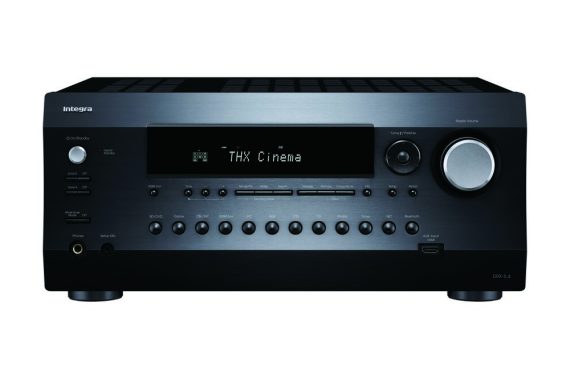
In the ever-evolving realm of home entertainment, the Integra DRX-5.4 home theater receiver stands as a powerhouse, delivering an immersive audio and visual experience that sets it apart from the crowd. Priced at $2,200.00, this receiver combines cutting-edge technology with an impressive array of features, making it a solid contender for home theater enthusiasts seeking uncompromising quality.

Design and Build: The Integra DRX-5.4 makes a striking first impression with its sleek aluminum front panel and volume knob. The build quality exudes durability, hinting at the robust performance within. The thoughtful design extends to the gold-plated banana-plug-ready speaker posts, making setup a breeze. It’s not just a receiver; it’s a stylish addition to your entertainment center.

Performance: When it comes to performance, the DRX-5.4 doesn’t disappoint. With a formidable 120 W per channel (8 ohms, 20 Hz–20 kHz, 0.08% THD, 2-ch driven, FTC), and THX® Certified Select for Theater Reference Sound, this receiver is engineered for an unparalleled home theater experience. The low-impedance amp system with 4-ohm speaker-driving capability ensures that even demanding speakers are handled with finesse.

Integra DRX-5.4 home theater
Integra DRX-5.4 – images: Integra

Audio and Video Features: The DRX-5.4 supports 5.2.4/7.2.2-ch Dolby Atmos® and DTS: X® playback, providing a three-dimensional audio experience that elevates your favorite movies and music. The Dolby Atmos Height Virtualization adds an extra layer of depth to your soundstage. With Dolby Surround® and DTS® Neural: X upmixing, even standard audio sources are transformed into immersive, lifelike sound.

HDMI inputs 1-3 and 4-6 support up to 8K/60AB and 4K/120AB video passthrough, ensuring compatibility with the latest visual technologies. HDR10+, Dolby Vision™, HDR10, HLG, BT.2020, VRR, DSC, ALLM, QFT, QMS, eARC, DeepColor™, x.v.Color™, LipSync, and HDCP 2.3 are all supported, guaranteeing a future-proofed system.

Amp Technology: The heart of the DRX-5.4 lies in its advanced amp technology. The 250 W/Ch at 6 Ohms, 1 kHz, 10%, 1 Channel Driven output is a testament to its power. The custom transformer and 15,000 μF capacitors ensure a stable and responsive performance. The non-phase-shift amp-circuit topology, along with audio-grade parts and separate digital/analog circuit boards, contribute to pristine sound reproduction.

Unique Features: The DRX-5.4 goes beyond the ordinary, offering features that set it apart. Dirac Live® Room Correction provides multi-point acoustic calibration, tailoring the audio to your unique space. AccuReflex™ phase-matching solution optimizes Dolby Atmos-enabled speakers for a seamless experience. The DSP-based Vocal Enhancer clarifies in-program vocals/dialog, ensuring crystal-clear dialogue even in the midst of intense action.

Connections: Versatility is a key strength of the DRX-5.4, evident in its comprehensive connectivity options. With 7 HDMI inputs (1 front), Main Out (eARC), Sub/Zone 2 Out, 2 digital audio inputs, 6 analog audio inputs, phono input, USB input for audio playback, and various video inputs, it accommodates a multitude of devices seamlessly. The inclusion of a Dirac Live/AccuEQ Advance setup mic input on the front panel highlights its commitment to user-friendly setup.

Price and Value: At $2,200.00, the Integra DRX-5.4 may seem like an investment, but its features and performance make it worth every penny. The receiver offers a balance of cutting-edge technology, build quality, and future-proofing that justifies the price tag for serious home theater enthusiasts.

Software and User Interface: The High-definition GUI over HDMI ensures a user-friendly experience, making navigation and setup a breeze. The OSD function on the front panel displays A/V input signal data, output signal/settings data, and network information, providing a comprehensive overview of your system’s status.

Connectivity and Zone Options: The DRX-5.4 doesn’t just stop at providing an exceptional main zone experience. Its 11.2-ch pre-outs and processing for 7.2.4-ch open up possibilities for an even more expansive setup. The bidirectional Bluetooth® wireless technology allows for versatile streaming options, and separate Zone 2 speaker outputs enable 5.2.4-ch + Zone 2 speaker connection or 5.2.4-ch playback switching to 5.2.2-ch + Zone 2 playback, providing flexibility to tailor your audio experience to different zones.

Integra DRX-5.4 home theater

Dedicated DACs support synced/independent D/A audio distribution in Zone 2 and Zone 3, offering a customized audio experience in different areas of your home. The ability to share the main audio source to a wireless headphone dock via Zone B line-out adds a personal touch to your listening experience.

IMAX® Enhanced and Certification: The DRX-5.4 proudly wears the IMAX® Enhanced certification for IMAX® digital remasters, promising a cinema-grade experience in your living room. This certification assures that the receiver has undergone rigorous testing to meet IMAX’s high standards for audio and visual performance, bringing the magic of IMAX into your home.

Ease of Use: Integra has prioritized user convenience with features like one-touch volume memory preset assignment, ensuring that your preferred volume levels are easily accessible. The front-to-surround/height speaker switching in Stereo Assign Mode adds to the user-friendly design, allowing for quick adjustments without navigating through complex menus.

Advanced Music Optimizer™: For those who appreciate high-quality audio, the Advanced Music Optimizer™ is a welcome addition. This feature enhances compressed audio playback quality, breathing new life into your digital music collection. Whether you’re streaming from a music service or playing files from a USB drive, the DRX-5.4 ensures that your audio experience remains top-notch.

Networking and Streaming: The DRX-5.4 isn’t just about physical connections; it’s also a hub for the digital age. With Ethernet LAN terminal connectivity, the receiver opens up a world of streaming possibilities. Internet radio enthusiasts will appreciate the 40 FM/AM/internet radio presets with station-naming, allowing you to effortlessly tune in to your favorite stations.

Final Thoughts: In the competitive landscape of home theater receivers, the Integra DRX-5.4 stands tall, offering a blend of performance, features, and design that caters to the discerning audio and video enthusiast. From its high-powered amp technology to its immersive Dolby Atmos and DTS:X capabilities, every facet of this receiver is meticulously crafted to deliver an exceptional home theater experience.

The DRX-5.4 strikes a delicate balance between cutting-edge technology and user-friendly design. While the $2,200.00 price tag may be an initial consideration, the investment pays off in the form of a theater-quality audio and visual experience that is sure to delight even the most demanding users. With its thoughtful design, advanced features, and future-proofing, the Integra DRX-5.4 home theater receiver earns its place as a cornerstone in the quest for the ultimate home entertainment setup. If you’re looking to elevate your home theater to new heights, the DRX-5.4 is undoubtedly a worthy companion on that journey.

A Guide to Watching Movies on PS5 with Sony Pictures Core

1

For those who crave more than just gaming on the powerful PlayStation 5 console, the option to rent, buy, or stream an impressive collection of 2,000 movies awaits through Sony Pictures Core. Discover the key steps to unleash this entertainment powerhouse and gain access to up to 100 free movies.

Unveiling Sony Pictures Core

Formerly recognized as Bravia Core, Sony Pictures Core stands as a premier movie streaming service tailored for PS4 and PS5 consoles. With an extensive library housing 2,000 Sony Pictures movies, the platform delivers exclusive perks, including early access to select titles, behind-the-scenes content, director commentaries, and enticing deals.

PS5 - Sony Pictures Core
PS5 – image: Sony

Moreover, Sony Pictures Core extends additional offerings such as time-limited discounts on seven movies for seven days and exclusive content from Crunchyroll. Keep an eye on the PlayStation website or Sony Pictures Core homepage to seize these fleeting opportunities.

Membership Tiers and Benefits

While a PS Plus membership isn’t mandatory for renting or buying movies on Sony Pictures Core, opting for the Premium or Deluxe tier unlocks exclusive advantages. Dive into the highest echelons of PS Plus, and you can revel in a rotating catalog of up to 100 free movies on Sony Pictures Core.

For the average movie enthusiast, choosing between PS Plus Extra, Essential, and Premium/Deluxe tiers becomes more straightforward, considering the added benefits that come with these top-tier memberships.

Navigating Sony Pictures Core on PS5

Accessing Sony Pictures Core on your PS5 is a breeze. Head to the Media tab, press R on the gamepad, and select the magnifying glass icon in the top right corner. Search for Sony Pictures Core, click download, and you’re ready to embark on a cinematic journey.

However, before diving into the movie magic, ensure your HDCP settings are enabled on your PlayStation. High-Bandwidth Digital Copyright/Content Protection prevents streaming or recording content without proper authorization. Adjusting this setting is a cinch – simply select Go to HDMI when prompted, and PlayStation will guide you to the necessary changes.

Creating a Sony Pictures Core account is the next step. After launching the application, click “Get Started,” and follow the prompts to set up your account. Link your PS Plus account for premium benefits, agree to the terms and conditions, and voila – you’re ready to explore an expansive catalog of epic movies.

Navigate through various categories, explore Studio Access for bonus content, and locate the ‘Included with PlayStation Plus’ section to find your 100 free movies. Once you’ve found a movie that captivates you, choose to rent or buy and easily access your collection in the Library.

Transform your PS5 into a multifaceted entertainment hub, seamlessly transitioning between gaming and cinematic experiences with Sony Pictures Core. Elevate your entertainment options and make the most out of your high-performance console.

All-in-one solution – DaVinci Resolve video editing software

0

DaVinci Resolve stands out as the ultimate solution for professional video editing, encompassing a diverse array of features developed by Blackmagic Design. This all-in-one program excels in color correction, visual effects, audio post-production, and 8K editing, making it a top choice for serious video editors.

For those eager to explore its capabilities, DaVinci Resolve 18 introduces cutting-edge features that set it apart. The software seamlessly integrates professional 8K editing, color correction, visual effects, and audio post-production into a single tool. Its intuitive interface enables users to effortlessly transition between editing, color grading, effects, and audio with a single click, making it a preferred choice for both freelance artists and large production teams.

DaVinci Resolve
DaVinci Resolve – images source

What’s noteworthy is the introduction of the free version of DaVinci Resolve 18, offering the same high-quality features as the Studio version. This includes 32-bit YRGB float image processing, advanced color correction tools, visual effects, and professional audio capabilities. The free version supports up to 60 frames per second, enables file exports in SD, HD, and Ultra HD resolutions, and allows the utilization of up to 2 GPUs in the MacPro.

One standout feature is the introduction of Blackmagic Cloud, revolutionizing collaboration through cloud-based workflows. DaVinci Resolve 18 users can store project libraries in the cloud, facilitating real-time collaboration with multiple users worldwide on the same timeline.

The Edit Cut Page is designed for projects with tight deadlines, emphasizing speed editing with tools like source override and synchronous bin tools. The software offers professional editing capabilities for both offline and online finishing, boasting an array of editing and cropping tools, stacked timelines, multiple cameras, captioning tools, and more.

DaVinci Resolve 18 continues to enhance its reputation as Hollywood’s favorite color corrector. Advanced HDR primary color grading tools, unlimited secondary corrections, LUT support, shared grading, gyro stabilization for AI cameras, and an array of Resolve FX plugins make it a powerhouse for color correction.

With the Fusion feature, DaVinci Resolve 18 provides a true 3D workspace with over 250 tools for creating feature-length visual effects and motion graphics. From complex composites to vector paint and 3D object integration, Fusion expands the creative possibilities within the software.

To create beautiful 2D or 3D titles, navigate to the effects library located at the upper left corner of the screen. Locate the text generator or Fusion title template of your choice and drag it onto the timeline above your video tracks. Subsequently, utilize the inspector tool to input your text and fine-tune parameters such as font, size, color, and more.

The fundamental title generators empower you to construct uncomplicated titles and lower thirds from the ground up. For precisely timed subtitles, the subtitle generator proves invaluable. Additionally, a plethora of Fusion title templates is available – professionally crafted, pre-assembled 2D and 3D animated titles that can be personalized, enabling you to achieve polished cinematic titles without requiring expertise in motion graphics.

Fairlight, the complete digital audio workstation within DaVinci Resolve, offers high-performance multi-track editing and mixing capabilities. ADR tools, audio library support, on-the-fly audio syncing, and various Fairlight FX plugins further enhance the audio post-production experience.

DaVinci Resolve’s comprehensive features cater to colorists, editors, VFX artists, sound designers, and other professionals working concurrently on a project. While its interface is beautifully designed, it may pose a learning curve for beginners. The developer provides a detailed reference guide and video tutorials on the official website to aid newcomers in navigating the software.

What’s New in DaVinci Resolve 18.5

DaVinci Resolve 18.5 brings forth numerous enhancements, featuring four new AI tools, over 100 upgraded features, and substantial improvements to the Cut page. Editors now have the capability to transcribe audio within clips, facilitating content search based on narrative elements or swift generation of subtitles through the automatic speech-to-text feature.

Leveraging the DaVinci Neural Engine AI, audio clips can be automatically classified and organized on the Fairlight page, allowing for expedited mix automation and editing through grouped audio tracks. Colorists benefit from the introduction of the Relight FX, enabling the addition of virtual lighting to scenes. For VFX artists, collaboration becomes more seamless with support for USD files, coupled with enhanced efficiency through the multi-merge tool.

DaVinci Resolve is a powerful and versatile video editing software tailored for professionals. Its advanced editing tools, precise control, quick file exports, and extensive feature set make it an ideal choice for serious video editors. However, due to its complexity, beginners may find it challenging to grasp initially. Despite this, for those committed to honing their skills, DaVinci Resolve proves to be a valuable asset in achieving high-quality video editing results.

DaVinci Resolve 21

DaVinci Resolve 21 expands its professional toolkit with the introduction of the Photo page, bringing advanced Hollywood-style color grading capabilities to photographers working with still images. The update also adds a new generation of AI-powered features, including content-based media searches, slate data recognition, AI de-aging, blemish removal, and more. The Edit and Cut pages receive enhanced keyframing tools and broader support for graphic formats, while the Color page benefits from streamlined workflows such as MultiMaster trim passes, layer-list node graphs, and group versions. Fusion adds more than 70 new graphics through the Krokodove toolset, and Fairlight makes managing and navigating audio tracks easier with its new folder functionality. Support for immersive and VR production has also been expanded, helping users stay current with modern delivery and production formats.

The new AI IntelliSearch feature makes it easier to locate people, objects, and specific content within your footage. It can analyze media and search for particular objects or keywords spoken in dialogue, while also allowing users to find clips featuring individual faces. Search results are displayed as complete clips directly in the Media Pool, making it faster to organize footage and begin editing.

DaVinci Resolve 21 also introduces AI-powered text-to-speech and voice generation capabilities. Users can convert written text into speech using one of Blackmagic Design’s voice models or create a custom voice based on a short recording. With just a 10-second voice sample, the DaVinci AI Neural Engine can generate a unique synthetic voice. Users can then modify parameters such as speed, pitch, and vocal inflection to produce different performances for narration, voiceovers, and other projects.

DaVinci Resolve brings professional-grade creative tools within reach of everyone, not just Hollywood professionals. DaVinci Resolve free edition gives users the opportunity to learn and work with many of the same tools used by industry experts. Built to encourage creativity, DaVinci Resolve helps you concentrate on producing your best work. As your skills develop and your projects become more demanding, you can upgrade to DaVinci Resolve Studio for a wider range of effects, advanced 3D features, and other professional capabilities. Adding dedicated hardware such as an editing keyboard, color control panel, or audio console can further improve your workflow, allowing you to use both hands simultaneously and work with greater speed and precision than a traditional mouse-based setup.

Corsair HS65 SURROUND Gaming Headset

0

The CORSAIR HS65 SURROUND Gaming Headset delivers all-day comfort and sound with memory foam leatherette ear pads and Dolby Audio 7.1 surround sound on PC and Mac, bolstered by lightweight construction reinforced with aluminum.

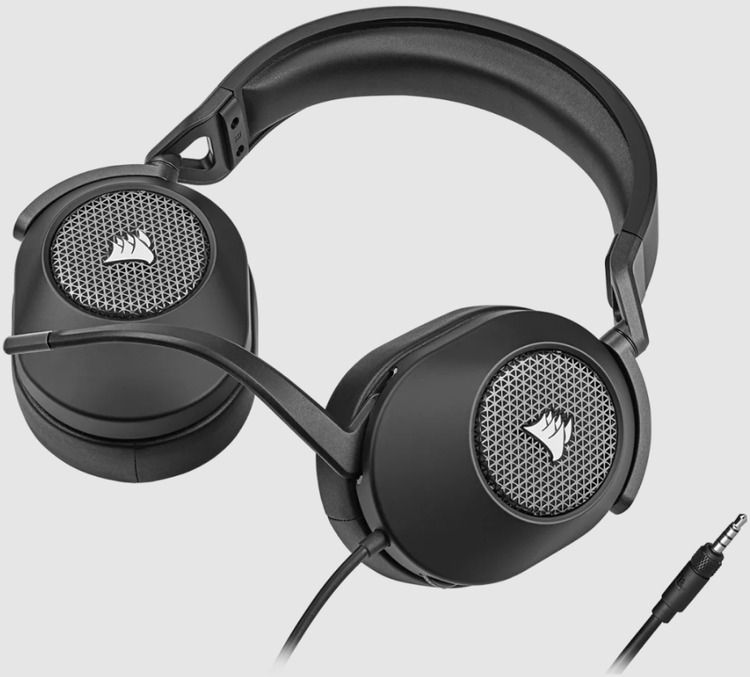
When it comes to design, the HS65 opts for the simple yet still classically Corsair approach, obviously taking cues from some of the grievances customers have made about the HS60 Pro Surround. Instead of a detachable mic and a separate mute button, for example, it now comes with a flip-to-mute non-detachable mic, which makes its operation more effortless and intuitive. Besides the grille on each earcup bearing that famous Corsair ship sail logo, everything else looks unembellished and plain, which appeals to me. Too many gaming peripherals are festooned with “gaming aesthetic” trimmings, and frankly, the Corsair HS65 Surround’s design is a nice departure from that, especially its white-and-silver colorway (a carbon one is on hand as well if you prefer to stick with an all-black setup).

Corsair HS65 SURROUND

Technology personalizes your headset settings to match your audio taste. An omni-directional microphone picks up your voice loud and clear, and custom-tuned 50mm neodymium audio drivers offer great sound quality and range. A 3.5mm audio connector ensures wide compatibility across most devices, including PC, Mac, Xbox Series X | S, PS5 with Tempest 3D AudioTech support, PS4, Nintendo Switch, and mobile. Powerful CORSAIR iCUE Software unlocks audio equalizer settings, multi-channel 7.1 surround sound, and more. Complete with convenient on-ear volume control, the HS65 SURROUND enables you to press play on great sound. You will need Corsair’s iCUE software and to use the USB adapter if you want to manage EQ settings and use 7.1 surround sound, otherwise it will work with the 3.5mm jack for your PC or console. It’s a comfortable fit that can be adjusted, the ear muffs are soft and don’t hurt your ears after prolonged usage.

Corsair HS65 Surround – Software

The Corsair HS65 Surround uses Corsair’s iCue software – the same software the brand uses for most of its gaming peripherals – and it’s as straightforward and sound-focused as ever. You can use the headset without it out of the box, but if you want to take advantage of its Dolby Audio 7.1 surround sound capabilities or tweak the current sound profile, it’s a good idea to have the software handy. And, believe me, you’ll want to toggle surround sound on at the very least.

There are three main tabs available to you on the iCue program. There’s the Equalizer, which gives you access to the 10-band EQ, the five audio presets, mic adjustments, the stereo/Dolby 7.1 toggle button, and the ability to create your own audio profiles.

With the Movie Theater profile on, the HS65 sound profile is quite pleasant. There is a clear spark in the highs that renders instruments and sound effects with energetic force, while the mid-range has enough room to breathe and spread out. The bass is still present, and there is quite a lot of it to contend with, but it is reasonably well controlled if not a little untamed.

Corsair HS65
Corsair HS65

The soundstage is surprisingly wide for a closed-back headset like this – it is almost as if it is artificially expanded – but thankfully, there is no hollowness present which is usually the case when the sound profile is engaged in such a way. As such, vertical and horizontal positioning is quite decent, and I had no problems identifying approaching enemies in Overwatch 2. It could be a little more clearer and precise, but maybe the other equalizer presets might come of use (for example, the FPS Competition, which sounds horrible to my ears but others might get some mileage out of it).

Of course, these equalizer presets are not available when you shift to using the headset on a console. In fact, the headset does seem to have built-in sound presets with similar functionality (triggered by pressing on the volume wheel) but they do not make any difference to the audio whatsoever. Changing from Pure Direct to Movie Theater made no difference without the iCUE software, and as such, it uses the default bass-heavy sound profile. In games, it doesn’t sound too bad as it does when listening to music, but it does lose out on a clear sense of directionality and sharpness in sound that the Movie Theater profile brings.

If you are on PC, you can avail two additional audio enhancement features. The first one is Dolby Audio, which expands the audio to provide a virtual 7.1 surround sound setup. It’s not good at all, to be honest, and games just sounded odd and disjointed with it. I mostly left it turned off for the entire period of my time with the headset, and I suggest you do the same.

Corsair HS65 Surround – Performance

The Corsair HS65 Surround may not be as feature-rich as others, but when it comes to gaming headsets, audio performance is king, and that’s where this headset truly shines. The headset supports Dolby Audio 7.1 surround sound for an even more immersive experience, but even on stereo, it delivers excellent sound quality in which all frequencies are represented beautifully and there’s decent sound imaging. On top of that, it’s pretty loud at its highest volume with only the slightest hint of distortion.

While it isn’t what I would call neutral-sounding, all frequencies are present and not one overwhelms the others. The bass is very present and actually delivers a bit of that rumble we all crave when gaming or watching blockbusters, but it’s not overwhelming. The highs are clear and detailed without being overly bright. And the mids are full without sounding muddy.

HS65 Wireless
HS65 – images

Utilize the USB adapter and toggle on the Dolby 7.1 surround sound feature in iCue, and suddenly, the soundscape is much wider and much more immersive without sounding artificial. Obviously, you’re not really getting a real 7.1 speaker system here, but the effect is as close to the real thing as you can get with a pair of headsets.

The sound imaging is even more impressive with the surround sound feature. You can really hear individual elements moving from one side to the other. Better yet, audio elements seem positioned in a three-dimensional space so you can easily hear elements relative to you, whether they’re far off to the left, moving around you, or just behind you on the right.

For $49.99, the Corsair HS65 SURROUND is a perfectly fine choice for gamers who want surround sound and adjustable EQ options for under $100 USD. The default sound profile is just okay, and shouldn’t impede your gaming too much on other platforms, but PC gamers will benefit the most from this headset given the ability to choose EQ it. The biggest selling point is the microphone, which is great for Discord and in-game chat. Otherwise, this is just an okay headset that doesn’t really stand out.

SpecificationDetails
Headphone ModelHS65 SURROUND
Headphone Interface3.5mm
Audio CompatibilityPC; MAC; Playstation; Xbox; Mobile
Headphone Frequency Response20Hz – 20 kHz
Headphone Battery LifeN/A
Headphone Sensitivity114dB (+/-3dB)
Headphone Wireless RangeN/A
Headphone TypeWired
Headphone Drivers50mm
Impedance32k Ohms @ 1 kHz
Memory Type3.5mm
Microphone TypeOmni-directional
Microphone Impedance2.2k Ohms
Microphone Frequency Response100Hz to 10kHz
Audio CUE SoftwareYes
Battery TypeN/A
ColorGRAY
AudioDolby Audio
LightingNo
PlatformPC, PS4/5, Xbox 1 / X
ModelHS65 SURROUND
Microphone Sensitivity-41dB (+/-3dB)
Surround SoundYes
Cable Length1.8m
Detachable MicrophoneNo
Weight0.514