Home Blog Page 32

Yamaha ATS-1090 Soundbar with Built-in Subwoofers

0

As an expert in audio technology, I had the pleasure of delving into the Yamaha ATS-1090 soundbar, a sleek and powerful addition to the audio landscape. Let’s break down its key features and performance aspects.

Compatibility and Inputs: The Yamaha ATS-1090 boasts a comprehensive range of inputs, making it a versatile companion for your home entertainment system. With one HDMI input and output supporting TV ARC, a digital optical input, and a subwoofer output, this soundbar ensures seamless connectivity. The 4K pass-through capability, supporting HDR10 and HLG, enhances its compatibility with modern high-resolution content.

Performance and Quality: The ATS-1090 doesn’t compromise when it comes to performance. The drivers, including front L/R speakers and built-in subwoofers, deliver a robust output power of 120W. This comprises 30W per channel for the front L/R speakers and an impressive 60W for the built-in subwoofers. The result is a rich, immersive audio experience that elevates your movies, music, and games.

Yamaha ATS-1090 soundbar

Energy Efficiency: Yamaha demonstrates a commitment to energy efficiency with the ATS-1090. The soundbar consumes a modest 30W during operation, and in standby mode, it minimizes power consumption to as low as 0.2W (HDMI control off, network standby off). This thoughtful design aligns with the demand for eco-friendly audio solutions.

Design and Dimensions: Sleek and versatile, the ATS-1090 is designed to complement your entertainment setup. Whether installed in front of a TV or mounted on a wall, the soundbar’s dimensions (35″ x 2-1/8″ x 5-1/8″) and weight (7.5 lbs) make it a discreet yet impactful addition to your living space.

Sound Technology and Surround Modes: Yamaha’s sound engineering prowess shines through with the incorporation of DTS Virtual:X™ technology. The virtual surround capability creates an expansive soundstage, enhancing your listening experience across various modes—Music, TV program, Movie, Sports, and Game. The Compressed Music Enhancer further ensures optimal sound quality, especially for Bluetooth® streaming.

Audio Formats and Connectivity: Supporting a range of audio formats, including Dolby Digital, Dolby Pro Logic II, and DTS Digital Surround, the ATS-1090 accommodates diverse preferences. Built-in music streaming services, Wi-Fi connectivity, and Bluetooth® (Version 4.2) with a communication range of approximately 33 feet add layers of convenience to your audio experience.

Additional Features: The Yamaha ATS-1090 comes with the Sound Bar Controller app for easy and intuitive control. While lacking a learning function and wireless subwoofer, its front surround system and absence of MusicCast Surround may be trade-offs for some users.

Price: Priced competitively at $219.95, the Yamaha ATS-1090 soundbar strikes a balance between affordability and premium features, making it an attractive choice for audio enthusiasts seeking quality without breaking the bank.

The Yamaha ATS-1090 proves to be a satisfactory option for music enthusiasts. Its default sound profile leans towards a bass-heavy and dark tone, occasionally obscuring voices. However, the simplicity of this soundbar limits the extent of sound customization, allowing only for the adjustment of subwoofer volume without the ability to fine-tune bass or treble settings. Notably, it lacks in low-bass reproduction, particularly evident in genres like EDM and hip-hop, where the expected thump and rumble are somewhat subdued.
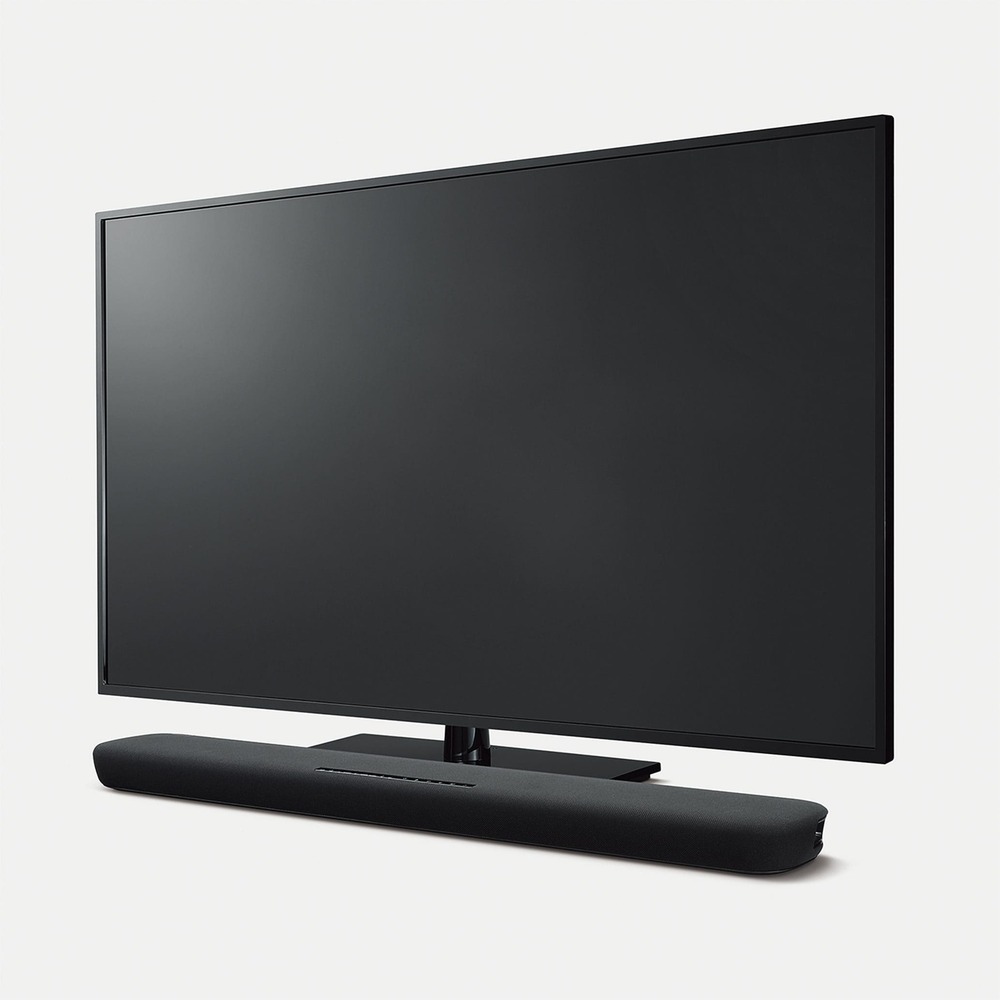
Yamaha ATS-1090 soundbar
ATS-1090 soundbar – images: Yamaha

Yamaha appears to cater to users who may be new to soundbars, ensuring a straightforward setup process. The YAS-109 prioritizes user-friendly adjustments, avoiding potentially detrimental changes to audio quality. For instance, the various sound modes—Movie, TV, Music, and Sports—offer subtle shifts in the EQ, providing a user-friendly experience without the risk of ruining the audio. This approach is advantageous for novice consumers, preventing accidental speaker damage due to mode selection.

The compact remote complements the overall simplicity, featuring all necessary buttons for input selection, volume control for mids/tweeters and subwoofer, sound mode selection, and an Amazon Alexa button. While the remote is serviceable, control feedback is only satisfactory, making it somewhat challenging to gauge speaker and woofer settings at a glance. Adjusting volume with the TV remote is not entirely seamless, requiring multiple presses before a noticeable change in decibels occurs.

In terms of movie performance, the Yamaha ATS-1090 falls into the middle ground. Its 2.2 configuration lacks the immersive feel provided by multichannel audio formats like Dolby Digital, as it must downmix 5.1 surround sound into stereo for playback. This results in a less clear and realistic audio experience. Additionally, the soundbar does not support Dolby Atmos content, and the absence of low-bass impact is noticeable in action scenes, where the expected rumble accompanying large explosions is somewhat subdued.

The Yamaha ATS-1090 soundbar delivers a harmonious blend of compatibility, performance, and quality. With its sleek design, powerful audio output, and thoughtful features, it stands as a commendable option in the realm of soundbars. Whether you’re a cinephile, music lover, or avid gamer, the Yamaha ATS-1090 promises to elevate your audio experience to new heights.
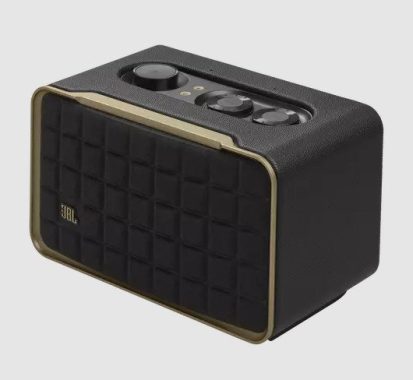
Review: JBL Authentics 200 Speaker

0

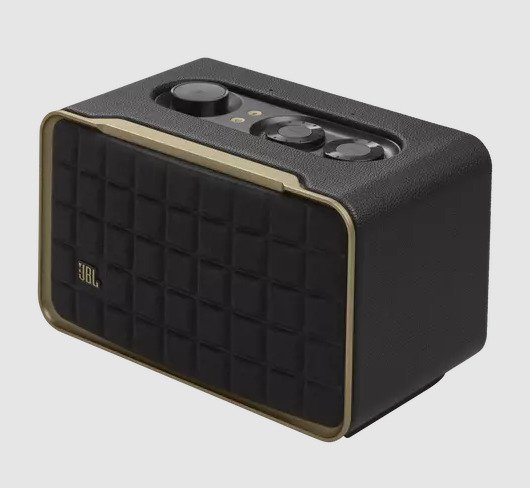
The JBL Authentics 200 speaker seamlessly blends retro aesthetics with modern technology, offering a delightful combination of style and performance. Priced at $349.99, this smart speaker proves to be an excellent investment for audio enthusiasts seeking a versatile and high-quality audio solution.

Design and Build: The Authentics 200 boasts a vintage Quadrex grille, complemented by a premium aluminum frame and a leather enclosure. This combination not only imparts a sophisticated appearance but also ensures durability. The attention to detail in design is evident, making it a visually appealing addition to any space.

Sound System and Performance: The heart of the JBL Authentics 200 lies in its exceptional sound system. With a Stereo 2.0 configuration and a total speaker power output of 90W at 1% THD, this speaker delivers an immersive audio experience. The inclusion of two 25mm tweeters and a 5-inch woofer, along with a downfiring 6-inch passive radiator, produces rich, full-bodied sound with impressive bass. The frequency response of 50Hz – 20kHz ensures a broad range, capturing the nuances of every track.

Compatibility and Inputs: One of the standout features of the Authentics 200 is its versatile compatibility. It supports multiple audio inputs, including 1 Audio in, Bluetooth/WIFI, Ethernet, and USB. The inclusion of Bluetooth 5.3 ensures reliable wireless connectivity, while the USB port, using Type C, supports a variety of formats such as mp3 and WAV. This speaker seamlessly integrates into your digital lifestyle, offering hassle-free connectivity options.

Connections and Control: The control and connection specifications of the Authentics 200 further enhance its user-friendly nature. The USB port, with a rating of 5V DC, 1A, supports Type C connections. Additionally, the speaker includes Wi-Fi capabilities, supporting IEEE 802.11 a/b/g/n/ac/ax across 2.4GHz and 5GHz frequencies. The Bluetooth version 5.3, with A2DP 1.3.2 and AVRCP 1.5 profiles, ensures efficient wireless streaming.

JBL One App and Voice Assistant Integration: For added convenience, the Authentics 200 features built-in Wi-Fi and is compatible with the JBL One App. This app allows seamless control and customization of your audio experience. Moreover, the speaker integrates with voice assistants, adding another layer of hands-free control and accessibility.

JBL Authentics 200 Speaker
JBL Authentics 200 Speaker – images JBL

What’s in The Box: The package includes the JBL Authentics 200 Speaker, a power cable, a quick start guide, a safety sheet, and a warranty card, ensuring you have everything you need for a hassle-free setup.

This speaker is equipped with a Self-Tuning feature that automatically optimizes its output by adapting to the specific acoustics of your living room. Upon plugging in the speaker, this feature activates, taking approximately three minutes to complete. It’s important to keep the microphone on during this process for optimal results.

With the Self-Tuning feature engaged, the speaker delivers a relatively even sound, particularly in the mid-range where most vocals and lead instruments are reproduced. However, it exhibits a slight lack of emphasis in the treble and bass ranges. Users have the option to customize the sound to their preference using the bass and treble knobs, along with the graphic EQ available in the JBL One app. It’s worth noting that, despite these adjustments, it doesn’t produce as much low-bass as its counterpart, the JBL Authentics 500.

While the JBL Authentics 200 may not be designed for a cinematic movie-watching experience, it performs admirably for streaming videos from a paired smartphone. The lowest latency is achieved through an Apple AirPlay connection, but it’s important to be aware of potential lip-synching delays when streaming over Bluetooth. The speaker ensures clear and easily understandable dialogue; however, it doesn’t replicate the deep cinematic bass found in larger and more premium models.

In conclusion, the JBL Authentics 200 Speaker stands out as a premium audio solution that excels in compatibility, performance, and quality. Its retro design, coupled with modern features, makes it a compelling choice for those who appreciate both style and substance in their audio devices. Whether used for streaming music in a home office or family room, the Authentics 200 delivers an impressive audio experience that is sure to satisfy even the most discerning audiophiles.

How to Resolve OnePlus Open Auto Brightness Issue

0

Adaptive brightness on Android utilizes sensors to adjust brightness based on lighting conditions, but its accuracy often falls short, causing inconvenience for users. The positive aspect is that OnePlus phones offer a solution by allowing adjustment to open automatically in bright light. To address the OnePlus auto brightness issue, read through the guide for a comprehensive solution.

If you’ve observed that your OnePlus auto-brightness isn’t functioning correctly, you’re not alone. Numerous users have reported problems with their OnePlus devices’ auto-brightness, which can trigger automatic brightness adjustments for various reasons.

To troubleshoot, access auto-brightness settings on your OnePlus device, especially if Adaptive Brightness is disabled. Additionally, automatic brightness may be influenced by night mode or reading mode settings. Enabling these modes might result in issues with auto-brightness on your OnePlus device.

How to Fix OnePlus Open Auto Brightness Issue

 1: Restart your Phone – If your OnePlus device is experiencing automatic brightness issues, a simple restart can often address software bugs and temporary problems. Follow these steps:

  1. Press and hold the power button (side button) until the restart option appears.
  2. Choose “Restart” from the menu.
  3. Power on your OnePlus device and check if the auto-brightness issue persists.

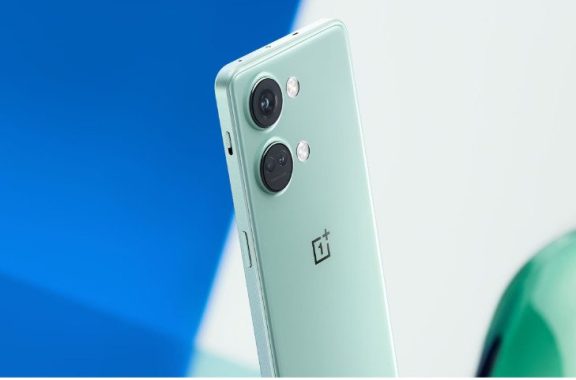
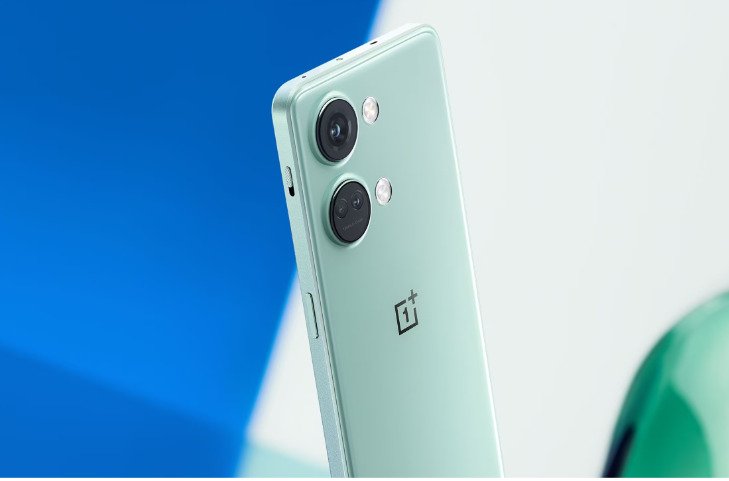
    OnePlus
    photo: OnePlus

 2: Reset Adaptive Brightness – Resetting Adaptive Brightness can be a helpful step in resolving auto-brightness problems. Follow these steps:

  1. Open Settings and select Apps.
  2. Tap on “See all apps.”
  3. Choose “Device Health Services” at the bottom.
  4. Select “Storage and Cache.”
  5. Tap “Clear Storage” and then “Reset Adaptive Brightness.”
  6. Verify if the auto-brightness issue is resolved.

 3: Disable and Re-enable Adaptive Brightness – For users with adaptive brightness enabled, disabling and re-enabling this feature can often resolve the issue. Follow these steps:

  1. Navigate to Settings on your OnePlus device.
  2. Select “Display.”
  3. In the top menu, choose “Adaptive Brightness.”
  4. Disable the toggle and wait for a moment.
  5. Re-enable Adaptive Brightness by toggling the switch again.
  6. Check if the auto-brightness problem persists.

 4: Update Phone Software – Ensuring your phone’s software is up to date is crucial. Follow these steps:

  1. Go to Settings > System > System Updates.
  2. Update your phone’s software if available.

 5: Perform a Factory Reset – As a last resort, you can perform a factory reset, but remember to back up your data first:

  1. Navigate to Settings > Additional Settings > Backup and reset.
  2. Select “Reset phone” at the bottom.
  3. Confirm “Erase all data.”

 6: Contact OnePlus Support – If the above methods do not resolve the auto-brightness issue, consider reaching out to OnePlus support for personalized assistance. You can contact them through the official OnePlus website or visit a nearby service center.

These steps aim to help you troubleshoot and resolve the OnePlus open auto-brightness issue. We hope this guide proves beneficial to you.

Motorola Moto G14 smartphone Review

0

The smartphone market is brimming with options, and the Motorola Moto G14 has entered the arena, aiming to carve out its space in the budget-friendly segment. Announced on August 1, 2023, and released on August 8, this device boasts several features that make it stand out in its price range. Let’s dive into a comprehensive review of the Motorola Moto G14, focusing on compatibility, performance, gaming, battery life, price, and quality.

Design and Build Quality:

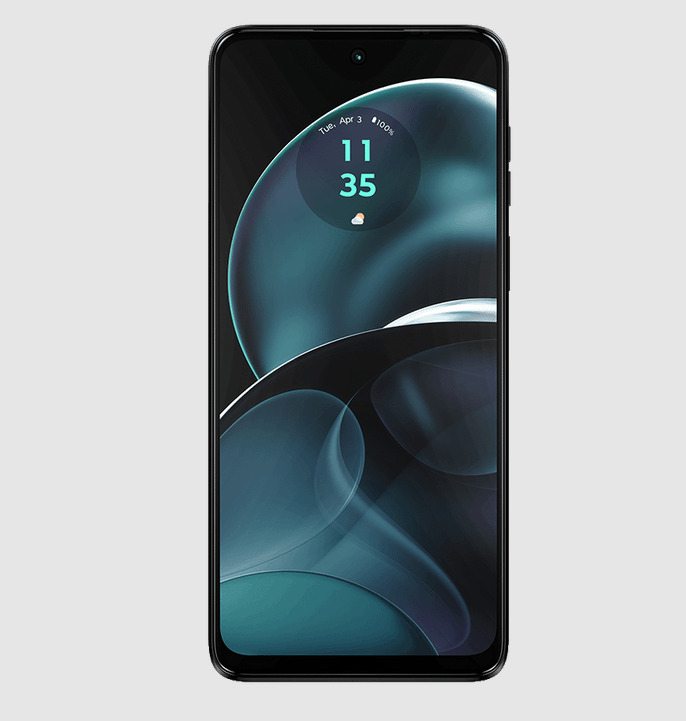
The Motorola Moto G14 sports a design that is both modern and functional. With dimensions of 161.5 x 73.8 x 8 mm and weighing in at 177g, it strikes a balance between a sizable display and comfortable handling. The combination of a glass front (Panda glass), plastic frame, and plastic back gives it a sleek look while ensuring durability. The inclusion of a water-resistant design adds a layer of protection against unexpected splashes, a feature not commonly found in devices at this price point.

The choice of colors adds a touch of personalization with options like Steel Gray, Sky Blue, Butter Cream, and Pale Lilac. The build quality feels solid, and the phone sits comfortably in the hand. The placement of the fingerprint sensor on the side is not only practical but also adds to the overall aesthetics.

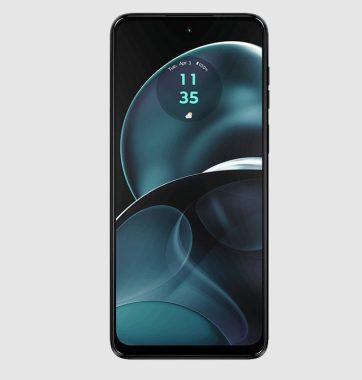
Motorola Moto G14
Motorola Moto G14

Display:

The Moto G14 features a 6.5-inch IPS LCD display with a resolution of 1080 x 2400 pixels, offering a sharp and vibrant visual experience. The 20:9 ratio provides an immersive display, and with Panda glass protection, users can expect some level of durability against scratches and minor drops.

The screen-to-body ratio of approximately 85.6% ensures that the front of the device is mostly dominated by the display, providing an edge-to-edge viewing experience. Whether you’re streaming videos, browsing the web, or gaming, the Moto G14’s display holds its own in this competitive segment.

Performance:

Under the hood, the Moto G14 is powered by Android 13, providing a clean and user-friendly interface. The Unisoc Tiger T616 (12 nm) chipset and Octa-core CPU (2×2.0 GHz Cortex-A75 & 6×1.8 GHz Cortex-A55) contribute to a smooth and responsive user experience. The Mali-G57 MP1 GPU handles graphics well, making this device capable of handling day-to-day tasks with ease.

The inclusion of 128GB internal storage and a dedicated microSDXC slot for expansion ensures that users won’t run out of storage space quickly. Paired with 4GB of RAM and UFS 2.2 technology, the Moto G14 strikes a balance between performance and efficiency, making multitasking a breeze.

Gaming Experience:

For gaming enthusiasts on a budget, the Moto G14 holds its ground admirably. The capable GPU and Octa-core CPU ensure a decent gaming experience across a range of titles. While it may not compete with flagship gaming phones, it handles popular games smoothly at moderate settings.

The 6.5-inch display adds to the gaming experience, providing an immersive feel. The stereo speakers deliver adequate sound quality, enhancing the overall gaming ambiance. The Moto G14 proves to be a reliable companion for casual gamers who don’t want to break the bank for a decent gaming experience on a mobile device.

Battery Life:

One of the standout features of the Moto G14 is its impressive battery life. The device is equipped with a non-removable Li-Po 5000 mAh battery. This sizeable battery, combined with efficient optimization, allows the phone to last through a full day of moderate to heavy usage. Whether you’re streaming videos, playing games, or using productivity apps, the Moto G14 has you covered.

The 15W wired charging ensures that the device can be quickly topped up when needed. It’s worth noting that in India, users benefit from an even faster 20W wired charging, providing a convenient solution for users on the go.

Camera System:

The Moto G14 features a dual-camera system on the rear, comprising a 50 MP wide lens with f/1.8 aperture and a 2 MP macro lens with f/2.4 aperture. The 50 MP lens delivers impressive clarity and detail, especially in well-lit conditions. The macro lens, while not groundbreaking, adds versatility for users who enjoy close-up shots.

The camera app offers features such as LED flash, HDR, and panorama, catering to users who want to experiment with different photography styles. The 1080p@30fps video recording capability ensures decent video quality for social media or personal use.

Moto G14
Moto G14 – images Motorola

On the front, the 8 MP wide lens captures clear and detailed selfies. The front camera also supports 1080p@30fps video recording, making it a reliable choice for video calls and vlogging.

Connectivity and Additional Features:

The Moto G14 covers the basics when it comes to connectivity. It supports GSM, HSPA, and LTE networks, ensuring reliable connectivity for calls and data. The dual SIM (Nano-SIM, dual stand-by) feature adds convenience for users who need to manage multiple numbers.

In terms of wireless connectivity, the Moto G14 offers Wi-Fi 802.11 a/b/g/n/ac, dual-band support, and Bluetooth 5.0 with A2DP and LE capabilities. The inclusion of GPS, GLONASS, and GALILEO positioning ensures accurate navigation for users on the move. Additionally, the device includes a USB Type-C 2.0 port for charging and data transfer.

The presence of a 3.5mm headphone jack is a welcome addition for users who prefer wired audio accessories. The Moto G14 also features a set of sensors, including a side-mounted fingerprint sensor, accelerometer, gyro, and proximity sensor, enhancing the overall user experience.

Dive into the immersive world of Dolby Atmos® audio, where Motorola Spatial Sound envelops you in heightened clarity even at elevated volumes. Enjoy exceptional sound consistently, whether you’re sharing the experience with friends through the stereo speakers or enjoying it solo with a headset.

Software and Unique Features:

Running on Android 13, the Moto G14 provides a near-stock Android experience. Motorola has a history of delivering timely software updates, ensuring that users receive the latest security patches and features.

While the Moto G14 doesn’t boast a plethora of unique features, its strength lies in its simplicity and reliability. The near-stock Android experience contributes to a smooth and bloatware-free user interface. The water-resistant design, stereo speakers, and fast charging support are standout features in this budget-friendly device.

Price and Conclusion:

Priced at £139.99, the Motorola Moto G14 offers excellent value for money. It competes fiercely in the budget segment, providing a well-rounded package of design, performance, and features.

In conclusion, the Motorola Moto G14 is a commendable addition to the budget smartphone market. Its sleek design, capable performance, impressive battery life, and affordable price make it an attractive option for users who prioritize functionality without breaking the bank. While it may not offer cutting-edge features, it excels in delivering a reliable and efficient smartphone experience. If you’re in the market for a budget-friendly device that doesn’t compromise on essential aspects, the Motorola Moto G14 is certainly worth considering.

Remotely control your DSLR camera – digiCamControl app

0

The digiCamControl application provides a convenient way to remotely control your DSLR camera. This software facilitates image importation along with EXIF data via a simple USB cable connection, making it an accessible and user-friendly tool.

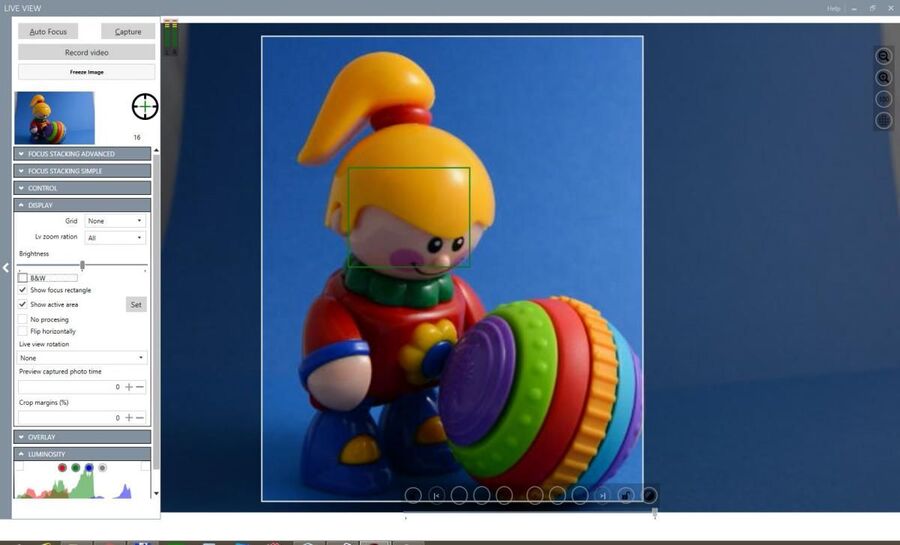
Graphical User Interface (GUI) – While the interface may not be excessively elaborate, it is notably intuitive. The menus are organized in rows, ensuring easy navigation to find various options. Functions such as triggering images and displaying them on the monitor are straightforward. Additionally, users can capture screenshots, adjust shutter speed, and explore time-lapse settings, providing versatility in exposure combinations.

digiCamControl application

Customization Options – The software allows users to manipulate ISO values, shutter speed, white balance, exposure, and aperture settings based on their photographic objectives. Notably, it enables the adjustment of these parameters for a more personalized and creative approach to photography.

Multi-Camera Control – One of the noteworthy features is the ability to control multiple connected cameras simultaneously. Users can trigger photo captures either concurrently or sequentially. External capture devices, such as Arduino-based triggers or USB relays, are supported to enhance sync capture. For efficient camera management, settings can be synchronized between connected cameras.

Configuration Panel – The settings are user-friendly, allowing customization of the app’s appearance and default view. Users can choose to automatically preview photos for a predefined duration. Familiarity with photography enhances the overall experience, and the software accommodates users of varying expertise levels.

Keyboard Trigger – Users can easily snap an image using a pre-set keyboard trigger, streamlining the capturing process. This feature adds to the user-friendly design of the application.

Advanced Capture Control – The application offers advanced capabilities, such as shooting bracketed shots with customizable shutter speed, aperture, or exposure values. An advanced interval meter facilitates the creation of time-lapse images based on a highly customizable scheduler. Motion detection triggering is also supported for cameras with live view functionality.

digiCamControl app
digiCamControl app – photo 

Photographer-Friendly App – Unlike some photo apps that may be overly complex or overly simplistic, digiCamControl strikes a balance suitable for a diverse user base. Users can enjoy a range of features without feeling overwhelmed, making it an ideal application for both novice and experienced photographers. The ability to draw images from multiple sources adds to its versatility and appeal.

You will need the followings to run the program:

Microsoft Windows 7 SP1 32 or 64 bit, Windows 8 32 or 64 bit, Windows 10 32 or 64 bit

Microsoft NET Framework 4.8 (Included in W8 and W10)

Download and install the software and the required libraries HERE

LG OLED Flex 42″ – fantastic Monitor & TV

0

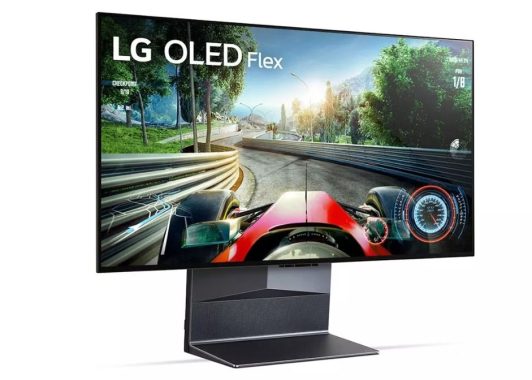
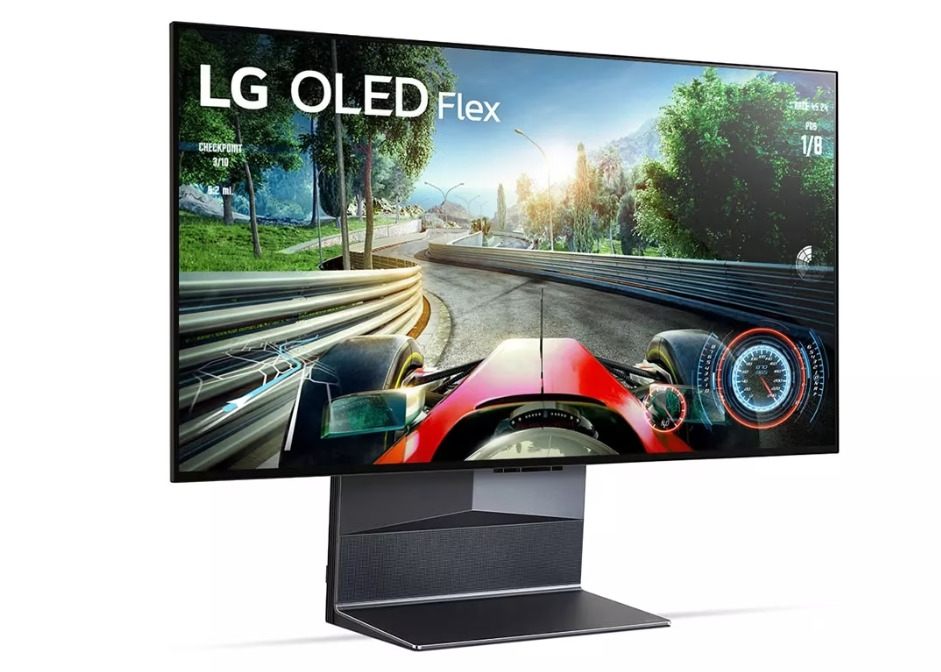
The LG OLED Flex, a 42-inch TV popularly used as a monitor, is a recent addition to LG’s OLED lineup. Its standout feature is the customizable curvature of the screen, ranging from a flat display to an impressive 900R curve. This flexibility caters to various preferences, whether for immersive movie-watching from a distance or for intense gaming with the edges brought closer to your field of vision. Distinguishing itself as a TV, it incorporates features uncommon in monitors, such as the α9 Gen 5 AI Processor 4K, webOS smart platform, and eARC for audio passthrough. However, it lacks certain typical monitor elements like a DisplayPort connection and a high refresh rate, yet compensates with HDMI 2.1 bandwidth, fully capitalizing on the capabilities of current-gen gaming consoles.

The build quality is top-notch, featuring a solid stand that prevents screen wobbling and maintains stability during adjustments, albeit requiring a bit of force. The curvature mechanism, while producing some creaking sounds, ensures a secure placement, although our unit exhibits a slight warp in the center visible from the sides, but inconspicuous when viewed head-on.

LG 42 OLED Flex
LG 42 OLED Flex – images: LG

The LG OLED Flex 42LX3QPUA boasts a unique design amalgamating TV and monitor elements, adorned with a sleek metallic finish. Its robust stand incorporates mechanics for adjusting the screen curvature, allowing users to set it from flat to a 900R curve in 5% increments. The display retains its previous curvature upon powering on, despite returning to a flat state when turned off.

In terms of SDR brightness, it performs adequately but faces limitations when labeled as ‘PC’, struggling against intense glare. Optimal usage is in dark or dimly lit rooms. Adjusting settings in the ‘Game Optimizer’ Picture Mode and enabling Game Optimizer, with specific OLED Pixel Brightness and Peak Brightness configurations, provides calibrated results. Setting the input label to ‘PC’ eliminates brightness fluctuations caused by the Automatic Brightness Limiter (ABL), maintaining consistent brightness across different scenes.

For gaming, the LG 42 OLED Flex impresses with low input lag, offering a responsive experience when using the ‘Game Optimizer’ Picture Mode, enabled Game Optimizer, and ‘Boost’ for Prevent Input Delay. While ‘Standard’ mode increases input lag, it remains acceptable for general use. The display excels with the Xbox Series X|S, although enabling HDMI override for 1440p @ 60Hz sacrifices VRR, recommending the use of 1440p @ 120Hz with VRR enabled.

As a gaming monitor, the LG 42 OLED Flex stands out with its HDMI 2.1 bandwidth, ensuring compatibility with current-gen gaming consoles. Despite limitations for PC gamers, such as the absence of a high refresh rate or DisplayPort connection, it compensates with near-instantaneous response time, low input lag, and variable refresh rate (VRR) support, promising a seamless gaming experience. Furthermore, its prowess in dark room gaming, characterized by deep blacks and impeccable black uniformity, adds to its appeal.

The LG 42 OLED Flex caters well to content creators, although it comes with certain limitations. The susceptibility of OLEDs to burn-in means constant display of static elements from editing software may harm the panel over time. Nevertheless, it excels in presenting a broad spectrum of accurate colors in SDR, and its expansive viewing angles maintain consistent image quality from various perspectives. However, its ergonomic flexibility is restricted, posing challenges when attempting to share the screen with colleagues or clients.LG 42 OLED Flex remote

In the realm of HDR, the LG 42 OLED Flex truly shines. With commendable peak brightness, it accentuates small highlights, faithfully rendering content at the intended brightness levels. The display’s HDR performance extends to a vibrant array of colors, enhanced by its impressive color volume. The near-infinite contrast ratio ensures deep, inky blacks, coupled with impeccable black uniformity, making it an exceptional choice for experiencing HDR content in dimly lit environments.

As an office monitor, the LG 42 OLED Flex performs adequately but comes with a caveat. The inherent risk of burn-in with prolonged exposure to static elements, such as UI components like taskbars or icons, makes it less advisable for continuous office use. However, for occasional productivity tasks, its wide viewing angles and superb reflection handling prove beneficial, even though its SDR brightness in PC mode may struggle against intense glare.

For media consumption, the LG 42 OLED Flex stands out as a fantastic choice. The 42-inch 4K screen provides an immersive experience for shared content viewing, accompanied by wide viewing angles. Its built-in smart platform facilitates easy content streaming without the need for a PC, and it boasts additional processing features not commonly found in monitors. Notably, the display excels in delivering excellent picture quality, characterized by deep blacks, accurate colors, and vibrant highlights.

LG 42 OLED Flex
LG 42 OLED Flex

Experience uninterrupted gaming with the Game Dashboard seamlessly overlaying your screen, allowing you to effortlessly discover the perfect screen size for your game. Immerse yourself in scenes presented in 27, 32, or 42 inches—tailored to suit the nuances of your favorite gaming genre. Engage in multitasking with Multi-view, splitting the screen into halves for gameplay on one side while watching game guides on the other.

Achieve the most immersive viewing position by adjusting the height up to 140mm and tilting the screen 10 degrees forward or 5 degrees backward. Whether confronting enemies or unwinding with a movie, finding the optimal spot for victory or relaxation is just a slight move away. Priced at $2,499, this gaming experience is tailored to your preferences.

Customize your gaming ambiance with adjustable backlight colors and explore five lighting modes to match your gaming mood. The Sound Sync feature synchronizes effects with the in-game audio, intensifying the impact of colossal explosions. Video Sync further deepens your connection to the gaming world by aligning with the graphics.

The LG OLED Flex takes you from a flat display to a stunning 900R curve, allowing you to discover the perfect arc for total immersion. Simply press the curvature button on your remote control to explore 20 different levels of curvature until you find the ideal setting.

Equipped with SAR technology, the LG OLED Flex 42LX3QPUA minimizes reflections from surrounding light, objects, and people, offering 25% fewer distractions compared to other OLED EVO models. Even in well-lit spaces, enjoy gaming with reduced shadows on the screen, enhancing your focus and overall experience.

What a DO file is, how to open it and convert?

0

A DO file can refer to different things depending on the context. Here are a few possible meanings:

  • Stata DO File: In the context of Stata, a statistical software package, a DO file is a text file containing Stata commands. These files typically have a .do extension and are used to automate the execution of a series of commands in Stata.
  • Batch File in DOS/Windows: In the context of DOS (Disk Operating System) or Windows command prompt, a batch file is a script file with a .bat extension that contains a sequence of commands that are executed by the command-line interpreter.

    What is a DO file
    photo: Pixabay
  • Fractint Formula File: Fractint is a popular fractal-generating software. In this context, a DO file could refer to a file that contains a set of formulas or instructions for generating fractal images.
  • Generic Term for Script or Macro: In a more general sense, “DO file” might be used as a generic term for a file containing a set of instructions or commands to be executed by a specific program or system.

Without additional context, it’s challenging to pinpoint the exact meaning of “DO file.” If you have a specific context in mind, providing more details could help in giving a more accurate explanation.

How to Open and Convert DO Files

Opening DO Files

  • Java Servlet Files:
    • For Java servlet files, utilize Apache Tomcat or possibly Apache Struts for access.
  • Stata Batch Analysis Files:
    • These files are exclusive to Stata. Execute them in Stata by typing “do” followed by the file name in the Stata command window (e.g., do myfile).
    • The Stata Do-File Editor is included for reading and editing commands. Alternatively, use any web browser for viewing commands and a text editor for viewing and editing files.
    • Execute files using the Stata editor by selecting “Execute do file.”
    • Tip: Refer to the Stata website for additional guidance on do files.
  • ModelSim DO Files:
    • Employ Mentor Graphics ModelSim, part of the Libero SoC suite, to open these plain text files. Any text editor can be used for viewing and editing.
  • Disk Images Apple II:
    • Compatible with CiderPress.
  • Document-like Files (e.g., bank statements):
    • If uncertain, rename the file to end with “.PDF” and attempt opening it with a PDF reader.

Converting DO Files

  • Java Servlet Files:
    • Convert through Apache programs by opening the file and exploring the “Save as” or “Export” menu.
  • Stata Batch Analysis Files:
    • Convert to other text-based formats like TXT. Specify the file extension when running commands in Stata after conversion (e.g., do myfile.txt).
  • ModelSim DO Files:
    • Use the Libero SoC menu to convert files or manually convert the macro’s text using a text editor.
  • Disk Image DO Files:
    • Use CiderPress to convert to formats like PO, SDK, and 2MG.
  • Incorrect File Extension (.DO instead of .PDF):
    • If mislabeled, simply rename from “.DO” to “.PDF” for proper recognition by PDF readers.

Troubleshooting

  • Unrecognized File Extension:
    • Confirm the file extension is “.DO” and not similar extensions like OD, DOCX, DOC, DOP, DM, etc.
    • Research the specific file extension for guidance on how to open or convert the file.

A Guide to Effective Video Conferencing

0

The term “video conferencing” can be easily understood as a virtual meeting between two or more individuals utilizing high-quality software and hardware. This method of communication has proven to be a convenient solution for both businesses and individuals. In this post, we delve into various categories to classify video conferencing or video calls.

Desktop Applications: This type of video conferencing is commonly used by internal members of organizations. Companies providing video conferencing solutions often support desktop applications. Users need to download the application once, granting access to the latest products, releases, and features for participants in the video call. Features include scheduling, hosting, and joining, collaborating with HD video and audio, screen sharing, application sharing, uploaded video sharing, as well as chat and annotation.

 Video Conferencing
Video Conferencing – photo: Pixabay

Browser-Based: Browser-based video conferencing eliminates the need for downloading any specific application or software. Participants can join a video call by logging in through a common web browser. The key feature of this type is its support for WebRTC (Real-Time Calling standard), making it ideal for external participants. Sharing a simple URL allows anyone to join the video conference without requiring additional software downloads. Experts recommend ensuring full WebRTC-based options for 2-way video, audio, and content sharing through the browser.

Mobile-Based: As the world becomes more accustomed to mobile devices, mobile-based video calls and conferencing have become invaluable for businesses and those with small business phone systems. Joining a mobile-based video conference is easy, requiring participants to use the vendor’s proprietary mobile app. Alternatively, leveraging WebRTC and using a browser for joining the video call is possible without the need for additional desktop software. While it’s advisable to download the mobile meeting app for complete access to features, some advanced apps offer toll-free and local phone number choices for dial-in and call-me-back services. Mobile conferencing provides the flexibility to join from anywhere with a Wi-Fi signal or through a cellular carrier’s data plan.

The best video conferencing software: Here are some popular and highly regarded options:

  1. Zoom: Known for its ease of use, Zoom gained immense popularity for both personal and business use. It supports various platforms, offers HD video and audio, and includes features like screen sharing and recording.
  2. Microsoft Teams: Integrated with the Microsoft 365 suite, Teams is an excellent choice for businesses already using Microsoft products. It provides a comprehensive platform for chat, video calls, file sharing, and collaboration.
  3. Cisco Webex: Webex is a reliable and feature-rich platform with strong security measures. It’s suitable for both small businesses and large enterprises, offering video conferencing, webinars, and collaboration tools.
  4. Google Meet: Part of the Google Workspace (formerly G Suite), Google Meet provides a simple and effective platform for video conferencing. It integrates seamlessly with other Google apps and services.
  5. Skype: A longtime player in the video calling space, Skype is known for its user-friendly interface and global accessibility. It’s a good choice for personal use and smaller team meetings.
  6. GoToMeeting: Offering a robust set of features, GoToMeeting is widely used for its reliability and ease of use. It supports video conferencing, webinars, and screen sharing.
  7. BlueJeans: Acquired by Verizon, BlueJeans is a cloud-based video conferencing solution with high-quality audio and video. It’s suitable for businesses of various sizes.
  8. Cisco Jabber: Cisco Jabber combines video conferencing with instant messaging and collaboration tools. It’s often used in enterprise environments.
  9. Adobe Connect: Known for its versatility, Adobe Connect is used for webinars, online meetings, and training sessions. It includes interactive features like polls and breakout rooms.
  10. RingCentral: RingCentral provides video conferencing along with a comprehensive business communication platform, including messaging and phone services.

The best software depends on your specific requirements, such as the size of your meetings, collaboration features needed, security considerations, and integration with other tools. Additionally, the landscape of video conferencing software can change, so it’s a good idea to check for the latest reviews and updates.

E7A, the “next gen” electric motor developed by Renault and Valeo

0

Harnessing the expertise it has built in wound-rotor motors – which it pioneered in the automotive sector in 2012 –, Renault Group is taking the next step and designing a new motor that is in a class by itself worldwide, even more powerful and efficient, and uses no rare earths. This third motor generation is a team adventure with Valeo, which is contributing its stator expertise. This motor, E7A, is still at the prototype stage and set to debut in 2027.

A breakthrough from France will bring about a more powerful, more compact and cleaner electric motor: Renault Group and Valeo are combining their expertise to create a new electric motor generation. As a result of the regular conversations between the carmaker and the equipment manufacturer, this partnership that started in 2021 soon grew into a co-development journey. They each pooled one key part (Renault Group the rotor, Valeo the stator) as well as their expertise in technology development and production. The are currently fine-tuning their E7A high-tech motor. Video: YouTube/Groupe Renault

Rare-earths-free and environmentally friendlier

Renault pioneered electrically excited synchronous motors (EESMs) in production vehicles when it introduced ZOE in 2012. This know-how puts it in a position to supply an all-in-one architecture for the new E7A motor (to make it 30% more compact for equivalent power than the current motors equipping the Megane E-Tech electric and the Scenic E-Tech electric) and the rare-earths-free rotor technology (to shrink its carbon footprint by 30%). By using a wound rotor instead of permanent magnets, Renault is improving the engine’s output, securing its supply chain and avoiding reliance on countries that produce rare earths and magnets.

E7A, the next gen electric motor
The E7A all-in-one electric motor – photo: Renault Group

More power and efficiency

This third-generation motor will also help shorten battery charging times as the system will be built for 800 volts instead of 400 volts, the standard today. And the stator by Valeo will boost power and efficiency. The new E7A motor, as a result, will unleash up to 200 kW. It will also supply more power without consuming more electricity. And the E7A motor uses hairpin technology to assemble copper wires, a Valeo specialty since 2010.

At this stage, the engine is still under development. There are other stages to go through before it can reach serial life. The mass production of this new-generation engine will start at Renault Group’s Cléon factory at the end of 2027.


Power and Reliability: XPG Core Reactor 750W PSU Review

0

In the vast landscape of power supply units, the XPG Core Reactor 750W PSU stands tall, offering a compelling blend of efficiency, reliability, and intelligent design. Packed with features that cater to both gamers and PC enthusiasts alike, this power supply unit earns its spot in the limelight. Let’s delve into the key aspects that make the XPG Core Reactor 750W PSU a noteworthy contender in the PSU arena.

Design and Build Quality

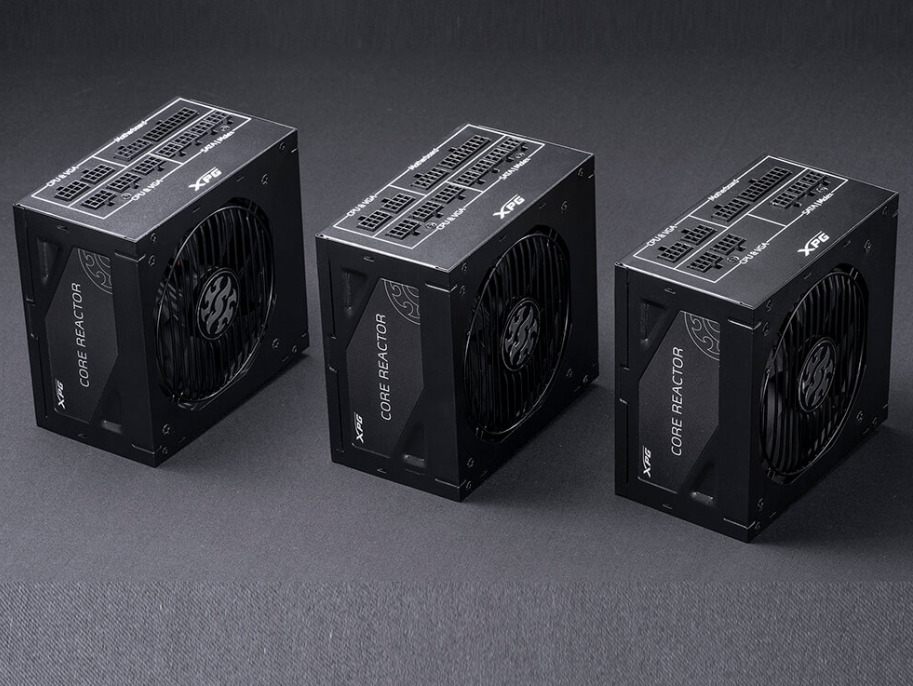
The XPG Core Reactor 750W PSU boasts a sleek and robust design that not only complements your gaming rig aesthetics but also ensures durability. The matte finish adds a touch of sophistication, making it a visually appealing component within your PC setup. The unit’s build quality is evident, with attention to detail and sturdy construction that reflects XPG’s commitment to delivering top-notch products.

XPG Core Reactor 750W PSU

Compatibility

One of the standout features of the XPG Core Reactor 750W PSU is its compatibility with a range of setups. Whether you’re building a gaming powerhouse or a content creation workstation, this PSU has you covered. With an ATX version and adherence to Intel ATX 12V v2.52 standards, the XPG Core Reactor seamlessly integrates into various PC configurations, providing a reliable power source for your components.

Performance and Certification

The 80 Plus Gold certification speaks volumes about the efficiency of the XPG Core Reactor 750W PSU. Delivering a commendable 90% efficiency at 50% load, this PSU ensures that power is utilized optimally, contributing to a stable and reliable system. The Cybenetics LAMBDA/ETA certifications further underscore its performance, placing it at the forefront of efficiency and noise control within its category.

While the XPG Core Reactor 750 delivers commendable performance, it falls short of surpassing the benchmarks set by both the Corsair RM750x and the more contemporary RM750. Although the Core Reactor 750 introduces alternative sleep mode support and achieves super-high efficiency at light loads, those indifferent to these features may find the RM750x a more budget-friendly alternative. In comparison to the RM750, the XPG unit incorporates more reputable components, yet both power supply units (PSUs) promise a minimum of 10 years of longevity, accompanied by robust 10-year warranties.

A notable advantage of the XPG Core Reactor 750 is its absence of in-cable caps, a boon for users as it simplifies cable routing and management processes. The quantity and length of cables, as well as the spacing between peripheral connectors at 145-150mm, meet satisfactory standards. Most electrolytic caps belong to the high-quality Chemi-Con, KY line, ensuring prolonged reliability. However, it’s worth mentioning that a single Chemi-Con KZE, noticeably inferior to KY members, and three Nichicon caps are also present. Additionally, CWT incorporated a substantial number of polymer caps in this platform.

XPG Core Reactor 750W PSU
Core Reactor PSU – images: XPG

Alongside the Corsair RM750, the XPG Core Reactor 750 stands as the second power supply in this wattage category that adheres to the rigorous requirements outlined by the ATX spec. These specifications demand efficiency higher than 70% with 2% of the max-rated-load (15W) and a Power-Ok delay within 100-150ms, coupled with a Power-on time lower than 150ms. Fulfilling these demands necessitates significant hardware adjustments, contributing to the higher cost of PSUs fully compliant with the newest ATX spec.

The XPG Core Reactor 750 not only boasts high performance but also operates at very low, often silent levels. Loaded with an abundance of modular cables and connectors, including two EPS, six EPS, and twelve SATA, compatibility concerns are virtually nonexistent. Moreover, the PSU effortlessly delivers its maximum power without significant voltage drops. The exceptional build quality is evident as XPG has employed top-tier, expensive components, such as an FDB fan and fully Japanese capacitors, ensuring the PSU easily outlives its extensive warranty period. In summary, the XPG Core Reactor 750 stands as a reliable performer in the PSU realm, striking a balance between performance, features, and longevity, making it a compelling choice for discerning users.

Intelligent Cooling with FDB Fan

The Fluid Dynamic Bearing (FDB) fan in the XPG Core Reactor 750W PSU takes center stage in maintaining an optimal temperature. Operating at 2400 RPM, the 12cm fan strikes a balance between cooling efficiency and noise reduction. The intelligent fan curve ensures near-silent operations, kicking in at a low 3.3v and 660 RPM ± 10%. This thoughtful design choice not only keeps your system cool but also extends the lifespan of both the fan and the power supply unit.

Connectors Galore

When it comes to connectivity, the XPG Core Reactor 750W PSU doesn’t disappoint. The inclusion of an ATX 24 Pin Connector, EPS 8 (4+4) Pin Connectors, PCI-E 6+2 Pin Connectors, Molex 4 Pin Connectors, and SATA Connectors ensures compatibility with a wide array of components. Whether you’re powering a high-end graphics card or multiple storage drives, the XPG Core Reactor has the connectors you need.

Japanese Capacitors for Enhanced Reliability

The XPG Core Reactor takes reliability seriously by incorporating high-quality Japanese capacitors. Renowned for their superior performance and longevity, Japanese capacitors play a pivotal role in maintaining stable DC voltage within ±2%. This not only reduces ripple and noise by up to 35% but also ensures enhanced dependability, crucial for the longevity of your components.

Protections for Peace of Mind

In the unpredictable world of computing, protection features are indispensable. The XPG Core Reactor 750W PSU comes equipped with a comprehensive set of protections, including OCP (Overcurrent Protection), OVP (Overvoltage Protection), UVP (Undervoltage Protection), OPP (Over Power Protection), SCP (Short Circuit Protection), OTP (Over Temperature Protection), NLO (No Load Operation), and SIP (Surge and Inrush Protection). These safeguards ensure that your components are shielded from potential electrical hazards, providing peace of mind during extended gaming sessions or resource-intensive tasks.

For gaming enthusiasts, the XPG Core Reactor 750W PSU is a reliable companion. The robust power delivery and stable voltage output contribute to a smooth gaming experience. Whether you’re engaged in fast-paced FPS games or exploring expansive open-world titles, the XPG Core Reactor ensures that your system remains steadfast, delivering the power your components demand.

XPG Core Reactor
XPG Core Reactor

With a price tag of $94.99, the XPG Core Reactor 750W PSU strikes a commendable balance between performance and affordability. Considering the 10-year warranty, this PSU not only provides a reliable power solution but also offers long-term peace of mind. The 10-year warranty period reflects XPG’s confidence in the durability and performance of their product. The 80 Plus Gold certified XPG CORE REACTOR gives you 90% efficiency at 50% load. It comes in 650W, 750W, and 850W.

Conclusion

In the realm of power supply units, the XPG Core Reactor 750W PSU emerges as a standout contender. Its 80 Plus Gold certification, intelligent cooling system, Japanese capacitors, and comprehensive protection features make it a reliable choice for both gaming rigs and professional workstations. The careful consideration given to design and compatibility further cements its position as a go-to option for PC enthusiasts. At a price point of $94.99, the XPG Core Reactor 750W PSU delivers exceptional value, backed by a 10-year warranty, making it a wise investment for those seeking a robust and efficient power supply solution.

In conclusion, the XPG Core Reactor 750W PSU not only meets the expectations set by its specifications but exceeds them, making it a noteworthy addition to any PC build.