Explore our tips for watching U.S. Netflix while traveling or residing outside the U.S. on your iPad, iPhone, or Mac. Stay connected to your favorite American content.
The U.S. version of Netflix offers a wide range of movies and TV shows that are often unavailable in other countries, including the U.K. However, there’s a way to watch U.S. Netflix even if you’re outside the U.S.
When attempting to access U.S. Netflix from locations like the U.K., you’ll likely encounter messages stating that certain content is not available in your region. But there’s a workaround, though it involves violating Netflix’s terms and conditions.
Netflix – photo Pixabay
In this guide, we’ll show you how to change the country on your Netflix account, enabling you to watch U.S. Netflix from outside the U.S. on your Mac, iPad, or iPhone. We’ll achieve this using a Virtual Private Network (VPN), a tool that not only protects your online privacy but also allows you to access content from various Netflix libraries worldwide.
What is a VPN? – A VPN, or Virtual Private Network, acts as a secure intermediary between your device and the broader internet. It establishes a connection between your computer and the internet through the VPN server. VPNs are primarily designed to safeguard your online privacy, making it difficult for others to track your online activities or determine your location.
One crucial feature of VPNs is their ability to make servers believe you’re in a different country than your actual location. This functionality allows a VPN to trick Netflix into providing you with content from the U.S. version of the service, even if you’re in the U.K. or elsewhere.
While free VPNs are available, for enhanced privacy, it’s recommended to use a paid VPN service, such as those listed in our best VPN services guide, which also features the best VPN deals.
How to Access U.S. Netflix on a Mac? To watch U.S. Netflix content outside of America, you can easily use a VPN. In this example, we’ll use NordVPN, but similar results can be achieved with other reputable services like CyberGhost or ExpressVPN.
Here’s what you need to do:
Open your browser and visit NordVPN’s website.
Click “Get NordVPN” and select your desired plan.
Create an account and complete the sign-up process by making a payment.
Install NordVPN on your Mac.
Launch the app, log in, and click on “List.”
Scroll to “America” and click to connect.
Once connected, you’ll see a green pin on the map, and the power icon in the app’s switch at the top should also be green.
Now, go to Netflix.com, log in with your usual account details, and enjoy U.S. Netflix content.
How to Access U.S. Netflix on iPad or iPhone? You can employ a similar method to watch American Netflix on your iOS device. Refer to our best VPN for iPhone and best VPN for iPad guides to find recommended apps. If you’ve already signed up for a VPN service on your Mac, it should cover your mobile devices as well. Simply download the chosen VPN app on your phone or tablet and log in.
As a general guide, follow these steps:
Download the VPN app and set up your account.
Launch the app and use “Quick Connect” to enable the VPN.
Go to the map and tap on any U.S. location.
Choose a server from the options provided.
Launch the Netflix app or access the site on Safari, log in with your Netflix details, and you’ll find U.S. content is now accessible.
Is It Legal to Watch U.S. Netflix Content in the U.K.? – Accessing U.S. Netflix content involves making Netflix believe you’re in the U.S., which is against the terms and conditions you agreed to when creating your Netflix account. The terms explicitly state that you should primarily view Netflix content within the country where you established your account and in locations where the service is available and content is licensed.
Be aware that breaking these rules can lead to suspension of your Netflix service. Furthermore, Netflix has been actively blocking many VPN services, making it more challenging to access U.S. Netflix than before.
The legality of using a VPN varies based on local laws, but it’s unlikely that anyone would pursue a copyright infringement case. Many observers argue that since Netflix technically broadcasts to the U.S., it’s within its rights due to territorial broadcasting rights ownership.
Transferring files between an iPad and an Android device presents a unique challenge due to the distinct operating systems they employ. However, while the process can be demanding, it’s not insurmountable. In the past, this task was fraught with limitations, especially for larger file transfers through apps like WhatsApp and email.
Thankfully, there are alternative methods for transferring files between these devices. Two recommended approaches are outlined below:
Solution 1: Using Dr.Fone Phone Transfer (Recommended)
If you’re seeking a reliable method for transfer files from an iPad to an Android device, Dr.Fone – Phone Transfer is a highly recommended tool. With a simple click, you can move contacts, photos, iMessages, calendars, videos, and music from your iPad to your Android device in just a few minutes.
Step 1: Connect your iPad and Android device to the computer, ensuring that iTunes is installed for proper connectivity.
Dr.Fone also offers an Android Switch app, allowing direct file transfers from iPad to Android and wireless access to iCloud files on Android.
Step 2: Copy the desired files (music, photos, videos, iMessages, calendars, contacts) from your iPad to your Android device. Both devices will be visible in the primary window, and you can select the content to transfer. Click “Start Transfer” to initiate the process.
Dr.Fone – Phone Transfer tool offers seamless file transfers between iOS and Android devices. When transitioning from iOS to Android, this program supports the transfer of 12 file types: photos, videos, contacts, contact blacklists, messages, bookmarks, calendars, voice memos, music, alarm records, voicemail, and ringtones.
Similarly, when moving from Android to iPhone, you can confidently utilize this tool, which facilitates the transfer of the 8 primary file types: photos, videos, contacts, messages, bookmarks, calendars, voice memos, and music.
Solution 2: Freely Transfer Files from iPad to Android
Here are steps for transferring specific types of files:
Fix 1: Transfer Photos
Connect your iPad to the computer via USB cable, treating it as an external hard drive.
Locate the DCIM folder on the iPad, containing all the photos.
Connect your Android device to the computer via USB cable and access its hard drive.
Create a photo folder on the Android device if needed.
Copy the photos from the iPad’s DCIM folder to the Android’s photo folder.
Fix 2: Transfer Music and Videos
Connect your iPad to the computer using a USB cable and run iTunes.
Authorize the computer using your Apple ID and password (used for purchasing music and videos).
When your iPad appears in the left sidebar, right-click it and choose “Transfer Purchased.”
Access the iTunes media folder on your computer (default location: C:Users/Administrator/Music/iTunes/iTunes Media).
Mount your Android device as a USB hard drive and paste the music and videos from the iTunes media folder.
Note: Some files may require conversion if they’re not compatible with Android devices (e.g., MOV, M4P, M4R, M4B). In such cases, use audio and video converters to convert them first.
Looking to ensure your safety and protect your data during your online browsing? Look no further than the Epic Privacy Browser, designed to keep you secure and your information private as you navigate the web.
With the Epic Privacy Browser, your online search activities remain shielded. One of the primary concerns while browsing is the collection of your data by various sites and entities, exposing it and potentially spreading it across the globe.
However, this browser incorporates numerous tools to safeguard you from such risks.
User-Friendly features this browser retains the core functionalities found in major browsers available today. It offers essential features that enhance the browsing experience, including bookmarks, history tracking, zoom capabilities, file downloads, a list of downloaded files, multiple tabs, language preferences, and customizable settings.
11 core browser privacy leaks that Epic blocks
Address bar and URL tracking removed
Local DB-based address bar suggest.
No URL check
Auto-translate removed
No URL tracker
Installation tracking removed
Installation ID removed
RLZ tracking number removed
Default updater removed
Installation time stamp removed
Error tracking removed
No alternate error pages
No navigation error suggestions
No error reporting
Based on the Chromium source code, it shares a familiar interface with other Chromium-based browsers, making it quite similar to Google Chrome in many aspects.
Nevertheless, the browser’s primary focus is not merely aesthetics but rather on delivering superior performance and ensuring your safety during online searches.
Robust Privacy Features for Your Protection The Epic Privacy Browser offers several security modes accessible through the settings with just a few clicks.
Key privacy features and modes include the proxy mode, enabling you to conceal your IP address while browsing. It also provides the ability to block third-party cookies and disable plugins.
Additional safety measures encompass data encryption, “Do Not Track Me” functionality to preserve your privacy, an ad blocker, and blocking lists. It refrains from storing your search history. Thus, you have a comprehensive suite of tools at your disposal to maintain the level of privacy you desire.
Epic is a secure, private web browser that effectively blocks ads, trackers, fingerprinting, cryptomining, ultrasound signaling, and more. It thwarts over 600 tracking attempts in an average browsing session. Activate network privacy with the included free VPN, available in servers across 8 countries.
In various browsing modes, you’re tracked by Google, your ISP, your government, and numerous data collectors. Even in incognito or other private browsing modes, your browsing history remains accessible (via your DNS cache) upon closing the incognito window.
When using a VPN, certain WebRTC calls can expose your real IP address—Epic is the only browser that blocks them. Furthermore, many websites employ fingerprinting techniques, such as accessing image canvas data, to track you. Epic effectively blocks these fingerprinting scripts and image canvas data access, providing protection beyond what browser extensions can offer. Unlike browser addons, Epic safeguards your entire browsing and search history, avoiding data collection and sale to third parties that can compromise your privacy and security.
Epic is a ultra-fast, uncomplicated, and truly effective private browser. With our encrypted proxy enabled, your data remains hidden and secure from government entities, ISPs, Google, employers, and numerous data collectors. Upon closing Epic, there’s no easily accessible record of your browsing history on your computer. We firmly believe that your browsing and search activities should always remain private.
Epic Privacy Browser offers a seamless and effective way to maintain your privacy while conducting online activities. By choosing Epic, you’re making a conscious decision to protect your data and secure your online presence.
The privacy-enhancing features of Epic are unparalleled:
Comprehensive Tracking Protection: Epic goes above and beyond by blocking not just ads but also trackers, fingerprinting, cryptomining, and ultrasound signaling. This thorough defense ensures that your online behavior remains hidden from prying eyes.
VPN Integration: Epic provides a free VPN with servers located in eight countries. This network privacy tool further masks your online identity, preventing your activities from being traced by your ISP, government entities, or data collectors.
Fingerprinting Protection: Epic’s advanced security extends to blocking fingerprinting scripts and functions like image canvas data access. These sophisticated tracking techniques, which can bypass regular browser extensions, are no match for Epic’s privacy measures.
Browse Without Leaving Traces: Upon closing the Epic Privacy Browser, there’s no trace of your browsing history left on your computer. This level of cleanliness ensures that your online habits remain your own.
Avoid Browser Addon Pitfalls: While some browser addons claim to enhance privacy, they often fall short or, worse yet, compromise your data. Epic avoids these pitfalls by providing robust privacy features within the browser itself, ensuring you’re shielded without compromising convenience.
Simplicity and Speed: Epic stands out not just for its privacy features but also for its speed and simplicity. You get a clean, intuitive browsing experience without sacrificing the safety of your data.
Privacy as a Core Value: Epic’s core principle is to protect your privacy. This philosophy extends to not storing your searches, ensuring that what you browse and search is your own business.
In a time when online privacy is a growing concern, Epic Privacy Browser stands as a beacon of security. It empowers you to explore the web without the worry of your data being harvested, sold, or exploited. With Epic, you take control of your digital life, and your online activities remain private and secure.
In a world where information is constantly being tracked and analyzed, choosing a browser that puts your privacy first is essential. Epic Privacy Browser provides the tools and technology to keep you safe, without compromising on performance or convenience. So, if safeguarding your data and maintaining your online privacy matter to you, Epic Privacy Browser is the way to go. The Epic Privacy Browser is an excellent choice for those seeking a private browsing experience while exploring the internet. Download Epic Privacy Browser HERE
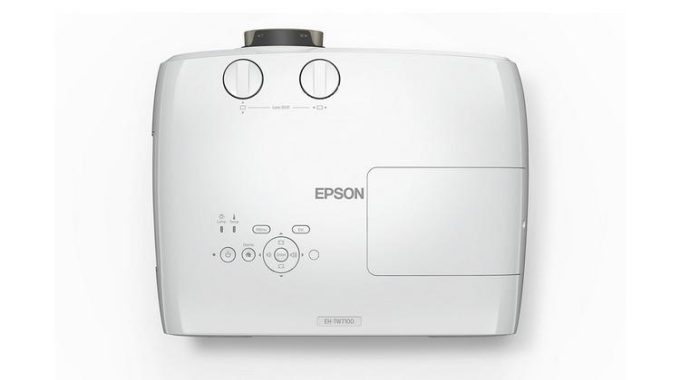
The Epson EH-TW7100 4K Enhanced HDR 3LCD Projector is a game-changer in the realm of home entertainment. With its impressive features and capabilities, this projector provides a cinematic experience right in the comfort of your own home.
One of the standout features of the EH-TW7100 is its ability to deliver big-screen entertainment effortlessly. Whether you’re watching movies, gaming, or catching a thrilling sports event, this projector makes it a seamless experience. The built-in speakers ensure you have audio covered without the need for additional sound systems, and you can even elevate the sound further by connecting an enhanced speaker system via Bluetooth.
The PRO-UHD 4K enhancement is another highlight. While not strictly a native 4K projector, the sophisticated 4K Enhancement processing brings out stunningly detailed and crisp images. The contrast ratio of 100,000:1 adds depth and realism, making every scene pop with vibrant colors and deeper blacks.
Epson EH-TW7100 4K
Installation is a breeze, thanks to lens shift and keystone correction. These features enable you to adjust the projector to fit your room setup with ease. The 3LCD technology ensures super-bright images, making the EH-TW7100 watchable even in rooms with ambient light.
The projector’s flexibility is evident with its multiple connectivity options, including two HDMI sockets, USB Type A, and USB Type Mini-B. This versatility allows you to connect various devices, from Blu-ray players to video streamers, enhancing your content choices.
Additionally, the Epson EH-TW7100 4K Enhanced HDR 3LCD Projector offers optional 3D, taking your viewing experience to a new dimension. Simply pair it with the ELPGS03 active 3D glasses, and you’re in for an immersive 3D experience.
The price point of £1,699 is competitive for the features and performance this projector delivers. With a manufacturer’s warranty of 2 years, you can enjoy peace of mind knowing that you’re investing in a quality product.
Furthermore, the Epson EH-TW7100’s ability to deliver a maximum screen size of 500 inches is truly impressive. This gives you the flexibility to create a massive, theater-like experience in your home, especially when you have a spacious room to accommodate such a grand display.
The inclusion of HDR support, including popular formats like HDR10 and HLG, enhances the visual quality by providing a broader range of colors and improved contrast. This ensures that you’ll experience content as intended by the creators, with stunning detail and vibrant imagery.
The projector’s pixel resolution of 1920 x 1080 (with 4K Enhancement) strikes a perfect balance between high-definition clarity and enhanced detail, making it suitable for a wide range of content, from the latest 4K movies to regular HD broadcasts.
The low fan noise levels, especially in Eco mode, ensure that your viewing experience remains uninterrupted and comfortable. This is a crucial factor when watching quiet scenes or engaging in immersive gaming sessions.
The addition of dual HDMI ports is convenient, allowing you to connect multiple devices without the need for frequent cable swapping. The presence of USB ports further expands the connectivity options, making it easy to share photos, videos, and other media with family and friends.
As for the optional 3D feature, it’s a fantastic bonus for those who enjoy the immersive depth of 3D content. The adjustable 3D depth allows you to fine-tune the effect to suit your preferences and room environment.
Considering all these features and the competitive price, the Epson EH-TW7100 is an excellent investment for anyone looking to elevate their home entertainment setup. It’s a projector that brings the big screen to you, whether you’re having a cozy movie night with your family or hosting a thrilling gaming session with friends.
With the Epson EH-TW7100, you’re not just getting a projector; you’re getting a gateway to a world of immersive entertainment, exceptional picture quality, and flexibility to adapt to your needs. This projector truly lives up to the promise of delivering big screen entertainment made easy, and it’s sure to enhance your movie, gaming, and sports experiences for years to come.
Pros:
Impressive Picture Quality: The PRO-UHD 4K enhancement, enhanced contrast ratio, and HDR support deliver stunning and vibrant visuals with excellent color reproduction and deep blacks, creating an immersive viewing experience.
Flexible Installation: Lens shift and keystone correction make installation easy and allow for adjustments, even in challenging room setups, ensuring that the projected image is distortion-free and aligned.
Large Screen Potential: The ability to achieve a 100-inch display in most rooms, expandable up to 500 inches in a spacious area, brings the cinematic experience home, making it great for movies, sports, and gaming.
Versatile Connectivity: The dual HDMI ports and USB options provide a wide range of connection possibilities for various devices, ensuring compatibility with your media sources and making it convenient to share content.
3D Capability: The optional active 3D feature, combined with 3D depth adjustment, adds a new dimension to your entertainment, perfect for those who enjoy 3D movies and content.
Built-in Speakers: The built-in stereo speakers offer decent sound quality, making the projector suitable for casual use or taking it to a friend’s house without the need for additional sound systems.
Bluetooth Sound Output: The ability to connect to compatible soundbars, AV systems, or Bluetooth speakers via Bluetooth adds flexibility in achieving a more immersive audio experience.
Cons:
Not Native 4K: While the 4K enhancement is impressive, the projector is not a native 4K device, which might be a consideration for those seeking the absolute highest resolution.
Fan Noise: Although the fan noise is relatively low, it may still be noticeable in quieter scenes, which could be a minor distraction for some viewers.
Additional Equipment Needed for Optimal Experience: To fully harness the projector’s capabilities, such as 3D viewing or superior audio quality, you might need to purchase optional accessories like 3D glasses or external speaker systems.
Price: While the projector offers a competitive price for its features, the initial investment might be on the higher side for some buyers, especially when considering the need for additional accessories.
Limited Native 4K Streaming Support: While the projector supports 4K streaming from providers like Netflix, the overall range of native 4K streaming content might still be somewhat limited.
The Epson EH-TW7100 4K Enhanced HDR 3LCD Projector is a fantastic choice for those seeking a high-quality, immersive home entertainment experience. Its superb picture quality, ease of installation, and versatility make it a top contender in the projector market. Whether you’re a movie buff, gamer, or sports enthusiast, this projector will undoubtedly enhance your viewing pleasure.
EH-TW7100
Specification
Technology
Projection System: 3LCD Technology, RGB liquid crystal shutter LCD Panel: 0.61 inch with C2 Fine
Image
Color Light Output: 3,000 Lumen (IDMS15.4) White Light Output: 3,000 Lumen (ISO 21118:2020) Resolution: 4K PRO-UHD Contrast Ratio: 100,000:1 Lamp: UHE, 250 W, 3,500 h durability, 5,000 h durability (economy mode) Keystone Correction: Manual vertical ± 30°, Manual horizontal ± 30° Colour Reproduction: Up to 1.07 billion colours
Interfaces: USB 2.0-A (2x), USB 2.0 Mini-B, HDMI in (2x), Jack plug out, Bluetooth Epson iProjection App: Ad-Hoc / Infrastructure
Advanced Features
3D: Active 2D Colour Modes: Dynamic, Natural, Cinema, Bright Cinema Other features: 3D depth adjustment, 4K enhancement, Frame interpolation, Horizontal and vertical keystone correction, Quick Corner, Wireless LAN capable
General
Power consumption: 323 Watt (Normal), 387 Watt (Peak), 297 Watt (Eco), 0.5 Watt (Energy saving standby) Product dimensions: 410 x 310 x 157 mm (Width x Depth x Height) Product weight: 6.9 kg Noise Level: Normal: 32 dB (A), Economy: 24 dB (A) Loudspeaker: 10 Watt, Stereo Room Type / Application: 4K Gaming, Home Cinema, Sports, TV & Box sets
Other
Warranty: 24 months Carry in, Lamp: 36 months or 3,000 h Optional warranty extension available
HDR (High Dynamic Range) and SDR (Standard Dynamic Range) are terms commonly used in the context of displays, such as TVs, monitors, and projectors. They refer to the range of brightness levels that a display can produce, which significantly affects the visual quality and realism of the content being viewed.
HDR (High Dynamic Range): HDR is a technology that expands the range of brightness and contrast in a display. It allows for both brighter highlights and deeper blacks, resulting in a more lifelike and immersive viewing experience. HDR content typically has a wider range of luminance levels, allowing it to represent details in both very bright and very dark areas of the image simultaneously. This is achieved through the use of higher peak brightness, better local dimming, and wider color gamuts.
SDR (Standard Dynamic Range): SDR is the traditional standard for displays and content. It has a limited range of brightness and contrast compared to HDR. SDR content typically has a narrower range of luminance levels, which may lead to loss of detail in very bright or very dark scenes. However, most content created before the HDR era is in SDR format.
photo: Pixabay
Peak Brightness: This refers to the maximum brightness a display can achieve. It is usually measured in nits (cd/m²). HDR displays have higher peak brightness compared to SDR displays. The higher peak brightness of HDR displays allows them to produce more vibrant and detailed images, especially in scenes with high contrast between bright and dark elements.
There’s limited room for enhancing a monitor’s peak brightness, usually accomplished by increasing brightness and selecting the picture mode that maximizes luminance, although these modes often compromise image accuracy. Some monitors offer an ‘Eco mode’ to save power, but disable it if visibility is crucial. A typical 300 cd/m² suffices for most environments, but for challenging conditions like sunlight or poor reflection handling, aim for around 400 cd/m² or brighter. For HDR, brighter is better, yet few monitors achieve true HDR brilliance.
Regarding specifications, advertised brightness can be listed in ‘cd/m²’ or ‘nits,’ essentially the same unit of measure.
Except for some budget options, most monitors get bright enough for use in well-lit environments. However, keep in mind that brightness can vary slightly from one unit to another, and the manufacturer’s advertised brightness is an estimate that tends to be on the optimistic side. If you’re in a room with sunlight or want a better HDR experience, then you should specifically check the monitor’s SDR and HDR peak brightness measurements to make sure it satisfies your needs.
Network Streaming Transport refers to the technology and protocols used to transmit data, typically audio or video, over a network in a streaming fashion. Streaming is the process of sending continuous data in real-time, allowing the receiver to start consuming the content before the entire file is downloaded. This is in contrast to downloading the entire file first and then playing it.
Network Streaming Transport involves various components, including:
Streaming Server: This is the software that serves as the source of the streaming content. It takes the media files (audio, video) and makes them available for streaming over the network.
Streaming Protocol: There are various protocols designed specifically for streaming content over the network. Common streaming protocols include HTTP Live Streaming (HLS), Dynamic Adaptive Streaming over HTTP (DASH), Real-Time Messaging Protocol (RTMP), and MPEG-DASH. These protocols determine how the data is transmitted, buffered, and played on the client side.
Client/Player: This is the software or device that receives the streaming data and plays it for the user. It could be a web browser, a dedicated media player, a mobile app, or any other device capable of playing media.
Network Infrastructure: The quality of the network, including factors such as bandwidth, latency, and stability, is crucial for a smooth streaming experience. High-quality streaming often requires a robust and fast network connection.
Streaming has become extremely popular for delivering multimedia content over the internet. It’s widely used for services like video on demand (VoD), live streaming of events, online gaming, and audio streaming. It allows users to start consuming content without the need to wait for the entire file to download, making it suitable for both real-time events and on-demand consumption.
Network streaming transport devices are specialized hardware or devices designed to facilitate the streaming of multimedia content over a network. These devices play a crucial role in ensuring a smooth and high-quality streaming experience for users. Here are some common types of network streaming transport devices:
Media Streaming Players: These are dedicated devices designed to connect to your television or display and stream content from various online sources. Popular examples include:
Roku devices
Amazon Fire TV
Apple TV
Google Chromecast
Network-Attached Storage (NAS) Devices: NAS devices are storage solutions that are often used to store media files and can also function as streaming servers. They allow you to store your media library and stream it to other devices on your network. Some popular NAS brands include:
Synology
QNAP
Western Digital (WD) My Cloud
Smart TVs: Many modern smart TVs come with built-in streaming capabilities. They can connect to the internet and stream content from popular streaming services directly without the need for an external streaming device.
Gaming Consoles: Modern gaming consoles, such as PlayStation, Xbox, and Nintendo Switch, often include streaming apps and services. Users can use these consoles to stream video content in addition to playing games.
Home Theater Systems: Some advanced home theater systems have built-in streaming capabilities, allowing users to access online content and services directly through the home theater setup.
Wireless Media Adapters: These devices can wirelessly connect your computer or mobile device to your TV or display, allowing you to stream content from your device to a larger screen. Examples include devices from Roku, Google Chromecast, and Apple TV.
Streaming Capture Devices: These devices are used by content creators to capture and stream their own content, such as live gaming streams or video tutorials. Popular options include Elgato Game Capture devices and AVerMedia capture cards.
Wireless Audio Streaming Devices: These devices allow you to stream audio from your mobile device or computer to your sound system or speakers wirelessly. Examples include Bluetooth audio receivers and Wi-Fi-enabled speakers.
High quality music streaming transport devices
High-quality music streaming transport devices are designed to provide an exceptional audio experience for music enthusiasts. These devices focus on delivering pristine audio quality, reliable network connectivity, and support for high-resolution audio formats. Here are some notable high-quality music streaming transport devices:
Bluesound Node 2i: The Node 2i is a versatile music streamer that supports high-resolution audio formats and can connect to your existing audio equipment. It’s known for its excellent sound quality and compatibility with various streaming services.
Sonos Port: Sonos Port is designed to integrate with your existing audio system, enabling high-quality streaming through your preferred speakers. It supports multiple streaming services and can be controlled via the Sonos app.
AURALiC ARIES G2.1: AURALiC’s ARIES G2.1 is a premium streaming transport that features high-quality digital audio processing and supports a wide range of audio formats, including DSD and MQA. It’s designed for audiophiles who demand the best sound quality.
Linn Selekt DSM: Linn’s Selekt DSM is a network music streamer that offers exceptional sound quality and customization options. It’s designed to work with Linn’s high-end audio systems, making it a great choice for those seeking audiophile-grade performance.
Cambridge Audio CXN V2: The CXN V2 is a network audio streamer with support for high-resolution audio formats. It features a high-quality DAC (digital-to-analog converter) and offers a user-friendly interface for accessing streaming services.
Naim ND5 XS 2: Naim is renowned for its high-end audio products, and the ND5 XS 2 is no exception. It’s a network music streamer that delivers excellent sound quality and integrates well with Naim’s ecosystem of audio components.
Roon Nucleus: Roon Nucleus is a dedicated music server that works with the Roon music management software. It’s designed to enhance your music streaming experience, providing robust performance and easy integration with high-quality audio systems.
Lumin U1 Mini: The Lumin U1 Mini is a compact music transport device that offers excellent audio quality and supports various streaming protocols, making it suitable for audiophiles who prioritize sound fidelity.
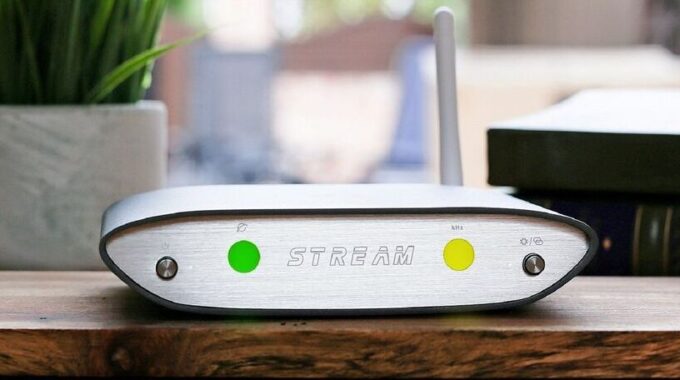
iFi Audio ZEN Stream
Introducing the iFi Audio ZEN Stream – a Network Streaming Transport designed to bring all your streaming music services together under a single hub. Seamlessly compatible with Spotify, Spotify Connect, TIDAL, and TIDAL Connect apps, as well as any DNLA certified app, allowing you to effortlessly stream music stored on other devices. With AirPlay and Chromecast support, streaming from your Apple iOS or Android device is a breeze. For multiroom setups, the ZEN Stream harmoniously integrates with Roon. Complete with direct USB connectivity, it provides all the essentials for your digital music needs.
The ZEN Stream, as a dedicated streaming transport, necessitates connection to a separate DAC (Digital to Analogue Converter) or amp/AVR equipped with digital input. Effortlessly link via the coaxial digital or USB outputs to your chosen DAC.
Part of the ZEN synergy concept, the ZEN Stream pairs exquisitely with the matching ZEN DAC. This pairing isn’t just visually complementary; the electronics have been intricately designed to function seamlessly, yielding sound quality that transcends the individual components.
Powered by a 64-bit, quad-core ARM Cortex processor, the ZEN Stream effortlessly handles data-intensive Hi-Res music files. It boasts compatibility with PCM files up to 32-bit/384kHz and DSD 256, promising sound quality that surpasses the capabilities of traditional CDs.
The ZEN Stream houses high-fidelity electronics, mirroring the standards found in top-tier hi-fi systems. Its circuit layout incorporates premium audio components, including TDK multilayer capacitors and precision-inductors from Taiyo Yuden and Murata, ensuring impeccable sound quality with minimal distortion.
Owning a car is a significant asset and a lifelong achievement. As a car owner, it’s essential to uphold certain responsibilities, including safeguarding your vehicle. Automotive protection, often referred to as car paint protection, plays a pivotal role in maintaining your car’s appearance and durability over time.
Specialized car cleaning services cater to specific needs and preferences. These services encompass headlight restoration, which enhances visibility by addressing cloudiness and yellowing. Engine bay cleaning optimizes performance by removing dirt, grime, and oil buildup, extending the engine’s lifespan. Additional paint protection choices such as ceramic coatings and paint protection films shield your car’s paintwork from scratches, stains, and fading, simplifying long-term maintenance.
The most notable benefit of ceramic car coatings lies in their outstanding protective properties. These coatings create a robust barrier against various environmental contaminants, such as UV rays, bird droppings, acid rain, and chemical stains. These harmful elements can gradually degrade a car’s paint surface, causing color fading, oxidation, and deterioration. However, applying a ceramic coating safeguards the paint from these threats, ensuring its longevity and preserving its original shine.
Taking extra care to ensure your car’s optimal functionality is crucial. Maintaining your vehicle’s engine is essential for improved performance and longevity. Partnering with the right automotive company can ensure your car runs smoothly.
photo: Pixabay
Car interior detailing involves a thorough cleaning process that necessitates removing loose items from the vehicle, including sports equipment, electronics, and tools. This deep cleaning method effectively eliminates dirt and debris from within these items, making the detailing process more effective and convenient.
Protecting Your Car from Harsh Environments
Given the changing climate and its impact on both living beings and their possessions, safeguarding your car has become even more critical. Vehicle coatings act as robust barriers, shielding cars from harsh winds, dust, rain, and UV rays. Without such protection, your car’s color may fade, corrode, and develop rust.
Enhancing Durability with Ceramic Car Coatings
Car owners are familiar with the vulnerability of their vehicles to scratches and abrasions. Automotive coatings are designed to repel such damage, acting as an investment that safeguards your car and increases its longevity. This protection translates to a clear exterior and reduced maintenance expenses.
Elevating Aesthetics and Value with Coatings
Whether your car is ordinary or eye-catching, automotive coatings can enhance its aesthetics and value. These coatings come in various finishes, from shiny to matte, boosting your vehicle’s appeal and potentially increasing its resale value. Additionally, coatings can minimize imperfections, enhancing the overall appearance.
Simplified Maintenance with Protective Coatings
Once your car is coated, maintenance becomes more manageable. The coating’s properties create a smoother surface that repels dirt, water, and contaminants. This results in reduced maintenance charges and an easier cleaning routine, making the upkeep of your car hassle-free.
Imagine a protective shield for your car’s paint that maintains its shine and luster over time. To delve into the details, a ceramic coating is a chemical polymer solution applied to your car’s exterior, acting as a safeguard against external paint damage. This hand-applied solution seamlessly integrates with your vehicle’s paint, creating an additional hydrophobic layer of defense.
The Perks of Ceramic Car Coatings:
Resilience in All Conditions: Ceramic coating offers resistance against typical atmospheric conditions like heat and rain. This makes it a compelling choice for those seeking a long-lasting investment for their vehicle. Keep in mind that the specifics of protection can vary based on the manufacturer’s formulation.
Enhanced Paint Protection: The major advantage of ceramic coating lies in providing an extra layer of protection for your car’s paint and clear coat. It shields against various damaging elements beyond heat and chemical degradation.
Dirt and Mud Repellence: With a ceramic coating, your vehicle gains a hydrophobic layer, making it resistant to rainwater and mud. This prevents rainwater from corroding the paint and minimizes micro-scratches caused by mud, ensuring your car stays pristine.
Effortless Cleaning: Ceramic coating’s repelling power simplifies car cleaning. Dirt and contaminants struggle to bond with the paint, allowing them to be effortlessly washed away during a regular cleaning routine.
Waxing No More: Invest in ceramic coating to bid farewell to laborious waxing sessions. This long-lasting solution eliminates the need for frequent waxing and buffing, maintaining your car’s shine without the hassle.
Limitations and Realities:
Scratches and Swirl Marks: While ceramic coating offers substantial protection, it won’t guard against all types of scratches and swirl marks. Highly abrasive objects can still penetrate the coating and damage the paint.
Water Spots: Though ceramic coating helps water slide off the paint, it can’t prevent water spots caused by mineral deposits in rainwater. Removing these spots remains a manual task, although the coating eases the process.
Necessity of Car Wash: Ceramic coating doesn’t eliminate the need for regular car washes. External maintenance, including removing dirt and debris, is still required, as the coating doesn’t work miracles but rather simplifies the cleaning process.
Ceramic coating stands as a powerful solution to preserve your car’s brilliance. Despite the initial investment, the benefits it offers, including extended shine and protection, make it worthwhile. While it isn’t a panacea for all paint-related issues, it significantly reduces the effort required for maintenance, contributing to the lasting beauty of your vehicle.
In the ever-evolving digital landscape, where access to information and online privacy are paramount concerns, the trio of Psiphon, Ultrasurf, and Freegate emerges as valuable allies for users seeking to transcend barriers and explore the web without restrictions.
Psiphon shines as a beacon of accessibility, granting users the ability to unlock hidden content in their region. With its intuitive interface and adaptable server options, Psiphon seamlessly navigates through censorship, enabling users to browse discreetly. Its emphasis on security and protection from potential browsing-related issues cements its position as a versatile tool for both beginners and advanced users.
Ultrasurf, on the other hand, takes privacy and anonymity to new heights. With its commitment to safeguarding user data, evading censorship, and preserving browsing speeds, Ultrasurf offers a comprehensive solution for those craving secure and untraceable online interactions. Its cost-free nature, coupled with its compatibility with existing software, further elevates its appeal as a go-to privacy companion.
Meanwhile, Freegate stands as a reliable ally for those facing content restrictions and network blocks. Its user-friendly approach, efficient browsing acceleration, and automatic detection of preferred websites ensure an unimpeded online journey. Freegate’s dedication to privacy, showcased through its history-clearing feature, solidifies its status as a trustworthy tool for secure and fast internet exploration.
In the realm of online privacy and content accessibility, Psiphon, Ultrasurf, and Freegate stand as indispensable assets, each catering to a specific facet of the user’s needs. Together, they create a triumvirate of empowerment, allowing individuals to transcend digital boundaries, secure their online presence, and navigate the web with unparalleled freedom. As the digital landscape continues to evolve, these tools prove to be essential companions, ensuring that users can explore, discover, and communicate without compromise.
Psiphon: Unlock Hidden Content and Browse Securely
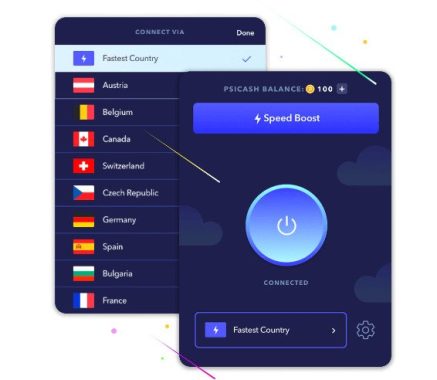
Psiphon is a powerful tool that liberates your online experience by circumventing content restrictions imposed by your country. By concealing your computer’s IP address and facilitating access to restricted websites, Psiphon empowers you to effortlessly explore the digital realm that was previously out of reach.
One of Psiphon’s standout features is its user-friendly interface, catering even to those new to VPN technology. Its sleek and intuitive design ensures seamless navigation, welcoming both novices and experienced users. While familiarity with VPN tools can enhance your experience, it’s not a prerequisite.
Psiphon 3 offers the flexibility to choose and connect to specific servers, optimizing your browsing speed. Selecting a server near your geographical location usually results in optimal performance, though exceptions do exist.
Beyond its accessibility, Psiphon also prioritizes your security. Through automatic protocol scanning, it identifies secure pathways, guaranteeing a shielded browsing experience. It even offers the alternative of SSH or SSH+ if conventional VPN services prove ineffective, ensuring that content censorship remains defeated.
Upon activation, Psiphon ushers you into a realm of confidentiality, rendering your traffic and connections invisible to prying eyes. Transitioning to a private network mode safeguards your interactions while granting you the liberty to tweak port settings or other connection preferences.
For some users, occasional slowdowns have been reported. However, these issues can usually be addressed through minor adjustments to configurations, accommodating various network environments or hardware specifications.
In summation, Psiphon empowers you to tread the digital landscape with confidence. Seamlessly evading censorship barriers, it offers a user-friendly yet adaptable platform to safeguard your online interactions. As the pursuit of online privacy becomes increasingly vital, Psiphon stands as an essential companion in the modern digital age.
Ultrasurf: Anonymity, Accessibility, and Security Unveiled
In an era where online privacy and unencumbered access to information are paramount, Ultrasurf emerges as a beacon of online liberation. A potent VPN solution, Ultrasurf grants users unhindered exploration of the web while preserving their anonymity, free from invasive tracking and restrictions.
Ultrasurf is designed with simplicity in mind, eschewing complex configurations and legal conundrums. Its core functionality is rooted in anonymity – the ability to traverse the digital landscape without being subjected to geographical barriers or prying eyes. Say goodbye to region-specific limitations; Ultrasurf’s seamless interface empowers you to switch locations effortlessly.
Central to Ultrasurf’s prowess is encrypted traffic, shielding your online activities from the prying gaze of Internet Service Providers (ISPs). No longer will your browsing patterns be recorded, and the potential for throttled connections on certain sites becomes a thing of the past. With a new IP address serving as your digital alter ego, privacy concerns fade away.
One of Ultrasurf’s most compelling attributes is its price tag – it’s free. Offering both security and privacy without a hidden agenda, Ultrasurf’s commitment to safeguarding users from malware, phishing, and other digital threats is commendable. Its compatibility with existing software enhances its value, ensuring seamless integration into your online routine.
In essence, Ultrasurf opens a gateway to confidential web exploration. Liberating users from the shackles of tracking and censorship, it offers an elegant solution for those seeking a safe, unrestricted online journey. In a digital landscape rife with challenges to privacy, Ultrasurf stands as a steadfast guardian, worthy of commendation and inclusion in your digital arsenal.
Freegate: Browsing Freedom and Speed at Your Fingertips
For those grappling with the frustration of restricted access to online resources, Freegate emerges as a formidable ally in the realm of internet browsing. A seamless and intuitive application, Freegate sidesteps network limitations, ensuring your digital interactions remain unhampered.
Freegate’s most enticing aspect is its hassle-free deployment. With no intricate setup process to navigate, launching Freegate is as simple as a double-click. This straightforward initiation unveils a world of secure browsing, impervious to potential blocks and surveillance.
Efficiency is a hallmark of Freegate, boasting a lightweight footprint that doesn’t encumber your system’s resources. As it optimizes your browsing speed, Freegate adeptly scans and selects the fastest proxy from a list, delivering swift and reliable browsing.
Navigating Freegate’s interface is a breeze, stripped down to the essentials for a seamless user experience. Beyond expedited browsing, Freegate intuitively detects your preferred websites, ensuring uninhibited access to your digital destinations.
A significant perk of Freegate is its commitment to privacy. Erasing your browsing history, it ensures your online footprint remains elusive and undetectable. This, coupled with its ability to evade blocking software, affords a worry-free browsing experience.
In conclusion, Freegate emerges as a steadfast companion for those striving for unrestricted, swift, and secure internet exploration. Effortlessly bypassing constraints, it paves the way for untrammeled browsing while shielding your digital identity. A must-have tool in the contemporary online landscape, Freegate stands as a testament to the quest for digital freedom and convenience.
The ASRock Phantom Gaming PG27Q15R2A is a 27-inch gaming monitor that promises an immersive visual experience with its curved display and impressive specifications. With a focus on high refresh rates, color accuracy, and unique features, this monitor aims to cater to both gamers and content creators. Let’s take a closer look at its pros and cons, design, connections, and other features.
Pros:
High Refresh Rate: The PG27Q15R2A boasts a maximum refresh rate of 165Hz, ensuring smooth and fluid gameplay, reduced motion blur, and an overall improved gaming experience.
Display Quality: The 2560 x 1440 resolution combined with the VA panel offers sharp visuals, vibrant colors, and deep blacks. The 1ms MPRT response time is excellent for fast-paced gaming.
HDR Support: VESA DisplayHDR 400 certification ensures a better dynamic range and more realistic colors, enhancing both gaming and multimedia experiences.
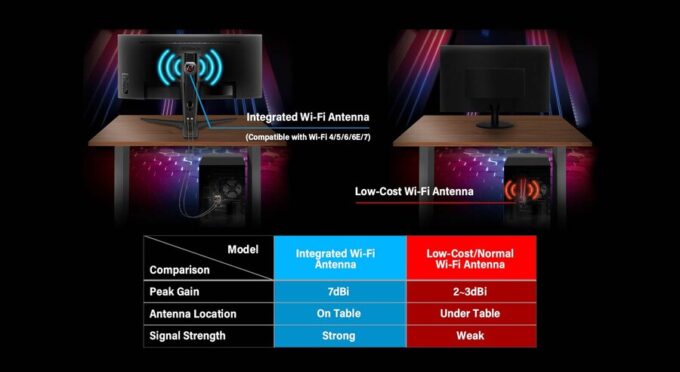
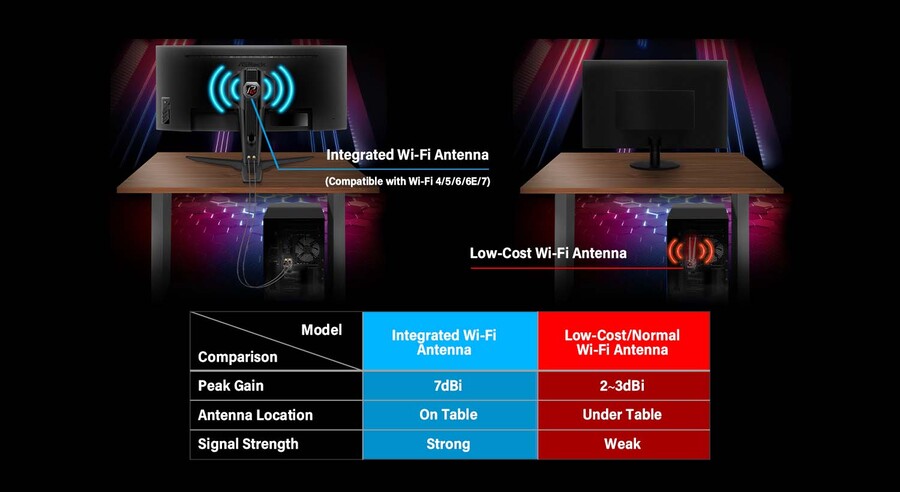
Wi-Fi Antenna: The integrated 7dBi Wi-Fi antenna is a unique feature that allows seamless connectivity and potentially better signal strength, which is particularly useful for online gaming and streaming.
Versatile Adjustments: The monitor offers tilt, swivel, and height adjustments, making it easy to find the optimal viewing angle and comfort level.
Wide Color Space: The monitor covers 87% of the DCI-P3 color space and 110% of sRGB, making it suitable for content creation and color-critical tasks.
Limited HDR Performance: While the monitor is HDR certified, the DisplayHDR 400 standard might not provide the most impressive HDR experience compared to higher-tier HDR certifications.
Color Accuracy: While the color space coverage is good, professional content creators might find the monitor’s color accuracy and calibration options lacking.
Design: The Phantom Gaming PG27Q15R2A features an elegant and modern design with slim bezels, enhancing the immersive viewing experience. The curvature of 1500R adds a subtle wrap-around effect, drawing the user into the action on the screen. The stand offers a range of adjustments, including tilt, swivel, and height, allowing users to find their preferred ergonomic setup. The VESA mount compatibility further enhances flexibility in mounting options.
Connections: The monitor provides a range of connectivity options, including one DisplayPort 1.4 and two HDMI 2.0 ports, enabling users to connect multiple devices such as gaming consoles, PCs, and laptops. The inclusion of an earphone jack is a thoughtful addition for users who prefer using headphones or external speakers.
ASRock Phantom Gaming PG27Q15R2A
Other Features: The built-in 2W speakers offer basic audio output, eliminating the need for external speakers in casual scenarios. The inclusion of essential cables like DisplayPort and HDMI, as well as Wi-Fi antenna cables and a cable sleeve, adds to the overall value of the package.
Conclusion: The ASRock Phantom Gaming PG27Q15R2A monitor presents a compelling option for gamers and content creators alike, offering a mix of high refresh rates, vibrant colors, and ergonomic design. Its standout feature, the integrated Wi-Fi antenna, showcases ASRock’s commitment to innovation. While it may not excel in all aspects, it delivers a solid performance in its intended use cases and offers excellent value for its price point. The ASRock PG27Q15R2A stands out as an exceptional choice among 27-inch 2K monitors for budget-conscious consumers. Priced affordably at $239.99, this monitor is conveniently available for purchase through various online e-commerce platforms.
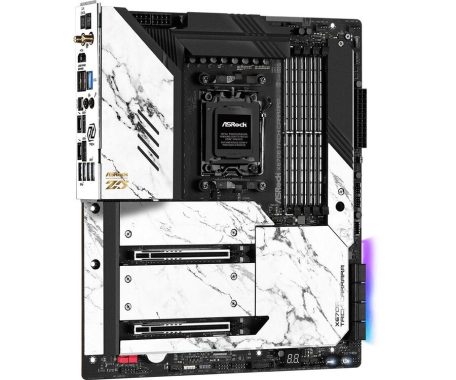
The ASRock X670E Taichi Carrara motherboard stands as a true testament to the capabilities of modern computing hardware. This motherboard is a perfect fusion of cutting-edge technology, rock-solid durability, and an array of features that cater to both productivity enthusiasts and hardcore gamers. From its PCIe Gen5 support to its exquisite design elements, the X670E Taichi Carrara offers an exceptional experience that sets a new standard for motherboards in its class.
The ASRock X670E Taichi Carrara comes loaded with features that enhance productivity and offer unparalleled performance:
PCIe Gen5 (Graphics, M.2): With support for PCIe Gen5, this motherboard opens up a world of possibilities for high-speed data transfers and graphics capabilities. Whether you’re a content creator or a professional demanding top-notch performance, the X670E Taichi Carrara has you covered.
ASRock X670E Taichi Carrara motherboard
Carrara Edition Cooling FAN: The inclusion of a 12CM Carrara Edition Cooling FAN ensures efficient heat dissipation, keeping your components cool even during demanding tasks.
Blazing M.2 Gen5 Fan Heatsink: The M.2 Gen5 Fan Heatsink provides optimal cooling for high-speed M.2 SSDs, preventing thermal throttling and ensuring consistent performance.
Dual Channel DDR5: Embrace the future of memory technology with dual-channel DDR5 support. Unlock higher bandwidth and faster data access for improved multitasking and system responsiveness.
USB4 Type-C Ports (40 Gb/s): Seamlessly connect and transfer data at blazing speeds using USB4 Type-C ports, ensuring your external devices perform at their peak.
Rock-Solid Durability: Built to Last
ASRock understands the importance of durability, and the X670E Taichi Carrara is no exception. Its robust features ensure long-lasting performance:
Ultra Low-Loss PCB: The motherboard’s Ultra Low-Loss PCB enhances signal integrity and minimizes energy loss, contributing to stable and reliable operation.
24+2+1 Power Phase, 105A SPS for VCore+GT: The 24+2+1 power phase design, coupled with a large heatsink armor, ensures efficient power delivery to your CPU and GPU, allowing for stable overclocking and consistent performance.
Flexible Integrated I/O Shield: The integrated I/O shield adds an extra layer of convenience, making installation smoother while offering protection against electrostatic discharge.
Nichicon 12K Black Caps: The use of high-quality, Japan-made Nichicon 12K Black Caps guarantees exceptional reliability and longevity, further enhancing the motherboard’s overall durability.
Ultrafast Gaming: Elevate Your Gaming Experience
For gamers who demand nothing but the best, the X670E Taichi Carrara delivers with its array of gaming-oriented features:
Killer 2.5G LAN, Killer 802.11ax Wi-Fi 6E Module: Enjoy lag-free online gaming and seamless streaming with Killer networking solutions, offering lightning-fast connections and reduced latency.
Killer DoubleShot Pro: Maximize your network bandwidth by combining Ethernet and Wi-Fi connections for an unparalleled online gaming experience.
ASRock Lightning Gaming Ports: Specially designed USB ports offer superior connectivity for gaming peripherals, minimizing input lag and ensuring a competitive edge.
ASRock doesn’t compromise when it comes to user convenience and ease of use:
BIOS Flashback Button – Update your BIOS effortlessly with the BIOS Flashback button, eliminating the hassle of complex update procedures.
ASRock Auto Driver Installer: Streamline driver installation with the Auto Driver Installer, making sure your system is always up to date and optimized.
The Heart of the System: CPU and Chipset Support
The X670E Taichi Carrara supports the latest AMD Socket AM5 Ryzenâ„¢ 7000 Series Processors, allowing you to harness the full power of AMD’s cutting-edge CPU architecture. In addition, the motherboard boasts the AMD X670 chipset, ensuring seamless compatibility and maximum performance for your system.
Memory and BIOS
Dual Channel DDR5 Memory Technology provides superior memory bandwidth, enabling smoother multitasking and faster data access. The motherboard supports overclocking profiles through Extreme Memory Profile (XMP) and EXTended Profiles for Overclocking (EXPO) memory modules, allowing enthusiasts to push their system performance to the limits.
The 256Mb AMI UEFI Legal BIOS with GUI support ensures a user-friendly experience when configuring your system settings, making it easy to tweak your hardware for optimal performance.
Immersive Graphics and Audio: A Feast for the Senses
The integrated AMD RDNA 2 graphics provide stunning visuals and support for high-resolution displays. The HDMI 2.1 port offers compatibility with the latest display technologies, including HDR and HDCP 2.3, ensuring an immersive visual experience.
For audiophiles, the 5.1 CH HD Audio with Realtek ALC4082 Audio Codec delivers crystal-clear sound, enhanced by WIMA Audio Capacitors and an ESS SABRE9218 DAC for Front Panel Audio. Individual PCB layers for R/L audio channels ensure minimal interference and distortion, while Nahimic Audio technology takes your audio experience to the next level.
The ASRock X670E Taichi Carrara motherboard offers an impressive array of connectivity and expansion options:
PCIe 5.0 x16 Slots: The motherboard provides two PCIe 5.0 x16 slots (PCIE1 and PCIE2) that support x16 or x8/x8 modes, allowing for multi-GPU setups or high-speed graphics configurations.
M.2 Slots: With multiple M.2 sockets, including PCIe Gen5x4 and PCIe Gen4x4 options, the motherboard caters to a variety of storage needs, from ultra-fast NVMe SSDs to versatile SATA-based drives.
USB Ports: The motherboard offers a plethora of USB options, including USB4 Type-C ports, USB 3.2 Gen2x2 Type-C, USB 3.2 Gen2 Type-A, USB 3.2 Gen1, and USB 2.0 ports, ensuring compatibility with a wide range of devices.
ASRock X670E Taichi Carrara motherboard
Form Factor and Accessories: Aesthetic and Functional Excellence
The EATX Form Factor (12.0-in x 10.5-in) provides ample space for all your components while allowing for efficient airflow and thermal management. The 8-layer PCB further enhances signal integrity and stability.
The package includes a variety of accessories such as SATA data cables, a wireless dongle USB bracket, a Blazing M.2 Gen5 Fan Heatsink, a 12CM Carrara Edition Cooling FAN, and more, ensuring that you have everything you need for a seamless build.
The ASRock X670E Taichi Carrara motherboard sets a new standard for high-performance computing. With its feature-rich design, exceptional durability, and impressive connectivity options, this motherboard is a true powerhouse for productivity, gaming, and entertainment. Whether you’re a content creator, a power user, or a dedicated gamer, the X670E Taichi Carrara is your gateway to unlocking the full potential of your system. Its PCIe Gen5 support ensures lightning-fast data transfers and graphics performance, making it perfect for demanding tasks such as video editing, 3D rendering, and more.
The innovative Carrara Edition Cooling FAN, combined with the Blazing M.2 Gen5 Fan Heatsink, ensures that your components stay cool even under heavy loads, safeguarding against thermal throttling and maintaining consistent performance. This is especially crucial for maintaining peak performance during extended gaming sessions or resource-intensive applications.
Gaming enthusiasts will be thrilled with the motherboard’s Ultrafast Gaming features. The Killer 2.5G LAN and Killer 802.11ax Wi-Fi 6E Module guarantee lag-free online gaming and seamless streaming experiences, while the Killer DoubleShot Pro technology intelligently prioritizes network traffic for an uninterrupted online experience. Additionally, the ASRock Lightning Gaming Ports offer a competitive edge by minimizing input lag, giving gamers the upper hand in fast-paced, competitive gaming scenarios.
The ASRock X670E Taichi Carrara motherboard doesn’t compromise on convenience either. The inclusion of features like the BIOS Flashback Button and ASRock Auto Driver Installer ensures that keeping your system up to date and optimized is hassle-free. This allows you to focus on what you do best without being bogged down by complex maintenance tasks.
Moreover, the motherboard’s support for the latest AMD Socket AM5 Ryzen 7000 Series Processors and Dual Channel DDR5 memory technology guarantees that you’re future-proofed for upcoming software and hardware demands. Whether you’re running resource-intensive applications or engaging in heavy multitasking, the X670E Taichi Carrara delivers the performance you need.
ASRock has designed a motherboard that not only boasts exceptional performance and durability but also pays attention to the finer details. From the aesthetically pleasing design to the premium accessories included in the package, every aspect of the X670E Taichi Carrara exudes quality and thoughtfulness.
The ASRock X670E Taichi Carrara motherboard is a masterful blend of technology, durability, and convenience. It empowers users to achieve new heights of productivity, immerse themselves in gaming experiences like never before, and enjoy a system that’s built to last. With its impressive features, comprehensive connectivity options, and meticulous design, the X670E Taichi Carrara proves itself as a standout choice for enthusiasts and professionals who demand nothing but the best from their computing hardware.