Home Blog Page 43

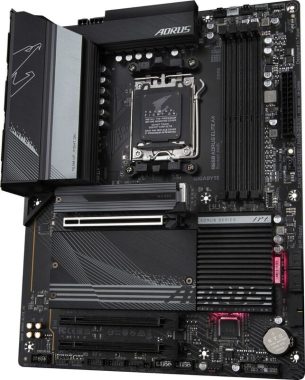
Review: GIGABYTE B650 AORUS ELITE AX Motherboard

0

The GIGABYTE B650 AORUS ELITE AX is a feature-packed motherboard designed for high-performance computing and gaming enthusiasts. With support for the latest AMD Ryzenâ„¢ 7000 Series Processors and a plethora of cutting-edge features, it aims to provide an exceptional computing experience.

Performance: The motherboard’s compatibility with AMD Socket AM5 and the Ryzenâ„¢ 7000 Series Processors ensures unparalleled performance capabilities. The Twin 14+2+1 Phases Digital VRM Solution, coupled with the 8-Layer 2X Copper PCB and PCIe 5.0 Ready Low Loss PCB, ensures stable power delivery and optimized performance, making it an excellent choice for demanding tasks and gaming.

GIGABYTE B650 AORUS ELITE AX Motherboard

Next-Generation Memory and Storage: The GIGABYTE B650 AORUS ELITE AX offers support for DDR5 memory modules, including impressive speeds such as DDR5 6666(OC) and Intel® XMP Memory Module Support. The inclusion of PCIe 5.0 x4 and PCIe 4.0 x4 M.2 connectors allows for lightning-fast storage performance, ensuring your system can handle the latest applications and games with ease.

Connectivity: The motherboard shines when it comes to connectivity options. The 2.5GbE LAN and Wi-Fi 6E 802.11ax provide fast and reliable network connectivity, whether you’re gaming or streaming. The inclusion of multiple USB ports, including USB Type-C® ports with varying Gen support, offers convenient and versatile peripheral connectivity options.

GIGABYTE B650 AORUS ELITE AX Motherboard
GIGABYTE B650 AORUS ELITE AX Motherboard – images: GIGABYTE

Cooling Innovation: The cooling features of the GIGABYTE B650 AORUS ELITE AX are truly impressive. The High Current Support allows for effective management of fans and water cooling pumps, with the option to configure precise fan curves and even stop fans below specified temperatures. The integrated heatpipe design and thermal conductivity pad ensure efficient heat dissipation, contributing to system stability.

User-Friendly Design: The motherboard’s design takes user convenience into account. The EZ-Latch for PCIe x16 Slot & M.2 Connectors, along with the Quick Release & Screwless Design, makes hardware installation and upgrades a breeze. The Q-Flash Plus feature allows for BIOS updates without the need for CPU, memory, and graphics card installation.

Audio and Visual Excellence: Equipped with Realtek® Audio CODEC and High Definition Audio support, the GIGABYTE B650 AORUS ELITE AX delivers high-quality audio output for immersive gaming and entertainment experiences. The inclusion of DisplayPort 1.4 and HDMI 2.1 ports with high resolutions and refresh rates ensures exceptional visual clarity for both gaming and content creation.

Price and Value: At a price point of €249,00, the GIGABYTE B650 AORUS ELITE AX offers an impressive array of features, making it a compelling option for gamers and power users looking for a future-proof motherboard with top-tier performance, innovative cooling, and extensive connectivity options.

GIGABYTE continues to uphold its reputation for quality and innovation with the B650 AORUS ELITE AX motherboard. The emphasis on stability, performance, and convenience is evident in every aspect of its design.

The motherboard’s compatibility with AMD Ryzenâ„¢ 7000 Series Processors sets the stage for an uncompromising computing experience. Whether you’re a gamer pushing the limits or a content creator seeking fast rendering times, this motherboard has the power to handle it all.

The support for DDR5 memory modules at speeds like 6666(OC) and Intel® XMP Memory Module Support ensures your system can harness the latest in memory technology for blazing-fast performance. The Dual Channel DDR5 configuration and AMD EXtended Profiles for Overclocking (AMD EXPO™) provide ample headroom for memory enthusiasts to explore.

Cooling Perfected: The cooling features are a standout highlight of this motherboard. The combination of High Current Support, precise fan curve controls, and the ability to stop fans below specific temperatures is a game-changer for maintaining optimal temperatures under various workloads. The integration of heatpipes, thermal conductivity pads, and fully covered MOSFET heatsinks showcases GIGABYTE’s commitment to thermal efficiency.

The GIGABYTE B650 AORUS ELITE AX motherboard ensures you stay connected at lightning speeds. The 2.5GbE LAN and Wi-Fi 6E provide high-speed networking, reducing latency and ensuring smooth online experiences. The inclusion of USB Type-C® ports, both on the back panel and internally, caters to modern connectivity needs and device compatibility.

The motherboard’s design elements are designed with the user in mind. The EZ-Latch system simplifies hardware installation, while features like Q-Flash Plus eliminate the hassle of CPU, memory, and graphics card installation during BIOS updates. The inclusion of multiple fan headers, addressable LED strip headers, and RGB LED strip headers offers customization options for enthusiasts looking to personalize their rig.

The Realtek® Audio CODEC and High Definition Audio capabilities ensure that sound quality matches the impressive visuals this motherboard can deliver. With support for DisplayPort 1.4, HDMI 2.1, and high resolutions, you can expect crystal-clear visuals whether you’re gaming, watching movies, or working on multimedia projects.

At its price point, the GIGABYTE B650 AORUS ELITE AX offers an exceptional value proposition. The combination of cutting-edge features, top-tier performance, and advanced cooling technology positions it as an investment that will pay dividends in terms of system longevity and performance.

In the competitive landscape of motherboards, the GIGABYTE B650 AORUS ELITE AX stands out as a comprehensive solution for those who demand the best. It embodies GIGABYTE’s commitment to innovation, reliability, and user satisfaction, making it a strong contender for anyone seeking a high-performance motherboard with an eye on the future.

GIGABYTE B650 AORUS ELITE AX Motherboard pros and cons & alternatives


Pros of the GIGABYTE B650 AORUS ELITE AX Motherboard:

  1. Powerful Performance: Compatible with AMD Ryzenâ„¢ 7000 Series Processors and equipped with a robust VRM solution, ensuring efficient power delivery for top-tier performance.
  2. DDR5 Memory Support: Supports high-speed DDR5 memory modules, allowing for faster data access and improved multitasking capabilities.
  3. Next-Gen Storage: Offers PCIe 5.0 and PCIe 4.0 M.2 connectors for high-speed storage solutions, enhancing system responsiveness and data transfer rates.
  4. Advanced Cooling: Features innovative cooling technology, including High Current Support, precise fan curve control, and integrated heatpipe design, contributing to effective heat dissipation.
  5. Networking: Provides 2.5GbE LAN and Wi-Fi 6E connectivity for high-speed and low-latency networking, essential for online gaming and data-intensive tasks.
  6. USB Connectivity: Offers a range of USB ports, including USB Type-C® with Gen 2 support, ensuring versatile connectivity for peripherals and devices.
  7. User-Friendly Design: EZ-Latch system, Q-Flash Plus for BIOS updates, and various headers for fans and LED strips enhance user convenience and customization.
  8. Audio and Visual Quality: Equipped with Realtek® Audio CODEC and support for high-resolution displays, ensuring immersive audio and visual experiences.
  9. Price-Performance Ratio: Balances a reasonable price with high-end features, making it an attractive option for budget-conscious enthusiasts.

Cons of the GIGABYTE B650 AORUS ELITE AX Motherboard:

  1. Price Point: While competitively priced, it may still be on the higher end for some users seeking more budget-friendly options.
  2. Overkill for Basic Usage: The motherboard’s high-end features might be unnecessary for users with basic computing needs.
  3. Size Consideration: Being an ATX form factor, it might not fit into smaller cases, limiting compatibility.

Alternative Motherboards:

  1. ASUS ROG Strix B650-F Gaming: Similar to the GIGABYTE B650 AORUS ELITE AX, this motherboard offers powerful performance and features like DDR5 support, PCIe 4.0 M.2 slots, and advanced cooling. It’s also equipped with ASUS’s renowned ROG aesthetics and features.
  2. MSI MPG B650 Gaming Carbon WiFi: This motherboard provides comparable features including DDR5 support, PCIe 4.0 M.2 slots, and Wi-Fi 6 connectivity. It’s known for its sleek design and gaming-oriented features.
  3. ASRock B650 Steel Legend: A budget-friendly option that still offers DDR5 support and PCIe 4.0 M.2 slots. It may lack some of the high-end features of the GIGABYTE model but can provide good value.
  4. GIGABYTE B650M DS3H: If you’re looking for a micro-ATX option, this motherboard offers a more compact form factor while still providing DDR5 support and PCIe 4.0 M.2 slots.

These alternatives cater to various needs and preferences, offering a range of features and price points to choose from based on your specific requirements.

The GIGABYTE B650 AORUS ELITE AX Motherboard stands as a testament to GIGABYTE’s commitment to delivering high-performance, feature-rich motherboards for enthusiasts. Its compatibility with the latest AMD processors, next-gen memory and storage support, advanced cooling features, and user-friendly design make it a well-rounded choice for those seeking a premium motherboard for their gaming or productivity rig.
Product Review: NZXT T120 CPU Air Cooler

0

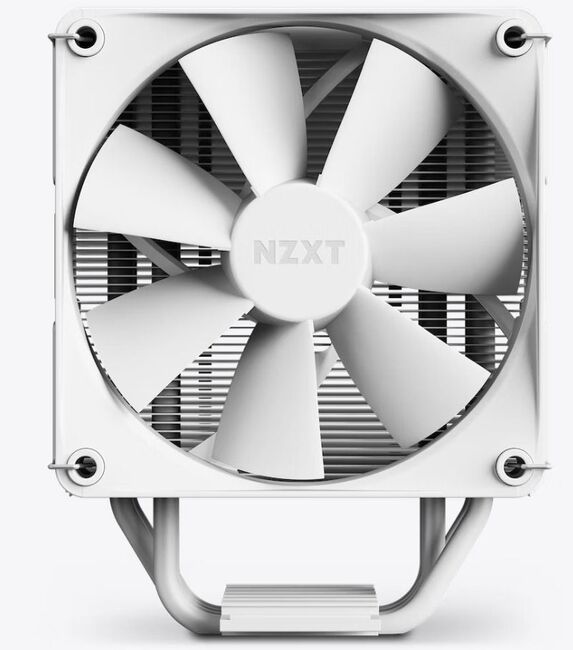
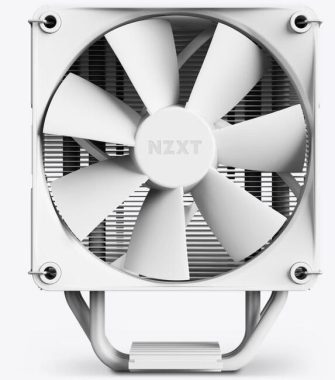
The NZXT T120 CPU Air Cooler is a compact yet powerful cooling solution that aims to keep your CPU temperatures in check while adding a touch of style to your system. With its thoughtful design and impressive specifications, it promises to deliver excellent thermal performance in a compact form factor.

Design and Dimensions:

The T120’s dimensions (Height: 120 mm, Width: 66 mm, Depth: 159 mm) make it suitable for a wide range of PC cases without sacrificing performance. The cooler features an elegant aluminum heat pipe cover that not only enhances its aesthetics but also discreetly conceals the four conductive copper heat pipes. This cover not only contributes to the cooler’s visual appeal but also prevents interference with neighboring components.

NZXT T120 CPU Air Cooler

Cooling Performance:

The T120 boasts a well-engineered heatsink made from aluminum and four high-quality copper heat pipes with Direct Contact technology. This design ensures efficient heat transfer from the CPU to the cooler, allowing for optimal cooling performance. The inclusion of a single F120P Static Pressure Fan (120 x 120 x 26mm) further aids in directing a substantial amount of air through the radiator. The fan’s variable speed (500-1,800 RPM) allows for fine-tuning the cooling performance based on your system’s needs.

The air flow range of 21.67 – 78.02 CFM and air pressure range of 0.75 – 2.7mm-H2O ensures that the cooler effectively dissipates heat even from demanding CPUs. While it accomplishes this task admirably, it does so without becoming overly noisy. The noise level remains between 17.9 – 30.6dBA, ensuring a relatively quiet operation even under load.

Installation and Compatibility:

NZXT provides a well-rounded package with the T120, including installation accessories and retention brackets for both Intel (1700, 115X, 1200) and AMD (AM5, AM4) motherboards. This compatibility ensures that the cooler can find a home in various system builds. Additionally, the slim radiator footprint allows for easy integration with other components, and it doesn’t obstruct RAM or GPU slots in most cases.

Extras and Conclusion:

A noteworthy inclusion is the 1g tube of NZXT High-Performance Thermal Paste, which ensures optimal heat transfer between the CPU and the cooler. This thoughtful addition reflects NZXT’s commitment to maximizing the cooler’s efficiency. NZXT’s High-Performance Thermal Paste is a crucial component when it comes to achieving optimal thermal conductivity between a CPU and its cooler. This thermal paste is designed to fill the microscopic gaps and imperfections between the CPU’s integrated heat spreader and the base of the cooler. This helps to enhance heat transfer, which in turn improves the overall cooling efficiency of the CPU cooler. NZXT’s thermal paste is typically applied in a thin, even layer between the CPU and the cooler’s base. Proper application is important to ensure that the entire CPU surface is covered without excess paste, which could lead to uneven contact and less effective heat transfer.

In summary, the NZXT T120 CPU Air Cooler offers an excellent balance of form and function. Its sleek design, effective cooling performance, and compatibility with various motherboard sockets make it a compelling choice for both casual users and enthusiasts. Whether you’re building a compact system or upgrading an existing setup, the T120 is poised to deliver reliable and stylish cooling performance.

NZXT T120 CPU Air Cooler
NZXT T120 CPU Air Cooler – images NZXT

Pros:

  • Compact dimensions suitable for various PC cases
  • Efficient cooling with copper heat pipes and aluminum heatsink
  • Thoughtful design with an elegant aluminum heat pipe cover
  • Low noise levels during operation
  • Inclusion of NZXT High-Performance Thermal Paste

Cons:

  • Limited to single-fan configuration (additional fan space available)
  • Two-year warranty might be shorter compared to some competitors

Rating: 4.5/5 Aesthetic appeal, cooling performance, and compatibility make the NZXT T120 CPU Air Cooler a top contender in the air cooling segment. T120 CPU Air Cooler  price: $49.99

NZXT T120 CPU Air CoolerSpecifications
DIMENSIONS
Height120 mm
Width66 mm
Depth159 mm
COLDPLATE
MaterialCopper
Dimensions40 x 35 mm
HEATSINK
MaterialAluminum
HEATPIPES
Quantity4
MaterialCopper
FAN
ModelF120P Static Pressure Fan
Quantity1
Dimensions120 x 120 x 26 mm
Speed500-1,800 + 300 RPM
Air Flow21.67 – 78.02 CFM
Air Pressure0.75 – 2.7 mm-H2O
Noise17.9 – 30.6 dBA
BearingFluid Dynamic Bearing
Power Consumption12V DC, 0.23A, 2.76W
Connector4-pin PWM
Life60,000 hours
COMPATIBLE SOCKET & CPU
Intel1700, 115X & 1200
AMDAM5 & AM4

Can you recommend other CPU coolers?


Here are some alternative CPU coolers that you might consider, based on different budget ranges and cooling needs:

1. Noctua NH-D15:

  • Type: Dual-Tower Air Cooler
  • Features: Excellent cooling performance, quiet operation, high-quality build, easy installation.
  • Compatibility: Supports a wide range of CPU sockets.
  • Website: https://noctua.at/en/nh-d15

2. Cooler Master Hyper 212 RGB Black Edition:

3. be quiet! Dark Rock Pro 4:

4. Corsair H100i RGB Platinum SE:

5. NZXT Kraken X63:

  • Type: All-in-One Liquid Cooler (280mm Radiator)
  • Features: RGB lighting, strong cooling performance, CAM software for customization.
  • Compatibility: Compatible with a variety of CPU sockets.
  • Website: https://nzxt.com/product/kraken-x63

6. Arctic Freezer 34 eSports DUO:

7. DeepCool Castle 360EX:

Remember that the choice of CPU cooler should be based on your specific needs, such as your budget, case size, cooling requirements, and aesthetics. Be sure to check the compatibility of the cooler with your CPU socket and case before making a purchase.

CPU Cooler Arctic Freezer i35 RGB review

0

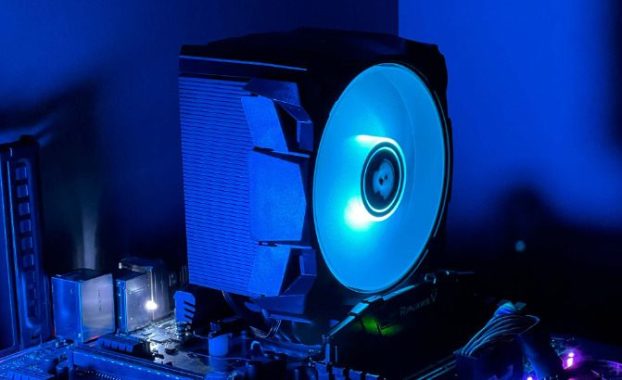
The Arctic Freezer i35 RGB stands as a testament to innovation, seamlessly aligning advanced performance with contemporary design elements. Crafted with meticulous precision, this CPU cooler is purpose-built to accommodate Intel’s Alder Lake LGA 1700 processors, seamlessly adapting to the increased socket size while maintaining a pivotal focus on cooling efficiency.

At its core, the Freezer i35 RGB employs the ingenious utilization of Direct Touch heat pipes that sprawl across the CPU die’s center, offering comprehensive coverage and optimized thermal management. A delicate balance of form and function, this tower cooler boasts four offset heat pipes that expedite swift heat transfer into the heat sink, effortlessly ushering the thermal load toward a poised 120 mm fan for meticulous dissipation.

Arctic Freezer i35 RGB

A testament to ARCTIC’s commitment to cutting-edge thermal solutions, the Freezer i35 RGB is accompanied by a 0.8 g syringe of the groundbreaking MX-5 thermal paste. The MX-5 not only dazzles with its remarkable capacity for heat reduction but also introduces an unparalleled level of safety with its non-conductive and non-capacitive composition. This makes it an ideal choice even for those new to the art of thermal management.

The fan nestled within the heart of the Freezer i35 RGB harnesses the remarkable advantages of P-fan technology. Merging a harmonious blend of low-vibration operation, energy-efficient mechanics, and a hydrodynamic plain bearing, the fan orchestrates a symphony of tranquility and efficiency. Remarkably, this fan delivers potent static pressure through focused airflows, making it an optimal companion for radiators and heat sinks. A dynamic PWM control system empowers users to tailor the fan’s speed, ensuring a bespoke cooling experience tailored to any computational context.

Arctic Freezer i35 RGB

The accolades of the Freezer i35 RGB do not stop at its performance prowess; it extends to its simplified installation and unrestricted RAM compatibility. Designed as a socket-specific installation variant, this cooler’s compatibility spans across Intel Sockets 1700, 1200, and 115X, streamlining the installation process and enhancing user convenience. ARCTIC’s artful engineering shines through with an upgraded and simplified mounting mechanism, highlighted by spring-loaded screws. This construction ensures optimal contact pressure and an evenly distributed thermal compound, ultimately translating into premium thermal efficiency.

Notably, the Freezer i35 RGB offers an unprecedented benefit of unlimited RAM clearance, an outcome of its intelligently compact design. This aspect ensures a hassle-free integration process with your system, eliminating potential compatibility concerns and offering a seamless experience.

unlimited RAM clearance
unlimited RAM clearance – images: Arctic

Technical Specifications:

  • Compatibility: Intel Socket 1700, 1200, 115X
  • Ram Clearance: Unlimited
  • Warranty: 6 Years
  • Operating Ambient Temperature: 0—40 °C
  • Heatsink:
    • Heatpipes: 4
    • Fin Material: Aluminum
    • Number of Fins: 54
    • Fin Thickness: 0.4 mm
  • Thermal Paste: MX-5 (0.8 g)
  • Fan:
    • Fan Size: 120 mm
    • Fan Speed: 200—1700 rpm
    • Fan Bearing: Fluid Dynamic Bearing
    • Noise Level: 0.35 Sone
    • Current: 0.11 A
    • Connector: 4-Pin
  • RGB Specifications:
    • LEDs: 12 A-RGB LEDs
    • Connector: 4-Pin 12 V-G-R-B Connector
    • Current / Voltage: 0.2 A | 12 V DC
    • Cable: 450 mm Cable with 80 mm Sharing Cable, Black
  • Size & Weight:
    • Length: 91 mm
    • Width: 133 mm
    • Height: 158.5 mm
    • Weight: 734 g

The Arctic Freezer i35 RGB stands as a triumph of contemporary cooling technology, effortlessly melding enhanced thermal performance, user-friendly design, and captivating RGB aesthetics. Whether you’re an enthusiast seeking a dynamic cooling solution or a novice embarking on your computing journey, the Freezer i35 RGB is poised to deliver a harmonious blend of power, aesthetics, and ease of use. Experience unparalleled cooling supremacy that remains unrivaled in its class.  Arctic Freezer i35 RGB CPU Cooler price: €48.99

Arctic Freezer i35 RGB
Arctic Freezer i35 RGB – Tower CPU Cooler for Intel with RGB

TCL X925 Pro Mini LED 8K TV Review

0

The TCL X925 Pro TV is a state-of-the-art QLED 8K Android Smart DTV that boasts an impressive array of features and cutting-edge technology. With its ECO Energy Efficiency and low standby power consumption of less than 0.5W, the TV is environmentally friendly and energy-efficient.

Under the hood, the TV is powered by a 64-bit A55x4 1.3GHz CPU and a Dvalin 800MHz GPU, which ensures smooth performance and fast response times. It comes with 2GB of RAM and 32GB of ROM, offering ample storage for apps and media content.

One of the standout features of the TCL X925 Pro TV is its stunning 8K display, which showcases content with over 33 million pixels. The combination of Quantum Dot nanocrystals and advanced technologies results in superior color precision, high brightness, and impressive contrast levels. The 120Hz MEMC (Motion Estimation & Motion Compensation) further enhances the viewing experience by providing silky-smooth picture processing, even during fast-paced action scenes.

TCL X925 Pro Mini LED 8K
TCL X925 Pro Mini LED 8K – images TCL

The TV’s audio capabilities are equally impressive, featuring a 5.1.2 channel ONKYO sound system with a total output of 160W. The powerful sound experience elevates the audio quality, making it feel like you’re in a home cinema. The Game Master feature is designed for gamers, automatically optimizing image quality and reducing input lag for a more immersive gaming experience.

The TCL X925 Pro TV runs on Android R with the Google TV Amati UI, providing access to a wide range of apps and services. It also supports various internet connectivity options, including 5G+2.4GHz WiFi 6 and Ethernet Network.

The TV’s design is sleek and minimalist, thanks to TCL’s Mini LED technology, which allows for a slim frame and a slim body. The 85-inch panel size and 8K resolution make it an impressive centerpiece for any home theater setup.

Pros:

  • Stunning 8K display with advanced color and contrast
  • Smooth picture processing with 120Hz MEMC
  • Powerful 5.1.2 channel ONKYO sound system
  • Extensive connectivity options and access to various apps
  • Slim and modern design

Cons:

  • High power consumption when the TV is on (800W)
  • No E-Manual for quick on-screen assistance

The TCL X925 Pro TV truly represents the pinnacle of home entertainment, offering a remarkable viewing and audio experience that surpasses expectations. With its real 8K display, every detail is brought to life with unrivaled clarity and precision, making it a fantastic choice for those who appreciate the finest visual quality available. TCL X925 Pro Mini LED 8K TCL X925 Pro Mini LED 8K

The inclusion of the 120Hz MEMC ensures that fast-moving scenes are displayed seamlessly, eliminating blurring and ensuring a smooth and immersive viewing experience for sports, action movies, and gaming. The Game Master feature further enhances the TV’s appeal for gamers, providing optimized settings and reduced input lag, resulting in a competitive edge and a thrilling gaming experience.

The sound quality of the TCL X925 Pro TV is equally impressive, with the 5.1.2 channel ONKYO sound system delivering a theater-like audio experience. The 160W audio output fills the room with rich and powerful sound, truly elevating the overall entertainment experience.

Moreover, the TV’s compatibility with various streaming services, such as Netflix, Google Play Movies, Prime Video, and YouTube, ensures that users have a vast library of content at their fingertips. The T-Cast feature enables seamless wireless mirroring, allowing users to display pictures, audio, and video content from their smartphones directly onto the TV screen.

The TV’s slim and elegant design, made possible by TCL’s Mini LED technology, enhances the aesthetics of any living space. The minimalist frame and slim body truly make it an impressive work of art, perfectly blending into modern interiors.

One of the few downsides of the TCL X925 Pro TV is its relatively high power consumption when in use (800W). However, given its energy efficiency during standby and the outstanding viewing experience it offers, this can be justified as a trade-off for the advanced technology and stunning display it provides.

TCL X925 Pro Mini LED 8K

The TCL X925 Pro TV is a top-tier, feature-rich, and visually stunning QLED 8K Android Smart DTV. With its exceptional 8K display, powerful audio, and extensive features, it sets a new standard for home entertainment. If you are looking for the ultimate TV experience and are willing to invest in the latest technology, the TCL X925 Pro TV should be at the top of your list. It is undoubtedly a testament to TCL’s commitment to innovation and providing consumers with an unforgettable home entertainment experience.

What are some computer tips and tricks for a daily basis?

0

Level up your computer skills with these essential daily tips and tricks. From keyboard shortcuts to backup strategies, explore ways to make the most of your computer.

Here are some computer tips and tricks for daily use that can help you be more productive and efficient:

Keyboard shortcuts: Discover powerful keyboard shortcuts to skyrocket your productivity. From basic copy and paste to advanced navigation, learn how to save time and streamline your computer tasks. Learn and use keyboard shortcuts for common tasks like copying (Ctrl+C), pasting (Ctrl+V), undo (Ctrl+Z), and more. They save time and reduce reliance on the mouse.

Search shortcuts: In Windows, use the Windows Key to open the start menu and start typing the program or file you want to open. On Mac, use Command+Space to open Spotlight Search.

Taskbar/Mac Dock customization: Organize your taskbar or Mac Dock with your most-used applications for quick access.

Snap windows: On Windows, use the Win + Arrow keys to snap windows to the sides or corners of your screen. On Mac, use the green maximize button to enter Split View.

Multiple desktops: Take advantage of multiple desktops (Windows) or Mission Control (Mac) to keep your workspace organized. Using multiple desktops, also known as virtual desktops, is a powerful feature available in many operating systems that allows you to organize your workflow and improve productivity. Here are some tips to make the most of multiple desktops: Know How to Enable and Access Multiple Desktops: First, familiarize yourself with how to enable and access multiple desktops on your operating system. On Windows, use the Task View button on the taskbar or press Windows key + Tab. On macOS, press Mission Control (F3) or use the four-finger swipe up on the trackpad. Organize Your Workflow: Use different desktops to separate different tasks or projects. For example, you can have one desktop for work-related applications, another for personal tasks, and a third for entertainment or research.

computer tips
photo: Pixabay

Cloud storage and syncing: Use cloud storage services like Google Drive, Dropbox, or OneDrive to easily access your files from any device.

Browser extensions: Take your web browsing to the next level with essential browser extensions. Block ads, enhance security, improve productivity, and enjoy a seamless online experience like never before.

Password manager: Use a password manager to generate and securely store your passwords. Using a password manager is an essential step in maintaining strong online security and managing multiple passwords effectively. Here are some tips to help you make the most of your password manager. Choose a Reputable Password Manager: Select a password manager from a trusted and reputable provider. Look for features like strong encryption, two-factor authentication (2FA), and regular updates to ensure the highest level of security. Use a Master Password: Create a strong and unique master password to protect your password manager. Avoid using easily guessable information like birthdays or common words. Make it long, combining upper and lower case letters, numbers, and special characters. Enable Two-Factor Authentication (2FA): Whenever possible, enable two-factor authentication for your password manager. This adds an extra layer of security and helps prevent unauthorized access to your password vault.

Backup your data: Regularly back up your important files and data to avoid losing data due to hardware failures or other issues.

Night mode: Enable night mode or blue light filters to reduce eye strain when using your computer in low-light conditions.

Virtual assistants: Explore the use of virtual assistants like Cortana (Windows) or Siri (Mac) to perform tasks with voice commands. Remember that virtual assistants are designed to make your life easier and more convenient. Choose the Right Virtual Assistant – There are various virtual assistants available, each with its strengths and limitations. Consider your needs and the specific tasks you want assistance with before choosing one. Some popular virtual assistants include Google Assistant, Amazon Alexa, Apple’s Siri, and Microsoft’s Cortana. Virtual assistants continuously evolve, with regular updates and new features. Make sure your virtual assistant is up to date to take advantage of the latest improvements.

Screenshots and screen recording: Learn how to take screenshots (Print Screen on Windows, Shift + Command + 4 on Mac) and use built-in screen recording tools. Most operating systems have built-in screenshot tools that allow you to capture the entire screen or a specific area. On Windows, you can use the Snipping Tool or Snip & Sketch. On macOS, use the Command + Shift + 4 shortcut to select an area or Command + Shift + 3 to capture the whole screen. Third-Party Screenshot Tools: There are many third-party screenshot tools available that offer additional features and customization options. Some popular options include Lightshot, Greenshot, and Snagit.

Use browser bookmarks: Organize your browser bookmarks to quickly access your favorite websites.

Find in page: Use Ctrl+F (Windows) or Command+F (Mac) to quickly search for text within a webpage or document.

Clipboard manager: Install a clipboard manager to store multiple copied items and switch between them easily. Choose the Right Clipboard Manager: There are various clipboard manager applications available for different operating systems. Some popular ones include ClipboardFusion (Windows), CopyClip (macOS), and CopyQ (cross-platform). Research and choose a clipboard manager that suits your needs and is compatible with your system. Once you have installed a clipboard manager, ensure that clipboard history is enabled. This allows the manager to save a record of your copied items. Check the security and privacy settings of your clipboard manager, especially if you deal with sensitive information. Ensure that the clipboard history is not accessible to unauthorized users.

Customize mouse and touchpad settings: Adjust mouse or touchpad sensitivity and gestures to suit your preferences.

Update software regularly: Keep your operating system, software, and apps up to date to ensure security and performance improvements.

Offline access to documents: Use apps like Google Docs or Microsoft Office with offline access, so you can work without an internet connection.

Customize desktop wallpaper: Personalize your desktop with a wallpaper that motivates you or makes you happy.

Learn a text editor: Familiarize yourself with a powerful text editor like Notepad++ or Visual Studio Code for programming or advanced text editing.

Remember, mastering these tips might take some time, so take it one step at a time, and soon you’ll be a computer pro!

iVCam – Transform Your iPhone/iPad into a High-Quality Webcam

0

If you’re tired of dealing with mediocre picture quality from your old webcam, iVCam offers a brilliant solution. This impressive app allows you to harness the power of your iPhone or iPad camera, elevating your webcam experience to a whole new level.

The best part about iVCam is that it takes advantage of the excellent cameras found in Apple devices. With this app, you can enjoy crystal-clear video and stunning photo quality during your video calls, meetings, and online interactions.

Getting started with iVCam is a breeze. Simply head to the App Store, download the iVCam application, and install it on your iPhone or iPad. Once the app is installed on your mobile device and the corresponding client software on your Windows PC, both devices should be connected to the same wireless network. The connection between your iPhone or iPad and PC is established automatically, making the setup process incredibly straightforward.

iVCam
iVCam photo

Once connected, you’ll be delighted to find a range of useful controls that enhance your camera’s capabilities. iVCam allows you to record videos and take photos directly from your phone, giving you the flexibility to capture moments effortlessly. Moreover, you can customize video orientation, frame rate, size, and video/audio quality to suit your preferences.

Whether you’re recording videos or taking photos, all your multimedia content is conveniently saved to your Videos folder, allowing easy access and management. With iVCam, you can even use your Apple device as a wireless microphone for your PC, adding an extra dimension to your virtual communications.

Another impressive feature is the ability to use multiple devices simultaneously with one PC. This functionality is perfect for various applications, such as video conferencing, streaming, and content creation.

iVCam also offers advanced camera settings, including AE/AF, ISO, EC, WB, and zooming, granting you full control over your camera’s performance. You can even experiment with different background effects like blur, bokeh, mosaic, and green screen to make your videos stand out.

iVCam is an excellent app that effortlessly transform your iPhone or iPad into a high-quality webcam for your Windows PC. Say goodbye to subpar webcam experiences and unlock the true potential of your Apple device’s camera. With iVCam, you’ll enjoy seamless video calls, impressive video quality, and intuitive controls, making it a must-have tool for anyone seeking a superior webcam solution. Give iVCam a try today, and take your webcam game to the next level. Download iVCam HERE

WD Black SN850X NVMe SSD Review: Unmatched Performance

0

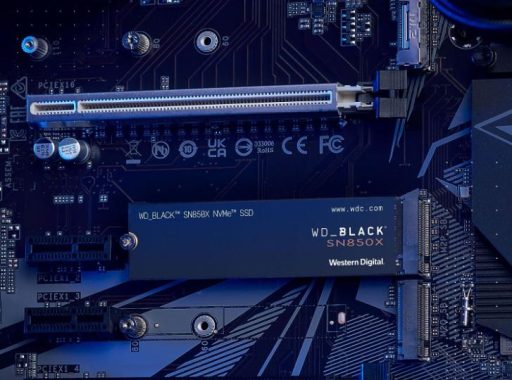
The WD Black SN850X is an impressive NVMe SSD that offers high-performance capabilities and several notable improvements over its predecessor, the SN850. It comes in capacities of 500GB, 1TB, and 2TB, with our review focusing on the 1TB model. With an in-house controller by WD (SanDisk), 112-layer TLC memory, and a PCIe Gen4 x4 interface, the SN850X boasts a rated sequential read speed of 7,300MB/s and a sequential write speed of 6,300MB/s. While it may not be a revolutionary leap forward, this SSD is undoubtedly one of the best options in the current Gen 4 SSD market.

Additionally, it’s worth highlighting that the 1GB DDR4 DRAM cache and the 300GB dynamic SLC cache contribute to the overall performance of the WD Black SN850X. These caching mechanisms help optimize data handling, leading to faster read and write operations and improving overall system responsiveness.

The impressive 600 TBW (Terabytes Written) endurance rating and the 5-year warranty add to the drive’s appeal, providing users with peace of mind regarding its reliability and longevity.

WD Black SN850X NVMe SSD

One noteworthy aspect of the SN850X is WD’s commitment to continuous improvement through its software. The 2.0 version of the Game Mode drive management software, with its “read look-ahead” algorithm for predictive caching of game data, demonstrates the manufacturer’s dedication to enhancing user experiences. Although the exact impact of this feature might be challenging to quantify in real-world scenarios, the intention to improve game loading times is commendable.

While the SN850X is an exceptional drive, users need to consider their specific needs before deciding on the version to purchase. For most standard desktop and gaming PC builds, the more affordable bare drive option, without the added heat spreader, should be sufficient, given the SSD’s improved cooling performance. However, for compact builds with limited airflow or gaming laptops that may benefit significantly from reduced operating temperatures, the extra cost of the heat sink-equipped version could be justified.

It’s important to keep in mind that as technology advances, newer SSDs may emerge, and the introduction of PCIe Gen 5 and subsequent generations might render PCIe Gen 4 drives less relevant in the future. However, for the majority of users, especially those with existing systems based on PCIe Gen 4, the WD Black SN850X remains an outstanding choice and provides all the Gen 4 SSD performance one could need.

In conclusion, the WD Black SN850X NVMe SSD is a powerful and reliable storage solution that offers incremental improvements over its predecessor, the SN850. Its superior cooling, excellent all-round performance, and compatibility with PCIe Gen 4 systems make it a top-tier option for users looking to upgrade their storage. Whether you’re a gamer, content creator, or general PC user seeking a high-speed, high-endurance SSD, the WD Black SN850X is undoubtedly a strong contender that won’t disappoint. Video: YouTube/WD

As technology continues to evolve, it’s always essential to consider the most recent options available on the market. However, at the time of this review, the WD Black SN850X stands as one of the best Gen 4 SSDs, offering impressive performance and delivering on the promise of fast, reliable, and efficient storage for your computing needs.

Pros:

  1. Improved Cooling: One of the significant advantages of the SN850X is its enhanced cooling performance compared to its predecessor. The drive runs much cooler under sustained load, with temperatures reduced from a toasty 77°C in the previous model to just 58°C. This cooling improvement can be especially beneficial for small form factor builds and gaming laptops, where every degree counts.
  2. All-Round Performance: The SN850X delivers excellent all-round performance, making it suitable for various applications and tasks. With high sequential read and write speeds, it handles data-intensive operations, such as video editing and gaming, with ease.
  3. PCIe Gen 4 Compatibility: Despite the emergence of PCIe Gen 5 on AMD and Intel platforms, the SN850X remains a relevant and powerful choice for users with systems equipped with PCIe Gen 4 M.2 slots.

    WD Black SN850X NVMe SSD
    WD Black SN850X NVMe SSD – images WD

Cons:

  1. Modest Performance Gains: While the SN850X is an impressive drive, its performance gains over the previous SN850 are not substantial, especially when it comes to 4K random access performance and system-wide measures like PCMark 10. This might not be noticeable in real-world scenarios for most users who are upgrading from an already high-performing SSD.
  2. Heat Sink Adds Cost: The review configuration includes WD’s signature armor-style cooling. However, for users looking to save on costs, the added heat sink may not be necessary, as the SSD’s improved cooling already makes a notable difference.
  3. Limited PCIe Gen 4 Relevance: With the introduction of PCIe Gen 5 on modern systems, the SN850X’s long-term relevance may be limited, as newer and faster SSD options become available.

The WD Black SN850X is a strong contender among Gen 4 SSDs, offering a compelling combination of performance, cooling improvements, and durability. While it may not represent a significant upgrade for existing SN850 owners, it is a top-notch choice for those in need of a high-speed and reliable SSD. The inclusion of WD’s Game Mode drive management software might be appealing to gamers, although its real-world impact remains uncertain. If you are considering this drive, the 1TB version provides a balance of capacity and price, making it an excellent choice for most users.

Specification
Capacity1TB
Form FactorM.2 2280
ConnectorM.2
CompatibilityWindows® 11, 10, 8.1
Computer with M.2 (M-key) port, capable of taking M.2 2280 form factor
Sequential Read Performance7300MB/s
Sequential Write Performance6300MB/s
Random Read800K IOPS
Random Write1100K IOPS
InterfacePCIe Gen4 x4
Warranty5-Year Limited Warranty
Endurance (TBW)600
Dimensions (L x W x H)3.15″ x 0.87″ x 0.09″
Weight7.5gms
Model NumberWDS100T2X0E
Operating Temperature0°C to 85°C
Non-Operating Temperature-40°C to 85°C
CertificationsBSMI, CAN ICES-3(B)/NMB-3(B), CE, FCC, KCC, Morocco, RCM, TUV, UL, VCCI

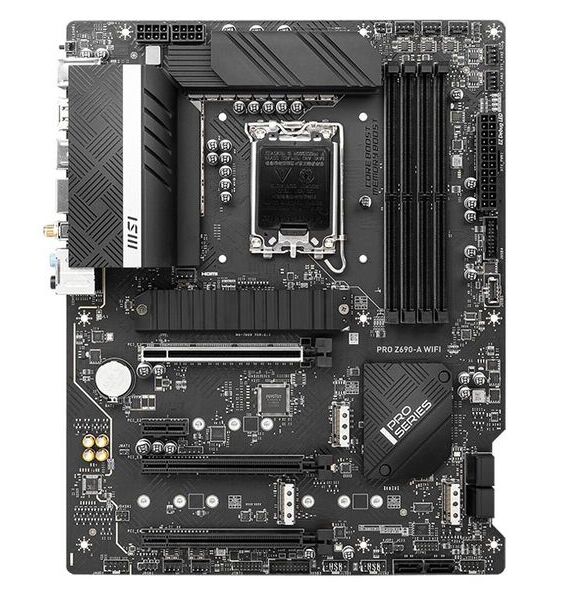
MSI PRO Z690-A WIFI high-end motherboard

0

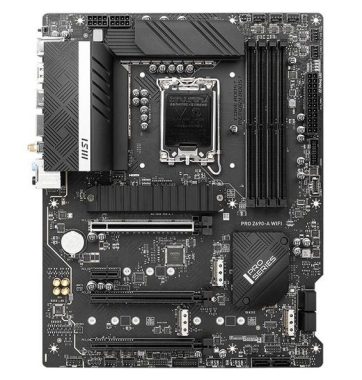
The MSI PRO Z690-A WIFI is a high-end motherboard designed to support 12th and 13th Gen Intel® Core™ processors, Pentium® Gold, and Celeron® processors, utilizing the LGA 1700 socket. With its impressive feature set and robust build, it aims to provide an excellent platform for enthusiasts, gamers, and professionals seeking top-tier performance and reliability.

One of the standout features of the PRO Z690-A WIFI is its support for DDR5 memory, with speeds of up to 6400+(OC) MHz. This allows for blazing-fast data transfer rates, ensuring smooth multitasking, and optimal performance even during resource-intensive tasks.

The motherboard offers a variety of connectivity options for lightning-fast data transfer. The PCIe 5.0 slots provide up to 128GB/s bandwidth, enabling maximum transfer speed for high-performance graphics cards and other PCIe devices. The Lightning Gen4 x4 M.2 slots and USB 3.2 Gen 2×2 ports further enhance the overall data transfer capabilities.

For gamers and content creators, the 2.5G LAN with LAN Manager and Intel Wi-Fi 6E Solution provides a stable and fast network connection. The inclusion of Intel Turbo USB 3.2 Gen 2 ensures uninterrupted connections with enhanced stability and the fastest USB speeds, making data transfers a breeze.

MSI PRO Z690-A WIFI
MSI PRO Z690-A WIFI

Audio enthusiasts will appreciate the Audio Boost feature, which delivers studio-grade sound quality, providing an immersive experience during gaming or media consumption.

MSI has given considerable attention to the motherboard’s thermal design, incorporating features like the Extended Heatsink Design, MOSFET thermal pads rated for 7W/mk, and M.2 Shield Frozr. This combination helps maintain low temperatures during extended usage, ensuring optimal performance and reliability for heavy workloads and gaming sessions.

The build quality is exceptional, with a 6-layer PCB made from 2oz thickened copper and server-grade level materials. This robust design ensures stability and longevity, even under intense operating conditions. Additionally, the Steel Armor PCI-E slots support AMD Crossfireâ„¢, allowing for multi-GPU configurations for those who require extra graphics processing power.

The motherboard’s VRM design, featuring 14 digital CPU power phases and Core Boost technology, enhances the overall stability and performance by providing sufficient power to the CPU, particularly during demanding tasks. This is especially beneficial for overclockers and power users who push their systems to the limits.

The use of SMT (Surface Mount Technology) welding process contributes to reduced defect rates in slot solder joints, minimizing electromagnetic interference, and increasing overall reliability. Paired with the Memory Boost technology, the motherboard can deliver clean and pure high-frequency DDR5 signals, optimizing memory performance.

The Wi-Fi 6E solution takes advantage of the 6GHz spectrum, offering improved network capacity and efficiency, making it ideal for high-density signal environments. With speeds up to 2400Mbps and features like Bluetooth 5.2, two-way MU-MIMO, and BSS color technology, it provides a robust wireless experience.

The Frozr AI Cooling feature automatically detects CPU and GPU temperatures and adjusts system fan duty accordingly. This intelligent cooling solution ensures that the system stays cool during demanding tasks, contributing to overall stability and performance.

Additionally, the MSI PRO Z690-A WIFI motherboard stands out for its exceptional build quality and attention to detail. The use of a 6-layer PCB made from 2oz thickened copper and server-grade level materials ensures durability and reliability, making it a long-lasting investment for users. The reinforced Steel Armor PCI-E slots provide added protection and stability for graphics cards in multi-GPU configurations.

MSI PRO Z690-A WIFI
MSI PRO Z690-A WIFI

For users who demand high-performance computing without compromising on cooling, MSI has integrated an array of thermal solutions. The Extended Heatsink Design, MOSFET thermal pads rated for 7W/mk, and M.2 Shield Frozr collectively contribute to effectively dissipate heat from critical components. The direct-touch Cross Heat-pipe further enhances the cooling capabilities, keeping the CPU and VRM temperatures in check during heavy workloads and overclocking.

M.2 Shield Frozr is an essential feature for users who utilize M.2 SSDs. It not only prevents thermal throttling but also protects the M.2 SSDs, ensuring they operate at optimal speeds for extended periods. This is particularly valuable for content creators and professionals who deal with large files and require high-speed storage.

The inclusion of Frozr AI Cooling and Frozr AI software demonstrates MSI’s commitment to providing smart and automated solutions for managing system temperatures. This proactive approach in fan control ensures that the system maintains an optimal temperature, promoting longevity and preventing performance degradation due to overheating.

Memory Boost is a noteworthy addition to this motherboard’s arsenal of features. This technology optimizes data signal delivery to memory modules, resulting in improved stability, compatibility, and overall memory performance. It ensures that the system can handle memory-intensive tasks with ease, making it ideal for content creation, rendering, and multitasking.

The Core Boost technology plays a significant role in delivering reliable power to the CPU, especially when dealing with high-core-count processors. By utilizing a premium layout and fully digital power design, the motherboard can effectively support the latest Intel Core processors, allowing users to push their CPUs to their maximum potential.

On the networking front, the PRO Z690-A WIFI motherboard offers cutting-edge features such as Wi-Fi 6E, which operates in the 6GHz spectrum, providing faster and more reliable wireless connectivity. With Bluetooth 5.2 support and two-way MU-MIMO, users can enjoy seamless connections and efficient data transfers, making it suitable for online gaming, streaming, and content sharing.

The motherboard’s Lightning USB 20G port offers an incredible 20Gbps transmission speed, making data transfers faster than ever before. This feature is particularly advantageous for users who deal with large files regularly and need a quick and reliable means of data exchange.

In conclusion, the MSI PRO Z690-A WIFI motherboard excels in every aspect that matters to power users, gamers, and content creators. Its support for the latest 12th and 13th Gen Intel Core processors, along with DDR5 memory, PCIe 5.0 slots, and ultra-fast USB ports, ensures that it remains relevant and powerful for years to come. The attention to detail in its thermal solutions, premium build quality, and advanced networking capabilities further solidify its position as a top-tier motherboard in the market. MSI PRO Z690-A WIFI price: $162.00

MSI PRO Z690-A WIFI
PRO Z690-A WIFI – images MSI

Whether you are a hardcore gamer looking to maximize your gaming performance, an overclocking enthusiast seeking the best power delivery, or a content creator requiring a reliable and efficient platform, the MSI PRO Z690-A WIFI is a motherboard that ticks all the right boxes and provides an unparalleled computing experience.

The MSI PRO Z690-A WIFI is an impressive motherboard that caters to power users, gamers, and content creators alike. Its support for DDR5 memory, PCIe 5.0 slots, lightning-fast USB ports, premium thermal solution, and cutting-edge networking features make it a top choice for those seeking unparalleled performance, stability, and efficiency. Whether you’re a hardcore gamer, an overclocking enthusiast, or a professional content creator, this motherboard offers a feature-rich platform to unleash the full potential of your 12th or 13th Gen Intel® Coreâ„¢ processor.

SPECIFICATION
SOCKETLGA 1700
CHIPSETIntel® Z690 Chipset
DDR5 MEMORY6400+(OC) , 6200(OC) , 6000(OC) , 5800(OC) , 5600(JEDEC) , 5400(JEDEC) , 5200(JEDEC) , 5000(JEDEC) , 4800(JEDEC) MHz
MEMORY CHANNELDual
DIMM SLOTS4
MAX MEMORY (GB)192
PCI-E X163
PCI-E X11
SATAIII6
M.2 SLOT4
RAID0/1/5/10
TPM (HEADER)1
WIFI & BLUETOOTHIntel® Wi-Fi 6E module
USB 3.2 PORTS (FRONT)1(Gen 2, Type C), 4(Gen 1, Type A)
USB 3.2 PORTS (REAR)1(Gen 2×2, Type C), 1(Gen 2, Type A), 2(Gen 1, Type A)
USB 2.0 PORTS (FRONT)4
USB 2.0 PORTS (REAR)4
AUDIO PORTS (REAR)Realtek® ALC897 Codec
DISPLAYPORT1
HDMI1
DIRECTX12
CROSSFIREY
OPERATING SYSTEMSupport for Windows® 11 64-bit, Windows® 10 64-bit
FORM FACTORATX
DIMENSION12 in. x 9.6 in. (30.5 cm x 24.4 cm)


Exploring Alternatives to the MSI PRO Z690-A Motherboard


Priced around $190–$230, it’s a compelling option for gamers, enthusiasts, and budget-conscious builders who don’t want to sacrifice quality. However, with the vast array of Z690 motherboards available, several alternatives offer similar or enhanced features, catering to various needs and preferences. In this article, we’ll explore four excellent alternatives to the MSI PRO Z690-A, diving into their specifications, strengths, and what makes them stand out. These alternatives are the ASUS TUF Gaming Z690-Plus WiFi D4, Gigabyte Z690 UD AX DDR4, ASRock Z690 Steel Legend, and MSI MAG Z690 Tomahawk WiFi DDR4.
1. ASUS TUF Gaming Z690-Plus WiFi D4
The ASUS TUF Gaming Z690-Plus WiFi D4 is a strong contender for those seeking a reliable, feature-packed motherboard with a slightly more premium aesthetic than the MSI PRO Z690-A. Priced around $220–$250, it’s in a similar price bracket but offers a distinct blend of durability, connectivity, and ASUS’s renowned BIOS quality, making it a favorite for gamers and overclockers.
Key Specifications
  • Chipset: Intel Z690
  • Form Factor: ATX
  • Memory: 4x DIMM, up to 128GB DDR4 (5333MHz+ OC)
  • Storage: 4x M.2 slots (3x PCIe 4.0, 1x PCIe 3.0), 6x SATA 6Gb/s
  • Connectivity: Wi-Fi 6, 2.5 GbE LAN, USB 3.2 Gen 2×2 Type-C
  • Expansion Slots: 1x PCIe 5.0 x16, 2x PCIe 3.0 x4, 1x PCIe 3.0 x1
  • VRM: 14+2 DrMOS power stages
  • Audio: Realtek ALC897
Strengths
The TUF Gaming line is known for its durability, and this motherboard lives up to that reputation with military-grade components and a robust VRM design suitable for overclocking mid-range CPUs like the Intel Core i5-12600K or i7-12700K. Its cooling solution includes large VRM heatsinks, a fanless PCH heatsink, and an M.2 heatsink, ensuring stable performance under load. The inclusion of Wi-Fi 6 and a USB 3.2 Gen 2×2 Type-C port provides modern connectivity, matching or exceeding the MSI PRO Z690-A’s offerings. ASUS’s BIOS is also highly regarded for its user-friendly interface and robust overclocking tools, such as AI Overclocking, which simplifies tuning for beginners.

Drawbacks
While the TUF Gaming Z690-Plus supports DDR4, it lacks DDR5 support, which may limit future-proofing compared to the DDR5 version of the MSI PRO Z690-A. Additionally, its audio codec (ALC897) is basic, so audiophiles may need an external DAC for high-quality sound. The aesthetic, while sleek with subtle RGB accents, may not appeal to those seeking a minimalist look like the MSI PRO’s.
Why Choose It?
If you prioritize ASUS’s build quality, an intuitive BIOS, and a slightly more premium feature set, the TUF Gaming Z690-Plus WiFi D4 is an excellent alternative. It’s ideal for gamers and builders who want a durable board with strong overclocking potential without breaking the bank.
2. Gigabyte Z690 UD AX DDR4
The Gigabyte Z690 UD AX DDR4 is a budget-friendly alternative, priced around $200–$220, offering a comparable feature set to the MSI PRO Z690-A. It’s designed for users who want solid performance and connectivity without unnecessary frills, making it a great choice for cost-conscious builders.
Key Specifications
  • Chipset: Intel Z690
  • Form Factor: ATX
  • Memory: 4x DIMM, up to 128GB DDR4 (5333MHz+ OC)
  • Storage: 3x M.2 slots (PCIe 4.0), 6x SATA 6Gb/s
  • Connectivity: Wi-Fi 6E, 2.5 GbE LAN, USB 3.2 Gen 2×2 Type-C
  • Expansion Slots: 1x PCIe 5.0 x16, 2x PCIe 3.0 x4, 2x PCIe 3.0 x1
  • VRM: 16+1+2 power phases
  • Audio: Realtek ALC897
Strengths
The Gigabyte Z690 UD AX DDR4 stands out for its value, offering Wi-Fi 6E and a USB 3.2 Gen 2×2 Type-C port at a lower price than many competitors. Its 16+1+2 VRM configuration is robust enough for moderate overclocking, and the board includes three M.2 slots with PCIe 4.0 support, matching the storage capabilities of the MSI PRO Z690-A. Gigabyte’s Ultra Durable branding ensures reliable components, and the board’s clean, black design fits well in most builds. The inclusion of Q-Flash Plus for BIOS updates without a CPU is a bonus for builders upgrading to newer Intel CPUs.

Drawbacks
The Z690 UD AX has fewer M.2 slots (three) compared to the MSI PRO Z690-A’s four, which may limit storage expansion for some users. Its VRM cooling is adequate but not as extensive as higher-end boards, so extreme overclocking may be limited. The audio codec is the same basic ALC897 as the MSI PRO, which is functional but not exceptional.
Why Choose It?
For those seeking a cost-effective Z690 motherboard with modern connectivity like Wi-Fi 6E and USB-C, the Gigabyte Z690 UD AX DDR4 is a compelling alternative. It’s perfect for budget builds that still need solid performance and future-proof features.
3. ASRock Z690 Steel Legend
The ASRock Z690 Steel Legend, priced around $200–$230, is a visually striking alternative with a silver and black aesthetic, making it ideal for themed builds. It offers a balanced feature set for gamers and enthusiasts, with robust storage and connectivity options.
Key Specifications
  • Chipset: Intel Z690
  • Form Factor: ATX
  • Memory: 4x DIMM, up to 128GB DDR4 (5000MHz+ OC)
  • Storage: 3x M.2 slots (PCIe 4.0), 6x SATA 6Gb/s
  • Connectivity: 2.5 GbE LAN, USB 3.2 Gen 2×2 Type-C
  • Expansion Slots: 1x PCIe 5.0 x16, 2x PCIe 3.0 x4, 2x PCIe 3.0 x1*.
  • VRM: 13 DrMOS power stages
  • Audio: Realtek ALC897
Strengths
The ASRock Z690 Steel Legend shines with its aesthetic appeal, featuring subtle RGB lighting and a polished design that stands out in a case with a window. Its VRM is capable of handling mid-range CPUs with moderate overclocking, and the board supports PCIe 5.0 for GPUs and storage. The inclusion of a USB 3.2 Gen 2×2 Type-C port and 2.5 GbE LAN ensures modern connectivity, while ASRock’s Polychrome RGB software allows for customizable lighting. The board also offers three M.2 slots with heatsinks, providing ample storage options for SSDs.
Drawbacks
Like the Gigabyte Z690 UD AX, the Steel Legend has only three M.2 slots compared to the MSI PRO Z690-A’s four. Its VRM, while sufficient, is less robust than the TUF Gaming or Tomahawk, potentially limiting extreme overclocking. The lack of built-in Wi-Fi may be a downside for some, requiring a separate Wi-Fi adapter.
Why Choose It?
The ASRock Z690 Steel Legend is ideal for builders who want a visually appealing motherboard with solid performance and connectivity. It’s a great choice for those who don’t need Wi-Fi and prefer a unique aesthetic over the MSI PRO’s minimalist look.
4. MSI MAG Z690 Tomahawk WiFi DDR4
The MSI MAG Z690 Tomahawk WiFi DDR4, priced around $250–$280, is a step up from the PRO Z690-A, offering enhanced features and a more premium design. It’s perfect for users who want a slightly more robust option within MSI’s lineup.
Key Specifications
  • Chipset: Intel Z690
  • Form Factor: ATX
  • Memory: 4x DIMM, up to 128GB DDR4 (5200MHz+ OC)
  • Storage: 4x M.2 slots (3x PCIe 4.0, 1x PCIe 3.0), 6x SATA 6Gb/s
  • Connectivity: Wi-Fi 6, 2.5 GbE LAN, USB 3.2 Gen 2×2 Type-C
  • Expansion Slots: 1x PCIe 5.0 x16, 2x PCIe 3.0 x4, 1x PCIe 3.0 x1
  • VRM: 16+1+1 Duet Rail Power System
  • Audio: Realtek ALC4080
Strengths
The MAG Z690 Tomahawk WiFi DDR4 offers a more robust VRM (16+1+1 phases) than the PRO Z690-A, making it better suited for overclocking high-end CPUs like the i9-12900K. It matches the PRO’s four M.2 slots, with three supporting PCIe 4.0, and includes superior cooling with extended heatsinks and M.2 Shield Frozr. The ALC4080 audio codec is a step up from the ALC897, providing better sound quality for gamers and content creators. Its military-inspired aesthetic and subtle RGB accents add visual flair without being over-the-top.
Drawbacks
The Tomahawk is pricier than the PRO Z690-A, which may not justify the upgrade for budget-conscious builders. Its Wi-Fi 6 is slightly older than the Wi-Fi 6E found on the PRO Z690-A WiFi, potentially limiting wireless performance. The DDR4 version also lacks the future-proofing of DDR5.
Why Choose It?
The MSI MAG Z690 Tomahawk WiFi DDR4 is ideal for users who want a premium MSI motherboard with enhanced VRM, cooling, and audio compared to the PRO Z690-A. It’s perfect for enthusiasts seeking a balance between performance and aesthetics.
The MSI PRO Z690-A is a versatile and budget-friendly motherboard, but the ASUS TUF Gaming Z690-Plus WiFi D4, Gigabyte Z690 UD AX DDR4, ASRock Z690 Steel Legend, and MSI MAG Z690 Tomahawk WiFi DDR4 are excellent alternatives, each catering to slightly different needs. The ASUS TUF offers durability and a user-friendly BIOS, the Gigabyte UD AX provides great value with Wi-Fi 6E, the ASRock Steel Legend stands out with its aesthetic appeal, and the MSI Tomahawk delivers premium features for enthusiasts. When choosing, consider your budget, whether you need Wi-Fi, the importance of aesthetics, and your overclocking plans. All four motherboards support Intel’s 12th, 13th, and 14th-gen CPUs, ensuring compatibility and performance for a wide range of builds.

A cutting-edge 3D modeling program – Blockbench

0

Blockbench, a cutting-edge 3D modeling program, is specially designed to create blocky graphics, a style that has regained popularity, especially due to Minecraft’s immense success.

Even if you’re not particularly interested in blocky graphics, learning how to create them can be advantageous if you’re keen on trying out 3D modeling. Blockbench provides an array of tools that make the process of crafting low-poly models exceptionally straightforward.

One of its standout features is the powerful animation editor, which allows you to rig your model and bring it to life using position, rotation, and scale keyframes. Fine-tuning your creations becomes effortless with the graph editor.

Blockbench
Blockbench

Moreover, Blockbench facilitates seamless export of animations to Minecraft: Bedrock Edition, Blender, Maya, or even sharing on Sketchfab. Whether you aim to achieve the iconic Minecraft aesthetic using cuboids or prefer to create intricate low-poly shapes with mesh modeling tools, Blockbench caters to both approaches.

With its sleek and user-friendly interface, even beginners can effortlessly dive into 3D modeling. The dedicated design and viewing area enables experimentation with various functions and provides real-time feedback on the results.

As you discover that constructing larger objects is as simple as placing blocks together, you’ll find it easy to explore and utilize the wide range of tools Blockbench offers.

These feature-rich tools allow you to tweak various design properties, such as adding cubes, adjusting cube angles and orientations, incorporating textures from existing PNGs, and applying scaling, rotation, and flipping to the object. Furthermore, you can create, export, and optimize block models and entities, all within one program.

Blockbench offers multiple display views, enabling you to observe your model from different perspectives and angles. You can zoom in, switch to alternative views, enter fullscreen mode, and set up presets to maintain your preferred display settings.

To monitor your progress effectively, you can take screenshots of your models, even applying backgrounds to envision how they would look outside the display area.

Blockbench
Blockbench – images

The best part is that Blockbench is completely free to use for any type of project, with no strings attached. Additionally, it is an open-source project under the GPL license, further promoting a collaborative and creative community.

Whether you’re a passionate Minecraft fan looking to create mods or an aspiring 3D model creator, Blockbench proves to be an invaluable and functional tool. Its array of features accommodates various modifications to bring your ideas to life while ensuring a seamless and enjoyable designing experience.

Download latest Blockbench 3D modeling program for free HERE

What is a Hardware Security Module (HSM)?

0

The task of managing cryptographic keys, which includes their generation, storage, and verification, can be a significant challenge when it comes to ensuring system security. Fortunately, a solution exists in the form of the Hardware Security Module (HSM).

In today’s digital landscape, cybercriminals are ubiquitous, targeting sensitive devices, software, and systems. To counter such threats, individuals and companies need to adopt advanced security measures, like the use of cryptographic keys, to safeguard their IT assets.

However, the management of cryptographic keys presents a major obstacle to system security. This is where the Hardware Security Module (HSM) comes into play as a secure means of managing cryptographic keys.

What exactly is the Hardware Security Module (HSM)?

The HSM is a physical computing device designed to safeguard and manage cryptographic keys. Typically, it is equipped with at least one secure cryptographic processor and is available as either a plugin card (such as a SAM/SIM card) or an external device that directly attaches to a computer or network server.

The HSM is purpose-built to protect the confidentiality and integrity of cryptographic keys through tamper-proof hardware modules that operate transparently and utilize various techniques, including encryption and decryption. Furthermore, it serves as a secure storage unit for cryptographic keys used in tasks like data encryption, Digital Rights Management (DRM), and document signing.

Hardware Security Modules
Hardware Security Modules – photo: Pixabay

How do Hardware Security Modules work?

The HSM ensures data security by handling the entire lifecycle of cryptographic keys, including their generation, securing, deployment, management, storage, and processing.

During provisioning, unique keys are generated and then encrypted for safe storage, with backups also created. These keys are deployed by authorized personnel, who insert them into the HSM, thereby enabling controlled access.

The HSM provides management functions to monitor, control, and rotate cryptographic keys in accordance with industry standards and organizational policies. For instance, modern HSMs adhere to NIST recommendations by employing RSA keys with a minimum length of 2048 bits to ensure compliance.

When cryptographic keys are no longer actively used, an archiving process is initiated, and if the keys are no longer required, they are securely and permanently destroyed.

What is the Hardware Security Module used for?

The primary purpose of the HSM is to safeguard cryptographic keys and offer essential services to protect identities, applications, and transactions. HSMs support various connectivity options, such as connecting to network servers or functioning offline as standalone devices.

HSMs can be packaged in different forms, including smart cards, PCI cards, separate physical devices, or even as a cloud service known as HSM as a Service (HSMaaS). In the banking sector, HSMs are utilized in ATMs, EFTs, PoS systems, and more.

The scope of HSM protection extends to numerous everyday services, including securing credit card data and PINs, medical devices, identity cards and passports, smartwatches, and cryptocurrencies.

Types of Hardware Security Modules (HSMs)

Hardware Security Modules (HSMs) are available in two main categories, each designed to offer specific protections tailored to different industries. Below are the various types of HSMs available:

General Purpose HSM:

General-purpose HSMs provide support for a wide range of encryption algorithms, including symmetric, asymmetric, and hash functions. These versatile HSMs are particularly renowned for their exceptional performance in safeguarding sensitive data types, such as crypto wallets and public key infrastructure.

They handle multiple cryptographic operations and find common use in tasks like PKI (Public Key Infrastructure), SSL/TLS encryption, and overall protection of sensitive data. As a result, general-purpose HSMs are often employed to comply with industry standards like HIPAA security requirements and FIPS (Federal Information Processing Standards) compliance.

Additionally, all-in-one HSMs offer API connectivity using various cryptographic frameworks, such as Java Cryptography Architecture (JCA), Java Cryptography Extension (JCE), Cryptography API Next Generation (CNG), Public-Key Cryptography Standard (PKCS) #11, and Microsoft Cryptographic Application Programming Interface (CAPI). This flexibility allows users to choose the framework that best suits their specific cryptographic operations.

HSM for Payments and Transactions:

The Payments and Transactions HSM is explicitly designed for the financial industry to protect sensitive payment information, including credit card numbers. These HSMs support payment protocols like APACS (Association for Payment Clearing Services) and adhere to industry-specific standards such as EMV (Europay, Mastercard, Visa) and PCI HSM (Payment Card Industry Hardware Security Module) to ensure compliance.

These specialized HSMs add an additional layer of protection to payment systems by securing sensitive data during transmission and storage. As a result, financial institutions, including banks and payment processors, consider them indispensable solutions to ensure secure processing of payments and transactions.

Key Features of Hardware Security Modules (HSMs):

Hardware Security Modules play a crucial role in ensuring compliance with cybersecurity regulations, enhancing data security, and maintaining optimal service levels. Here are the key features of HSMs that contribute to these objectives:

Anti-Counterfeiting:

HSMs are designed to be tamper-proof, protecting cryptographic keys in the event of a physical attack on the device. To meet FIPS 140-2 certification requirements, HSMs incorporate tamper-proof seals. Any attempt to tamper with the HSM triggers a self-destruct mechanism that erases encryption data, configuration settings, and user data.

Secure Design:

HSMs are equipped with unique hardware that meets the standards set by PCI DSS (Payment Card Industry Data Security Standard) and complies with various government standards, such as Common Criteria and FIPS 140-2. Most HSMs are certified at different FIPS 140-2 levels, primarily at Level 3, while select models achieve the highest level of protection at Level 4.

Authentication and Access Control:

HSMs act as gatekeepers, controlling access to the devices and the data they protect. They actively monitor for tampering and respond by deactivating or deleting cryptographic keys if unauthorized access is detected. HSMs use strong authentication methods, like multi-factor authentication, and enforce strict access control policies to limit access to authorized individuals.

Compliance and Audit:

HSMs must comply with various standards and regulations, such as GDPR (General Data Protection Regulation) in the European Union, DNSSEC (Domain Name System Security Extensions), PCI DSS, Common Criteria, and FIPS 140-2. Compliance with these standards ensures data and privacy protection, secure DNS infrastructure, secure payment card transactions, adherence to internationally recognized security standards, and compliance with government encryption standards. HSMs also include logging and auditing features for monitoring and tracking encryption activities for compliance purposes.

Integrations and APIs:

HSMs support popular APIs, such as CNG and PKCS #11, allowing developers to seamlessly integrate HSM functionality into their applications. They are also compatible with other APIs, including JCA, JCE, and Microsoft CAPI. This enables smooth integration of HSM capabilities into various software systems and cryptographic workflows.