Home Blog Page 89

The main differences between a Smart TV and an Android TV?

0

Generally, there is not very much significant difference between smart and Android tv, but there are several details that make android TV considerably better.

Smart TV
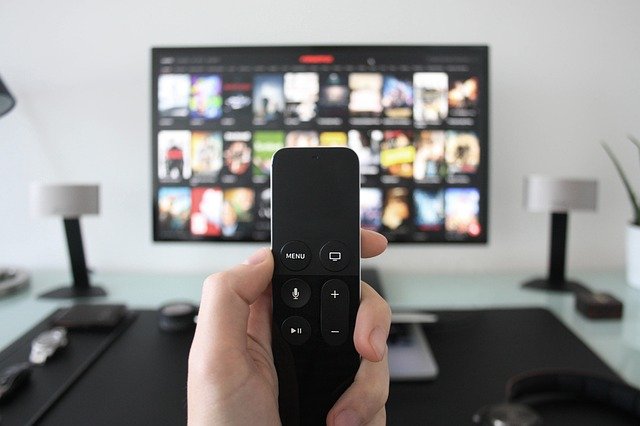
Smart TV is a tv that arrives with built-in apps such as Netflix, Amazon Prime, Hotstar, and many more for watching movies.
This TV supports some other applications also for executing other tasks such as playing games. Smart TVs offer the consumer with the features to connect the TV to one’s Wi-Fi network and set up all the preferred applications and on-line services made available in the manufacturer’s installed application store in the TV. Smart TVs furthermore have built-in voice search function that allows the users to search for all their favorite content by simply speaking the title or description of the content. The best smart tv should also support Dolby Audio and DTS Decoding technology. It should also allow you to cast the content onto devices of your choice. One of the key properties of an Android smart TV is voice search. Make sure not to miss this factor too when selecting your television. You will be keeping your TV for many years. Make sure that it is ready for both the present and future technologies.

webOS
Photo: LG newsroom

Smart TV have the foremost visible features with the fully developed widescreen in High Definition where you can see what digital detailing feels like. The TV has a built-in stereo box speaker with the Dolby Decoder audio technology which enhances the sound quality so magnificently, recreating the theatrical experience within homes.

Android TV
But on the other hand, an Android TV works with the Android operating system. Android is owned by Google so you can use the play store for getting applications and video games.
Android TV as well supports Google Assistant that you can use to give the command to TV for performing any kind of task.
You can also connect the Android TV with additional smart devices at home. Rest other features like Live cast, home cloud, Chromecast technology, live streaming are the same in both smart and Android TV. Android TVs outshine both Smart and Non-Smart TVs in terms of accessibility of content. They open the world to a whole new stage of Android unique content such as Google Play Store which houses plenty of applications and well known games, Google Play Movies and TV which lets one stream the most recent movies and popular TV shows, some of which are exclusive to Google Play Movies and TV.

Point to be mentioned-: In the tv marketplace, Samsung and LG TVs are there which do not support the Android operating system.

In Samsung’s TVs, you will only get the Tizen operating system and on LG’s TV, you will find webOS. (Smart Tv).
The rest, 90 % of the television companies for example Hisense, Panasonic, TCL, Sony, and many others supports Android OS.

Summary-: Many people today support Android TV but that does not imply that Samsung and LG TVs are not very good. The Tizen and WebOS also support voice assistants like Alexa and often Google Assistant. Still, Android TV has an benefit in that these TVs support google play store.

Download Winamp 5.8 v. – ultimate media player

0

Winamp is one of the most popular media players that gives you several advanced features including rendering your favorite movies and songs, syncing with your favorite devices, and more. Winamp player, since 1997!

If you are looking for a best performance audio and video player, you will have many options designed for you. However, many unique video players will give you features that almost no other tool will have.

Winamp player offers you some advanced playback tools such as the ability to view reproductions of your favorite videos or songs, rendering, customizable interface, support for various types of files and the ability to listen to radio stations.

Customize your interface
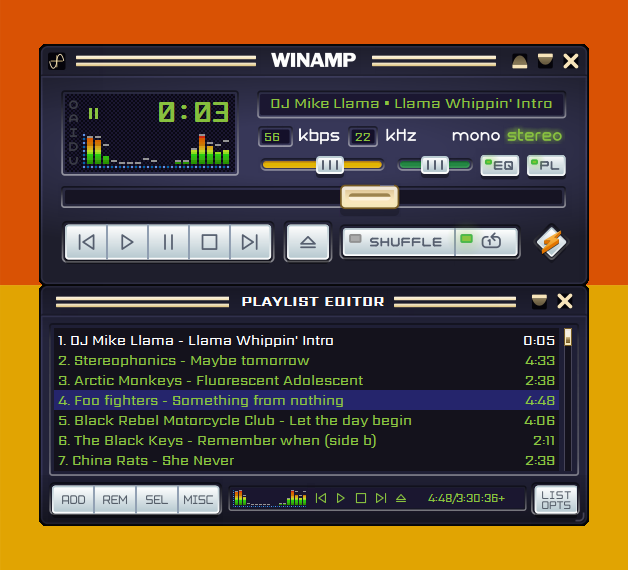
The first time you start Winamp, you will see that it has an interface that may seem a bit  complicated at first, but once you get familiar with the tool, you will start to find some of its biggest advantages it has to offer.Download Winamp 5.8 v.

One of them is the customizable interface. Button placement is already intuitive and designed to help you perform the actions you need to perform quickly and easily. Photo: Winamp forum

But you will also be able to add a look to the interface, which will provide you with some good customization options where you will have the ability to adapt the interface to your needs.

Play songs, videos, radio
It is also a very versatile software that you can use to play a wide range of different media files. Some of the most used files include videos, songs and even radio stations.

You will be able to access the collection of Shoutcast radio stations, where you can choose from some of the most popular radio stations out there.

You can also enhance the videos and audio you have with the equalizer and other additional functions!

Winamp is one of the most popular media players, and for good reason. It has advanced features and a customizable interface that will provide you with the greatest joy possible.

Features and advantages of Winamp:

Winamp Orgler lets you track, chart and share your Winamp listening history

Find and manage add-ons directly in your media player
Improved support for iPod Sync
Podcast Directory
Smart views with new presets for dynamic
Plays many types of audio and video
Compatible Winamp 2 Plug-ins
Full support for classic skins / modern skins
New iTunes library import
Gallery of online services
Our services Radio internship online
Turkish, Romanian and Portuguese language packs
Playback: discover songs, videos, radios and photos of artists
AOL Radio powered by CBS Radio
Dynamic Song Recommendation
Multi-channel MP3 surround support
Massive Auto-Tagger provides the latest music metadata
Integrated search by artist and track information
Compatibility with album covers for portable devices
Updated Download Manager and Podcast Directory
Fully integrated browser
New visualization plugin-Milkdrop 2
Portable device sync support
Access to SHOUTcast radio stations
Enjoy thousands of free songs and videos
Listen to AOL radio stations
Support extended Flash video
Media Monitor: playing music on Theeb
Updated Winamp toolbar
Remote music and video playback and sharing

License:   Free
Supported OS :  Windows 11 / Windows 10 / Windows 8 / Windows 7

Winamp player – Download the current 5.8 version here

Stellarium app – watch the stars in 3D

0

Want to see the stars in 3D? Then you can use Stellarium app, which is an exclusive 3D app that allows you to see stars, planets and other celestial objects in a fun way.
Observing stars and constellations is one of the oldest pastimes in the world. People thousands of years ago wondered what the stars do and what they are there for, and we are still understanding.

There is also a sense of calm and enigma when it comes to seeing the stars, so many people have so much fun.Stellarium app

If you want to see stars on your computer and observe different constellations, Stellarium is a perfect app. It allows you to see these stars and planets in 3D, as its goal is to introduce you to the star system in an easy-to-understand way.

It is meant to be educational and fun at the same time.

3D sky exploration
An easy way to describe this app would be that it is an app that allows you to see stars in 3D. it will show you all the stars in our star system, but it is much more. It is essentially a collection of information and details about the different stars you can see.
For example, if you click on an object in space, you will be shown all the details about that specific object you clicked on, such as the name, type, cluster it is associated with, and more.

In addition, the app offers many different options to explore space and stars, making it the go-to app for celestial explorers.

Advanced options
You should also know that the Stellarium app comes with some advanced features that will best serve the most experienced explorers.

For example, you will be able to see the past positions of the constellations, enter details about each constellation and many other useful tools that will make the use of this application more enjoyable.Stellarium app
Stellarium is an excellent application to see the stars and explore space thanks to its 3D animations and exceptional options. Photo: Stellarium

Features and benefits of Stellarium app:
Realistic simulation of sky, sunrise and sunset
Default catalog of over 600,000 stars; additional downloadable catalogs of up to 210 million stars
Images of almost all Messier objects and the Milky Way
Artistic illustrations moderna for the 88 constellations
More than a dozen different cultures with their constellations
Simulation of solar and lunar eclipses
Photorealistic landscapes

Free download Stellarium app here

Stereo Receiver Sony STR-DH190 for great performance

0

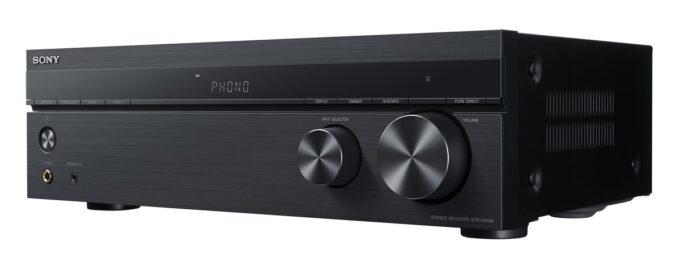
From Bluetooth streaming to vinyl and FM radio on the go, the Sony STR-DH190 meets all your stereo needs.

Designed for a system that revolves around vinyl
If you like vinyl and want a stereo receiver that really gets the most out of it, check out this Sony. With its built-in phono preamp, you can connect any turntable with MM cartridge (moving magnet), without the need for a separate box. The quality phono preamp is carefully positioned away from the power transformer, minimizing interference and maximizing musical detail.Sony STR-DH190 stereo receiver

The Sony STR-DH190 may not be packed with an abundance of features, but it does offer a few noteworthy functionalities. One convenient attribute is its ability to power on via a paired Bluetooth device, such as your phone, even when the receiver is in standby mode. This small yet practical enhancement eliminates the need to search for the remote or physically approach the receiver every time you want to begin listening to music.

You might also come across a Pure Direct button on both the front panel of the device and the remote, leading you to wonder how it enhances the sound quality. However, it’s important not to get overly excited as its effects are limited. Activating this button simply turns off the display lights to minimize noise that could potentially impact the sound quality, while also disabling any bass and treble equalizer adjustments. This feature has been a subject of debate for quite some time and has been present on receivers for a while.

One notable omission from the Sony STR-DH190 is the absence of a dedicated line-level subwoofer output. While it is still possible to connect certain subwoofers using speaker wire and the secondary set of speaker terminals at the back of the device, not all subwoofers can be accommodated this way. Consequently, the number of subwoofers you can seamlessly connect to is limited, as many lack speaker wire terminals, which might be a source of frustration for some users.

Although it works well with all turntables, the Sony STR-DH190 was developed with Sony PS-H H500 and PS-L. This means that by pairing one of these two bridges with the receiver, you can ensure that you get the optimal sound quality. Photo: Sony

Bluetooth connection for music streaming
When you’re not shooting records, this flexible son son is just as happy to stream music from your smartphone or tablet. Just connect via Bluetooth and enjoy stored music and favorite streaming services like Spotify. An additional feature is the ability to turn on the receiver from your smartphone as well.Sony STR-DH190 stereo receiver

The Sony STR-DH190 stereo receiver offers a delightful and hassle-free home audio experience, combining simplicity and style. This Sony STRDH190 model is a straightforward yet fully functional receiver that will leave you thoroughly satisfied. It boasts essential features that most music enthusiasts appreciate, such as phono plugs and inputs, as well as Bluetooth connectivity for turntables.

One aspect you can count on with confidence is the presence of analog inputs on the STR-DH190 stereo receiver. These inputs allow for easy connection to speakers. Simply power on the receiver and pair it with your smartphone or tablet via Bluetooth. Sony stereo receivers with Bluetooth encompass everything a novice audiophile could need, offering the convenience of Bluetooth standby to activate your Bluetooth stereo from your portable device.

First and foremost, the receiver provides a phono input that enables you to enjoy your vinyl records on a turntable. Whether you possess a traditional turntable or one of the more modern variants, you can expect excellent sound output.

Additionally, the receiver boasts four stereo RCA outputs, a noteworthy feature rarely found in this price range, making it highly recommended for Sony enthusiasts.

With a 3.5mm input and stereo RCA output, you can establish secure connections to your audio sources.

Moreover, this device is not limited to analog functions alone. It includes Bluetooth connectivity, allowing you to wirelessly stream music from any Bluetooth-enabled device or music service. This feature also provides remote functionality, making the Sony STRDH190 a fantastic upgrade from some of its predecessors.

The receiver accommodates up to four speakers and utilizes automatic Class A/B switching, enabling you to play them collectively or individually.

For those who enjoy staying up-to-date with global news, there is an FM radio with over 30 station presets.

An additional feature we appreciate is the built-in headphone amplifier. Equipped with a full-size headphone jack, the amplifier allows for private listening sessions.

Powerful and high quality sound
The use of a discrete amplifier, with separate components, gives the son suono With a large capacity transformer, there is also the power to match the purity, not less than 100 watt.
The center of your system
As a receiver, the Sony STR-DH190 is also equipped with an integrated FM radio with 30 presets. Other music sources that you can have are managed by the four RCA inputs, sufficient for a CD player, TV, transmitter and other source. With two sets of speaker outputs, you can also have music in another room.

The STR-DH190 stands out as a commendable integrated amplifier, offering an attractive balance between performance and cost. Beyond its budget-friendly price tag, this component provides notable versatility, making it suitable for placement in spaces like your garage or workshop. Additionally, if you’re considering a stereo system component for music-loving kids without breaking the bank, the STR-DH190 fits the bill.

Setting up Bluetooth connectivity is a breeze; a simple switch to the Bluetooth mode and following Sony’s provided instructions in the manual get you up and running within minutes. Despite its numerous analog inputs, it lacks digital inputs such as HDMI or Optical/Toslink, limiting its direct compatibility with televisions. Moreover, it may not be the ideal choice for those seeking a more sophisticated audio solution or trying to fill a large room with sound. With an output of 100 watts at 8 ohms, the amplifier excels in smaller spaces but may struggle at higher volumes or with demanding speakers.

The Sony STR-DH190’s value is hard to beat, particularly for those entering the realm of high-performance HI-FI. While it may not be the most exquisite or aesthetically pleasing component, it becomes a memorable part of your audio journey. Its utility extends beyond a standalone amplifier; it can serve as a preamp or find a place in other rooms, ensuring ongoing enjoyment. The STR-DH190 becomes a noteworthy starting point, not solely for its intrinsic qualities but for the possibilities it opens up in the world of audio enthusiasts.

If you love music (all formats) enjoy with the all-inclusive Sony STR-DH190 stereo receiver.Sony STR-DH190 stereo receiver

Amplifier

Number of Amp. Channels

2ch (Supporting Speaker A+B)

Power Output

100 W + 100 W (8 ohms, 1 kHz, THD 1%)

Speaker Impedance

6–16 ohms

Audio Features

PHONO VOLUME OFFSET

Yes

Sony STR-DH190 General Features

Auto Standby

Yes

Power Requirement

AC 120 V 60 Hz

Interface

Input and Output Terminals

Analog Audio Input (4), Phono input (1), Headphone Output (1)

Speaker Output Terminals

A/B

Network Connectivity

Network features

Bluetooth® Receiver

Size & Weight

Dimensions (W x H x D in)

17″ x 5-1/4″ x 11-1/4″ (430 x 133 x 284 mm)

Weight (lb)

14 lb 13 oz (6.7 kg)

Tuner Features

FM/AM

Yes / No

Preset Channel (FM/AM)

TTL30 (30/- )

Noctua NH-P1 – Fanless cooling, passive CPU cooler

0

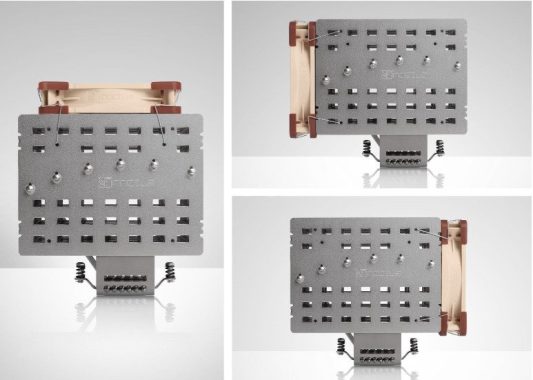
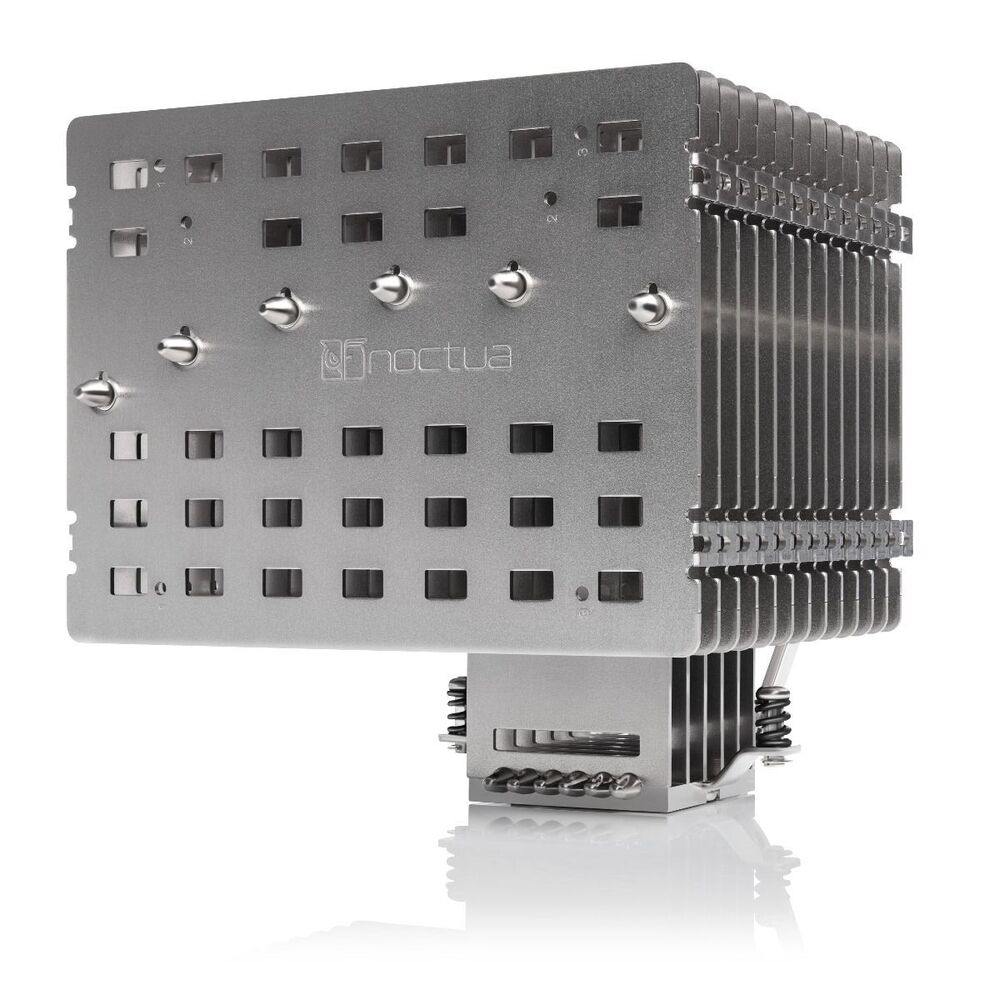
An easy glimpse on the Noctua NH-P1 is sufficient for anyone to realize this is no run-of-the-mill PROCESSOR cooler. To commence with, the pure proportions of the NH-P1 are huge beyond comparison. In 15. 8cm by 15. 4cm by 15. 2cm (essentially a 6. 5-inch cube), the NH-P1 dwarfs typical tower system coolers – that are already pretty large – taking around three times the volume of the full assembled NH-U12S. As well as one. 1,18kg weight makes it heavier than some laptop computer systems.

Considering both the size and the nature of the Noctua NH-P1, it is bound to face compatibility issues with both systems and cases, as well as limited suitability with CPUs. In order to that end, Noctua provides detailed suitability tables that include both system components and PC instances, to help purchasers get an improved idea in advance over where the plus-sized unaggressive cooler can fit.
Case compatibility apart, the NH-P1 facilitates practically all modern CPU sockets, including Intel’s LGA-11xx/1200 outlet and latest LGA-1700 socket, as well as AMD’s outlet AM4. Threadripper is left out in the cold, nevertheless , as it would not have to get possible for the NH-P1 to handle the extreme thermal requirements such a high-end processor chip.Noctua NH-P1
6 heatpipes are in charge of transferring the mass of the heat energy created by the CPU on to the fins of the cooler. The particular heatpipes begin with the base of the cooler, positioned exactly in parallel to one another, and extend to a single side of the bottom towards the top half the fins in a symmetric fan design. They are made out of copper mineral but are completely nickel-plated to prevent surface corrosion.
The particular base of the NH-P1 is almost typical for any modern heatpipe-based chillier, with the exclusion that six of the fins lengthen and are straight attached to the bottom itself. This is mostly to raise the mechanical strength of the NH-P1, as the colossal b array could hardly be reliably maintained the heatpipes alone. However it may also be playing a little part in the thermal performance of the chillier as well by allowing some heat energy to move directly from the bottom towards the bout.
The Noctua NH-P1 are designed for loads lower than 100 W rather well. The particular temperatures will be high, but modern processors should gladly operate at temps up to 50°C above ambient : assuming that the interior temperature of the PC situation is actually near that of an average home room (~22°C). Extented loads more than 120-140 Watts will have the temperature delta widening too much for the NH-P1 to keep a chip from thermally throttling. The good news is that modern CPUs are designed to manage just such a thing (see: almost any compact laptop in the final decade), but our testing equipment is another story: we had to stop our testing after 200W in order to avoid harmful our equipment.Noctua NH-P1

All of us should explain again that these results require excessively extented testing time than normal, as the thermal inertia of the NH-P1 is outworldish. For typical PCs, where the CPU is not constantly running at full load, the thermal performance of the NH-P1 is bound to seem to be far better. Still, we would not recommend using it on infamously hot cpus and/or on an overclocked processor. Believe something closer to AMD & Intel’s standard 65W components, rather than their extreme K/X components. Video: YouTube/Noctua

Noctua any of the most reputable PC cooling manufacturers for a reason: their products typically are well-designed along with excellent quality. The particular Noctua NH-P1 is no exception to that particular tip, and the time of its release definitely is not coincidental. For example, with AIO chillers becoming increasingly popular over the earlier few years, typical PC cases nowadays are somewhat larger and roomier, which allowed for the NH-P1 to greatly lengthen its abiliyy table, as it would unfit the width of countless aged case designs.

Employing a passive CENTRAL PROCESSING UNIT cooler does have disadvantages, the most significant being the (relatively) low thermal performance. Typically, the Noctua NH-P1 triumphs over that issue, with the cooler offering passable thermal performance for almost all modern computer PC processors. It is steady-state thermal amount of resistance is comparable to regarding a basic stock CPU cool but its cold weather inertia is huge, meaning that it can maintain good operating temperatures under typical operational circumstances, for the reason that processor will only be confronting near-maximum loads for short amounts of time. This kind of massive thermal masse comes from the respectively huge size of the Noctua NH-P1, which limits the compatibility of the cooler and greatly increases its making cost.

SecuFirm2+™ Torx-based multi-socket mounting system

Noctua’s SecuFirm2™ mounting systems have become synonymous with quality, safety and easy installation. Torx-based, the professional SecuFirm2+ version with its included screwdriver provides even better handling and durability. Socket support includes Intel LGA1200, LGA115x (LGA1150, LGA1151, LGA1155, LGA1156) and LGA20xx (LGA2066, LGA2011-0, LGA2011-3), as well as AMD AM4, AM3(+), AM2(+), FM2(+) and FM1.

In words of quality, Noctua never disappoints. In the event anything, their products have proven to be the standard for how top-tier designers and manufacturers should practice their business. The NH-P1 is very sophisticated mechanically, excellently set up, which is built from premium materials, all as we’d expect from a luxurious Noctua product. Nonetheless designing and building such a advanced system is costly, and that is mirrored by the $110 price tag of the Noctua NH-P1. Typically the sheer mass of the NH-P1 concludes up as a major factor here, as the costs of the virtually a split kilo of additional machined copper and aluminum needed to build such a sizable heatsink tally up quickly.Noctua NH-P1

Ultimately, it is clear that Noctua does not have the well known market in head, but instead is going after state-of-the-art users who understand and accept the implications of employing a passive cooler. Owing to that the NH-P1 is certainly much a niche market product, but they have also a product that fills that niche well. Making quiet PC systems has always recently been a popular design choice, and that ending Noctua’s NH-P1 should find itself right at home in the private PC community. Photo: Noctua

Noctua model NH-P1 CPU Cooler Specs:

Height 158 mm
Width 154 mm
Depth 152 mm
Weight 1180 g
Supported Sockets Intel: LGA1700, LGA1200, LGA1156, LGA1155, LGA1151, LGA1150, LGA2066, LGA2011-0 & LGA2011-3 (Square ILM)

AMD: AM4, AM2, AM2+, AM3, AM3+, FM1, FM2, FM2+ (backplate required)

Warranty 6 Years
Price $110

The Basic Types of Cloud Computing

0

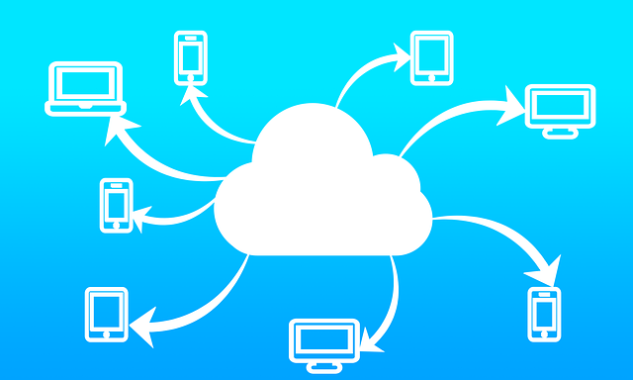
When we talk about the types of cloud computing, this can refer to two different things. One way to look at cloud computing is to focus on what the technology is used for. Most of this article focuses on this, but first we need to look at cloud computing in terms of architecture.

Software (SaaS) – If you’re not a cloud provider or developer, SaaS is the most common type of cloud computing you’ll find. Almost all types of cloud computing that we are going to discuss below are an example of SaaS and are aimed at end users.
Remote computer rental
If you need access to a computer in a data center, you can pay for exclusive or shared access. This is exactly the same as using a remote desktop to access your home computer from, say, a tablet. The difference is that you don’t have to pay for the equipment, you don’t have to maintain it, and all the other headaches of what’s available to you 24/7 are taken care of by someone else for a single fee. This is a popular choice for people who need access to certain types of hardare For example, you can rent a cloud Mac, or maybe you need a super-fast computer.

Cloud Computing
Photo: Pixabay

Cloud native applications
A cloud-native application runs on a cloud computing infrastructure and was developed from the beginning to work this way. Therefore, running Microsoft Word on a virtual machine that you are renting in the cloud is not an example of a cloud-native application. However, the Office 365 application. The same goes for applications like Gmail and most of the cloud-based services you use every day.
Cloud storage
Cloud storage is a easy and simple concept. Instead of saving the files to a computer hard drive or to a local external hard drive, you save them using a cloud service on a remote computer.
Most cloud storage services are much more than an external drive in the sky. Your data is stored in accordance with international standards, including storing multiple redundant copies in physically separate locations. Cloud storage services also offer additional features, such as the ability to search for files or edit them in the cloud.
Examples of cloud storage include Google Drive, Microsoft OneDrive, Dropbox.
Entertainment streaming services
These services not only send content to your device on demand, but dynamically adjust the quality based on your Internet connection. These services also closely monitor what you do with the service, so that they can make recommendations based on your personal data and those of other users.
You can also stream video games. You don’t need to buy a console or build a gaming PC, just pay to use a service like X They work with tablets, smart TVs or anything with the support of the bro bro Cloud games are still very new, so not all bugs have been fixed. However, if you have excellent internet connectivity, it is worth a try now.
Platform as a service (PaaS)
If you want to develop applications in the cloud, but do not want to keep the operating systems or development environment in the cloud, you need PaaS. They will provide you with the tools you need to build your cloud service or app.

HDD vs. SSD – Differences and advantages

0

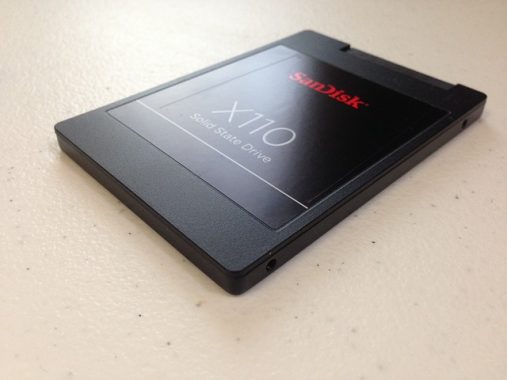
Solid state drives (SSDs) are auxiliary storage drives, such as hard disk drives (HDDs). They are not volatile, that is, they retain data even after the device is turned off. SSDs use micro chip reminiscence for storage, which is absolutely different from the technology used by hard drives and other magnetic storage media, which have a moving head. The moving head incurs the search time, which is eliminated on SSD.

Performance:
Solid-state drives are tremendously faster, up to 20x – 25x

Factors influence performance:
Two factors that affect the overall performance of the device.

SSD vs HDD
SSD Photo: Pixabay

Latency:

On hard drives, the time it takes for the read/write head to position itself only in the sector (segments of a track) containing the details is defined as latency.
Accessibility time:

The time it takes to send the request for information and receive a response.

SSD vs HDD:
When evaluating SSD vs HDD, we can say that the access time and latency of SSDs, attributed to the lack of a transfer head, are much lower than those of HDDs, giving it a performance advantage.

Fragmentation:
Hard drives tend to slow down due to fragmentation. This is not the case with SSDs, which are not affected by fragmentation.

SSD vs HDD problems:
Hard vertebral discs have a movable head, which moves at high speed. This creates a lot of heat and noise on the disk. This also consumes a lot of electricity.

The lack of moving head in SSD calms him down. In addition, it consumes much less energy.

Duration:
Hard drives are vulnerable to head shock, which occurs when the transfer head comes into contact with the platter. This can cause damage to the device and thus data loss.

SSDs, on the other hand, are durable.

Cost issues:
SSDs were very expensive when they first arrived. Then the charges dropped considerably . Even immediately after their tariffs are reduced, SSD drives are still expensive.

Although you can get them at the same price, the actual price of the device, i.e. the cost per 1 GB of memory in the case of SSDs, is much higher than in the case of hard drives.

SSD vs HDD
HDD Photo: Pixabay

Conclusion:
SSDs are fast, that’s a fact. But not everyone could afford it. Hard drives are cheaper, but slower. Wouldn’t it be nice if SSD performance could be achieved at the price of hard drives? Well, there’s a way to do it.

Multiple hard drives can be used in variet ridond They are used in large data stores, where reliability and performance are required. This can be replicated to meet our national needs.

By having a combination of SSD and HDD, you can save money while having faster input speeds.
This method also has other advantages. By using SSD for OS and other installation files and HDD to store media files, you could get the performance and in case of damage to one of the devices, the data on the other device is intact. Since SDDs are more durable and less vulnerable to damage, you won’t have to worry about your important data.

Audioengine HD6 aptX-HD Bluetooth premium speakers

0

Audioengine is really serious concerning the sound of your own music. Their valuable HD6 powered bookshelf speakers provide outstanding sound quality. And they’re flexible enough to use with just about any sort of source – turntable, personal computer, or TV. You can also stream through Bluetooth from your smartphone or tablet. And the speakers look as very good as they sound – they’re housed in tough, low-vibration MDF cabinets with hand-polished furniture level finishes. Removable magnetic grilles let you either cover up the speakers, or show them off in all their old style magnificence.Audioengine HD6 Wireless Speakers

Easy setup
The Audioengine HD6 Wireless Speakers system can be set up in a few minutes. Connect the left channel speaker, which includes the system’s amplification, directly into an AC outlet. Then run the supplied connector cable to the right channel speaker. After that connect your sound sources.

The HD6 has optical digital input for TV audio. It furthermore has an RCA stereo input for your turntable with built/in preamp or some other audio component. A stereo mini-jack allows you connect practically any kind of portable device. Or you can go wireless by using Bluetooth.

Bluetooth 5.0 with aptX-HD®
The Audioengine HD6 Wireless speakers uses aptX-HD, an superior type of Bluetooth wireless streaming. It enables suitable devices to stream audio signals at close to CD quality. The system also operates with earlier forms of Bluetooth. For that reason, you can play your tunes wirelessly from almost any portable device. You receive an powerful wireless range of up to 100 feet. Photo: Audioengine

Top quality drivers and amplification
Every single Audioengine HD6 speaker features two custom drivers: a 1” silk dome tweeter for crystal clear, precise levels, and a 5-1/2” Kevlar woofer for nice and clean, precise mid-range and stable bass. An RCA line-level output lets you connect a powered subwoofer – such as the Audioengine S8 – for quite possibly deeper lows. The left and right speakers are each one driven by a 50-watt Class A/B monoblock amplifier, for sound that is clear, punchy, and fast. The amplifiers are supplied with constant current by a toroidal transformer for most effective overall performance.Audioengine HD6 Wireless Speakers

Audioengine HD6 Wireless speakers specs:


  • Type
    Powered Bluetooth aptX HD speaker system

    Amplifier Type
    Class AB

    Power Output
    150 W peak power total (50 W RMS / 75 W peak per channel), AES

    Drivers
    5.5″ aramid fiber woofers

    1″ silk dome tweeters

    Inputs
    3.5 mm stereo mini-jack, RCA L/R, digital optical (SPDIF,) Bluetooth aptX

    Outputs
    RCA variable line-out

    Input Voltages
    115/240 V, 50/60 Hz manually switchable

    SNR
    >95 dB (typical A-weighted)

    THD+N
    <0.05% at all power settings

    Crosstalk
    <50 dB

    Frequency Response
    50 Hz-22 kHz ±1.5 dB

    Analog Input Impedence
    48K ohms unbalanced (mini-jack and RCA inputs)

    Protection
    Output current limiting, thermal over-temperature, power on/off transient protection, replaceable external main fuse

    Power Consumption
    Idle: 10 W
    Mute: 6 W
    Sleep: 4 WAudioengine HD6 Wireless Speakers

  • BLUETOOTH SPECIFICATIONS

    Internal D/A Converter
    AKM AK4396

    Input Bit Depth
    24 bit (padded)

    Bluetooth Receiver Type
    Bluetooth 5.0

    Supported Codecs
    aptX HD, aptX, AAC, SBC

    Wireless Operation Range
    Up to 100 ft (30 m) typical

    Input Data Rate
    Determined by Bluetooth

    Wireless Latency
    ~30 milliseconds (ms)

  • OPTICAL SPECIFICATIONS

    Internal D/A converter
    AKM AK4396

    Input Bit Depth
    up to 24 bit native

    Sample Rate
    up to 192 kHz native

  • WEIGHTS AND MEASURES

    Dimensions (HWD)
    Left speaker (active)
    Dimensions: 11.75″ (30 cm) x 7.25″ (18.5 cm) x 10″ (25 cm)
    Right speaker (passive)
    Dimensions: 11.75″ (30 cm) x 7.25″ (18.5 cm) x 10″ (25 cm)

    Weight
    Left (active) – 17.5 lb (8 kg)
    Right (passive) – 12.5 lb (5.5 kg)

    Total Shipping Weight
    33.5 lb (15 kg)

    Shipping Box Dimensions (LWH)
    20″ (51 cm) x 15″ (38 cm) x 17″ (43 cm)

Pioneer SC-LX904 Dolby Atmos AV Receiver – Clean and natural sound

0

The Pioneer SC-LX904 is a high-end AV receiver designed for home theater enthusiasts. It delivers high-quality audio and comes with advanced features like 4K upscaling, HDR10, Dolby Vision, and HLG, as well as support for Hi-Res Audio, Bluetooth, and Wi-Fi. However, it is an expensive and large receiver that may be overwhelming to set up for some users, and it has limited network streaming services.

11.2 channels for greatest Atmos and DTS:X
The Pioneer SC-LX904 delivers unique overall flexibility in Pioneer’s range. For the best Dolby Atmos system, this range topping Pioneer lets you set up 4 ceiling or Atmos-enabled audio speakers as well as total 7-channel surround sound. Additionally, use two Atmos speakers and get pleasure from a broad soundstage with ‘front wide speakers’ collecting a 9.2.2 system. If you don’t fancy a Dolby Atmos specific system but want the most immersive sound achievable, go for an 11.2 configuration. This provides 7.2 sound with the addition of front width and height audio speakers.

The receiver’s vivid display and wide buttons make its front panel incredibly easy to use. The buttons click satisfyingly to give feedback. Even in dim lighting, the wide display is simple to read.The receiver’s rear panel is equally as well-designed as its front panel. Every input and output has a clear label and is accessible.
Eight HDMI inputs, three HDMI outputs, Hi-Res Audio playback, and integrated Wi-Fi and Bluetooth are among the features of the Pioneer Elite SC-LX904. Additionally, the front panel has a USB port that facilitates the simple connection of a thumb drive or portable hard drive. I managed to connect a laptop, a turntable, a TV, a PlayStation, and a smartphone.

All the surround formats – which includes IMAX Enhanced
With wide-ranging surround sound assistance, the SC-LX904 has your option of format covered – however a lot of speakers you use. Suitable formats include Dolby Atmos, Dolby Atmos Height Virtualization Technology, DTS:X, DTS Neural:X and IMAX Enhanced. This large range of choices implies you can adjust your surround sound speaker system from the most basic system with ‘virtual height’ speakers to a full-blown 11.2 system that really bring the cinema home.Pioneer SC-LX904

215 watts of beast power
Providing up a mighty 215 watts (at 6 ohms) of real power, the Pioneer SC-LX904 highly recreates the sound of cinema. For improved effectiveness, the SC-LX904 uses Pioneer’s Class D Direct Energy HD amp. Pioneer’s Class D amplifiers also use short, direct signal ways. By getting rid of filters, feedback loops and existing limiters, the sound quality is both less unbalanced and more vibrant.

Digital precision from double ESS PRO DACs
With twin ESS ES9026PRO DACs (Digital to Analogue Convertors) used for all channels, the SC-LX904 provides studio quality digital audio. With a high signal-to-noise ratio and wide dynamic spectrum, digital audio advantages from ultra-low levels of noise and deep, effective dynamics. No matter whether watching a Blu-ray film or listening to streamed music, the advantage to all digital audio is wonderful to hear.

Jitterless sound transmission and processing for ultra-low distortion
Pioneer’s sophisticated PQLS (Precision Quartz Lock System) jitter reduction system guarantees a clean and natural sound top quality when connected to a suitable Pioneer disc player. In addition to PQLS, the Pioneer SC-LX904 is additionally equipped with PQFA (Precision Quartz File-based Audio) for ideal sync with your network/USB-based music files.Pioneer SC-LX904

Famous Pioneer SC-LX build quality
Fastidious focus to fine detail shown in the Pioneer’s building offers it high class sound quality. Featuring an Anti-Standing Wave Insulator and Rigid Trans-Stabiliser, the heavy weight casing isolates the very sensitive electronics from mechanical and electrical interference. This delivers a purity of sound that only the very best AV receivers can match.

Equipped for full-on systems
Featuring 6 HDMI inputs at the backside, as well as a further front-mounted socket, the SC-LX904 is equipped for full-on systems. 3 HDMI outlets include a second, Zone 2, for independent outputs. The SC-LX904 goes over the more standard models in also providing component and composite video inputs for older devices.

3 zone, multi-room flexibility
Using a 5.1.2 channel Atmos system in play, you can still use the extra channels to add two more powered zones. Zone 2 and Zone 3 can either be synced with the primary signal for ‘party’ sound or play from separate sources – giving the SC-LX904 true multi-room appeal. Passive outputs for Zone 2 and 3 are also available should you currently have amplification or dynamic speakers.

Stream it your way, with Apple AirPlay 2 and ‘Works with SONOS’
A lot more than only an AV receiver, the SC-LX904 is also a complete music streamer. Apple AirPlay 2 is standard as is ‘Works with SONOS’. Integrated Amazon Music, Spotify (Premium account required for full features), TIDAL and Deezer are all typical. There’s also Chromecast, FlareConnect and DTS Play-Fi plus TuneIn for Internet radio and Bluetooth music streaming.

Works with Apple AirPlay 2
AirPlay 2 takes this popular wireless streaming format and can make it much better. Manageable by simply asking Siri or using your Apple device, AirPlay 2 lets you gracefully stream music and podcasts all-around your home – and all in excellent sync.

Operates with SONOS
Link up to a SONOS Connect and the SC-LX904 becomes built-in into your SONOS system. You can group the receiver with other SONOS devices or use it separately. Working with SONOS means as soon as you start playing music from your SONOS application, the Pioneer switches on and chooses the proper input – automatically.

Chromecast with Google Assistant
Chromecast helps you stream music, podcasts and audio applications, including Google Play, at the touch of a button. Additionally, use Google Assistant and this Pioneer AV receiver becomes part of your voice controlled smart home.

Pioneer SC-LX904 AV receiver – Here are some of its pros and cons:

Pros:

  • High-Quality Audio: The SC-LX904 delivers excellent audio quality thanks to its Class D3 amplifier and the ability to support high-resolution audio formats like Dolby Atmos and DTS:X.
  • Advanced Features: This receiver comes with advanced features like 4K upscaling, HDR10, Dolby Vision, and HLG, as well as support for Hi-Res Audio, Bluetooth, and Wi-Fi.
  • Easy to Use: The receiver features an intuitive interface that is easy to navigate, with clear on-screen menus and a well-designed remote control.
  • Multi-Room Capabilities: The SC-LX904 supports multi-room audio and video playback, allowing you to stream audio and video content to multiple rooms simultaneously.

Cons:

  • Expensive: The SC-LX904 is an expensive receiver, making it less accessible to budget-conscious buyers.
  • Complex Setup: The receiver has a lot of advanced features that may be overwhelming to set up for some users.
  • Large Size: The SC-LX904 is a large and heavy receiver, which may make it difficult to fit into some home theater setups.
  • Limited Network Streaming Services: The receiver supports some popular streaming services like Tidal, Deezer, and Spotify, but it does not support others like Apple Music, Amazon Music, or Pandora.

The innovative SC-LX904 does cover the 1st feature that buyers are searching for, power. The Direct Energy HD Amplifier has now achieved the 6th generation and includes new power coils as well as new customized film capacitors co-developed with Shinyei Capacitor for which Pioneer states will provide the greatest sound. The power supply and patterning has been made via repeated tuning. Furthermore, the whole transmission path from the pre stage to the power stage has been transformed to well balanced circuitry, to transmit near noise-free top quality signals to the power stage. The receiver offers a Class D3 (Direct Energy HD) amp with 140 W x 11ch (8 ohms, 1 kHz, THD 0.08 %, 2ch Driven FTC).

Supports HDR10, Dolby Vision, HLG and BT.2020 standards
The Pioneer SC-LX904 is the ideal companion for your HDR-equipped TV and video sources. It supports HDR10, Dolby Vision, BT.2020 and HDCP 2.3, which implies you can play UHD Blu-ray discs and stream UltraHD video in the top quality. The HDMI sockets allow 4K pass-through, for hassle free switching and viewing without the receiver requiring to be powered up. Photo: Pioneer

Is it a good choice to buy?

  • Yes, if:
    • You prioritize top-notch sound quality and have a high-end home theater setup.
    • You need extensive channel support for immersive formats like Dolby Atmos.
    • You’re satisfied with HDMI 2.0 capabilities and don’t need HDMI 2.1 features.
  • No, if:
    • You’re on a budget or have a small to mid-range system.
    • You require the latest gaming or video features that rely on HDMI 2.1.

If the Pioneer SC-LX904 fits your needs and budget, it’s a fantastic choice for an advanced AV receiver. If not, newer models from Denon, Yamaha, or Marantz might provide similar or better features with more up-to-date specs.

Have fun with the best of the best, with the Pioneer SC-LX904.

Pioneer SC-LX904 specs:

AMPLIFICATION

Channels: 11

Amplification Type: Class D (Direct Energy HD)

215 W x 11ch (6 ohms, 1 kHz, THD 1 %, 1ch Driven IEC)Pioneer SC-LX904

CONSTRUCTION DESIGN

Advanced Direct Construction

Rigid Trans-Stabilizer

Anti-Standing Wave Insulator

AC Inlet Type Thick Cable

AUDIO FEATURES

IMAX Enhanced

Dolby Atmos®, Dolby Surround Upmixer

DTS:X®, DTS Neural:X® Upmixer

Reflex Optimizer

Dolby Atmos Height Virtualizer

Dolby® TrueHD, Dolby Digital Plus

DTS-HD Master Audio, DTS-HD High Resolution Audio, DTS 96/24, DTS-ES, DTS Express

DSD Direct Playback via Network/USB (11.2, 5.6, 2.8 MHz/2 ch)

DSD Disc (SACD) Playback via HDMI (2.8 MHz/2 ch, 5.1 ch)

Digital Quad-Core 32-bit DSP (Cirrus Logic) + Aureus™ floating-point DSP (TI)

384 kHz/32-bit D/A Conversion with ES9026PRO x 2

Enhanced Audio Return Channel (eARC) on HDMI

MCACC Pro Auto Room Tuning

  • Full Band Phase Control
  • Precision Distance
  • Subwoofer EQ
  • Multi-point Standing Wave Control

PQLS Jitterless Sound Transmission

PQFA Jitterless Sound Processing for Network/USB

Audio Exclusive Mode

AV Direct Mode

Advanced Sound Retriever (2ch)

Advanced Surround Modes

  • Classical, Unplugged, Entertainment Show, Drama, Advanced Game, Action, Rock/Pop, Sports, Extended Stereo, Extended Mono, Front Stage Surround Advance

VIDEO FEATURES

Ultra HD Pass-through with HDCP 2.3 (4K/60p/4:4:4/24-bit, 4K/24p/4:4:4/36-bit, 4K/60p/4:2:0/36-bit)

HDR10, HLG, BT.2020 Compliant Wide Colour Gamut and ALLM (Auto Low Latency Mode) Signal Pass-through

Dolby Vision™ Compatible

Ultra HD Upscaling (1080p to 4K)

3D Ready (Blu-ray Disc™, Broadcast, and Games)

Deep Colour (36-bit), “x.v. Colour”

HOME NETWORK FEATURES

FlareConnect™ for Multi-room Audio

Works with Alexa supporting multi-room music

Chromecast built-in and Works with the Google Assistant

DTS Play-Fi supporting Critical Listening mode with Pioneer Music Control App

Apple AirPlay 2

Roon Tested

Works with SONOS supporting multiple Sonos Connect control and Volume Pass Through mode

Amazon Music, Spotify, TIDAL, and Deezer Hi-Fi Music-Streaming Services and Internet Radio with TuneIn Ready

Hi-Res Audio File Playback via USB/Network

  • Up to 192 kHz/24-bit ALAC*5, AIFF, FLAC, WAV (RIFF) and 11.2 MHz DSD

CONVENIENCE FEATURES

Personal Preset

Dialog Enhancement

Dual Band (5 GHz/2.4 GHz) 802.11ac Compliant Wi-Fi® Built-in

Bluetooth® Wireless Technology (Version: 4.2, Profile: A2DP 1.2/AVRCP 1.3, Codec: SBC/AAC) Built-in

Pioneer Remote App Ready for Multi-room Entertainment Control and Network Streaming

User-Friendly GUI with System Setup Menu

On-Screen Information for Audio/Video Status

PC Setup

Auto Power Off in HDMI Standby Through

AM/FM Tuner 40 Presets

Sleep Timer

Self-Illuminating Remote Control

FRONT TERMINALS

HDMI 1 In

USB 1 In for USB Drive

MCACC Setup MIC In

Phones 1 Out

REAR TERMINALS

HDMI 6 In (4 Assignable)

HDMI 3 Out (1 for MAIN, 1 for SUB, 1 for ZONE 2)

Ethernet 1 In

USB 1 In for USB Drive

AV (Component) 2 In (Assignable)

AV (Composite) 2 In (Assignable)

Audio 6 In (Assignable)

Phono (MM) 1 In

Digital Coaxial 2 In (Assignable)

Digital Optical 3 In (Assignable)

Subwoofer x 2 Pre Out

ZONE B Line Out for Wireless Headphones

ZONE2/ZONE 3 Pre/Line Out

Speaker 11ch Out (FRONT, CENTER, SURROUND, SURROUND BACK, HEIGHT 1, HEIGHT 2)

IR 2 In/1 Out

12 V Trigger 2 Out

RS-232C

FM/AM Antenna

SPECIFICATIONS

Power Requirements: AC 220-230 V, 50/60 Hz

Power Consumption/Standby: 340 W/0.2 W

Dimensions (W x H x D): 435 x 185 x 440 mm

Weight: 18.5 kg

The best way to produce a powerful and effective infographic

0

One of the biggest mistakes marketers make is thinking that a strong graphic design will compensate for a weak infographic structure. They often hire a designer and give them responsibility for research and planning. The result is a beautiful infographic that is deeply boring and practically useless.

Of course, if the design is so bad that you can not bear to see it, then it’s a bad sign. Therefore, it is worth investing in a quality design, but this is of secondary importance to plan the piece well.

A well-planned infographic with great design is almost guaranteed to succeed, so let’s see how you should describe your new infographic.

This is a summary of the process:

1. Write a short powerful title

When writing infographic headlines, you need to forget what you know about writing headlines and article headlines. For infographics, the title should look more like the title of a novel or movie.

Movies and novels have short titles full of emotions. They create a sense of intrigue and mystery. When they are well written, they tell you exactly what kind of story you will read, often in 4 words or less.

infographic
Photo: Pixabay

Here are some examples of extremely well written movie titles:

Star Wars
taxi driver
Kung Fu Panda
Around the world in Eighty Days
When you read these headlines, you have a good idea of what the story will cover. If you like animals and martial arts, you know that you will enjoy Kung Fu Panda. If you hate science fiction, you won’t like Star.

Books and films are sold by the strength of their titles. Sometimes, people take the time to read reviews or watch trailers, but most of the time, it’s the title that sells the show.

You need to apply the same thought to your title. You only have a small space to write your title, so make it count!

Fortunately, since your infographic tells a story, it will be very easy to find a suitable title.

2. Solve the structure of the story

A story is made up of pieces that go together one after another, and form one whole. Every story is a journey from the beginning to the end.

When it comes to an infographic, your story will consist of a series of points that lead to a conclusion. And if you want to attract the attention of your readers and motivate them to take action, there is a very specific formula that you must fulfill.

I’m talking about AIDA’s formula. AIDA means:

3. Choose between 6 and 10 data points to back up your story

4. Now the visual theme for the infographic

Finally, you need to decide on a visual theme that will unite the infographic and unify it. The last thing you need is a jarring collection of unrelated images. Instead, you want graphics that complement each other and convey the story. At the same time, choosing the visual theme can increase the emotional impact of your story.

Start by identifying the general mood of your infographic.

Then, choose images that represent the ideas you want to convey, evoking mood and emotional points.

For example, let’s imagine that our site is about cloud computing. We want to create an infographic about how large organizations are wasting money when building expensive server rooms. They only need the computing power at peak times, but they have to pay for the equipment all the time.

Our reader profile tells us that our target audience cares about reducing costs. But they also worry that they can not cut their IT expenses without losing the ability to deal with busy times.

We focus on reducing costs, but we also try to trigger emotions of anxiety. We want to move from anxiety to a feeling of calm and hope at the end of the article.

As for the images, the idea that comes to mind is that of a ferocious monster that eats money. So why not turn a server into a monstrous, money-devouring oven? He may have a mouth full of flames instead of teeth. This works well for me, because people have to do everything they can to keep the servers cool and ventilated. So it’s not an exaggerated imagination to imagine yourself as an oven.

This would be the dominant image. Now the other images used throughout the infographic would be chosen to support the metaphor. And, as the story unfolds, the terrifying monster would eventually be defeated and replaced by a quiet scene with clouds (because the solution is cloud computing).

Now, just by taking a look at these images, you get the overall arc of the story, you understand the point we are trying to make, without supporting words or graphics. And you get the emotional triggers right from the start. With the rest of the infographic, we will support these points with visual facts of impact.

After planning the infographic in this grade, you are ready to hand it to your designer with precise instructions. This allows them to focus on their skill set and produce a powerful and effective infographic.