

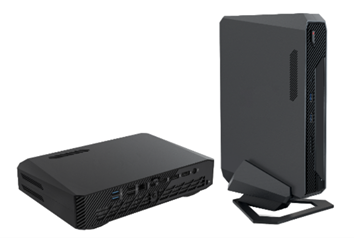
ASUS has unveiled the ASUS NUC 14 performance, a versatile mini PC designed to combine efficiency and raw power, making it ideal for business environments. Equipped with Intel® Core™ Ultra 9 or 7 processors and NVIDIA® GeForce RTX™ 4070 or 4060 graphics, this compact powerhouse is built to handle AI-driven tasks seamlessly.
Enhanced AI Performance
The Intel Core 9 and 7 series processors incorporate advanced Intel technology, boosting computing performance by approximately 21.5% compared to previous generations while cutting power consumption by up to 40%. The inclusion of a Neural Processing Unit (NPU) significantly enhances energy efficiency and performance for AI applications, such as image generation and facial recognition.
Superior Graphics Capabilities
The NVIDIA GeForce RTX 4070 graphics card, based on the efficient NVIDIA Ada Lovelace architecture, along with up to 64 GB RAM, delivers rapid ray-tracing and accelerates the performance of multiple programs, providing a seamless and immersive user experience.
Extensive Multi-Display Support
The ASUS NUC 14 Performance supports up to five displays, utilizing an HDMI® 2.1 port, two DisplayPort™ 1.4a ports, and two Thunderbolt™ 4 ports (with an optional Thunderbolt splitter adapter). This configuration is perfect for AI developers, fintech professionals, lab technicians, and business leaders who require efficient multitasking across multiple real-time applications. Additionally, the mini PC is equipped with six USB ports for enhanced connectivity.
Customizable and Adaptable Design
The ASUS NUC 14 Performance is a NUC Kit, allowing for extensive customization as it comes without a pre-installed operating system, RAM, or SSD. This flexibility enables users to tailor the mini PC to their specific requirements. Its logo-free design permits the addition of corporate branding, and the included stand supports both vertical and horizontal placement for optimal positioning.
Specifications
ASUS NUC 14 Performance
CPU
- Intel® Core™ Ultra 7 155H Processor
- Intel® Core™ Ultra 9 185H Processor
Chipset
- Integrated
Accessories
- AC adapter and power cord
- Warranty card
- Quick start guide
- Vertical stand
Graphics
- Integrated: Intel® Arc™ Graphics
- Discrete: NVIDIA® GeForce RTX 4060 / 4070
Wireless Data Network
- Intel® Killer™ WiFi 6E (Gig+) 2×2 + Bluetooth® 5.3
LAN
- 10/100/1000/2500 Mbps, 2.5 Gbps Intel® LAN
Audio
- Realtek / ALC256
Front (Side) I/O Ports
- 1 x SD Express 8.0 card reader (UHS-I support)
- 2 x USB 3.2 Gen 2 Type-A
- 1 x audio jack (Line out / Mic in / Headphone out / Headset)
Back I/O Ports
- 1 x Thunderbolt™ 4/ USB4® port (supports DisplayPort™ 2.1 and 5 / 9 / 12 V fast-charging profiles)
- 2 x USB 3.2 Gen2 Type-A
- 2 x USB 2.0 Type-A
- 1 x HDMI®
- 2 x DisplayPort™ 1.4a
- 1 x 2.5 Gbps RJ45 LAN
- 1 x DC-in
- 1 x Kensington lock slot
Power Supply
- 330 W power adapter
Dimensions (W x D x H)
- 270 x 180 x 50 mm (~2.5 liters)
Weight
- 2.6 kg