Home Blog Page 21

PDF Format: Best Software, Alternatives, & How to Write on a PDF

0

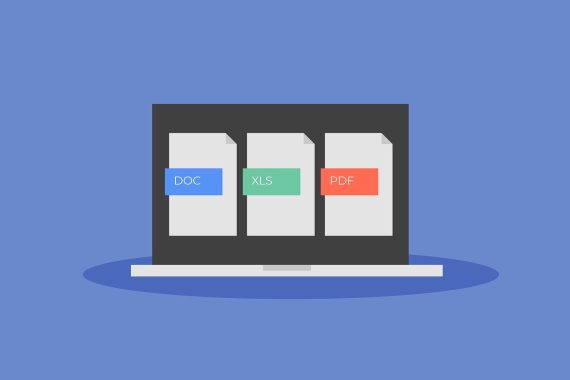
The PDF (Portable Document Format) is a file format created by Adobe Systems in 1993, which is used to present documents, including text and images, in a manner independent of application software, hardware, and operating systems. Its primary goal is to preserve the formatting of documents, regardless of the software, hardware, or fonts used by the creator and the recipient of the document. The PDF format has become a standard for document exchange and is widely used across a variety of sectors, from business and education to government and publishing.

Key Features of PDF

One of the defining features of PDF is its ability to encapsulate all the necessary components of a document, including text, images, fonts, and even interactive elements such as forms and hyperlinks. When a document is converted into PDF, the formatting remains consistent across different devices and operating systems. This makes PDFs highly reliable for sharing documents where the exact appearance is important, such as contracts, resumes, technical manuals, or presentations.

Another important feature of PDFs is their ability to support various levels of interactivity. PDFs can include hyperlinks, multimedia elements such as audio and video, and forms that users can fill out electronically. Additionally, PDFs can be secured with passwords, encryption, and digital signatures to protect sensitive content. This makes PDFs highly versatile for both professional and personal uses.

Advantages of Using PDF format

One of the major advantages of the PDF format is its cross-platform compatibility. Unlike formats such as Word documents or Excel spreadsheets, which may render differently depending on the software used to open them, PDFs look the same regardless of whether the document is viewed on a Windows PC, Mac, or mobile device. This makes it an ideal format for sharing documents globally.

The format is also space-efficient. PDF files are generally compressed to reduce their size without compromising the quality of the document. This makes it easy to share large documents over email or upload them to websites without causing long load times or overwhelming storage capacities.

Furthermore, PDF allows for a high degree of customization and flexibility in document presentation. Unlike simple text documents or images, PDFs allow users to include complex layouts, text formatting, and high-quality graphics. This makes PDFs an ideal choice for creating professional-looking brochures, e-books, user manuals, and other documents that require a polished appearance.

Applications of PDF

PDFs are used in a wide variety of contexts. In the business world, they are commonly used for sending invoices, contracts, proposals, and other official documents. The ability to lock a document with a password or encrypt it further enhances its usefulness for handling sensitive business information. Similarly, in government agencies, PDFs are often used to distribute forms, tax documents, and official records, as the format ensures they can be printed or filled out without loss of content.

In education, PDFs are popular for distributing textbooks, study materials, research papers, and academic articles. Their ability to preserve formatting ensures that all diagrams, charts, and images are displayed properly, which is crucial for technical or scientific content.

In publishing, many e-books are distributed in PDF format, especially those that require fixed formatting, such as textbooks, instructional guides, or design portfolios. The consistency of the layout across devices makes it a popular choice for distributing content with complex formatting that needs to be preserved.

History and Importance of PDF

PDF was created by Adobe Systems and officially introduced at the COMDEX conference in 1992. The format was designed to solve the problem of sharing documents between different computer systems while preserving the document’s format and layout. PDFs quickly gained popularity due to their ability to embed fonts, images, and other content types, ensuring that documents appeared the same regardless of the device or software used to view them.

Core Features of PDFs

  • Portability: PDFs can be opened and viewed on any device with a PDF reader.
  • Consistency: The document’s layout, fonts, and images remain consistent across different devices and platforms.
  • Security: PDFs can be password-protected and encrypted, ensuring that sensitive information is kept secure.
  • Interactive Elements: PDFs can include hyperlinks, buttons, form fields, and other interactive elements.
  • Compression: PDF files can be compressed to reduce their file size without losing quality, making them easier to share and store.

    Files Pdf
    photo: pixabay

Best Software for Handling PDFs

Several software options are available for viewing, editing, and managing PDFs. Here are some of the best:

Adobe Acrobat DC

Adobe Acrobat DC is the gold standard for PDF format software. It offers a comprehensive set of tools for creating, editing, converting, and signing PDF documents. Key features include:

  • Editing: Easily edit text and images in PDFs.
  • Conversion: Convert PDFs to and from other formats like Word, Excel, and PowerPoint.
  • E-signatures: Add legally binding electronic signatures to documents.
  • Security: Protect documents with passwords and encryption.
  • Collaboration: Share and review PDFs with others, adding comments and annotations.

Foxit PhantomPDF

Foxit PhantomPDF is a robust alternative to Adobe Acrobat, offering a wide range of features at a lower price point. Key features include:

  • Editing: Edit text, images, and pages in your PDF.
  • Conversion: Convert PDFs to Word, Excel, and other formats.
  • Collaboration: Share and collaborate on PDFs with comments and annotations.
  • Security: Secure PDFs with passwords, encryption, and redaction tools.
  • Form Creation: Create and fill out forms within PDFs.

Nitro Pro

Nitro Pro is another popular PDF software that provides powerful tools for creating, editing, and converting PDFs. Key features include:

  • Editing: Modify text, images, and pages in your PDFs.
  • Conversion: Convert PDFs to and from various formats, including Word, Excel, and PowerPoint.
  • Collaboration: Review and annotate PDFs with others.
  • E-signatures: Add electronic signatures to documents.
  • Batch Processing: Perform batch operations on multiple PDFs at once.

Smallpdf

Smallpdf is a web-based PDF software that offers a range of tools for managing PDFs online. It’s known for its user-friendly interface and ease of use. Key features include:

  • Conversion: Convert PDFs to and from other formats.
  • Compression: Reduce the file size of PDFs.
  • Editing: Edit PDFs by adding text, images, and shapes.
  • E-signatures: Sign PDFs electronically.
  • Security: Secure PDFs with passwords.

PDFelement

PDFelement by Wondershare is a versatile PDF software that combines powerful features with an intuitive interface. Key features include:

  • Editing: Edit text, images, and pages in PDFs.
  • Conversion: Convert PDFs to and from other formats.
  • Form Creation: Create and fill out forms.
  • OCR: Perform optical character recognition to convert scanned documents into editable text.
  • Security: Protect PDFs with passwords and encryption.

Alternatives to PDF Format

While PDFs are incredibly versatile, there are alternative formats that might be better suited for specific needs. Here are some common alternatives:

Microsoft Word (DOC/DOCX)

Microsoft Word documents are widely used for creating and editing text-based documents. They are ideal for documents that require frequent updates or collaboration. Key features include:

  • Editing: Advanced text editing and formatting options.
  • Collaboration: Real-time collaboration with track changes and comments.
  • Integration: Seamless integration with other Microsoft Office applications.
  • Compatibility: Can be saved in various formats, including PDF.

EPUB

EPUB is a popular format for eBooks and digital publications. It is designed for reflowable content, meaning that the text adjusts to fit different screen sizes. Key features include:

  • Reflowable Content: Text adjusts to different screen sizes and orientations.
  • Interactivity: Supports multimedia elements, hyperlinks, and interactive content.
  • Accessibility: Designed with accessibility features for readers with disabilities.
  • Compatibility: Supported by most eBook readers and software.

HTML

HTML is the standard format for creating web pages. It is ideal for content that will be viewed in a web browser. Key features include:

  • Interactivity: Supports multimedia elements, hyperlinks, and interactive content.
  • Accessibility: Designed with accessibility features for users with disabilities.
  • Flexibility: Can be easily updated and modified.
  • Compatibility: Supported by all web browsers.

Google Docs

Google Docs is a web-based word processing tool that allows for real-time collaboration. It’s ideal for documents that require multiple contributors. Key features include:

  • Collaboration: Real-time editing and collaboration with comments and suggestions.
  • Integration: Integrates with other Google Workspace applications.
  • Accessibility: Accessible from any device with an internet connection.
  • Compatibility: Can be saved in various formats, including PDF and DOCX.

How to Write on a PDF format

Writing on a PDF can involve adding text, annotations, comments, or filling out forms. Here’s how to write on a PDF using various tools:

Using Adobe Acrobat DC

  1. Open the PDF: Launch Adobe Acrobat DC and open the PDF file you want to write on.
  2. Edit PDF: Click on the “Edit PDF” tool in the right pane. This will allow you to add and edit text and images.
  3. Add Text: Click on the “Add Text” tool, then click on the area where you want to add text and start typing.
  4. Annotate: Use the “Comment” tool to add annotations, comments, and sticky notes.
  5. Save: Once you’ve made your changes, save the PDF.

Using Foxit PhantomPDF

  1. Open the PDF: Launch Foxit PhantomPDF and open the PDF file you want to write on.
  2. Edit PDF: Click on the “Edit” tab to access the editing tools.
  3. Add Text: Click on the “Typewriter” tool, then click on the area where you want to add text and start typing.
  4. Annotate: Use the “Comment” tool to add annotations, comments, and sticky notes.
  5. Save: Once you’ve made your changes, save the PDF.

Using Nitro Pro

  1. Open the PDF: Launch Nitro Pro and open the PDF file you want to write on.
  2. Edit PDF: Click on the “Edit” tab to access the editing tools.
  3. Add Text: Click on the “Add Text” tool, then click on the area where you want to add text and start typing.
  4. Annotate: Use the “Review” tab to add annotations, comments, and sticky notes.
  5. Save: Once you’ve made your changes, save the PDF.

Using Smallpdf

  1. Upload the PDF: Go to the Smallpdf website and upload the PDF file you want to write on.
  2. Edit PDF: Click on the “Edit” tool to access the editing options.
  3. Add Text: Click on the “Add Text” tool, then click on the area where you want to add text and start typing.
  4. Annotate: Use the annotation tools to add comments, shapes, and highlights.
  5. Download: Once you’ve made your changes, download the edited PDF.

Using PDF element

  1. Open the PDF: Launch PDFelement and open the PDF file you want to write on.
  2. Edit PDF: Click on the “Edit” tab to access the editing tools.
  3. Add Text: Click on the “Add Text” tool, then click on the area where you want to add text and start typing.
  4. Annotate: Use the “Comment” tab to add annotations, comments, and sticky notes.
  5. Save: Once you’ve made your changes, save the PDF.

The PDF format remains a vital tool for document management and sharing due to its portability, consistency, and security features. Various software options are available for handling PDFs, each offering unique features and benefits. While there are alternatives to PDFs, such as DOC/DOCX, EPUB, HTML, and Google Docs, PDFs continue to be the preferred format for many types of documents. Writing on a PDF can be easily accomplished using tools like Adobe Acrobat DC, Foxit PhantomPDF, Nitro Pro, Smallpdf, and PDFelement, each providing user-friendly interfaces and powerful features for editing and annotating PDFs.

Understanding the capabilities and limitations of PDF software and alternatives will enable users to make informed decisions about how to manage their documents effectively. Whether you need to create, edit, convert, or secure PDFs, there is a solution that fits your needs.

The History and Future of Dacia

0

Dacia, a name synonymous with affordable and reliable automobiles, has carved a significant niche in the global automotive industry. Founded in 1966, the Romanian car manufacturer has undergone numerous transformations, evolving from a local producer to an internationally recognized brand under the stewardship of Renault. This article delves into Dacia’s rich history, its evolution through the decades, and its promising future.

Dacia – Early History (1966-1989)

Dacia was established in 1966 in Colibași, Romania, with a vision to build a national car for the Romanian people. The company’s early years were marked by a significant collaboration with the French automaker Renault. This partnership was pivotal in shaping Dacia’s initial product line. The first model, the Dacia 1100, was a licensed version of the Renault 8, launched in 1968. This compact sedan quickly gained popularity due to its practicality and robustness, making it a common sight on Romanian roads.

In 1969, Dacia introduced the Dacia 1300, based on the Renault 12. This model became the cornerstone of Dacia’s production for many years, with various versions being produced until 2004. The 1300 series, including sedans, station wagons, and pick-up trucks, were known for their durability and ease of maintenance. Despite the constraints of the communist economy, Dacia managed to produce a range of vehicles that were affordable and reliable, thus earning a loyal customer base.

Dacia 1300
Dacia 1300 – photo renaultgroup

Transition and Growth (1990-2000)

The 1990s were a period of significant transition for Dacia, as Romania shifted from a communist regime to a market economy. This transition brought about numerous challenges, including the need to modernize production facilities and update the product lineup to meet new market demands. Dacia faced increased competition from Western automakers entering the Romanian market, which pressured the company to innovate and improve quality.

In response to these challenges, Dacia launched several new models, including the Dacia Nova in 1995. The Nova was the first model entirely developed by Dacia and featured a modern design and improved performance. However, it struggled to compete with more established Western brands, highlighting the need for further investment and strategic partnerships.

Renault Acquisition and Modernization (2001-2010)

A turning point in Dacia’s history came in 1999 when Renault acquired a majority stake in the company. This acquisition marked the beginning of a new era, characterized by significant investments in modernization and a strategic focus on producing affordable, reliable vehicles for both local and global markets.

The most notable outcome of this partnership was the launch of the Dacia Logan in 2004. Designed to be an affordable family car, the Logan quickly became a global success. Its low price, robust build, and spacious interior appealed to a wide range of customers, particularly in emerging markets. The Logan’s success underscored Dacia’s ability to produce high-quality vehicles at competitive prices, reinforcing the brand’s value-for-money proposition.

During this period, Dacia also expanded its product lineup with models such as the Sandero and the Duster. The Sandero, a compact hatchback, offered practicality and affordability, while the Duster, an SUV, combined ruggedness with versatility. Both models were well-received, further cementing Dacia’s reputation for producing reliable and affordable vehicles.

Expansion and Diversification (2011-2020)

Building on the success of the Logan, Sandero, and Duster, Dacia embarked on an ambitious expansion and diversification strategy in the 2010s. The company entered new markets, including Western Europe, Africa, and South America, significantly increasing its global footprint.

Dacia’s approach to diversification was evident in the launch of models such as the Lodgy, a compact MPV, and the Dokker, a versatile van designed for both personal and commercial use. These models addressed the needs of different customer segments, enhancing Dacia’s appeal across various demographics.

Technological advancements also played a crucial role in Dacia’s growth during this period. The company introduced features such as modern infotainment systems, advanced safety technologies, and more efficient engines. These innovations helped Dacia stay competitive in an increasingly tech-driven automotive market.

Moreover, Dacia’s commitment to sustainability became more pronounced. The company began exploring eco-friendly technologies, including electric and hybrid powertrains, aligning with global trends towards greener mobility solutions.

Current Status and Market Position (2021-Present)

As of today, Dacia stands as a formidable player in the automotive industry, known for its cost-effective and reliable vehicles. The brand’s current lineup includes updated versions of the Logan, Sandero, and Duster, alongside newer models like the Spring, Dacia’s first electric car. The Spring embodies Dacia’s commitment to sustainability and innovation, offering an affordable entry into the electric vehicle market.

Dacia’s market performance remains strong, particularly in Europe, where it continues to capture significant market share. The brand’s strategic focus on affordability, combined with Renault’s technological support, has enabled it to maintain a competitive edge. Dacia’s vehicles are often praised for their value-for-money proposition, reliability, and low running costs, making them a popular choice among budget-conscious consumers.

Dacia Duster
new DACIA DUSTER – photo: Dacia

Recent innovations include the integration of advanced driver-assistance systems (ADAS), improved connectivity features, and more efficient powertrains. These developments reflect Dacia’s ongoing efforts to enhance the overall driving experience while maintaining affordability.

Dacia, Future Prospects

Looking ahead, Dacia’s future appears promising, with several key initiatives and strategic plans in place. The brand aims to continue its focus on affordability while incorporating advanced technologies to meet evolving customer expectations. Dacia’s future vision includes the development of more electric and hybrid models, aligning with the broader industry shift towards sustainable mobility.

Technological advancements will be at the forefront of Dacia’s future endeavors. The brand plans to leverage Renault’s expertise in electric and autonomous driving technologies to develop innovative solutions that enhance safety, efficiency, and convenience. Additionally, Dacia is exploring ways to integrate smart connectivity features, providing a seamless and intuitive user experience.

Sustainability remains a core priority for Dacia. The company is committed to reducing its environmental footprint by adopting greener manufacturing processes and utilizing eco-friendly materials. Dacia’s future models are expected to incorporate recycled and sustainable materials, contributing to a more sustainable automotive industry.

Despite the promising prospects, Dacia will face challenges, including increased competition in the budget segment and the need to adapt to rapidly changing consumer preferences. However, the brand’s resilience and adaptability, demonstrated throughout its history, position it well to navigate these challenges and seize new opportunities.

Dacia’s journey from a local Romanian car manufacturer to a globally recognized brand is a testament to its resilience, innovation, and strategic vision. Over the decades, Dacia has consistently evolved, adapting to changing market conditions and leveraging key partnerships to drive growth and success. Today, Dacia stands as a symbol of affordability, reliability, and value in the automotive industry.

As Dacia looks to the future, it remains committed to delivering high-quality vehicles that meet the needs of budget-conscious consumers while embracing sustainability and technological innovation. With a strong foundation and a clear vision for the future, Dacia is poised to continue its remarkable journey, contributing to the global automotive landscape for years to come.

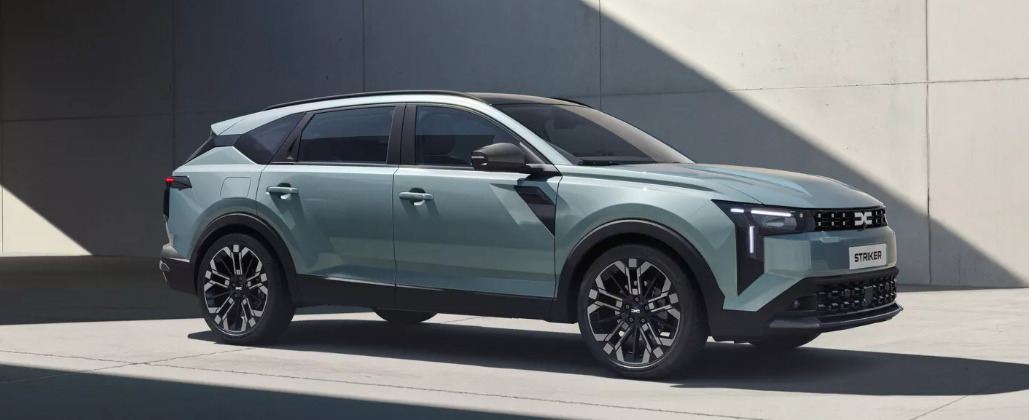
Dacia, the Romanian automaker under the Renault Group, continues to solidify its reputation for delivering affordable, practical, and reliable vehicles with its 2025 lineup. This year, Dacia introduces the all-new Bigster SUV, alongside updated versions of the Sandero, Jogger, and Spring, reflecting its commitment to value-driven mobility. These models blend modern design, enhanced technology, and efficient powertrains, including hybrid options, to meet evolving consumer demands while maintaining Dacia’s hallmark affordability.
The Dacia Bigster is the flagship addition for 2025, marking the brand’s bold entry into the C-segment SUV market. Positioned above the Duster, the Bigster stretches 4.57 meters, offering a rugged yet refined design inspired by the 2021 Bigster Concept. It competes with models like the Nissan Qashqai and Volkswagen Tiguan but at a significantly lower price point, starting around £24,995 in the UK. The Bigster boasts a spacious interior with best-in-class headroom and a 667-liter boot, making it ideal for families. It introduces premium features for Dacia, including dual-zone climate control, a panoramic roof, and an electric tailgate. Powertrain options include a new 155 hp full-hybrid system, combining a 1.8-liter petrol engine with two electric motors for efficiency and performance. Petrol and LPG variants are also available, with the hybrid offering up to 56.5 mpg. The Bigster’s rugged aesthetic, with protective cladding and high ground clearance, suits both urban and off-road use, while its modular interior and optional seven-seat configuration enhance versatility.
The 2025 Dacia Sandero, Europe’s best-selling retail car, receives a significant refresh to maintain its edge in the B-segment hatchback market. The updated Sandero adopts Dacia’s new design language, featuring a bolder front grille, sleeker LED headlights, and a modernized interior with a 10.1-inch touchscreen on higher trims. Starting at approximately £13,795, it remains one of the most affordable new cars in Europe. The Sandero offers petrol, LPG, and a new mild-hybrid 1.0-liter TCe engine with 100 hp, improving fuel efficiency to around 50 mpg. Safety upgrades include standard autonomous emergency braking and lane-keep assist, aligning with stricter EU regulations. The Sandero Stepway, its crossover-inspired variant, gains rugged styling tweaks and an optional CVT automatic for smoother urban driving. Its compact dimensions, practical 328-liter boot, and low running costs continue to appeal to budget-conscious buyers.
The Dacia Jogger, a unique seven-seat MPV-crossover hybrid, also sees updates for 2025. Priced from around £18,295, it remains the cheapest seven-seater in many markets. The refreshed Jogger sports a revised front fascia, new alloy wheels, and an upgraded infotainment system with wireless Apple CarPlay and Android Auto. Its powertrain lineup includes a 140 hp full-hybrid, offering 47 mpg and electric-only driving for short distances, alongside petrol and LPG options. The Jogger’s modular interior, with a 708-liter boot (expandable to 1,819 liters), makes it a practical choice for large families. Off-road-inspired elements, like higher ground clearance and skid plates, enhance its versatility, while new ADAS features improve safety.
The Dacia Spring, Europe’s most affordable electric vehicle, gets a comprehensive overhaul for 2025. Starting at around £14,995, the Spring EV retains its compact crossover design but gains a modernized interior with a 10-inch touchscreen and improved materials. Its 26.8 kWh battery delivers a 137-mile range, suitable for urban commuting. A new 65 hp motor option joins the existing 45 hp variant, improving performance while maintaining efficiency. The Spring’s lightweight 984 kg design ensures agile handling, and fast-charging capability (up to 30 kW) allows a 20-80% charge in 45 minutes. Its boxy shape maximizes interior space, offering a 308-liter boot.
Dacia’s 2025 models strengthen its position as a leader in affordable mobility. The Bigster expands its market reach, while the Sandero, Jogger, and Spring updates ensure competitiveness with modern tech, efficient powertrains, and unbeatable value. By balancing cost, practicality, and innovation, Dacia continues to appeal to budget-conscious consumers seeking reliable, no-frills transportation.
new Dacia crossover - Striker
new Dacia crossover – Striker

How to Clear Your Browser Cache on MacBooks

0

As you browse the internet, websites store trackers on your computer, subtly slowing it down over time. These trackers include cookies and cached data, which can monitor your activity if you visit the same sites regularly. Like iPads and iPhones, MacBooks aren’t immune to these issues, making it crucial to know how to clear your browser cache filled with unwanted data.

Every browser maintains its own cache. Unless you’re a Mac user who switches between different browsers for various tasks, you’ll typically only need to clear the cache on your primary browser.

The process of clearing the cache removes a lot of data, including cookies, site permissions, and login information. If you don’t use a third-party or built-in password manager from Apple or Google, you might need to re-enter your passwords on some websites and go through 2FA or CAPTCHA processes again. However, clearing the cache can make your browser run more smoothly and resolve issues that slow down website loading.

Clear Your Browser Cache on MacBooks
photo: pixabay

Clearing Cache on Safari

To clear your cache on Safari:

  1. Open Safari.
  2. Click on “Safari” in the top left corner, next to the Apple logo.
  3. Select “Settings,” then choose “Manage Website Data.”
  4. Here, you can select specific website data to remove or click “Remove All” to eliminate all trackers.

Clearing Cache on Chrome

If you use Google Chrome, follow these steps to clear your cache:

  1. Open Chrome.
  2. Click on the three dots in the top right corner next to your profile picture.
  3. Select “Settings.”
  4. In the left-hand menu, click on “Privacy and security.”
  5. Choose “Clear browsing data.”
  6. You can select to delete all browsing history, cookies, and cached images and files. For more detailed options, click the “Advanced” tab to delete browsing history and download history separately.

Note: Clearing your cache in Chrome won’t delete your search history tied to your Google account. You can delete that separately through Google’s My Activity page, though this won’t necessarily speed up your Mac.

Clearing Cache on Other Browsers

Other browsers, such as Firefox, DuckDuckGo, and Brave, have their own processes for clearing cache. For instance, DuckDuckGo and Brave have built-in privacy settings designed to prevent sites from tracking your activity.

Firefox

  1. Open Firefox.
  2. Click on the three horizontal lines in the top right corner.
  3. Select “Settings.”
  4. Choose “Privacy & Security.”
  5. Scroll down to the “Cookies and Site Data” section and click “Clear Data.”

DuckDuckGo

  1. Open DuckDuckGo.
  2. Click on the three dots in the top right corner.
  3. Select “Settings.”
  4. Go to “Clear Data” to remove cache and cookies.

Brave

  1. Open Brave.
  2. Click on the three horizontal lines in the top right corner.
  3. Select “Settings.”
  4. Choose “Privacy and security.”
  5. Click “Clear browsing data.”

Regularly clearing your browser cache is a simple yet effective way to enhance your browsing experience. It helps your browser run more smoothly and can fix issues that cause websites to load more slowly than they should. By keeping your cache clean, you can ensure your Mac or MacBook remains efficient and responsive.

By following the steps outlined for your preferred browser, you can maintain optimal performance and enjoy a smoother, faster browsing experience on your MacBook.

The Future of TV Screen Technology: An In-depth Analysis

0

Television screen technology has evolved dramatically since the days of black-and-white cathode ray tube (CRT) sets. Today, we are in the midst of a digital revolution, where advances in screen technology are not only enhancing viewing experiences but also transforming the very nature of content consumption. This analysis explores the future of TV screen technology, examining emerging trends, advancements in display technologies, and their implications for consumers and the entertainment industry.

Current State of TV Screen Technology

1. LCD and LED Displays

Liquid Crystal Display (LCD) and Light Emitting Diode (LED) technologies dominate the current TV market. These screens offer good brightness, color accuracy, and energy efficiency. LED TVs, a subset of LCDs, use LEDs for backlighting, providing better contrast and thinner panels.

2. OLED Displays

Organic Light Emitting Diode (OLED) displays represent a significant leap in screen technology. OLEDs emit light individually per pixel, offering superior contrast ratios, deeper blacks, and more vibrant colors compared to traditional LEDs. Additionally, OLED screens are flexible, allowing for innovative form factors like rollable or curved displays.

3. Quantum Dot Technology

Quantum Dot LED (QLED) TVs use quantum dots to enhance color accuracy and brightness. These nanoparticles emit precise colors when illuminated by a backlight, resulting in a wider color gamut and better HDR performance. QLEDs bridge the gap between traditional LED and OLED displays in terms of performance.

4. 4K and 8K Resolution

Resolution has also seen significant advancements, with 4K (Ultra High Definition) becoming mainstream and 8K emerging as the next frontier. Higher resolutions offer more detailed and immersive viewing experiences, although the content ecosystem and broadcasting infrastructure for 8K are still in development.

Future of TV Screen Technology
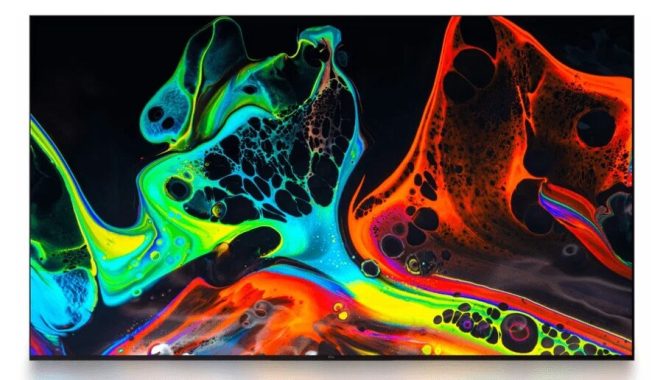
TV Screen Technology – photo: TCL

Emerging Trends and Technologies

1. MicroLED Technology

MicroLED technology is poised to be the next big thing in TV screens. MicroLEDs consist of microscopic LEDs that can function independently, similar to OLEDs but with better brightness, durability, and energy efficiency. They do not suffer from burn-in issues like OLEDs and can achieve higher peak brightness levels, making them ideal for HDR content.

2. MiniLED Backlighting

MiniLED is an evolution in LED backlighting technology. By using smaller LEDs, MiniLED displays can offer more precise local dimming, resulting in better contrast and black levels. This technology is being integrated into high-end LCD TVs, enhancing their performance to compete with OLEDs.

3. Flexible and Rollable Displays

Flexible and rollable displays, enabled by OLED technology, are becoming a reality. These displays can be rolled up or bent, offering new possibilities for TV design and portability. Rollable TVs can be stored away when not in use, freeing up space and providing a futuristic aesthetic.

4. Transparent Displays

Transparent displays are another futuristic technology gaining traction. These displays allow light to pass through while still displaying images. Applications for transparent TVs include integration into windows or mirrors, offering a blend of functionality and entertainment.

5. Improved HDR and Color Technologies

High Dynamic Range (HDR) technology continues to evolve, with new standards like HDR10+ and Dolby Vision enhancing the viewing experience. These technologies offer better color accuracy, contrast, and brightness, making content appear more lifelike. Advancements in color technology, such as Wide Color Gamut (WCG), will further enhance picture quality.

Future Implications for Consumers

1. Enhanced Viewing Experience

Advancements in screen technology will provide consumers with a more immersive and visually stunning viewing experience. Higher resolutions, better color accuracy, and improved contrast will make TV watching more enjoyable and lifelike.

2. Innovative TV Designs

Flexible, rollable, and transparent displays will lead to innovative TV designs that can blend seamlessly into home environments. These advancements will offer greater flexibility in terms of placement and aesthetics, catering to modern lifestyle needs.

3. Accessibility and Affordability

As new technologies mature and become more widespread, their cost will decrease, making high-end features accessible to a broader audience. This democratization of technology will ensure that more consumers can enjoy premium viewing experiences.

4. Interactive and Smart Features

Future TVs will likely integrate more advanced smart features, including voice control, gesture recognition, and AI-driven content recommendations. These interactive features will enhance user engagement and provide personalized viewing experiences.

Implications for the Entertainment Industry

1. Content Creation and Distribution

The rise of 4K and 8K TVs will drive demand for higher-resolution content. Content creators and distributors will need to invest in equipment and infrastructure to produce and deliver ultra-high-definition content. This shift will also impact streaming services, which will need to upgrade their platforms to support higher resolutions and enhanced picture quality.

2. New Business Models

Innovative TV designs and functionalities may give rise to new business models. For example, transparent TVs integrated into commercial spaces can serve as dynamic advertising platforms. Similarly, rollable and flexible displays could be used in various industries, including automotive and retail, creating new revenue streams.

3. Gaming and Interactive Media

The gaming industry will significantly benefit from advancements in TV technology. Higher resolutions, faster refresh rates, and improved HDR will enhance gaming experiences. Future TVs with interactive features could also support more immersive and engaging gameplay.

4. Broadcast and Streaming Infrastructure

The entertainment industry’s infrastructure will need to evolve to support the demands of future TV technologies. This includes upgrading broadcasting equipment, enhancing streaming platforms, and expanding internet bandwidth to handle higher data loads associated with 4K and 8K content.

Challenges and Considerations

1. Content Availability

One of the main challenges with adopting new TV technologies is content availability. While 4K content is becoming more common, 8K content is still scarce. Ensuring a robust content ecosystem that supports these advanced resolutions will be crucial for the success of new TV technologies.

2. Consumer Adoption

Consumer adoption of new technologies can be slow, especially when there are significant cost implications. Manufacturers and marketers will need to educate consumers on the benefits of new technologies and offer affordable options to drive widespread adoption.

3. Environmental Impact

The production and disposal of advanced TV technologies pose environmental challenges. Companies must prioritize sustainable practices, such as using eco-friendly materials and developing recycling programs, to minimize the environmental impact.

4. Compatibility and Standards

Ensuring compatibility across different devices and platforms is essential for a seamless viewing experience. Industry-wide standards for new technologies like HDR, resolution formats, and connectivity will be necessary to ensure interoperability and a smooth transition for consumers.

The future of TV screen technology is bright, with numerous advancements set to enhance the viewing experience and transform the entertainment industry. Emerging technologies like MicroLED, MiniLED, flexible displays, and improved HDR will redefine what is possible with TV screens. These innovations will not only provide consumers with stunning visuals and innovative designs but also open up new opportunities for content creators, distributors, and other industries.

However, challenges such as content availability, consumer adoption, environmental impact, and compatibility must be addressed to fully realize the potential of these technologies. By navigating these challenges responsibly, the future of TV screen technology can bring about a new era of entertainment that is more immersive, interactive, and accessible for all.

1. MicroLED Technology

MicroLED technology is anticipated to be the most significant advancement in TV screen technology. Each pixel in a MicroLED display consists of microscopic LEDs, which emit light independently. This results in several benefits:

  • Brightness: MicroLEDs can achieve much higher brightness levels compared to OLEDs, making them ideal for HDR content.
  • Durability: Unlike OLEDs, MicroLEDs do not suffer from burn-in, where static images can permanently affect the screen.
  • Energy Efficiency: MicroLEDs are more energy-efficient than traditional LEDs and OLEDs, providing better performance with lower power consumption.

Samsung and Sony have already showcased prototypes of MicroLED TVs, but the technology is still in its infancy in terms of mass production. As manufacturing processes improve, we can expect MicroLED TVs to become more affordable and widely available.

2. MiniLED Backlighting

MiniLED technology represents a significant improvement in backlighting for LCD panels. By using thousands of tiny LEDs for backlighting instead of a few hundred, MiniLED displays can achieve:

  • Improved Local Dimming: More precise control over brightness levels in different parts of the screen, resulting in better contrast and deeper blacks.
  • Enhanced Brightness and Color: Increased peak brightness and a wider color gamut improve overall picture quality.

Manufacturers like TCL and LG are already incorporating MiniLED backlighting in their premium models, offering performance that rivals OLEDs at a potentially lower cost.

3. Flexible and Rollable Displays

Flexible and rollable displays, primarily based on OLED technology, offer unique advantages:

  • Space-Saving: Rollable TVs can be stored away when not in use, freeing up living space.
  • Portability: Flexible displays can be incorporated into portable devices, enhancing their usability.
  • Aesthetic Appeal: These displays allow for innovative and sleek designs that can blend seamlessly into modern home decor.

LG has been at the forefront with its rollable OLED TV, which can roll up into its base when not in use. As production costs decrease, these types of displays will likely become more mainstream.

4. Transparent Displays

Transparent displays are an exciting frontier, offering new ways to integrate screens into everyday environments:

  • Commercial Applications: Transparent displays can be used in retail windows, automotive windshields, and public signage.
  • Home Integration: These displays can be incorporated into home decor, such as windows or mirrors, providing information or entertainment without taking up additional space.

Companies like Panasonic and Xiaomi have already demonstrated prototypes of transparent TVs. While still early in development, the potential applications are vast and varied.

5. Improved HDR and Color Technologies

High Dynamic Range (HDR) and color technologies continue to evolve, providing more lifelike and vibrant images:

  • HDR10+ and Dolby Vision: These advanced HDR formats offer dynamic metadata, allowing TVs to adjust brightness and color settings on a scene-by-scene basis for optimal performance.
  • Wide Color Gamut (WCG): Technologies like QLED and MicroLED offer broader color spectrums, closer to what the human eye can perceive.

These improvements ensure that content looks as realistic and immersive as possible, enhancing the overall viewing experience.

Future of TV Content and Broadcasting

1. Evolution of 8K Content

While 8K TVs are already on the market, the content ecosystem is still catching up. Future advancements will focus on:

  • Content Creation: More studios and filmmakers will invest in 8K cameras and production techniques.
  • Broadcasting Infrastructure: Upgrading broadcast systems and streaming platforms to handle 8K resolution.
  • Compression Technologies: Developing more efficient video compression methods to deliver 8K content without overwhelming internet bandwidth.

2. Streaming Services and Cloud Gaming

Streaming services will play a crucial role in the adoption of new TV technologies:

  • 4K and 8K Streaming: Services like Netflix, Amazon Prime, and Disney+ are already offering 4K content, with 8K on the horizon.
  • Cloud Gaming: Platforms like Google Stadia and NVIDIA GeForce NOW will benefit from advanced TV technologies, offering high-resolution, low-latency gaming experiences.

3. Personalized and Interactive Content

Future TVs will offer more personalized and interactive content experiences:

  • AI-Driven Recommendations: AI algorithms will analyze viewing habits to suggest content tailored to individual preferences.
  • Interactive Features: Viewers will be able to interact with content through voice commands, gestures, and integrated apps, creating a more engaging experience.

Conclusion

The future of TV screen technology is set to transform how we consume content, offering unprecedented visual experiences and innovative designs. From MicroLED and MiniLED advancements to flexible, rollable, and transparent displays, the possibilities are vast. These technologies will enhance not only the viewing experience but also open new avenues for content creation, broadcasting, and interactive media.

However, realizing this future will require addressing challenges related to content availability, consumer adoption, environmental sustainability, and industry standards. By navigating these challenges, we can ensure that the next generation of TV technologies delivers on their promise, creating a more immersive, engaging, and accessible future for all viewers.

LOEWE We. SEE 55 TV – Premium quality

0

When it comes to premium TVs, the LOEWE We. SEE 55 TV sets a high standard. Priced at $2,300.00, this model is tailored for those who demand not just high performance, but also a touch of sophistication and style in their home entertainment setup. From its 4K HDR display to the robust built-in soundbar system, the LOEWE We. SEE 55 TV aims to deliver a comprehensive viewing experience. In this review, we will delve into its design, performance, compatibility, gaming capabilities, connectivity options, audio and video quality, as well as the pros and cons of this high-end television.

LOEWE We. SEE 55 TV
LOEWE We. SEE 55 TV

Design

One of the standout features of the LOEWE We. SEE 55 TV is its design. Available in striking Coral Red and Aqua Blue, this TV is not just a device but a statement piece. Its seamless design and unique color options make it a standout in any room, providing 360-degree appeal that most mainstream brands lack. The detachable panel at the rear hides cables, maintaining a clean and uncluttered look even in a freestanding environment. The sleek table-top stand is color-coded to match the TV, adding to its cohesive and stylish appearance. For those who prefer wall mounting, a range of floor stands and wall brackets are available as additional cost options, ensuring flexibility in installation.

Performance and Picture Quality

The LOEWE We. SEE 55 TV boasts a 4K HDR display with a resolution of 3840 x 2160 pixels, ensuring crisp and detailed images. The screen uses Interior auto-dimming (OPC) technology to adapt to various lighting conditions, optimizing contrast levels for the most natural picture possible. This feature is particularly beneficial in rooms with varying light levels, ensuring a consistent viewing experience throughout the day.

Moreover, the TV supports Dolby Vision and HDR10, two of the leading HDR formats. Dolby Vision, in particular, enhances the viewing experience by optimizing the HDR format, delivering sharp and accurate images. This makes the LOEWE We. SEE 55 TV an excellent choice for movie enthusiasts who want to experience cinematic quality at home.

LOEWE We. SEE 55 TV
We. SEE 55 TV – images: LOEWE

Gaming Capabilities

For gamers, the LOEWE We. SEE 55 TV offers several features that enhance the gaming experience. The TV is equipped with four HDMI 2.1 sockets, ensuring compatibility with the latest gaming consoles. HDMI 2.1 supports higher frame rates, variable refresh rates (VRR), and Auto Low Latency Mode (ALLM), all of which contribute to a smoother and more responsive gaming experience. The response time of 8ms is decent for casual gaming, although hardcore gamers might find it slightly lacking compared to dedicated gaming monitors.

Connectivity

Connectivity is a strong suit for the LOEWE We. SEE 55 TV. In addition to the four HDMI 2.1 ports, the TV features two USB sockets (including one USB 3.0), making it easy to connect various media devices. The presence of optical digital and analogue 3.5mm outputs ensures compatibility with older audio components, providing flexibility in setting up your home entertainment system.

The TV also includes built-in Wi-Fi and Bluetooth, enhancing its connectivity options. Whether streaming content from the internet or connecting wireless peripherals, the LOEWE We. SEE 55 TV offers a comprehensive set of options to suit modern connectivity needs.

Audio Quality

Audio quality is another area where the LOEWE We. SEE 55 TV excels. The built-in 40-watt, six-array soundbar system delivers powerful and spacious sound. Thanks to its forward-facing speakers and bass reflex design, the audio output is well-balanced and immersive. The TV is also compatible with Dolby Atmos, a feature that further enhances the audio experience by providing three-dimensional sound. Whether you’re watching a blockbuster movie or listening to your favorite music, the LOEWE We. SEE 55 TV offers an audio experience that matches its impressive visual performance.

Smart Features and Software

The LOEWE We. SEE 55 TV runs on the responsive OS7 operating system, providing quick and easy access to a wide range of smart TV features. The informative home screen gives users access to video-on-demand services, media libraries, music, internet browsing, and more. The integration with the VIDAA app store offers a wide selection of streaming services, ensuring that all your favorite content is just a click away.

Additionally, the TV’s remote control includes one-touch access to popular apps like Netflix, YouTube, and Amazon Prime Video. This feature significantly enhances user convenience, making it easy to switch between different streaming services without navigating through multiple menus.

LOEWE We. SEE 55
LOEWE We. SEE 55 – ENGINEERED IN GERMANY: HIGH-QUALITY ULTRA HD TECHNOLOGY

Pros and Cons

Pros

  • Premium Design: The LOEWE We. SEE 55 TV’s unique color options and seamless design make it a standout piece in any room.
  • Excellent Picture Quality: With a 4K HDR display, Dolby Vision, and HDR10 support, the TV delivers sharp and vibrant images.
  • Superior Audio: The built-in soundbar system with Dolby Atmos compatibility provides an immersive audio experience.
  • Robust Connectivity: Four HDMI 2.1 ports, USB sockets, and various audio outputs ensure compatibility with a wide range of devices.
  • Responsive Software: The os7 operating system and one-touch remote control access enhance user convenience.

Cons

  • Price: At $2,300.00, the LOEWE We. SEE 55 TV is on the higher end of the price spectrum, which might be a barrier for some consumers.
  • Response Time: The 8ms response time, while decent, may not satisfy hardcore gamers looking for the fastest possible response.
  • Limited Color Options: Although the unique color options are a plus, they may not suit everyone’s taste or home decor.

Unique Features

The LOEWE We. SEE 55 TV comes with several unique features that set it apart from other models in the market. The built-in soundbar system, for instance, is not a common feature in most TVs, especially with the quality and power it offers. The Dolby Atmos compatibility further enhances this feature, providing a surround sound experience without the need for additional speakers.

The TV’s design also includes practical elements such as the detachable rear panel that hides cables, maintaining a clean and uncluttered look. This attention to detail in both aesthetics and functionality is a testament to LOEWE’s commitment to premium quality.

LOEWE We. SEE 55 TV
LOEWE We. SEE 55 TV coral red

Price and Value

At $2,300.00, the LOEWE We. SEE 55 TV is certainly an investment. However, considering its premium design, superior picture and audio quality, robust connectivity, and responsive software, it offers good value for those looking for a high-end television. It’s a perfect fit for consumers who not only want excellent performance but also a TV that adds a touch of style to their living space.

Conclusion

In conclusion, the LOEWE We. SEE 55 TV is a premium option for those who demand more from their television. Its exceptional design, top-notch picture and audio quality, extensive connectivity options, and user-friendly smart features make it a standout choice in the crowded TV market. While its higher price point and slightly slower response time might be drawbacks for some, the overall package it offers is hard to beat. If you’re looking for a TV that combines performance, style, and premium quality, the LOEWE We. SEE 55 TV is definitely worth considering.

Marantz Cinema 30 Receiver Review

0

The Marantz Cinema 30 receiver is a high-end AV receiver that delivers exceptional performance, versatility, and a robust set of features for both audiophiles and home theater enthusiasts. Priced at $4,500.00, this receiver is a significant investment, but its capabilities and quality make it well worth the cost for those seeking an immersive audio and video experience.

Design and Build Quality

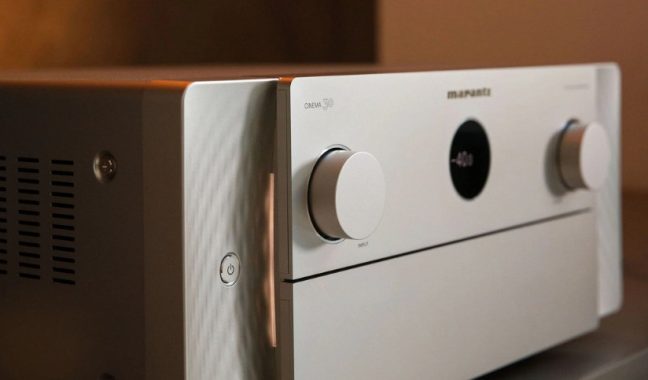
From the moment you unbox the Marantz Cinema 30 receiver, the premium build quality is evident. The design is sleek and modern, featuring a minimalist front panel with a large, easy-to-read display and intuitive control knobs. The overall aesthetic is both elegant and functional, blending seamlessly into any home theater setup.

Marantz Cinema 30 receiver
Marantz Cinema 30 receiver – images: Marantz

Amplifier and Audio Performance

At the heart of the Marantz Cinema 30 receiver is an 11-channel amplifier that delivers a powerful 140 watts per channel into 8 ohms (20-20,000 Hz) at 0.05% THD, with 2 channels driven. This robust power output ensures that it can drive a wide range of speakers with ease, providing dynamic and detailed sound across all types of media.

Marantz’s Hyper Dynamic Amplifier Modules (HDAM) are a standout feature, offering exquisite detail and dynamic range while reducing noise. This results in a clear and immersive audio experience, whether you’re watching movies, listening to music, or playing video games.

Surround Sound and Immersive Audio

The Marantz Cinema 30 receiver excels in creating an immersive sound environment with support for Dolby Atmos®, DTS, and Auro-3D® surround sound decoding. These technologies allow for the use of in-ceiling or height speakers, enhancing the depth and realism of the audio experience. Additionally, Dolby Atmos Height Virtualization and DTS Virtual provide three-dimensional effects without the need for actual height speakers, making it easier to achieve a comprehensive surround sound setup in any room.Marantz Cinema 30 receiver

IMAX® Enhanced is another notable feature, reproducing the full dynamic range of specially encoded IMAX soundtracks from compatible sources, further elevating the home theater experience.

Room Calibration and Optimization

Achieving the perfect sound balance is made simple with Audyssey speaker calibration and system optimization. The MultEQ® XT32 auto setup and room calibration deliver balanced, dynamic sound with enhanced surround performance. Features like Dynamic Volume and Dynamic EQ improve dialogue clarity, bass response, and surround channel levels, even at lower volumes. Sub EQ HT provides individual calibration for up to four subwoofers, ensuring even bass response throughout the room. Additionally, the optional Dirac Live room calibration and bass management offer further customization for audiophiles who desire precise control over their sound environment.

Digital and Streaming Options

The Marantz Cinema 30 receiver offers a plethora of digital and streaming music options, making it a versatile hub for all your audio needs. Built-in Wi-Fi allows for seamless listening to music from a networked PC, free internet radio, and various music services such as Pandora®, TIDAL, SiriusXM, and Spotify®. The free HEOS app provides easy control over these services, as well as Wi-Fi settings adjustments and music selection.

For those who prefer voice control, the receiver is compatible with Amazon Alexa and Google Assistant, enabling hands-free operation. AirPlay 2 support allows for direct streaming from Apple® devices, and built-in Bluetooth facilitates wireless music listening from smartphones, tablets, and compatible computers. The receiver also supports Bluetooth transmission to Bluetooth-enabled headphones, providing flexibility in how you enjoy your audio.

Multi-Room Audio/Video Capabilities

One of the standout features of the Marantz Cinema 30 receiver is its multi-room audio and video capabilities. It supports three-room/three-source output, allowing you to play different audio sources in multiple rooms simultaneously. Powered stereo outputs for the second and third rooms enable playback in three rooms at once, while line-level outputs for Zones 2 and 3 can be used with separate amplifiers or powered speakers.

The amp assign function lets you reassign the height channels for bi-amping or use in Zone 2 or 3, providing additional flexibility in your audio setup. TV Audio sharing lets you play surround sound in your main room and downmixed stereo in additional zones, ensuring a cohesive audio experience throughout your home.

Connectivity and Compatibility

The Marantz Cinema 30 receiver is equipped with an impressive array of connectivity options, ensuring compatibility with a wide range of devices and sources. It features HDMI 2.1 audio/video switching with 7 inputs and 3 outputs, all of which support 8K/60Hz and 4K/120Hz video. This ensures that the receiver is future-proof and ready for the latest Ultra HD content.

The receiver also supports HDR10, HDR10+, Dolby Vision®, HLG, and Dynamic HDR, providing extended picture contrast and brightness with compatible TVs and HDR-encoded content. For gamers, the receiver includes Variable Refresh Rate (VRR), Auto Low Latency Mode (ALLM), and Quick Frame Transport (QFT) technologies, which help reduce or eliminate lag and frame tearing for a smoother, more enjoyable gaming experience.

Other notable connections include composite and component video inputs, digital audio inputs (Toslink optical and coaxial), analog stereo audio line-level inputs and outputs, a moving magnet (MM) phono input for turntables, and four discrete line-level subwoofer outputs. The front-panel USB port allows for audio playback from USB flash drives, and an Ethernet port provides a stable network connection.

The receiver also features RS-232C and IR remote connections for use with optional third-party controllers and three 12-volt trigger outputs for advanced home automation systems.

Software and Ease of Use

Setting up the Marantz Cinema 30 receiver is straightforward, thanks to the Marantz Setup Assistant. This intuitive software guides you through the initial connection process and settings, ensuring that even those new to AV receivers can get everything up and running quickly and easily. The HEOS app further simplifies control, offering a user-friendly interface for managing your music and settings.

For advanced users, the Audyssey MultEQ Editor app provides further audio customization options, allowing for precise adjustments to achieve the perfect sound. This paid app offers in-depth control over the receiver’s calibration and optimization features, making it a valuable tool for audiophiles and home theater enthusiasts.Marantz Cinema 30 receiver

Price and Value

At $4,500.00, the Marantz Cinema 30 receiver is certainly a premium product. However, considering its extensive feature set, exceptional performance, and versatility, it offers excellent value for those looking to invest in a high-quality AV receiver. Its robust power output, comprehensive surround sound capabilities, and extensive connectivity options make it a standout choice for anyone serious about their home audio and video setup.

Conclusion

In summary, the Marantz Cinema 30 receiver is a top-tier AV receiver that delivers outstanding performance, versatility, and build quality. Its powerful amplifier, advanced surround sound decoding, and extensive connectivity options make it a perfect choice for creating an immersive home theater experience. The inclusion of modern features like HDMI 2.1, HDR support, and gaming-optimized technologies further enhance its appeal, while the multi-room audio/video capabilities and user-friendly software ensure that it meets the needs of even the most demanding users.

Whether you’re an audiophile, a home theater enthusiast, or a gamer, the Marantz Cinema 30 receiver provides a premium, future-proof solution that will elevate your audio and video experience to new heights. While the price tag is significant, the investment is justified by the receiver’s comprehensive feature set, performance, and the unmatched quality that Marantz is known for.

Review – Cooler Master Tempest GP27U Monitor

0

If you’re on the lookout for a top-tier monitor that excels in both gaming and professional use, the Cooler Master Tempest GP27U monitor is a standout option. With a plethora of features and specifications tailored for high performance, this monitor has garnered significant attention. Let’s dive deep into its design, performance, and unique features to see if it lives up to the hype.

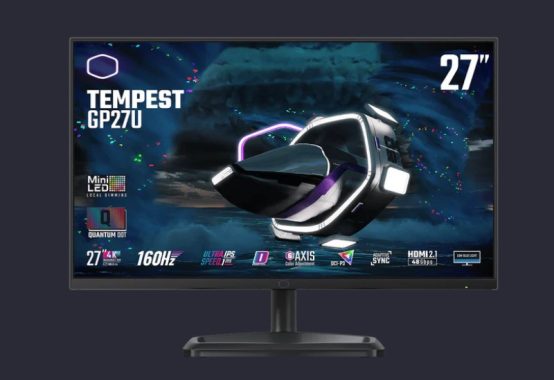
Cooler Master Tempest GP27U
Cooler Master Tempest GP27U – images: CM

Design and Ergonomics
The Cooler Master Tempest GP27U monitor boasts a sleek and modern design that will complement any setup. Its 27-inch screen is framed by thin bezels, maximizing screen real estate and providing an immersive viewing experience. The stand, made from sturdy aluminum with a unique hexagonal base, ensures stability but does occupy a significant amount of desk space. So, if you’re planning to use this monitor, make sure you have a sizeable desk to accommodate both the monitor and your peripherals comfortably.

Ergonomically, the GP27U shines. The stand offers excellent adjustability, allowing you to tilt, swivel, pivot, and adjust the height to find the perfect viewing angle. This flexibility is particularly useful if you spend long hours in front of the screen, whether for work or play. However, it’s worth noting that the stand’s cable management clip, while handy, can come off easily if you tug on the cables.

Performance and Display Quality
Performance-wise, the Cooler Master Tempest GP27U monitor is a beast. Its 4K resolution (3840×2160) ensures crisp and sharp images, making it ideal for both gaming and professional tasks such as photo editing, video production, and detailed spreadsheet work. The high pixel density provides excellent clarity, ensuring text and images are sharp and easy to read.

One of the standout features of this monitor is its Mini LED backlighting with 576 zones of full-array local dimming. This technology significantly enhances contrast and brightness levels, making it perfect for HDR content. The monitor supports HDR10 and achieves a fantastic peak brightness that makes highlights pop, even in well-lit rooms. The local dimming feature also helps to deliver deep blacks, crucial for an immersive viewing experience in darker scenes.

Gaming Performance
For gamers, the Cooler Master Tempest GP27U monitor is an excellent choice. It supports HDMI 2.1, allowing you to fully leverage the capabilities of next-gen consoles like the Xbox Series X and PlayStation 5. With a high refresh rate of 144Hz and Variable Refresh Rate (VRR) support, this monitor ensures smooth gameplay with minimal screen tearing. It’s compatible with both AMD FreeSync and NVIDIA G-SYNC, providing versatility regardless of your GPU choice.

Cooler Master Tempest GP27U

The low input lag and quick response time make for an incredibly responsive gaming experience. Motion looks smooth at any refresh rate, and the monitor handles fast-moving scenes with ease. The VRR support also includes Low Framerate Compensation, ensuring that VRR remains effective even when the frame rate drops, providing a seamless gaming experience.

Office and Professional Use
Beyond gaming, the Cooler Master Tempest GP27U monitor is also an excellent office companion. The 4K resolution and 27-inch screen size provide ample space for multitasking, allowing you to open multiple windows side by side. This feature is particularly beneficial for productivity tasks such as coding, writing, and data analysis.

The monitor’s brightness levels and reflection handling are exceptional, making it easy to use in bright environments. Wide viewing angles ensure that the image quality remains consistent even when viewed from the side, which is great for collaborative work. The adjustable stand adds to its office-friendly nature, allowing you to position the screen ergonomically for long working sessions.

HDR Performance
The HDR performance of the Cooler Master Tempest GP27U monitor is noteworthy. It gets incredibly bright, delivering vivid highlights and a broad range of colors with impressive color volume. The Mini LED backlighting enhances the HDR experience, providing deep blacks and reducing blooming around bright objects. This makes it an excellent choice for watching HDR movies and playing HDR games.

The monitor’s gradient handling is superb, ensuring smooth transitions between colors without noticeable banding. This quality is particularly important for content creation and media consumption, where color accuracy and smooth gradients can significantly impact the viewing experience.

Software and Unique Features
The Cooler Master Tempest GP27U monitor comes with a user-friendly on-screen display (OSD) that provides easy access to various settings. You can customize picture profiles, adjust brightness, contrast, and color settings, and enable features like local dimming and VRR through the OSD. The monitor also includes preset modes optimized for different usage scenarios, such as gaming, movie watching, and reading.

One unique feature of the GP27U is its excellent gradient handling. Whether you’re editing photos, videos, or simply watching content with subtle color transitions, the monitor performs admirably. This feature minimizes color banding, providing a smooth and immersive visual experience.

Price and Value
At a price point of $739.91, the Cooler Master Tempest GP27U monitor offers excellent value for its feature set. While it is a significant investment, the combination of 4K resolution, Mini LED technology, HDR support, and robust gaming features makes it a versatile choice for both gamers and professionals. The performance and quality you get for this price are comparable to, if not better than, many higher-priced monitors on the market.

Conclusion
In conclusion, the Cooler Master Tempest GP27U monitor is a versatile and high-performing monitor that excels in multiple areas. Its design is sleek and functional, offering excellent ergonomics and adjustability. The 4K resolution and Mini LED backlighting provide outstanding display quality, making it perfect for both gaming and professional use.

Gaming enthusiasts will appreciate the monitor’s support for HDMI 2.1, VRR, and its low input lag and quick response time. For office and productivity tasks, the high pixel density and wide viewing angles enhance usability and comfort. The monitor’s HDR performance is impressive, delivering bright highlights and deep blacks that enhance any HDR content.

While the price of $739.91 may seem steep, the value offered by the Cooler Master Tempest GP27U monitor justifies the investment. Whether you’re a gamer looking for a competitive edge, a professional needing a reliable and high-quality display, or someone who enjoys watching HDR content, this monitor is an excellent choice that won’t disappoint.

In the competitive landscape of high-end monitors, the Cooler Master Tempest GP27U monitor stands out as a top contender. Its combination of design, performance, and unique features makes it a solid choice for anyone seeking a premium display experience.

ASUS ROG Swift PG259QN – excellent gaming monitor

0

The ASUS ROG Swift PG259QN’s build quality is nice. The display is made of plastic, but it feels sturdy, and there are no loose parts. The stand has a solid metal base and supports the monitor properly. All the hinges really feel well-made, and it feels secure when rotating the screen. It doesn’t have the most premium materials, but you shouldn’t have any issues with it.

The ASUS PG259QN is good for office use. You can simply modify the screen to your optimal viewing position thanks to its good ergonomics, and its IPS panel has wide viewing angles, making it ideal for sharing your work with coworkers. The screen might be too small for some, especially for multitasking, and the pixel density is a bit low, so text doesn’t look as sharp.

ASUS PG259QN
ASUS PG259QN  – images: Asus

The ASUS ROG Swift PG259QN has good ergonomics, making it easy to adjust the screen to your ideal viewing position or share content on your screen. If ergonomics are important to you, the MSI Oculux NXG253R is a nearly identical monitor with a wider swivel range.

The back of the monitor has a fairly heavy gamer design. The ROG logo lights up, and you can control it through the on-screen menu or the Aura Sync software. There’s a cutout at the bottom of the stand that allows cables to pass through for cable management. It can be VESA-mounted, but there’s no quick-release feature to remove the stand.

The ASUS PG259QN’s HDR peak brightness is okay. It’s again very consistent when displaying different scenes, but it isn’t enough to make highlights stand out in HDR content. We measured the HDR peak brightness in the ‘HDR’ Picture Mode. The screen’s brightness isn’t adjustable in this picture mode.

The ASUS ROG Swift PG259QN has a superb maximum refresh rate to deliver a smooth and responsive gaming experience. Due to HDMI’s bandwidth limitations, you need a DisplayPort connection to take full advantage of this monitor. It has native G-SYNC support and is compatible with Adaptive Sync, so it works with AMD graphics cards, too. If you’re looking for a similar monitor with native FreeSync support for your AMD graphics card, take a look at the Acer Nitro XV252Q Fbmiiprx. G-SYNC works over HDMI and DisplayPort.

The ASUS ROG Swift PG259QN has an optional backlight strobing function to enhance motion clarity. It only works at fixed refresh rates, 144Hz or 240Hz. You can’t use it simultaneously with VRR, and enabling it disables the overdrive settings menu. Also, it causes slight image duplication due to strobe crosstalk. If you’re searching for a monitor with less image duplication when backlight strobing is on, take a look at the ASUS ROG Swift Pro PG248QP. There are totally different settings accessible with the PG259QN to regulate the brightness of the backlight.

The ASUS PG259QN works fantastic with macOS devices like a MacBook Pro. The refresh rate is limited to 240Hz, and there aren’t any issues with VRR. Like most displays that use a USB-C to DisplayPort adapter, windows return to their original position when the laptop goes to sleep, but not when you close the lid.

The ASUS PG259QN has many extra options, including:

  • LED Bias Lighting: Controllable RGB lighting on the back of the monitor. A couple of lighting options are accessible through the on-screen menu, however you need the Aura-Sync software for full customization options.
  • Crosshair: Adds a virtual crosshair.
  • Timer: Adds a timer on the screen.
  • Frame Rate Counter: Adds an overlay display current frame rate.
  • Stopwatch: Adds a stopwatch on the screen.
  • Dark Boost: Helps make objects more visible in dark scenes.
  • Display Alignment: Helps with alignment in multi-monitor setups.

Unfortunately, unlike most of the other 360Hz G-SYNC monitors available now, this monitor doesn’t support NVIDIA’s Reflex Latency Analyzer.

The ASUS ROG Swift PG259QN is great for gaming. It has low input lag, a quick response time, and a 360Hz refresh rate, resulting in an incredibly smooth and responsive experience. It has native G-SYNC support and FreeSync compatibility to reduce screen tearing. It isn’t well-suited for gaming in the dark, though, as its IPS panel has a low contrast ratio that makes blacks look grayish.

The ASUS PG259QN is very good for media creation. It has near-full coverage of the sRGB color space, superb gradient handling, and its out-of-the-box accuracy is exceptional, so you might not need to calibrate it to get accurate color reproduction. However, the resolution and screen size may be disappointing for some, and its low contrast ratio makes blacks look grayish. The ASUS ROG PG259QN is a great monitor overall. Though it’s primarily designed for gaming, it’s appropriate for a wide range of uses. It has good ergonomics, wide viewing angles, and overcomes glare easily, making it ideal for work and media consumption. It’s excellent for gaming due to its exceptional motion handling, low input lag, and VRR support. Sadly, it can’t deliver a good HDR experience, as it lacks local dimming, a wide color gamut, and doesn’t get bright enough to make highlights stand out.

ASUS PG259QN
ASUS PG259QN

The ASUS ROG Swift 360Hz PG259QN is an excellent gaming monitor with exceptional motion handling. It has an impressive response time, a Black Frame Insertion feature, and a 360Hz refresh rate, leading to clear and smooth motion in fast-moving scenes. It has G-SYNC support and FreeSync compatibility to deliver a nearly tear-free gaming experience. It has good ergonomics and wide viewing angles, making it a great option for co-op gaming and sharing content. Sadly, while it gets bright enough to fight glare easily, it is not sufficient to deliver a satisfying HDR experience. Also, the screen size might be too small for some, and its IPS panel’s low contrast ratio makes it much less ideally suited for gaming in the dark.

PROS
  • Wide viewing angles.
  • Excellent out-of-the-box accuracy.
  • Good ergonomics.
  • Nice reflection handling.
CONS
  • Mediocre contrast ratio.
  • Screen could be too small for some.

ASUS PG259QN Display:

Panel Size (inch) : 24.5
Aspect Ratio : 16:9
Panel Type : Fast IPS
True Resolution : 1920×1080
Display Viewing Area (HxV) : 543.168 x 302.616 mm
Display Surface : Non-Glare
Pixel Pitch : 0.2830mm
Brightness (Typ.) : 400cd/㎡
Brightness (HDR, Peak) : 400 cd/㎡
Contrast Ratio (Typ.) : 1000:1
Viewing Angle (CR≧10) : 178°/ 178°
Response Time : 1ms(GTG)
Display Colors : 16.7M
Flicker free : Yes
HDR (High Dynamic Range) Support : HDR10
Refresh Rate (max) : 360Hz

Video Feature

GamePlus : Yes
Low Blue Light : Yes
HDCP Support : Yes, 2.2
Game Visual : Yes
VRR Technology : Yes (Adaptive-Sync)

I/O Ports

DisplayPort 1.4x 1 (HBR3)
HDMI (v2.0)x 1
Earphone jack : Yes
USB Hub : 2x USB 3.2 Gen 1 Type-A

Audio Features

Speaker:No

Signal Frequency

Digital Signal Frequency : DP:255KHz-255KHz (H), 1-360Hz (V)
HDMI:30KHz-291KHz, 24Hz-240Hz

Power Consumption

Power Consumption : <27W
Power Saving Mode : <0.5W
Power Off Mode : <0.5W
Voltage : 100-240V, 50/60Hz

Mechanical Design

Tilt : Yes (+20° ~ -5°)
Swivel : Yes (+25° ~ -25°)
Pivot : Yes (0° ~ 90° Clockwise)
Height Adjustment : 0~120mm
VESA Wall Mounting : 100x100mm
Lighting effect (Aura) : Aura Sync
Kensington Lock : Yes

Dimensions (Esti.)

Phys. Dimension stand (W x H x D) : 55.70 x 49.90 x 24.70 cm (21.93″ x 19.65″ x 9.72″)
Phys. Dimension without Stand (W x H x D) : 55.70 x 33.00 x 8.80 cm (21.93″ x 12.99″ x 3.46″)
Box Dimension (W x H x D) : 68.80 x 25.40 x 50.80 cm (27.09″ x 10.00″ x 20.00″)

Weight (Esti.)

Net Weight with Stand : 7.1 kg (15.65 lbs)
Net Weight without Stand : 3.5 kg (7.72 lbs)
Gross Weight : 9.9 kg (21.83 lbs)

Accessories (vary by regions)

Color pre-calibration report
DisplayPort cable
HDMI cable
Power adapter
Power cord
Quick start guide
USB 3.0 cable
Warranty Card

M.2 or SATA SSD 2.5”: Performance and Pros & Cons

0

How much faster are M2 drives compared to SSDs?

M.2 drives can significantly outperform traditional 2.5-inch SATA SSDs due to several factors, primarily related to their interface and technology.

  1. Interface Differences:
    • M.2 NVMe SSDs: These use the PCIe (Peripheral Component Interconnect Express) interface and the NVMe (Non-Volatile Memory Express) protocol. PCIe allows for multiple lanes for data transfer, greatly increasing the bandwidth compared to SATA.
    • 2.5-inch SATA SSDs: These use the SATA (Serial ATA) interface, which is limited to a maximum theoretical transfer speed of about 600 MB/s due to the SATA III standard.
  2. Performance Metrics:
    • Read/Write Speeds:
      • M.2 NVMe SSDs: Modern M.2 NVMe drives, like those based on PCIe 3.0, typically offer read speeds up to 3,500 MB/s and write speeds up to 3,000 MB/s. With PCIe 4.0, these speeds can exceed 7,000 MB/s for reads and 6,500 MB/s for writes.
      • 2.5-inch SATA SSDs: These are typically capped at around 550-600 MB/s for both read and write speeds due to the SATA III interface limitation.
  3. Latency:
    • M.2 NVMe SSDs: Have significantly lower latency, which means faster response times for accessing data.
    • 2.5-inch SATA SSDs: Have higher latency compared to NVMe drives, which can affect performance in tasks requiring rapid access to data.
  4. Input/Output Operations Per Second (IOPS):
    • M.2 NVMe SSDs: Can handle a much higher number of IOPS compared to SATA SSDs, making them more efficient for tasks involving random read/write operations, such as database transactions or booting the operating system.
    • 2.5-inch SATA SSDs: While still much faster than traditional hard drives, they have lower IOPS performance compared to NVMe SSDs.

Example Comparison

  • Samsung 970 EVO Plus (M.2 NVMe):
    • Read Speed: Up to 3,500 MB/s
    • Write Speed: Up to 3,300 MB/s
  • Samsung 860 EVO (2.5-inch SATA):
    • Read Speed: Up to 550 MB/s
    • Write Speed: Up to 520 MB/s

M.2 NVMe drives are typically 5-10 times faster than traditional 2.5-inch SATA SSDs in terms of raw read/write speeds. They also offer superior performance in terms of latency and IOPS, making them a preferred choice for high-performance computing tasks. However, the actual performance gain in everyday use may vary based on the specific workload and system configuration.

What are the pros and cons of a 2.5-inch SATA SSD?

2.5-inch SATA SSD (Solid State Drives) offer a range of advantages and some drawbacks, depending on your specific needs and use case. Here’s a comprehensive look at their pros and cons:

2.5-inch SATA SSD
2.5-inch SATA SSD – images: WD

Pros of 2.5-inch SATA SSDs

  1. Speed:
    • Fast Data Transfer: Portable SSDs typically offer much faster read and write speeds compared to traditional portable hard drives (HDDs), significantly reducing the time needed to transfer large files.
  2. Durability:
    • No Moving Parts: SSDs are less susceptible to physical damage from drops or bumps because they have no moving parts, unlike HDDs, which have spinning disks.
  3. Portability:
    • Compact and Lightweight: Portable SSDs are usually smaller and lighter than portable HDDs, making them easier to carry around.
  4. Energy Efficiency:
    • Lower Power Consumption: SSDs generally use less power than HDDs, which can be beneficial when using them with battery-powered devices like laptops.
  5. Noise:
    • Silent Operation: Since there are no moving parts, SSDs operate silently, unlike HDDs which can produce noise from the spinning disks and moving read/write heads.
  6. Reliability:
    • Better Resistance to Shock and Vibration: The lack of moving parts also means SSDs are more resistant to physical shock and vibration, making them more reliable for portable use.

Cons of 2.5-inch SATA SSDs

  1. Cost:
    • Higher Price Per GB: Portable SSDs are generally more expensive per gigabyte compared to portable HDDs, making them a more costly option, especially for larger storage capacities.
  2. Limited Storage Capacity:
    • Higher Cost for High Capacity: While SSDs are available in higher capacities, they can be prohibitively expensive. HDDs offer much higher capacities at a lower price point, making them more suitable for users who need to store large amounts of data cost-effectively.
  3. Data Recovery:
    • More Complex Recovery: In the event of a failure, data recovery from SSDs can be more complicated and expensive compared to HDDs.
  4. Lifespan:
    • Limited Write Cycles: SSDs have a finite number of write cycles, although for most users, this limit is unlikely to be reached during the drive’s useful life. Still, it can be a concern for extremely write-intensive use cases.
  5. Compatibility:
    • Older Devices: Some older devices may not support the latest SSDs, particularly those that use newer interfaces like USB-C or Thunderbolt 3. While adapters can be used, they might not always provide the same performance benefits.

Portable SSDs offer significant advantages in terms of speed, durability, portability, and energy efficiency, making them an excellent choice for many users, especially those who prioritize performance and reliability. However, their higher cost and lower storage capacities compared to HDDs can be a drawback for users needing extensive storage space at a lower price. Additionally, data recovery can be more challenging with SSDs, and their compatibility with older devices may require additional considerations.

Pros of M.2 SSDs

  1. Enhanced Speed
    • If you’ve upgraded from an HDD to an SSD, you know the significant improvement in performance. M.2 SSDs, especially those designed for PCIe connectors, offer much greater potential than SATA SSDs. These M.2 drives can provide speeds up to 15 times faster than the quickest HDDs. Additionally, M.2 SSDs using the NVMe protocol benefit from lower latency, further enhancing performance.
    • Upgrading to an M.2 SSD can make your computer’s operations smoother, improving boot times and reducing game load times.
  2. Compact Form Factor
    • M.2 SSDs have been used in laptops for years, but earlier versions utilized slower SATA connectors. M.2 SSDs are significantly smaller than 2.5-inch SSDs, often fitting on two or three fingers. They connect directly to the motherboard, eliminating the need for extra cables.
    • These drives are much lighter, typically around 7 grams, making them ideal for portable builds.
  3. Future-Proofing
    • Innovations like M.2, PCIe storage, and NVMe are set to dominate the consumer market in the coming years. Major manufacturers such as Samsung, Intel, and Western Digital are heavily investing in M.2 technology.
    • Owning a system that supports M.2 drives will provide you with ample upgrade opportunities in the future.
  4. Reliability
    • SSDs, including M.2 variants, are known for their longevity as they lack moving parts that physically degrade. This makes M.2 SSDs just as reliable as traditional SSDs, offering a dependable long-term storage solution.

      M.2 SSD
      M.2 SSD

Cons of M.2 SSDs

  1. Compatibility Issues
    • Finding a compatible M.2 drive for your motherboard can be challenging if you’re not well-versed in computer hardware. Some issues include:
      • M.2 connectors only supporting specific ‘keys.’
      • Not all M.2 drives and connectors support NVMe.
      • The need to switch your M.2 drive to PCIe mode in your BIOS.
      • M.2 drives using SATA connections might reduce overall system performance.
    • It’s crucial to check your motherboard’s compatibility with M.2 drives and understand the necessary setup.
  2. Higher Costs
    • M.2 SSDs can cost up to four times more per gigabyte than standard SSDs, with even higher prices for cutting-edge technologies like Intel Optane. Before upgrading, ensure no other components are limiting your system’s performance.
  3. Upcoming Technologies
    • Currently, the best price-to-performance ratio is often found in 2.5-inch SSDs. Unless you need top-tier performance or have specific applications, it might be wise to wait. M.2 SSD prices have become more reasonable for high-end models, but newer, faster technologies are still on the horizon.

5G Networks Explained: Frequencies, Safety, and Health Impacts

0

A 5G network, short for the fifth-generation mobile network, represents the latest iteration of mobile communication technologies designed to enhance and expand the capabilities of wireless communication beyond those of previous generations (1G through 4G). Here are key elements defining a 5G network:

Key Features of 5G Networks

  1. High Speed and Capacity:
    • Enhanced Mobile Broadband (eMBB): 5G aims to provide significantly faster data rates compared to 4G, with peak speeds potentially exceeding 10 Gbps. This is crucial for applications requiring high data throughput, such as HD video streaming, virtual reality (VR), and augmented reality (AR).
  2. Ultra-Low Latency:
    • Ultra-Reliable Low Latency Communications (URLLC): 5G networks strive to reduce latency to as low as 1 millisecond, facilitating real-time communication for applications like autonomous driving, industrial automation, and remote surgery.
  3. Massive Device Connectivity:
    • Massive Machine Type Communications (mMTC): 5G is designed to support a vast number of connected devices, which is essential for the Internet of Things (IoT). It can handle up to a million devices per square kilometer, enabling smart cities and connected ecosystems.
  4. Improved Network Efficiency and Flexibility:
    • Network Slicing: 5G allows the creation of virtual networks tailored to specific applications or industries on a shared physical infrastructure. This flexibility ensures that different use cases (like emergency services, consumer broadband, and industrial applications) can be supported efficiently.
  5. Advanced Technology Integration:
    • Millimeter Waves (mmWave): Utilizes higher frequency bands (24 GHz and above) to provide high-speed wireless communication. However, these waves have a shorter range and require more base stations.
    • Massive MIMO (Multiple Input Multiple Output): Uses a large number of antennas at the base station to improve capacity and efficiency.
    • Beamforming: Directs radio waves to specific devices rather than broadcasting signals in all directions, enhancing signal strength and reducing interference.
  6. Energy Efficiency:
    • 5G networks are designed to be more energy-efficient than their predecessors, which is critical for the sustainability of widespread IoT and mobile device use.

      Features of 5G Networks
      photo: pixabay

Applications and Use Cases of 5G

  1. Enhanced Mobile Experiences: Faster download and upload speeds for mobile users, improved streaming quality, and immersive gaming experiences.
  2. Smart Cities: Infrastructure monitoring, traffic management, and public safety enhancements through real-time data communication.
  3. Healthcare: Telemedicine, remote surgery, and real-time health monitoring using low-latency, reliable connections.
  4. Industry 4.0: Automation and control in manufacturing, logistics, and other industrial processes facilitated by reliable and real-time data exchange.
  5. Transportation: Autonomous vehicles and smart traffic systems relying on quick and reliable communication with surrounding infrastructure.

Challenges in 5G Implementation

  • Infrastructure Requirements: Deployment of 5G requires significant investment in new infrastructure, including the installation of numerous small cells, especially for mmWave frequencies.
  • Spectrum Allocation: Efficient use of available spectrum and managing interference with existing networks is a critical challenge.
  • Security Concerns: Enhanced connectivity and integration with critical systems raise new security vulnerabilities that need to be addressed.

In telecommunications, 5G is the fifth-generation technology, which began global deployment in 2019 and is the planned successor to the 4G networks that currently connect most cellphones. By 2025, 5G networks are expected to have over 1.7 billion subscribers worldwide. Like previous generations, 5G networks are cellular networks, dividing the service area into small geographical regions called cells.

All 5G wireless devices within a cell connect to the Internet and telephone network via radio waves through a local cell antenna. The primary advantage of 5G networks is their greater bandwidth, enabling higher download speeds, potentially up to 10 gigabits per second (Gbps). This increased bandwidth means 5G networks could serve as general internet service providers for laptops and desktop computers, competing with existing ISPs like cable internet. Additionally, 5G will facilitate new applications in the Internet of Things (IoT) and machine-to-machine communications.

4G cellphones cannot access the new 5G networks, which require 5G-enabled devices.

Frequency Bands and Performance:

  • Low-band 5G: Operates in a similar frequency range to 4G (600–850 MHz), providing slightly higher download speeds than 4G, ranging from 30 to 250 megabits per second (Mbps). Low-band cell towers have coverage areas similar to 4G towers.
  • Mid-band 5G: Uses 2.5–3.7 GHz microwaves, allowing speeds of 100 to 900 Mbps. Each cell tower can service an area several kilometers in radius. This service level was widely deployed in many metropolitan areas in 2020 and serves as the minimum service level in some regions.
  • High-band 5G: Operates at 25–39 GHz, near the lower end of the millimeter wave band, with potential for higher frequencies in the future. High-band 5G often achieves gigabit-per-second (Gbps) download speeds, comparable to cable internet. However, millimeter waves have a limited range and require numerous small cells. They can also be obstructed by materials such as walls or windows.

The safety of the radiofrequency (RF) energy used in 5G technology has been a topic of considerable debate and research. Here is a summary of the current understanding based on scientific evidence:

Understanding 5G RF Energy

  1. Frequency Range: 5G technology uses a range of frequencies, including:
    • Low-band 5G: Similar to 4G frequencies (600–850 MHz).
    • Mid-band 5G: Uses 2.5–3.7 GHz microwaves.
    • High-band 5G: Operates at 25–39 GHz, within the millimeter wave spectrum.
  2. Non-Ionizing Radiation: The RF energy used in 5G is non-ionizing, meaning it does not have enough energy to remove tightly bound electrons from atoms or molecules and thus cannot directly damage DNA or cells. This is in contrast to ionizing radiation (such as X-rays and gamma rays), which can cause such damage.

Health Studies and Regulatory Standards

  1. Scientific Consensus: Most scientific studies and reviews conducted by reputable organizations (such as the World Health Organization, International Commission on Non-Ionizing Radiation Protection (ICNIRP), and Federal Communications Commission (FCC)) have not found conclusive evidence that RF energy at levels used in 5G networks poses significant health risks to humans.
  2. Exposure Limits: Regulatory bodies have established safety guidelines and exposure limits for RF energy to ensure that the levels emitted by 5G equipment and devices remain well below thresholds considered harmful. For instance, the ICNIRP guidelines set limits to avoid thermal effects, which are the primary known mechanism of harm from RF exposure.

Current Research and Ongoing Studies

  1. Monitoring and Research: Ongoing research continues to monitor the long-term health effects of RF exposure, including frequencies used in 5G. So far, studies have not indicated any consistent or credible evidence linking 5G RF exposure to adverse health outcomes.
  2. Public Concerns and Misconceptions: Public concerns often stem from misconceptions or misinformation. For example, fears about 5G have sometimes been linked to unrelated health issues or based on a misunderstanding of how RF energy interacts with biological tissues.

Practical Considerations

  1. Distance and Power Levels: The RF exposure from 5G devices and infrastructure decreases rapidly with distance from the source. Additionally, the power levels of consumer devices are typically much lower than those of base stations and are regulated to ensure safety.
  2. Millimeter Waves and Penetration: High-band 5G (millimeter waves) has limited penetration power, meaning it does not penetrate human skin deeply and is absorbed mostly by the outermost layer of the skin. This further reduces potential health risks.

Conclusion

5G networks are a transformative step in wireless communication, offering unprecedented speed, connectivity, and flexibility. They are poised to enable a wide range of advanced applications across various sectors, driving innovation and efficiency. However, the deployment and operation of 5G networks come with challenges that need to be navigated to fully realize their potential. Based on current scientific evidence and regulatory standards, the RF energy used in 5G technology is not considered dangerous to humans at the levels typically encountered in everyday use. Regulatory agencies continue to monitor and review new research to ensure public safety remains a priority.