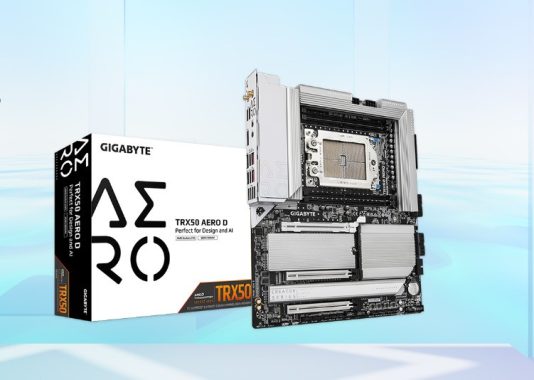
GIGABYTE’s TRX50 AERO D motherboard is engineered for high performance, targeting content creators, tech enthusiasts, and AI specialists. It features an all-digital 16+8+4 phase power design, driven by an Infineon multiphase PWM controller, allowing it to unlock the full potential of AMD’s Ryzen™ Threadripper™ processors. This motherboard’s robust architecture ensures stability even under heavy loads, making it ideal for builders seeking top-tier hardware.
GIGABYTE has unveiled its latest High-End Desktop (HEDT) offering—the TRX50 AERO D. This motherboard is tailored for the AMD Ryzen™ Threadripper™ PRO 7000 WX-Series and Ryzen™ Threadripper™ 7000 Series processors, designed to meet the demands of content creators and AI professionals. Prosumers can now access workstation-level power right at home.
GIGABYTE TRX50 AERO D
The TRX50 AERO D offers extensive expansion capabilities, supporting multiple GPUs and PCIe devices. This allows for efficient handling of intensive tasks, whether you’re working with NVIDIA RTX™ Ada Generation professional graphics cards or the AORUS Gen5 AIC Adapter. The three PCIe x16 slots are ideal for AI training, content creation, design rendering, scientific computing, and large-scale data analysis. The triple-slot design accommodates large high-end graphics cards while ensuring efficient cooling and broad compatibility. The PCIe UD Slot X, designed to support up to 58KG due to its one-piece structure, provides extra reinforcement and stability.
With an all-digital 28-phase power design, the TRX50 AERO D delivers outstanding performance with AMD Ryzen™ Threadripper™ processors, establishing itself as one of the most powerful HEDT platforms available. The advanced thermal design, with an enlarged heatsink and heat pipe in the VRM area, along with an M.2 thermal guard, ensures efficient cooling during intense workloads or multitasking.
The TRX50 AERO D supports quad-channel DDR5 RDIMM with a capacity of up to 1TB, offering excellent memory performance. Additionally, this motherboard features advanced connectivity options, including dual USB4® Type-C ports for ultra-fast data transfer, each capable of reaching speeds up to 40Gb/s, Wi-Fi 7 with GIGABYTE’s high-gain antenna, and dual LAN with 10GbE/2.5GbE capabilities. With four onboard PCIe 5.0/4.0 M.2 slots, users can set up RAID configurations with multiple NVMe devices to tackle demanding workloads.
GIGABYTE has integrated user-friendly features for easy assembly and setup. The new M.2 EZ-Latch Click design allows for screwless installation of M.2 heatsinks, while the M.2 EZ-Latch Plus enables tool-free M.2 SSD installation. The improved UC BIOS offers a more intuitive user interface with a Quick Access panel that can be customized to suit your needs.
The TRX50 AERO D emphasizes ease of use with DIY-friendly innovations like M.2 EZ-Latch Click for screwless heatsink installation and M.2 EZ-Latch Plus for tool-free SSD swaps. The user-centric UC BIOS features an intuitive interface with a Quick Access panel for simplified tweaking. However, some users report inconsistent POST times (up to 1 hour 45 minutes on cold starts) and driver installation quirks, suggesting GIGABYTE’s software support could improve.
GIGABYTE’s Ultra Durable technology shines through with a robust thermal solution. The VRM Thermal Armor Advanced and M.2 Thermal Guard use enlarged full-metal heatsinks to prevent throttling under heavy workloads. High-quality fans with 7 W/mK thermal pads ensure efficient heat dissipation, supporting PWM/DC fans and water-cooling pumps with customizable settings. The PCIe UD Slot X, with a one-piece design and zinc alloy shielding, offers 10x the load-bearing strength, protecting high-end GPUs from sagging or electromagnetic interference.
The GIGABYTE TRX50 AERO D is a state-of-the-art HEDT motherboard that combines performance, versatility, and ease of use, making it an excellent choice for content creators, tech enthusiasts, scientific computing, and AI operations.
Priced around $309, the TRX50 AERO D offers exceptional value for HEDT builders, combining PCIe 5.0, Wi-Fi 7, USB4, and robust thermals. Despite minor BIOS and driver hiccups, its performance and scalability make it a top choice for creators and enthusiasts.
Here’s a table summarizing the specifications for the GIGABYTE TRX50 AERO D motherboard:
Component
Specification
CPU
AMD Socket sTR5, supports AMD Ryzen™ Threadripper™ PRO 7000 Series / Ryzen™ Threadripper™ 7000 Series See GIGABYTE’s website for latest CPU support list
Chipset
AMD TRX50
Memory
– Supports DDR5 up to 7800(O.C.) MT/s – ECC Registered RDIMM/RDIMM-3DS modules – 4 x DDR5 DIMM sockets, up to 1TB (256 GB per DIMM) – Quad-channel architecture – AMD EXPO™ & Intel XMP support
Qualcomm® Wi-Fi 7 QCNCM865 – Supports 802.11a/b/g/n/ac/ax/be & Bluetooth 5.3 – 2.4/5/6 GHz bands (Wi-Fi 7 requires Windows 11 SV3)
Expansion Slots
– 2 x PCIe x16 (PCIe 5.0 @ x16) – 1 x PCIe x16 (PCIe 4.0 @ x16)
Storage Interface
– 1 x M.2 (PCIe 5.0 x4), 2 x M.2 (PCIe 5.0 x4), 1 x M.2 (PCIe 4.0 x4) – 8 x SATA 6Gb/s – RAID 0/1/10 (NVMe & SATA)
USB
– 3 x USB 3.2 Gen 2 Type-A (rear) – 2 x USB4® Type-C (rear) – 1 x USB 3.2 Gen 2×2 Type-C (internal) – 1 x USB 3.2 Gen 2 Type-A (internal) – 6 x USB 3.2 Gen 1 (4 rear, 2 internal) – 4 x USB 2.0/1.1 (internal)
Internal I/O
– 1 x 24-pin ATX, 2 x 8-pin ATX 12V – CPU/system fan/pump headers – RGB/ARGB headers – 4 x M.2, 8 x SATA – USB headers (3.2, 2.0, Type-C) – Power/reset buttons, TPM, noise/thermal headers
Back Panel I/O
– Q-Flash Plus button – 2 x SMA antenna connectors – 1 x DisplayPort In – 1 x USB4 Type-C, 4 x USB 3.2 Gen 2 Type-A, 4 x USB 3.2 Gen 1 – 2 x RJ-45, 2 x audio jacks
I/O Controller
iTE® I/O Controller Chip
H/W Monitoring
Voltage, temperature, fan speed, water flow, noise detection, fan fail warning
BIOS
256 Mbit AMI UEFI BIOS, supports PnP, DMI, SM BIOS, ACPI 5.0
Unique Features
GIGABYTE Control Center (GCC), Q-Flash, Q-Flash Plus
Bundled Software
Norton® Internet Security (OEM), LAN bandwidth management
If you’re a movie enthusiast, there’s nothing like watching a film in a theater. But there’s also something special about curling up on your sofa with a pile of snacks while you binge-watch your favorite movies and TV shows. Are you wondering how to download Blu-ray HD movies for free? Do you want to know the best websites for downloading free Blu-ray movies or the top sources for 4K movie torrents? If you’re asking these questions, here’s a guide that might help you find the answers.
photo: pixabay
Top Websites to Download Blu-ray Movies for Free
1. Filmxy – Filmxy is one of the top websites for downloading Blu-ray movies for free. It focuses on providing high-quality movies and offers three different formats: Blu-ray, 720P, and 1080P. The website has a straightforward design, making it easy to search through categories like Comedy, Adventure, Action, Documentary, and Romance to find the movies you want. The site is frequently updated, allowing users to download the latest releases in 720P and 1080P Blu-ray quality. If you’re new to the site, there’s a helpful FAQ section with guidance on how to download. However, keep in mind that Filmxy doesn’t offer some features like user accounts, community forums, or other social elements.
2. YTS.am – Another excellent source for downloading high-quality Blu-ray movies for free is YTS.am. This site is the official platform for YIFY movies, renowned for offering high-quality movies in compressed sizes. At YTS.am, you can download HD Hollywood movies in various formats, including Blu-ray, 1080P, 720P, 4K, and 3D. The movies are encoded with the X264 codec, ensuring a good balance of quality and file size. According to Alexa, a prominent web traffic analysis service, YTS.am ranks as the fourth most popular torrent site globally.
3. DivxCrawler – The final website on this list is DivxCrawler, another popular destination for downloading Blu-ray movies for free. It caters to users from various regions and countries. The homepage categorizes movies by resolution (HD, Blu-ray, 1080P, and 720P) and language, including HINDI, BANGLA, ENGLISH, TAMIL, CHINESE, and others. This organization makes it easy for users from different linguistic backgrounds to find what they want. The simple website layout is also beginner-friendly, ensuring even first-time visitors can navigate the site without difficulty.
These websites offer a good starting point for finding and downloading free Blu-ray movies. However, always remember to be cautious about copyright laws and understand the risks associated with downloading content from unofficial sources.
The MSI G274QPF-QD is an affordable gaming monitor that offers a solid gaming experience. It features a low input lag for quick responsiveness, along with a 170Hz refresh rate and Variable Refresh Rate (VRR) to minimize screen tearing. However, it has a low contrast ratio and poor black uniformity, which makes deep blacks appear grayish and cloudy in dim lighting. Despite good motion handling across its VRR range, there can still be some blurriness.
Design-wise, the MSI G274QPF-QD has a black plastic body that looks plain from the front, but more gaming-oriented from the back. Its stand is compact, allowing you to position a keyboard or mouse close to the monitor without taking up much space. The build quality is solid, with the plastic body and stand providing sturdy support.
In terms of HDR performance, the monitor’s brightness is adequate, but it doesn’t quite achieve the vivid highlights that HDR typically offers. This is due to an early roll-off in the EOTF curve as the monitor approaches peak brightness, limiting the intensity of highlights. Additionally, many settings are locked when the monitor is in HDR mode, including brightness controls.
The monitor’s refresh rate compliance is generally acceptable. The ‘Normal’ overdrive setting offers consistent performance across various refresh rates, while the ‘Fast’ setting is better suited for high refresh rates but performs worse at lower rates. The ‘Fastest’ setting has an extremely high CAD, exceeding chart limits, indicating high overshoot.
For console gaming, the MSI G274QPF-QD has low input lag and decent motion handling at 120Hz and 60Hz. However, it suffers from some blur and lacks HDMI 2.1 bandwidth, preventing it from fully leveraging the capabilities of the PlayStation 5 and Xbox Series X|S. Compatibility issues with Xbox are also reported, and its limited picture quality due to the low contrast ratio and absence of local dimming restricts image realism.
For office use, the monitor is suitable due to its brightness levels that overcome glare and its good reflection handling. The 27-inch screen is large enough for multitasking with multiple windows, and the monitor’s ergonomic design allows for customizable positioning. However, pixel inversion can cause occasional discoloration, which might be distracting. Additionally, the minimum brightness could be too high for dark-room use.
The MSI G274QPF-QD is a 27-inch gaming monitor with a 1440p resolution that fits into the budget-friendly category. While it’s part of MSI’s G series for entry-level gaming, this model stands out because it includes a quantum dot layer that enhances HDR color performance. It supports FreeSync VRR, is G-SYNC compatible, and offers a 170Hz refresh rate. Unlike many other budget gaming monitors, this one comes with a USB-C connection that supports DisplayPort Alt Mode and provides 15W of power delivery. It also has extra gaming features like “night vision,” which adjusts the brightness to improve visibility, and “screen assistance,” which adds crosshair overlays to help with aiming.
Comparing the MSI G274QPF-QD with the Gigabyte M27Q (rev. 1.0), both are 27-inch gaming monitors with similar overall performance. However, the Gigabyte performs better in well-lit environments because it has a significantly higher SDR brightness. Additionally, it provides superior motion handling, making it a better choice for fast-paced games. On the other hand, the MSI G274QPF-QD has a broader HDR color gamut, allowing it to display more vibrant and realistic colors in HDR content.
MSI G274QPF-QD
In a comparison between the MSI G274QPF-QD and the MSI Optix MAG274QRF-QD, both are similar 27-inch gaming monitors, but the MAG274QRF-QD generally offers a better experience. It has improved black uniformity, resulting in less cloudiness in dark scenes, and it provides more vivid HDR colors. It also has a faster response time, leading to sharper images when objects move quickly.
The MSI G274QPF-QD is suitable for media creation to an extent. Its 27-inch screen size allows you to work with multiple windows simultaneously, and it has excellent ergonomics, enabling you to adjust it for comfort during long editing sessions. It offers good color accuracy out of the box, though it tends to oversaturate colors, so calibration is required for optimal accuracy. One drawback is an issue with pixel inversion, which can cause screen elements to appear discolored, potentially affecting editing work or becoming a distraction.
The MSI G274QPF-QD is a 27-inch, 1440p budget gaming monitor ($269.99) with a 170Hz refresh rate and FreeSync VRR support. It also offers G-SYNC compatibility and a unique quantum dot layer for improved HDR color performance. The monitor has a USB-C connection with DisplayPort Alt Mode support and 15W power delivery, along with gaming features like night vision for better visibility in dark scenes and screen assistance for crosshair overlays.
Compared to the Gigabyte M27Q (rev. 1.0), the MSI G274QPF-QD has a wider HDR color gamut, providing more realistic colors for HDR content. However, the Gigabyte is brighter in SDR and has better motion handling, making it ideal for fast-paced games. Against the MSI Optix MAG274QRF-QD, the G274QPF-QD is similar, but the MAG274QRF-QD has better black uniformity and faster response times.
For media creation, the G274QPF-QD has a large screen and excellent ergonomics, but it may require calibration for accurate color representation. A drawback is potential pixel inversion, causing discoloration that might distract during editing or general use. Overall, the monitor offers solid features for gaming and general use, but some issues may affect certain applications.
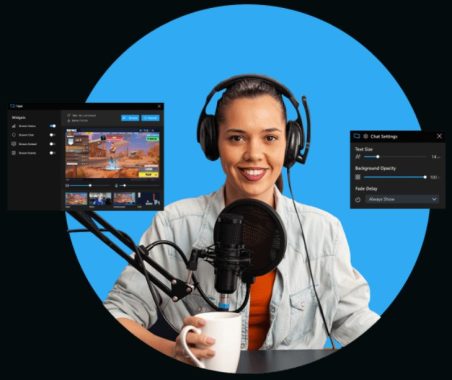
The best software for live video streaming depends on your requirements. Popular choices include OBS Studio, Streamlabs OBS, XSplit, and Wirecast, each offering features tailored to different types of streaming, such as gaming, events, or webinars. When choosing the right software, consider factors like ease of use, hardware compatibility, and essential features for your streaming setup. It’s advisable to research each option to find the best fit.
Encoding and Live Streaming
A camera’s raw video signal must be encoded to be broadcasted online. The encoding process compresses and prepares the video for delivery in formats like RTMP (Real-Time Messaging Protocol) or HLS (HTTP Live Streaming). RTMP is ideal for low-latency streaming, while HLS supports adaptive bitrate streaming, adjusting quality based on the viewer’s internet connection.
Production Features in Streaming Software
Live streaming software allows you to produce content that looks polished. Most platforms offer features like adding/editing titles, live effects, transitions, overlays, and more. These tools let you mix and switch content and manage audio for a professional-quality stream.
Internet Connection, Cameras, and Encoders
To broadcast live streams, you need a stable internet connection, a camera, an encoder, and a streaming service. Since raw video is too large for online broadcasting, it’s encoded using software on a powerful computer or dedicated hardware encoders for high-performance streaming. If you’re aiming for HD quality or parallel streams, ensure your system is robust enough. Hardware encoders are more reliable but costly; software encoders are versatile and often free.
Recording Your Streams
A key feature in live streaming software is the ability to record your streams for later use or archiving. Some platforms offer isolated recordings for each camera input, providing more flexibility for post-streaming editing and content sharing.
photo: OBS Studio
Software Options for Live Streaming
OBS Studio (Open Broadcaster Software): Free and open-source with many features and customization options, available on Windows, macOS, and Linux.
XSplit Broadcaster: User-friendly with resizable tools, supporting live streaming to platforms like Twitch, YouTube, and Facebook Live.
Streamlabs OBS: An easy-to-use version of OBS Studio with additional integrations, making it ideal for streamers who want more customization and monetization options.
Zoom: Primarily a video conferencing and live streaming tool, suitable for online conferences, webinars, and seminars, with features like shared screens and breakout rooms.
What to Look for in Live Video Streaming Software
When selecting streaming software, consider the broader live streaming setup, which includes:
Audio/Video source: Your camera or other content source.
Capture card: To connect non-USB cameras to your computer.
Encoder: To compress and package your video for streaming.
Stable internet connection: Essential for reliable streaming.
Streaming service: The platform where your stream will be broadcasted.
Encoding is a critical part of this setup, and software encoders are popular among non-professionals due to their affordability and flexibility. When choosing live streaming software, ensure it meets your encoding needs and supports additional features like scene switching, multi-camera setups, and recording.
photo: XSplit Broadcaster
XSplit Broadcaster allows you to record your live stream with advanced features like multiple audio tracks. You can add queue points to simplify post-production editing. With its flexible recording profiles, you can stream and record different scenes simultaneously. This means you could record raw gameplay footage while streaming with your camera and overlays visible.
System Requirements
Minimum:
OS: Windows 10 (64-bit)
Processor (CPU): 2nd Generation Core i5 or equivalent
Memory (RAM): 8 GB
Graphics (GPU): GeForce or Radeon class with DirectX 10.1 support or higher
Storage: 250 MB available space
Network: For basic streaming, a minimum upload speed of 500 kbps is required
Recommended:
OS: Windows 10 (64-bit)
Processor (CPU): 2nd Generation Core i7 or equivalent
Memory (RAM): 8 GB
Graphics (GPU): GeForce or Radeon class with DirectX 10.1 support or higher
Storage: 250 MB available space
Network: For HD quality streaming, an upload speed of at least 5 Mbps is recommended.
For most people, the best live video streaming software is OBS Studio because it is free, open-source, powerful, and works on Windows, macOS, and Linux. OBS supports live streaming and recording for platforms like Twitch and YouTube.
Best for
Software
Why I’d pick it
Best overall / free
OBS Studio
Free, open-source, highly customizable, great for YouTube, Twitch, Facebook, and custom RTMP. Best value.
Beginners / gamers
Streamlabs Desktop
Easier setup than OBS, built-in alerts, overlays, widgets, analytics, and creator tools.
Professional productions
vMix
Best for multi-camera shows, NDI/SRT, video calls, titles, replay, Zoom inputs, and advanced live switching on Windows.
Mac users
Ecamm Live
Polished Mac-native tool with camera switching, screen sharing, overlays, interview mode, virtual camera, and multistreaming options.
Multistreaming
Restream
Best when you want to go live to YouTube, Facebook, Twitch, LinkedIn, X, TikTok, and more at the same time.
Paid pro alternative
Wirecast
Strong choice for professional live events, remote guests, multistreaming, ISO recording, PTZ control, and Mac/Windows workflows.
Podcasts / interviews
Riverside
Better for live interviews where you also want high-quality local recordings and separate audio/video files.
My pick by situation:
Use OBS Studio if you want the best free option and do not mind learning setup.
Use Streamlabs if you are a beginner, gamer, or streamer who wants alerts, overlays, and donation tools built in.
Use vMix if you are running a serious event, church service, sports broadcast, conference, or multi-camera production.
Use Ecamm Live if you are on Mac and want something easier than OBS but still professional.
Use Restream if your main goal is streaming to several platforms at once.
Use Riverside if your stream is also a podcast, interview, or content recording session.
Overall recommendation: OBS Studio for most users, Streamlabs for beginners, vMix for professionals, and Restream for multistreaming.
Introducing Huawei’s Pura 70 Ultra: Redefining Smartphone Photography with a Retractable Marvel
In a bold move set to redefine smartphone photography, Huawei unveils its latest innovation: the Pura 70 Ultra. This flagship model from the Pura 70 smartphone range is not just another addition to the market but a technological marvel designed to captivate and inspire.
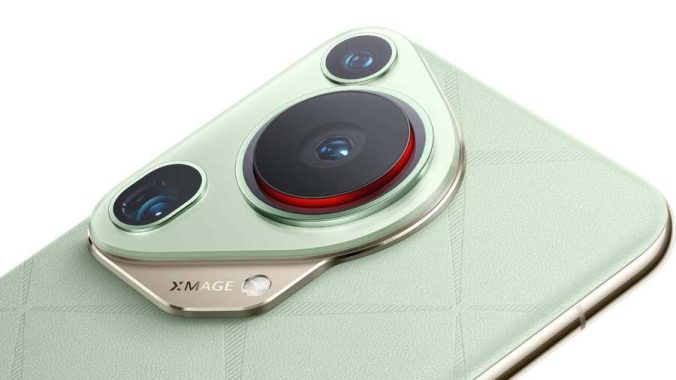
At the heart of the Pura 70 Ultra lies its groundbreaking retractable camera, a feature that sets it apart from the competition. While Huawei faces challenges in Western markets, particularly with access to Google Mobile Services, it refuses to compromise on pushing the boundaries of mobile imaging.
Pura 70 Ultra – photo: phone arena
The standout feature of the Pura 70 Ultra is its revolutionary retractable camera system, a testament to Huawei’s commitment to innovation. This camera module, rigorously tested for durability with 300,000 retractions, serves a dual purpose: enabling the integration of a sizable 1-inch sensor while maintaining a sleek and ergonomic design.
The primary camera boasts an impressive array of features, including a variable aperture ranging from f/1.6 to f/4.0, sensor-shift stabilization, and exceptional performance in high-speed scenarios. Complementing this powerhouse is a 50MP 3.5x macro telephoto lens and a 40MP ultra-wide lens, ensuring versatility in capturing every moment with unparalleled clarity.
The Huawei Pura 70 Ultra’s front-facing camera offers autofocus and eye-tracking, along with a wide range of effects and a portrait mode with beauty filters. It supports video recording at up to Ultra HD resolution and 60fps. Selfies come out sharp with well-balanced colors, though some noise appears in low-light conditions.
The standout feature is on the back: for the first time, Huawei uses a 1-inch sensor, paired with an automatically extending lens. This design increases the distance between the lens and sensor to let in more light. The camera also includes a variable aperture with four levels of automatic adjustment, or manual control, as well as Sensor Shift OIS for stabilization.
Photos taken in daylight look impressive—sharp, with a warm white balance and wide dynamic range, though some fine details can be lost. In low light, automatic exposure keeps shutter speeds short to minimize blur. For sharper results with static subjects, manual night mode is recommended.
Huawei doesn’t rely solely on traditional pixel-binning. In good lighting, it captures 25.4 MP images; in darker conditions, it combines four pixels into one for 12.5 MP shots. A manual 50 MP mode is also available, along with RAW support in Pro mode.
The ultra-wide-angle camera features a high-resolution sensor and aims to deliver detailed images, but in everyday use, it falls slightly short. Photos often appear a bit soft, particularly around the edges. The periscope lens offers 3.5x optical zoom and up to 100x digital zoom, along with a macro mode (minimum focus distance of 5 cm), making the camera system quite versatile. However, zoom performance still lacks precision, and images could benefit from finer detail.
The Pura 70 Ultra can record video at up to 2160p (4K) at 60fps, but only in a 16:9 aspect ratio. Users wanting a 21:9 widescreen format are limited to Full HD (30 or 60fps). Unlike many competitors, the phone records 21:9 video at full resolution (2,560 x 1,080 pixels), which is a plus. Video quality is impressive overall, with support for HDR Vivid recording—though only at 30fps. It’s worth noting that HDR Vivid is not yet widely supported.
Beyond its imaging capabilities, the Pura 70 Ultra boasts a stunning 6.8-inch 2844 x 1260 120Hz LTPO OLED display, offering an immersive viewing experience like never before. With a robust 5200mAh battery and lightning-fast 100W wired charging, coupled with 80W wireless charging, power is never a concern.
Underneath the hood, reports suggest the Pura 70 Ultra is powered by Huawei’s latest 7nm Kirin 9010 processor, delivering blazing-fast performance. Paired with 16GB of RAM and a choice of 512GB or 1TB of storage, it ensures seamless multitasking and ample space for all your digital needs.
Huawei Pura 70 Ultra
Operating on Harmony OS 4.2, Huawei’s bespoke UI built on the foundations of Android, the Pura 70 Ultra offers a familiar yet refreshing user experience. While initially available in China, the global release of these cutting-edge devices remains eagerly anticipated.
With the Huawei Pura 70 Ultra leading the charge, the future of smartphone photography has never looked more promising. As it sets new standards for innovation and excellence, one thing is certain: Huawei is once again at the forefront of technological advancement.
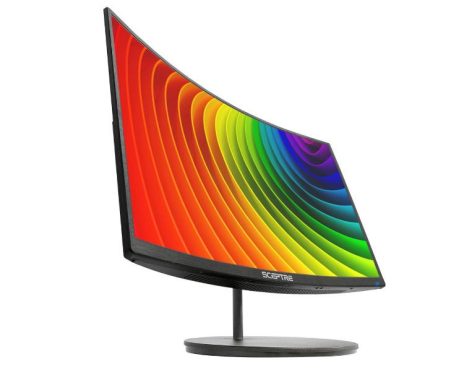
The Sceptre C275W-1920RND 27″ Curved Monitor offers an immersive viewing experience at an affordable price point. With its 27-inch curved Full HD LED display, this monitor aims to elevate your multimedia and gaming experiences without breaking the bank.
Design and Display Quality: The monitor boasts a sleek and modern design with a curvature of 1500R, enveloping you in your content for a more immersive viewing experience. The 1920 x 1080 Full HD resolution ensures sharp and crisp visuals, while the VA panel technology delivers vibrant colors and deep blacks. The slim bezels maximize the screen real estate, allowing for an expansive viewing area.
Sceptre C275W-1920RND
Performance: Featuring a refresh rate of up to 75Hz and Adaptive Sync technology, the monitor ensures smooth and tear-free gameplay, making it suitable for casual gamers and multimedia enthusiasts alike. With a response time of 5ms, motion blur is minimized, enhancing the clarity of fast-paced scenes. The 178-degree viewing angles ensure consistent image quality from virtually any angle, ideal for sharing content or collaborating with others.
Features and Connectivity: Equipped with built-in speakers, HDMI and VGA ports, and a 3.5mm headphone jack, the monitor offers versatile connectivity options for various devices. The OSD control allows for easy customization of display settings, while the blue light shift feature helps reduce eye strain during extended viewing sessions.
Value for Money: Priced competitively at $329.99, the Sceptre C275W-1920RND offers excellent value for its features and performance. Whether you’re gaming, streaming movies, or working on creative projects, this monitor delivers a premium viewing experience.
Experience gaming like never before with the Sceptre C275W-1920RND 27″ Curved Monitor, designed to give you the competitive edge you need. Boasting multiple ports including two HDMI and one VGA, this monitor accelerates refresh rates up to 75Hz, ensuring smooth visuals that keep you ahead in every gaming scenario.
Immersive Audio-Visual Experience: Whether you’re deep into work tasks or immersed in intense gaming sessions, the built-in speakers of the C275W-1920RND deliver robust and smooth audio, eliminating the need for external speakers and saving precious desk space.
Tailored Gaming Modes: Gain an advantage with Sceptre’s custom FPS and RTS display settings. FPS (First Person Shooter) and RTS (Real-Time Strategy) modes are optimized to enhance your gaming experience, providing the perfect visual environment for each genre.
With its immersive curvature, powerful audio, and tailored gaming modes, the Sceptre C275W-1920RND 27″ Curved Monitor is your ultimate companion for conquering the virtual battlefield and achieving new levels of gaming excellence.
Conclusion: In summary, the Sceptre C275W-1920RND 27″ Curved Monitor combines affordability with impressive performance, making it a compelling choice for anyone in need of a versatile display solution. With its immersive curvature, vibrant visuals, and versatile connectivity options, this monitor ticks all the right boxes for an enjoyable multimedia experience. Whether you’re a casual gamer, movie buff, or productivity enthusiast, the Sceptre C275W-1920RND delivers on both performance and value.
About Sceptre:
For nearly four decades spanning from 1984 to 2023, Sceptre has remained resolutely committed to progress, laying the groundwork for an empire in cutting-edge display technology. Originating with the pioneering introduction of CRT technology in 1984, Sceptre’s Research and Development (R&D) labs embarked on a transformative journey, culminating in groundbreaking advancements in LCD technology. As early as 1993, Sceptre’s R&D lab unveiled its inaugural line of LCDs, heralding a new era and paving the way for subsequent breakthroughs in LED and 3D displays.
This strategic evolution has firmly established Sceptre’s R&D labs as vanguards of innovation, not solely in LCD displays but also in LED HDTV and 3D technology. Sceptre has earned widespread recognition as a trailblazer in the LCD/LED display industry. Yet, the linchpin of Sceptre’s triumph extends beyond crafting world-class products; it lies in comprehending and catering to the distinctive requirements of its partners and channels, cultivating trust throughout.
Sceptre’s overarching objective is to nurture mutually beneficial relationships with a diverse array of partners, spanning mass retail, e-commerce, Fortune 500 firms, governmental bodies, and small businesses nationwide. This mission is underpinned by an unwavering dedication to research and development, harnessing state-of-the-art technology while upholding top-tier service standards.
Evidenced by a rich legacy in research and development, Sceptre remains steadfast in its pursuit of maintaining leadership status by perpetually advancing LCD, LED, and HDTV technology. The exceptional quality of Sceptre’s products, coupled with industry-leading specifications, distinguishes our R&D labs from the competition. This distinction is achievable through our steadfast commitment to research and sophisticated development methodologies, empowering Sceptre to excel in delivering bespoke solutions for our partners.
Here’s how you can easily share your WiFi password between different devices such as iPhone, Android, PC, or Mac:
When guests visit your home, they often ask for WiFi access. You can swiftly share your WiFi password or generate a QR code with your smartphone, ensuring everyone gets connected quickly. Below are methods to accomplish this:
Sharing WiFi password between iPhones:
Ensure both iPhones are updated to the latest iOS version (iOS 11 or higher).
Activate WiFi and Bluetooth on both iPhones.
Confirm that the Apple IDs associated with both devices are saved in each other’s contacts.
Place both iPhones near each other and the WiFi source. Connect the iPhone with the known WiFi and open WiFi settings on the other device.
A pop-up window will prompt you to share the WiFi password. Simply tap “Share Password” and the connection will be established instantly.
images: pixabay
If the pop-up doesn’t appear:
Navigate to Settings on your iPhone, then go to Wi-Fi.
Select the current WiFi network and tap “Password”.
Authenticate with your passcode to reveal the password. You can then copy and share it with your friend.
These steps ensure seamless WiFi sharing among iPhone users, simplifying the process for everyone involved.
Sharing WiFi password from iPhone to Mac:
Ensure both devices have each other’s Apple ID email addresses added to their contacts.
Connect your iPhone to the WiFi network.
On your Mac, open Network Preferences by clicking the WiFi icon and selecting “Open Network Preferences…”
Choose the desired WiFi network on your Mac.
A prompt will appear on your iPhone to share the WiFi password with the Mac. Simply tap “Share Password” to complete the process.
Sharing WiFi password from Mac to iPhone:
Ensure all devices are updated to the latest OS version.
Activate Bluetooth and WiFi on both devices.
Confirm that the Apple ID email addresses are saved in contacts on both devices.
On your iPhone, select the desired WiFi network.
Your Mac will display a prompt asking to share the password with the iPhone.
Select “Share Password” on your Mac, then click “Done” to finish.
Sharing WiFi password from iPhone to Android:
Since iPhone and Android systems are less compatible, generating a QR code is an alternative method.
How to generate a QR code for WiFi sharing:
Visit the qifi website.
Input your WiFi details into the provided table.
Your QR code will be generated.
Print the QR code or save it on your browser for easy sharing with trusted friends.
Alternatives to qifi:
While qifi is secure, other options like QR-Code-Wifi and QR Code Generator are available.
Scanning QR codes:
On iPhone: iOS 11 or later supports WiFi QR scanning with the camera app. Alternatively, download a QR reader app like QR Reader for iPhone or Avira QR Code Barcode Scanner.
On Android: Some models have a built-in QR code scanner in HiVision mode. Otherwise, apps like Barcode Scanner or NeoReader QR & Barcode Scanner are good alternatives.
The Sony WH-CH520 represents a step forward from the casual-use on-ear Sony WH-CH510 Wireless headphones. What sets them apart as a significant upgrade is their customizable features through the Sony| Headphones Connect app. This app allows users to tweak the sound profile using a 5-band graphic EQ and presets, personalize the control scheme, and access Sony’s 360 Reality virtual soundstage software. Straight out of the box, their sound is more balanced compared to the Beats Solo3 2019 Wireless headphones, and they boast a longer battery life. Overall, these on-ear headphones offer several premium features typically absent in higher-priced models, making them a worthy option to explore.
The Sony WH-CH520 delivers a commendable neutral sound. The bass and mid-range exhibit excellent balance, rendering genres like EDM and rock with punchiness, richness, and clarity. However, the treble range tends to be recessed, resulting in a slight loss of detail in vocals and instruments, with sibilants sounding somewhat muted. Thankfully, the companion app’s 5-band graphic EQ and presets allow users to adjust the sound profile to their preference. Nevertheless, there is some distortion in the low-bass and low to mid-treble frequencies, which compromises clarity, especially at moderate to high volumes.
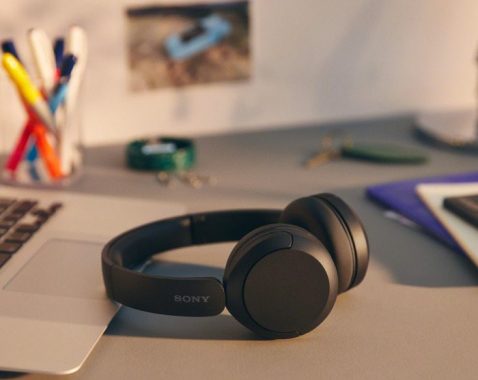
Sony WH-CH520 Wireless Headphones
These on-ear headphones boast a sleek and understated design. The yokes seamlessly integrate with the ear cups, and a subtle manufacturer’s logo adorns the headband. They are available in four monochromatic color options: Black, White, Beige, and Blue.
In terms of comfort, the Sony WH-CH520 performs decently. They exert minimal clamping force and feel lightweight on the head, thanks to well-padded and plush headband and ear cups. However, due to their on-ear design and relatively small ear cups, users may need to make adjustments to achieve a comfortable fit.
The headphone controls are adequate, offering intuitive operation with tactile feedback and voice prompts indicating maximum/minimum volume levels and battery status upon power-up. However, discerning between buttons may be challenging despite the presence of indicator protrusions.
The Sony WH-CH520 offers a slightly warm sound profile characterized by flat and well-balanced bass and mid ranges, albeit with a noticeable low-bass roll-off. This results in audio that feels full-bodied, clear, and present. However, the treble range exhibits less balance, causing vocals and instruments to sound clear yet lacking in detail, while sibilants like cymbals may appear dull. Fortunately, the companion app provides a graphic EQ and presets for users to customize their listening experience according to their preferences.
In terms of frequency response consistency, these on-ear headphones require adjustment each time they are worn to ensure consistent audio delivery, especially impacting treble delivery, which can be affected by factors such as hair length or wearing glasses.
Regarding peaks and dips performance, a mismatch in the L/R drivers leads to slight differences in performance between each side. A small mid-bass bump, more pronounced in the right driver, lends punchiness to the audio but extends into the high-bass, potentially muddying the mix. Additionally, a wide peak from mid-mid to low-treble, particularly noticeable in the left driver, may render instruments and vocals sounding boxy and harsh. The presence of a deep dip and peak in the mid-treble range causes sibilants, such as S and T sounds in dialogue, to sound alternatively dull and piercing, noticeable in both drivers.
The Sony Headphones Connect app’s 360 Reality Audio feature, capable of analyzing ear shape and integrating a virtual soundstage via compatible apps like Tidal and Sony’s own 360 Reality Audio Live, enhances the listening experience. However, it’s worth noting that many of these programs require a subscription for use.
Comparatively, the JBL Tune 660NC Wireless and Sony WH-CH520 Wireless are both on-ear Bluetooth headphones, with only the former featuring active noise cancelling (ANC), albeit not particularly impressive. The JBL model offers better noise reduction against ambient chatter and traffic noise, along with more comprehensive controls and a more compact fold-down design. However, its sound profile is notably more bass-heavy without the option to adjust EQ through an app. On the other hand, the Sony WH-CH520 boasts longer battery life and a more balanced sound profile with the inclusion of EQ adjustments and virtual surround sound via the companion app. Nevertheless, its passive noise isolation is limited to high-pitched sounds, and while its headband offers better padding for comfort, it lacks ANC.
For calls, the Sony WH-CH520 performs adequately, with the integrated mic delivering clear but slightly thin and unnatural voice reproduction. The mic effectively separates the user’s voice from moderate background noise but struggles in louder environments, such as busy subway stations, where the user’s voice may be drowned out. The absence of ANC and poor passive noise isolation further impedes call clarity, especially in moderately loud environments.
The Sony WH-CH520 offers a commendable neutral sound experience. With well-balanced bass and mid-range frequencies, genres like EDM and rock are delivered with punchiness, full-bodied presence, and clarity. However, the treble range takes a step back, leading to a slight loss of detail in vocals and instruments, with sibilants appearing somewhat dull. Thankfully, the companion app’s 5-band graphic EQ and presets allow for sound profile customization. Yet, there’s noticeable distortion in the low-bass and low to mid-treble frequencies, particularly evident at moderate and high volumes, impacting clarity.
In terms of noise isolation performance, the Sony WH-CH520 falls short. Lacking active noise cancellation (ANC) and a seal around the ears due to their on-ear design, they struggle to block incoming noise effectively. Bass-range noise, such as the rumble of a bus engine, remains largely unaffected, while mid-range noise like ambient chatter barely gets isolated. However, they fare relatively better in eliminating treble-range noise, such as the hum of an AC unit.
Battery performance is a strong suit for these headphones. Offering nearly 53 hours of continuous usage, they can last through multiple workdays without requiring a recharge. Additionally, their standby mode extends up to 200 hours, alleviating concerns about unintentional power drain if left on overnight. Nonetheless, it’s important to note that being Bluetooth-only means there’s no passive listening option via an AUX cable in case the battery depletes. It’s worth mentioning that actual battery life may vary based on usage patterns.
Bluetooth performance of the Sony WH-CH520 is noteworthy. Capable of maintaining connections with up to two devices simultaneously, seamless switching is facilitated, although audio playback from a second device requires pausing on the first. On iOS or Android devices, there’s minimal sync discrepancy while watching videos. However, latency issues are apparent on PCs, resulting in audio lag during live streams or gaming sessions. It’s essential to consider that different apps and devices may handle latency compensation differently.
Here’s a summary of the key points regarding the Sony WH-CH520 Wireless headphones:
Sony WH-CH520
Sound Quality: Offers a neutral sound profile with well-balanced bass and mid-range frequencies, providing punchiness and clarity to genres like EDM and rock. However, the treble range is slightly recessed, impacting detail in vocals and instruments, but can be adjusted via the companion app’s graphic EQ.
Noise Isolation: Limited noise isolation performance due to the absence of active noise cancellation and an on-ear design that fails to create a seal around the ears. While they fare better with treble-range noise, bass and mid-range noise, such as engine rumble and ambient chatter, remain largely unblocked.
Battery Performance: Impressive battery life of nearly 53 hours of continuous usage, making them suitable for extended periods without recharging. Additionally, standby mode extends up to 200 hours, ensuring prolonged usability without worrying about power drain.
Connectivity: Strong Bluetooth performance allows for simultaneous connection with up to two devices, although playback from a second device requires pausing on the first. Minimal sync issues are observed on iOS or Android devices, but latency may affect PC usage, particularly during live streams or gaming.
The Sony WH-CH520 Wireless headphones offer a neutral sound experience with customizable features, long-lasting battery life, and reliable Bluetooth connectivity, although their noise isolation performance may be lacking for some users.
When it comes to analog tuners, there aren’t necessarily “best types” in the same way as with digital tuners, as analog television broadcasting has largely been phased out in many parts of the world in favor of digital broadcasting standards like DVB-T, ATSC, and ISDB. However, there were various types of analog tuners commonly used in the past. Here are a few types that were popular:
NTSC Tuners: NTSC (National Television System Committee) is a standard for analog television broadcasting used primarily in North America, parts of South America, and some Asian countries. NTSC tuners were designed to receive NTSC analog TV signals. These tuners were prevalent in TVs and VCRs before the transition to digital broadcasting.
PAL Tuners: PAL (Phase Alternating Line) is a standard for analog television broadcasting used in Europe, Asia, Africa, and parts of South America. PAL tuners were designed to receive PAL analog TV signals. Similar to NTSC, PAL tuners were widely used in TVs and other consumer electronics before the digital transition.
SECAM Tuners: SECAM (Séquentiel couleur à mémoire, French for “sequential color with memory”) is another analog television broadcasting standard used in some countries, primarily France and former Soviet Union countries. SECAM tuners were designed to receive SECAM analog TV signals. While less common globally compared to NTSC and PAL, SECAM tuners were used in TVs in regions where the SECAM standard was adopted.
Multistandard Tuners: In regions where multiple analog broadcasting standards were used or where cross-border reception was common, some TVs and tuners were equipped with multistandard tuners. These tuners could receive and decode multiple analog TV standards, such as NTSC, PAL, and SECAM, allowing viewers to watch broadcasts from different regions.
photo: pixabay
It’s important to note that as analog broadcasting has been largely phased out in favor of digital standards, the relevance of analog tuners has diminished significantly. However, if you have an older TV or electronic device that relies on analog tuners, ensuring compatibility with the specific analog standard used in your region would be essential for optimal reception.
Digital Video Broadcasting (DVB) is a set of standards for digital television (DTV) transmission. It encompasses various transmission methods, including terrestrial (DVB-T), cable (DVB-C), and satellite (DVB-S). DVB-T2, DVB-C, and DVB-S2 are updated versions of these standards that offer improved performance and efficiency over their predecessors. Let’s delve into each:
DVB-T2 (Terrestrial):
DVB-T2 is the second generation of the DVB-T standard, specifically designed for terrestrial transmission.
It offers significant improvements over DVB-T, including better error correction, higher data capacity, and improved modulation techniques.
DVB-T2 supports both standard definition (SD) and high definition (HD) television broadcasts, making it more versatile for broadcasters.
This standard is used in many countries worldwide for terrestrial digital television broadcasting.
DVB-C (Cable):
DVB-C is the standard for digital cable television transmission.
It is used by cable TV operators to deliver digital TV signals over cable networks to subscribers’ homes.
DVB-C supports various types of video compression and modulation schemes, ensuring efficient use of the available bandwidth.
Like other DVB standards, DVB-C supports both SD and HD content, as well as interactive services.
DVB-S2 (Satellite):
DVB-S2 is the second generation of the DVB-S standard, which is used for digital satellite television transmission.
It provides more efficient modulation and error correction compared to DVB-S, allowing for higher data rates and better resistance to signal degradation.
DVB-S2 supports a wide range of transmission applications, including broadcast television, interactive services, and broadband data delivery via satellite.
This standard is commonly used by satellite TV providers to deliver digital TV services to viewers around the world.
Now, regarding TV tuners, there are two main types:
Digital Tuners:
Digital tuners are designed to receive digital television signals, such as those broadcast using DVB-T2, DVB-C, or DVB-S2 standards.
These tuners are capable of decoding digital signals and displaying them on compatible televisions or set-top boxes.
Digital tuners are essential for receiving digital TV broadcasts and enjoying the benefits of improved picture quality and additional features offered by digital television.
Analog Tuners:
Analog tuners, on the other hand, are designed to receive traditional analog television signals.
These tuners are becoming increasingly obsolete as many countries transition to digital broadcasting.
Analog television signals are subject to interference and degradation, resulting in lower picture and sound quality compared to digital signals.
However, some older televisions and equipment may still feature analog tuners, especially in regions where digital broadcasting has not been fully implemented or in use.
DVB-T2, DVB-C, and DVB-S2 are standards for digital television transmission via terrestrial, cable, and satellite networks, respectively. Digital tuners are required to receive and decode these digital signals, while analog tuners are used for traditional analog television broadcasts, although they are becoming less common as digital broadcasting becomes more widespread.
photo: pixabay
More about ISDB and ATSC standards and their tuners
ISDB (Integrated Services Digital Broadcasting):
ISDB is a digital broadcasting standard developed in Japan. It has been adopted by several countries in South America and Asia. The ISDB standard includes various transmission methods, such as terrestrial (ISDB-T), satellite (ISDB-S), and mobile (ISDB-Tmm). Here’s more about ISDB tuners:
ISDB-T Tuners: These tuners are designed for receiving terrestrial digital television broadcasts based on the ISDB-T standard. They are commonly found in TVs, set-top boxes, and digital TV recorders in countries where ISDB-T is used.
ISDB-S Tuners: ISDB-S tuners are used for receiving digital satellite television broadcasts based on the ISDB-S standard. They are used in satellite receivers and integrated into TVs that support satellite reception in regions where ISDB-S is utilized.
ISDB-Tmm Tuners: ISDB-Tmm (Terrestrial Mobile Multimedia) is an extension of ISDB-T designed for mobile devices. ISDB-Tmm tuners are incorporated into mobile phones, tablets, and other portable devices to receive digital TV broadcasts on-the-go.
ISDB tuners are crucial for receiving digital television signals in countries that have adopted the ISDB standard, providing viewers with access to high-quality digital TV broadcasts.
ATSC (Advanced Television Systems Committee):
ATSC is a digital television standard primarily used in North America, including the United States, Canada, Mexico, and South Korea. It supports various transmission methods, including terrestrial (ATSC), cable (ATSC-C), and satellite (ATSC-S). Here’s more about ATSC tuners:
ATSC Tuners: ATSC tuners are designed for receiving terrestrial digital television broadcasts based on the ATSC standard. They are commonly found in TVs, set-top boxes, and digital TV recorders in North American regions where ATSC is used.
ATSC-C Tuners: ATSC-C tuners are used for receiving digital cable television broadcasts based on the ATSC-C standard. Cable operators in ATSC-C regions provide digital TV services to subscribers through cable networks, and ATSC-C tuners are used in cable set-top boxes and compatible TVs.
ATSC-S Tuners: ATSC-S tuners are used for receiving digital satellite television broadcasts based on the ATSC-S standard. While less common than terrestrial and cable broadcasting, ATSC-S is utilized by satellite TV providers in North America to deliver digital TV services to subscribers. ATSC-S tuners are found in satellite receivers and integrated into compatible TVs.
ATSC tuners are essential for accessing digital television broadcasts in North American regions where the ATSC standard is implemented, offering viewers improved picture quality, sound, and additional features compared to analog broadcasts.
ISDB and ATSC standards have their respective tuners tailored for terrestrial, satellite, and cable broadcasting methods, providing viewers in different regions with access to digital television broadcasts. These tuners are integrated into TVs, set-top boxes, and other devices to receive and decode digital TV signals according to their respective standards.
Can you install a USB tv tuner into Google tv?
Google TV does not natively support USB TV tuners for live television reception. Google TV is primarily focused on streaming services and content aggregation rather than traditional live television broadcasting. However, you might be able to achieve TV tuner functionality through workarounds or third-party apps, but this would largely depend on the capabilities of the specific device running Google TV and whether developers have created compatible software.
Here are a few points to consider:
Device Compatibility: Google TV is available on select streaming devices, smart TVs, and set-top boxes. Whether or not you can use a USB TV tuner with Google TV depends on the hardware and software capabilities of the specific device you are using.
Third-Party Apps: There may be third-party apps available on the Google Play Store that enable TV tuner functionality with external USB tuners. These apps might provide support for live TV reception and DVR features. However, the availability and compatibility of such apps can vary.
Rooting or Modding: Some users might explore rooting or modifying their Google TV devices to enable additional functionality, including support for USB TV tuners. However, these methods can void warranties, introduce stability issues, and may not be suitable for all users.
Alternative Solutions: If you’re primarily interested in live TV, you might consider alternative solutions such as using a separate TV tuner device with its own interface or investing in a dedicated TV streaming device that supports live TV reception out of the box.
It’s essential to research thoroughly and consider the potential limitations and risks before attempting to add TV tuner functionality to a Google TV device. Additionally, keep in mind that software updates and changes in platform policies can affect the availability and compatibility of third-party apps and modifications.
Summer evokes images of road trips, beach excursions, and the delight of cruising under the sun’s warmth. Yet, as temperatures soar, the significance of a fully operational air conditioning (air con) system in your vehicle cannot be emphasized enough. A once-enjoyable journey can swiftly become uncomfortable if your air con falters during the summer months. This article provides a series of recommendations to guarantee the efficiency of your car’s air conditioning system throughout the scorching summer months.
Don’t let the summer heat turn your car into an unbearable oven on wheels. Stay cool with a dependable and effective air conditioning system that guarantees comfort during your travels.
Regular Maintenance Checks
Similar to regular health checkups, regular inspections of your car are essential. Be sure to schedule routine maintenance with a certified technician. These automotive experts will check refrigerant levels, inspect for leaks, and verify the functionality of all components. A well-maintained system serves as your primary defense against the summer heat. This proactive approach not only ensures optimal performance but also helps detect potential issues before they worsen.
photo: pixabay
Clean Air Filters
Air filters in your car play a vital role in maintaining the efficiency of the air conditioning system. Over time, these filters can accumulate dust and debris, obstructing airflow. Regularly clean or replace the filters to ensure that cool air flows freely into the car’s cabin. It’s a simple yet effective way to ensure smooth operation of the car’s system and enjoy cool air during summer drives.
Monitor Refrigerant Levels
Adequate refrigerant levels are crucial for a comfortable ride. If refrigerant levels are low, the system will struggle to cool the air effectively. Keep an eye on the levels and promptly refill them when necessary.
Park in the Shade
Parking in the shade can significantly help maintain the interior temperature of your car. Direct sunlight can heat up the interior, causing the air conditioning system to work harder. Parking in the shade not only protects your upholstery from sun damage but also reduces the workload on the cooling system. If shade is limited, consider using a sunshade on the windscreen to block out the sun’s rays and keep the car cooler for longer.
Use Gradual Cooling and Recirculation Mode
Instead of immediately setting the air con to the maximum intensity when entering a hot car, opt for gradual cooling. Start with a lower intensity and increase it as the interior temperature becomes more comfortable. This approach prevents unnecessary strain on the system and contributes to better fuel efficiency. Additionally, utilize the recirculation mode to circulate already-cooled air inside the car, reducing the load on the system.
Check for Leaks
Driving habits greatly affect the cooling system in your car. Avoid unnecessary idling, as it strains the compressor. Drive with the windows down for a few minutes to let out hot air before relying solely on the air conditioning. Pay attention to any signs of leakage, such as puddles of water or oily stains under the car after using the system. Promptly addressing these issues maintains efficiency and prevents more significant problems in the future.
Regularly Operate the Air Conditioning
Even if you don’t use the air conditioning daily, it’s recommended to run it for a few minutes regularly. This prevents components from seizing up and ensures proper circulation of refrigerant. Occasional usage helps maintain the system’s condition. Unusual sounds like squealing, grinding, or hissing can signal potential trouble. Addressing these noises early can prevent more serious issues later on.
Protect the Dashboard
Excessive heat can damage a car’s dashboard, affecting both its appearance and the efficiency of the air conditioning. Using a sunshade or window visor when parked helps shield it from direct sunlight. This simple measure maintains a cooler interior and extends the life of the air conditioning system. If your air con struggles to keep up, consider upgrading to a more energy-efficient model for improved performance and environmental friendliness.
Easy Access to Professional Service
Getting your car serviced by qualified mechanics in your area is now convenient. This prevents costly repairs in the future. Don’t wait for temperatures to soar; schedule a maintenance check for your car’s air conditioning system today and enjoy uninterrupted coolness all summer long.