Home Blog Page 37

How Does LED TV Actually Work? A Complete Explanation

0

Are you like me, someone who’s always been curious about the inner workings of modern technology? Well, if you’ve ever wondered, “How does LED TV actually work?” then you’re in for a treat! In this comprehensive guide, we’ll dive deep into the fascinating world of LED TVs, unraveling their secrets and highlighting some unique features that make them a staple in our living rooms today.

Understanding the Basics

Before we get into the nitty-gritty details, let’s establish a foundation by understanding what LED TV stands for. LED stands for “Light Emitting Diode,” which is at the heart of this television technology. While the term “LED TV” is often used, it’s essential to clarify that these TVs are technically a type of LCD (Liquid Crystal Display) TV that uses LED backlighting.

The Guide to the Light

Now, let’s embark on our journey into the workings of an LED TV.

1. The Light Source: LED Backlighting

At the core of every LED TV is its LED backlighting system. Unlike older CRT (Cathode Ray Tube) TVs, LED TVs do not use phosphors to create images. Instead, they rely on an array of tiny light-emitting diodes situated behind the screen. These diodes emit white light, which serves as the primary source of illumination for the television.

How Does LED TV Actually Work
Image by DCStudio on Freepik

2. The Role of Liquid Crystals

But here’s the magic trick: LED TVs wouldn’t be much without the LCD part of their name. Liquid crystals play a pivotal role in controlling the light produced by the LEDs. These liquid crystals are sandwiched between two layers of glass, forming what’s known as the LCD panel.

3. Pixels and Color Mixing

Now, let’s talk pixels. The LCD panel is divided into millions of tiny cells, each of which is responsible for a single pixel on the screen. Each pixel contains three subpixels: one red, one green, and one blue. The key to creating vibrant colors and images is manipulating the intensity of light passing through these subpixels.

4. The Art of Manipulation: Liquid Crystals in Action

Here’s where the real magic happens. The liquid crystals can twist and untwist to control the passage of light. When electricity is applied to a pixel, it causes the liquid crystals to align in such a way that they either block or allow light to pass through. This manipulation of light intensity across the red, green, and blue subpixels creates the full spectrum of colors we see on our screens.

5. Backlight Control: Achieving Brightness and Contrast

The intensity of the LED backlight plays a crucial role in achieving the desired brightness and contrast levels. Depending on the content being displayed, the TV adjusts the brightness of the backlight dynamically to enhance image quality. This is where some unique features come into play.

Unique Feature #1: Local Dimming

Many high-end LED TVs incorporate a feature called “local dimming.” This technology allows the TV to dim or turn off specific zones of LEDs behind the screen, creating deeper blacks and better contrast in darker scenes. It’s like having a spotlight on the action while keeping the rest of the screen in darkness, which can significantly enhance your viewing experience.

6. The Role of Color Filters

In addition to liquid crystals, color filters are used to fine-tune the colors on the screen. These filters help ensure that the red, green, and blue subpixels produce accurate and vibrant colors. The combination of precise liquid crystal manipulation and color filtering results in the lifelike colors we’ve come to expect from LED TVs.

7. Resolution and Image Quality

Resolution is another essential aspect of LED TVs. It refers to the number of pixels packed into the screen. Common resolutions include Full HD (1920×1080 pixels), 4K Ultra HD (3840×2160 pixels), and even 8K (7680×4320 pixels). Higher resolution screens offer more detail, but they also require more powerful processing to render content smoothly.

Unique Feature #2: HDR (High Dynamic Range)

HDR is a technology that’s becoming increasingly prevalent in LED TVs. It enhances the contrast and color accuracy of images, making them more true to life. HDR content contains a wider range of brightness levels, allowing you to see more details in both the darkest shadows and the brightest highlights. It’s like having sunglasses for your TV, letting you see all the nuances in your favorite movies and shows.

8. Refresh Rates and Motion Handling

To ensure smooth motion during fast-paced scenes, LED TVs have a refresh rate, typically measured in Hertz (Hz). A higher refresh rate results in smoother motion, which is particularly important for sports and action-packed movies.

9. Sound: The Companion to Visuals

While we’ve been focusing on the visual aspect, sound is a crucial part of the TV-watching experience. Many LED TVs come with built-in speakers that deliver decent audio quality. However, for a truly immersive experience, consider investing in a soundbar or a surround sound system.

10. Smart Features: The Modern Touch

Nowadays, LED TVs are not just about displaying content from cable or satellite sources. Most come equipped with smart features that allow you to access streaming services, browse the internet, and even control your smart home devices. It’s like having a mini-computer in your living room.

Unique Feature #3: Voice Assistants

Some smart LED TVs include voice assistants like Amazon Alexa or Google Assistant, which enable you to control your TV and other connected devices using voice commands. It’s a convenient feature that adds a touch of futuristic flair to your TV setup.

11. Connectivity: Ports and Inputs

Behind the scenes, LED TVs have an array of ports and inputs to connect to various devices. Common connections include HDMI (for Blu-ray players, gaming consoles, and more), USB (for media playback), and Ethernet (for a wired internet connection).

12. Energy Efficiency: The Green Side of LEDs

One of the advantages of LED TVs over older technologies like plasma and CRT is their energy efficiency. LEDs consume significantly less power, which not only lowers your energy bills but also reduces your carbon footprint.

So, there you have a comprehensive guide on how LED TVs actually work. From the LED backlighting and liquid crystals to resolution, HDR, and smart features, LED TVs are a marvel of technology that has transformed our viewing experiences. With unique features like local dimming, HDR, and voice assistants, they continue to evolve and offer more immersive entertainment.

Next time you turn on your LED TV and enjoy your favorite show or movie, you’ll have a newfound appreciation for the intricate processes happening behind the scenes to deliver those stunning visuals and crystal-clear audio. So, sit back, relax, and let your LED TV transport you to another world of entertainment, all while knowing exactly how it works.
Tips to Recover Chrome Browsing History

0

In this era of advanced technology, we accumulate a trail of links while scouring the web for information. Browsers routinely store this history, but it can be accidentally deleted. If you find yourself unable to recall a website due to your Google Chrome history vanishing, you might wonder how to recover it. Below, you’ll find a step-by-step guide to help you restore your Chrome browsing history. Please note that not every method may work for your situation, so it’s advisable to try each one until you succeed.

Restoring Deleted Chrome Browsing History

Every web browser, including Google Chrome, maintains a record of recently visited websites, including timestamps. Losing your Chrome history can be troublesome, but you can attempt one of the following three methods to recover it.

  1. Check the Recycle Bin Follow these steps to recover deleted Chrome history:

a. Open the Recycle Bin to check if deleted history files are temporarily stored. b. If you find them, select the files and click “Restore.” c. If not, proceed to the next method.

  1. Utilize DNS Cache

Ensure your computer is connected to the internet before attempting this method. Do not restart or turn off your computer after losing your Chrome history.

a. Open the Windows Start menu and type “cmd” into the Command Prompt. b. In the Command Prompt, type “ipconfig /displaydns” and press Enter. c. This will display recently visited websites.

  1. Resort to System Restore

You can use System Restore to recover lost Chrome history whenever it has been deleted. Follow these steps:

a. Click on the ‘Cortana’ icon and search for ‘System restore.’ b. Select the option ‘Create a restore point,’ then go to the ‘System protection’ tab and choose ‘System Restore.’ c. Choose a suitable restore point and click ‘Next.’ d. Click ‘Finish’ and wait for the process to complete. Restart your computer and check if your internet history is restored.

Chrome
Chrome – photo: Pixabay
  1. Examine Cookies

Cookies store information about your browsing history and can be used to recover your Google Chrome history:

a. Launch Google Chrome, go to ‘More Options,’ and access ‘Settings.’ b. In the ‘Privacy and Security’ section, click ‘Advanced.’ c. Choose ‘Content settings,’ and at the top of the list, you’ll find ‘Cookies.’ Select this option to retrieve the desired information.

  1. Explore My Activity

Google Chrome users logged in with a Google Account can utilize ‘My Activity’ to view and control their browsing history:

a. Visit http://www.google.com and search for ‘My Activity.’ b. Navigate to myactivity.google.com, which should be the first result. c. Sign in to your Google Account to access your Activity and associated data. d. Browse through your Google Account to recover deleted information.

  1. Use the ‘Restore Previous Versions’ Option

If you can’t find your browsing history through your Google Account activity, you can restore Chrome history using Windows Explorer:

a. In “Windows Explorer,” go to “Local Disk (C:)” (usually the default installation location for apps). b. Open the “Users” folder. c. Access your specific user profile folder. d. Ensure the “Hidden Items” option is enabled in the “View” tab. e. Navigate to the “AppData” folder, then “Local.” f. Right-click on the “Google” folder, select ‘Properties,’ and go to the “Previous versions” tab. g. Choose the desired previous version and click ‘Apply,’ then ‘OK.’

Your browsing history should now be restored to its previous state.

  1. Turn to Desktop Search Programs

Consider using desktop search tools to locate files on your computer, but ensure you choose the right program and install it on a separate drive. Afterward, use the Windows search box to search for any remembered phrases to find and recover your Google Chrome history files.

Select the method that best suits your situation from the options outlined above. This article provides several potential solutions for recovering deleted Google Chrome history.

Turtle Beach Stealth 700 Gen2 Max Gaming Headset Review

0

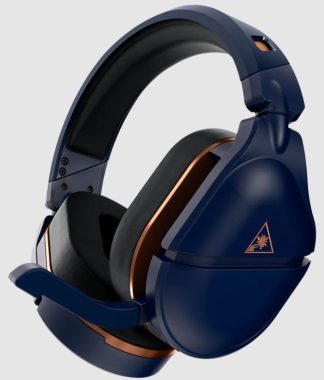
Are you in search of a top-tier gaming headset that delivers exceptional performance and comfort without breaking the bank? Look no further than the Turtle Beach Stealth 700 Gen2 Max Gaming Headset. With a reasonable price tag of $239.99, this headset offers an impressive combination of features that cater to both casual gamers and hardcore enthusiasts. In this review, we’ll dive deep into its compatibility, performance, gaming capabilities, battery life, and overall quality, giving you a comprehensive overview of what makes this headset stand out.

Design and Comfort

Let’s kick things off with the design of the Turtle Beach Stealth 700 Gen2 Gaming Headset. It sports a sleek and modern aesthetic that will undoubtedly appeal to gamers of all tastes. The over-ear, closed-back ear-cup design not only adds to the overall aesthetics but also contributes to sound isolation, immersing you in your gaming world.

One standout feature in terms of comfort is the Aerofitâ„¢ cooling gel-infused ear cushions. These ear cushions are a game-changer, providing a plush memory foam experience with a layer of cooling gel. Long gaming sessions are no longer synonymous with discomfort and sweaty ears. The headset’s build quality feels sturdy, ensuring it can withstand the rigors of intense gaming sessions and everyday wear and tear.

Turtle Beach Stealth 700 Gen2 Max Gaming Headset

But what sets the Stealth 700 Gen2 Max apart is the ProSpecsâ„¢ glasses relief system, a patented feature by Turtle Beach. Dual-foam ear cushions cater to gamers with glasses, alleviating pressure and ensuring that everyone can game in comfort. This thoughtful design consideration is a small touch that makes a big difference for glasses wearers.

Performance and Compatibility

Compatibility is a crucial factor when choosing a gaming headset, and the Turtle Beach Stealth 700 Gen2 Max doesn’t disappoint. It’s compatible with a wide range of platforms, including Xbox Series X, Xbox Series S, Xbox One X, Xbox One S, PS5, PS4, PS4 Pro, PS4 Slim, Nintendo Switch, PC, Mac, iOS, Android, and other Bluetooth-equipped devices. This extensive compatibility ensures that you can use this headset across your entire gaming ecosystem, whether you’re a console or PC gamer.

One of the standout performance features is the proprietary low-latency, lossless 2.4 GHz wireless connection. This ensures a lag-free gaming audio and chat experience, giving you a competitive edge in fast-paced games. The simple mini-USB transmitter connects swiftly to Xbox, PlayStation, PC, and Nintendo Switch, making setup a breeze.

Gaming Experience

Now, let’s talk about the gaming experience with the Turtle Beach Stealth 700 Gen2 Max. The headset is optimized for surround sound, with support for Windows Sonic, Dolby Atmos, and PS5. While Dolby Atmos and DTS:X may require additional purchases and hardware, the fact that this headset supports these technologies is a testament to its immersive audio capabilities. It truly brings your games to life, ensuring you catch every important detail, enhancing both your gaming and entertainment experiences.

The high-performance Nanoclearâ„¢ speakers are a highlight, delivering realistic sound imaging. Whether you’re deep in a single-player campaign or engaged in multiplayer action, the audio quality ensures you’re fully immersed in the gaming world. The 50mm Nanoclearâ„¢ neodymium drivers are a powerhouse when it comes to sound reproduction.

The Gen 2 flip-to-mute microphone is a significant upgrade in terms of voice chat. It’s larger, highly sensitive, and boasts a remarkable 99.95% voice accuracy rate. Moreover, it seamlessly conceals into the headset when flipped up to mute, eliminating any awkward mic visibility during your gaming sessions.

Software and Unique Features

The Turtle Beach Audio Hub app is a game-changer for customization. With this app, you can easily adjust your audio settings and program the mappable dial and button on the headset, all through your Bluetooth-connected mobile device (iOS/Android). This means you can fine-tune your audio settings for a custom, immersive experience tailored to each game you play.

Superhuman Hearing® is another unique feature that can give you an edge in competitive gaming. This setting allows you to hear subtle, game-changing sounds, such as enemy footsteps and weapon reloads, with greater clarity. It’s a game-changer that can help you react faster and stay ahead of the competition.

Battery Life and Price

The rechargeable lithium-polymer battery ensures you won’t be constantly tethered to a charging cable. With this headset, you can enjoy extended gaming sessions, thanks to its respectable battery life. The inclusion of a USB-C cable for fast charging and easy firmware updates is a nice touch, keeping you in the game rather than waiting for your headset to charge.

Turtle Beach Stealth 700 Gen2 Max Gaming Headset
Turtle Beach Stealth 700 Gen2 Max – images: Turtle Beach

Now, let’s address the price. At $239.99, the Turtle Beach Stealth 700 Gen2 Max Gaming Headset is competitively priced considering its feature set. It competes with headsets in a higher price bracket while delivering comparable, if not superior, performance and comfort. It’s a smart investment for gamers looking for top-notch audio quality without breaking the bank.

Final Thoughts

In conclusion, the Turtle Beach Stealth 700 Gen2 Max Gaming Headset impresses on multiple fronts. Its compatibility with a wide range of platforms, lag-free wireless connection, and immersive gaming experience make it a strong contender in the gaming headset market. The attention to comfort, especially for glasses wearers, is commendable, and the inclusion of unique features like Superhuman Hearing® and the Turtle Beach Audio Hub app sets it apart from the competition.

Considering its competitive price of $239.99, the Turtle Beach Stealth 700 Gen2 Max Gaming Headset offers exceptional value for the features and performance it delivers. Whether you’re a casual gamer or a dedicated enthusiast, this headset is well worth your consideration for an enhanced gaming experience that won’t disappoint.

SpecificationsDetails
ConnectionsWireless Transmitter: Xbox Series X, Xbox Series S, Xbox One X, Xbox One S, PS5, PS4, PS4 Pro, PS4 Slim, Nintendo Switch, PC & Mac<br>Bluetooth: iOS, Android, Nintendo Switch, PC & Mac, and other Bluetooth Equipped Devices
Speakers50mm Nanoclearâ„¢ neodymium drivers
Frequency Response20Hz – 22kHz
Ear-Cup DesignOver-Ear (Closed)
Ear-Cushion MaterialSynthetic Leather (Black) with Memory Foam Cushioning
Mic DesignFlip-up Omni-Directional
BatteryRechargeable Lithium Polymer

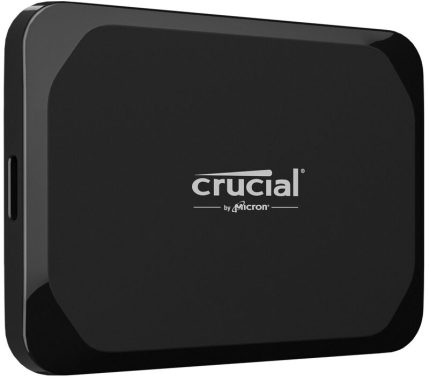
Crucial X9 1TB Portable SSD Review

0

In the age of ever-expanding digital horizons, having a trusty external storage solution is akin to having a reliable companion for all your data-related adventures. Enter the Crucial X9 1TB Portable SSD, a compact powerhouse that’s ready to take on your storage needs with flair. In this review, we’ll dive into the key aspects of this portable SSD, from its compatibility and build quality to its performance and impressive capacity.

Compatibility

When it comes to external storage, compatibility is crucial (pun intended). The Crucial X9 1TB Portable SSD boasts an impressive USB 3.2 Gen-2 interface, providing a zippy 10Gb/s transfer speed. This means that it’s not only compatible with the latest laptops and desktops but also ensures that you won’t be twiddling your thumbs while transferring data.

One of the notable features here is backward compatibility, making it play nicely with older USB ports as well. So whether you’re connecting it to a sleek, modern machine or your trusty, battle-worn laptop, the X9 won’t leave you hanging. This kind of adaptability is just what we need in a world full of diverse tech ecosystems.

Build Quality: A Solid Pocket Companion

First impressions count, and the Crucial X9 1TB Portable SSD certainly leaves a positive one. This sleek, silver drive is not only compact but also feels reassuringly solid in your hand. Its aluminum exterior adds a layer of durability, which is a blessing for those of us who tend to be a bit rough with our gadgets. The weight is just right – substantial enough to feel well-constructed, yet light enough to be comfortably portable.

The design is minimalist and clean, with the Crucial logo tastefully etched on the surface. It’s a device that doesn’t scream for attention but still manages to look classy sitting on your desk or in your bag.

Crucial X9 1TB Portable SSD

One feature that sets this SSD apart is its shock and vibration resistance. Accidents happen, and if you’re the type to carry your storage on the go, knowing that your precious data is protected is a big relief. The X9’s robust build ensures that your files are safe even if the drive takes a tumble.

Performance: The Need for Speed

Now, let’s talk about the heart of the matter – performance. The Crucial X9 1TB Portable SSD is no slouch in this department. With a sequential read speed of 1050MB/s, it blazes through data transfers like a champ. This means you can move large files or even entire folders in a flash.

Whether you’re a content creator dealing with hefty video files, a gamer needing speedy game backups, or just someone who hates waiting around, the X9 has your back. It’s like having a speedster for your data – it gets the job done swiftly, allowing you to focus on what matters most to you.

Gaming enthusiasts will appreciate how quickly games load from the X9, reducing those annoying wait times. Content creators can seamlessly edit and preview high-resolution videos directly from the drive, thanks to its stellar performance.

Capacity

At 1TB, the capacity of the Crucial X9 Portable SSD is nothing short of generous. Whether you’re storing a vast media library, countless documents, or a combination of both, this SSD has room to spare. It can easily accommodate your daily needs, and then some. One of the most captivating aspects of the Crucial X9 Portable SSD is its staggering capacity options. With 1TB, 2TB, and 4TB variants to choose from, it’s akin to diving into an ocean of storage possibilities.

For photographers and videographers, the X9 is a dream come true. You can store thousands of high-resolution images or hours of 4K video without breaking a sweat. It’s also an excellent choice for business professionals who need to keep their work files accessible and secure.

Software: Simple and Effective

While the X9 doesn’t come with a boatload of fancy software, it does provide a user-friendly experience. Crucial offers a free downloadable utility called Crucial Storage Executive that allows you to monitor the drive’s health, update firmware, and optimize performance with ease. It’s a no-fuss solution for keeping your SSD in top shape.

Crucial X9 1TB Portable SSD
X9 Portable SSD images: Crucial

Unique Features

One of the standout features of the Crucial X9 1TB Portable SSD is its robust data protection. With AES 256-bit hardware encryption, your files are secured against unauthorized access. This is particularly important if you’re storing sensitive information or personal data on the drive.

Moreover, Crucial offers a limited 3-year warranty, which adds an extra layer of confidence in your investment. Knowing that the manufacturer stands by their product for three years is a comforting thought.

In conclusion, the Crucial X9 Portable SSD is a compelling choice for those who demand speed, reliability, and versatility from their external storage solution. Its compatibility with a wide range of devices, sturdy build quality, lightning-fast performance, and an expansive range of capacity options make it an exceptional addition to your tech arsenal.

With prices starting at $79.99 for the 1TB model, the Crucial X9 Portable SSD offers outstanding value for your investment. Whether you’re safeguarding your important files, working with media, or simply seeking a swift and dependable storage companion, the Crucial X9 Portable SSD is poised to be the guardian of your digital world. Choose the capacity that suits your needs and elevate your storage experience to new heights.

Improved and always better – What’s new in iOS 17?

0

At WWDC 2023, Apple introduced iOS 17, the next iteration of its iPhone operating system, alongside iPad 17 for iPads. While not a revolutionary update, the presentation showcased a host of appealing customization features. In this article, we’ll delve into the key features of iOS 17.

Over the past year, iOS 16 has made significant strides in enhancing iPhone customization. It introduced features such as the AlwaysOn display mode, an improved Lock Screen, and various app enhancements. The upcoming iOS 17 update aims to continue this trend.

What’s New in iOS 17?

In addition to the recently unveiled accessibility enhancements designed to improve usability for individuals with disabilities, iOS 17 brings a collection of refreshing features. Noteworthy improvements have been made to essential apps like Phone, Messages, and the keyboard. However, there’s been no mention of changes to the App Store or the possibility of acquiring apps outside the official platform. This may become necessary to comply with the Digital Market Act, a new European legislation governing the digital services market. It remains uncertain whether this significant shift will be implemented in iOS 17 or a subsequent version.

iOS 17
A new full-screen experience
Turn your iPhone on its side while charging to make it even more useful when you set it down.” – Apple

The Phone app, a cornerstone of the iPhone experience, introduces personalized Contact Posters. Users can now customize the appearance of incoming call notifications. These Contact Posters take up the entire screen when one of your contacts calls you.

Another new feature in the Phone app is Live Voice Mail. If you choose not to answer and the caller leaves a message, the Phone app displays a transcript of the message left on your voicemail. This feature is useful for quickly determining whether it’s necessary to call back based on the message’s content. Its availability across all operators is yet to be confirmed.

FaceTime receives a minor update with the addition of video messages, similar to video voicemails. FaceTime calls become more expressive with the inclusion of Reactions, featuring effects like hearts, balloons, fireworks, laser beams, rain, and more. Activating these effects is as simple as making a gesture, adding an extra layer of fun to your conversations.

The Messages app for SMS still does not utilize the RCS protocol, despite Google’s urging. However, it does receive improvements, such as the ability to track a contact’s movements and receive notifications when they reach their destination. This feature is practical for ensuring the safety of loved ones, such as children returning home after a night out.

Stickers play a more significant role, allowing users to create them directly from photos in their library and resize them as needed. You can even create small animations in the form of stickers from Live Photos taken on an iPhone.

AirDrop, the Quick Sharing system available across iOS, iPadOS, and macOS, becomes even easier to use. NameDrop enables users to share contact details by bringing two iPhones closer together or between an iPhone and an Apple Watch. This gesture also facilitates sharing various types of content and initiating SharePlay, where you can listen to music, watch movies, or play games with nearby iPhone users.

iOS 17 Be Available
Apple images

Journal is a new app coming to iOS, allowing you to create a diary that combines notes, photos, videos, music, and locations, all stored locally on your device.

Standby mode transforms your iPhone into an advanced alarm clock when combined with a stand or charger and positioned horizontally. It resembles a voice assistant with a screen, displaying your daily schedule, news, weather, and more.

In addition to these changes, iOS 17 includes several minor improvements. The SMS autocorrection system is enhanced with machine learning to better understand your habits and only correct “useful” mistakes. You no longer need to say “Hey Siri” to wake up the voice assistant; a simple “Siri” will suffice. Conversations with Siri can continue without repeating the name. The Maps app allows you to download maps for offline use, and the Photos app not only recognizes human faces but also identifies animals.

Which iPhones Will Be Compatible with iOS 17? – Apple has reduced the list of compatible iPhones for iOS 17. Models released since 2018 will be able to run it, including the iPhone XR, iPhone SE (2nd generation), iPhone XS, and all iPhone 11, 12, 13, and 14 models. However, iPhone X, iPhone 8, and 8 Plus are excluded from the list and will remain on iOS 16.5. Apple’s impressive software support longevity, extending to 5 years, stands in contrast to the Android world, where major updates are often limited to four years at best.

When Will iOS 17 Be Available?

As of now, iOS 17 is in beta and available to developers this month. The public beta, offering a sneak peek at the new features, will be available in July. The final version of the operating system is expected to be fully released in September, coinciding with the launch of the iPhone 15 lineup.

A Quick Guide to Downloading YouTube Videos on a Mac

0

Whether you’re stocking up on videos for a long trip without Wi-Fi or hoping to download tutorials or essays for work or personal projects, knowing how to download YouTube videos onto your Macbook is a useful skill. Rather than having to constantly rely on an internet connection while you’re on the go, you can simply plop down wherever you are, boot up your Macbook, and start watching.

Now, YouTube does have a feature that will allow you to download videos straight onto your iPad or iPhone, but there’s a catch – you’ll need to be subscribed to YouTube Premium. The same can be said about other streaming services like Disney, Netflix, and Amazon Prime. If you’re like me and don’t want to commit to yet another subscription service, this is the place for you.

What do you need to embark on this journey of downloading YouTube videos on a Mac? Well, it’s quite simple, and chances are, you already have everything you need:

  • A MacBook
  • Screen recording software

The beauty of this method is that you won’t need to download or purchase any additional software or apps. Ever since Mojave, macOS has had a built-in screen recording feature, which makes this process a breeze.

Youtube on mac
photo: YouTube

Step-by-Step Guide

Let’s dive into the step-by-step process of downloading YouTube videos on your Mac:

  1. Find the YouTube video of your choice: Start by loading up your chosen YouTube video on your Mac. Ensure that the video quality is set to your desired resolution and that it’s in full-screen mode for the best results.
  2. Activate screen recording: Here’s where the magic happens. Press Command + Shift + 5 on your keyboard. This key combination will open up the screen recording menu.
  3. Begin recording: In the screen recording menu, click on the “Record Entire Screen” button. Now, press the play button on the YouTube video or simply hit the space bar to start playing the video. Your Mac is now recording the screen, capturing the YouTube video in the process.
  4. Stop recording: Once you’ve recorded what you want, click on the stop button at the top of the screen, or you can press the same key combination you used to start recording (Command + Shift + 5). Your recording will stop, and you’ll have successfully captured the YouTube video.

There you have it! It’s a straightforward process that doesn’t require any additional software or subscriptions. You’ve just learned how to download YouTube videos on a Mac using the built-in screen recording feature.

But, if you’d rather have an app do the downloading for you, there are options available as well. Some apps like EaseUS Video Downloader or Downie offer 14-day free trials and relatively affordable pricing plans if you want to explore this route. However, it’s worth noting that most free YouTube video downloaders aren’t of very high quality, carry the risk of viruses, or plaster watermarks all over your downloaded content.

In the end, whether you choose the built-in screen recording method or opt for an external app, the power to download YouTube videos on your Mac is now at your fingertips. So, whether you’re preparing for a tech-free journey or just want to keep some entertainment handy, you’re all set to build your offline video library.

Streaming music – Wi-Fi vs. Bluetooth

0

When it comes to streaming music wirelessly, the battle between Wi-Fi vs. Bluetooth has been raging for quite some time. Both technologies have their merits and quirks, making it essential to choose the right one to suit your musical needs. In this review, we’ll dive deep into the world of Wi-Fi vs. Bluetooth for streaming music, exploring their strengths, weaknesses, and which one will keep the tunes flowing seamlessly to your ears.

Let’s kick things off with Wi-Fi, the elder statesman of wireless streaming. When it comes to audio quality, Wi-Fi reigns supreme. It offers a more robust and stable connection, which translates to high-fidelity audio that’s hard to beat. Whether you’re an audiophile or just someone who loves to hear every nuance in your music, Wi-Fi is your go-to choice.

One of the significant advantages of Wi-Fi is its ability to support lossless audio formats like FLAC and WAV. This means that you can enjoy your music in all its glory without any loss in quality. It’s like having your favorite artist perform right in your living room. The clarity, depth, and richness of the sound are simply unmatched by Bluetooth.

Another feather in Wi-Fi’s cap is its range. Wi-Fi signals can travel much farther than Bluetooth, which means you can roam around your house without losing connection. So, if you’re hosting a party and want your music to reach every corner of your home, Wi-Fi is your trusty companion.

The Elegance of Multi-Room Audio

One of the coolest features of Wi-Fi streaming is the ability to create a multi-room audio setup. With platforms like Sonos, Google Home, or Amazon Echo, you can synchronize music playback across various rooms, providing a seamless listening experience. Imagine starting your favorite album in the living room and then moving into the kitchen without missing a beat. Wi-Fi makes it happen.

Wi-Fi
Wi-Fi – photo: Pixabay

Additionally, Wi-Fi streaming tends to be more versatile when it comes to multi-device support. You can have multiple devices connected to your network, each streaming different music to different speakers or headphones. It’s a fantastic option for households with diverse musical tastes.

The Downsides of Wi-Fi Streaming

As much as Wi-Fi has its strengths, it’s not without its drawbacks. The setup process for Wi-Fi streaming can be a bit more complicated, involving routers, passwords, and network configurations. This might not be ideal for those who want a plug-and-play experience.

Moreover, Wi-Fi can sometimes suffer from interference issues, especially if you live in a crowded Wi-Fi environment with many devices competing for bandwidth. This interference can lead to dropouts or buffering, which can be a real mood-killer when you’re in the groove.

Bluetooth: The King of Convenience

Now, let’s shift our attention to Bluetooth, the poster child of wireless convenience. If you’re looking for a hassle-free way to stream music, Bluetooth is your best friend. Pairing devices is a breeze – just enable Bluetooth on your smartphone, tablet, or laptop, and you’re ready to rock.

Bluetooth might not match Wi-Fi in terms of audio quality, but it’s come a long way. With the advent of Bluetooth 5.0 and later versions, the sound quality has improved significantly. While it might not satisfy the most discerning audiophiles, it’s more than sufficient for casual listening and on-the-go scenarios.

Bluetooth
Bluetooth – photo: Pixabay

Among the prevalent high-resolution Bluetooth options, two stand out: aptX and Bluetooth 4.0. When it comes to audio quality, aptX shines by providing nearly CD-quality sound when paired with a compatible speaker. Typically, it maintains a reliable connection within a range of approximately 30 feet.

On the other hand, Bluetooth 4.0 takes a distinct approach to delivering high-resolution sound. Devices equipped with Bluetooth 4.0 can extend their reach to an impressive 98 feet.

These formats are frequently encountered in top-tier home Bluetooth speakers known for their exceptional performance. They are also commonly employed in premium wireless Bluetooth headphones, ensuring a superior audio experience.

Portability and On-the-Go Freedom

One of Bluetooth’s strongest suits is its portability. Bluetooth speakers and headphones are incredibly popular for their ease of use and portability. Whether you’re at the beach, on a hike, or just chilling in the park, Bluetooth allows you to take your music with you without the need for a Wi-Fi network.

Bluetooth’s range, while not as extensive as Wi-Fi, is generally suitable for most personal use cases. You can stay connected to your device within a reasonable distance without worrying about signal dropouts.

Despite its many conveniences, Bluetooth does have its limitations. One of the most significant drawbacks is the audio compression used during transmission. To fit the music within the limited bandwidth of Bluetooth, audio quality is often sacrificed. Audiophiles might find this a deal-breaker, but for the average listener, it’s usually not a big issue.

Bluetooth’s limited range can also be a drawback in larger homes or when you want to maintain a more extended connection distance. If you stray too far from your device, you’ll start encountering dropouts and disconnections.

Moreover, Bluetooth doesn’t play well with multiple devices simultaneously. You can’t easily switch between devices like you can with Wi-Fi streaming. So, if you’re someone who enjoys seamlessly switching your audio source from your phone to your laptop or tablet, you might find Bluetooth’s limitations frustrating.

Wi-Fi vs. Bluetooth – Which One Should You Choose?

The choice between Wi-Fi and Bluetooth for streaming music ultimately depends on your priorities and how you plan to use it.

Choose Wi-Fi If:

  1. Audio Quality is Your Top Priority: If you’re an audiophile or simply want the best sound quality possible, Wi-Fi is the clear winner. It supports lossless audio formats and offers superior fidelity.
  2. You Want a Multi-Room Setup: If you dream of having synchronized music throughout your home, Wi-Fi’s multi-room audio capabilities make it the obvious choice.
  3. You Have a Large Home: Wi-Fi’s longer range is ideal for larger spaces where you need to maintain a strong connection throughout your property.

Choose Bluetooth If:

  1. Convenience is King: If you want a straightforward, easy-to-use setup that doesn’t involve complex configurations, Bluetooth is your go-to.
  2. You’re On the Move: If you love taking your music with you wherever you go, Bluetooth’s portability is unbeatable for outdoor adventures or travel.
  3. You’re Not a Hardcore Audiophile: If you’re a casual listener who enjoys music but doesn’t obsess over every detail of sound quality, Bluetooth’s sound quality improvements in recent years will likely suffice.

In the end, the Wi-Fi vs. Bluetooth for streaming music debate isn’t about one being definitively better than the other. It’s about finding the right tool for the job based on your specific needs and preferences. So, whether you’re seeking audiophile-level bliss or the sheer convenience of wireless streaming on the go, both Wi-Fi and Bluetooth have their places in the harmonious world of music streaming. It’s all about what strikes the right chord with you.

Elevating Entertainment: AI Processing Picture on TV

0

In the ever-evolving landscape of technology, it’s no surprise that our humble televisions have also undergone a significant transformation. The latest buzz in the world of TV tech is the integration of AI processing picture, and let me tell you, it’s a game-changer. In this review, we’ll dive into the wonderful world of AI processing picture on TV and explore how it enhances your viewing experience like never before.

Before we delve into the nitty-gritty details, let’s grasp the essence of AI processing picture. Picture this: you’re watching your favorite movie, and every scene feels like a masterpiece. Colors are more vibrant, details are crisper, and motion is smoother. That’s the magic of AI processing picture in action.

In a nutshell, AI processing picture is like having a dedicated artist sitting inside your TV, constantly fine-tuning each frame to perfection. It’s all about enhancing visual elements to make your content pop and shine. But how does it work its magic? Let’s find out.

At the heart of AI processing picture lies, well, artificial intelligence. This is not your run-of-the-mill computer program; it’s a sophisticated system capable of analyzing and enhancing images in real-time. Think of it as having an expert photographer adjusting every camera setting instantaneously for the perfect shot.

One of the key functions of AI processing picture is upscaling. Remember those older movies and TV shows that looked a bit dated when you tried to watch them on your new 4K TV? AI processing picture comes to the rescue by upscaling the resolution, effectively breathing new life into those classics. Suddenly, you’re seeing details you never noticed before, and it’s like rediscovering your favorite content.

AI processing picture
photo – Pixabay

But that’s not all. AI processing picture doesn’t just stop at resolution. It’s also responsible for color grading, contrast enhancement, and noise reduction. These tweaks may seem minor, but they add up to create an incredibly immersive viewing experience. It’s like the difference between watching a movie on a scratched DVD versus a pristine Blu-ray.

The 4K Resolution Revolution

Let’s talk numbers for a moment. AI processing picture’s best buddy is 4K resolution. While 1080p was the gold standard for a while, 4K takes things to a whole new level. It’s four times the resolution of Full HD, meaning you get four times the detail. And when combined with AI processing picture, it’s a match made in TV heaven.

Imagine watching a wildlife documentary with 4K and AI processing picture. The fur on a lion looks incredibly lifelike, and you can count every blade of grass in the savannah. It’s like you’re right there with the wildlife, experiencing it firsthand. In short, 4K resolution with AI processing picture elevates your TV-watching experience to a cinematic level.

Color Brilliance

Now, let’s talk colors. AI processing picture is a wizard when it comes to color enhancement. It can boost the vibrancy of colors, making them more true-to-life. You’ll notice this especially in nature documentaries, where every hue of the rainbow shines with unparalleled brilliance.

But it’s not just about making colors pop. AI processing picture also excels in maintaining accurate skin tones. When you’re watching a drama or a romantic movie, you want the characters to look like, well, humans and not like they’ve been doused in paint. AI processing picture ensures that everyone on screen looks just right.

Motion Handling

Have you ever watched a fast-paced action sequence on TV and felt like the motion was a bit jarring? AI processing picture has got you covered. It excels in motion handling, ensuring that even the most intense action scenes are buttery smooth. No more motion blur or juddering; it’s a revelation for sports fans and action movie enthusiasts alike.

This is particularly noticeable in sports broadcasts. When you’re watching a soccer match, for instance, you can follow the ball’s movement with utmost clarity. It’s like having front-row seats without leaving your couch.

Noise Reduction

One of the silent heroes of AI processing picture is noise reduction. No, we’re not talking about loud neighbors or honking cars; we’re talking about visual noise. This can be in the form of graininess in old movies or artifacts from streaming compression. AI processing picture uses its AI smarts to clean up the noise, delivering a picture that’s as smooth as silk.

The result? A crystal-clear image that allows you to immerse yourself fully in the story without any distractions. It’s like reading a book in a quiet, cozy library, but on your TV screen.

The Smartest of Them All: AI Picture Modes

Manufacturers have caught on to the AI processing picture craze and have introduced a plethora of AI picture modes to cater to different tastes. From “Cinema” mode for that authentic movie theater experience to “Sports” mode for the ultimate game day setup, you can customize your TV’s AI processing to suit your content.

For instance, if you’re a gaming enthusiast, there’s a mode that optimizes visuals for gaming, reducing input lag and enhancing image quality. Or if you’re watching a documentary, there’s a mode that emphasizes detail and color accuracy. It’s like having a personal assistant who knows exactly what you want from your TV.

The Verdict: A Visual Feast

AI processing picture is a revolutionary advancement in the world of television technology. It’s like having a dedicated team of experts constantly fine-tuning your TV’s visuals to perfection. The combination of 4K resolution and AI processing picture creates a visual feast that immerses you in a world of lifelike detail, vibrant colors, and smooth motion.

Whether you’re a movie buff, a sports fanatic, or a gaming enthusiast, AI processing picture has something to offer for everyone. It’s the magic wand that transforms your TV into a portal to breathtaking worlds and captivating stories.

So, if you’re in the market for a new TV, make sure to look for one that boasts AI processing picture technology. It’s not just a feature; it’s a game-changer that will redefine how you experience entertainment in the comfort of your home. Say goodbye to ordinary TV and say hello to the future of television with AI processing picture.

Seasonic B12 BC vs. Asus TUF Gaming 850W Gold PSU – A Comprehensive Comparison

0

When it comes to powering your PC rig, the choice of a power supply unit (PSU) can make all the difference. Two contenders in the PSU arena that deserve your attention are the Seasonic B12 BC 850W and the Asus TUF Gaming 850W Gold PSU. In this review, we’re going to pit these two powerhouses against each other and see which one comes out on top. We’ll delve into their performance, efficiency rating, build quality, noise level, and cable management capabilities, highlighting their unique features along the way.

Performance

Let’s kick things off with the heart of the matter – performance. Both the Seasonic B12 BC 850W and Asus TUF Gaming 850W Gold PSU offer impressive power outputs of 850W. This is enough juice to handle even the most demanding setups, ensuring your components run smoothly without any hiccups.

However, the Seasonic B12 BC 850W takes a slight edge when it comes to performance. With a rock-solid +12V rail delivering a hefty 70A, it provides a stable and reliable power supply, making it ideal for overclocking and powering high-end graphics cards. The Asus TUF Gaming PSU, while still packing a punch with a +12V rail of 70.8A, doesn’t quite match the Seasonic in terms of sheer

Seasonic B12 BC 850W
Seasonic B12 BC 850W – photo Seasonic

performance.

Efficiency Rating

Efficiency is a crucial factor to consider when choosing a PSU. It not only affects your electricity bills but also the overall lifespan of your components. In this department, both PSUs offer competitive efficiency levels.

The Seasonic B12 BC 850W comes with a Bronze 80PLUS® certification. While it may not be the highest certification available, it ensures that the PSU operates at an efficient level, minimizing energy waste. However, specific details about Cybenetics Efficiency Level and Noise Level for this unit are currently unavailable.

On the other hand, the Asus TUF Gaming 850W Gold PSU boasts an 80Plus Gold certification. This means it operates at a higher efficiency level than the Seasonic unit. Gold-rated PSUs are known for their ability to convert more of the electricity from your wall outlet into usable power for your components, resulting in less wasted energy and reduced heat generation. This is a significant advantage for the Asus unit in terms of long-term savings and environmental impact.

Build Quality

Now, let’s talk build quality. Both Seasonic and Asus are renowned for their commitment to quality, and their PSUs are no exception. The Seasonic B12 BC 850W comes in a compact form factor measuring 140mm (L) x 150mm (W) x 86mm (H). It’s a sturdy unit that feels robust and well-constructed. The inclusion of flat black cables adds a touch of elegance to its overall design.

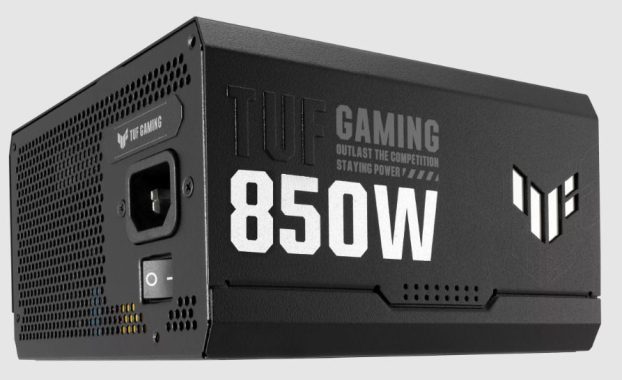
As for the Asus TUF Gaming 850W Gold PSU, it also boasts a solid build quality with dimensions of 150mm (L) x 150mm (W) x 86mm (H). What sets it apart is the TUF Gaming Cable Tie, which comes included. This nifty accessory helps with cable management, keeping your rig looking clean and organized. It’s a thoughtful addition for gamers who value aesthetics and airflow.

Asus TUF Gaming 850W Gold PSU
Asus TUF Gaming 850W Gold PSU – photo Asus

Noise Level

Noise can be a deal-breaker for some, especially if you prefer a quiet gaming or working environment. Both PSUs come equipped with a 120mm fan, which is pretty standard for power supplies.

The Seasonic B12 BC 850W features a Sleeve Bearing fan. While this type of bearing is generally reliable, it tends to generate a bit more noise compared to other types like Fluid Dynamic Bearings (FDB). Unfortunately, specific details about its noise level are currently unavailable.

On the other hand, the Asus TUF Gaming 850W Gold PSU boasts a Smart and Silent Fan Control system. This means the fan adjusts its speed based on the PSU’s temperature and load, ensuring it operates as quietly as possible when you’re not pushing your system to the max. It’s a feature that enhances the overall user experience, particularly for those who demand a quieter PC.

Cable Management

Now, let’s talk about cable management – an often-overlooked aspect of building a PC. Proper cable management not only improves airflow but also makes your rig look cleaner and more organized.

The Seasonic B12 BC 850W comes with fixed cables. While they’re not modular, Seasonic has done a commendable job with flat black cables, making them easier to route and hide. However, fixed cables can make your build appear cluttered, especially if you don’t need all of them.

On the flip side, the Asus TUF Gaming 850W Gold PSU offers a more versatile approach with its modular design. You get the flexibility to use only the cables you need, reducing clutter significantly. Additionally, the inclusion of various cable types, including SATA, PCI-E, and motherboard power cables, ensures compatibility with a wide range of setups.

Unique Features

Let’s take a moment to highlight the unique features of these PSUs:

Seasonic B12 BC 850W:

  1. Efficiency and Reliability: While Bronze-rated, it offers stable and reliable power delivery, making it a solid choice for most gaming and workstation setups.
  2. Compact Form Factor: Its smaller footprint is ideal for cases with limited space.

Asus TUF Gaming 850W Gold PSU:

  1. Gold Efficiency: The 80Plus Gold certification ensures high efficiency, saving you money in the long run.
  2. TUF Gaming Cable Tie: This handy accessory helps with cable management, enhancing the overall aesthetics of your build.
  3. Modular Design: Modular cables give you flexibility and reduce clutter, making cable management a breeze.

Conclusion

In the showdown between the Seasonic B12 BC 850W and the Asus TUF Gaming 850W Gold PSU, both units have their strengths. The Seasonic shines in terms of raw performance, making it a great choice for demanding setups. On the other hand, the Asus unit offers superior efficiency, a quieter operation, and a modular design for improved cable management.

Ultimately, your choice between these two excellent PSUs will depend on your specific needs and preferences. If you prioritize performance and don’t mind a non-modular design, the Seasonic B12 BC 850W could be your go-to option (price: €104,95). However, if you value efficiency, low noise levels, and the convenience of modular cables, the Asus TUF Gaming 850W Gold PSU might be the perfect fit for your build. But, price … £156.97!

In the world of PC components, having choices like these two PSUs allows you to tailor your setup to your exact requirements. Whether you’re a hardcore gamer or a professional content creator, one thing is clear: Seasonic and Asus both deliver quality when it comes to power supplies.

USB-C Data Transfer Speeds: From USB 2.0 to Thunderbolt 4

0

USB-C, also known as USB Type-C, represents the future of wired connectivity. With its distinctive reversible connector, support for diverse technologies, and advanced features, USB-C aspires to become a versatile universal connector.

However, as the importance of rapid data transfer continues to grow, the question arises: How fast can USB-C truly perform?

The official USB-C specification, finalized in August 2014, introduced a 24-pin reversible connector, which can be inserted into the port in any orientation. USB-C’s design enables it to provide more power compared to its predecessors, all while seamlessly coexisting with various connectors such as USB-A, USB-B, HDMI, DisplayPort, and the 3.5mm audio jack.

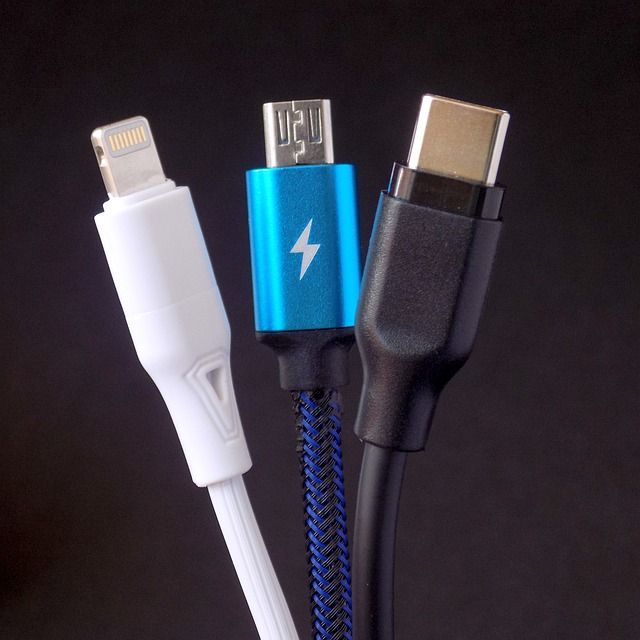
It’s crucial to note that USB-C refers solely to the connector’s physical style, not the specific USB protocol it supports. Consequently, this versatile connector accommodates USB 2.0, USB 3.1 Gen 1 (USB 3.0), USB 3.1 Gen 2, USB 3.2 (and its subsequent iterations), USB4, and even Thunderbolt 3 and 4. USB-C connectors are only marginally larger than micro-USB connectors, offering a thin yet robust connection suitable for both mobile devices and power-hungry laptops.

Although the USB-C connector itself lacks backward compatibility with USB-A ports, you can utilize adapters to connect USB-C devices to older USB ports. However, the connectivity will be limited to the capabilities of the USB-A or USB-B port.

USB-C Data Transfer
photo: Pixabay

USB-C Data Transfer Standards: As previously mentioned, USB-C supports various protocols, each with distinct data transfer speeds, ranging from 480Mbps to 40Gbps. While higher speeds are theoretically possible, they have yet to be fully realized. It’s important to recognize that two USB-C cables that appear identical may deliver significantly different data transfer rates.

  • USB 1.x: The initial USB standard provided data transfer rates of 1.5 megabits per second (Mbps) at low speed and 12 Mbps at full speed. USB 1.x played a pivotal role in eliminating legacy ports, such as serial and PS/2 ports, from computers, resulting in more compact and portable devices. Today, USB-C cables generally support a minimum of USB 2.0, while retaining backward compatibility with USB 1.0.
  • USB 2.0: Introduced in 2000, USB 2.0 enhanced the previous standard, elevating the maximum data transfer speed to 480 Mbps.
  • USB 3.x: The third generation of USB introduced significant speed improvements. USB 3.2 Gen 2×2 employs multi-lane signaling to achieve data transfer speeds of up to 20Gbps.
  • USB4: Conforming to Thunderbolt 3 specifications, USB4 can tunnel various protocols, including PCIe and DisplayPort. USB4 can achieve substantially higher speeds than USB 3.2, even with existing cables. The USB4 V2.0 specification further increased theoretical transfer speeds to 80Gbps in bidirectional mode and 120Gbps in asymmetric mode.
  • Thunderbolt 3: Intel’s once-proprietary standard, now royalty-free, also utilizes a USB-C connector and supports data transfer speeds of up to 40Gbps.
  • Thunderbolt 4: Thunderbolt 4 shares the same theoretical maximum transfer speed as USB4 and Thunderbolt 3 but enhances the PCIe data requirement to 32Gbps from 16Gbps, with additional distinctions compared to USB4.

What is the maximum theoretical data transfer limit for USB-C? The USB-C connector is capable of achieving remarkably high data transfer speeds. USB4 is anticipated to reach speeds of 80Gbps and 120Gbps, although products supporting these levels are not yet available. Furthermore, future iterations like Thunderbolt 5 are likely to offer similar speeds.

Currently, the highest attainable data transfer speed through a USB-C connection is 40Gbps, available on select Apple, Intel, and AMD laptops released after 2020. However, it’s essential to understand that these speeds are purely theoretical and are likely to vary significantly in real-world usage. Factors affecting USB transfer speeds include cable length, cable quality, device compatibility (a USB 2.0 to USB 3.2 connection operates at USB 2.0 speeds), interference, and the type of files being transferred. The speed of the drive being used also plays a role, with modern PCIe SSDs offering much faster data transfers than older hard drives, regardless of the USB standard in use. There are various methods to enhance USB data transfer speed on Windows, which can be beneficial when encountering sluggish transfer rates.