Home Blog Page 38

Gaming & Entertainment – Hisense U6K Review

0

Are you in the market for a new TV that can elevate your gaming and entertainment experience? Look no further than the Hisense U6K! With a sleek design, top-notch display technology, and a host of features that cater to both gamers and cinephiles, this TV promises to be a game-changer. In this review, we’ll dive deep into the key aspects of the Hisense U6K, including its gaming performance, build quality, contrast, sound quality, inputs, specifications, and overall performance.

Gaming Performance (5/5)

Gamers, rejoice! The Hisense U6K is a true powerhouse when it comes to gaming. Whether you’re into fast-paced shooters or exploring open-world adventures, this TV has got you covered. With its 4K resolution and 60Hz refresh rate, the visuals are not just crisp but also buttery smooth. The Mini-LED ULED display technology takes it a step further, offering remarkable picture quality and brilliant colors that make your games come alive.

The Hisense U6K’s HDR support is impressive, boasting compatibility with Dolby Vision, HDR10, HDR10+, and HLG. This means you’ll experience enhanced brightness, richer colors, and deeper blacks, providing a more immersive gaming environment. It’s like having front-row seats to your favorite virtual world.

Hisense U6K
Hisense U6K

What truly sets the Hisense U6K apart for gamers is its ultra-low input lag. Whether you’re playing on a console or a gaming PC, you’ll appreciate the lightning-fast response time, giving you the edge in competitive games. So, if you’re tired of blaming your TV for those missed headshots, the Hisense U6K is here to silence those excuses.

Build Quality (4.5/5)

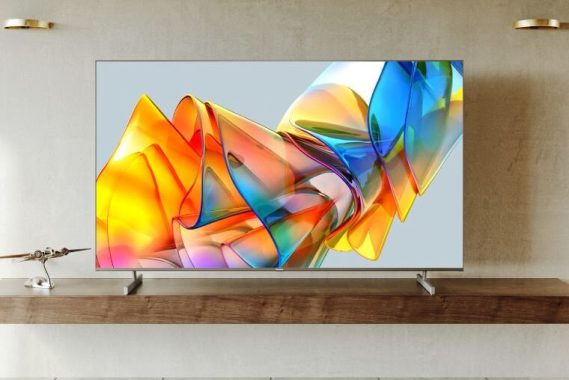
The Hisense U6K exudes a sense of sophistication with its sleek and modern design. It’s available in two sizes, 55 inches or 65 inches, allowing you to choose the one that fits your living space perfectly. The bezels are impressively slim, ensuring that your focus remains firmly on the stunning display.

While the TV is undeniably attractive, it’s also quite sturdy. The build quality is commendable, and the TV feels well-constructed. The stand is robust, offering stability that minimizes any wobbling. If you prefer to wall-mount your TV, the Hisense U6K’s slim profile makes it an excellent candidate for that setup.

The only slight drawback is that the TV’s back panel is made of plastic. While this doesn’t affect its overall durability, a metal back panel would have added a premium touch to the design. Nonetheless, it’s a minor quibble considering the TV’s overall build quality.

Contrast (4.5/5)

One of the standout features of the Hisense U6K is its exceptional contrast ratio. Thanks to the Mini-LED ULED display technology, you’ll enjoy deep, inky blacks and dazzling whites. This makes for a striking visual experience, whether you’re watching a movie in a dark room or playing a game with dramatic lighting effects.

The local dimming feature on this TV is a game-changer, enhancing the contrast by dynamically adjusting the brightness of different zones on the screen. This results in brighter highlights and deeper shadows, creating a more realistic and cinematic viewing experience.

Hisense U6K
Hisense U6K images: Hisense

However, it’s worth noting that the local dimming can sometimes be a tad aggressive, causing subtle fluctuations in brightness during certain scenes. While this isn’t a deal-breaker by any means, it’s something to be aware of, especially if you’re a stickler for consistency.

Sound Quality (3.5/5)

The sound quality of the Hisense U6K is decent but not exceptional. It’s equipped with built-in speakers that deliver clear dialogue and decent mid-range sound. However, for a truly immersive experience, it’s recommended to pair the TV with a soundbar or external speakers.

One unique feature that sets the Hisense U6K apart in the sound department is its support for Dolby Atmos. When you connect a compatible sound system, you’ll enjoy three-dimensional audio that adds a whole new layer to your movie nights and gaming sessions. It’s a great addition for those seeking an immersive auditory experience.

Inputs and Specifications (4/5)

The Hisense U6K is well-equipped in the inputs department. It offers three HDMI ports (2.0), which is sufficient for most users. These HDMI ports are perfect for connecting your gaming consoles, Blu-ray players, and streaming devices. Additionally, there are other inputs like USB ports and a built-in tuner (Freeview Play) for your convenience.

In terms of operating systems, you have a choice between VIDAA and Google TV. VIDAA provides a user-friendly interface with quick access to popular streaming apps, while Google TV offers a more extensive ecosystem with Google Assistant integration and a wide range of apps through the Google Play Store. Whichever you choose, you’ll have a smooth and intuitive user experience.

Performance (4.5/5)

When it comes to everyday performance, the Hisense U6K excels. It handles streaming, app navigation, and regular TV watching with ease. Switching between apps and inputs is snappy, thanks to a responsive processor.

The TV’s upscaling capabilities are noteworthy as well. Even non-4K content looks surprisingly sharp and detailed on the 4K screen. This is great news for those who still enjoy their collection of DVDs or want to watch older content without sacrificing picture quality.

However, if you’re a hardcore cinephile or a professional gamer who demands the absolute best, you may notice that the Hisense U6K falls slightly short in terms of color accuracy and motion handling compared to some higher-end models. But for the majority of users, these differences are subtle and don’t detract from the overall experience.

The Hisense U6K delivers Mini-LED excellence without breaking the bank, boasting top-tier contrast and color performance rarely matched by TVs in its price range.Hisense U6K

However, it’s essential to note that this TV falls into the no-frills category. It operates at a 60Hz refresh rate, lacks notable special features, and suffers from the less-than-stellar VIDAA operating system, particularly for users outside the United States.

Nevertheless, if your primary goal is to maximize display quality while getting the most value for your money – a commendable approach to TV shopping – then the Hisense U6K is a formidable contender, especially if you’re shopping in the United States.

The Hisense U6K is available at a starting price of $579 for the 55-inch model and goes up to $799 for the 65-inch version.

Conclusion

In conclusion, the Hisense U6K is a standout performer in the mid-range TV market. With its outstanding gaming performance, impressive build quality, excellent contrast, and unique sound features like Dolby Atmos support, it’s a fantastic choice for both gamers and entertainment enthusiasts. The inputs and specifications ensure you have all the connectivity options you need, and the TV’s performance in everyday use is top-notch.

Whether you’re indulging in a gaming marathon, binge-watching your favorite shows, or hosting a movie night, the Hisense U6K will not disappoint. It offers a superb balance of features and performance at a price point that won’t break the bank. So, if you’re in the market for a new TV that offers incredible value, the Hisense U6K deserves a spot at the top of your list.

Streamline Your OS Needs with Windows ISO Downloader

0

In today’s tech-savvy world, the need for a reliable source to download operating system ISO files is undeniable. Whether you’re looking to set up a new PC or just want to keep a handy collection of Windows OS versions, the Windows ISO Downloader is a name that’s making waves. In this review, we’ll dive deep into this nifty tool, discussing home network performance, setup simplicity, the ability to download multiple ISO files, and, of course, its core function: fetching operating system ISOs.

Setting the Stage with Setup:

Getting started with the Windows ISO Downloader is like a walk in the park on a sunny day. You don’t need to be a tech guru to understand its setup process. The software’s installer is straightforward, requiring just a few clicks to get it up and running. Once installed, it boasts an intuitive user interface that doesn’t bombard you with unnecessary bells and whistles.

The main screen welcomes you with a clean and user-friendly design, making it easy for even newcomers to navigate. Right from the get-go, it’s clear that this software values simplicity and efficiency. You won’t be overwhelmed with complex menus or bewildering options, but rather a straightforward approach that aligns with the needs of most users.

Home Network Performance: A Seamless Experience:

One of the standout features of Windows ISO Downloader is its impeccable home network performance. Whether you’re on a blazing-fast fiber connection or a more modest DSL setup, this tool ensures a seamless experience. The download speeds are impressive, and it efficiently utilizes available bandwidth without hogging resources.

Windows ISO Downloader
Windows ISO Downloader – photo HeiDoc

The software employs robust algorithms to ensure a stable connection, reducing the chances of interrupted downloads. This is a massive relief for anyone who has ever experienced the frustration of a failed download due to network issues. With Windows ISO Downloader, you can trust that your downloads will complete without a hitch, saving you both time and sanity.

Downloading Multiple ISO Files: A Game Changer:

What truly sets Windows ISO Downloader apart from the crowd is its ability to download multiple ISO files simultaneously. This feature is an absolute game changer for IT professionals, tech enthusiasts, and anyone who frequently juggles various Windows versions.

Imagine the convenience of being able to grab the latest Windows 10 update, a Windows 7 ISO for compatibility testing, and a Windows Server edition all at once. With this tool, there’s no need to wait for one download to finish before starting another. Simply queue up your selections, hit the download button, and watch as the software effortlessly manages them all.

This functionality not only saves time but also ensures you always have the ISO files you need at your fingertips. It’s a game-changer for system administrators and anyone who regularly troubleshoots or tests different Windows versions. Say goodbye to tedious, one-at-a-time downloads; Windows ISO Downloader simplifies the process.

A World of Operating Systems at Your Fingertips:

Of course, the core functionality of Windows ISO Downloader is to provide easy access to a wide range of operating system ISO files. And in this regard, it excels. The software offers a comprehensive selection of Windows OS versions, from Windows 7 to Windows 10, and even server editions.

Not only does it provide access to official Microsoft ISOs, but it also keeps them updated, ensuring you always get the latest and most secure version. This is a lifesaver if you often work with different Windows installations or frequently need to reinstall the OS.

In addition to Microsoft’s offerings, Windows ISO Downloader also supports ISOs for various Linux distributions, making it a versatile tool for those who dabble in both Windows and Linux environments. The ability to switch between different operating systems seamlessly is a true testament to the software’s flexibility.

Windows ISO Downloader – Unique Features:

Windows ISO Downloader doesn’t just stop at the basics; it’s packed with unique features that set it apart from other ISO downloaders on the market.

  • Checksum Verification: Ensuring the integrity of downloaded ISO files is critical, and Windows ISO Downloader takes this seriously. It provides built-in checksum verification to confirm that the downloaded file matches the official release, reducing the risk of using compromised or corrupted ISOs.
  • Customization Options: While the software maintains its simplicity, it doesn’t sacrifice customization. Users can choose between 32-bit and 64-bit versions of Windows, select different language editions, and even opt for the N or KN versions if needed.
  • Integrated USB Tool: Need to create a bootable USB drive with the downloaded ISO? Windows ISO Downloader has you covered. It integrates a USB creation tool, simplifying the process of getting your OS up and running.

Windows ISO Downloader is a hidden gem in the realm of operating system ISO downloaders. It excels in home network performance, keeps setup simple, allows you to download multiple ISO files simultaneously, and, most importantly, provides a comprehensive library of operating system ISOs. Its unique features, like checksum verification and USB creation, add significant value to an already outstanding product.

Whether you’re a tech enthusiast, IT professional, or just someone who wants easy access to Windows ISO files, this software is a must-have. It streamlines the process, making it a breeze to fetch the OS files you need, and its reliability ensures that you won’t be left high and dry during crucial installations.

In a world where operating systems are constantly evolving, having a tool like Windows ISO Downloader in your toolkit is a smart move. It’s the Swiss Army knife of ISO downloading, and once you start using it, you’ll wonder how you ever managed without it. Windows ISO Downloader Download

Simplify Your Home Network with NETGEAR Genie

0

In today’s digital age, a dependable home network is the backbone of our connected lives. Whether you’re streaming your favorite shows, working from home, or keeping an eye on your children’s online activities, having a robust and user-friendly network management tool is crucial. Enter the NETGEAR Genie, a versatile software that can help you take control of your home network like a pro. In this review, we’ll dive deep into the key aspects of NETGEAR Genie, focusing on home network performance, password and restrictions management, Live Parental Controls, and its unique features.

Using NETGEAR Genie, you can easily visualize your Internet traffic for both uploads and downloads. While the application is active, it provides a list of all installed applications on your computer that are currently using an Internet connection, displaying their current and cumulative upload and download speeds, allowing you to identify any bandwidth abuse.

Additionally, NETGEAR Genie allows you to manage Wi-Fi connections and configure router settings by providing the administrator username and password.

This application is remarkably fast. Within seconds of running it, it generates a comprehensive network map, showing connected computers along with details such as connection type, IP address, status, and MAC address. It can also be set to notify you when a new device joins the network.

Beyond monitoring, NETGEAR Genie assists users in applying content restrictions through its parental control feature, which can block access to various website categories.

Furthermore, NETGEAR Genie facilitates the conversion of a printer into an AirPrint-compatible device, enabling wireless printing from iPad and iPhone.

Home Network Performance

Let’s face it – a slow and unreliable Wi-Fi connection can turn your digital paradise into a frustrating ordeal. The good news is that NETGEAR Genie is here to rescue you from such woes. This nifty software boasts an array of features that can significantly boost your home network’s performance.

One standout feature is the ability to analyze your network’s speed and health. With just a few clicks, NETGEAR Genie provides valuable insights into your network’s performance, including download and upload speeds, latency, and signal strength. This information is incredibly useful for pinpointing weak spots in your home where Wi-Fi signals may be struggling, allowing you to optimize your router placement or consider range extenders if needed.

NETGEAR Genie
NETGEAR Genie photo

Moreover, NETGEAR Genie offers a convenient network map that displays all connected devices in your home. This feature not only helps you identify who or what is hogging your bandwidth but also allows you to control each device’s access and prioritize them accordingly. This means you can ensure that your work laptop gets priority over your teenager’s gaming console when it comes to internet speeds.

Passwords and Restrictions Management

In a world filled with online threats, managing your network’s security is paramount. NETGEAR Genie makes password management and network restrictions a breeze. Gone are the days of scribbling down complex Wi-Fi passwords on sticky notes (only for them to get lost or fall into the wrong hands).

NETGEAR Genie allows you to change your Wi-Fi password with ease. You can create strong, unique passwords and even set up a schedule to change them regularly, adding an extra layer of security to your network. This is particularly handy for keeping unwelcome guests out of your network and ensuring that your data remains confidential.

But it doesn’t stop there – NETGEAR Genie also offers robust content filtering options. You can establish parental controls that restrict access to certain websites and online content based on age-appropriate settings. This is a lifesaver for parents who want to protect their children from inappropriate content or excessive screen time.

Live Parental Controls

Speaking of parental controls, NETGEAR Genie’s Live Parental Controls feature deserves a special mention. It’s like having a digital guardian angel watching over your kids while they explore the vast realms of the internet.

With Live Parental Controls, you can set up profiles for each of your children and customize the online experience for each one. You can create internet schedules, block specific websites or categories, and even receive email alerts if your child tries to access a restricted site. It’s a powerful tool for keeping your kids safe online without having to hover over their shoulders.

One unique aspect of Live Parental Controls is the ability to filter online content in real-time. NETGEAR Genie partners with OpenDNS to categorize websites, so you can be confident that your children won’t stumble upon inappropriate or harmful content. Plus, it works on all devices connected to your network, ensuring that your children are protected whether they’re on a computer, tablet, or smartphone.

Unique Features of NETGEAR Genie

NETGEAR Genie doesn’t just stop at the basics; it offers several unique features that set it apart from the crowd:

  1. Guest Network: NETGEAR Genie makes it a breeze to set up a guest network for your visitors. This keeps your main network secure while still providing internet access to guests.
  2. Traffic Meter: Worried about data caps? The built-in traffic meter in NETGEAR Genie helps you keep an eye on your data usage, preventing any unwanted surprises on your monthly bill.
  3. Remote Access: Need to manage your network while you’re away from home? NETGEAR Genie offers remote access, allowing you to control and monitor your network from anywhere with an internet connection.
  4. MyMedia: Love streaming your media collection? NETGEAR Genie’s MyMedia feature lets you easily access and play media files from your home network on DLNA-compatible devices.
  5. EZ Mobile Connect: Say goodbye to typing in long Wi-Fi passwords. With EZ Mobile Connect, you can simply scan a QR code to connect your mobile devices to your network.
When fully functional on compatible routers and desktops, Genie allows you to:
  • View a Network Map to see all connected devices.
  • Configure WiFi settings and set up Guest Access.
  • Run speed tests and manage Parental Controls.
  • Enable remote network access and manage basic ReadySHARE file sharing.

Conclusion

In the world of home network management, NETGEAR Genie stands out as a versatile and user-friendly tool. Its ability to improve home network performance, streamline password management, and offer robust Live Parental Controls makes it an essential software for anyone looking to take control of their digital domain.

NETGEAR Genie’s unique features, such as guest network setup, traffic monitoring, remote access, media streaming, and QR code-based device connection, make it a well-rounded package that caters to the needs of modern households.

So, if you’re tired of wrestling with a sluggish network, worried about security, or want to ensure your kids have a safe online experience, give NETGEAR Genie a try. It’s like having a network genie in a digital bottle, ready to grant your network management wishes. Say goodbye to Wi-Fi woes and hello to a smoother, safer, and more enjoyable online experience with NETGEAR Genie by your side. NETGEAR Genie Download

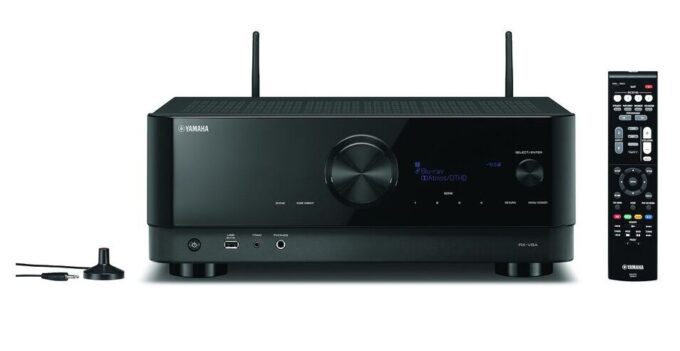
Yamaha RX-V6A AV receiver Dolby Atmos and DTS:X

0

For precise and dynamic audio performance, the Yamaha RX-V6A uses a robust 100-watt amplifier with a high slew rate. Whether you’re indulging in HiRes music or immersing yourself in a home cinema experience, this amplifier delivers a powerful and engaging sound, ensuring that action movies and gaming keep you on the edge of your seat, while your favorite music captivates you. Yamaha’s unique amplifier design strikes a delicate balance, achieving dynamic scale without compromising signal stability.

Experience untethered surround sound – To simplify your setup and reduce cable clutter, the RX-V6A offers the convenience of wireless rear speakers. When paired with Yamaha MusicCast 20 or MusicCast 50 speakers, you can bid farewell to the hassle of speaker cable connections. This is especially advantageous if you have a solid floor that makes hiding cables challenging or if you prefer a cleaner, more streamlined aesthetic. With wireless surround speakers, you can enjoy immersive surround sound without the clutter.

Yamaha RX-V6A AV receiver
Yamaha RX-V6A AV receiver – images Yamaha

1. Home Theater Enthusiasts:

As a home theater enthusiast, the Yamaha RX-V6A AV receiver offers a solid package of features that enhance the overall entertainment experience. The inclusion of Dolby Atmos and Dolby ProLogic Surround support is a significant advantage, providing immersive and dynamic sound for movies and gaming. The 4K upscaling capability ensures that your video content looks stunning on your compatible display.

Pros:

  • Dolby Atmos support for immersive audio.
  • 4K upscaling for improved video quality.
  • Multiroom capability allows for audio distribution throughout the house.
  • Multiple HDMI inputs for various devices.
  • Smartphone control for convenience.

Cons:

  • Limited analog RCA inputs.
  • Could have more USB ports for connectivity.
  • Some users might want more power for larger home theaters.

Improvement Suggestions:

  • Increase the number of analog RCA inputs.
  • Consider adding more USB ports.
  • Offer different power output options to cater to larger home theaters.

Additional Feature Suggestions:

  • Integration with popular streaming services for easier access to content.
  • Enhanced room calibration and equalization for optimized audio performance.

2. Audiophiles:

For audiophiles, the Yamaha RX-V6A AV receiver provides a decent audio experience with the inclusion of Dolby Surround and high-quality components. The Phono Input for MM (Moving Magnet) turntables is a plus for vinyl enthusiasts. The receiver offers good value for those who want both home theater and music listening capabilities.

Yamaha RX-V6A AV receiver
Yamaha RX-V6A

Pros:

  • Phono Input for vinyl record playback.
  • High-quality audio components.
  • Dolby Surround support for enhanced music listening.
  • Pre and sub outputs for external amplification.

Cons:

  • May not meet the highest audiophile standards.
  • Limited audio input options for various sources.
  • Room calibration could be more advanced.

Improvement Suggestions:

  • Enhance room calibration technology for precise audio optimization.
  • Provide more audio input options for flexibility.
  • Consider releasing a dedicated audiophile-focused model with higher-end components.

Additional Feature Suggestions:

  • Support for more audio formats, such as DSD.
  • Improved audio DAC (Digital-to-Analog Converter) for audiophile-grade sound.

3. Smart Home Enthusiasts:

Smart home enthusiasts will appreciate the Yamaha RX-V6A AV receiver’s integration with popular smart platforms like Amazon Alexa and Google. The built-in Wi-Fi and app control make it easy to manage the receiver within a smart home ecosystem. The inclusion of Apple AirPlay is a bonus for Apple users.

Pros:

  • Seamless integration with Amazon Alexa and Google.
  • Apple AirPlay support for iOS users.
  • App control and smartphone compatibility.
  • Multiroom capabilities for distributed audio.
  • Internet radio services add versatility.

Cons:

  • Limited native smart home features (e.g., voice assistant).
  • Room for improved integration with more smart devices.
  • May require some technical setup for full smart home integration.

Improvement Suggestions:

  • Expand native smart home integration to include more voice assistants.
  • Develop a dedicated smart home control app for easier management.
  • Simplify the setup process for smart home enthusiasts.

    Yamaha RX-V6A AV -receiver
    Yamaha RX-V6A AV receiver

Additional Feature Suggestions:

  • Integration with a wider range of smart devices and platforms.
  • Voice control for more receiver functions and settings.

The Yamaha RX-V6A AV receiver caters to a diverse set of customers, from home theater enthusiasts to audiophiles and smart home enthusiasts. While it offers a range of features and capabilities, there is room for improvement and potential additional features to better serve each category’s specific needs and preferences.

Dealing with Plex Buffering Issues: How to Resolve?

0

Experiencing buffering interruptions during video playback can be quite exasperating. Numerous Plex users have recently reported encountering buffering problems. Initially, they may assume it’s a temporary glitch that will resolve itself over time. However, the frustration mounts when Plex continues to buffer persistently without improvement. Today, we’ll delve into the main topic: how to fix buffering problems on Plex. Additionally, we’ll explore why buffering occurs and what steps to take if Plex persists in buffering.

Why Does Plex Keep Buffering?

Let’s begin by addressing why Plex seems to buffer incessantly, while other media servers in the same category do not face such persistent buffering issues. Frequent video buffering can be highly disruptive to your live streaming experience. Several factors can contribute to constant buffering. One of the most common culprits is network connectivity. If your network speed is insufficient or experiences sudden disruptions, video streaming becomes nearly impossible, leading to buffering problems.

Plex Keep Buffering
Plex photo

Secondly, Plex’s media server offers various video quality options. To ensure smooth playback on Plex, it’s essential to select the appropriate streaming quality for your situation. If your streaming quality is set too high for your system to handle, buffering during playback is almost certain. Thirdly, the devices you use for streaming can also be a source of buffering issues on Plex. If your streaming device is malfunctioning or not operating correctly, it can hinder Plex’s ability to stream videos smoothly.

Last but not least, the Plex buffering issue can also be attributed to the transcoder throttle buffer. As you may be aware, Plex’s media server has default buffer settings, and tampering with these settings can result in buffering problems. In a typical scenario, resetting the transcoder throttle buffer to allow Plex to stream data closer to real-time can help alleviate buffering.

How to Resolve Plex Keeps Buffering?

Given the aforementioned factors contributing to Plex buffering, the question arises: how can you fix this vexing issue? Here are some insights on tackling Plex buffering problems:

  1. Check Network Connectivity: Begin by assessing your network connection. There are websites like SpeedTest that can help you determine your network speed. If your network is too slow, buffering is likely. You can enhance your network’s performance by upgrading your router, minimizing background processes, and removing malware from your system.
  2. Adjust Streaming Quality: Tweaking the streaming quality settings on Plex is an effective way to address buffering. If your streaming quality exceeds your system’s capabilities, Plex will continue to buffer regardless of your network speed. Opt for a streaming quality that your system can comfortably support to prevent buffering.
  3. Ensure Streaming Device Functionality: Ensure that your streaming device is in good working condition. Outdated or malfunctioning devices are prone to buffering issues. Consider replacing or repairing older systems to eliminate buffering problems.
  4. Transcoder Throttle Buffer Settings: The transcoder throttle buffer in Plex is measured in seconds. It determines how much data Plex should buffer before streaming it to your client devices. Lowering the transcoder throttle buffer can help Plex stream data closer to real-time, potentially resolving buffering issues. For average users, following recommended guidelines for adjustment is advisable.
  5. Direct Play and Direct Stream: Enable Direct Play and Direct Stream in Plex settings to reduce transcoding load

Common Questions:

Q: What is the Plex transcoder throttle buffer, and is it difficult for the average user to adjust?

The Plex transcoder throttle buffer is a setting measured in seconds. It dictates the amount of time Plex should buffer data before streaming it to your client devices. For average users, it’s recommended to follow provided guidelines for adjustment when facing buffering issues.

Q: Why is my Plex app buffering?

Buffering issues can affect both the Plex media server and the Plex app. If you’ve ensured that your Plex app settings are correct but you still encounter buffering problems, the root cause may lie in your Plex Media Server struggling to transcode content quickly enough. Check the Transcoding Speed.

Q: Is Plex free?

Both the Plex media server and Plex web app are free to use, with access to streaming services supported by ads.

Q: Is there a way to play Plex content offline?

If you’re utilizing the Plex Home system, which is a premium feature included with the Plex Pass allowing user profiles for home members, offline use with a Plex client is not supported.

If Plex buffering persists after trying these, you may want to check Plex forums or support for device-specific solutions or consider upgrading your hardware or internet plan.

SVS 3000 Micro subwoofer – powerful Bass In A Tiny Package

0

If you’re in the market for a subwoofer that packs a punch without taking up half your living room, then the SVS 3000 Micro subwoofer deserves your attention. This pint-sized powerhouse delivers a gaming and audio experience that’s nothing short of extraordinary. In this review, we’ll dive into the build quality, sound quality, and performance of this compact titan, and explore its unique features that set it apart from the competition.

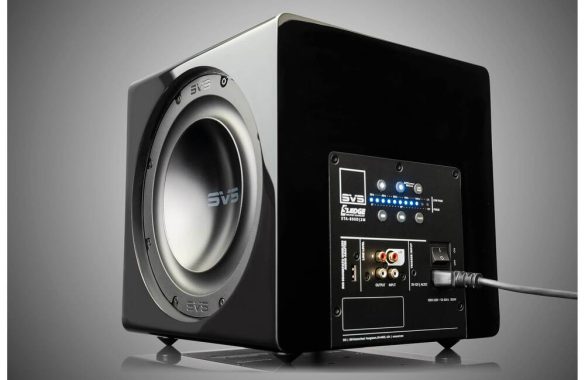
Right out of the box, the SVS 3000 Micro exudes an air of sophistication and durability. Its compact dimensions (10.9″ H x 11.7″ W x 10.7″ D) make it a space-friendly addition to any gaming or entertainment setup. The high-end Piano Gloss Black and Piano Gloss White finish options give it a premium look that’s a perfect fit for modern living spaces.

The build quality of this subwoofer is truly remarkable. The structurally reinforced MDF cabinet construction ensures that it’s built to last. Even at maximum output levels, you’ll notice minimal system vibration, thanks to the dual opposing 8-inch drivers designed electrically and mechanically in parallel. This means you can crank up the volume without worrying about rattling your walls or causing any distortion.

One of the standout features of the SVS 3000 Micro is its rear-mounted internal amplifier with Intelligent Control Interface (ICI). This interface provides intuitive control over various settings, allowing you to tailor the subwoofer’s performance to your preferences. Whether you’re gaming, watching movies, or listening to music, you have precise control over the subwoofer’s output.

SVS 3000 Micro subwoofer

When it comes to gaming, the SVS 3000 Micro subwoofer doesn’t hold back. It boasts an 800-watt RMS (2500+ watts peak) Sledge STA-800DM amplifier with fully-discrete MOSFET output. This high-efficiency Class-D switching topology, combined with massive 25-amp 600-volt MOSFETs, ensures that you’ll experience powerful, distortion-free bass that adds depth and immersion to your gaming sessions.

What truly sets the SVS 3000 Micro apart is its precision in delivering bass frequencies. The proprietary injection-molded NBR surround and precisely tuned overhung motor configuration give it unparalleled woofer control, even at high drive levels. This means you’ll feel every explosion, rumble, and thud in your games with pinpoint accuracy.

The subwoofer’s total excursion of 24mm Xmax and 37mm Xmech, coupled with a 1100 aluminum single piece cone and junction, provide excellent stiffness and lightweight moving mass. This optimized design ensures that it can handle extreme-excursion while maintaining accuracy and minimizing distortion – a must-have for gaming enthusiasts who demand both power and precision.

SVS 3000 Micro subwoofer
SVS 3000 Micro – images SVS Sound

SVS 3000 Micro subwoofer – Immersive Sound Quality

In addition to gaming, the SVS 3000 Micro excels in delivering a rich and immersive audio experience across various media. Its frequency response of 23-240 Hz ±3 dB ensures that it can reproduce a wide range of frequencies with precision. Whether you’re listening to music, watching movies, or engaging in intense gaming battles, the SVS 3000 Micro provides the low-end foundation that enhances your overall enjoyment.

The high-current 4-layer copper voice coil winding minimizes distortion and power compression, while the powerful proprietary ferrite motor system generates high-flux-density magnetic fields. This combination results in room-filling sound pressure levels with pinpoint transient speed, adding depth and realism to your audio experience.

The SVS subwoofer DSP and Bluetooth smartphone control app for iOS, Android, and Amazon devices elevate your audio experience further. You can easily customize settings such as low pass filter, phase, polarity, room gain, and three parametric equalizers to suit your room and listening preferences. The 3-band parametric EQ controller even allows precise adjustments down to the single Hz level, ensuring you can eliminate peaks, nulls, and other room issues for optimal sound quality.

SVS 3000 Micro Smartphone App

One of the standout features of the SVS 3000 Micro is the dedicated smartphone app designed for easy control and optimization. This app is the most convenient way ever to manage your subwoofer’s DSP and control it with a single touch.

You can adjust crossover frequencies, fine-tune the three-band parametric EQ, control polarity, and manage room gain, all from the comfort of your favorite seat. Whether you’re tweaking settings for music, movies, or gaming, the SVS 3000 Micro app puts the power in your hands.

SVS 3000 Micro subwoofer

Additionally, the subwoofer connects via Bluetooth, making it incredibly convenient to control even when the subwoofer is out of sight. You can save custom presets for one-touch tuning, optimized for different listening preferences – whether you’re into movies, music, or gaming. This level of customization ensures that you’re getting the most out of your subwoofer, no matter the content.

Some users might miss having a more prominent visual display on the subwoofer itself. While the smartphone app is convenient, a physical display can be handy for quick adjustments without needing to grab your phone.

The SVS 3000 Micro subwoofer is undoubtedly a premium product, and its price reflects that. It might not be within everyone’s budget, making it more of an investment for audiophiles and serious gamers. Price: $899.99

Due to its compact size, the placement of the SVS 3000 Micro can be critical for optimal performance. Finding the right spot where it blends seamlessly with your main speakers and acoustics might require some experimentation.

While these drawbacks are worth considering, they are relatively minor in the grand scheme of things. The SVS 3000 Micro subwoofer’s impressive build quality, sound quality, and versatile performance make it a top contender in the compact subwoofer category. Despite these minor drawbacks, it stands out as a premium choice for those who demand exceptional audio experiences.

The SVS 3000 Micro subwoofer is a game-changer for anyone seeking a compact yet powerful addition to their gaming and audio setup. Its build quality, sound quality, and performance are second to none in its class. The dual opposing 8-inch drivers, powerful amplifier, and precision engineering combine to deliver an immersive audio experience that will elevate your gaming, movie nights, and music listening to new heights.

The dedicated smartphone app is a testament to SVS’s commitment to user convenience and customization, allowing you to fine-tune every aspect of the subwoofer’s performance to suit your preferences and room acoustics.

Whether you’re a hardcore gamer, a cinephile, or a music enthusiast, the SVS 3000 Micro subwoofer will add depth, power, and clarity to your audio experience like never before. It’s proof that big things come in small packages, and it’s sure to be a game-changer for your home entertainment system. Don’t miss out on the opportunity to bring this exceptional subwoofer into your life and elevate your audio experience to the next level with the SVS 3000 Micro subwoofer.

MSI Oculux NXG253R Monitor: Elevate Your Gaming Experience

0

If you’re a serious gamer, you know that a great monitor can make all the difference in your gaming setup. That’s where the MSI Oculux NXG253R monitor comes into play. This gaming monitor packs a punch with its impressive features and delivers an immersive gaming experience that’s hard to beat.

MSI Oculux NXG253R Gaming Performance

Let’s kick things off with what matters most to gamers – performance. The Oculux NXG253R is a beast in this department. With a lightning-fast refresh rate of 360Hz, you’ll experience buttery-smooth gameplay that’s ideal for competitive gaming. It’s like having a front-row seat to the action, and it can make all the difference when split-second decisions matter.

The 1ms GTG response time ensures that there’s minimal motion blur, giving you a clear and sharp view of your games. Whether you’re into fast-paced shooters, real-time strategy, or immersive RPGs, this monitor can handle it all. And with G-SYNC technology, you can say goodbye to screen tearing and hello to seamless, tear-free gaming.

MSI Oculux NXG253R monitor
MSI Oculux NXG253R

MSI Oculux NXG253R Display Quality

The 24.5-inch Rapid IPS panel of the Oculux NXG253R monitor boasts a Full HD resolution of 1920 x 1080 pixels. While it might not be 4K, it’s more than sufficient for most gamers. The display is sharp, vibrant, and colors pop thanks to its 1.07 billion colors and anti-glare surface treatment. The 178-degree viewing angles ensure that your gaming experience remains top-notch, even if you’re not sitting dead-center.

One unique feature worth mentioning is the DCI-P3 and sRGB color coverage. With 84.09% DCI-P3 and 109.63% sRGB coverage, this monitor is suitable not only for gaming but also for content creation tasks that require accurate color representation. It’s a versatile addition to your setup.

Build Quality

The MSI Oculux NXG253R monitor screams quality from the moment you lay eyes on it. Its frameless design gives it a sleek and modern look that will undoubtedly enhance the aesthetics of your gaming rig. The monitor’s adjustable stand allows for versatile positioning – tilt it, swivel it, pivot it, or adjust the height to find the perfect viewing angle. Whether you’re in an intense gaming session or just browsing the web, comfort is guaranteed.

The monitor’s robust construction is evident, and it feels durable in hand. The inclusion of a Kensington Lock provides extra security if you plan to use this in a shared space.

MSI Oculux NXG253R Sound Quality

While the MSI Oculux NXG253R monitor is an absolute winner when it comes to visuals and performance, it doesn’t excel in the audio department. It features a single earphone out port, which is handy if you don’t have a dedicated speaker system or headphones. However, for the best audio experience, it’s recommended to invest in a good pair of gaming headphones or external speakers.

MSI Oculux NXG253R monitor
Oculux NXG253R – images: MSI

MSI Oculux NXG253R Monitor – Unique Features

One standout feature of this monitor is its 360Hz refresh rate, which is currently one of the highest in the market. If you’re a competitive gamer, this is a game-changer. The buttery-smooth visuals and reduced input lag give you an edge over your opponents. It’s like seeing the future milliseconds before your rivals do.

The 5-way OSD navigation joystick at the back of the monitor makes adjusting settings a breeze. You won’t have to fumble through confusing menus, and it’s a much more user-friendly approach. Additionally, the monitor offers a Console Mode that supports FHD at 120Hz, which is perfect for console gamers looking to get the most out of their gaming consoles.

The MSI Oculux NXG253R monitor also comes with a range of connectivity options. With two HDMI 2.0b ports, one Display Port 1.4, and a USB hub featuring three USB 3.2 Gen 1 Type-A ports and one USB 3.2 Gen 1 Type-B port, you’ll have no trouble connecting your gaming devices, peripherals, and even charging your smartphone. This monitor has you covered on the connectivity front.

The 24.5-inch screen size might be too small for some gamers who prefer larger displays for a more immersive experience. If you’re used to larger monitors, transitioning to this size might take some adjustment. Gamers who want a more expansive field of view may consider other options with larger screen sizes.

While the monitor is energy-efficient, with a power consumption of 22W, some users might have hoped for even lower power usage, especially considering its high refresh rate. For eco-conscious individuals, this could be a concern.

As previously mentioned, the monitor’s audio capabilities are modest. While it includes an earphone out port, it lacks built-in speakers. For users who prefer integrated audio solutions, this could be a drawback. Investing in external speakers or high-quality gaming headphones is necessary to enjoy the full gaming experience.

In the world of gaming monitors, the MSI Oculux NXG253R is a true heavyweight. Its jaw-dropping 360Hz refresh rate, coupled with G-SYNC technology, makes for a gaming experience that’s hard to beat. The display quality is impressive, with excellent color coverage and wide viewing angles, suitable not only for gaming but also for content creation.

MSI Oculux NXG253R
MSI Oculux NXG253R

The build quality is solid, and the adjustable stand provides ergonomic flexibility. While the sound quality might not be its strong suit, investing in dedicated gaming headphones or speakers will easily solve that issue.

The Oculux NXG253R monitor is tailor-made for competitive gamers. With a lightning-fast 1ms GTG response time, it virtually eliminates any motion blur, ensuring that your gaming visuals remain crystal clear. What sets this monitor apart is its blazing-fast 360Hz display, powered by NVIDIA G-SYNC technology. This speed is 1.5 times faster than conventional 240Hz displays, making it the perfect match for today’s most demanding titles like VALORANT, Fortnite, CS: GO, Rainbow Six Siege, Overwatch, and Apex Legends.

Immerse yourself in gameplay that’s incredibly fluid, with no noticeable latency. This level of precision targeting is what competitive gamers dream of. The Oculux NXG253R monitor is your ticket to a world where every action is executed with pixel-perfect accuracy.

The unique features, including the 360Hz refresh rate and intuitive 5-way OSD navigation, set this monitor apart. It’s a dream come true for competitive gamers and those who demand the best in visual performance.

If you’re a serious gamer looking to take your gameplay to the next level, the MSI Oculux NXG253R monitor is an investment worth making. It’s a premium gaming monitor that delivers on its promises and will undoubtedly enhance your gaming setup.

Pros and Cons of MSI Oculux NXG253R

✅ Pros

1. Extremely high 360 Hz refresh rate

One of the biggest advantages is the 360 Hz refresh rate, which delivers extremely smooth motion compared to 144 Hz or 240 Hz monitors. This is especially useful in fast-paced competitive games like CS2, Valorant, or Fortnite.

2. Very fast response time

The monitor offers around 1 ms gray-to-gray response time, reducing motion blur and ghosting during fast gameplay. This helps competitive players track targets more clearly.

3. NVIDIA G-SYNC with dedicated module

Unlike many “G-SYNC Compatible” displays, it includes a hardware G-SYNC processor, allowing smooth gameplay without screen tearing across a wide refresh range (up to 360 Hz).

4. NVIDIA Reflex Latency Analyzer

A unique esports feature: the monitor can measure total system latency from mouse click to screen response when used with compatible hardware.

5. Rapid IPS panel

Compared to older TN esports monitors, the Rapid IPS panel provides:

  • Better colors

  • Wider viewing angles

  • Good brightness (~400 nits)

  • Good reflection handling

This makes the display usable for general tasks, not just gaming.

6. Excellent ergonomics

The stand supports height adjustment, tilt, swivel, and pivot, making it easy to position the screen comfortably.

❌ Cons

1. Only 1080p resolution

Despite the high refresh rate, the monitor is still Full HD (1920×1080).
For a 24.5-inch display this is acceptable, but many gamers now prefer 1440p or 4K for sharper visuals.

2. Low contrast ratio

The IPS panel has about 1000:1 contrast, which means blacks look more gray compared to VA or OLED displays.

3. HDR is weak

Although it supports HDR10 / DisplayHDR 400, the experience is limited because:

  • No local dimming

  • Limited contrast

  • Narrower color gamut

So HDR improvements are minimal.

4. 360 Hz benefits only specific games

To fully use 360 Hz you need very high FPS (300+ FPS), which usually only happens in esports titles.
For story games or AAA titles, the difference compared to 144–240 Hz is small.

5. Expensive compared to 240 Hz monitors

360 Hz displays typically cost more while providing smaller real-world improvements compared to cheaper 240 Hz options.

6. Occasional user-reported issues

Some users on forums reported issues such as color problems or refresh-rate instability in rare cases, often related to firmware, cables, or compatibility.

SENNHEISER HD 660S2 Review: A Symphony for the Senses

0

When it comes to high-quality audio, SENNHEISER has long been a name synonymous with excellence. The SENNHEISER HD 660S2, their latest offering, is no exception. These headphones are a testament to the brand’s commitment to delivering top-notch audio experiences. In this review, we’ll delve into the build quality, sound quality, and overall performance of the SENNHEISER HD 660S2, so you can decide if they’re the right pair of headphones for you.

SENNHEISER HD 660S2 Build Quality

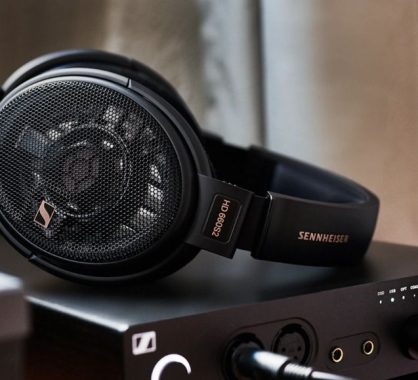
Right out of the box, the SENNHEISER HD 660S2 exude a sense of elegance. The combination of matte black and silver accents gives these headphones a sophisticated, premium look. But it’s not just about appearances; these headphones are built to last.

The materials used in the construction feel robust and durable. The ear cups and headband are adorned with plush velour padding, providing a comfortable fit even during extended listening sessions. The adjustable headband allows for a customized fit on any head size, and the headphones weigh in at a mere 260 grams, making them surprisingly lightweight for over-ear headphones.

SENNHEISER HD 660S2 - Performance
SENNHEISER HD 660S2

One of the standout features of the SENNHEISER HD 660S2’s build quality is its detachable cable. The 1.8-meter cable is of high quality, and its detachability is a practical touch. This means that if the cable ever gets damaged, you can easily replace it without having to replace the entire set of headphones. Furthermore, the package includes two different connectors: a 6.3 mm (1⁄4 inch) jack plug and a 4.4 mm balanced plug, offering versatility in how you choose to connect to your audio source.

Overall, the build quality of the SENNHEISER HD 660S2 is top-notch. These headphones feel like they can withstand the test of time and the rigors of daily use.

SENNHEISER HD 660S2 Sound Quality

Now, let’s talk about what really matters with headphones: the sound quality. The SENNHEISER HD 660S2 doesn’t disappoint. With a 38 mm dynamic, open transducer principle, they are designed to deliver an exceptional audio experience.

The frequency response of 8 – 41,500 Hz means that these headphones cover an impressively wide range of frequencies. Whether you’re listening to thunderous basslines or the delicate nuances of a classical piece, the SENNHEISER HD 660S2 handles it all with grace. The soundstage they offer is expansive, allowing you to immerse yourself in your favorite music like never before.

One of the unique features of these headphones is their high impedance of 300 Ω. While this might make them less suitable for on-the-go listening without an amplifier, it’s a boon for audiophiles who crave precision and detail in their music. The SENNHEISER HD 660S2 truly shine when paired with a quality amplifier, allowing you to unlock their full potential.

The sound pressure level (SPL) of 104 dB at 1 kHz and 1 Vrms ensures that even at lower volumes, you won’t miss out on any subtleties in your music. And when you crank up the volume, these headphones maintain their composure, with a total harmonic distortion (THD) of less than 0.04% at 1 kHz and 100 dB.

SENNHEISER HD 660S2
SENNHEISER HD 660S2 images source

Whether you’re into rock, jazz, classical, or electronic music, the SENNHEISER HD 660S2 offers a balanced and natural sound signature. The bass is tight and controlled, the mids are lush and detailed, and the highs are crisp without being piercing. These headphones excel in reproducing vocals, making every lyric and note feel like a private concert.

SENNHEISER HD 660S2 – Performance

In terms of performance, the SENNHEISER HD 660S2 is designed to elevate your audio experience to new heights. The open-back design, combined with their impressive transducer and frequency response, creates a sense of space and depth that few headphones can match. This makes them ideal for critical listening and audiophile-grade setups.

The headphones’ ear coupling is over-ear, which enhances comfort and noise isolation. However, it’s important to note that these headphones are open-back, so they do allow some sound leakage. They may not be the best choice for use in a noisy office environment, but they excel in quieter settings where you can fully appreciate their soundstage.

The included adapter, which converts the 6.3 mm (1⁄4 inch) plug to 3.5 mm, adds to the versatility of the SENNHEISER HD 660S2. You can easily connect them to a wide range of devices, from high-end audio equipment to your smartphone or laptop. And if you’re a fan of balanced audio, the 4.4 mm balanced plug option is a welcome addition.

SENNHEISER HD 660S2
SENNHEISER HD 660S2

In Conclusion…

The SENNHEISER HD 660S2 is a masterpiece in the world of headphones. Their build quality, with attention to comfort and durability, ensures they’re more than just a pretty face. When it comes to sound quality, these headphones deliver a sonic experience that will leave you spellbound. The wide frequency response, high impedance, and low THD make them a favorite among audiophiles seeking accuracy and detail.

While they may not be the most portable option due to their open-back design and high impedance, the SENNHEISER HD 660S2 shines in quiet listening environments where you can fully appreciate their sonic prowess. Whether you’re a music enthusiast, a gamer, or a professional audio engineer, these headphones are a worthy addition to your setup.

In the world of audio, the SENNHEISER HD 660S2 stands as a testament to the brand’s commitment to excellence. If you’re in search of headphones that deliver a symphony for the senses, these are a harmonious choice that will elevate your listening experience to new heights. SENNHEISER HD 660S2 price: $‌499.95

MIMO technology – How does it enhance the capacity & reliability of wireless communication systems?

0

MIMO is a technology used in wireless communication systems to improve data throughput, coverage, and reliability by simultaneously transmitting multiple data streams over the same channel. It involves multiple antennas at both the transmitter and receiver ends of a communication link. Here’s how MIMO works and how it enhances wireless communication:

1. Spatial Multiplexing:

  • MIMO takes advantage of the spatial dimension by using multiple antennas to transmit and receive multiple data streams simultaneously. Each antenna at the transmitter and receiver is considered as a separate “spatial channel.”
  • For example, in a 2×2 MIMO system, there are two antennas at both the transmitter and receiver. This allows for the simultaneous transmission of two independent data streams.

2. Increased Data Throughput:

  • MIMO technology significantly boosts data throughput. By transmitting multiple data streams in parallel, it effectively multiplies the data rate of the wireless channel.
  • For instance, in a 2×2 MIMO system, the data rate can be approximately doubled compared to a non-MIMO system under the same conditions.

    MIMO technology
    photo: Pixabay

3. Improved Coverage and Reliability:

  • MIMO helps overcome issues like signal fading, multipath interference, and dead spots. The multiple antennas at both ends provide redundancy and diversity in the signal paths.
  • When a signal encounters obstacles or experiences fading due to reflections, the multiple spatial channels can still provide a reliable signal.
  • This is especially beneficial in urban environments or indoor spaces where signals can bounce off walls and structures, causing interference.

4. Spatial Processing:

  • MIMO systems employ spatial processing techniques like beamforming and spatial diversity to optimize signal quality and coverage.
  • Beamforming focuses the signal in a specific direction, enhancing coverage in that direction. It’s crucial for extending the reach of wireless networks in a specific area.
  • Spatial diversity ensures that if one path experiences interference or signal loss, another path can still provide the data, improving the overall reliability.

5. Applications:

  • MIMO technology is widely used in various wireless communication systems, including Wi-Fi, 4G LTE, and 5G.
  • In Wi-Fi routers and access points, MIMO enables faster data speeds and better coverage in homes and offices.
  • In 4G and 5G cellular networks, MIMO is a key technology for providing high-speed data to mobile devices and improving network capacity.

MIMO technology is a critical advancement in wireless communication that leverages multiple antennas to increase data throughput, enhance coverage, and improve reliability. It plays a pivotal role in the performance and capacity of modern wireless networks, allowing users to enjoy faster and more reliable wireless connections.

What are the key differences between 4G and 5G wireless technologies…

0

4G (LTE) and 5G are both wireless communication technologies, but they have significant differences in terms of their capabilities and performance:

1. Data Transfer Speed:

  • 4G: 4G networks typically offer peak download speeds of up to 100 Mbps (megabits per second) and upload speeds of up to 50 Mbps.
  • 5G: 5G networks are designed to provide much higher data transfer speeds. They can offer peak download speeds ranging from 1 Gbps (gigabit per second) to 10 Gbps or even more. This is a significant improvement over 4G and allows for ultra-fast data transfers.

2. Latency:

  • 4G: 4G networks generally have latency (the time it takes for data to travel from sender to receiver) in the range of 30 to 50 milliseconds.
  • 5G: 5G networks aim to achieve extremely low latency, often below 1 millisecond. This low latency is crucial for applications like autonomous vehicles, remote surgery, and augmented reality.

3. Network Capacity:

  • 4G: 4G networks have limited capacity and can become congested in densely populated areas or during large events.
  • 5G: 5G networks are designed to handle a much larger number of connected devices simultaneously. This improved network capacity is essential for the growing number of IoT devices and smart cities.

    differences between 4G and 5G wireless
    photo: Pixabay

4. Spectrum and Frequency Bands:

  • 4G: 4G networks primarily operate in lower frequency bands (sub-6 GHz), which provide good coverage but limited bandwidth.
  • 5G: 5G utilizes a broader spectrum, including higher-frequency mmWave (millimeter wave) bands. These higher frequencies offer wider bandwidth, enabling faster data speeds, but they have shorter propagation distances and require more cell towers.

5. Network Slicing:

  • 4G: 4G networks do not support network slicing, which allows network operators to create virtual, customized networks for specific use cases.
  • 5G: 5G introduces network slicing, enabling the creation of dedicated network segments for applications like autonomous vehicles, industrial automation, and healthcare, each with specific performance characteristics.

6. Energy Efficiency:

  • 4G: 4G devices may consume more power, which can impact battery life.
  • 5G: 5G technologies are designed to be more energy-efficient, allowing for longer battery life in devices and reducing the environmental footprint.

5G represents a significant leap in wireless technology compared to 4G, offering much higher speeds, lower latency, improved network capacity, and the ability to support a wide range of applications and devices. These differences make 5G a key enabler for the future of communication, including IoT, autonomous vehicles, and immersive multimedia experiences.


Here are some key differences between 4G and 5G wireless technologies along with examples illustrating these differences:


Speed:

4G: 4G networks offer peak download speeds of up to 100 Mbps. For example, you can download a high-definition movie in about 10 minutes.

5G: 5G networks provide peak download speeds ranging from 1 Gbps to 10 Gbps or more. With 5G, you can download the same movie in just a few seconds.

Latency:

4G: 4G networks have latency (the delay between sending and receiving data) of around 30 to 50 milliseconds. This is suitable for tasks like video conferencing.

5G: 5G aims for ultra-low latency, often below 1 millisecond. This allows for real-time applications like remote surgery or augmented reality gaming where instant responses are critical.

Network Capacity:

4G: 4G networks can become congested in densely populated areas, leading to slower data speeds during peak times. For example, at a crowded sports event, you might experience slow internet connectivity.

5G: 5G networks are designed to handle a massive number of connected devices simultaneously. This is essential for scenarios like smart cities where thousands of sensors and devices need to communicate without network congestion.

Frequency Bands:

4G: 4G primarily uses lower-frequency bands (sub-6 GHz). These frequencies provide good coverage but limited bandwidth.

5G: 5G utilizes a wider spectrum, including higher-frequency mmWave (millimeter wave) bands. These high frequencies offer much wider bandwidth, enabling faster data speeds but requiring more cell towers. For example, mmWave 5G is ideal for providing high-speed internet in densely populated urban areas.

Applications:

4G: 4G networks are well-suited for traditional mobile data, video streaming, and basic IoT applications. For instance, you can use 4G for streaming music and videos on your smartphone or connecting smart thermostats in your home.

5G: 5G opens the door to a wide range of new applications. Examples include autonomous vehicles that rely on real-time data exchange, smart factories with ultra-responsive automation, and augmented reality experiences with lifelike graphics and minimal lag.

Energy Efficiency:

4G: 4G devices may consume more power, impacting battery life. For instance, you may need to recharge your 4G smartphone daily.

5G: 5G technologies are designed to be more energy-efficient, leading to longer battery life in devices. This is crucial for IoT sensors that need to operate for years on a single battery.

These differences showcase the significant advancements that 5G brings compared to 4G, enabling a wide range of applications that were either not possible or not practical with previous-generation networks.