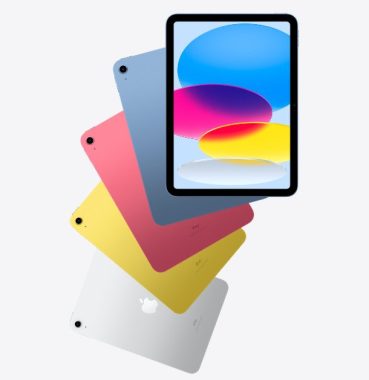
If you’ve been an iPad user for the past few years, encountering problems is not uncommon. While Apple’s iPad remains a top-tier tablet, like all electronic devices, it is not immune to occasional glitches. With various models available in the market, this article discusses common issues that can hinder your iPad experience. You have the choice to either seek assistance from an iPad repair center or explore DIY solutions to address these problems promptly. Let’s delve into the common troubleshooting steps for these iPad problems. Here are some typical problems you may encounter, along with recommendations for resolving them.
Dead or Stuck Pixel
It can be frustrating when a pixel on your iPad’s screen becomes unresponsive or remains black. Occasionally, there may be more than one affected pixel. To address this iPad problem, consider the following steps:
If the pixel is still illuminated but stuck or displaying the wrong color, gently apply pressure to the affected area of the screen using a clean cloth-covered thumb while moving it slowly. This may help resolve the problem. Sometimes flashing bright, changing colors can reset a stuck pixel. If the pixel remains dark and unresponsive, it may be dead, and unfortunately, dead pixels cannot be fixed. Attempt the steps above for minor issues.
One of the most common problems iPad users encounter is a frozen screen, often caused by conflicts between running apps or corrupted memory. To resolve this iPad problem:
Try turning your iPad off and then back on. If that doesn’t work, perform a hard reset by simultaneously holding down the home button and the sleep/wake button. If the issue persists, connect your iPad to a computer and use iTunes to restore the operating system. Ensure you regularly back up your data to prevent any loss of important information.
Latest iPadOS Installation problems
If you’re having trouble installing the latest iOS/iPadOS updates, it’s essential to check if your iPad meets the update requirements. Follow these steps to ensure a successful update:
Ensure your iPad has at least a 50% battery charge and connect it to a power source before initiating a significant update.
Do not use a cellular data connection to download large updates to conserve mobile data.
Check if Low Power Mode is disabled, as it may interfere with the update process.
iPad Not Charging
In some instances, your iPad may not charge properly. The most common issue is insufficient power from USB connections, especially on older computers. To address this problem:
Restart your iPad and connect it to a wall outlet using the original power cable and adapter.
If the issue persists, consider getting a new cable and adapter, as the old ones may be damaged.
If a new power adapter doesn’t resolve the problem, contact Apple as there might be an underlying hardware issue.
iPad Won’t Power On
Several factors can prevent your iPad from powering on, with a dead battery and a frozen device being the most common culprits. To revive your iPad:
Perform a reset by simultaneously holding down the home and sleep/wake buttons for 10 seconds. Look for the Apple logo to appear, signaling a successful restart.
If the reset doesn’t work, your iPad might have run out of battery. Connect it to a wall outlet using the original power adapter and wait for up to 20 minutes for it to charge.
These troubleshooting steps should help you address common iPad problems and get your device back to working order.
If you’re currently on the lookout for a top-notch audio receiver, that seamlessly combines old-school vinyl charm with modern streaming versatility, the Technics SA-C600 might be the perfect addition to your audio setup. With its array of features, including compatibility, performance, design, streaming capabilities, and a reasonable price point of £899, this receiver promises to be a one-stop solution for your audio needs.
Design: A Classy Blend of Old and New
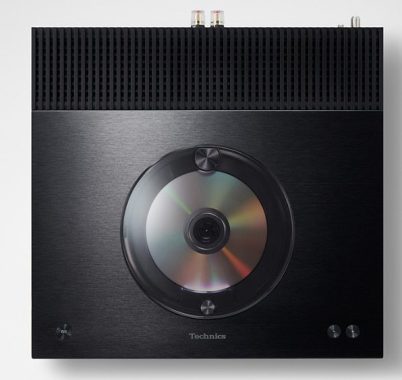
The Technics SA-C600 boasts a design that skillfully marries the classic aesthetics of yesteryear with a sleek and modern look. With its minimalist yet elegant appearance, it won’t be an eyesore in your living room. The Perspex plate that covers the CD player adds a touch of sophistication, and the controls are neatly laid out for easy access.
One unique aspect of its design is the inclusion of a built-in MM phonostage, a testament to Technics’ legacy in turntables. This feature allows you to connect any MM cartridge-equipped turntable directly, eliminating the need for an extra phono preamp. The high-quality phonostage ensures a dynamic sound with minimal distortion.
Technics SA-C600
Performance: Technics’ Signature Sound
When it comes to audio performance, Technics has always set a high standard, and the SA-C600EB is no exception. The receiver incorporates Technics’ proprietary technology, JENO (Jitter Elimination and Noise-shaping Optimization), which reduces distortion to a minimum. JENO optimizes the signal by minimizing jitter and delivering precise signal processing, resulting in unparalleled audio quality.
To ensure the best possible sound, the Technics SA-C600 uses a twin power supply system. One supply is dedicated to the amplifier, while the other powers the rest of the system. This separation of power supplies minimizes background noise and distortion, providing a pristine audio experience.
Streaming Music
One of the standout features of the Technics SA-C600 is its extensive streaming capabilities. With built-in Chromecast, Apple AirPlay 2, and Bluetooth, it caters to a wide range of preferences. Chromecast is ideal for Android users, offering easy access to various music and podcast apps, all controllable from your smartphone. Apple AirPlay 2 allows wireless streaming from Apple devices, and Bluetooth is perfect for quickly connecting your friends’ phones or for backup when your Wi-Fi is down.
Moreover, the SA-C600EB is compatible with popular streaming services like Spotify, TIDAL, Amazon Music, Deezer, and even Internet radio. This gives you access to an extensive library of music, ensuring you never run out of tracks to play.
Space Tune: Tailor the Sound to Your Room
The Technics SA-C600 takes customization to the next level with its Space Tune feature. By downloading the Technics Audio Centre app (available for Apple iOS only), you can fine-tune the sound to suit your room’s unique acoustics. Alternatively, you can choose one of the four presets – ‘Free,’ ‘Wall,’ ‘Corner,’ or ‘Shelf’ – to quickly tailor the sound to your liking. This flexibility ensures that you get the best possible audio experience, regardless of your room’s layout.
Technics SA-C600 Network CD Receiver
Multi-room Compatibility: Connect and Play Everywhere
The SA-C600 adapts seamlessly to multi-room setups, giving you the flexibility to enjoy your music throughout your home. You can choose to connect it with other devices using Apple AirPlay 2 or Chromecast speakers in the system. Additionally, the Technics Audio Centre app allows you to link up other compatible Technics devices using Chromecast, creating a cohesive multi-room audio experience.
CD Player and DAB/FM Tuner
While the Technics SA-C600 is packed with modern features, it hasn’t forgotten about the classics. The Perspex plate elegantly conceals a high-quality CD player that offers smooth, highly detailed playback. Thanks to Technics’ decades of experience in CD player technology, you can expect a super-smooth sound that brings out the best in your cherished CD collection.
Furthermore, the built-in DAB/FM tuner ensures you have access to all your favorite local and national radio stations, giving you an extensive array of listening options.
Versatile Connectivity: The Hub of Your Audio System
In addition to its built-in streaming, radio, and CD player, the Technics SA-C600 serves as the hub of your audio setup. It features an array of inputs, including RCA analog, optical, and coaxial digital inputs, ideal for connecting your TV, game console, set-top box, or any other digital or analog source. Additionally, a USB-B interface at the rear allows streaming music from your PC, and a USB-A socket at the front is perfect for connecting USB memory devices.
The Technics SA-C600 receiver offers a slew of unique features that set it apart from the competition. Here are some of the standout characteristics that make it a true audio masterpiece:
1. JENO Technology: The inclusion of JENO (Jitter Elimination and Noise-shaping Optimization) technology is a testament to Technics’ commitment to sound quality. JENO reduces distortion to the absolute minimum, ensuring that your music is reproduced with impeccable precision and clarity.
2. Twin Power Supply: The twin power supply system is a thoughtful addition that separates the amplifier’s power supply from the rest of the system. This design ensures that the amplifier’s circuitry doesn’t introduce noise into the system, resulting in a background so quiet that every note and detail in your music comes to life.
3. Space Tune: The Space Tune feature, accessible through the Technics Audio Centre app, allows you to fine-tune the sound to match your room’s unique acoustics. Whether your room is spacious or snug, you can optimize the audio experience to your liking, making sure every corner of your space is filled with rich, immersive sound.
4. Multi-room Compatibility: The SA-C600 seamlessly integrates with multi-room audio setups, offering two options for linking with other devices: Apple AirPlay 2 or Chromecast. This flexibility enables you to extend your music listening experience throughout your home effortlessly.
5. Turntable Input: As an homage to their turntable heritage, Technics has included a built-in MM phonostage in the SA-C600EB. This allows you to connect any MM cartridge-equipped turntable directly to the receiver without the need for an additional phono preamp. With its dedicated power supply, the phonostage produces a dynamic sound with minimal distortion, preserving the warmth and authenticity of vinyl records.
6. Extensive Connectivity: The SA-C600EB serves as the central hub for your audio system, offering an array of inputs, including RCA analog, optical, and coaxial digital connections. This versatile array of inputs ensures that you can connect a wide range of devices, making it a versatile addition to your audio setup.
Technical Details:
Power Output: 40 watts per channel (at 4 ohms), providing ample power to drive most speakers.
Frequency Response: Impressive range from 20 Hz to 90,000 Hz, ensuring that both the deepest bass and the highest treble frequencies are faithfully reproduced.
High-Resolution Audio: The SA-C600EB is capable of handling high-resolution audio, ensuring that you can enjoy your music in its most detailed and lifelike form.
Smartphone Control: You can control the receiver using your smartphone, offering a user-friendly interface for adjusting settings and selecting your favorite tunes.
Internet Radio Services: Access to internet radio services ensures that you have a world of music at your fingertips.
The Technics SA-C600 receiver is a true masterpiece of audio engineering, blending the best of both classic and modern audio technologies. Whether you’re spinning vinyl records, streaming music, or enjoying your CD collection, this receiver delivers impeccable sound quality. Its unique features, such as JENO technology, twin power supply, and Space Tune, set it apart from the crowd, ensuring that your listening experience is finely tailored to your preferences and surroundings.
The inclusion of multi-room compatibility, extensive connectivity options, and a dedicated phono input for turntables make it an incredibly versatile and complete audio solution. With a reasonable price of £899, the SA-C600EB offers excellent value for audiophiles and music enthusiasts alike. This receiver embodies Technics’ commitment to producing top-tier audio equipment, making it a fantastic addition to any music lover’s setup. Elevate your listening experience with the SA-C600EB and enjoy the best that both the past and the present have to offer in audio technology.
The specifications for the Technics SA-C600 Network CD Receiver:
The Technics SA-C600 Network CD Receiver is a compact, all-in-one audio system designed for audiophiles seeking versatility and high-quality sound in a single unit. Below is a detailed breakdown of its pros and cons, based on its features, performance, and user feedback.
Pros
Versatile Connectivity and Source Options:
The SA-C600 supports a wide range of music sources, including CD playback, DAB/DAB+ and FM radio, network streaming (Spotify Connect, Tidal, Deezer, Amazon Music, Qobuz), Bluetooth, AirPlay 2, Chromecast, and physical inputs like USB-A, USB-B, coaxial, optical, and analog RCA.
It includes a built-in moving magnet (MM) phono stage, allowing direct connection of a turntable without an external preamp, making it ideal for vinyl enthusiasts.
Supports high-resolution audio up to 32-bit/384kHz PCM and DSD 11.2 MHz via USB and LAN, as well as MQA files, ensuring compatibility with high-quality digital formats.
High-Quality Sound Performance:
Utilizes Technics’ JENO Engine (Jitter Elimination and Noise-Shaping Optimization) for fully digital amplification, delivering precise signal transmission with minimal noise and distortion, preserving both high-resolution digital audio and the warmth of analog recordings.
Offers punchy, expressive sound with strong rhythmic drive, excellent dynamics, and detailed soundstaging, performing consistently across CD, streaming, and radio sources.
The Space Tune function optimizes sound for room acoustics with presets (Free, Wall, Corner, Shelf) or iOS-based auto-calibration, enhancing audio quality in various environments.
Compact and Elegant Design:
Measuring 340 x 94 x 341 mm and weighing approximately 4.8 kg, the SA-C600 is compact, making it suitable for small spaces or desktop setups.
Features a sleek, minimalist design with a brushed aluminum top panel (available in silver or black) and a top-loading CD player with a manually operated lid, adding aesthetic appeal and functional beauty.
Incorporates design elements inspired by Technics turntables, enhancing visual cohesion when paired with compatible turntables like the SL-1500C.
Ease of Use:
Comes with a well-laid-out remote control for easy operation, with direct access to key inputs like CD, radio, and Bluetooth.
The Technics Audio Center app simplifies setup and streaming, though it’s more functional when paired with Google Home or native streaming apps.
Optical input supports auto-on/off functionality, allowing seamless integration with devices like TVs without needing the remote.
Robust Build and Noise Reduction:
Features a twin power supply circuit system, with separate power supplies for the amplifier and other circuits, minimizing interference and ensuring clean audio output.
The phono equalizer has a dedicated power supply and shielded construction to reduce noise, delivering high-fidelity vinyl playback.
Clean Powered Clock Generator, borrowed from Technics’ flagship SL-1000R turntable, enhances noise reduction for the JENO Engine.
Value for Money:
Priced at approximately $999 / £899 / AU$1749, the SA-C600 offers a comprehensive feature set, making it a cost-effective all-in-one solution compared to separate components.
Received a What Hi-Fi? Award in 2024 for its performance as a compact, just-add-speakers system.
Cons
Limited Power Output:
Rated at 60W per channel into 4 ohms (40W into 8 ohms), the SA-C600 may struggle to drive power-hungry or less sensitive speakers, particularly in larger rooms. Some users noted limitations with demanding speakers.
Total Harmonic Distortion (THD) of 1% at 1kHz is not class-leading, potentially affecting audio purity with certain setups.
Compromises in Build Quality:
Despite its premium appearance, some parts, like the top panel heatsink and side panels, are made of plastic, which may not feel as high-end as expected for a “Premium Class” product.
The small speaker binding posts may not accommodate larger spade connectors, limiting compatibility with some high-end speaker cables.
Headphone Output Limitations:
The 3.5mm headphone jack and its drive circuitry can sound muddy at higher volumes or with headphones above 40 ohms, making it less ideal for headphone enthusiasts.
Compared to competitors like the Marantz PM7000N with a 6.3mm jack, the headphone output is less robust.
Technics Audio Center App Shortcomings:
The app is functional but less responsive and has a more primitive interface compared to native streaming apps like Amazon Music or Spotify. Navigating large music libraries via the app can be cumbersome due to the single-line LCD display.
Space Tune’s advanced calibration is iOS-only, limiting accessibility for Android users.
Missing Advanced Features:
Lacks support for aptX or aptX HD Bluetooth codecs, which could improve wireless audio quality.
Does not support SACD playback or advanced optical disc features, limiting its appeal for collectors of high-resolution discs.
No HDMI ARC or pre-out connections, reducing flexibility for integration with modern home theater systems or external amplifiers.
Not Roon-certified, which may disappoint users invested in the Roon ecosystem.
Operational Quirks:
Switching between input modes without direct shortcuts on the remote can be tedious, requiring sequential scrolling.
The unit takes a bit longer to power on compared to some competitors, which may frustrate users seeking instant operation.
The CD drive’s longevity has been questioned by some users, though禁止
CD Drive Concerns:
Some users have raised concerns about the longevity of the top-loading CD drive, as its mechanical design may wear over time with frequent use.
The manual sliding cover for the CD player, while elegant, may be less convenient for frequent disc changes compared to a traditional tray design.
Speaker Pairing Considerations:
While the SA-C600 can drive a range of speakers, its performance is best with efficient speakers like the Technics SB-C600 or KEF LS50 Meta. Pairing with less sensitive or more demanding speakers may not yield optimal results, requiring careful speaker selection.
Summary: The Technics SA-C600 is a highly versatile, compact audio solution that delivers excellent sound quality, a wide array of connectivity options, and a sleek design, making it ideal for audiophiles with limited space or those seeking a streamlined system. Its JENO Engine, Space Tune, and robust noise reduction features ensure high-fidelity playback across various sources. However, its power output may limit its performance with certain speakers, and some compromises in build quality, headphone performance, and app functionality may detract from its “premium” branding. Additionally, the lack of advanced features like aptX Bluetooth, SACD support, or HDMI ARC may disappoint users with specific needs. For best results, pair it with efficient speakers and a reliable network setup to maximize its potential.
An Android emulator is a software application or tool that simulates the Android operating system (OS) and hardware on a desktop or laptop computer. It allows developers and users to run Android apps and test them on their computers without the need for physical Android devices. Android emulators are commonly used for various purposes, including app development, testing, and running Android apps on a larger screen.
Here are some key points and features of Android emulators:
App Development: Android emulators are essential for app developers. They provide a controlled environment for testing and debugging Android applications without the need for physical devices. Developers can test their apps on different Android versions and screen sizes.
Compatibility Testing: Emulators allow developers to test the compatibility of their apps across various Android versions and device configurations, helping ensure that the app works correctly on a wide range of devices.
Performance Profiling: Developers can use emulators to profile the performance of their apps, including CPU usage, memory consumption, and more.
Screen Capture and Recording: Some emulators offer features for capturing screenshots and recording video of the emulator’s screen. This is useful for creating promotional materials or documenting app behavior.
Customizable Hardware: Many emulators allow you to configure the hardware specifications, such as screen size, resolution, RAM, and processor speed, to mimic different real Android devices.
Root Access: Some emulators provide root access to the Android OS, which is useful for certain testing and debugging tasks.
Google Play Services: Some emulators come with Google Play Services pre-installed, making it easier to test apps that rely on Google’s APIs and services.
Third-Party Emulators: There are various Android emulators available, both officially from Google and from third-party developers. Examples of popular Android emulators include Android Studio’s built-in emulator, Genymotion, BlueStacks, and Nox Player.
Cross-Platform Compatibility: Android emulators are available for various operating systems, including Windows, macOS, and Linux, making them accessible to a wide range of developers.
LeapDroid presents a comprehensive Android emulation solution for Windows computers, offering a complete Android experience without the need for an actual Android device.
In today’s landscape, a multitude of Android emulators exists, all serving as gateways to Android apps and the complete Android environment on your computer. These emulators empower you to manage applications, install games, and embark on an entirely new experience with your favorite apps and games, while also providing a reliable testing environment.
photo: Pixabay
LeapDroid, in particular, shines as an exceptional Android emulator, transforming your Windows PC into an Android platform. It emulates Android up to version 4.4, known as KitKat—an older but notably stable Android iteration that ensures a satisfying experience with a selection of top-tier apps.
The standout advantage of employing an emulator like LeapDroid lies in the ability to harness Android’s full array of apps and games right on your computer. It’s a distinctive experience, enabling you to enjoy games and applications within the Android environment using your mouse and keyboard.
Beyond mere app and game access, LeapDroid offers a comprehensive Android encounter. Users can customize buttons and keys, effectively tailoring the emulator’s functionality to their device.
Notably, LeapDroid distinguishes itself through its lightweight, user-friendly, and swift performance. While enhanced hardware can unlock its full potential, it operates admirably even on more modest systems.
In conclusion, LeapDroid stands as an exceptional Android emulator for your computer, providing the complete Android experience you’ve long desired.
When developing and using Android emulators, it’s essential to keep them up to date with the latest Android versions and security patches to ensure accurate testing and compatibility with the latest apps and features.
Improving your typing speed takes practice and patience. Here are some tips to help you become a faster typist:
Touch Typing: Learn how to touch type, which means typing without looking at the keyboard. Familiarize yourself with the position of the keys and practice until you can type comfortably without looking down.
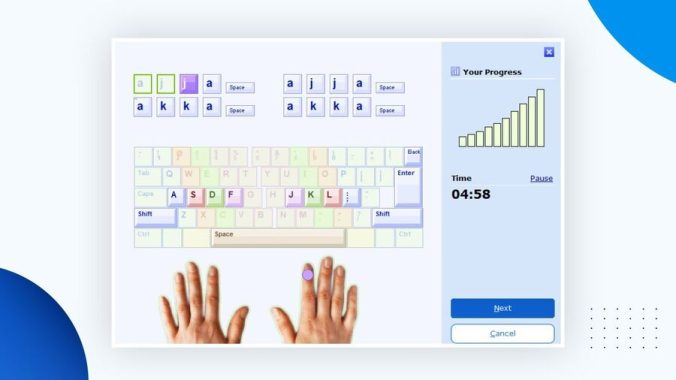
Use Proper Finger Placement: Position your fingers correctly on the keyboard. Your left hand should rest on the keys A, S, D, and F, while your right hand should rest on J, K, L, and the semicolon (;) key. The other fingers should naturally reach for the surrounding keys.
Practice Regularly: Consistent practice is essential for improvement. Dedicate time each day to typing exercises and drills.
Use Online Typing Tutors: There are many typing tutor websites and software available, like TypeRacer, 10FastFingers, and Keybr. These platforms offer typing tests and lessons to help you improve your speed and accuracy.
Focus on Accuracy: Initially, focus on typing accurately rather than quickly. Speed will naturally follow as you become more comfortable with the keyboard layout.
Increase Typing Speed Gradually: As you become more confident, gradually increase your typing speed. Push yourself to type faster, but always maintain good accuracy.
Type from Dictation: Transcribing audio or copying text from books can be an effective way to practice typing.
Short Paragraph Practice: Find interesting articles or texts and practice typing them. Try to challenge yourself with different content and subjects.
Keyboard Shortcuts: Learn and use keyboard shortcuts for common tasks. This will improve your overall efficiency when using a computer.
Posture and Ergonomics: Maintain proper typing posture and ergonomics. Ensure your chair, keyboard, and monitor are set up to prevent strain and discomfort.
Use a Mechanical Keyboard: Some people find mechanical keyboards more comfortable and responsive, which can help improve typing speed. Find the keyboard that suits you best.
Slow Down for Difficult Words: When you encounter challenging words or characters, slow down to ensure accuracy. Over time, you’ll become more proficient with these as well.
Take Breaks: Typing for long periods can lead to fatigue. Take regular breaks to prevent strain and maintain focus.
Track Your Progress: Keep a record of your typing speed and accuracy over time. This will help you see your improvement and set goals.
Be Patient: Improving typing speed takes time. Don’t get discouraged if you don’t see immediate results. Keep practicing, and you’ll get faster over time.
Typing Master, previously known as TypingMaster Pro, stands as an exceptional typing tutor for computer users. It offers an effective, user-friendly, and enjoyable approach to learning the art of typing.
The learning process is characterized by its progressive nature, high degree of customization, and a comprehensive range of exercises tailored to different proficiency levels. These exercises empower users to enhance their typing skills rapidly.
Typing Master photo
Typing Master caters to both novices and individuals who may have developed unorthodox typing habits, such as single-handed typing.
Analyze & Improve: Keep a close eye on your progress and identify areas for improvement.
Customized Courses: Craft personalized courses to address your specific needs.
Expert Analysis: Gain in-depth insights through detailed analysis and reports.
Games & Challenges: Make the learning process engaging and entertaining while enhancing your speed.
Multi-Language Support: Utilize Typing Master in multiple languages to suit your preferences.
Personalized Lessons: Tailor lessons to align with your current skill level.
Professional Typing Tests: Prepare for professional certification exams by taking specialized tests.
Speed Building: Acquire the proper techniques to increase your typing speed.
Step-by-Step Approach: Progress through lessons covering basic to advanced typing skills systematically.
Support for Multiple Users: Create multiple user accounts to accommodate various learners.
Typing Lessons: Access step-by-step, comprehensive instruction to refine your typing proficiency.
Typing Meter: Track and monitor your accuracy and typing speed over time.
Typing Test: Assess and evaluate your typing speed and accuracy through dedicated testing.
Remember that speed comes with accuracy. It’s essential to strike a balance between the two. Initially, prioritize accuracy, and as you become more comfortable, work on increasing your speed while maintaining that accuracy. With dedication and practice, you’ll become a faster typist.
In the ever-evolving realm of gaming and graphics, there’s a new contender for the throne, and it’s none other than the ASUS 4090 Matrix. This beast of a graphics card has taken the gaming world by storm, redefining the benchmarks of compatibility, performance, cooling, gaming, overclocking, price, and quality. We’re diving deep into this graphical behemoth, examining its exceptional features, and letting you in on what makes it tick.
Design
This card’s construction is both robust and innovative. Weighing in at around 2kg, it features a metal frame that encases a specially designed cold plate, setting it apart from the competition. The copper cold plate is engineered to cool the GPU, VRMs, and memory efficiently, thanks to the liquid metal thermal compound that conducts heat effectively. This choice of liquid metal comes with its challenges, as it’s electrically conductive. To mitigate any potential risks, ASUS has integrated UV resin on the capacitors and introduced dual protective barriers between the GPU die and the PCB, ensuring no unintentional short circuits due to the liquid metal.
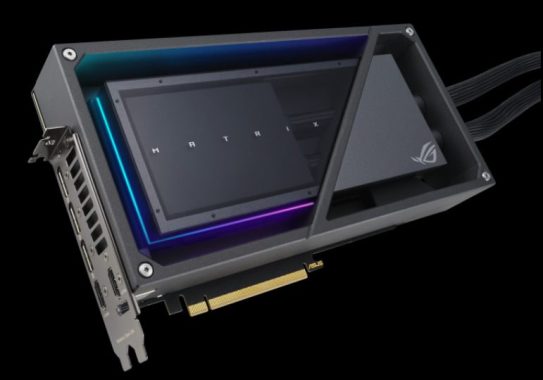
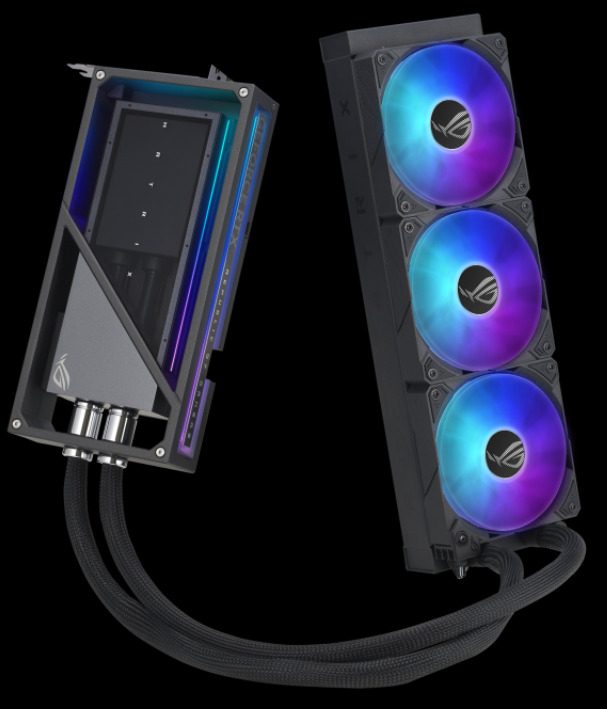
ASUS ROG 4090 Matrix
The ASUS 4090 Matrix is nothing short of a visual masterpiece. Its striking design is a testament to ASUS’s commitment to aesthetics and functionality. The card features a sleek, triple-fan cooling system, enclosed in a robust metallic shroud. The Matrix branding shines boldly on the side, reminding you that you’re dealing with a true powerhouse.
What truly sets this card apart, design-wise, is the inclusion of RGB lighting. ASUS has integrated their AURA SYNC technology to illuminate your rig with customizable, synchronized lighting. From a gentle glow to a disco of colors, you have the power to set the mood of your gaming station. The RGB lighting extends to the card’s three fans, creating a dynamic light show that’s as entertaining as it is eye-catching. One of the unique aspects of the ASUS 4090 Matrix is its compatibility with both horizontal and vertical orientations, making it versatile for various PC setups. The exclusively engineered copper cold plate is connected through the innovative liquid metal thermal compound, and this liquid metal solution has garnered praise in the overclocking community. The liquid is efficiently circulated by an ASUS-customized pump, ensuring optimal flow. ASUS proudly touts an 8°C temperature drop compared to their liquid-cooled Strix card, showcasing their commitment to delivering top-tier cooling performance.
Compatibility: A Worthy Companion for Your Rig
When it comes to compatibility, the ASUS 4090 Matrix doesn’t disappoint. Sporting a PCI Express 4.0 interface, it’s well-equipped to keep up with modern motherboards. It’s not just the interface; it’s also the compatibility with multiple displays and resolutions that makes this card stand out.
This graphics card supports a jaw-dropping digital maximum resolution of 7680 x 4320, which is a testament to its future-proofing. Whether you’re gaming, content creation, or working with multiple high-resolution monitors, the 4090 Matrix has you covered. With two HDMI 2.1a ports and three DisplayPort 1.4a ports, connecting your favorite displays is a breeze. HDCP support version 2.3 ensures secure streaming and content protection.
Performance: Unleash the Beast
When it comes to performance, the ASUS 4090 Matrix is a standout in its class. Preliminary tests indicate that it’s one of the fastest RTX 4090 graphics cards on the market. ASUS has not only increased the card’s power consumption allowance (TGP) but also set the turbo clock frequency at an impressive 2670 MHz (or 2700 MHz in OC mode). And if you’re feeling adventurous, you can push the frequency even further, up to a staggering 3.0 GHz.
ASUS ROG Matrix Platinum GeForce RTX 4090 – images: Asus
The ASUS 4090 Matrix is powered by the NVIDIA GeForce RTX 4090, and it’s all about performance. The card boasts an impressive 24GB of GDDR6X video memory, which ensures that even the most demanding tasks and games run seamlessly.
In terms of clock speed, the ASUS 4090 Matrix comes in two modes: OC Mode, which clocks in at 2700 MHz, and Default Mode, which is no slouch at 2670 MHz. This dual-mode capability allows you to choose the level of performance you need, striking a balance between raw power and energy efficiency.
With 16,384 CUDA cores under the hood, this graphics card handles complex tasks and graphics-intensive games with ease. Whether you’re into 3D rendering, ray tracing, or simply gaming at the highest settings, the ASUS 4090 Matrix excels in every arena.
Cooling
The cooling system doesn’t just stop at practicality; it’s a sight to behold as well. The ASUS 4090 Matrix’s cooling system features a 360mm AIO water cooler equipped with three ROG MF-12S fans, each with customizable RGB LEDs. What’s remarkable is that these fans are magnetically linked, allowing for a single cable connection, discreetly concealed within the cooling tubes of the AIO. ASUS has left no stone unturned when it comes to optimizing the cooling solution for maximum efficiency.
The cooling system in the ASUS 4090 Matrix is a work of art. Three massive fans ensure that the card stays cool under pressure, even during marathon gaming sessions or resource-intensive tasks. The cooling solution is efficient and silent, thanks to ASUS’s attention to detail in the design.
A standout feature is the custom radiator, measuring 400 x 120 x 65mm. This massive heat exchanger plays a pivotal role in keeping your card cool. The heat pipes and fin stack dissipate heat effectively, ensuring that your ASUS 4090 Matrix remains at optimal temperatures, no matter how demanding the task.
Gaming
When it comes to gaming, the ASUS 4090 Matrix doesn’t hold back. This graphics card takes gaming immersion to a whole new level. Thanks to its raw power and ray tracing capabilities, games come alive in stunning detail and realism. The frame rates are consistently high, delivering a smooth gaming experience that’s second to none.
With support for NVIDIA’s DLSS technology, you can push your games to their limits while maintaining exceptional image quality. This means that even in the most graphically intense games, your ASUS 4090 Matrix will ensure that you have a competitive edge.
In terms of gaming and rendering quality, the ASUS 4090 Matrix delivers exceptional performance. It’s geared towards high-resolution gaming, especially at 8K, although it’s crucial to recognize that many avid gamers opt for monitor resolutions such as UWHD, QHD, or UHD. Using the RTX 4090 for Full HD gaming might lead to bottlenecks and CPU limitations in some cases. However, well-optimized games, particularly those using DX12/ASYNC computation, can experience significant performance boosts with this card. The RTX 40 series introduces a new generation of Ray tracing and Tensor cores, providing more power. Although the specific counts of RT and Tensor cores are significant, what truly matters is the performance each unit delivers. Their proximity to the rendering engine has led to increased efficiency. While quantifying Tensor cores’ performance can be challenging, preliminary observations, such as those from DLSS3, indicate positive results.
The GeForce RTX 4090 is optimized for resolutions ranging from 2K (2560×1440) to 4K (3840×2160). Different architectures inherently present varying performance metrics due to their strengths and weaknesses in specific game rendering tasks. When evaluating performance on a per-card basis, ASUS’s product outperforms the competition, thanks to its higher TGP, increased clock frequencies, and optimal temperatures.
Overclocking: Pushing the Envelope
For enthusiasts and overclockers, the ASUS 4090 Matrix is a dream come true. The card is built to be pushed to the limits, with extensive overclocking capabilities. The GPU Tweak III software provided by ASUS empowers you to fine-tune the card’s performance.
If you’re seeking the highest frame rates or want to push your creative software to new heights, the 4090 Matrix is more than willing to accommodate. The CUDA cores, combined with the high memory clock speed and extensive cooling, provide a solid foundation for overclocking endeavors.
The ASUS ROG Matrix Platinum edition of the GeForce RTX 4090 offers significant performance enhancements. It not only provides an approximate 6-8% performance boost compared to the reference model but also operates silently while maintaining effective cooling. When considering the expected price point, which is around $2000, the cooling efficiency of this GPU truly shines. In silent BIOS mode, it maintains a temperature of 60~65°C, resulting in an acoustic level of approximately 33 dBA. In terms of performance, that 6-8% increase over the reference model varies depending on workload and resolution. When assessing its shader capabilities, the product showcases a considerable performance improvement over previous-generation models.
ASUS ROG Matrix Platinum GeForce RTX 4090
Moreover, there’s a marked enhancement in ray tracing performance, along with added ray tracing features. NVIDIA has integrated improved Tensor cores to support the new DLSS 3.5, potentially delivering up to a 2x performance boost with future ray-traced deep learning capabilities. However, with a TBP of 450 Watts, especially in the current era of rising energy prices, it raises concerns about energy consumption and its environmental impact. While the performance is undoubtedly impressive, these considerations might influence its overall appeal.
Price: Premium Performance at a Price
As with any top-tier product, the ASUS 4090 Matrix comes with a premium price tag of $3,199. While this may be a considerable investment, it’s important to recognize the incredible value you’re getting for your money. This card is a top-tier performer that can handle any task you throw at it, whether it’s gaming, content creation, or professional workloads.
For those who demand the absolute best in graphics performance and are willing to invest in a future-proofed system, the ASUS 4090 Matrix is a worthy consideration. The value it delivers in terms of performance, cooling, and overclocking potential makes it a smart investment for those who take their computing seriously.
Quality: Built to Last
ASUS is known for its commitment to quality and durability, and the ASUS 4090 Matrix is no exception. The card is built with precision and care, using high-quality components and materials. It’s not just a powerhouse; it’s a reliable and long-lasting one.
The inclusion of a collection card, adapter cable, and a ROG Velcro Hook & Loop is a testament to ASUS’s dedication to delivering a premium package. The ROG MATRIX NFT Register procedure and the Thank You Card provide a touch of personalization, making you feel like a valued customer.
Software: Control at Your Fingertips
ASUS has included their GPU Tweak III software, which empowers you to take control of your graphics card. This user-friendly software lets you monitor and tweak the card’s performance, fan speed, and RGB lighting. It’s a valuable tool for both beginners and seasoned enthusiasts, ensuring that you get the most out of your ASUS 4090 Matrix.
ASUS’s GPU Tweak III software takes center stage, offering a plethora of advanced monitoring and overclocking capabilities, leveraging the card’s impressive features and sensors. Users have the power to customize various settings, including power targets, GPU voltage, and fan speed. But it doesn’t stop there; this software also provides real-time temperature insights and allows you to track the card’s performance at different power settings, giving you absolute control over your ASUS 4090 Matrix.
A noteworthy feature is the card’s Power Detector+. This nifty function scrutinizes the 12VHPWR connector, constantly monitoring currents across all power rails to identify any irregularities. If it detects any anomalies, it recommends corrective action, ensuring your gaming rig remains reliable and stable.
Unique Features: AURA SYNC and More
One of the standout features of the ASUS 4090 Matrix is its AURA SYNC technology. The customizable RGB lighting is a treat for the eyes, and it can be synchronized with other AURA SYNC-compatible components in your system, creating a harmonious and visually stunning setup.
The inclusion of a custom radiator is another unique aspect of this card. It’s designed for optimal cooling performance, ensuring that your ASUS 4090 Matrix runs at its best in all conditions. The attention to detail in cooling design sets this card apart from the competition.
Conclusion: The ASUS 4090 Matrix – A Game Changer
The ASUS ROG Matrix Platinum GeForce RTX 4090 is a game-changer in the world of graphics cards. The ASUS ROG Matrix Platinum GeForce RTX 4090 is a powerful and innovative graphics card that combines outstanding performance, efficient cooling, and unique features. It’s designed to meet the demands of high-resolution gaming and content creation, offering exceptional overclocking potential and a quiet acoustic profile.
ASUS’s meticulous design choices shine through in the remarkable ASUS ROG Matrix Platinum GeForce RTX 4090, an exceptional revelation for GPU enthusiasts hungry for the latest in graphics technology. This custom board partner card is finely tuned and efficiently cooled, setting it apart from the rest. The addition of a liquid cooler atop the advanced ADA GPU underscores its engineering prowess.
Aesthetically, it’s a feast for the eyes. The two-tone square aluminum design on the cooler shroud and backplate gives it a distinct and futuristic appearance. Equipped with three DisplayPorts and two HDMI video outputs, it’s ready to handle your multi-monitor setup. The backplate boasts a contemporary, almost cubist design, enhanced by RGB accents.
But it’s not just about looks and cooling; the technical enhancements are noteworthy. With a substantial increase in shader cores, almost double the ray tracing and tensor cores, and innovative technologies like Shader Execution Reordering (SER) and DLSS 3.5, the RTX 4090 sets a new benchmark for the Series 4000 GPUs. The GeForce RTX 4090 AD102 GPU, with its impressive 76.3B transistors, showcases the potential of this advanced technology.
This graphics card truly shines for those aiming for Ultra HD gameplay or a starting monitor resolution of 2560×1440. It’s specialized nature means that potential drawbacks might not deter enthusiasts, as these components are truly in a league of their own.
However, it’s important to note that the RTX 4090 does emit a significant amount of heat, so proper ventilation is essential. Weighing in at 2kg, its extended size due to tubing and weight demands a spacious PC build.
This card truly shines in Ultra HD, demonstrating its outstanding performance in both traditional rendering and the combination of ray-tracing and DLSS. With a price tag of $3,200, it offers remarkable value when compared to other cards within its category. The high-end cooling system not only ensures a peaceful operation but also results in a slight improvement in overall frequency performance. If you have the financial means and are looking for something exceptionally impressive, the ASUS ROG Matrix Platinum GeForce RTX 4090 is an outstanding choice—a truly commendable piece of hardware.
To recover your TikTok account, follow these straightforward steps within 30 days of deletion to avoid permanent loss.
Open your TikTok app and tap the profile icon in the bottom right corner. Then, select “Sign Up.”
At the bottom of the screen, tap “Log in” next to “Already have an account?”
Choose the option “Use phone/email/username” and enter your username and password. If you’ve forgotten your associated email, don’t worry; you can still recover your account using your phone number or username.
On the following page, tap the “Reactivate” button at the bottom, and your account will be reactivated shortly.
Recovering a Deleted TikTok Account After 30 Days: Unfortunately, TikTok accounts deleted for over 30 days are permanently closed and cannot be recovered, so act swiftly.
TikTok – image: Pixabay
Resolving TikTok Shadowbanning: If you suspect you’ve been shadowbanned on TikTok, signifying that your content may be partially restricted due to a breach of TikTok’s Community Guidelines, here’s how to address the issue. TikTok won’t directly notify you of a shadowban, but you may observe declining views and likes. To get un-shadowbanned, follow these steps:
Remove any content that may violate TikTok’s terms.
Clear your TikTok cache.
Delete and then reinstall the TikTok app.
Be patient; it may take a couple of weeks for your account to return to normal.
How to Recover Your TikTok Account without Email or Phone Number
To regain access to your TikTok account without email or phone number details, you must follow these steps:
Submit the TikTok Feedback Form: Initiate the recovery process by completing the TikTok feedback form.
Alternative Method: If you prefer, you can create a new TikTok account and use the in-app reporting feature to report the issue.
Await TikTok’s Response: After submitting the feedback form or reporting the problem, exercise patience as you wait for TikTok’s response. Please note that without access to your email or phone number, you won’t be able to reset your password.
Reaching Out to TikTok Directly
Besides the feedback form, there’s an alternative way to contact TikTok via the TikTok app. Here’s how:
Create a New Account: Start by creating a new TikTok account.
Log In and Access Profile: Log in to TikTok using your new account credentials. Navigate to your profile by tapping the three dots in the lower right corner.
Report a Problem: Scroll down and select “Report a problem.”
Provide Details: Choose a relevant topic, tap “No,” then “Still have a problem.” Describe your issue and tap “Report.”
Now, let’s dive into a step-by-step guide on using the TikTok feedback form to recover your account:
1. Visit the TikTok Feedback Form
Begin the process by accessing the TikTok feedback form. This form serves a dual purpose, allowing you to provide feedback on your app experience and report issues. Any information you provide is used solely for responding to your report. You can access the form on both desktop and mobile.
Perform a Google search for “TikTok feedback” and click the first result.
Alternatively, use this official TikTok feedback form link: Share your feedback.
2. Enter Your Email Address and Username
Once on the TikTok feedback form, you’ll find a “Contact information” section with two fields. The first, labeled “Email address,” is marked with an asterisk. Here, enter any email address, which doesn’t have to be associated with your TikTok account. Since you’ve lost access to your previous email, use an alternative address, or create a new one. Additionally, complete the “Username” field, which is necessary for account recovery.
3. Explain Your Email and Phone Number Loss
Scroll down on the form beneath the “Username” field, and you’ll come across a “What would you like to tell us?” section marked with an asterisk. In this mandatory section, explain the problem you wish to report. As you are aiming to recover your TikTok account without email and phone number access, provide a concise description like: “Hello TikTok, I’ve forgotten my TikTok password and lost access to my email and phone number. My TikTok username is @example. Can you assist me in recovering it?”
While there is an option to upload attachments under the “What would you like to tell us?” field, it’s unnecessary for reporting email and phone number loss. You can proceed to submit the form without attachments by clicking the “Submit” button.
Once submitted, allow 3 to 5 business days for TikTok to respond. They will communicate via the email address you provided in the “Email” field, so ensure you monitor your email for instructions on how to recover your account.
Multitasking, in the context of computing and technology, refers to the ability of a computer or an operating system to execute multiple tasks or processes simultaneously. This is typically achieved through the allocation of CPU (Central Processing Unit) time and system resources to various tasks, allowing them to run concurrently. Multitasking is a fundamental feature of modern operating systems and plays a crucial role in enhancing the efficiency and productivity of both personal computing and enterprise-level systems. In this review, we’ll explore the concept of multitasking, its importance, advantages, and potential challenges.
The Basics of Multitasking:
Multitasking enables a computer to handle multiple tasks without waiting for one to finish before starting another. These tasks can be applications, processes, or threads, and they may include activities like running software applications, handling system maintenance, and processing background services.
Advantages of Multitasking in Computing:
Improved Efficiency: Multitasking allows users to switch between different applications or tasks quickly, increasing productivity by avoiding downtime.
Better Resource Utilization: Modern systems are equipped with multiple CPU cores and abundant RAM. Multitasking harnesses these resources effectively, maximizing system performance.
User Convenience: It enables users to work with multiple applications simultaneously, such as editing documents while listening to music or browsing the web, enhancing the user experience.
Background Processes: Multitasking supports essential background tasks like system updates, antivirus scans, and automatic backups without disrupting the user’s primary activities.
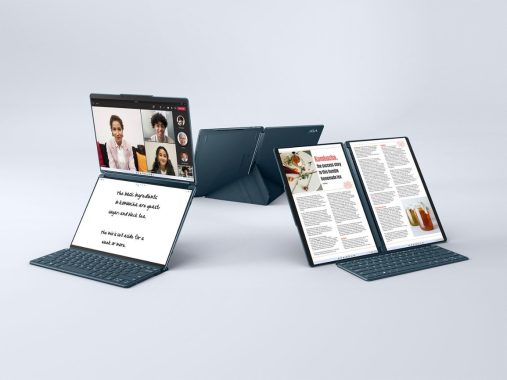
The Power of Multitasking – Yoga Book 9i . photo: Lenovo
Types of Multitasking:
Preemptive Multitasking: The operating system manages task execution, allocating time slices to each task. If a task takes too long, the system can pause it and switch to another task, ensuring fair resource distribution.
Cooperative Multitasking: Applications themselves manage task switching, yielding control to other tasks voluntarily. This approach is less common and can lead to instability if an application does not relinquish control.
Challenges of Multitasking:
Resource Contention: Multiple tasks competing for the same resources, like CPU time and RAM, can lead to resource contention, slowing down the system.
Complexity: Managing and scheduling multiple tasks simultaneously can be complex, requiring efficient algorithms to prioritize and execute tasks effectively.
Overhead: Multitasking introduces some overhead due to task switching, which can impact overall system performance.
Real-world Applications:
Multitasking is essential in various computing environments. In personal computing, it allows users to run multiple applications, switch between them seamlessly, and manage background processes. In enterprise environments, it enables server systems to handle multiple client requests simultaneously, making it possible to run web servers, databases, and other critical services. Mobile devices use multitasking to let users run numerous apps concurrently and handle incoming calls and notifications.
Multitasking is a fundamental feature of modern computing that empowers users to work efficiently and effectively. It has become an integral part of our daily lives, both in personal and professional computing. While it offers significant advantages, it’s crucial for operating systems to manage it efficiently to avoid resource contention and ensure a smooth user experience. With advancements in hardware and software, multitasking continues to evolve, contributing to the ever-improving capabilities of computing systems.
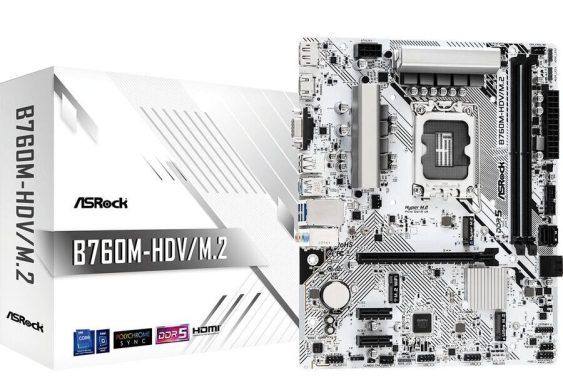
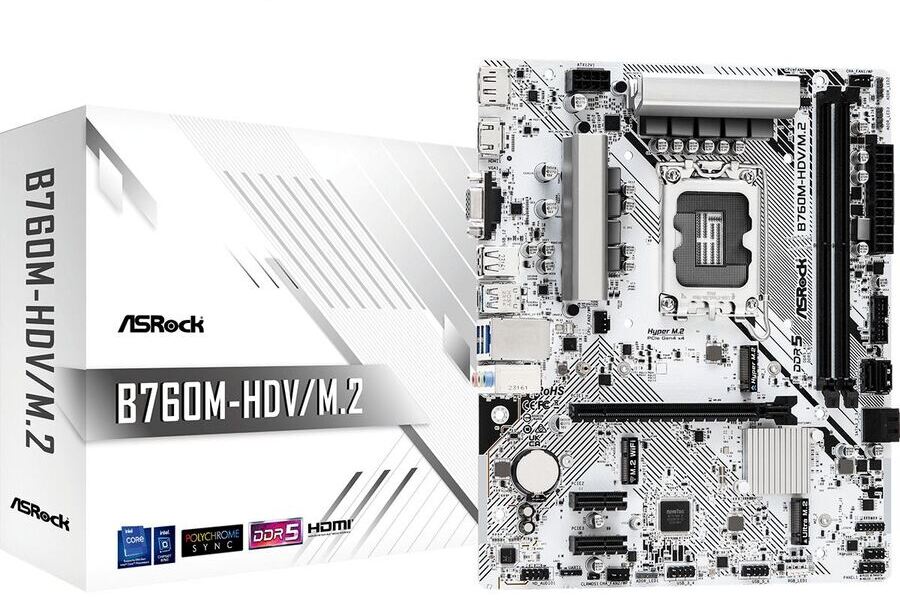
ASRock launches the company’s first all-white motherboard available on both Intel® & AMD platform, and the exciting thing is, this design is not limited to just high-end product, the first three motherboards to have this brand new outfit will be B760M-HDV/M.2 & H610M-HDV/M.2+ D5 from Intel, as for the AMD side we have B550M Pro SE. Looking good is no longer a privilege to expensive motherboards, for the first time stylish budget friendly product has become a new trend of DIY.
Besides the brand new outfit, the functionality has been upgraded too, new Dragon 2.5G Lan and DDR5 memory support on selected models gives the new motherboard a boost of performance, all three motherboards are compatible with NVMe M.2 storage devises and most importantly, RGB LED header is available for stunning yet creative PC builds.
The ASRock B760M-HDV/M.2 motherboard is a compact yet feature-rich option for those seeking a dependable platform for their PC build. With support for 13th and 12th Gen Intel Core processors, DDR5 memory, and a range of connectivity options, it promises superb productivity and rock-solid durability. The inclusion of 2.5G LAN and ASRock’s Auto Driver Installer makes setup and connectivity a breeze.
The motherboard’s PCIe slots and M.2 sockets provide flexibility for expanding your system, and the support for NVMe SSDs as boot disks ensures snappy performance. The motherboard’s graphics capabilities are decent for integrated graphics, with support for 4K and 8K resolutions.
7+1+1 Power Phase Design – This robust power phase design ensures the utilization of durable components for seamless power delivery to the CPU. It results in elevated performance levels, making it an excellent choice for gamers seeking enhanced gameplay.
PCI Express 4.0 M.2 SSD Support – Embracing the next-gen technology, this motherboard is equipped to handle PCI Express 4.0 M.2 SSDs. This capability allows for data transfers at twice the speed of the previous 3rd generation, offering a lightning-fast and incredibly responsive data transfer experience.
2.5Gb/s LAN Connectivity – The intelligent 2.5Gb/s LAN platform is purpose-built to deliver maximum networking performance, catering to the high demands of home networking, content creators, online gamers, and high-quality media streaming. With up to 2.5 times the bandwidth of standard gigabit Ethernet, you’ll relish a faster and uninterrupted connectivity experience, whether you’re gaming, transferring files, or performing backups.
On the downside, users who require extensive expansion options might find the limited PCIe slots a constraint. Nevertheless, the ASRock B760M-HDV/M.2 motherboard is well-suited for compact system builds and offers a stable and efficient platform for various computing needs.
Specifications
ASRock B760M-HDV/M.2
Unique Feature
– Superb Productivity
– Rock-Solid Durability
– Ultrafast Connectivity
– EZ Update
CPU
– Supports 13th & 12th Gen Intel Core Processors (LGA1700)
– Supports Intel Hybrid Technology
– Supports Intel Turbo Boost Max 3.0 Technology
– Supports Intel Thermal Velocity Boost (TVB)
– Supports Intel Adaptive Boost Technology (ABT)
Chipset
– Intel B760
Memory
– Dual Channel DDR5 Memory Technology
– 2 x DDR5 DIMM Slots
– Supports DDR5 non-ECC, un-buffered memory up to 7200+(OC)
The LG OLED83M3PUA TV is a name that stands out, and for good reason. Packed with cutting-edge technology, stunning visual quality, and a range of features that cater to both entertainment and gaming enthusiasts, this TV is a game-changer in more ways than one. In this review, we’ll dive deep into the LG OLED83M3PUA TV, exploring its compatibility, performance, gaming capabilities, connectivity, unique features, and overall value.
Design
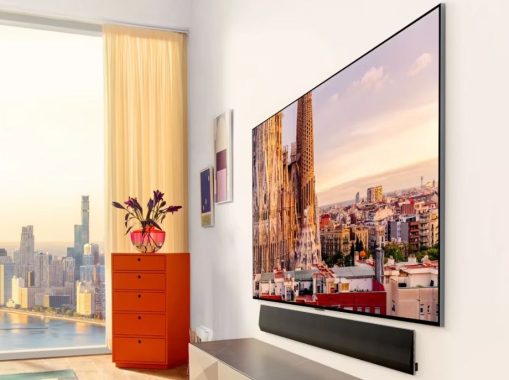
Let’s start with the aesthetics. The LG OLED83M3PUA TV boasts a sleek and modern design that effortlessly blends into any living space. One notable feature is its compatibility with wall-mounting, making it a perfect choice for those who prefer a minimalist setup. Keep in mind that no stand is included, so wall mounting is the way to go for this TV.
Connectivity and Zero Connect Box: Cutting the Clutter
The LG OLED83M3PUA TV is the world’s first consumer TV with a wireless connectivity solution capable of real-time video and audio transmission at up to 4K 120Hz. This game-changing innovation eliminates the need to run unsightly cables and wires directly to the TV. Instead, you’ll use the Zero Connect Box, which simplifies installation by allowing all your media devices to plug into the box, which then wirelessly transmits the signal to your OLED TV from up to 30 feet away. This not only removes wire clutter but also offers versatile TV placement options.
LG OLED83M3PUA TV – Zero Connect Box
Performance: A Visual Feast
Now, let’s talk performance. The LG OLED83M3PUA TV delivers a visual feast with its 4K OLED display, which offers stunning picture quality and intense colors thanks to its wide color gamut. Perfect black levels create exceptional contrast, and the OLED Motion technology ensures smooth and lifelike motion on the screen. Whether you’re watching movies, sports, or playing games, this TV does it all with unmatched clarity.
LG OLED83M3PUA TV – Gaming
Gaming enthusiasts will be delighted with the LG OLED83M3PUA TV’s gaming features. With a lightning-fast 0.1ms response time and support for Variable Refresh Rate (VRR), AMD FreeSync Premium™, and Nvidia G-SYNC®, this TV is tailored for gamers who demand speed and precision. The Auto Low Latency Mode (ALLM) ensures lag-free gameplay, and the HDR Gaming Interest Group (HGiG) mode calibrates tone-mapping for accurate detail and shading, enhancing your gaming experience to a whole new level.
The Game Optimizer feature on the LG OLED83M3PUA TV is a game-changer, quite literally. It lets you quickly access all your gaming settings, allowing you to fine-tune your gaming experience with ease. Whether it’s adjusting picture quality, input lag, or audio settings, Game Optimizer gives gamers the control they need to excel in their favorite titles.
Unique Features: Art Mode and Voice Control
Beyond gaming and entertainment, the LG OLED83M3PUA TV comes with unique features that enhance its versatility. One standout feature is the ability to transform the screen into a digital canvas when not in use. You can display paintings or art, while the TV’s built-in speakers provide music to match the visuals, creating a captivating atmosphere in your room.
The TV also supports hands-free voice control, making it easy to navigate and control your content with Intelligent Voice Recognition. Additionally, it’s compatible with Amazon Alexa, Apple Airplay 2, Apple Home, and Google Assistant, ensuring seamless integration into your smart home ecosystem.
The LG OLED83M3PUA TV doesn’t skimp on connectivity options. With HDMI 2.1 support on all HDMI inputs, you can enjoy 4K/120Hz on all compatible devices. It also features eARC (HDMI 2) for enhanced audio performance, ensuring that you get the most out of your home theater setup. Furthermore, the TV offers Bluetooth 5.0 support, Ethernet input, and Wi-Fi 6E certification for robust wireless connectivity.
Content Partners and Web Browsing: Endless Entertainment
For those who love streaming content, this TV has you covered. It provides access to a wide range of content partners, including iHeartRadio, Max, Apple TV, Disney+, Hulu, Netflix, Paramount+, Peacock, Prime Video, Spotify, YouTube TV, and more. The inclusion of a full web browser further expands your entertainment options, giving you the freedom to explore the web right from your TV.
Operating System: webOS 23 and Magic Remote
The LG OLED83M3PUA TV runs on the webOS 23 operating system, known for its user-friendly interface and smooth navigation. It also comes with the Magic Remote Control, which is built-in and offers intuitive gesture controls. The TV’s operating system ensures quick access to your favorite apps and features, making your overall viewing experience seamless and enjoyable.
Audio Quality: Immersive Sound
Sound quality is equally important, and the LG OLED83M3PUA TV doesn’t disappoint. With AI Sound Pro and a virtual 9.1.2 up-mix, the TV delivers immersive audio that matches its exceptional visual quality. It supports various audio codecs, including Dolby Atmos and DTS, and offers a powerful 4.2-channel speaker system with a total output power of 60W. Whether you’re watching movies, playing games, or simply enjoying music, the sound quality will leave you immersed in the content.
Price: Premium, But Worth Every Penny
The LG OLED83M3PUA TV comes with a premium price tag of $7,999.99, and while it may not be budget-friendly, it’s undoubtedly worth every penny. With its cutting-edge technology, outstanding visual and audio quality, gaming capabilities, and versatile features, it delivers an entertainment experience that is second to none. If you’re looking to invest in a top-tier TV that will elevate your home entertainment setup, this TV is a fantastic choice.
Size matters, and the LG OLED83M3PUA TV makes a statement with its expansive 83-inch screen. With TV dimensions of 72.7″ x 42″ x 1.1″ without the stand and VESA mounting support (400×400), it’s designed to provide a cinematic experience that fills your field of vision. Whether you’re watching a blockbuster movie or cheering for your favorite sports team, this TV ensures that every detail comes to life on its large canvas.
Cloud Gaming and Next-Gen TV: Stay Ahead of the Curve
For gamers and tech enthusiasts, the LG OLED83M3PUA TV supports cloud gaming with NVIDIA GeForce NOW and Utomik, bringing a world of gaming possibilities to your fingertips. It’s also equipped with NEXTGEN TV (ATSC 3.0) support, ensuring that you’re future-proofed for the latest broadcasting standards and enhanced content delivery.
LG OLED83M3PUA TV
Dolby Vision IQ and Filmmaker Mode: Elevate Your Viewing
The TV’s commitment to providing an exceptional viewing experience extends to its support for advanced HDR formats like Dolby Vision, HDR10, and HLG. With Dolby Vision IQ, you’ll enjoy optimized picture quality in varying lighting conditions, ensuring that you never miss a detail. The Filmmaker Mode is another standout feature, preserving the filmmaker’s vision by presenting content in its original frame rate, aspect ratio, and color.
AI-Powered Picture and AI Processor Gen6: Picture Perfection
The LG OLED83M3PUA TV takes picture quality to the next level with AI Picture and AI Picture Pro, enhancing image clarity, color accuracy, and detail. This is made possible by the α9 AI Processor Gen6, a powerful engine that delivers AI Super Upscaling 4K, ensuring that even lower-resolution content looks stunning on the 4K Ultra HD display.
The LG OLED83M3PUA TV is a powerhouse of technology and innovation. It sets a new standard for home entertainment, offering compatibility, performance, gaming prowess, and connectivity that are unparalleled in the market. Its unique features, such as the Zero Connect Box and Art Mode, add a touch of sophistication to your living space.
While the price may be on the higher side, the value it brings to your home theater setup is undeniable. If you’re in the market for a TV that not only meets but exceeds your expectations, the LG OLED83M3PUA TV is the future of home entertainment. It’s a TV that seamlessly blends form and function, delivering a viewing experience that will leave you in awe. Upgrade your entertainment game with this remarkable piece of technology.
In this era of very rapid technological advancements, our trusty smartphones have become an integral part of our lives. They’re our daily companions, helping us stay connected, entertained, and organized. But as time marches on, so does the wear and tear on our beloved devices. Eventually, there comes a time when your phone starts showing clear signs that it’s ready for the scrap heap. In this review, we’ll walk you through these unmistakable indicators, so you can make an informed decision about when it’s time to bid farewell to your old buddy. Yes, we’re talking about the your OLD phone.
1. Sluggish Performance and Frequent Freezes: One of the most frustrating signs that your phone is ready for scrap is sluggish performance. Remember when your phone used to zip through apps and tasks without a hitch? Well, if it’s now moving at a snail’s pace and freezing up like a deer in headlights, it’s a clear red flag. Apps take forever to load, and multitasking becomes an exercise in patience. You might even find yourself longing for the good old days when your phone was a speed demon.
2. Rapid Battery Drain: Is your phone’s battery life dwindling faster than a snow cone in the desert? This is another unmistakable sign that it might be time to consider a replacement. Over time, your phone’s battery degrades, and if you find yourself constantly tethered to a charger or carrying around a portable battery pack, it’s a telltale sign that your phone is on its last legs.
photo: Pixabay
3. Diminished Camera Quality: Many of us use our smartphones as our primary cameras. If your once-sharp and vibrant photos have become grainy, blurry, or just plain lackluster, it’s a sign that your phone’s camera system is struggling. Technological advancements in camera technology have been rapid, and if your phone can’t keep up, it might be time to upgrade to a device that can capture those precious moments in all their glory.
4. Frequent App Crashes and Glitches: Apps crashing like a house of cards? Frequent glitches and unexplained restarts? These are clear indicators that your phone is struggling to keep up with the demands of modern software. As apps and operating systems evolve, older phones may struggle to run them smoothly. If you find yourself constantly force-quitting apps or enduring frustrating crashes, it’s a strong sign that your phone’s days are numbered.
5. Outdated Software and Security Risks: Software updates are more than just cosmetic changes; they often come with critical security patches that protect your device from vulnerabilities. If your phone no longer receives software updates or you’re stuck on an ancient version of your operating system, it’s not just a sign that your device is outdated—it’s a security risk. Running outdated software can leave your personal data vulnerable to hacks and cyber threats.
6. Physical Wear and Tear: Take a good look at your phone. Is the screen cracked, scratched, or chipped? Are the buttons worn down or unresponsive? Has the back cover seen better days? Physical wear and tear can greatly impact your phone’s usability and resale value. If your phone looks like it’s been through a war, it might be time to consider retirement.
7. Limited Storage Space: With our ever-expanding collection of photos, videos, apps, and documents, storage space is a precious commodity. If you constantly find yourself deleting files and apps just to make room for new ones, it’s a clear sign that your phone’s storage capacity is no longer cutting it. Modern smartphones come with ample storage options, so it might be time to upgrade to a device that can accommodate your digital life.
8. No Longer Supported by Manufacturers: Manufacturers have a limited lifespan for providing support and spare parts for older phone models. If your phone has reached the point where the manufacturer no longer offers repairs or replacement parts, it can be a real headache when something goes wrong. This is a significant sign that your phone is on its last legs and that it’s time to consider a replacement.
9. Overheating Issues: Is your phone hotter than a summer day in the Sahara, even when you’re not using it intensively? Overheating can be a sign of internal problems, such as a failing battery or a struggling processor. It can also lead to performance issues and, in extreme cases, damage to your device. If your phone resembles a mini furnace, it might be time to retire it.
10. Poor Reception and Connectivity: Constantly dropping calls, weak signals, and slow internet speeds can be infuriating. While it’s not always your phone’s fault (network issues play a role too), if you’ve ruled out other factors, it could be a sign that your phone’s internal components, like the antenna or modem, are failing. Staying connected is essential in today’s world, so if your phone can’t do that reliably, it’s time to consider a replacement.
Signs that your phone is ready for scrap is more than just a catchy phrase; it’s a collection of clear and unmistakable indicators that your trusty companion has reached the end of its journey. While parting ways with an old friend can be tough, it’s essential to recognize when it’s time to move on. Don’t let the frustration of a sluggish phone, poor battery life, or unreliable performance hold you back from experiencing the joys of a new, more capable device. Upgrade to a modern smartphone, and you’ll wonder how you ever managed with your old, tired phone. Your digital life will thank you, and you’ll be ready to embrace the future of technology with open arms.