Home Blog Page 56

Marantz M-CR612 Network CD receiver review & specs

0

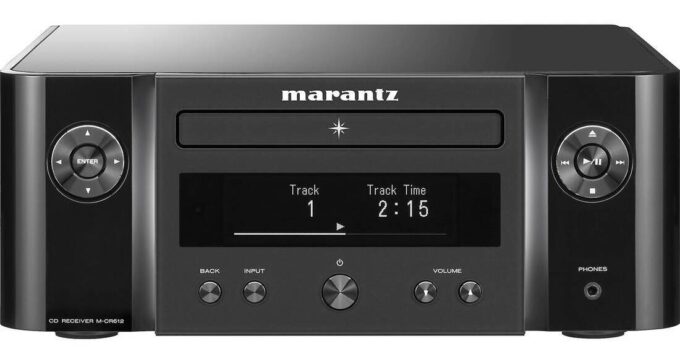
The Marantz M-CR612 network CD receiver is a feature-packed device that delivers high-quality sound in a compact design. With a 4-channel amplifier, it lets you bi-amp one pair of speakers or drive a second pair in A/B configuration, making it versatile for a variety of listening situations.

The integrated CD player can play standard CDs, CD-Rs, and CD-RWs, while the AM/FM tuner provides access to local radio stations. Dual-band Wi-Fi allows for music streaming over your wireless home network, and built-in Bluetooth lets you connect to your devices wirelessly.

Marantz M-CR612 network CD receiver
Marantz M-CR612 network CD receiver photo: Marantz

The M-CR612 also works with voice control assistants like Amazon Alexa, Google Assistant, and Siri, making it easy to control your music with just your voice.

Media playback features include compatibility with HEOS wireless whole-home audio, Apple AirPlay 2 for streaming music from an Apple device, and built-in streaming from popular services like Pandora, Spotify, SiriusXM, Amazon Prime Music, TIDAL, and thousands of free internet radio stations.The M-CR612 can be integrated into a wireless multi-room audio system, allowing you to stream music to HEOS wireless speakers and components in different rooms and control each room’s sound independently with the free HEOS app.

It can even play high-resolution digital music files via USB storage device or a networked computer, with support for PCM up to 24-bit/192kHz resolution and DSD up to 5.6 MHz .dsf files.

In terms of connectivity, the M-CR612 features two optical digital inputs, an RCA analog stereo input, analog stereo RCA output, preamp output for a powered subwoofer, Ethernet port for wired network connection, rear USB input, and four pairs of binding post speaker connectors. There’s also a 3.5mm headphone output for private listening.

While the Marantz M-CR612 network CD receiver has a lot of great features, there are a few cons to consider. One is that the display can be difficult to read from a distance, and there’s no option for adjusting the brightness. Another is that the remote control is not backlit, which can make it hard to use in dimly lit rooms. Additionally, some users have reported issues with Wi-Fi connectivity, which can be frustrating.

For some Hi-Fi enthusiasts, the Marantz M-CR612 receiver may seem a bit puzzling. It’s often referred to as an “all-in-one” system online, but it lacks one crucial element: speakers. However, this is a deliberate choice by Marantz.

Marantz M-CR612 network CD receiver
– Marantz M-CR612 network CD receiver –

When you purchase the M-CR612, you’re investing in its connectivity, power, and audio technology. Unlike other Hi-Fi systems that come with built-in speakers, Marantz offers you the freedom to select your preferred speakers. This enables you to create a personalized system that suits your individual requirements.

While you may need to obtain your own speakers, Marantz takes care of everything else for you. The M-CR612 provides access to Wi-Fi channels and can be easily connected to your smart assistant, making it a versatile and user-friendly Hi-Fi audio device.

With the right speakers, the Marantz M-CR612 can deliver exceptional sound quality that’s both clear and voluminous. The sound is open and rich, offering plenty of depth where it counts. Moreover, the HEOS multi-room system provides the flexibility to wirelessly stream different music sources in different rooms and control your audio quality from your smartphone. The integration with Alexa is seamless and intuitive, enabling you to control your music with just your voice. Additionally, the high-performance technology embedded in the M-CR612 means that you can play your music at louder volumes without worrying about distortion. Finally, with the option to use both sets of speaker inputs, you can really crank up the volume and take your party to the next level.


Summary: The Marantz M-CR612 network CD receiver is an impressive stereo receiver that offers excellent connectivity options, powerful amplification, and easy-to-use controls. However, it should be noted that some streaming services may require a subscription, and the unit’s price point may not be suitable for all budgets.

Marantz M-CR612 network CD receiver specifications:

High quality power output2 x 60W
CD Compatibility: CD / CD-R/RW / WMA / MP3Yes / Yes / Yes / Yes
Tuner: FM / AMYes / Yes
HEOS Multiroom and StreamingYes
Online service (HEOS)Spotify Connect, Amazon Prime, Deezer Premium+, iHeart Radio, Pandora, SiriusXM, Sound Cloud, Tidal
Streaming audio from computerYes
AirPlay 2 Audio StreamingYes
Internet radioTune In
Voice control using AlexaYes
Voice Control – Google Assist / Apple SiriYes
BluetoothYes
Ethernet / WiFi 2.4GHz (11b/g/n) / WiFi 5GHz (11a/n)Yes
WiFi setup: WPS / WiFi SharingYes / Yes
Lossy formats: MP3 / WMA / AACYes / Yes / Yes
Lossless formats: FLAC HD / ALAC / WAV / AIFF / DSDYes / Yes / Yes / Yes / Yes
DSD Audio2.8 / 5.6 MHz
FLAC / WAV / ALAC192kHz / 24bit
Gapless Playback – FLAC / WAV / DSDYes / Yes / Yes
Remote APP: iDevice / AndroidYes HEOS App
Tone Control: Bass / Treble / BalanceYes / Yes / Yes
Low noise OLED displayYes / Yes / Yes
Illuminated frontBlue, White, Green, Orange
Alarm: Once / Daily / Programmable / TimerYes / Yes / Yes / Yes
IR Learning for TV remoteYes

Marantz M-CR612 Inputs/Outputs

analog In/out1 / 1
Digital Optical In2
USB Input: type A1 (rear)
Subwoofer PreOut1
Headphone OutYes
Speaker A / BYes
Speaker Binding PostScrew type


FileMenu Tools – user-friendly and powerful application

0

FileMenu Tools is an impressive application that provides a wide range of powerful tools for managing files and folders in Windows. One of the notable features of this application is its ability to synchronize folders in various synchronization types, including unidirectional and bidirectional, and specify the file types to be synchronized. This is especially useful for users who need to keep their files up to date across different locations.

Another useful tool provided by FileMenu Tools is the Extended Delete feature, which enables users to recursively delete specific file types from a folder, using wildcards such as *.txt and *.t??.

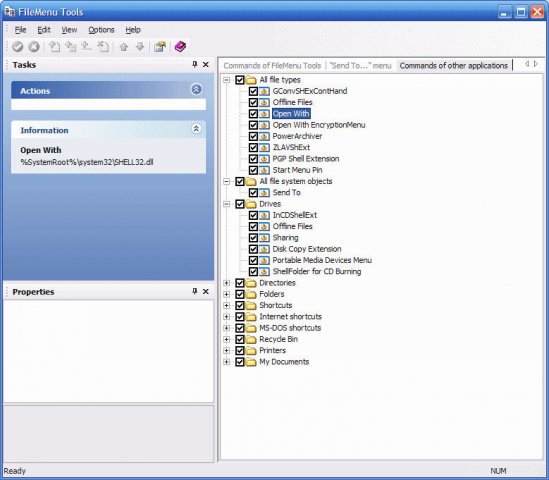
FileMenu Tools
FileMenu Tools – photo LopeSoft

The application also includes a Find and Replace feature that allows users to find and replace a text string in all selected files, with support for regular expressions. Similarly, the Advanced Renamer feature enables users to rename all selected elements according to specified rules.

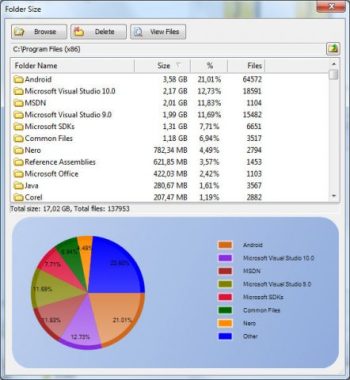
FileMenu Tools also provides tools for deleting locked files, deleting files permanently, changing icons assigned to folders, running programs with parameters typed in a dialog box, opening a command line window in the selected folder, and displaying the size of the folders.

Other useful features include copying the name, path, UNC path, and Internet path of selected elements to the clipboard, copying the content of selected elements to the clipboard, and pasting the clipboard contents into the selected elements. Users can also change the creation time, last access time, and/or last modified time of the selected elements, calculate and verify checksums of files, create symbolic links, and delete empty folders.FileMenu Tools

The application’s interface is simple, making it easy to install, use and configure. Users can perform various configurations, add folders and shortcuts, and optimize their workflows by customizing their menus. This level of customization can greatly enhance users’ overall Windows workflow.

One of the best features of FileMenu Tools is the ability to export settings. Users can export their settings to an INI or REG file, making it easier to share and use them on other computers where the app is installed. The tool runs smoothly and has a good response time, supporting two languages for the interface and providing user documentation. There have been no reported instances of crashes or freezes.FileMenu Tools

In summary, FileMenu Tools is a lightweight and user-friendly tool that allows users to optimize and customize their menus, making their workflow smoother and more efficient. It is a powerful tool appropriate for beginners and experts alike, saving users time and effort.

FileMenu Tools is a comprehensive file management tool that provides a wide range of useful features to help users manage their files and folders with ease. The application is user-friendly, and the tools are well-organized and easy to access through the context menu. If you’re looking for a powerful file management tool for Windows, FileMenu Tools is definitely worth checking out. FileMenu Tools download HERE

Yamaha NS-AW150 Indoor/Outdoor Speakers

0

Looking for speakers that can withstand the elements and deliver quality sound both indoors and outdoors? Check out Yamaha NS-AW150 All-Weather Speakers, designed with a sealed enclosure, 5″ woofer, and 1/2″ dome tweeter for clear, accurate sound.

If you’re looking for a set of speakers that can withstand the elements, the Yamaha NS-AW150 All-weather indoor/outdoor speakers are an excellent choice. These speakers have an all-weather design that allows them to stand up to rain, sun, and extreme temperatures.

One of the key features of these speakers is their acoustic suspension (sealed) enclosure. This design helps to prevent distortion and produces a clean, clear sound. The 5″ woofer and 1/2″ dome tweeter provide a frequency response of 55-40,000 Hz, and the sensitivity of 85 dB makes them an efficient choice.

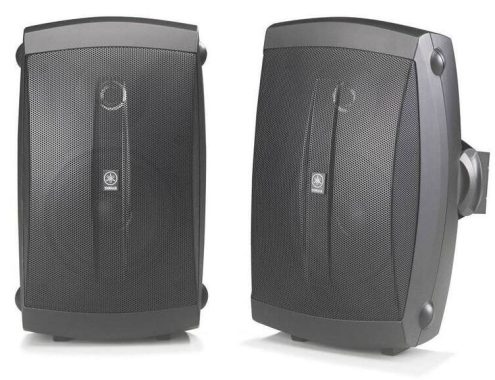
Yamaha NS-AW150 indooroutdoor speakers
Yamaha NS-AW150 indoor/outdoor speakers – photo Yamaha

The NS-AW150 speakers have a 6-ohm impedance and can handle up to 35 watts of power. Each speaker has a built-in stand for easy placement on a table or shelf, and wall-mounting brackets are included for vertical or horizontal mounting.

The 5-way binding post speaker wire connectors make it easy to connect your speakers to your amplifier or receiver. With dimensions of 6-3/16″W x 10-1/8″H x 6-1/16″D and a weight of 3.7 lbs. each, these speakers are compact and lightweight.

While the Yamaha NS-AW150 indoor/outdoor speakers are a solid choice for those in need of all-weather speakers, there are a few potential downsides to consider:

  • Limited power handling: With a maximum power handling of 35 watts, these speakers may not be ideal for those looking to play music at high volumes.
  • Average sound quality: While the acoustic suspension enclosure helps to reduce distortion, some users may find that the overall sound quality of these speakers is average compared to other speakers in the same price range.
  • Bass response: Due to the small size of the woofer, these speakers may not deliver deep bass notes as well as larger speakers.
  • Limited placement options: While the built-in stands and included wall-mounting brackets provide some flexibility, the options for placing these speakers may be limited due to their size and shape.

Here are some pros of the Yamaha NS-AW150 indoor/outdoor speakers:

  • All-weather design: The NS-AW150 speakers are built to withstand the elements, making them a great choice for use both indoors and outdoors.
  • Compact size: With dimensions of 6-3/16″W x 10-1/8″H x 6-1/16″D and a weight of 3.7 lbs. each, these speakers are compact and easy to place in a variety of locations.

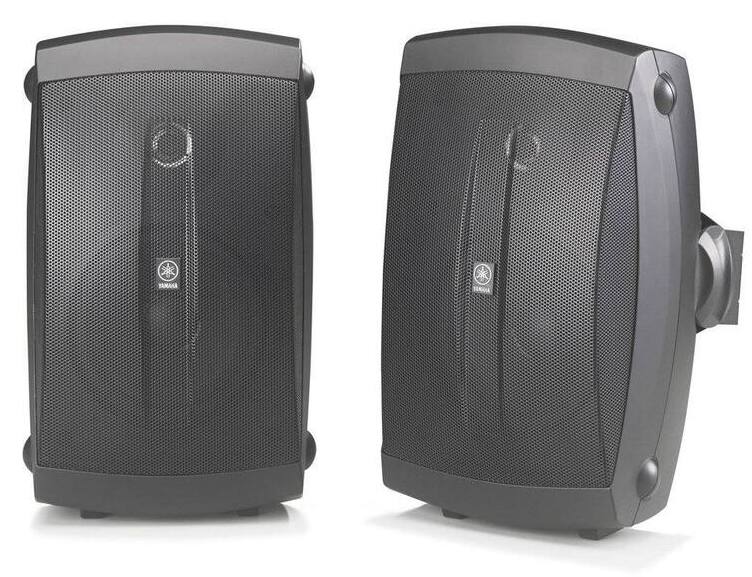
    Yamaha NS-AW150 speakers
    Yamaha NS-AW150 speakers
  • Easy installation: The built-in stands and included wall-mounting brackets make it easy to install these speakers in a variety of orientations and locations.
  • Clear sound: The acoustic suspension enclosure and 5″ woofer and 1/2″ dome tweeter provide clear, accurate sound with minimal distortion.
  • Efficient: With a sensitivity of 85 dB, these speakers are efficient and can produce good sound quality even with lower-powered amplifiers.
  • Affordable: These speakers are relatively affordable compared to other all-weather speakers in their class, making them a great option for those on a budget. / $119.95 pair /

When hosting a gathering at your home, it’s important to make the most of your available space. The Yamaha NS-AW150 speakers provide an all-weather solution that can help. With built-in feet, you can easily place them on a table or shelf, or use the included bracket to mount them horizontally or vertically on the wall.

These speakers are designed to withstand the elements, making them perfect for indoor or outdoor use. Not only do they offer great durability, but they also produce excellent sound quality, allowing you to enjoy your music both inside and outside your home. Each speaker features a 5″ woofer and a 1/2″ dome tweeter, providing a full range of sound that includes both deep bass and crystal-clear high notes.

The Yamaha NS-AW150 outdoor speakers come with a standard 2-year warranty, which is typical for speakers in this price range. The design of the speakers is also standard, with sealed polypropylene woofers that are suitable for outdoor use. Some users have reported rust on the grill, which is a common issue with lower-tier outdoor speakers. However, if you are concerned about the appearance of rust stains, you may want to consider the black version of these speakers.

Yamaha NS-AW150
Yamaha NS-AW150

Despite the rust issue, the Yamaha NS-AW150 outdoor speakers are still a great value for their specifications. They are one of our favorite outdoor speakers in their price range, and they even come with the required speaker wire included, which is a rare and convenient feature. If you are looking for affordable speakers that offer good sound quality and all-inclusive features, the NS-AW150 speakers are a great choice.

Yamaha NS-AW150 speakers specs:

Yamaha NS-AW150
Recommended UsageIndoor / Outdoor Front / Surround Speakers
TypeAccoustic Suspension Design
Woofers5″ High Compliance
Tweeters1/2″ PEI Dome
Magnetic ShieldingYes
Frequency Response55 Hz – 40 kHz
Sensitivity85 dB / 2.83 V / 1 m
Input Power (Maximum / Nominal)120 W / 35 W
Impedance6 Ohms

12-channel multi-zone amp AudioSource AD5012 – Review

0

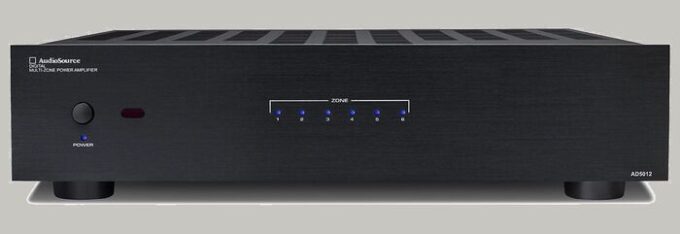
The AudioSource AD5012 power amplifier is an excellent choice for those looking to power multiple zones in their home or commercial space. With 12 channels and 6 independent playback zones, this amplifier can handle all of your audio needs. Whether you want to play the same source through all 6 zones or have a different source playing in each zone, the AD5012 power multi-zone amp can accommodate your preferences.

This power amplifier delivers 50 watts per channel into 8 ohms (20-20,000 Hz) at 0.2% THD with all channels driven, and 75 watts per channel into 4 ohms. It also has the capability to output 125 watts x 6 bridged into 8 ohms (at 1 kHz). The high-efficiency switching amplifier design ensures that the AD5012 operates at a high level without using too much energy.

AudioSource AD5012 power amplifier

One of the standout features of this amplifier is its Over Temperature Protection (OTP), which gently reduces power if the temperature gets too high, preventing shutoff. The Over Current Protection (OCP) feature is also impressive, as it differentiates between a direct short and a dynamically low speaker impedance. This means that you can enjoy your music without worrying about any potential damage to your equipment.

Other noteworthy features include rear-panel bass and treble controls, rear-mounted, independent level controls for each channel, and Bus 1 and Bus 2 RCA inputs that can be assigned to any channel so that different sources are available for each zone. The AD5012 also has discrete pairs of local RCA inputs for each zone and three power-on modes (normal, signal-sensing, trigger), making it a versatile and flexible option.

The infrared remote control included with this power amp allows for easy operation, and the rack-mountable design with included hardware makes it easy to install. Measuring two-rack spaces high (3.5″ tall without feet), the AD5012 is a compact yet powerful amplifier that delivers outstanding performance. With a frequency response of 20-20,000 Hz and a signal-to-noise ratio of 100 dB, this amplifier is sure to impress even the most discerning audiophile. Overall, the AudioSource AD5012 power amplifier is an excellent choice for those in need of a powerful and flexible amplifier for multiple zones.

While the AudioSource AD5012 power amplifier is an impressive and versatile device, there are a few potential cons to keep in mind when considering this product:

  • Limited compatibility: The AD5012’s optical digital input only accepts 2-channel PCM and is not compatible with Dolby Digital or DTS. This means that if you want to use this amplifier with a device that uses these formats, you’ll need to use a different input or convert the signal to PCM.-
  • Lack of visual display: Unlike some other amplifiers, the AD5012 does not have a visual display to show you what source is playing or what settings are being used. This can make it harder to adjust settings or troubleshoot any issues that may arise.
  • Price: The AD5012 is not the most affordable amplifier on the market, so it may not be the best option for those on a tight budget. ( $849.00 )
  • Limited power output: While the AD5012 is a powerful amplifier, it may not be sufficient for some high-end audio setups that require more than 50 watts per channel. In these cases, a more powerful amplifier may be necessary.
  • No built-in Wi-Fi or Bluetooth: The AD5012 does not have built-in Wi-Fi or Bluetooth, so you’ll need to use a separate device or adapter to connect wirelessly to the amplifier.

    AudioSource AD5012 power amplifier
    AudioSource AD5012 – photo: AudioSource

There are many impressive pros to the AudioSource AD5012 power amplifier, including:

  • Versatility: The AD5012 has 12 channels and 6 independent playback zones, which allows for a wide range of audio configurations. You can play the same source through all 6 zones or have a different source playing in each zone, making it a versatile option for various applications.
  • Power: With 50 watts per channel into 8 ohms (20-20,000 Hz) at 0.2% THD with all channels driven, 75 watts per channel into 4 ohms, and the capability to output 125 watts x 6 bridged into 8 ohms (at 1 kHz), the AD5012 is a powerful amplifier that can handle even demanding audio setups.
  • Protection features: The AudioSource AD5012 includes Over Temperature Protection (OTP) and Over Current Protection (OCP) features to prevent damage to the amplifier or speakers in case of overheating or short circuits. This provides peace of mind and helps to protect your investment.
  • Easy operation: The infrared remote control included with the AD5012 allows for easy operation, and the rack-mountable design with included hardware makes installation simple.
  • Flexibility: The AD5012 offers several inputs, including Bus 1 and Bus 2 RCA inputs that can be assigned to any channel, discrete pairs of local RCA inputs for each zone, and an optical digital input for connecting to a TV, CD player, or network streaming device. The rear-mounted, independent level controls for each channel and bass and treble controls allow for fine-tuning of the audio.
  • Compact design: Measuring only two-rack spaces high (3.5″ tall without feet), the AD5012 is a compact and space-saving amplifier that can be easily integrated into a variety of setups.

The AudioSource AD5012 power amplifier is a versatile and powerful device that offers a range of features to enhance your audio experience. Whether you’re setting up a home theater or a commercial audio system, the AD5012 is a great choice for high-quality, multi-zone sound.

AudioSource AD5012 power amplifier specs:

Stereo (8 ohm): 12 x 50W per channel, <0.2% THD+N
Stereo (4 ohm): 12 x 75W per channel, <0.2% THD+N
Bridged Mono (8 ohm): 125W, 1kHz, <0.2% THD+N
Frequency Response: 20Hz ~ 20kHz, +/-0dB
Signal to Noise Ratio: 100dB below 50W output into 8 ohms
w/20kHz lowpass filter/A-Wgt
Channel Separation: 65dB @ 1kHz, referred to 50W output
into 8 ohms
Input Sensitivity: Variable, 430mV for full output with
Input Level control at maximum
AC Power Consumption: 1000W maximum
Net Weight: 34.5lbs / 15.6kgs
Gross Weight: 39.5lbs / 17.9kgs
Digital Multi-Zone Power Amplifier AD5012
12 Channels (6 stereo zones)
12 Rear mounted level controls
12 Independent inputs, 2 Bus inputs, 1 optical input
Bus 1 and Bus 2 master level controls
Multi-function IR remote control
Normal, signal sensing, and trigger power modes
Rear mounted treble and bass controls for bus 1 & 2
Phoenix-style speaker connectors
LED status indicator lights
Bridgeable channel outputs
Rack mountable (rack mount included)
Input: 120/230V~, 60/50Hz, 1000W

Auto-Restart Your Computer After Power Outage: Tips

0

Power outages can be a major threat to your computer’s health. In this article, we’ll discuss how you can protect your tech devices from damage caused by power failures and ensure that your computer keeps running smoothly.

With the summer season approaching, it’s important to understand what causes electrical failures and how to safeguard your devices from the fatal reboot disease. Whether you’re working in a business office or a home office, this knowledge is vital.

To minimize damage from electrical power fluctuations, it’s recommended to plug your computer and modem into power surge protective strips. Surge protectors are effective in protecting against glitches caused by normal energy fluctuations. However, in the event of a direct lightning strike, the surge protector can be damaged, causing the electronic gadgets plugged into it to burn out. In such a situation, it’s best to unplug the surge protector from the wall socket during a storm.

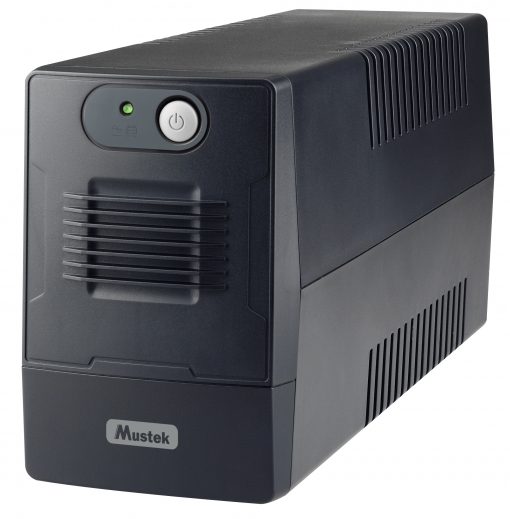
Another essential piece of protective equipment is an Uninterruptible Power Supply or UPS. A UPS is a battery-containing device that supplies backup power to desktop PCs during electrical grid outages and brownouts. One of the most important services a UPS provides is the continuation of electrical power for about 15 minutes, giving you enough time to safely save your data and power down your equipment. The UPS will automatically kick in when it senses an interruption of electricity from the main service line to your home or office.

uninterruptible power supply or UPS
UPS MUSTEK photo source

The latest UPS models can reset to an off position automatically as their rechargeable batteries run out of energy. When the normal power supply returns, your computer can restart without its power supply being blocked if it is configured appropriately. Many computers have BIOS settings that allow you to adjust power settings so that the computer can sense when the normal electrical supply returns. UPS devices are available at office supply retailers, box stores, and online shopping centers.

The software that comes with a UPS safeguards your computer when it is unattended, making it useful for those who use remote access services and file-syncing cloud storage services. To get your PC to restart automatically after a power outage, you’ll need to make some changes to the PC’s BIOS settings and install the UPS-included software.

Set Up Your Computer to Auto-Restart After a Power Outage
Set Up Your Computer to Auto-Restart After a Power Outage – photo: Pixabay

Power outages can be a significant threat to your computer’s health, but with the right protective equipment and settings, you can safeguard your digital gear from damage and ensure that your computer keeps running smoothly.

When it comes to restarting your computer after a power outage, the process will vary depending on the make and model of your machine. The BIOS restart setting is independent of the operating system you use, whether it’s Microsoft Windows or Linux. Essentially, the BIOS is responsible for initiating the hardware and startup process that leads to your computer’s desktop.

Here’s a step-by-step guide to setting your computer’s BIOS to start automatically after a power outage:

Power on your computer and press one of the following keys to enter the BIOS setup utility: “DEL,” “F1,” “F2,” or “F10.” The key you need to press will depend on the manufacturer of your computer. Look for a message in small print at the bottom of your screen when your computer first turns on to determine which key to use.

Once you’re inside the BIOS menu, look for the “Restore on AC/Power Loss” or “AC Power Recovery” or “After Power Loss” setting under either the “Advanced,” “ACPI,” or “Power Management Setup” menus. Note that the location of this setting may differ depending on your computer’s manufacturer.

Set the “Restore on AC/Power Loss” setting to “Power On.”

Save and exit from BIOS settings. The menu on your screen will provide you with the function key combination to do this.

If you’re using a Linux-powered computer as a server, it’s crucial to get it up and running as soon as possible after a power outage, especially if the server is located in a less accessible area of your building. To ensure an unattended restart after a power interruption, you’ll need to set up four additional settings:

BIOS: Make sure the BIOS is set up to boot when power resumes.

Boot loader: Configure the boot loader to not wait for a user to select an OS to boot into. Instead, it should boot into the default OS right away.

Login: Set up the boot procedure to log in to a particular user automatically after booting up, without waiting for a person to log in.

Application restart: Set up the boot procedure to automatically start up the necessary application programs without requiring human intervention.

To make it easier for your computer to restart after a power outage, some computers have a BIOS setting that you can activate. Here’s how you can check if your computer has this feature and enable it:

Access the BIOS settings menu, which is a process that is hardware-dependent and works similarly on all computers, regardless of the operating system you use. To do this, restart your computer and watch for the first flash screen to appear.
Look for the Setup function key description, which can be Setup F2 or F12, or something similar. Press the appropriate function key during startup and tap it repeatedly until the BIOS settings menu appears.
Within the BIOS settings menu, look for the Power Settings option and turn on the AC Power Recovery or similar setting. Look for a power-based setting that confirms that your computer will restart when power becomes available. Note that some older computers may not have this feature. If your computer does have it, save the configuration by pressing the designated function key displayed on the screen. This will reboot your computer.
If you are using an Uninterruptible Power Supply (UPS) to provide a short-interval battery supply when the power outage occurs, there are additional steps you need to take to make the hardware connections. However, for now, let’s focus on how to restart your computer when the power grid is back online.

Get Windows 10 to Start Again

If your Windows system encounters a power outage, it may fail to restart or boot correctly, displaying a stalled loading screen or a blue screen with an error message. One of the common reasons for booting issues with Windows is power surges that can corrupt system files. However, you can use the following suggestions to address this problem.

One solution is to start Windows 10 in Safe Mode. To do so, press the power button on your computer and then press the Windows logo key + I on your keyboard to open Settings. Select Update & Security > Recovery, and under Advanced startup, click Restart now. Once your PC restarts to the Choose an option screen, select Troubleshoot > Advanced options > Startup Settings > Restart. Choose an option to finish the process when your PC restarts.

Alternatively, you can use the built-in System Configuration Utility to restart Windows 10 after a power outage. Open the Run box from the Win+X Menu and type msconfig before pressing Enter. Under the Boot tab, check the Safe boot and Minimal options and click Apply/OK before exiting. Your computer will automatically enter Safe Mode when it restarts and will continue to boot into Safe Mode until you change the setting back to normal boot. Therefore, before shutting down Windows 10, open msconfig again and uncheck the Safe Boot check box, click Apply/OK, and then click the Restart button.

Having a connected UPS can offer several benefits, including the ability to restart your computer once the power supply resumes. When looking for a UPS to purchase, consider factors such as the initial cost, the cost and frequency of replacement batteries, the ability to manage and monitor the UPS from Linux, and the watts and volt-amps provided.

Over time, the batteries in a UPS can degrade and lose their total power capacity. You may need to replace the batteries every three to five years. If you only need to run your machine for a short time, such as five minutes, you can choose a UPS with a larger capacity to avoid replacing the batteries for a longer period, although the batteries for larger UPSs may be more expensive.

If you use the Linux operating system, ensure that the UPS you choose has software that supports Linux. Otherwise, you will need to manually turn off your computer before the UPS batteries run out.

Here are the steps to connect your UPS to your computer and peripherals, such as a printer and modem:

  • Plug your PC and monitor directly into available controlled AC outlets on the UPS, rather than a power strip.
  • Connect the included USB cable between the UPS and PC for communication. Avoid using a powered USB hub between the UPS and PC, as this can cause communication failure during an outage.
  • Plug the UPS into the wall power supply and allow it to fully charge, which can take four or more hours.
  • If available, install and configure the UPS software based on the directions that come with it. Navigate to the Energy Management tab or a similar setting within the Configuration setting, and check the Enable Energy Management check box. Choose the Default settings in PowerChute and look for any Turn On Again settings in any other power management software and check them as appropriate.

Understanding VPS Hosting: Pros and Cons – Why Choose VPS Hosting?

0

If you’re considering starting a website, web hosting is a must. You’ll come across several options, including shared hosting, VPS hosting, cloud hosting, and dedicated hosting. Although shared hosting may seem like an attractive choice due to its low prices, it may not be the best option. VPS hosting is a viable alternative that provides more benefits than shared hosting without the high cost of a dedicated server. To make an informed decision, it’s essential to understand VPS hosting and its advantages and disadvantages.

VPS hosting stands for virtual private server hosting. It operates on a server, which is like a building that houses websites or hosting accounts. With VPS hosting, multiple accounts share the same server, similar to an apartment complex. However, each account rents space within the building and has its own resources, which they can use without sharing them with others.

VPS hosting why
photo: Pixabay

VPS hosting differs from shared hosting in that users have access to specific resources assigned to them, rather than sharing them in a first-come-first-serve format. Conversely, dedicated hosting allows users to have the entire server to themselves, unlike VPS hosting, which still shares the server with others. Virtual private server hosting is an intermediate option between shared and dedicated server hosting. Shared hosting is affordable, while a dedicated server can be quite expensive. VPS hosting offers some of the benefits of dedicated hosting at a more reasonable cost.

When it comes to VPS hosting, there are several types to choose from depending on your specific requirements. Here are the three primary types of VPS hosting available:

Full Virtualization – With full virtualization, the hypervisor interacts with the physical server’s CPU to access information on the OS level. This allows users within the network to remain unaware of the main server in the string of servers. Full virtualization hosting uses the hypervisor at an expensive level.

Para-virtualization – With para-virtualization, guest servers work as a single unit, and there is no isolation between them. This type of VPS hosting is ideal for those who need a streamlined approach for each guest server.

OS-level Virtualization – VPS hosting without a hypervisor is known as OS-level virtualization. In this type of hosting, each guest operates as part of the host operating system, making them all the same. This is an excellent choice for those who need a homogenous approach to resource sharing.

The pros of VPS hosting include cost/value, scalability, more security options, hosting on auto-pilot, and high performance. VPS hosting is cheaper than dedicated hosting and falls in the middle in terms of value compared to shared hosting. Additionally, it’s easy to upgrade your resources as your business grows, and VPS hosting offers better security options than shared hosting. Managed VPS hosting also allows you to put your hosting on auto-pilot, while VPS hosting offers high performance, which is essential for better SEO.

The cons of VPS hosting include the higher cost compared to shared hosting and the limited resources, which may require you to upgrade your VPS package or move to a dedicated server. Additionally, VPS hosting is not as secure as dedicated server hosting because it only gives you control over the partition of resources assigned to you.

Allied Market Research predicts that the global virtual private server (VPS) hosting market will reach $8.38 billion by 2026. The growth is attributed to the increasing concerns regarding security among organizations, improved customization, scalability, and downtime, the rise in cloud-based services adoption, and reduced hardware requirement in data centers. The VPS hosting market was valued at $2.63 billion in 2018 and is expected to have a Compound Annual Growth Rate (CAGR) of 16.2% from 2019 to 2026. Allied Market Research’s report delves into the top investment pockets, winning strategies, market size & estimations, competitive scenario, and wavering market trends. However, the limited physical resource & bandwidth availability and inadequate efficiency compared to dedicated hosting might hinder the market growth. The integration of machine learning (ML) and artificial intelligence (AI) with VPS hosting is expected to create new opportunities in the future.

In summary, VPS hosting provides a middle ground between shared and dedicated server hosting. It offers several benefits at a lower cost than dedicated hosting, making it an excellent choice for those who need more resources and better security options than shared hosting but cannot afford dedicated hosting.

Here are five affordable VPS hosting services worth considering:

HOSTPRICE FROM (/ MO.)CPUSTORAGEBANDWIDTHMEMORY
Hostinger$3.99120 GB1 TB1 GB
Vultr$2.50110 GB512 GB512 MB
A2 Hosting$4.991150 GB2 TB1 GB
InMotion$5.00125 GB1 TB1 GB
Namecheap$9.88240 GB1 TB2 GB

Gcore Basic: The Budget-Friendly Virtual Machines for Webmasters

0

Gcore, a Luxembourg-based company that provides CDN services, edge infrastructure, and public cloud solutions globally, has recently launched an affordable virtual machines solution, specifically aimed at webmasters, programmers, hobbyists, and others who need light web services. The new product line, called Gcore Basic, is designed to provide a budget-friendly option for managing a range of online applications, such as hosting a blog, setting up a private VPN, or creating a backup server.

Gcore Basic The Budget-Friendly Virtual Machines
photo: Pixabay

Gcore Basic offers a compute instance on a shared virtual machine for light web servers and microservices, starting from just a few euros per month. Each virtual machine comes with free DDoS protection and can be set up within minutes. According to Seva Vayner, Director of Edge Cloud stream at Gcore, Gcore Basic provides low-latency, high-performance computing for everyone. It is an excellent platform for aspiring programmers to learn their craft, for developers to run proof of concepts, pet projects, and test environments, and for aspiring entrepreneurs to build out online services. With Gcore Basic running on their cloud infrastructure, customers can easily scale up and deploy additional services when needed, such as adding extra resources to handle significant increases in traffic.

Initially, Gcore Basic’s budget-friendly Virtual Machines solution will be available from Gcore’s Amsterdam site, but it will soon expand to the USA, Singapore, and Hong Kong, with Frankfurt providing a second location in Europe.

Gcore Cloud’s bare metal servers and virtual machines are powered by recent generations of Intel processors, such as the 3rd Gen Intel Xeon Scalable CPU (Ice Lake).

Gcore’s services rely on a global Content Delivery Network (CDN), which is designed to improve online content’s performance and availability. The CDN service utilizes a global network of strategically located servers in Tier IV and Tier III data centers, with over 150 Points of Presence (PoPs) worldwide. This enables Gcore to deliver content with low latency, regardless of the user’s location.

Gcore’s CDN service leverages various techniques, including caching, compression, and HTTP/2 support, to optimize content delivery. The service also offers DDoS protection and load balancing to ensure high availability and reliability.

The Gcore global network backbone is capable of handling significant traffic and supporting a wide range of content types, such as video, audio, images, and more. Additionally, the service provides detailed analytics and reporting tools, enabling customers to monitor their content’s performance and make necessary adjustments.

The Gcore CDN is compatible with multiple platforms and frameworks, including WordPress, Magento, and other popular Content Management Systems, as well as streaming protocols like HLS, MPEG-DASH, and others. This makes it easy for users to integrate the CDN service with their existing systems and workflows.

Broadcom’s Jericho3-AI: High-Performance Fabric for AI Networks

0

Broadcom has introduced Jericho3-AI, a high-performance fabric aimed at reducing the time it takes for artificial intelligence (AI) workloads to complete a task. Jericho3-AI offers features like congestion-free operation, flawless load balancing, Zero-Impact Failover, and ultra-high radix, making it a game-changer in the AI networking space. With AI usage set to surge in the coming years, Jericho3-AI will enable network administrators to manage the constantly growing workloads posed by AI demands.

Broadcom has introduced Jericho3-AI
photo: Pixabay

Jericho3-AI delivers 40% less power per gigabit and provides 26 petabits per second of Ethernet capacity, almost four times as much as the previous generation, while also allowing for the lowest total cost of ownership (TCO). The fabric is designed to provide optimal load balancing, end-to-end traffic scheduling, congestion-free operation, and zero-impact failover capability, specifically for AI applications.

With the ability to grow connections to 32,000 GPUs, each with 800Gbps, in a single cluster, Jericho3-AI offers ultra-high radix, providing the fastest task completion times. The fabric is expected to deliver the highest performance while also providing the broadest ecosystem of hardware and software vendors and a great degree of flexibility in network topologies and deployment options.

Bob Wheeler, Chief Analyst at Wheeler’s Network, said, “Jericho3-AI offers a high-bandwidth, low-latency, and low-power choice for networks connecting tens of thousands of GPUs, revolutionizing the economics of building and maintaining AI clusters for this exciting new era.”

The launch of Jericho3-AI is a significant milestone in the AI networking space, according to Broadcom, as it provides the highest performance fabric for AI networks. Arista, which runs the Arista 7800R3 supporting the growth of AI workloads and network traffic at petabit scale, is also excited to collaborate with Broadcom and drive the AI revolution.

TCL 85S446 TV – great 4K UHD picture quality

0

The TCL 4-Series S446 is a great option for those who are looking for a budget-friendly 4K TV with decent features. With a 60Hz panel refresh rate and a resolution of 3840 x 2160, the picture quality is quite good. The TV is also equipped with HDR10 and HLG, which allows for greater color and contrast accuracy. The display colors are also impressive, with 1.07 billion colors.

The TCL 85S446 TV also has a built-in Chromecast, making it easy to stream content from your phone or tablet directly to the TV. The integrated voice assistant, Google Assistant, is also a great feature, allowing you to control your TV using your voice.

TCL 85S446 TV
TCL 85S446 TV photo source TCL

The audio quality is also decent, with a total output power of 12W + 12W and Dolby Digital Plus support. Additionally, the TV has a multilingual on-screen display, closed captioning, parental controls, and a sleep timer, making it a versatile and family-friendly option.

The TV has multiple connection options, including 3 HDMI ports (1 eARC), 1 composite audio/video input, 1 digital optical audio output, 1 headphone jack, 1 RF antenna input, and 1 USB 2.0 port. It also has 802.11ac 2×2 Dual Band wireless connectivity, which supports both 2.4GHz and 5GHz.

TCL 85S446 TV comes in two sizes, 74.9″ x 46.8″ x 16.7″ with stand and 74.9″ x 43.1″ x 3.9″ without stand, and weighs 108.5 lbs with the stand and 102.1 lbs without it. The package size is 82.2″ x 54.9″ x 13.2″, and the total package weight is 179.5 lbs.

The TCL 4 Series (S446) is a decent choice for daytime sports or TV show viewing in a moderately-lit room. Its wide viewing angle makes it suitable for a broad seating arrangement, and the low input lag makes it acceptable for gaming, although it lacks advanced gaming features. However, it falls short for movie watching in a dark room due to its low contrast ratio and lack of local dimming, which results in poor display of dark scenes. The TV is acceptable for HDR gaming with low input lag, but it lacks features such as HDMI 2.1 bandwidth and variable refresh rate support. The TCL 4 Series supports most resolutions, including up to 4k @ 60Hz and 1440p @ 60Hz if you create a custom resolution from your PC. It displays chroma 4:4:4 signals correctly with 1080p and 4k signals at 60Hz, but text looks blurry with 1440p signals. For casual gamers, the TV offers very low input lag, but a slow response time results in significant blur and ghosting behind fast-moving objects. With a 60Hz fixed refresh rate and no variable refresh rate support, the TCL 4 Series is not ideal for PS5 or Xbox Series X gaming.TCL 85S446 TV

The TCL 85S446 TV is a great value for those looking for a budget-friendly 4K TV with good features. While it may not be as advanced as some of the more expensive options on the market, it still offers great picture quality, sound, and connectivity options, making it a solid choice for most people.

Pros:

  1. Stunning 4K UHD picture quality with a panel resolution of 3840 x 2160 and a refresh rate of 60 Hz.
  2. High Dynamic Range (HDR) Technology, which enhances the color and contrast of the picture, providing more realistic images.
  3. Easy-to-use voice remote with Google Assistant and Alexa, which makes it convenient to search for content.
  4. Access thousands of streaming apps through the Smart Platform Google TV, making it a one-stop destination for all your streaming needs.
  5. Dolby Digital Plus Audio and 12W + 12W output power provide an immersive audio experience.
  6. Fast WiFi connectivity and Bluetooth® wireless connectivity allow easy connection to other devices.
  7. Cord cutting made easy with a digital TV tuner and smart features built in, making it an excellent option for those who want to cut the cord.
  8. Access recommendations, library, and Watchlist on the Google TV app, making it convenient to manage your content.

Cons:

  1. The TCL 85S446 TV is a massive television (really heavy), with a screen size of 43″ – 85″.
  2. The total package weight is 179.5 lbs, which makes it difficult to handle and assemble.
  3. While the TV has Chromecast built-in, it does not support Apple AirPlay, which may be a disadvantage for those who prefer to use Apple devices.
  4. The TV has only one composite audio/video input, which may be a disadvantage if you have multiple devices that require this type of input.--TCL 85S446 TV

TCL 85S446 TV price is $1,799.99

TCL 85S446 tech specs:

Model
85S446
Screen Size85″
Viewable Display Size84.5″
DescriptionGoogle Smart HDR 4K TV
Features
ChromecastYes
Integrated Voice AssistantGoogle Assistant
Control ButtonsOne Button
Multilingual On-Screen-DisplayEnglish, Spanish, French
Closed CaptionYes
Parental Control (V-Chip)Yes
Accessible Menu System (CVAA)Yes
Sleep TimerYes
Audio Quality
Output Power12W + 12W
Premium AudioDolby Digital Plus
Connected TV Features
Smart PlatformGoogle TV
Tuner TypeATSC / NTSC / Clear QAM
Display
Panel Refresh60 Hz
Panel Resolution3840 x 2160
ResolutionUHD
Display Colors1.07 billion
High Dynamic Range FormatHDR10, HLG
Connections & Networking
HDMI3 (1 eARC)
Composite Audio/Video Input1
Digital Optical Audio Output1
Headphone Jack1
RF Antenna Input1
USB 2.01
Wireless Connection802.11ac 2×2 Dual Band (support 2.4GHz & 5GHz)

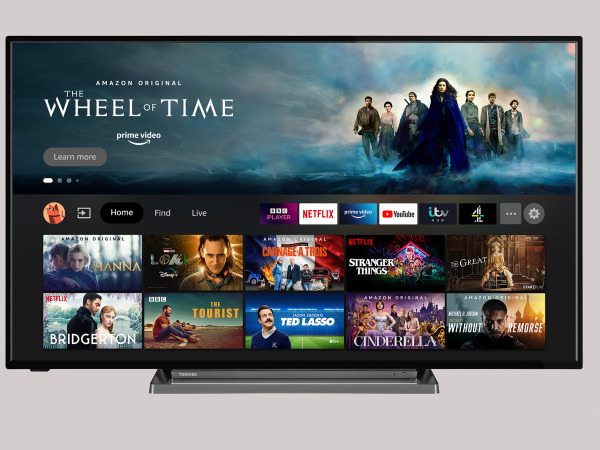
Discover the Toshiba 65UF3D53DB with Fire TV and Sound by Onkyo

0

The Toshiba 65UF3D53DB is a 65″ LED TV with 4K Ultra HD resolution and a Quad Core Processor. It offers a range of smart features, including a full web browser and Netflix 4K streaming, and works with Amazon Alexa and smartphone control. Other notable features include Freeview Play, voice-activated TV, and Dolby Vision, HDR10, and HLG HDR formats.

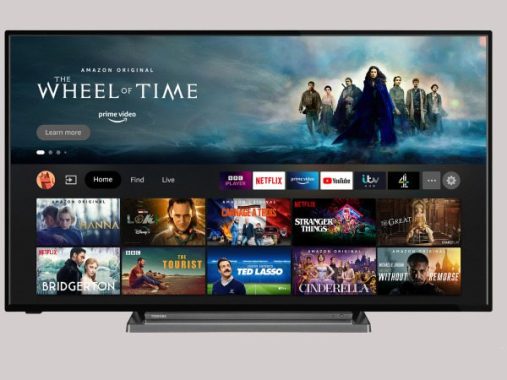
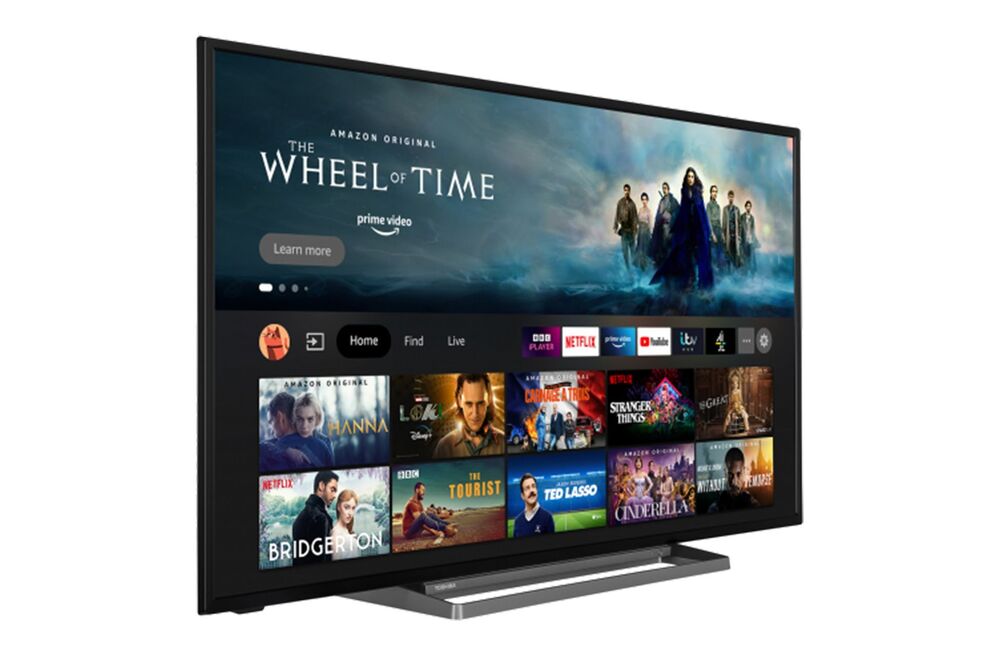
Toshiba 65UF3D53DB
Toshiba 65UF3D53DB

One of the biggest advantages of this TV is its picture quality, thanks to its LED backlight and direct LED technology. The 2100 TPQ motion processing also ensures smooth and clear picture quality. The TV is also DLNA compliant, making it easy to share content between devices.

The TV’s smart features are also a highlight, with easy access to streaming services like Netflix and a full web browser. The inclusion of Amazon Alexa and smartphone control is also convenient for users who prefer voice-activated or mobile control. The 4K upscaling and USB recording features are also beneficial for users who want to enhance or save their viewing experience.

However, there are a few drawbacks to this TV. The 50Hz panel frequency may result in some motion blur and may not be as smooth as higher-frequency panels. The TV’s warranty is also limited to one year, which may not provide sufficient peace of mind for some users. Additionally, the TV only has two USB ports, which may limit connectivity options for some users.

The Toshiba 65UF3D53DB offers top-of-the-line Smarts and sound, powered by Fire TV and Onkyo. With Toshiba’s TRU Picture Engine and 4K UHD Upscaler, the TV delivers UHD 4K resolution with exceptional clarity. The Dolby Vision HDR format optimizes the image quality, providing the sharpest and most accurate visuals possible. The TV also supports HDR10 and HLG, which are widely used for UHD gaming consoles and transmitting 4K signals.

Toshiba 65UF3D53DB specs
Toshiba 65UF3D53DB – photo source Toshiba

In terms of sound, the TV features a built-in subwoofer and receives an upgrade from audio experts, Onkyo. The Onkyo-tuned sound system offers a more lifelike performance with enhanced detail. Additionally, the larger 65″ screen size and higher power output give an extra boost to the TV’s built-in audio.

While a separate soundbar is always recommended for the best sound quality, the Toshiba 65UF3D53DB offers an impressive audio experience. The TV’s picture quality is also outstanding, thanks to its advanced TRU Picture technology and Dolby Vision support. The onboard 4K UHD Upscaler is particularly noteworthy, as it allows standard content to be upscaled for a superior viewing experience. Toshiba’s TRU Picture Technology is an advanced picture processing system that optimizes picture quality by analyzing and enhancing every frame of video. It is specifically designed to deliver sharper, more detailed images with vivid colors and deeper contrast levels. TRU Picture Technology is at the heart of the Toshiba 65UF3D53DB’s UHD 4K resolution, which provides an immersive viewing experience that brings your movies, TV shows, and other content to life. The onboard 4K UHD Upscaler in the Toshiba 65UF3D53DB also uses this technology to take standard content and upscale the image, giving your Blu-rays, in particular, an entirely new lease of life.

The Toshiba 65UF3D53DB TV boasts a Screen Share feature that enables Screen Mirroring via Miracast. This allows users to wirelessly stream the contents of their mobile or tablet onto the larger screen, provided they have a wi-fi network and a Miracast certified smartphone (firmware update may be required).

In addition to its Screen Share feature, the Toshiba 65UF3D53DB delivers exceptional sound, vision, and Smart TV functionality, making it a complete entertainment package. However, it should be noted that this Smart TV includes third-party apps, which are subject to modification or withdrawal at any time.

Toshiba 65UF3D53DB is a strong contender for those looking for a 65″ TV with excellent picture quality and smart features. However, users who prioritize higher panel frequency or a longer warranty may want to consider other options. Toshiba 65UF3D53DB is an excellent TV for those who value top-notch Smarts and sound. Its combination of TRU Picture Engine, Dolby Vision, and Onkyo-tuned audio delivers an immersive and realistic viewing experience.Toshiba 65UF3D53DB specs

Toshiba 65UF3D53DB specs:

Display

    • Screen Size (inch / cm)   65″ / 164cm
    • Panel Type   Direct Back Light (DLED)
    • Resolution     Ultra HD (3840 x 2160)
    • Brightness          350

Sound

    • Dolby Audio       Yes
    • Audio Output Power (RMS)        2x12W
    • Speaker Type         Down Firing
    • Internal Subwoofer          Yes
    • Sound Modes                 Music, Movie, Speech, Classic, Flat, User
    • DTS                          Yes
    • Onkyo                   Yes
    • Ger (D) + Nicam Stereo           Yes
Connections

  • CI+     Yes
  • HDMI™          3 HDMI
  • USB               2 USB
  • Component (YPbPr) in               No
  • Composite Video/Audio in          No
  • Scart           No
  • Ethernet           Yes
  • Digital Audio Output            Optic
  • Antenna Input      Yes
  • VGA (PC in – D-Sub15)       No

Video

    • Wide Color Gamut       No
    • HDR           Yes
    • Picture Modes               Dynamic, Game, Sports, Cinema, Natural, Dolby Vision Bright, Dolby Vision Dark, User
    • Dolby Vision HDR            Yes
    • TRU Flow             Yes
    • TRU Resolution                Yes
    • TRU Micro Dimming               Yes
    • MEMC               Yes
    • UHD Upscaler        Yes

SMART TV FEATURES

HBBTV ver 2.0.2          Yes
Audio-Video Sharing (AVS)              No
Smart Portal
Web Browser            Yes
Netflix             Yes
YouTube™                Yes
Bluetooth                 Yes
Screen Mirroring            Yes
Prime Video                   Yes
Google Assistant               No
Amazon Alexa              Built in Alexa
Netflix 4K                    Yes
Youtube 4K                 Yes