An intuitive user interface was made by IObit developers. To identify the protected area from the unprotected one, this tool has a black background with green and red accents. Users can run the program after installation, at which point a partial window will appear.
With just one click, you can do a quick scan to confirm that your system is secure. All of the possible extra options are listed in a menu on the left side of the screen. You can perform a more comprehensive scan, look online for any upcoming updates, or go to the shared resource center here. A tab is also present to access the program’s other functions.Your confidential and sensitive information can also be safely locked away in IObit Malware Fighter safe box. Simply create a password and enter your sensitive information; only you have permission to access it. By creating an isolated environment, IObit Malware Fighter enables users to execute unknown apps and suspicious software without risking damage. Your privacy is additionally protected by this malware removal tool’s anti-ransomware engine in data protection. All of your data are intelligently shielded from ransomware. Free enhanced security for your PC IObit Malware Fighter is unquestionably a very systematic, comprehensive and powerful antivirus program. In practice, it has protected thousands of people against dangerous downloads for more than ten years. This anti-ransomware program is regarded as one of the most potent ones available.
Many users’ problems brought on by viruses like WannaCry highlight the value of protection. It also guarantees data safety while being extremely resource-efficient. In particular, everything is free. With a choice like this, you couldn’t ask for much more. The article advises downloading SpyBot Search & Destroy and Malwarebytes Anti-Malware if you’re seeking for more free options. With the help of IObit Malware Fighter, you can minimize annoying advertisements, stop your homepage from being modified for malicious purposes, avoid phishing websites, and automatically delete tracking cookies. Additionally, when you open an email in the browser, the sophisticated Email Protection safeguards your web emails from spam, phishing attempts, and other e – mail risks. Your regular browsing for both business and fun is protected with IObit Malware Fighter.
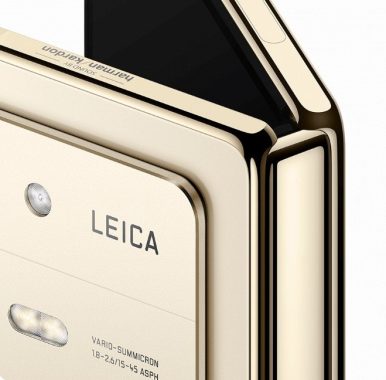
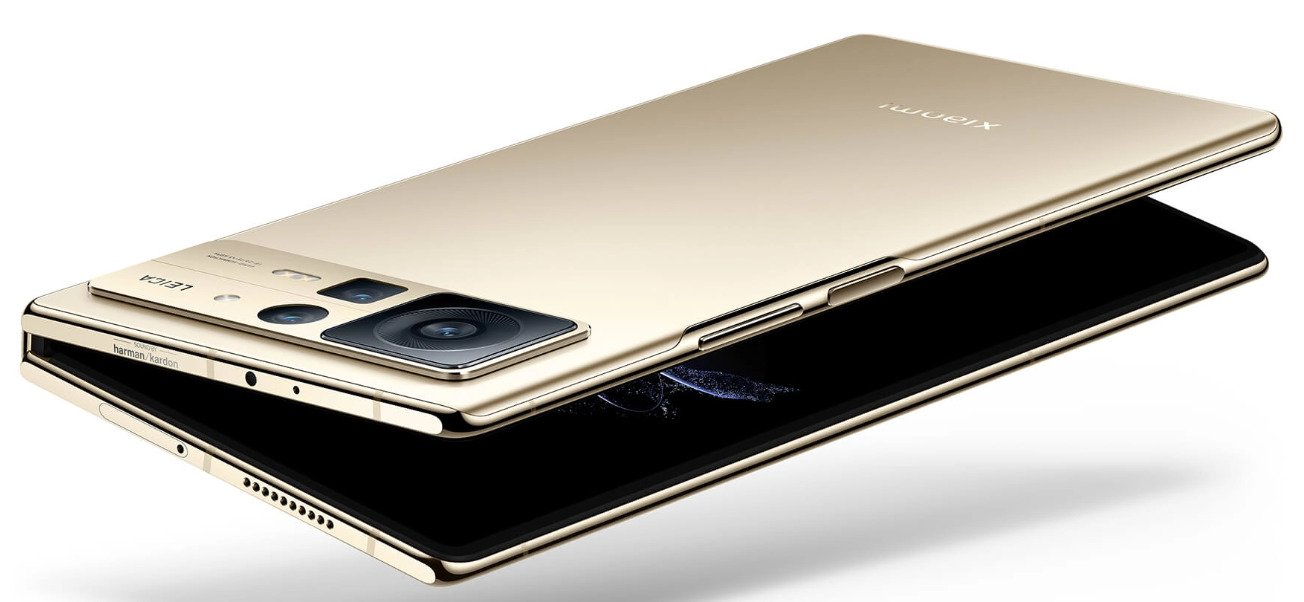
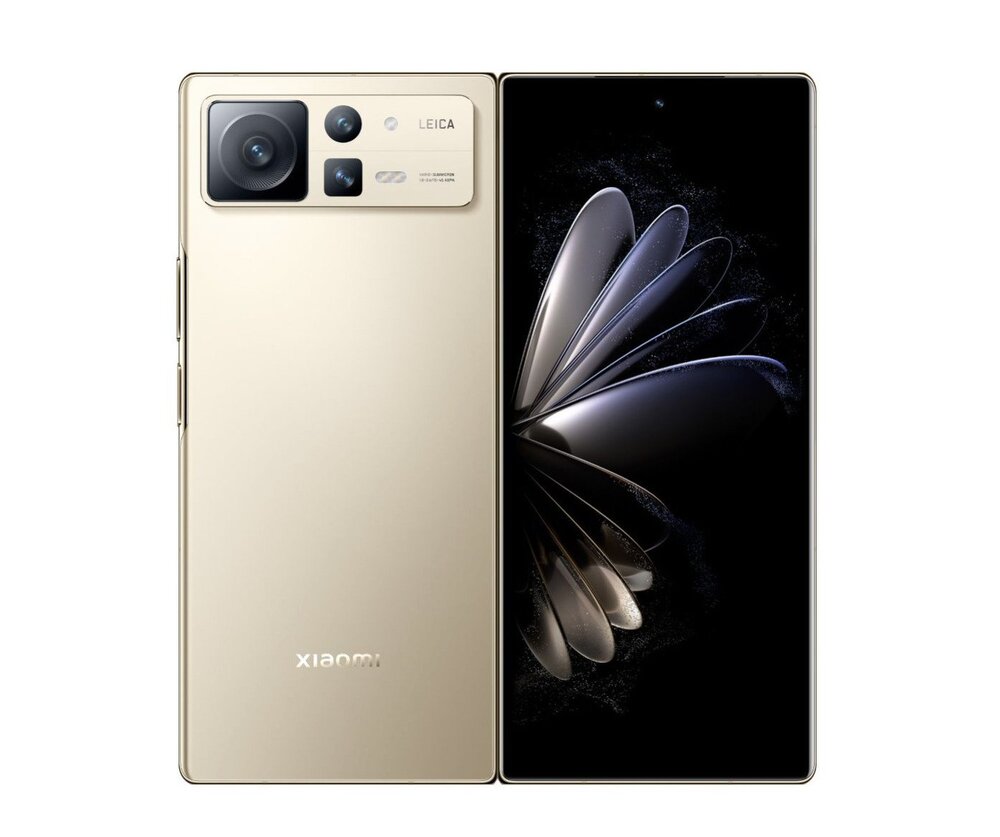
At a recent product launch event in China, global smartphone manufacturer Xiaomi recently unveiled its foldable flagship model, the Xiaomi MIX Fold 2. The MIX Fold 2 provides a consistent viewing experience on both its inner and outside displays, measuring 5.4mm when unfolded.
Xiaomi MIX Fold 2
According to a press statement, it also offers Leica imaging and battery efficiency with the most recent Snapdragon 8+ Gen 1 mobile platform. Xiaomi MIX Fold is “slimmer than many previous folding devices” with a folded body measuring just 11.2mm.
The gadget has a self-designed Micro Waterdrop Hinge that has a reduced bending radius, thinner screen modules, a mini rotating hinge that is specifically made for it, and employs an integrated solder-free precise method to manufacture a carbon fiber double-wing floating panel. The MIX Fold 2 has an interior folding design with two AMOLED flagship screens on each of its two sides, each of which is of a different size. Samsung E5 material, a resolution of 2520×1080, support for a 120Hz fast refresh rate, P3 color gamut, and a brightness of up to 1000 nits are all highlights of the 6.56-inch display.
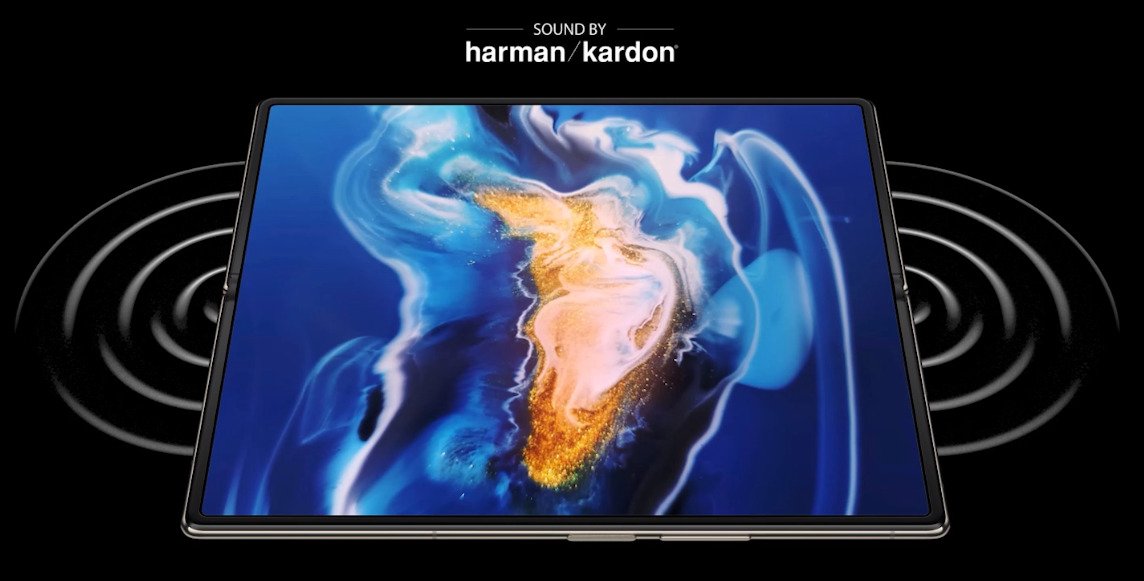
The MIX Fold 2’s internal display is an 8.02-inch Samsung Eco OLED screen. It implements POL-LESS technology, a black matrix material to prevent reflection on the screen, and an incredibly tiny color filter in place of the conventional polarizer. The two displays provide Dolby Vision, a display brightness of 100 nits, a professional screen calibration on main colors, and a refresh rate of 120Hz. A 50MP IMX766 primary camera and 7P lenses with ALD low-reflective coating are both characteristic of the MIX Fold 2.A 13MP ultra-wide angle camera and an 8MP telephoto camera with 2x optical zoom and portrait modes are also included in the smartphone. Dolby Vision HDR recording is supported by MIX Fold 2, as well as Dolby Vision and Dolby Atmos for viewing videos. Photo: Xiaomi
The Xiaomi MIX Fold 2 utilizes the most recent Qualcomm Snapdragon® 8+ Gen 1 mobile platform in addition to its cutting-edge thin and light foldable screen design for efficient performance. Tens of billions of transistors can be integrated into an area the size of a fingernail using TSMC’s 4nm manufacturing technology, significantly increasing energy efficiency. Both CPU and GPU performance can be increased by 10% thanks to the sophisticated method, which also reduces CPU and GPU energy consumption by 30%. The ultra-slim smartphone can now operate at higher speeds and efficiency thanks to an improved design. The battery may last for a whole day even when the inner screen is regularly used, and it can last longer when the outside display is used the majority of the time. This is made possible by the smartphone’s excellent power efficiency.
Furthermore, the Xiaomi MIX Fold 2 features a cooling system with a large-area VC, which is rare for folding smartphones. With a surface area of up to 2,520mm2, the high-quality VC allows for a 50% increase in thermal conductivity over conventional VCs. With an area of up to 3715mm2, second-generation boron nitride heat dissipation film is used to cover the battery’s inner layer. Finally, the exceptional sustained performance of the Xiaomi MIX Fold 2 is built on a strong foundation created by multi-layer high-density graphite sheet.
Xiaomi MIX Fold 2 Specs:
Design
Dimensions: – Folded: 161.6mm x 73.9mm x 11.2mm¹ – Unfolded: 161.6mm x 144.7mm x 5.4mm¹ Weight: 262g¹ Colors: Black, Gold Xiaomi-developed Micro Waterdrop Hinge – Custom hinge mechanism – Durable MIM alloy – Weldless unibody technology – Carbon fiber dual hinge plates – Recessed center structure – Compact layered design
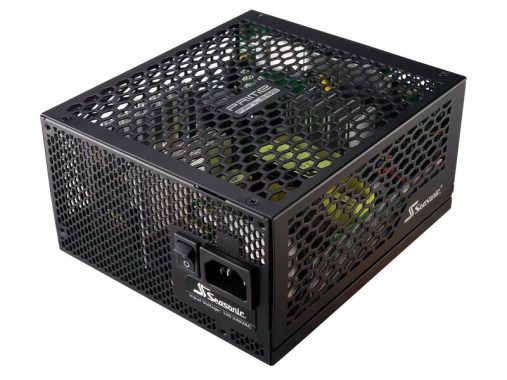
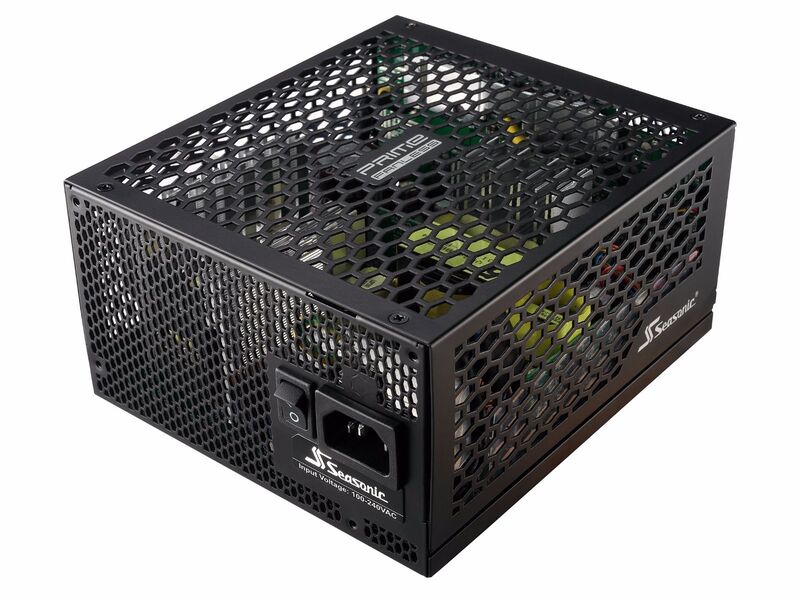
The best streaming requires complete silence, and Seasonic SSR-600TL fanless PSU provides that. It has the lowest possible noise rating from Cybenetics, LAMBDA-A++, which ensures silence.
Noise levels were never higher than 28dbA, such as a whispering. The Seasonic SSR-600TL defies the general rule that passive-cooling CPUs are only appropriate for lower power consumption.SSR-600TL is equipped with a premium Japanese 105c capacitors. Additionally, it has Titanium’s highest Cybernetics efficiency rating of 80 Plus. In terms of efficiency, this equates to 94+% at 50% load and 90% at 100% load.
However, independent testing has revealed that Seasonic SSR-600TL performs even better, at 96% under 50% load and 93.5% under full load.
This makes it one of the highest-quality PSUs available with great efficiency and low noise.
Typically completely modular, it is also incredibly small (170 x 150 x 86 mm). Perfect for the build of a streamer.
There are three heatsinks, and the whole contraption is ventilated for the most airflow possible.
Exceptional 50A can be handled on the +12V rail, while 2.5A can be handled on the 5VSB rail. Even though the aggregate power output of the minor rails is only 100W, they aren’t frequently used. OPP is a good protection feature, and all rails include short circuit protection. Additionally, it is well-protected from significant inrush currents and voltage spikes.
Strong ripple suppression is achieved thanks to the use of high-grade Japanese 105c capacitors throughout. In fact, this model’s ripple suppression was ranked in the top 2% of all models.
Seasonic SSR-600TL has 6 SATA, 5 Molex, 2 EPS, 4 PCIe connectors, which are uncommon on fanless models. Although it isn’t ideal, there is less than 15cm between the peripheral connectors because of the device’s overall size. The highest-capacity fanless PSU on the market right now is Seasonic’s Prime Fanless 600W (or SSR-600TL). It can offer greater power without the use of active cooling components because of its high efficiency (80 PLUS Titanium and ETA-A+ in the Cybenetics program). A 600W power output under demanding working circumstances without a cooling fan is a remarkable accomplishment. Actually, it demonstrates the full range of Seasonic’s Prime platform, which is now regarded as the best analog platform available. We’ve discovered that the Prime design is so superior in several fields that it even competes with totally digital platforms. Seasonic’s engineers are able to push analog circuits to limits that were once believed to be unattainable because of their extensive experience in the industry.
All other main 650w models, excluding its own Seasonic SSR-650TD, which isn’t fanless, were outperformed by it in terms of overall performance. You should have enough headroom with 650W for the components needed to stream games in 1080p or even 1440p.
The increased price of fanless is the only major downside.
However, Seasonic at least backs up its claims with a record-breaking 12-year warranty.
Notables: Seasonic SSR-650TD is a fantastic alternative if you’re not concerned about silent passive cooling. Photo: Seasonic Video: YouTube/Seasonic
Seasonic SSR-600TL technical specifications:
80PLUS®
Titanium
Cybenetics Efficiency Level
ETA-A+
Cybenetics Noise Level
LAMBDA-A++
Form Factor
Intel ATX 12 V
Dimensions
170 mm (L) x 150 mm (W) x 86 mm (H)
Fan Information
Fan Size
N/A
Fan Control
N/A
Fan Bearing
N/A
Life Expectancy
N/A
Cable Information
Modularity
Fully Modular
Cable type
Webbed cables (MB, CPU, PCIe) Flat black cables
Electrical Features
Operating Temperature
0 – 50 °C (derating from 100 % to 80 % from 40 °C to 50 °C)
The Roksan Attessa Integrated Amplifier gives a boost to your entire system with a variety of inputs, elegant good looks, and outstanding Roksan sound quality.
High-quality amplifier for all of your analog and digital sources The Roksan Attessa Integrated Amplifier provides the ideal balance of excellence and adaptability. It features inputs for your whole system, including Bluetooth, four digital, and three analogue. Even a phono pre-amp for your turntable is integrated. The Attessa delivers smooth, room-filling power with 2 x 80 watts.
Powerful sound The Attessa’s 2 x 80 watt amp gives it the vibrant, dynamic sound for which Roksan is famous. High current circuitry, powered by a robust transformer, ensures that there is always enough on hand to enable you to hear musical peaks at their most dynamic. Look no farther if you want an exciting listen.
Wide range Bluetooth Bluetooth is easily paired for simple streaming from your smartphone or other device. Bluetooth makes wireless music sharing simple, which is ideal for when friends and family are over and you want to share music. The standard range of the Roksan Attessa Integrated Amplifier is 15 meters, which is 50% longer than the average. Digital inputs that are flexible Up to four digital sources can be connected via the two coaxial and two optical digital inputs. Connect your CD player, Blu-ray player, gaming system, and TV for an audio update on your entire digital setup.
MM phonostage is among the many flexible analogue inputs. You can connect your other sources, including a CD player without a digital output and a cassette player, using the two RCA phono inputs that are available. The Phono input contains a built-in MM pre-amp for wide-ranging compatibility and an easy connection with a turntable. Pre outs let you to connect your preferred active subwoofer or upgrade to a more potent amp, providing yet another illustration of the Attessa’s extensive versatility. The Attessa Streaming Amplifier is a “hub” product that covers the majority of requirements. A trio of analogue inputs (on RCA) are available on the amp, one of which is for an integrated MM phono stage. These inputs are in addition to Ethernet/Wi-Fi, aptX Bluetooth, and its BluOS connection. Additionally, there are USB and four digital ins (two coaxial and two optical). There is also a subwoofer/RCA pre-out connection. An HDMI eARC port for an easier connection to a TV is what other competitors offer.
Attessa IR Remote
When taken out of the box, it feels substantial and high-quality, which gives off positive first impressions. The huge volume knob has a wonderful, smooth motion and exudes assurance in the caliber of the building materials. The free MaestroUnite app, which is available for Android, iOS, Windows, and Mac, made setup very quick and easy. Simple pushes and turns of the front control knob are all it takes to choose from the several available inputs.
A seamless design The Roksan Attessa Integrated Amplifier looks as seamless and streamlined as it sounds, with no visible aerials, a wraparound steel lid, and a front panel made of anodized aluminum. Its timeless design, which is available in black or silver finishes, melds seamlessly with its surroundings. Photo: Roksan
The Roksan Attessa Integrated Amplifier will put high-quality sound at the center of your system.
Power Output into 8 Ohm
80W Both Channels Driven, Nominal (THD+N <0.1%)
Power Output into 4 Ohm
130W Both Channels Driven, Nominal (THD+N <0.1%)
Inputs (Digital)
Digital 1 (D1) – Coax SPDIF (up to 192kHz/24bit) Digital 2 (D2) – Optical SPDIF (max. 96kHz/24bit) Digital 3 (TV) – Optical SPDIF (max. 96kHz/24bit) Digital 4 (CD) – Coax SPDIF (up to 192kHz/24bit) Digital 5 (Bluetooth) – Bluetooth (48kHz/16bit)
Inputs (Analogue)
A1 – No signal sense A2 – With signal sense & used for AV Mode MM (Phono) – RIAA (equalised)
Outputs
1x pair Speaker binding posts (L&R) 1x pair of RCA Analogue (Pre-out/SUB) 3.5mm Stereo mini-jack headphone socket – 7.5Vrms drive suitable for all headphone types including high-impedance
Other
IEC mains power socket (3 pin)/Fuse holder 3.5mm mini-Jack – 12v trigger Input (On / Standby) IR wired input 3.5mm jack
Other Interface – IR remote
Bluetooth
A2DP Audio profile / Codecs – SBC, aptX & AAC Bluetooth Range – 15m (typical)
Digital Coax Input
up to 24bit/192kHz PCM
Digital Optical Input
up to 24bit/96kHz PCM
MaestroUnite
System Creation and Control Advanced System Setting Over the Air Updates via Wi-Fi
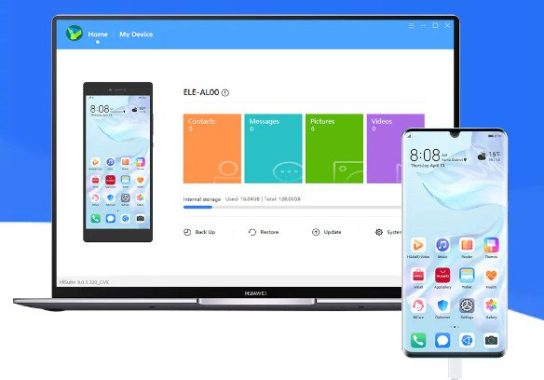
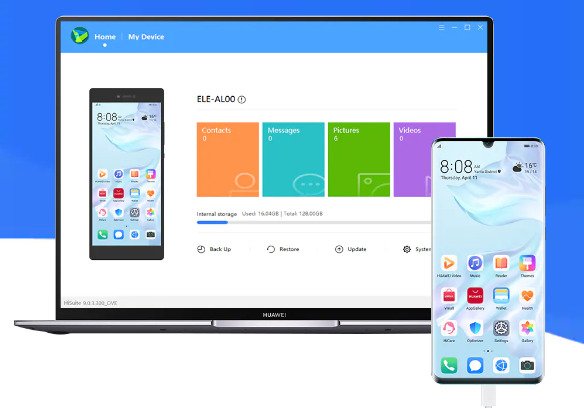
If you own a Huawei smartphone, you can use HiSuite app to manage it from your computer, giving you access to options for managing the apps and data you have installed.
In terms of smartphones, Huawei has just emerged as a powerful contender. It offers top-notch specifications for affordable costs, as well as top-notch software pre-installed on the phones. To manage your phone and the files you have on it, you’ll also need special hardware from Huawei. If you have a Huawei smartphone, HiSuite is one of the more crucial programs you’ll need to install on your PC.
It is made to provide you more authority over the data and applications on your phone. It works well for syncing files, contacts, and data on your phone in addition to other utility functions.
Connect Your Smartphone to a Computer You must first connect your phone to your PC in order to use this software. You can accomplish it using either an USB cable or your phone’s WiFi connection. If you choose the wireless connection, you could even be able to use an encrypted connection, which provides you a little bit more security.
Manage Files, Sync Contacts, and More You will have more control over your files, contacts, and data thanks to HiSuite app. HiSuite will enable you to synchronize contacts between your phone and any other devices where you may have them stored.
Additionally, you’ll be able to sync other types of data from your smartphone, such calendars and events. Data can be moved between your tablet or smartphone and other devices. Of course, you can also easily transfer files across devices and carry out other computer-based file management functions. All of this is necessary to get greater control over your smartphone and to be able to choose which functions should be updated frequently.
The HUAWEI HiSuite features:
Management of contacts • Delete contacts • Import and export contacts • Manage contact groups
File management • Manage files on internal storage and SD cards • Export files to computers • Import files to mobile phones
Application Management • Check, install and uninstall applications, easy and fast. • Single click to upgrade applications online.
Backup and recovery • The data on devices can be backed up to the computer, including contacts, messages, applications, music, call history, emails, and schedule. • It also supports transferring backed up data to devices.
System Recovery • Restore the device to factory settings when its system crashes and won’t turn on
Gallery management • Support multiple ways of viewing pictures • Import and export pictures • Set the picture as device wallpaper
Update • Provide the function of Upgrade and Rollback for Huawei Mobile System System Recovery Upgrade your mobile phone system to the latest version easily.
Almost all Huawei smartphone owners must use HiSuite, which is one of the most important apps. They can use their smartphone to carry out a variety of chores thanks to it.
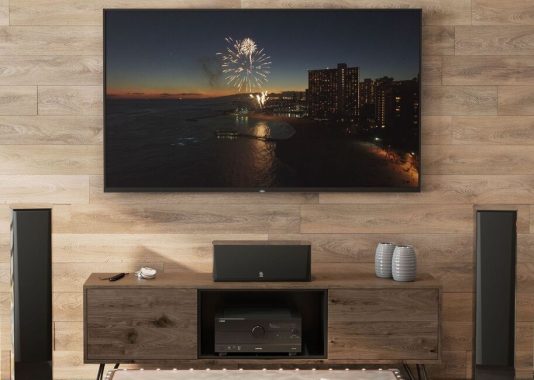
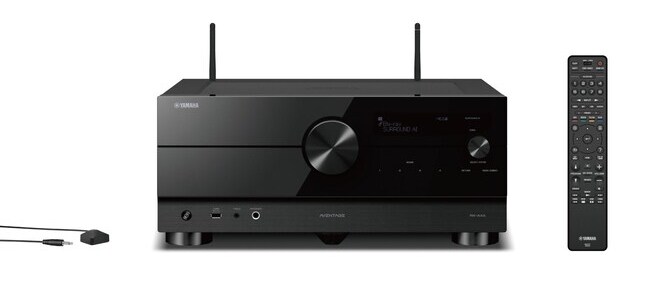
This high-performance receiver has excellent A/V processing, strong amplification, and superior room calibration. It is also vibration-damped. Yamaha’s excellent control app for your phone or tablet makes using the Yamaha AVENTAGE RX-A4A very simple. A 5.1.2 Dolby Atmos or DTS:XTM system, which consists of the conventional five speakers and subwoofer as well as two upward-firing or in-ceiling speakers for overhead effects, is best powered by the seven-channel RX-A4A.
The primary goal of Yamaha’s Aventage RX-A4A receiver is still to provide customers with the most adaptable home theater and multi-room options as well as the most immersive surround sound formats. The most recent Ultra HD TVs and Blu-ray players function flawlessly with this powerful receiver, which fully supports cutting-edge 8K and HDR+ (High Dynamic Range) video technology. However, their days seems to be numbered now that online streaming is a reality. With MusicCast wireless multi-room audio playback, you can stream music from a broad range of sources and listen to high-quality audio in your living room or any other room in your home.
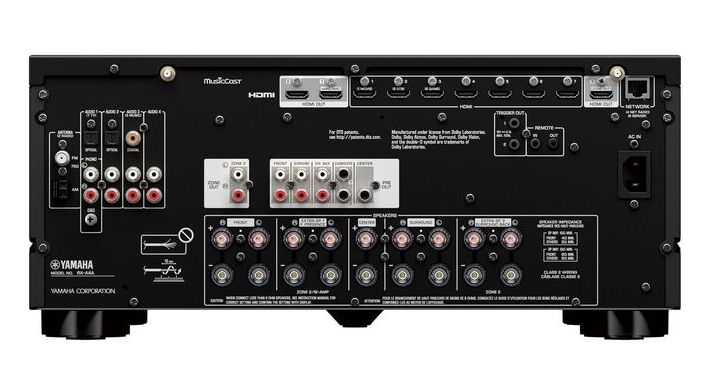
You’ve decided to use five speakers in your home theater space? Drive speakers in a different room of the house, such as the kitchen or a bedroom, by using the other two power channels. The RX-A4A was designed by Yamaha to work with cutting-edge video technologies. Its seven HDMI ports are all 4K/60Hz compatible, making them ideal for high-end sources like an Apple TV or a 4K Ultra HD Blu-ray player. (HDMI 2.1 functionality will be made available with a free firmware upgrade in the future.) For iOS and Android tablets, the free AV Setup Guide app from Yamaha takes you through the connection process step-by-step. The straightforward yet sophisticated YPAO calibration system analyzes your speakers and the acoustics of your room using a setup microphone that is included in order to optimize the sound of your system. Your compatible mobile device becomes an incredibly practical Wi-Fi remote control thanks to the complete, customizable AV Controller app.
Simple Setup & Control: Yamaha’s free AV Setup Guide app for tablets running iOS and Android guides you into the connection process step-by-step. The simple and direct yet sophisticated YPAO calibration system analyzes your speakers and the acoustics of your area using a setup microphone that is included in order to optimize the sound of your system. Your compatible mobile device becomes an incredibly practical Wi-Fi remote control thanks to the complete, customizable AV Controller app.
High slew rate amplifiers are now available in this Yamaha AVENTAGE RX-A4A model. The dynamics of the final sound are directly correlated with an amplifier’s slew rate, which measures how rapidly the amplifier can react to a sudden shift in the input signal. The more exactly it can replicate and maintain pace with the original source, the more detail it can capture from the source, producing a sound that is more dynamic and powerful. To put things into perspective, this Aventage AVR model’s slew rate has doubled compared to that of the previous generation and is now the same as the MX-A5200 power amplifier.
Enjoy a wide range of musical genres. There are many choices available for playing music as well. Through Wi-Fi, Bluetooth, or Apple AirPlay 2, you may play music from your smartphone or tablet. Optionally, connect your turntable using the built-in phono input. Even high-resolution tracks can be played from a networked computer or USB thumb drive. In addition, the Yamaha RX-A4A can play music wirelessly across many rooms when paired with other MusicCast components. photo: YAMAHA
The tipping point in this range of home theater receivers may just be the Yamaha Aventage RX-A4A. It comes in at a price that most of us can afford and has practically all the features a performance-minded consumer might desire. How admirable is that? It features a 7 channel amplifier, making it simple to use Dolby Atmos in a 5.2.2 home theater system. Additionally, it offers 8K capability, enhanced HDMI connectors, greater resonance control, improved YPAO sound field correction, and a striking new design. The RX-A4A home theater receiver should be at the top of your short list for all these reasons, in addition to Yamaha’s famous durability.
Yamaha AVENTAGE RX-A4A features: Power and processing: A 7-channel amplifier with 110 watts per channel into 8 ohms at 0.06% THD and 2 channels driven with a high slew rate design for crystal-clear, reliable performance over a broad frequency range. Dolby Atmos® and DTS:XTM processing for use with in-ceiling or “height” speakers to envelop overhead sound effects Dolby® and DTS® surround sound decoding Without height speakers, Dolby Atmos Height Virtualization produces three-dimensional effects. Cinema DSP HD3 adds richness and depth to music and movie soundtracks Surround:AI™ technology analyzes your content and creates optimal surround effects in real time H-shaped cross frame adds additional stability to the chassis while reducing vibrations YPAO (Yamaha Parametric Room Acoustic Optimizer) automatic speaker calibration included microphone helps fine-tune your system to best match your room’s acoustics R.S.C. (Reflected Sound Control) with multipoint measurement helps deliver smooth, well-balanced surround sound across different seating positions
HDMI features: HDMI 2.1 audio/video switching: 7 in, 3 out all HDMI connections support 8K/60Hz and 4K/120Hz video content (with free future firmware update) HDCP 2.3 technology ensures compatibility with Ultra HD sources and TVs HDR-compatible for extended picture contrast and brightness with compatible TVs and HDR-encoded content supports HDR10, HLG, and Dolby Vision® HDR10+ enabled with free future firmware update
Input jacks Analog Audio ( Audio x 4 (including PHONO) Digital Audio ( Optical x 2 (Supported frequencies: 32 kHz/44.1 kHz/48 kHz/88.2 kHz/96 kHz) ( Coaxial x 1 (Supported frequencies: 32 kHz/44.1 kHz/48 kHz/88.2 kHz/96 kHz/176.4 kHz/192 kHz) HDMI Input ( HDMI x 7 Other jacks ( USB x 1 (USB2.0) ( NETWORK (Wired) x 1 (100Base-TX/10Base-T)
Bluetooth version ( Ver. 4.2 Wireless output ( Bluetooth Class 2 Maximum communication distance ( 10 m (33 ft) without interference
Your Apple Mac is made to work as efficiently as possible for many years after you buy it, but with time, you may notice a decrease in performance. How you treat your device and how frequently you use it will determine how much the performance changes. There are a few regular maintenance tasks you can perform to keep your laptop functioning as well as it did when it was brand-new and slow down its deterioration. We examine some quick techniques to clean up your old MacBook below.
How to Clean Up Your Old MacBook?
If you want to clean up your old MacBook, there are a few steps you can follow to do so:
Start by backing up your data. This is important because it will allow you to restore any important files in case something goes wrong during the cleaning process. You can back up your data using Time Machine, iCloud, or an external hard drive.
Once you have backed up your data, you can begin removing any old files and data that you no longer need. This might include old documents, applications, and downloaded files.
After removing old files, you can use a disk cleaning tool to remove temporary files and other unnecessary data that has accumulated on your hard drive over time. Some common disk cleaning tools for Mac include CleanMyMac, Onyx, and DaisyDisk.
Once you have cleaned up your hard drive, you can use a tool like CCleaner to clean up your system registry and remove any old, invalid entries. This can help improve the performance of your MacBook.
Finally, you can use a tool like MacKeeper to scan your system for malware and remove any threats that might be present. This can help protect your MacBook from viruses and other malicious software.
Overall, cleaning up your old MacBook can help improve its performance and keep it running smoothly. It’s a good idea to do this periodically to make sure your Mac is running at its best.
Take Out Your Trash You might believe that files have been deleted when you remove them on an Apple Mac, but this is not the case. When you delete files, they are transferred to your trash can, so they continue to take up space on your laptop. Due to this, it’s crucial to ensure sure items are truly gone by emptying your trash after removing them. Your MacBook’s performance may suffer if you don’t regularly empty the trash after removing files, especially if you’ve been doing a lot of file deletion.
photo: Pixabay
Delete old software When was the last time you looked over the installed programs on your Apple Mac? You will have downloaded more applications over time as your Apple Mac becomes older. Many of these programs might not be necessary any longer; in fact, you might not even be absolutely sure they were on your laptop. As a result of each of these programs, your device will have less storage available to it, which will in turn slow it down. Go through them and get rid of anything you don’t need. You can always install them again if you need them.
Check your downloads folder Everybody downloads files, but we never remove them from our downloads folder. The more often we do this, the more data they can store. This folder may become very cluttered over time, which will slow down your old Mac. Go through this folder, move the data you require to your documents, and then remove the rest. You might be surprised at the size of some of the files, so sort the files by size and delete the bigger ones first. Additionally, you might discover that you have a few copies where you downloaded the same thing more than once over time, wasting space.
Clean the outside of your Mac Cleaning the outside of your Mac is an excellent idea in combination to cleaning the software. It may accumulate filth, dust, and dirt over time, which may enter the hardware and prevent it from operating as effectively as it should. Take your Mac, unplug it, and turn it off before cleaning it with a little damp cloth to do it right. A powerful chemical should not be added as it could harm your Mac. Rather, invest in a special cleaning that you spray over the cloth to prevent moisture from getting inside your gadget. To remove any internal dirt inside the pores, use compressed air in short bursts.
If your Mac is not currently up to date, it can make it much more susceptible to hacking and potential malware making its way onto your machine. Avoid this by ensuring you run regular updates to your machine, checking there is never anything that needs doing. While we’re all guilty of selecting the “update later” option, it’s important to get it done as quickly as possible to keep your machine safe and protected from any viruses. Even if no pop-ups occur telling you an update is required, be sure to do your own checks manually, including updating your browser as well as any applications you have on your machine.
These are just a few simple ways that you can clean up your Mac in order to make it work better moving forward. It is important to keep your device in the best condition possible so it will last longer and be more efficient when it’s in use.
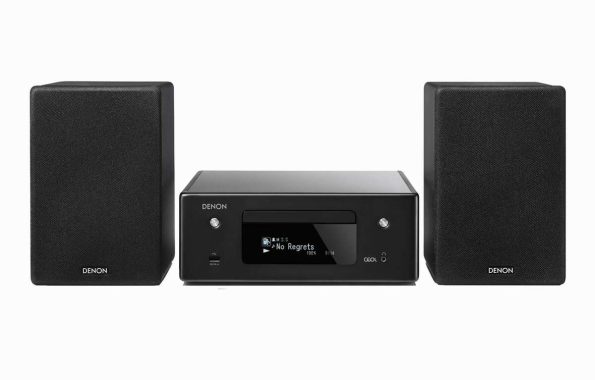
There are numerous ways to access your favorite music with the flexible, small Denon CEOL N10 stereo receiver. With the FM tuner or the built-in CD player, you can go retro. Alternatively, you can use the Ethernet port on the back of the device or Wi-Fi® to connect to your home network and stream music from services like Spotify®, Deezer, TIDAL, or TuneIn internet radio. Bluetooth and Apple AirPlay 2 are additional options for wireless streaming.
The Denon CEOL N10 offers a standout feature in its user-friendly design. With its generously sized monochromatic OLED screen, it effortlessly presents essential track information, readable from several meters away. Complementing this, the spacious remote control boasts an intelligently organized layout.
The CEOL 10 is a sleek and compact device that could easily be mistaken for a petite CD player. Its front panel exudes simplicity, featuring an on/off button, a CD tray button, and a prominent display. Additionally, it offers a headphone output and a USB port for USB key playback. The glossy “piano lacquer” plastic top panel conveniently houses commonly used operational functions, sparing you the need to hunt for a remote control or mobile phone just to adjust the volume or switch tracks.
The rear of the device maintains the same straightforward approach, primarily consisting of a pair of pin connectors for speakers, although it’s worth noting that they do not accommodate “banana” connectors. Regrettably, there is no provision for a turntable input or HDMI input, but most TVs can be easily connected through one of the two optical digital inputs available. Furthermore, there’s a subwoofer output and a single analog input, which is somewhat surprising as it employs proper RCA connectors. While it’s possible that many Denon CEOL N10 buyers may be more accustomed to the 2.5mm mini-jack, it’s worth noting that some mistakenly believe that “aux” refers to this type of cable.
You may simply ask the RCD-N10 to play a particular song, playlist, or station by speaking into a device like the Google Home or an Amazon Echo Plus or Echo Dot.
Connect all of your devices, including your TV. There are numerous inputs available on the Denon CEOL N10 for connecting A/V components. There are two Toslink digital optical inputs in addition to an RCA input for analog sources. Because the RCD-N10 provides a convenient way to amplify and enhance the sound coming from your TV, adding a little “oomph” to binge-watching movies and TV shows, one optical input is marked “TV.” Even your TV remote’s commands can be programmed to it. Utilize HEOS to set up a wireless all-home audio system.The Denon CEOL N10 may be quickly and simply included into a wireless multi-room audio system thanks to built-in HEOS technology. Use the free HEOS mobile app to individually control the speakers in each room while streaming music to HEOS wireless speakers and other HEOS-compatible devices. Denon Sound Signature – Exceptional audio engineering using carefully chosen and well tested Hi-Fi components.
A great balance between multi-room speakers and the ideal stereo system is the Denon CEOL N10. You receive some of the sound quality from the full-fledged system as well as the flexibility and power options from the first. As long as you pair the CEOL N10 with some quality speakers (speakers must be purchased separately). Although there are restrictions on effect and nuance, you will rapidly question if you could have been satisfied with less as the second facility in, say, the living room or the bedroom. CEOL N10 product features: 50 station preset FM radio tuner with 65 watts x 2 into 4 ohms for streaming music from services like Spotify®, Deezer Premium, TIDAL, or TuneIn. With built-in dual-band Wi-Fi and built-in Bluetooth® for wireless music listening with smartphones, tablets, and compatible laptops, HEOS technology wirelessly connects compatible components for whole home audio. You can stream directly from an iPhone® or iPad® using Apple AirPlay 2, and you can ask Siri to play Apple Music while using voice control with Amazon Alexa and Google Assistant. Convenient touch key control buttons are located on top of the device, and they also include a TV remote learning feature. photo: Denon
Denon CEOL N10 stereo receiver connections: single analog stereo RCA input dual Toslink optical digital inputs Ethernet port for connecting to home network one pair of binding post speaker outputs one analog mono RCA subwoofer output front-panel 3.5mm headphone output front-panel USB port for playing music from a compatible thumb drive Video: YouTube/Denon
Denon CEOL N10 Mini Hi-Fi System with CD Player and HEOS® Built-in specs:
High Quality Power Output
2 x 65 W
CD Compatibility: CD / CD-R/RW / WMA / MP3
Yes / Yes / Yes / Yes
Tuner: FM (RDS) / AM
Yes / Yes
Network Audio Streaming
Yes
Spotify Connect* / Tidal* / Deezer* / others *
Yes / Yes / Yes / Yes
AirPlay 2
Yes
Internet Radio
tunein
HEOS Multiroom and Streaming
Yes
Voice Control – Works with Amazon Alexa
Yes
Auto Power On by optical input signal
Yes
TV remote learning
Yes (update)
Bluetooth / aptX / NFC
Yes / No / No
USB Audio (Front) / Made for iPod / Made for iPhone
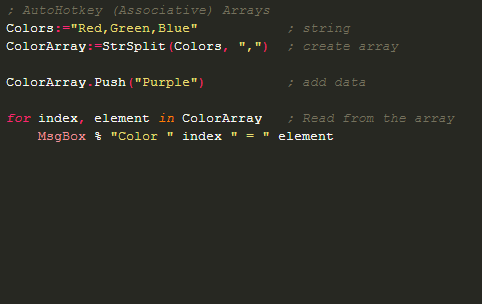
Setting up hotkeys, automation tasks, and other scripting configurations using AutoHotkey helps you be more productive and make it simple to access your hotkeys. Your keyboard’s hotkeys can be useful for a number of things. Hotkeys can help you save time whether you’re wanting to automate a process or just make life easier for yourself while working.
Additionally, having hotkeys might be very beneficial if you frequently perform monotonous chores that take a lot of time and are uninteresting. AutoHotkey is one of the greatest tools available for creating hotkeys for various uses. You can use it to adjust your keyboard’s hotkeys for either personal or professional use.
As you may switch between multiple keyboard protocols to make the adjustments, you can customize your keyboard and other devices like a joystick or mouse.
AutoHotkey app
Supports a variety of keyboards You’ll be delighted to know that AutoHotkey is an extremely flexible application. It will function with a variety of keyboards and their operating systems, including ANSI 32-bit, Unicode 32-bit, and Unicode 64-bit. You may also utilize the drag and drop support to make things simpler for you or install the compiler, which will assist you in writing scripts.
Easy to Use It is intended for regular users. The majority of the activities in this application are quite simple to perform, yet you can develop scripts, which are thought to be a little bit more difficult. It doesn’t take a genius to figure out how to create straightforward hotkeys, and you can utilize them in a variety of ways after that.
Alternately, you can write scripts, which are more effective for use in a variety of settings, including video games, software, and the workplace. The scripting language for this application is not very complex, so learning it won’t be difficult.
AutoHotkey, useful app for creating hotkeys. Since you don’t need to be an experienced user to create even more sophisticated scripts, it is simple to use and incredibly effective.
AutoHotkey is a free, open-source scripting language for Windows – download here
Depending on the permits from rights holders, the accessibility of music can change over time and between different regions. The good news is that Spotify adds new content every day, so if you can’t find what you’re looking for right now, keep checking back because it might show up (or come back).
You can use your Spotify app to play music files stored on your smartphone in addition to the over 40 million tracks available by Spotify (which is referred to as “local files”). You must use the desktop app to import your local files to Spotify.
Click the arrow in the top-right corner of the desktop app and select Settings.
Scroll down to Local Files.
Any files in My Music and Downloads are automatically selected. Switch off any sources you don’t want Spotify to access.
Click ADD A SOURCE to select another folder.
photo: Pixabay
Supported file types:
.mp3
.m4p (unless it contains video)
.mp4 (if QuickTime is installed on your computer)
If you have Premium, here’s how to access the local files on your mobile device:
Add the files to a playlist.
Log in on your mobile or tablet using the same WiFi network as your desktop app.
 Your confidential and sensitive information can also be safely locked away in IObit Malware Fighter safe box. Simply create a password and enter your sensitive information; only you have permission to access it. By creating an isolated environment, IObit Malware Fighter enables users to execute unknown apps and suspicious software without risking damage. Your privacy is additionally protected by this malware removal tool’s anti-ransomware engine in data protection. All of your data are intelligently shielded from ransomware.