If you’re in the market for a TV screen that offers a truly immersive viewing experience, the Hisense 85A6BGTUK is definitely worth considering. With its massive 85-inch display, this TV outshines many other options in its price range. Whether you’re watching movies, TV dramas, nature programs, or gaming, the larger screen size enhances the visual experience and brings content to life like never before.
One of the standout features of the Hisense 85A6BGTUK is its support for Dolby Vision and HDR10+. Dolby Vision ensures optimal picture quality by adjusting the display settings to deliver vibrant colors, deeper blacks, and brighter whites. It offers an impressive level of detail and realism, especially with content specifically encoded in Dolby Vision. HDR10+ takes it a step further with scene-by-scene HDR mastering, resulting in the most accurate and true-to-life picture quality.
For gamers and sports enthusiasts, the TV offers dedicated Game and Sport Modes. Game Mode disables unnecessary picture enhancements and focuses on delivering a fast response time, enhancing your gaming experience. Sport Mode creates a live stadium feel, putting you at the heart of the action.
The Hisense 85A6BGTUK runs on VIDAA U5, a user-friendly Smart TV platform. It provides easy access to a wide range of apps and services, including popular streaming platforms like Netflix, Amazon Prime Video, YouTube, and Freeview Play. Switching between apps and devices is seamless, thanks to VIDAA U5’s intuitive interface.
Voice control is also a breeze with VIDAA Voice and Amazon Alexa compatibility. You can search for TV content or utilize Alexa skills simply by using voice commands.
With Freeview Play, catching up on your favorite shows is effortless. The TV integrates catch-up TV services such as BBC iPlayer, ITV Hub, All4, and Demand 5, allowing you to easily access shows you missed from the last 7 days.
While the Hisense 85A6BGTUK delivers impressive visuals, the sound quality is also worth mentioning. While it is recommended to pair the TV with a soundbar or home cinema system for a cinematic audio experience, the built-in DTS Virtual:X sound technology creates a virtual surround sound and enhances the TV’s own speakers, providing immersive and punchy sound.
In terms of connectivity, the TV offers three HDMI 2.1 ports, making it easy to connect your set-top box, UHD Blu-ray player, and gaming console. It also features twin USB ports for connecting media devices and playing back various types of media. Additionally, there’s an optical connection for a soundbar and a headphone socket for private listening.
If you’re ready to upgrade to a large-screen TV, the Hisense 85A6BGTUK is a compelling choice. Its stunning 85-inch display, support for Dolby Vision and HDR10+, dedicated gaming and sports modes, user-friendly Smart TV platform, voice control capabilities, and convenient connectivity options make it a solid option for those seeking an immersive and feature-rich viewing experience.
Please note that the availability and functionality of third-party apps may vary and are subject to change. Catch-up TV app availability may also vary by region.
The audio performance of the Hisense 85A6BGTUK might not meet everyone’s expectations. With only two integrated speakers providing a combined power output of 16W, it falls short compared to other mid-range models. To truly enhance the audio experience, investing in a soundbar is highly recommended, despite the additional cost involved.
Fortunately, there are many affordable soundbar options available that can significantly improve the overall audio quality. While the Hisense 85A6BGTUK does incorporate technologies like Dolby Atmos and DTS Virtual:X, which aim to deliver an immersive and precise audio experience, the built-in speaker setup still leaves room for improvement and may not satisfy those seeking top-notch sound quality.
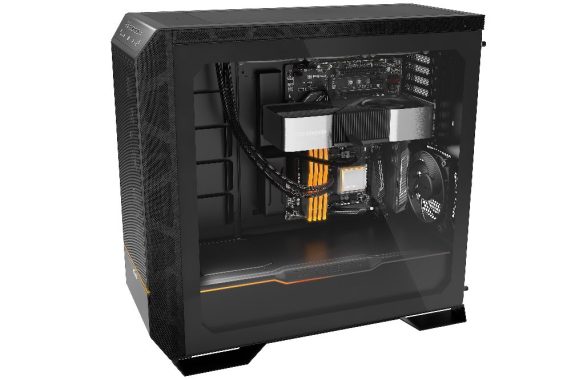
be quiet!, the German manufacturer for premium PC components, presents Dark Base Pro 901. This long-anticipated successor to Dark Base Pro 900 is once again an absolute high-end case with groundbreaking features. Whether you prefer a virtually inaudible or an extremely performant case, Dark Base Pro 901 is the perfect choice. Smart design decisions when it comes to the top and front of the case lead to an outstanding flexibility and versatility. Building a system using an inverted layout is a breeze with Dark Base Pro 901, while ARGB lighting and vertical VGA installation ensure an ideal presentation of your build. To top it off, the upgraded 15W wireless charger charges your smartphone faster than ever before. Alongside Dark Base Pro 901, be quiet! also introduces its own Riser Cable and the new HDD Cage 2.
Silence and performance optimized
Dark Base Pro 901 features a silence-oriented and performance-optimized solution for the top and the front, thanks to exchangable panels included in the box. A detachable top and front bracket with included fan hub and pogo pin connector allows for a comfortable installation of radiators and fans. Even an inverted layout can be done easily thanks to an intuitive rail system. be quiet! Dark Base Pro 901 makes good use of be quiet!’s award-winning Silent Wings 4 fans: thanks to their silence-optimized fan blades and funnel shaped fan frame, these fans make no compromises between virtually inaudible operation and high performance. Their extraordinary air pressure significantly increases the cooling performance of Dark Base Pro 901.
be quiet! Dark Base Pro 901
be quiet! Dark Base Pro 901
be quiet! Dark Base Pro 901
be quiet! Dark Base Pro 901
be quiet! Dark Base Pro 901
be quiet! Dark Base Pro 901
Maximum space for individual needs
With its remarkably large dimensions, be quiet! Dark Base Pro 901 sets no limits on creativity. The front can fit a radiator of up to 420mm and additional fans can be installed throughout the case, even on the side panel. The VGA holder of Dark Base Pro 901 is very versatile and prevents GPU sag even with heavy graphics cards. Two cable bars, one located inside the VGA holder and the other next to the motherboard tray, hide the cables inside the case. Dark Base Pro 901 supports installation of one 5.25″ drive and two HDDs or six SSDs out of the box, with the option to expand this with 5x HDD or 10x SSD. The high-quality, fully-windowed tempered glass side panel offers a perfect view of the components inside your case. And just as important: Dark Base Pro 901 can be deployed without the hassle of additional screws and small parts, creating the optimal case for any build.
Silent Wings 4 PWM Fans: The Heart of Acoustic Excellence
At the core of the Pro 901’s silence are three pre-installed Silent Wings 4 140mm PWM fans—two at the front intake and one rear exhaust. be quiet!’s fourth-generation Silent Wings series, refined over years, represents the pinnacle of fan engineering. Each 140 x 140 x 25mm fan spins up to 1900 RPM via 4-pin PWM control, delivering 78.4 CFM airflow and 2.36 mmH2O static pressure at full tilt, yet caps noise at 29.3 dB(A)—comparable to a whisper in a library.
This balance stems from six optimized blades with anti-vortex dimples, a closed fan-wheel hub to eliminate bearing rattle, and a funnel-shaped frame that boosts pressure without turbulence. Rated for 300,000 hours MTBF at 25°C, they draw just 4.8W (0.4A at 12V), ensuring efficiency in idle or load.
From its generous interior space to its array of customizable options, this chassis emerges as a premium pick for both seasoned builders and beginners. The Dark Base Pro 901 checks nearly every box for the enthusiast crowd. Its extensive bundle of accessories provides flexibility to meet the needs of most users, even as those needs evolve—provided size isn’t a constraint. The construction is top-notch, and the design is visually striking, at least in my view. That said, perfection is elusive, and being particularly discerning with high-end gear, I spotted a few drawbacks, outlined here:
The PWM fan controllers could benefit from thicker wiring, especially for the one farther from the I/O panel that handles power delivery, to better accommodate high-powered fans. It lacks an ARGB controller, a feature even some budget cases include. The bottom panel covering the 5.25″ bay is unnecessarily difficult to access! Just two HDD cages are supplied; you’ll need to purchase extras if required. I’d argue for at least one more (or ideally two) in the box.
The downsides are limited, but the upsides are plentiful, including exceptional adaptability that makes this case a solid long-term investment. The ability to switch between quiet operation and maximum airflow is a key strength. In my evaluations—constrained by time—I focused on noise and thermal testing with the sound-dampening elements installed, fitting for a brand synonymous with silent builds. Stripping away those panels would enhance cooling by allowing better heat escape and airflow, but at the cost of increased noise. You can’t have the best of both worlds: true silence demands sealing off the interior, which inevitably raises internal temps. Ultimately, it’s about prioritizing what matters most—whisper-quiet performance or cooler components for a minor edge in efficiency.
The fans integrate seamlessly via dual PWM hubs (one front, one top) supporting up to eight fans total, with screwless mounting brackets that slide into place. No loose wires: pre-connected headers plug into the hubs, which route to a touch-sensitive controller on the I/O. Users can select five speed presets—from “Silent” (near-zero RPM for idle) to “Max” (full blast for stress tests)—or sync to motherboard PWM for automatic curves. APH Networks measured turbulence minimal even behind the front bracket, thanks to spacers that offset blades by 5mm, preventing the “whoosh” heard in lesser cases like the Phanteks P600S.
Cooling potential is staggering: up to three 140mm/120mm top fans (or 360mm radiator), three front (420mm rad), three side (360mm), one bottom (140mm), and the rear. This supports triple 420mm rad setups—rare for full-towers—ideal for custom loops. EnosTech praised the front fans’ positioning for direct GPU impingement, dropping temps 6°C versus stock configurations.
Subtle ARGB lighting and modern design touches
Dark Base Pro 901 features ARGB lighting on the front and the PSU shroud to ensure the case remains elegant with subtle illumination. The light and fan settings can be conveniently controlled via touch-sensitive buttons on the I/O panel. A wireless charger for Qi enabled devices and a full 3-year manufacturer’s warranty perfectly rounds up Dark Base Pro 901.
Now available: Riser Cable and HDD Cage 2
Alongside the introduction of Dark Base Pro 901, be quiet! also introduces two accessories that can be used with this and selected other cases in its product portfolio. The Riser Cable is a high-speed data transfer cable for PCIe 4.0 cards, compatible with all be quiet! cases that support vertical installation of the graphics card. It has an elegant all-black design and prevents sagging of the graphics card. Also new is the HDD Cage 2, a tool-free decoupled drive cage that fits one additional HDD or two SSDs in Dark Base Pro 901 and future cases.
be quiet! Dark Base Pro 901 is available from June 27 at a recommended retail price of €319.90 / $299.90 / £319.99. The Riser Cable and HDD Cage 2 are available on the same day for €59.90 / $54.90 / £59.99 and €9.90 / $9.90 / £9.99 respectively.
Dark Base Pro 901 Technical Data Motherboard compatibility XL-ATX, E-ATX, ATX, M-ATX, Mini-ATX Case type Full Tower PSU PS2 ATX (not included) Dimensions (L x W x H in mm) 603 x 254 x 569 Material Steel (SGCC), ABS plastic, Aluminium Weight (kg) 16.3 (net) / 20.8 (gross) I/O port 1x USB 3.2 Gen. 2 Type C, 4x USB 3.2, HD Audio (mic + audio), fan controller, ARGB controller PCI slots 8 Drive bays up to 16x 2.5 (6 included) up to 7x 3.5 (2 included) up to 1x 5.25 (1 included) Preinstalled fans (mm) / (rpm) Front: 2x Silent Wings 4 PWM 140 / 1900 Rear: 1x Silent Wings 4 PWM 140 / 1900 Optional fans (mm) Front: 3x 140 / 120 Top: 3x 140 / 120 Side: 3x 120 Bottom: 1x 140 / 120 Rear: 1x 140 / 120 Optional radiators (mm) Front: 120 / 140 / 240 / 280 / 360 / 420 Top: 120 / 240 / 360 Side: 120 / 240 / 360 Rear: 120 / 140 Maximum dimensions (mm) CPU cooler: up to 190 PSU: up to 288 GPU: 495 ATX motherboard: 350 (with HDD cage) E-ATX motherboard: 370 (with HDD cage) ARGB connector 3-pin
There are several excellent free password managers available that offer strong security and convenient features. Here are four popular options:
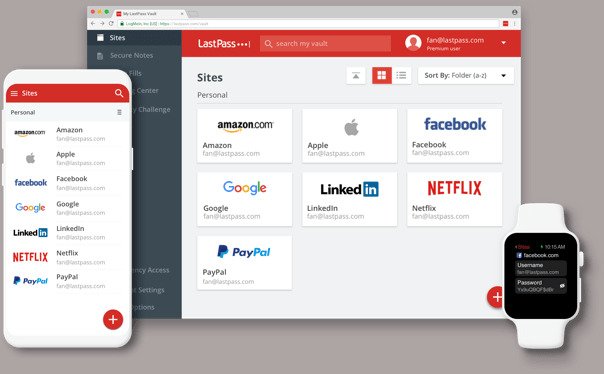
LastPass: LastPass is a widely-used password manager known for its user-friendly interface and robust security. It offers features such as password generation, autofill, secure notes, and multi-factor authentication. LastPass has browser extensions and mobile apps for easy access across different devices. LastPass Free password manager features:LastPass Free password manager photo
Secure password vault
Access on one device type
One-to-one sharing
Save and fill passwords
Password generator
Secure notes
Security Dashboard and Score
Dark Web Monitoring
Basic Support
Multifactor authentication
LastPass Authenticator
Bitwarden: Bitwarden is an open-source password manager that provides end-to-end encryption for your data. It offers features similar to LastPass, including password generation, autofill, and secure notes. Bitwarden has browser extensions, desktop applications, and mobile apps that synchronize your data across multiple devices. Bitwarden ensures complete encryption of your data right from your device, guaranteeing that only you can access it. Even the Bitwarden team cannot unlock or access your protected data. To secure your sensitive information, Bitwarden utilizes end-to-end AES-256 bit encryption, salted hashing, and PBKDF2 SHA-256. This robust encryption seals your data with utmost protection and safeguards your privacy.
KeePass: KeePass is another popular open-source password manager that stores your passwords in an encrypted database. It requires you to remember a master password to access your data. KeePass does not have built-in cloud syncing but allows you to manually manage the database file across devices using secure methods like cloud storage services.
KeePass is a secure and free password manager that allows you to effectively manage your passwords. With KeePass, you can store all your passwords in a single database, protected by a master key. This means you only need to remember one master key to unlock the entire database. The database files themselves are encrypted using highly secure and trusted encryption algorithms like AES-256, ChaCha20, and Twofish.
Notably, KeePass goes beyond being free—it is also open source and certified by the OSI (Open Source Initiative). This means that you have the opportunity to examine its complete source code and verify that the security features have been implemented correctly. The transparency of the open-source nature of KeePass allows users to have confidence in its security and understand how it protects their sensitive information.
Dashlane: Dashlane offers a free version with limited features, but it still provides a solid password management solution. It has an intuitive interface, password generator, autofill, and the ability to securely store payment information. Dashlane has browser extensions and supports synchronization across multiple devices. Dashlane Password Manager stands out with its user-friendly and practical design, ensuring a seamless experience for all users. The onboarding process is effortless, sharing passwords is straightforward, and the Autofill feature enables quick and effortless login procedures. While some password managers may feel technical and overwhelming, Dashlane takes pride in its intuitive interface, making it easy for anyone to navigate and utilize its features effectively. Additionally, Dashlane offers human support through email, live chat, and phone, ensuring that assistance is readily available in case you have any questions or need guidance along the way.
These password managers prioritize security, ease of use, and cross-platform compatibility. It’s important to note that while the free versions of these password managers are feature-rich, they often offer premium subscription plans with additional functionalities.
Is password manager the best and most secure way to store passwords?
Yes, using a password manager is generally considered one of the best ways to store passwords securely. Here are a few reasons why password managers are widely recommended:
Strong and Unique Passwords: Password managers can generate strong, complex passwords for each of your online accounts. Since these passwords are typically long and random, they are much harder to guess or crack than simple, easily guessable passwords. Using unique passwords for each account also ensures that a compromise in one account doesn’t affect your other accounts.
Encrypted Storage: Password managers use encryption to securely store your passwords and other sensitive information. This means that even if the password database is somehow accessed, the stored data is unreadable without the encryption key. Most reputable password managers use robust encryption algorithms to protect your information.
Convenience: Password managers make it easy to access and use your passwords across different devices. They typically offer browser extensions and mobile apps that can automatically fill in your login credentials, saving you the hassle of remembering or typing passwords manually.
Additional Security Features: Many password managers offer additional security features like two-factor authentication (2FA) or biometric authentication (such as fingerprint or face recognition) to add an extra layer of protection to your accounts.
However, it’s important to remember that no system is entirely foolproof. It’s always recommended to follow best practices in conjunction with using a free password manager, such as enabling multi-factor authentication, regularly updating passwords, and being cautious of phishing attempts.
GIGABYTE TECHNOLOGY Co. Ltd, a leading manufacturer of motherboards, graphics cards, and hardware solutions, proudly announces a groundbreaking achievement with the Z790 AORUS TACHYON motherboard. Esteemed overclocker HiCookie has once again pushed the limits of performance, breaking the DDR5 memory overclocking world record. The Z790 AORUS TACHYON has achieved an astonishing DDR5-11254 frequency, surpassing all previous records. This remarkable achievement reinforces GIGABYTE’s commitment to providing cutting-edge technology for overclocking enthusiasts.
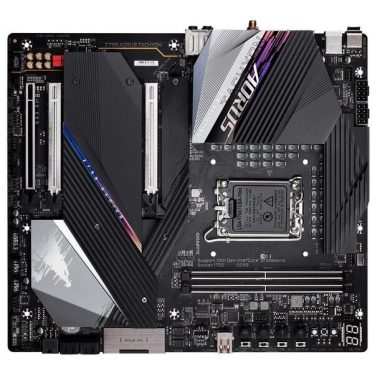
The GIGABYTE Z790 AORUS TACHYON is a motherboard designed exclusively for overclocking enthusiasts, offering exceptional capabilities with its advanced all-digital power design. Through the optimization of memory trace and the implementation of Shielded Memory Routing, the Z790 AORUS TACHYON achieves an impressive DDR5-11254 frequency, showcasing its advanced design and unmatched performance. The motherboard also features an integrated overclocking toolkit, equipped with convenient shortcut keys, toggle switches, and voltage detection functions, empowering overclockers to effortlessly push boundaries.
By leveraging the immense power of the Z790 AORUS TACHYON motherboard and the exceptional performance of AORUS DDR5 memory module, HiCookie has achieved a groundbreaking milestone. The DDR5-11254 frequency represents an unprecedented level of performance and reaffirms GIGABYTE’s commitment to delivering cutting-edge technology to the overclocking community.
The Z790 AORUS TACHYON (rev. 1.0) motherboard for Intel® Z790 Chipset is a high-end motherboard that offers exceptional performance and a wide range of features. Designed to support the 13th and 12th Generation Intel® Core™ processors, Pentium® Gold, and Celeron® processors, this motherboard provides excellent compatibility and power for demanding computing tasks.
One notable feature of the Z790 AORUS TACHYON motherboard is its support for DDR5 memory modules. With support for various memory frequencies ranging from 4000MHz to 8333(O.C)MHz, you can experience blazing-fast data transfer speeds and smooth multitasking capabilities. The motherboard accommodates up to 96GB of system memory, providing ample space for resource-intensive applications.
When it comes to graphics, the Z790 AORUS TACHYON offers integrated Intel® HD Graphics support with a HDMI port capable of a maximum resolution of 4096×2160@60 Hz. This allows for immersive visual experiences and the ability to connect high-resolution displays.
Audio performance is also a highlight of this motherboard, featuring the Realtek® ALC1220-VB audio codec. The inclusion of DTS:X® Ultra and support for high-definition audio ensures that you can enjoy crystal-clear sound for gaming, movies, and music.
Networking capabilities are robust with the inclusion of an Intel® 2.5GbE LAN chip for high-speed wired connections and an Intel® Wi-Fi 6E AX210 module. The Wi-Fi module supports various frequencies and Bluetooth 5.3, providing a reliable and fast wireless connection.
Z790 AORUS TACHYON motherboard
In terms of storage, the Z790 AORUS TACHYON motherboard offers multiple M.2 connectors and SATA ports for extensive storage options. The support for PCIe 4.0 and RAID configurations enables fast data transfer rates and improved data redundancy.
The motherboard also features a range of connectivity options, including USB Type-C® ports, USB 3.2 Gen 2×2, and USB 3.2 Gen 1 ports. These ports offer convenient and high-speed data transfer capabilities for your peripherals and devices.
The Z790 AORUS TACHYON motherboard boasts a comprehensive set of internal and external connectors, enabling you to connect various components and accessories. Additionally, it offers advanced BIOS features, dual BIOS support, and monitoring options for voltage, temperature, fan speed, and more.
The Z790 AORUS TACHYON (rev. 1.0) motherboard for Intel® Z790 Chipset is a high-performance motherboard with excellent compatibility and a wide array of features. Whether you are a gamer, content creator, or power user, this motherboard provides the reliability, power, and flexibility you need for a top-tier computing experience.
Web hosting can be understood as an agreement between you and a web hosting service provider. It entails paying a monthly fee to lease and utilize a portion of their extensive web servers. These servers, essentially powerful computers, store all your data and enable others to access and explore the content you diligently create. Imagine it as a storage unit with windows, allowing Internet users to pass by and glimpse inside.
To establish a functioning website, a web hosting account is essential, as no site can exist on the Internet without a web server. However, purchasing a web server outright can be prohibitively expensive, which is why leasing one from a web hosting provider is a much more affordable option. By utilizing web hosting services, you gain the opportunity to connect with the worldwide web without making a substantial upfront investment.
What is a shared web hosting?
Shared web hosting services are widely favored due to their affordability, making them one of the most popular types of web hosting. With shared web hosting, users gain access to a portion of a web server that is shared among hundreds of other websites. These powerful servers are divided into partitions, which are allocated to individual web hosting customers. As a shared web hosting user, you have access to a specific amount of server resources. However, if you exceed these limits, resources are borrowed from other partitions on the network to accommodate your needs. While this process may slightly impact performance and page loading times, it allows for unlimited plan features such as bandwidth and disk space.
What is a web hosting? – photo: Pixabay
Shared hosting is a distinct type of web hosting that generally costs less than other hosting plans. Many webmasters begin their hosting journey by purchasing and utilizing a shared hosting plan. Shared hosting entails a configuration where a single web server powers numerous websites owned by different webmasters, hence the term “shared” hosting.
The configuration of web servers can significantly influence website performance, especially as sites grow and experience increased traffic. Despite being a less comprehensive service, shared web hosting is sufficient to run a basic website and gain internet expertise. In fact, most experts recommend starting with shared web hosting to learn in a comfortable and affordable hosting environment before progressing to more advanced solutions. If you are embarking on your journey as a webmaster, considering shared web hosting as your first hosting plan would be beneficial.
Shared hosting – advantages!
Shared hosting offers a notable advantage in terms of its remarkably low cost. In fact, certain shared hosting plans can be as inexpensive as $3 per month, making it highly affordable, especially considering the allocated server resources for each hosting account.
With multiple websites hosted on a shared web server simultaneously, it becomes a highly profitable situation for both the hosting company and the hosting account holder. If you have a strict monthly budget to adhere to, shared web hosting is worth considering for your next online venture.
Apart from the cost benefits, shared hosting plans often come with unlimited features like unlimited bandwidth and disk space. These “unlimited” features are made possible by the ability to swiftly increase or adjust the size of the server partition to accommodate the webmaster’s needs. Shared web servers evenly distribute the server load to ensure optimal performance of the hosted sites. If you happen to exceed your plan’s usage with shared hosting, you generally receive a warning rather than an immediate bill, and most companies are willing to assist you in upgrading to a new plan.
Many shared web hosting plans also allow you to host unlimited domains, often referred to as multiple-domain hosting. If you own multiple websites and prefer to manage them within a single interface, shared hosting can be a suitable choice.
If you are uncertain about your requirements as a webmaster, opting for a shared hosting plan is a wise decision as they are highly scalable, and the risk is minimal due to their affordability.
Shared hosting – disadvantages!
Shared hosting does come with several disadvantages, making it less favorable compared to other types of web hosting. The primary drawback is the limited availability of server resources for webmasters. When multiple websites share the same web server, it can lead to decreased performance. To maintain customer satisfaction, web hosting providers enforce strict restrictions to ensure optimal server functionality. Consequently, many webmasters face limitations in building comprehensive websites.
While unexpected site crashes are uncommon in the hosting industry, shared hosting experiences regular site downtime due to server maintenance. To ensure smooth operation of numerous sites on a single server, hosting companies need to perform administrative tasks and maintenance routines. During these periods, servers are reset, causing temporary site outages lasting approximately 15 minutes to an hour. Although such resets occur once every few weeks during off-peak hours, it can be inconvenient for site owners who have significant daily traffic from different time zones, considering the global nature of the Internet.
If you require a hosting plan that supports expansion and ensures fast site performance, it is advisable to explore alternative hosting options. Shared web hosting is well-suited for new webmasters who seek hosting at a minimal cost. If you have little experience and aim to start an online business, shared web hosting may be a suitable choice. However, if you prioritize long-term success for your online endeavors, it is recommended to examine other hosting alternatives before settling on shared web hosting.
What is a dedicated hosting?
A dedicated server, as the name suggests, is a private web server exclusively dedicated to a single individual or company. Unlike shared or VPS hosting plans, the server responsible for hosting your websites is not shared with anyone else.
Dedicated web servers are highly sought-after in the web hosting industry, offering the most powerful solution for small to medium-sized online businesses. While some webmasters may opt for the cheapest hosting plan available without thoroughly considering their website’s needs, this often leads to an inevitable upgrade later on, usually at an inconvenient time for both the site owner and visitors.
Dedicated web hosting stands as the most robust hosting type currently accessible to the general public, excluding corporate cloud hosting solutions. Dedicated hosting accounts have the capability to host multiple websites simultaneously without requiring additional features or services. If your goal is to establish an online empire, a dedicated server is undoubtedly necessary.
With a dedicated server, concerns about slow-loading pages, site downtime, or limitations imposed by a shared hosting environment become obsolete. If you own a large business or multiple successful websites, upgrading to a dedicated hosting plan should be considered, particularly if you are experiencing site downtime or performance issues with your current hosting plans.
However, for those new to web hosting, it is not recommended to begin with a dedicated hosting plan as the first experience. Instead, starting with a shared or VPS hosting plan is advisable, as both options serve as suitable solutions for small to medium-sized businesses.
Privacy, power, and control are the key advantages of a dedicated hosting plan.
In addition to the impressive capabilities of a dedicated server, there are numerous other benefits associated with having a dedicated hosting plan. One notable advantage is the provision of multiple IP addresses. This allows you to assign different websites to their own unique IP addresses, rather than sharing a single IP address with numerous other website owners.
Furthermore, you have complete control over the server’s software configuration. This grants you the freedom to utilize any server-side application of your choice. In contrast to shared hosting plans with fixed software configurations, the flexibility offered by a dedicated hosting plan is highly desirable.
With a dedicated web server, you can fully unleash the potential of your site. You can add thousands of pages of content, handle unlimited levels of traffic, and enjoy fast-loading pages with minimal site downtime.
When considering dedicated server plans, it’s important to understand that there are two distinct types: managed and unmanaged. These options differ significantly in terms of ease of use. The choice between managed and unmanaged dedicated hosting depends on your experience with web servers and your specific needs as a webmaster.
If you have limited or no experience with server management, a fully managed dedicated web hosting account is highly recommended. While managed hosting plans may be slightly more expensive than unmanaged ones, they include on-site technical support and server administration. With a managed dedicated hosting plan, you can relax and leave the complex issues to the hosting company, as they will take care of the necessary tasks.
On the other hand, if you have a tight budget and possess experience with web servers, you may consider opting for unmanaged hosting. Unmanaged hosting is more cost-effective, mainly because it doesn’t include additional support costs. With an unmanaged dedicated hosting plan, you will be responsible for handling all administrative tasks yourself, including server maintenance, regular resets, and ensuring smooth operation. If you don’t have the financial resources to invest in a fully managed dedicated web hosting plan but still require ample server resources, you may want to explore the advantages of a VPS hosting plan instead. Additionally, cloud hosting is another alternative for those seeking comprehensive web servers without the cost or maintenance requirements of a dedicated server.
The JVC KW-Z1000W digital multimedia receiver is a cutting-edge car audio system that offers a wide range of features and functionalities to enhance your driving experience. With its sleek design, advanced connectivity options, and customizable display, this receiver stands out as a top choice for car enthusiasts.
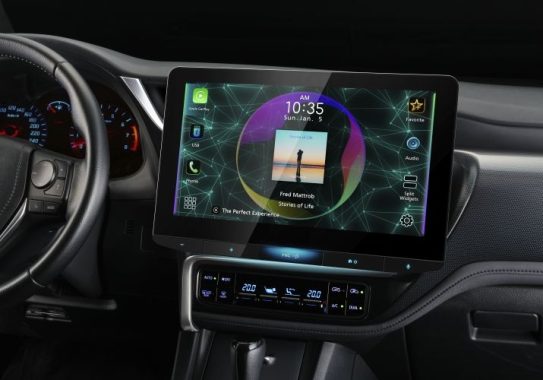
One of the standout features of the KW-Z1000W is its impressive 10.1″ floating capacitive touchscreen display. The large size ensures easy readability and smooth navigation through menus and settings. Moreover, the depth and height of the display can be adjusted to provide dash vent and control access, allowing for a seamless installation process tailored to your specific vehicle.
JVC KW-Z1000W digital multimedia receiver
Connectivity is a key strength of this multimedia receiver. With Wi-Fi certification, you can seamlessly connect to your home or other accessible networks. Furthermore, the receiver is Waze-ready with Apple CarPlay or Android Auto, enabling you to integrate your smartphone seamlessly and access navigation apps and other features.
The customizable display background and live wallpaper options allow you to personalize the look of your receiver, adding a touch of style to your car’s interior. Additionally, the manual tilt angle adjustment feature ensures optimal visibility, with a range from -10° to +45°.
When it comes to audio playback, the KW-Z1000W excels. It plays high-resolution FLAC and WAV files up to 24-bit/192 kHz, as well as DSD files from USB drives, delivering an exceptional listening experience. The built-in HD Radio tuner expands your radio options, providing access to high-quality digital broadcasts.
The smartphone integration features of this receiver are impressive. Whether you use Apple CarPlay or Android Auto, you can enjoy a seamless connection to your smartphone, either wirelessly or wired. Additionally, Android users can benefit from wireless and wired mirroring, while iPhone users can enjoy the benefits of wired mirroring.
Bluetooth functionality is another strong point of the JVC KW-Z1000W. With hands-free calling and audio streaming, you can stay connected and enjoy your favorite music without distractions. The JVC Streaming DJ feature takes it a step further, allowing you to stream and control music from up to five paired smartphones simultaneously. The built-in LDAC technology ensures high-resolution wireless audio streaming with select Android phones, delivering exceptional sound quality.
The audio/video features of the KW-Z1000W provide a great deal of control over your listening experience. It plays USB memory devices, and the 13-band parametric equalizer with digital time alignment allows you to fine-tune the sound to your preferences. The K2 technology further enhances the digital sound for all music sources, resulting in rich and immersive audio quality. The subwoofer level, phase, and low-pass crossover controls give you the flexibility to tailor the bass response to your liking.
In terms of expandability, the KW-Z1000W is compatible with a wide range of accessories. It can be connected to a SiriusXM satellite radio tuner for additional radio options. The receiver offers multiple inputs, including rear USB input, rear A/V input (mini), rear HDMI input, and four camera inputs, making it highly versatile. The outputs include a rear A/V output (mini) and 6-channel preamp outputs (5-volt front, rear, subwoofer), allowing you to connect external amplifiers or other audio equipment.
It is important to note that the monitor dimensions are 10.313″ x 7.125″, so before purchasing, make sure to check for possible interference with your dash to ensure a proper fit.
To ensure safety and compliance, the JVC KW-Z1000W requires a wired connection to the parking brake. This connection is necessary to access settings and other features that involve video display. The receiver also features a built-in internal amp that delivers 22 watts RMS/50 peak x 4 channels, providing ample power for most car audio setups.
JVC KW-Z1000W digital multimedia receiver
The KW-Z1000W is compatible with most factory steering wheel audio controls, although an adapter may be required for proper integration. Additionally, it works seamlessly with the iDataLink Maestro module, retaining factory features in a wide selection of vehicles. Moreover, the receiver displays engine performance and other vehicle data on the touchscreen, giving you valuable information at a glance.
In conclusion, the JVC KW-Z1000W digital multimedia receiver is a feature-packed entertainment hub for your car. With its expansive display, advanced connectivity options, customizable features, and impressive audio capabilities, it offers a complete multimedia experience. Whether you’re a music enthusiast or a tech-savvy driver, this receiver delivers on all fronts, making it a top choice for upgrading your in-car entertainment system. JVC KW-Z1000W price: $1,249.95
The Humax Aura offers a variety of functionalities that cater to different individuals, and its pricing seems to be attractive to a wide range of customers. Its primary use is as a Freeview Play recorder, equipped with various internal storage options capable of capturing hours of live television in Full HD and standard definition.
Moreover, the Aura features the Android TV platform, enabling it to function as a Chromecast device with added benefits. This means you can access over 5000 apps and streaming services, delivering an abundance of 4K content to your television or projector. Additionally, the device includes USB ports, support for hi-res audio, and 3D home cinema codecs, allowing you to utilize it for local playback of film files. It truly offers a multitude of capabilities.
Humax Aura
In terms of pricing, the Humax Aura comes in two models: the 1TB variant priced at £249, which can store up to 250 hours of HD or 500 hours of SD programming, and the 2TB model priced at £279, offering storage for up to 500 hours of Full HD or 1000 hours of SD programming.
Physically, the Aura is a compact box measuring 26cm by 20cm, occupying a similar space to your Wi-Fi router. Its glossy black body features an LED strip underneath that changes color, indicating its power status and whether it’s recording or in standby mode.
While the Aura impresses with its front-end design, the back of the device is where the real business happens. It provides a single HDMI 2.1-out port, along with USB 3.0 and USB 2.0 (Type A) sockets for local media connectivity. Additionally, there’s an optical audio-out port and a LAN connection for those who prefer using a wired connection instead of relying on 2.4/5GHz Wi-Fi.
The Aura’s remote control is fully equipped with dedicated buttons for all essential functions, including shortcuts to streaming services, recordings, the TV guide, the Freeview Play platform, and the Android TV homepage. To utilize the Google Assistant voice system, the remote needs to be paired with the Aura box via Bluetooth.
Thanks to its three Freeview Play tuners, the Humax Aura grants access to over 70 non-subscription live TV channels and over 20,000 hours of on-demand entertainment through catch-up services like BBC iPlayer, ITV Hub, All 4, and My5. These tuners also allow you to pause, rewind, and record up to four channels while simultaneously watching a fifth live channel.
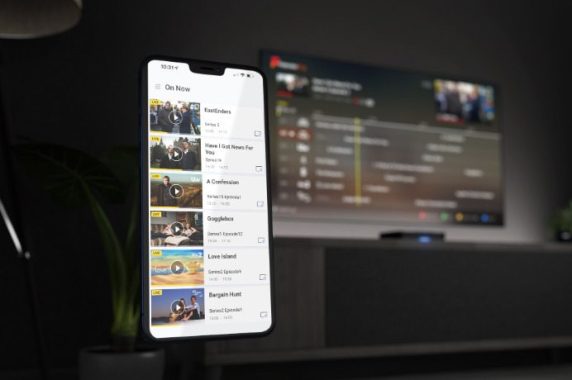
Unlike its predecessor, the FVP-5000T, the Aura lacks a built-in app for streaming live TV or recordings from the box to other devices within your home. However, Humax has announced plans to add DLNA support to the Aura through a future firmware update. In the meantime, the Aura mobile app serves as a convenient tool, providing a comprehensive view of the electronic program guide (EPG) on your mobile screen. With the app, users can schedule recordings, watch saved content, and even enjoy live TV on their mobile devices, making it ideal for keeping up with shows like Countdown while making a quick tea break.
The Humax Aura enhances its big-screen experience with the inclusion of Android TV, granting access to approximately 5000 apps available through Google Play. This encompasses popular subscription services like Disney+ and Amazon Prime Video, as well as UK-specific apps such as BT Sport and UKTV Play.
To play local media or connect a NAS drive from your home network, you’ll need to download third-party apps like VLC or Plex. With support for 4K HDR (HDR10 and HLG) and 3D audio codecs, the Aura has the potential to deliver excellent performance when playing high-quality movie files.
The combination of a quad-core 1.8GHz CPU and 3GB RAM ensures a snappy and cohesive user experience. From the responsive remote to the on-screen navigation, the device caters to your commands smoothly.
However, the integration of Freeview Play and Android TV 9.0 proves to be a bit challenging. Each platform has its own home page experience, creating confusion for users about which one to use. Some apps are available on both platforms, while others are exclusive to one. Additionally, each platform has its own settings menus. Although the remote shortcuts provide some convenience, the poor integration of the two interfaces remains a notable drawback.
Nevertheless, the Aura’s compromise of sacrificing a touch of detail for better blending seems like a well-considered decision by Humax. The resulting visuals showcase a natural aesthetic, with the bright blue TV shelf exhibiting a sense of complexity. When upscaled to 4K, the picture feels believable and offers a pleasing viewing experience.
When switching to SD content, such as the BBC News channel, the Aura’s slightly softer approach alleviates the harshness and blockiness typically associated with low-resolution content. It smooths out unwanted edges and adds subtlety to clothing colors and skin tones, enhancing the overall visual quality.
One minor downside is the complexity of the dynamic range and refresh rate content matching system, which may not be user-friendly for everyone. Incorrect settings can result in juddery motion and jumping streams. While adjustments can be made using the remote during viewing, it is not an easy task. Ideally, the Aura should have an automatic matching feature similar to quality standalone streamers.
In terms of sound, the Aura delivers a spacious and immersive experience, particularly with vocals and guitars. The acoustics of the recording room are captured exceptionally well, and the instruments exhibit dynamic range and character. The music feels complete, and the excitement is maintained throughout. While some streamers at this price range may offer slightly crisper rhythm, they often sacrifice the Aura’s level of excitement.
The Humax Aura performs its primary function admirably as an excellent Freeview recorder, supporting both Full HD and standard definition. It features an easy-to-use TV guide, ample storage space, and convenient remote recording capabilities. However, compared to its predecessor, the Aura falls short in delivering the promised extras effectively, despite the higher price tag.
The omission of the most popular app and the subpar handling of streamed TV and film content are notable issues. The inclusion of the Android TV platform also slightly compromises the overall user interface experience.
Download the Aura app to a compatible smart device and stream Live TV or recordings around the house.
Set reminders, schedules and recordings through the Humax Aura App, or download recordings straight to your device to take on the go.
Available for both Android & iOS.
For those seeking a comprehensive and superior performance, opting for the cheaper but still impressive Humax FVP-5000T alongside a separate Google Chromecast with Google TV is a better alternative. This combination provides a more complete smart offering with improved picture quality.
Nevertheless, if you prefer a single-box solution for TV recording and video streaming, the Humax Aura remains a solid choice.
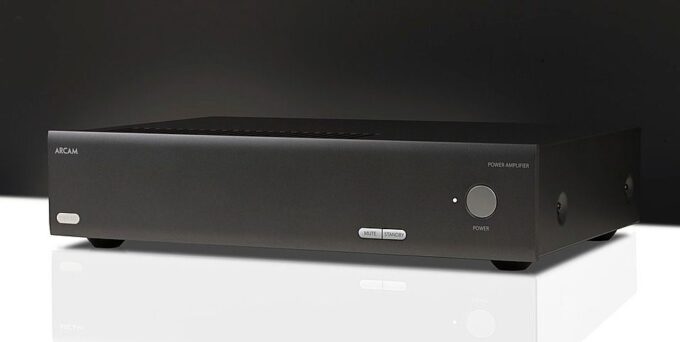
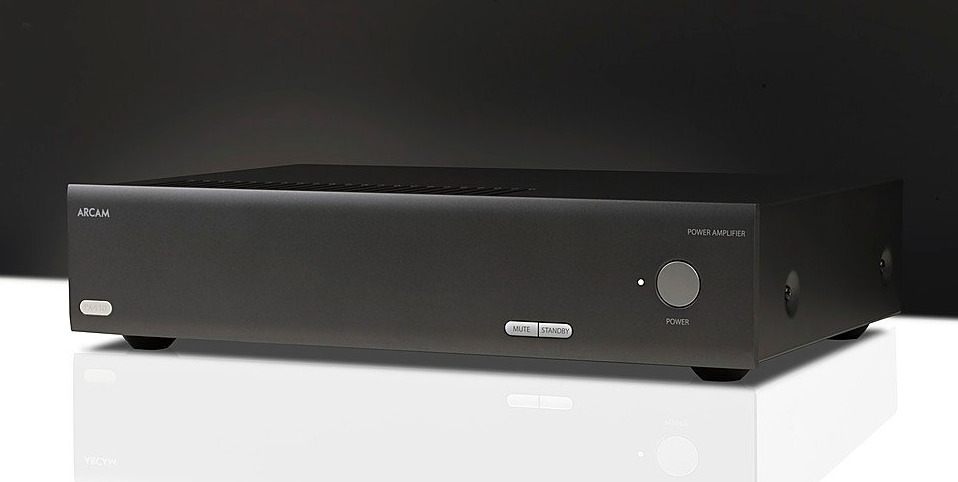
Arcam PA410 – Offering a multitude of connectivity options, this 4-channel power amplifier is designed to enhance your audio experience when paired with Arcam’s line of AV receivers. By simply connecting it to your existing setup using RCA phono leads, you can expand your speaker configuration, resulting in a more immersive sound. With the ability to support Dolby 7.1.4, DTS:X, and other surround sound formats, this amplifier takes advantage of seven surround speakers and four ceiling speakers, creating a captivating audio environment.
Upgrade for unparalleled surround sound For those seeking the ultimate surround sound experience, the PA410 is a perfect match for the AVR20, AVR21, AVR30, and AVR31 models. By adding two of these power amps, you can achieve a sensational 9.1.6 surround sound setup, with nine speakers positioned around the room and six in the ceiling. This configuration is particularly suited for larger rooms, providing an immersive audio experience that is hard to match.
Enhance your AV40 or AV41 Compatible with Arcam’s AV40 and AV41 AV processors, the PA410 allows you to customize your channel configuration according to your preferences. Whether you choose to pair it with other PA410 power amps or combine it with different Arcam power amps, this flexibility enables you to create a tailored setup. Furthermore, by utilizing Arcam products together, you can ensure optimal system synergy and sonic harmony throughout your amplification.
Impressive stereo performance In addition to its surround sound capabilities, the PA410 excels as a high-quality stereo amplifier. When switched to bridged mode, it provides a power output of 60 watts per channel (90 watts at 4 ohms), making it suitable for most room sizes. Simply connect your preferred pre-amp or source with a built-in volume control, and you’re ready to enjoy the enhanced audio performance.
Exemplary sound quality Thanks to its efficient Class AB amp design, the PA410 delivers the renowned Arcam sound signature, characterized by its smooth, powerful, and natural audio reproduction. The toroidal power supply and paralleled transistor output stages ensure ample power delivery. Additionally, the acoustically damped chassis and high-quality components minimize distortion, resulting in an optimal listening experience.
Perfect for professional installations Equipped with a wide range of sockets, the PA410 is ideal for professional audio installations. With RS232 control and 12V in/out triggers, seamless integration into sophisticated systems becomes effortless. Installers can also take advantage of firmware updating capabilities via USB or Ethernet connections, ensuring the amplifier operates at its full potential.
Elevate your Arcam AV system with the PA410 4-channel power amp, and enjoy an audio experience that surpasses expectations.
Introducing Root Genius, a revolutionary rooting application that enables you to unlock the hidden potential of your Android phone. With Root Genius, you can easily and safely root your device, allowing you to make significant changes to its default factory settings and explore a whole new world of possibilities.
Whether you’re a beginner or an advanced user, Root Genius caters to your needs and ensures a seamless rooting experience. By utilizing this user-friendly utility, you gain access to a range of custom settings that are typically unavailable to standard Android users. You can modify your operating system, install custom ROMs, and even experiment with older or unreleased versions.
One of the standout features of Root Genius is its simplicity and efficiency. Unlike other rooting tools, it doesn’t require any complex installation processes or external connections to a PC. With just a single click, you can initiate the rooting process directly from your mobile device. The application supports a wide array of Android phone models, including the latest ones, making it accessible to a broader user base.
When it comes to safety, Root Genius prioritizes the integrity of your device. It is designed to minimize potential risks and safeguard your phone throughout the rooting process. Unlike some other applications, Root Genius doesn’t come bundled with adware or hidden applications, providing a clean and secure experience.
It’s worth noting that while the latest version of Root Genius is currently available only in Chinese, an earlier version (2.2.84) supports both English and Chinese languages. Before proceeding with the root, it’s essential to check the compatibility with your device.
For those who prefer a PC-based rooting experience, Root Genius offers a PC version that connects to your Windows computer. This version ensures the highest level of stability and is equipped with extensive script support and updated features. The PC version doesn’t require any installations and can be easily executed by connecting your device to the computer.
Root Genius photo
Root Genius is a powerful tool that grants you access to hidden settings and features, allowing you to personalize your Android phone to the fullest. Its portable nature, one-click rooting functionality, compatibility with numerous Android devices, and commitment to security make it a top choice among rooting applications. Download Root Genius today and embark on a journey to unleash the true potential of your Android device.
Benefits of Root Genius Root Tool Download
By downloading and using Root Genius, you unlock a multitude of advantages that enhance your Android experience:
Flash Custom ROMs and Kernels: Root Genius enables you to install custom ROMs and kernels, expanding your device’s functionality and customization options.
Access to Powerful Apps and Tweaks: With root access, you can download and utilize thousands of root-only apps and tweaks, opening up a world of advanced features and capabilities.
Remove Preinstalled Crapware: Root Genius allows you to remove unwanted preinstalled applications, freeing up valuable storage space and optimizing system performance.
Customize Android Skin and Advanced Modifications: Take control of your Android device’s appearance by changing the Android skin and making advanced modifications using Root Genius.
Upgrade to the Latest Android OS: With Root Genius, you can upgrade your Android operating system to the latest version, enjoying the benefits of new features and improvements.
Automate the Android System: Root Genius empowers you to automate various tasks and functions within the Android system, streamlining your device’s operation.
Block Annoying Ads: Say goodbye to intrusive advertisements by utilizing Root Genius to block ads across all applications, providing a more pleasant and uninterrupted user experience.
Complete Backup and Restore: Root Genius facilitates comprehensive backup and restoration, including application backups, ensuring your data is protected and easily recoverable.
Admin Rights and Performance Boost: By granting complete administrative rights, Root Genius significantly improves overall device performance, allowing you to maximize the capabilities of your Android device.
In summary, Root Genius Root Tool Download empowers you to unleash the full potential of your Android device, providing customization options, performance improvements, and access to a vast array of powerful applications and features.
Safety Precautions for Root Users
Rooting your Android device grants you complete administrative privileges, allowing you to make internal changes and modifications to the stock settings. However, it’s important to understand that rooting involves bypassing Android’s security measures, which introduces potential security risks. Therefore, exercising caution is crucial when making changes after rooting your device.
With great power comes great responsibility. Rooting provides numerous advantages beyond the limitations of the stock framework, but it also exposes your device to security threats. To ensure a safe rooting experience, it is recommended to use a reliable root app such as the Free Root Genius Download. Additionally, it is essential to perform a comprehensive backup of all your data before initiating the rooting process, as there is a risk of potential data loss. Proceed with caution and prioritize the safety of your device and its contents.
The HyperX Cloud III gaming headset is an exceptional choice for gamers who want a high-quality headset without breaking the bank. Priced at just under $100, this headset offers a range of features that make it a great investment.
One of the standout features of the HyperX Cloud III is its iconic design, which is both stylish and comfortable. The headset is built to provide excellent comfort, allowing users to enjoy long gaming sessions without discomfort. The soft leatherette ear cushions provide a cozy fit that feels snug on the head without causing headaches.
HyperX Cloud III gaming headset
In terms of audio performance, the HyperX Cloud III delivers exceptional gaming audio. The headset offers a spatial sound stage, immersing users in their gaming environment. However, it’s worth noting that the virtual surround sound is achieved through PC software rather than onboard hardware, which means the audio experience may vary depending on the platform you use.
The HyperX Cloud III is compatible with all modern gaming platforms, including smartphones, PCs, PS5, Nintendo Switch, and Xbox Series X. It features multiple connectivity options such as AUX, USB Type-A, and USB Type-C, ensuring versatility and ease of use across different devices.
The headset comes with a two-year limited warranty, providing peace of mind to users in case of any manufacturing defects or issues.
When it comes to the design, the HyperX Cloud III features a sturdy build with a swivel attachment for the cups and a red metal piece for adjusting the headband. The headband itself is made of thick leatherette material, which not only adds to the headset’s durability but also enhances its aesthetic appeal.
In terms of accessories, the package includes a female AUX to male USB Type-C connector, which comes pre-attached to a female USB Type-C to male USB Type-A adapter. Additionally, there’s a microphone that plugs directly into the headset.
HyperX Cloud III gaming headset
To unlock the full potential of the headset’s audio capabilities, users are advised to download the DTS Sound Unbound software, which is compatible with PC. The software enables DTS:X audio for the headset, allowing users to choose between balanced or spacious audio settings. However, it’s worth noting that the software lacks EQ settings. For EQ adjustments, you can turn to the HyperX NGENUITY app, although some gamers may find the app to be buggy and slow.
The HyperX Cloud III gaming headset is a perfect example of simplicity and durability. Its lightweight design feels flexible and sturdy, with no creaking or groaning during use. The large ear cups, adorned with plush leatherette cushions, are connected to the headband through thin metal yokes, creating a minimalist yet appealing look. The absence of excessive stylings and complicated features is refreshing, and there are no flashy lights, except for a small red light near the mic to indicate mute status – a commendable addition for an analog headset.
Navigating the headset’s controls is straightforward, with a simple volume dial on the right earcup that offers a good grip and precise adjustment. However, the small mic mute button on the back of the left earcup is harder to locate and lacks a locking mechanism to indicate its status, making the mute indicator light even more important.
HyperX has maintained the quality of its previous iterations with the Cloud III headset. Whether in games, movies, or music, the audio experience is pleasing and well-rounded. While it may not deliver groundbreaking, mind-blowing sound, it more than satisfies at its $100 price point. The headset offers a balanced presentation, with ample bass for an immersive feel and strong reproduction of mids and treble for clear and detailed audio. Volume is not an issue either, as the headset can reach higher levels than most users would desire.
However, the processing for the spatial sound feature falls short. It introduces unusual and disruptive artifacts to the audio, diminishing the overall experience. This may not be a significant drawback for those using the Cloud III on platforms other than PC, but it’s disappointing to pay for surround sound functionality and not fully benefit from it, even on PC. Spatial audio features rarely impress me, but it’s rare for them to degrade audio quality like this. On a positive note, the microphone on the Cloud III is exceptional for its price. A good microphone can make a significant difference, surpassing the limited performance of wireless headsets, including high-end models. The HyperX Cloud III’s microphone excels at reducing background noise from peripherals like the mouse, keyboard, and fan, capturing the user’s voice with clarity and a natural tone.
The HyperX Cloud III may not be the ultimate gaming headset, but it offers excellent value at its $100 price tag. It is built to last, compatible with various platforms, and provides reliable audio output and microphone performance. If you’re seeking a no-frills option without compromising quality, the HyperX Cloud III is a solid choice.
Technical Specs
Driver: Dynamic, 53mm with Neodymium magnets
Form Factor: Over ear, circumaural, closed back.
Frequency Response: 10Hz-21kHz
Sensitivity: -42dBV (0dB=1V/Pa at 1kHz)
T.H.D: < 2%
Frame Type: Aluminum
Ear Cushions: Memory foam and premium leatherette
Microphone Specification
Element: Electret condenser microphone
Polar Pattern: Uni-directional, Noise-cancelling
Sensitivity: -42dBV (0dB=1V/Pa at 1kHz)
Connections and Features
USB Specification: USB 2.0
Bit-Depth: 16 bit, 24 bit
Audio Controls: Onboard audio controls
Physical Specifications
Weight: 0.67lb; Weight with microphone: 0.70lb
Cable Length (imperial) and type: 3.93ft headset cable; 4.26ft USB dongle cable | USB cable
In the Box
Gaming Headset, Detachable Microphone, USB Dongle, USB-C to USB-A Adapter, Quick Start Guide