Home Blog Page 50

Review: AORUS P1200W 80+ Platinum Modular PSU

0

The AORUS P1200W 80+ Platinum Modular PSU is a high-performance power supply unit that offers excellent power delivery and efficiency. With a maximum output capacity of 1200W, this PSU is suitable for demanding systems and can easily handle power-hungry components like high-end graphics cards and processors.

One of the standout features of this PSU is its 80 PLUS Platinum certification, which indicates a high level of efficiency. At typical loads, the PSU operates at an impressive 92% efficiency, ensuring that minimal power is wasted as heat and reducing energy consumption. This makes it not only environmentally friendly but also helps keep electricity bills in check.
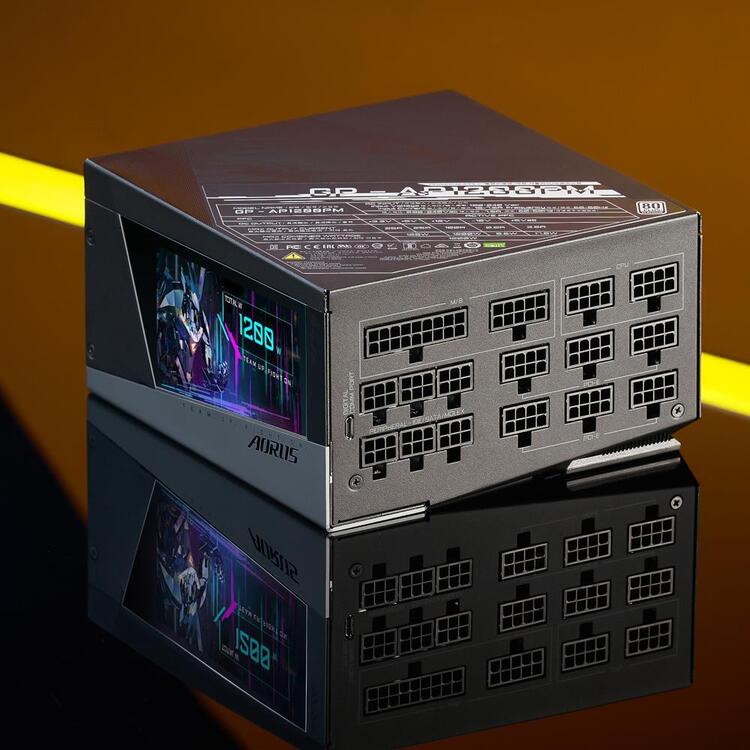
AORUS P1200W 80+
AORUS P1200W 80+

The build quality of the AORUS P1200W is top-notch. It comes in the popular Intel Form Factor ATX 12V v2.31, ensuring compatibility with a wide range of systems. The modular design allows for easy cable management, as you can connect only the cables you need, reducing clutter and improving airflow within your PC case. The all-black flat cables further enhance the clean and sleek appearance.

To maintain stable operation and protect your components, the PSU is equipped with various safety features, including over-voltage protection (OVP), over-power protection (OPP), short-circuit protection (SCP), under-voltage protection (UVP), over-current protection (OCP), and over-temperature protection (OTP). These safeguards provide peace of mind, knowing that your valuable hardware is well-protected.

The AORUS P1200W PSU also boasts a 140mm double ball bearing fan for efficient cooling. The fan operates quietly, ensuring a pleasant computing experience without excessive noise. The power good signal is responsive, with a 100-150ms delay, and the hold-up time is more than sufficient at over 16ms, providing stable and reliable power delivery to your system.
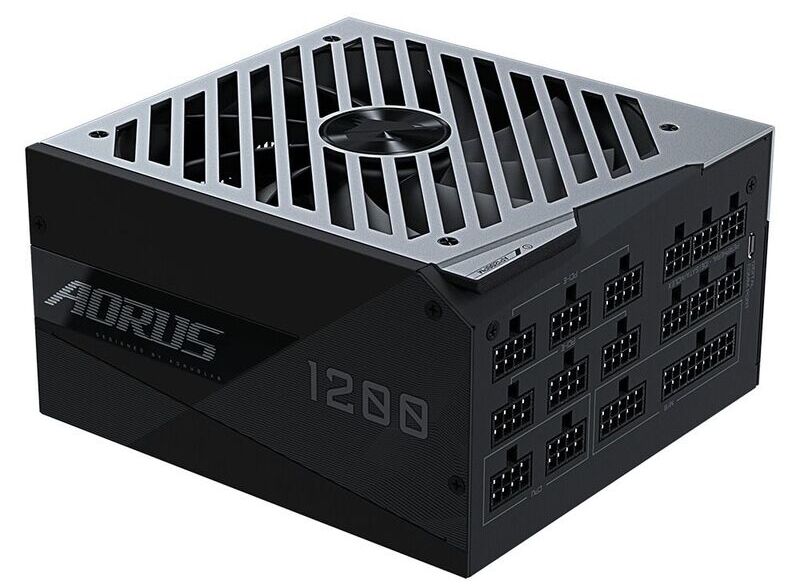
AORUS P1200W 80+
AORUS P1200W 80+

In terms of connectivity, the PSU offers a good selection of cables and connectors. It includes an ATX/MB 20+4 Pin connector, two CPU/EPS 4+4 Pin connectors, ten PCI-e 6+2 Pin connectors, and sixteen SATA connectors, along with six 4-pin peripheral connectors and two 4-pin floppy connectors. This comprehensive range of connectors ensures compatibility with a wide array of components, allowing for easy installation and expansion. Video: YouTube/AORUS

The onboard digital LCD monitor can display the health status of the power supply in real time along with custom text, images, GIFs, and MP4 videos, adding a sense of personality and style to your rig. You can also adjust the lighting effects through the free to download RGB FUSION 2.0 software.

The AORUS P1200W 80+ Platinum Modular PSU is a fantastic choice for users who require a high-wattage power supply with exceptional efficiency and reliable performance. Its modular design, robust construction, and comprehensive set of safety features make it a reliable and future-proof option for powering high-end gaming systems or workstations. With AORUS’s reputation for quality and performance, this PSU is a solid investment for enthusiasts and professionals alike.

AORUS P1200W 80+ PLATINUM MODULAR pros and cons

Pros of the AORUS P1200W 80+ PLATINUM MODULAR PSU:

High power output: With a capacity of 1200W, this PSU can handle power-hungry components and demanding systems without any issues.

80 PLUS Platinum certification: The PSU boasts excellent energy efficiency, operating at 92% efficiency at typical loads. This translates to lower electricity bills and reduced environmental impact.

Modular design: The modular cables allow for easy cable management and improved airflow within the PC case. You can connect only the necessary cables, reducing clutter and improving the overall aesthetics.

High-quality build: The PSU is built with Intel Form Factor ATX 12V v2.31, ensuring compatibility with a wide range of systems. The all-black flat cables enhance the sleek appearance.

Comprehensive safety features: The PSU comes equipped with various protection mechanisms, including OVP, OPP, SCP, UVP, OCP, and OTP. These safeguards protect your components from electrical damage and ensure stable operation.

Quiet operation: The 140mm double ball bearing fan operates quietly, providing efficient cooling without excessive noise.

Responsive power delivery: The power good signal has a quick response time of 100-150ms, and the hold-up time exceeds 16ms, ensuring stable and reliable power delivery to your system.

Cons of the AORUS P1200W 80+ PLATINUM MODULAR PSU:

Overkill for average systems: The 1200W power capacity may be excessive for most average gaming or productivity setups, leading to higher cost without fully utilizing the PSU’s capabilities.
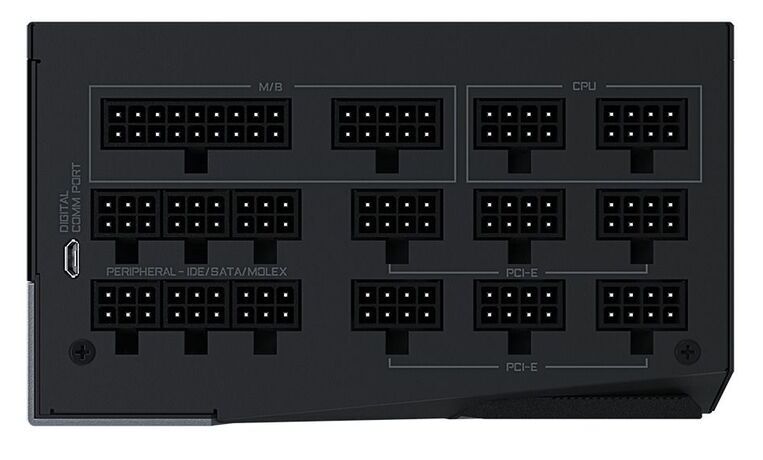
AORUS P1200W 80+
AORUS P1200W 80+ photos Gigabyte

Large physical dimensions: The PSU measures 150 x 160 x 86mm, which may pose compatibility issues with smaller PC cases. Ensure that your case has enough space to accommodate this PSU before purchasing.

Price: The AORUS P1200W PSU is likely to have a higher price point due to its high wattage and platinum efficiency rating. It may not be the most budget-friendly option for users on a tight budget.

The AORUS P1200W 80+ PLATINUM MODULAR PSU is a high-quality power supply unit that offers excellent performance, efficiency, and safety features. It’s a suitable choice for enthusiasts and professionals who require a robust and future-proof power solution for their high-end systems. However, users with average or smaller systems may find its power capacity excessive and might consider more cost-effective alternatives.

This power supply unit is a single-rail 12V design, so users don’t need to worry about which cables are powering high-current devices like graphics cards. It offers a 1200W output capacity and supports an input frequency of 50-60Hz, making it suitable for global use. Additionally, it supports a wide input range of 100-240VAC, ensuring compatibility worldwide.

The unit features Active PFC (Power Factor Correction) and meets the Intel ATX specification v2.31. It’s equipped with a 140mm cooling fan that operates quietly while maintaining optimal performance. A unique feature allows the fan to spin in reverse, helping to clear out any accumulated dust. With an 80Plus Platinum rating, the unit achieves peak efficiency of 92% at 50% load with 120VAC input or 94% with 240VAC. It also comes with a range of power protections, which are detailed in the image above.

Pricing: The AORUS P1200W is priced at $309.99 and includes a 10-year warranty.
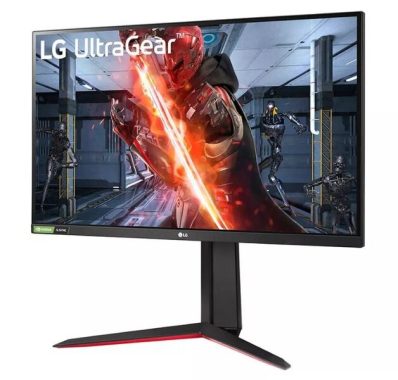
Monitor comparison: ASUS TUF VG27A vs. LG 27GN850-B

0

Today, having a high-quality monitor is essential for an immersive and visually stunning computing experience. Two popular choices in the market are the ASUS TUF VG27AQ and the LG 27GN850-B. Both monitors offer impressive specifications and features, making it challenging to choose between them. This review aims to compare and contrast the key aspects of these monitors to help you make an informed decision.

Design and Build Quality: Starting with the design, the ASUS TUF VG27AQ features a sleek and modern appearance with thin bezels, providing an edge-to-edge display. The stand is adjustable, allowing you to find the perfect viewing angle. On the other hand, the LG 27GN850-B also boasts a minimalist design and slim bezels, exuding a premium look. It comes with a versatile stand that offers ergonomic adjustments as well. Overall, both monitors exhibit solid build quality and aesthetics.

ASUS TUF VG27AQ
ASUS TUF VG27AQ photo

Display Performance: When it comes to display performance, both the ASUS TUF VG27AQ and the LG 27GN850-B offer stunning visuals. The ASUS TUF VG27AQ boasts a 27-inch IPS panel with a WQHD resolution (2560 x 1440 pixels), delivering sharp images and vibrant colors. It supports a 165Hz refresh rate, providing smooth and fluid motion during fast-paced gaming. Additionally, it supports Adaptive-Sync technology for tear-free gaming.

The LG 27GN850-B also features a 27-inch Nano IPS panel with a WQHD resolution, resulting in excellent picture quality and accurate colors. It supports a higher refresh rate of 144Hz, which is still highly responsive for gaming. Like the ASUS monitor, it supports Adaptive-Sync (compatible with both AMD FreeSync and NVIDIA G-Sync), ensuring a seamless gaming experience.

Connectivity and Additional Features: In terms of connectivity options, both monitors offer a similar range of inputs, including DisplayPort and HDMI ports. The ASUS TUF VG27AQ has the added advantage of having two HDMI ports, which can be convenient if you want to connect multiple devices simultaneously. It also includes a USB hub for easy connectivity with peripherals. The LG 27GN850-B features a single HDMI port, but it compensates by including a USB-C port, allowing for display and power delivery in a single cable.

LG 27GN850-B
LG 27GN850-B – photo

Both monitors come equipped with various additional features to enhance the user experience. The ASUS TUF VG27AQ incorporates ASUS GamePlus and GameVisual technologies, offering customizable gaming enhancements and optimized picture settings. The LG 27GN850-B includes features like Dynamic Action Sync and Black Stabilizer, enhancing gaming performance and visibility in dark scenes.

Pros of ASUS TUF VG27AQ monitor:

  • Display Quality: The ASUS TUF VG27AQ features a 27-inch IPS panel with a WQHD resolution, delivering sharp and vibrant visuals. The IPS technology ensures wide viewing angles and accurate color reproduction, making it suitable for various tasks including gaming, multimedia, and content creation.
  • High Refresh Rate: With a refresh rate of 165Hz, the VG27AQ offers smooth and fluid motion, reducing motion blur and providing an immersive gaming experience. It is especially beneficial for fast-paced games that require quick reactions.
  • Adaptive-Sync Technology: The monitor supports Adaptive-Sync, which is compatible with both AMD FreeSync and NVIDIA G-Sync. This technology synchronizes the monitor’s refresh rate with the graphics card, eliminating screen tearing and stuttering for a seamless gaming experience.
  • Ergonomic Design: The VG27AQ comes with an adjustable stand that allows users to customize the height, tilt, swivel, and pivot according to their comfort. This ergonomic design ensures optimal viewing angles and reduces strain during long gaming or working sessions.
  • Connectivity Options: The monitor offers multiple connectivity options, including DisplayPort 1.2, HDMI 2.0, and two HDMI 1.4 ports. This versatility enables users to connect various devices simultaneously, such as gaming consoles, PCs, and multimedia devices.

Cons of ASUS TUF VG27AQ:

  • Limited HDR Performance: While the VG27AQ supports HDR10, its HDR performance is not as impressive compared to monitors specifically designed for high dynamic range content. The peak brightness and local dimming capabilities may be limited, resulting in a less impactful HDR viewing experience.
  • Average Contrast Ratio: The monitor’s contrast ratio, while decent, may not match the deep blacks and bright whites offered by high-end monitors. This can affect the overall image depth and contrast in certain scenes, particularly in darker environments.
  • Mediocre Built-in Speakers: The VG27AQ comes with built-in speakers, but their audio quality is generally considered average. For a more immersive audio experience, it is recommended to use external speakers or headphones.
  • Price: As a premium monitor with desirable features, the ASUS TUF VG27AQ tends to have a higher price tag ($469.00) compared to entry-level or budget monitors. It may not be the most affordable option for those on a tight budget.
  • Lack of USB-C Connectivity: Unlike some other monitors in its class, the VG27AQ does not include a USB-C port, which may be a drawback for users who rely on USB-C for video, data, and power delivery in a single cable.

Pros of LG 27GN850-B:

  • Nano IPS Display: The LG 27GN850-B features a 27-inch Nano IPS panel that offers excellent color accuracy and wide viewing angles. This display technology delivers vibrant and lifelike colors, making it well-suited for content creators, graphic designers, and anyone who values accurate color representation.
  • High Refresh Rate: The monitor boasts a refresh rate of 144Hz, ensuring smooth and fluid motion during fast-paced gaming. It reduces motion blur and provides a more immersive gaming experience, making it ideal for gamers who prioritize responsiveness.
  • Adaptive-Sync Technology: The LG 27GN850-B supports both AMD FreeSync and NVIDIA G-Sync compatibility, allowing for tear-free gaming by synchronizing the monitor’s refresh rate with the graphics card.
  • USB-C Connectivity: One notable advantage of the LG 27GN850-B is the inclusion of a USB-C port. This versatile port enables video, data, and power delivery in a single cable, making it convenient for connecting laptops, tablets, and other USB-C devices.
  • Additional Gaming Features: The monitor incorporates features such as Dynamic Action Sync, which minimizes input lag, and Black Stabilizer, which enhances visibility in dark scenes. These features contribute to an improved gaming experience, providing better visibility and responsiveness.

Cons of LG 27GN850-B:

  • Average Contrast Ratio: While the LG 27GN850-B offers respectable image quality, its contrast ratio may not match the deep blacks and bright whites seen on high-end monitors. This can lead to a slight loss of image depth and contrast, particularly in dark scenes.
  • HDR Performance: While the monitor supports HDR10, its HDR performance may not be as impressive as dedicated HDR displays. The peak brightness and local dimming capabilities may be limited, resulting in a less impactful HDR experience.
  • Integrated Speakers: Similar to many monitors, the built-in speakers on the LG 27GN850-B are not known for their exceptional audio quality. They are sufficient for basic audio playback, but for a more immersive audio experience, external speakers or headphones are recommended.
  • Price: As a premium monitor, the LG 27GN850-B is likely to come with a higher price point compared to entry-level options. This might make it less accessible for those on a tight budget.
  • Limited Connectivity Options: While the LG 27GN850-B offers a DisplayPort 1.4 and HDMI 2.0 ports, it does not have multiple HDMI ports like some other monitors. This may be a minor inconvenience if you need to connect multiple HDMI devices simultaneously.

After a thorough comparison, it is clear that both the ASUS TUF VG27AQ and the LG 27GN850-B are exceptional monitors that excel in different aspects. The ASUS TUF VG27AQ impresses with its higher refresh rate and additional HDMI port, making it a strong choice for gamers who prioritize smooth gameplay and multi-device connectivity. On the other hand, the LG 27GN850-B stands out with its Nano IPS panel, accurate color reproduction, and USB-C connectivity, making it a great option for professionals and users who value color accuracy.

The best free office tools – reviews with pros and cons

0

There are several excellent free office tools available today that offer powerful features for productivity and collaboration. Here are five of the best free office tools along with their reviews, pros, and cons:

  1. Google Workspace: (formerly G Suite) Google Workspace is a suite of cloud-based productivity tools that includes Google Docs, Sheets, Slides, and more. It offers real-time collaboration, automatic saving, and seamless integration with other Google services.

Pros:

  • Excellent collaboration features, allowing multiple users to work on documents simultaneously.
  • Cloud-based storage and accessibility from any device with internet access.
  • Automatic saving and version history to track changes.
  • Powerful search functionality across all documents.
  • Easy sharing and permission controls.

Cons:

  • Requires an internet connection to access and edit documents.
  • Offline editing options are limited compared to desktop-based tools like Microsoft Office.
  • Advanced formatting options can be limited in some applications.
  1. Microsoft Office Online: Microsoft Office Online provides free web-based versions of popular Office applications, including Word, Excel, PowerPoint, and OneNote. It offers a familiar interface and seamless integration with the desktop version of Microsoft Office.

Pros:

  • Familiar interface and features for users already accustomed to Microsoft Office.
  • Integration with OneDrive for cloud storage and file sharing.
  • Real-time collaboration and co-authoring capabilities.
  • Offline editing with synchronization when a connection is available.
  • Supports a wide range of file formats.

Cons:

  • Some advanced features and formatting options are available only in the desktop version of Microsoft Office.
  • Requires a Microsoft account to access all features.
  • Limited storage space for free users.
  1. LibreOffice: LibreOffice is a free and open-source office suite that includes Writer (word processing), Calc (spreadsheets), Impress (presentations), and more. It provides a comprehensive set of tools with robust features.

    LibreOffice
    LibreOffice photo

Pros:

  • Offers a wide range of features and compatibility with various file formats.
  • Regularly updated with bug fixes and new features.
  • Supports advanced features like macros and pivot tables.
  • Available for Windows, macOS, and Linux.
  • No subscription or account required.

Cons:

  • User interface may feel less polished compared to commercial alternatives.
  • Collaboration features are not as robust as cloud-based tools.
  • Less frequent updates compared to proprietary office suites.
  1. Zoho Office Suite: Zoho Office Suite is a cloud-based office suite that includes Writer, Sheet, Show, and more. It provides a full-featured office suite with a focus on collaboration and integration with other Zoho services.

Pros:

  • Comprehensive office suite with a wide range of features.
  • Real-time collaboration and co-editing capabilities.
  • Integration with other Zoho apps for enhanced productivity.
  • Provides offline editing options through Zoho Docs Sync.
  • Easy sharing and permission controls.

Cons:

  • Free version has some limitations compared to the paid plans.
  • Interface may not be as intuitive as other office suites.
  • Limited storage space for free users.
  1. WPS Office: WPS Office is a free office suite that includes Writer, Spreadsheets, Presentation, and PDF tools. It offers a user-friendly interface and compatibility with Microsoft Office file formats.

Pros:

  • Intuitive user interface resembling Microsoft Office.
  • Supports a wide range of file formats, including DOCX, XLSX, and PPTX.
  • Built-in PDF editing and conversion tools.
  • Collaboration features for co-editing and sharing documents.
  • Available for Windows, macOS, Linux, iOS, and Android.

Cons:

  • Free version includes ads and offers limited cloud storage.
  • Some advanced features are only available in the premium version.
  • Less frequent updates compared to commercial office suites.

It’s important to note that the pros and cons mentioned above are subjective and can vary based on individual preferences and requirements. I recommend trying out these tools to determine which one best suits your specific needs.

More about office tools

Office tools are software applications designed to facilitate various tasks and activities related to office work and productivity. These tools typically include word processors, spreadsheets, presentation software, email clients, and other applications that help with document creation, data analysis, communication, and organization. Here are some key types of office tools:

  • Word Processors: Word processors are used for creating and editing documents. They provide features such as formatting options, spell checking, and collaboration tools. Examples include Microsoft Word, Google Docs, and LibreOffice Writer.
  • Spreadsheets: Spreadsheets are used for organizing and analyzing data in a tabular format. They offer functions, formulas, charts, and data manipulation capabilities. Popular spreadsheet tools include Microsoft Excel, Google Sheets, and LibreOffice Calc.
  • Presentation Software: Presentation tools help create visual presentations using slides. They offer features like slide templates, transitions, animations, and multimedia integration. Microsoft PowerPoint, Google Slides, and LibreOffice Impress are common examples.
  • Email Clients: Email clients are applications for managing and sending emails. They provide features like inbox organization, composing and replying to emails, and contact management. Examples include Microsoft Outlook, Mozilla Thunderbird, and Gmail.
  • Note-taking Tools: Note-taking applications help capture and organize ideas, reminders, and information. They often support features like text formatting, multimedia attachments, and synchronization across devices. Examples include Microsoft OneNote, Evernote, and Google Keep.
  • Project Management Tools: Project management tools assist in planning, tracking, and organizing tasks and projects. They offer features like task assignment, progress tracking, collaboration, and scheduling. Popular options include Trello, Asana, and Microsoft Project.
  • PDF Editors: PDF editors allow viewing, editing, and creating PDF documents. They offer features like annotation, form filling, and conversion from other file formats. Adobe Acrobat, Foxit PhantomPDF, and PDFelement are widely used PDF tools.
  • Communication and Collaboration Tools: These tools facilitate communication and collaboration among team members, including instant messaging, video conferencing, file sharing, and virtual meeting platforms. Examples include Microsoft Teams, Slack, Zoom, and Google Meet.

Security of Smartwatches: Is it possible to hack them?

0

Many people take measures to safeguard their computers against cybercriminals, yet they often overlook the fact that their phones and smartwatches are also vulnerable. Although smartwatches may seem like mere accessories to our primary devices, they can still be exploited by malicious individuals. Consequently, it is crucial to understand the ease with which smartwatches can be hacked and to adopt protective measures.

Smartwatches have the capacity to store a wide range of data, including highly sensitive information such as phone numbers, email addresses, login credentials, and payment details. If hackers successfully gain access to this information, they can cause significant harm. While the amount of data stored on a smartwatch might not be as substantial as that on a computer or smartphone, it does not imply that there is nothing of value for malicious actors to pursue. Even a single phone number or a set of credentials can expose individuals to various risks. Therefore, it is unwise to assume that your smartwatch, despite being a seemingly inconsequential accessory, is immune to hacking attempts.

Smartwatches are typically connected to smartphones, establishing a direct link that renders them susceptible to hacking. Cybercriminals can intercept the information exchanged between smartphones and smartwatches, illustrating why smartwatches are an enticing target for malicious activities. It is essential to recognize this inherent risk and take appropriate precautions to safeguard your smartwatch and the data it contains.

Samsung Galaxy Watch 5 Pro
Samsung Galaxy Watch 5 Pro – photo Samsung

Smartwatches can be regarded as miniature computers, offering a multitude of functionalities such as internet connectivity, Bluetooth, NFC, call-making capabilities, and text messaging. Consequently, they support various wireless communication channels, which makes them susceptible to remote attacks.

The range of remote attack possibilities is extensive, making it impractical to list them all comprehensively. However, there are specific types of attacks that smartwatches are particularly vulnerable to.

Phishing attacks exploit various communication channels, including email, SMS, and social media direct messages. These attacks involve impersonating legitimate individuals or organizations to distribute malware or steal data. If you receive a phishing email and open it on your smartwatch, you expose yourself to risk.

For instance, let’s consider a scenario where you unintentionally open a phishing email attachment on your smartwatch, unknowingly installing malware on the device. Once activated, this malware can record your activities, steal data, and even track your location. Smartwatches have even fallen victim to highly dangerous forms of malware like ransomware, with email phishing being used as a means to deploy such malicious programs.

Moreover, using Bluetooth on a smartwatch can pose risks. Bluetooth is a short-range wireless technology commonly employed to pair devices like wireless headphones and speakers. In the case of smartwatches, Bluetooth enables connectivity with your smartphone, facilitating call management, app usage, and access to additional features.

However, the utilization of Bluetooth to establish a connection between your smartphone and smartwatch opens up another avenue for hackers to exploit. Cybercriminals can compromise the Bluetooth connection and eavesdrop on the data transmitted between the two devices.

Another vulnerability arises from the usage of default passwords on smartwatches. Default passwords are often assigned to Internet of Things (IoT) devices during the manufacturing process. If cybercriminals manage to discover your original default password, they can gain unauthorized access to your smartwatch through the device’s backend. Although it is possible to change this password, doing so is often challenging, and many users neglect this task, leaving an exploitable channel for hackers.

It is crucial to be aware of these vulnerabilities and take appropriate precautions to protect your smartwatch from remote attacks.

Ensuring the security of your smartwatch against hackers involves implementing several measures. Here are some steps you can take to keep your smartwatch safe:

  • Manage Connections: Smartwatches utilize various communication channels like WiFi, Bluetooth, and NFC. To minimize the risk of exploitation, enable only the connections you currently need. For instance, if you don’t require NFC on a particular day, disable it until it’s needed again. Additionally, avoid connecting your smartwatch to too many devices simultaneously, as a compromise in one device can lead to access to your smartwatch.
  • Public WiFi Awareness: Connecting your smartwatch to public WiFi networks can make you an easy target for hackers. This applies to all devices, including laptops, tablets, and smartphones. To mitigate the risks of data theft or tracking by cybercriminals, it’s crucial to use protective protocols like a Virtual Private Network (VPN) when connecting to public WiFi networks.
  • Software Updates: Regularly updating your smartwatch’s software, particularly the operating system, is vital for enhancing security. Software updates often include bug fixes and patches that address vulnerabilities, reducing potential security risks. Although waiting for updates to complete can be inconvenient, it is important to install them as frequently as possible.
  • Strong Password Protection: Physically safeguard your smartwatch by employing a strong password. In cases where someone gains physical access to your smartwatch, the installation of malware becomes a possibility. A robust password serves as an additional layer of defense against unauthorized access.
  • Choose Trusted Manufacturers: Opt for smartwatches from reputable and trusted manufacturers. This ensures that your device is equipped with robust security measures. Cheaper smartphone brands may compromise certain features, including security protocols, in order to offer lower-priced devices. While this is not always the case, selecting a brand with a good reputation and positive reviews generally provides greater security assurance.

By following these measures, you can significantly enhance the security of your smartwatch and reduce the risk of unauthorized access or compromise by hackers.

2023 Honda Ridgeline Black – Amazing Mid-Size Truck

0

The 2023 Honda Ridgeline is a captivating pickup truck that defies conventional categorization. Essentially, it’s a mid-sized, two-row SUV with a unique twist—the rear cargo area has been replaced by a pickup truck bed/trunk combo. Honda has ingeniously combined the best features of SUVs and small trucks into one vehicle.

While some might label it as a crossover, that term has already been claimed to describe SUVs that lack off-road capabilities. For over a decade, the Ridgeline has dominated the “near truck” market without any direct competition. However, Hyundai and Ford have now entered the scene with their own unibody trucks—the Santa Cruz and the Maverick respectively. Unlike traditional body-on-frame pickups, these models, like the Ridgeline, offer a unibody construction.

Honda Ridgeline
Honda Ridgeline

The Ridgeline boasts several impressive features, making it an appealing choice for those who don’t require a “real” truck. Honda has incorporated convenient elements, such as a lockable trunk integrated into the bed, allowing you to store valuables securely while running errands. Of course, the trunk’s capacity may limit what you can store in it.

Additionally, the trunk can be filled with ice and beverages, making it perfect for tailgating, picnics, or road trips. It’s a nifty feature to have. The truck also features a “dual-action” tailgate, reminiscent of the large domestic station wagons from the 1960s. This tailgate can be lowered conventionally or swung sideways, providing flexibility for loading items into the bed without straining or reaching over the tailgate—a welcome convenience for those who may have limited mobility.

The Ridgeline offers a well-thought-out and comfortable package, delivering a smooth ride. The cabin is designed with ample storage compartments, providing practical solutions for keeping your belongings organized. The rear seats can be folded upward and out of the way, revealing a generously spacious rear floor area that can accommodate bicycles, larger boxes, and more. While it may not fit an adult-sized coffin, the bed could certainly be used for such purposes, if needed.

Honda Ridgeline
Honda Ridgeline black – photos: Honda

Powering all Ridgeline models is Honda’s excellent 3.5-liter V6 engine, a departure from the increasingly common turbocharged four-cylinder engines. Paired with a nine-speed automatic transmission instead of a continuously variable transmission (CVT), the powertrain performs admirably. While the nine-speed transmission could benefit from a more conservative gear selection, avoiding premature upshifts, it still delivers strong performance overall.

The 3.5-liter V6 engine produces 280 horsepower at 6000 rpm and 262 lb.-ft. of torque at 4700 rpm. While it may not be the ideal choice for heavy towing, it should handle most lighter-duty tasks with ease—exactly what the Ridgeline is designed for.

According to Honda, the Ridgeline has a towing capacity of up to 2,267 kg (5,000 lbs), although I did not personally test this feature. Power is transmitted to the ground through Honda’s Intelligent Variable Torque Management (iVTM-4) all-wheel drive system.Honda Ridgeline

The Ridgeline’s suspension leans more towards a car/SUV-like setup rather than a traditional truck suspension. This is one of the reasons why I appreciate the Ridgeline—it doesn’t drive like a typical truck. With its MacPherson strut front suspension and multi-link independent rear suspension, it offers a comfortable ride with good road feel. The driving experience is far more pleasant, in my opinion, compared to “real” trucks that tend to bounce excessively and exhibit sideways instability over uneven road surfaces.

The 2023 Honda Ridgeline is a captivating vehicle that combines the best aspects of SUVs and trucks.

Why don’t car manufacturers offer a customizable package that caters to different preferences? For those who prefer a more hands-on driving experience, they could opt out of certain features and save some money. On the other hand, those who appreciate added assistance could choose a package that suits their needs. Starting at approximately $49,561.25 for the base Sport trim level, including freight, PDI, and additional fees, the Ridgeline offers a range of options.

Honda Ridgeline black edition

Speaking as someone who typically isn’t a fan of pickup trucks, I must admit that if I were in the market for one, the Ridgeline would be my top choice. However, I haven’t had the opportunity to test the Santa Cruz, so I can’t provide any insights on Hyundai’s take on the concept.

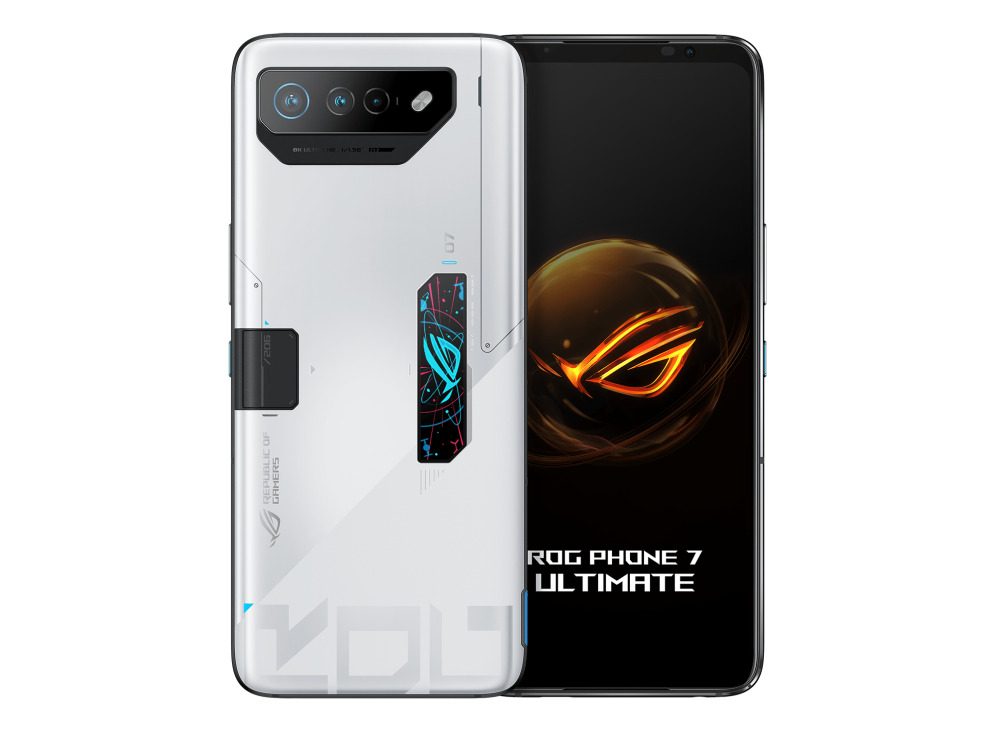
Asus ROG Phone 7 Ultimate – smartphone & gaming machine

0

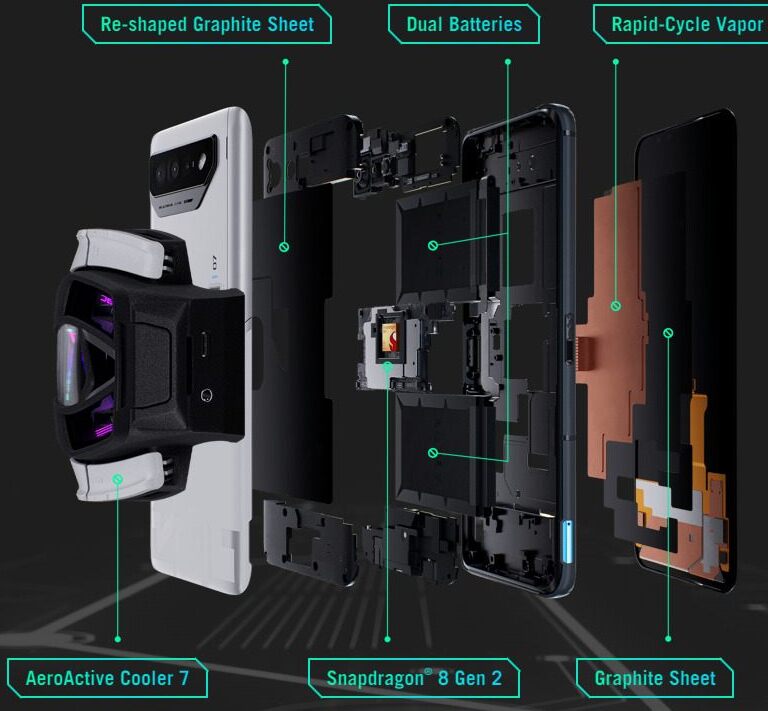
Asus recently introduced the latest addition to its gaming smartphone lineup, the Asus ROG Phone 7 Ultimate. Building upon the success of its predecessor, the ROG Phone 6 Pro, Asus has once again enhanced the device’s processor. The ROG Phone 7 Ultimate boasts the Snapdragon 8 Gen 2, which is currently one of the fastest Android SoCs available. Additionally, an upgraded cooling system ensures efficient heat dissipation.

The Ultimate version of the phone comes equipped with an external fan that connects via USB-C and includes four extra control buttons.

The display of the ROG Phone 7 Ultimate is equally impressive, matching the strength of its predecessor. Sporting a 6.78-inch AMOLED panel with a resolution of 2448 x 1080, the device achieves frame rates of up to 165 Hz and features a touch sampling rate of 720 Hz.

Asus ROG Phone 7 Ultimate

Asus has created a gaming smartphone in the ROG Phone 7 Ultimate that leaves no room for compromise. Almost all the hardware components are top-of-the-line, including the Snapdragon 8 Gen 2, 16 GB of RAM, 512 GB of storage, and a 6.78-inch 165 Hz display. But it doesn’t stop there. The phone also boasts a 6000 mAh battery and includes features like an external fan.

Gaming phones have traditionally catered to a niche market, but Asus has refined and improved the formula with the ROG Phone 7. In fact, we would highly recommend it to anyone seeking an exceptional media and gaming experience.

The phone’s speakers, positioned on either side of the display, are unmatched by any other device on the market. Individually powered, these speakers produce loud, well-balanced sound with rich bass and excellent stereo separation. Combined with the fantastic, large, and vibrant display, the ROG Phone 7 Ultimate delivers an unparalleled audiovisual experience.

Moreover, the phone packs substantial power, ensuring fast and lag-free performance across all types of games. Thanks to its enhanced cooling and thermal efficiency, it can sustain this performance for extended periods without any issues.

However, there are a few downsides to consider, namely the phone’s hefty build and the accompanying high price tag. While it excels in one camera department, the other two cameras may not meet flagship standards. Nonetheless, the overall experience of using the ROG Phone 7 Ultimate has been an absolute delight.

The build quality of the ROG Phone 7 Ultimate is exceptional, with a sturdy construction that remains resistant to twisting or denting despite its 6.78-inch screen size. Weighing in at 239 grams, it matches the weight of the ROG Phone 6 Pro, making it a heavyweight contender. The display-to-surface ratio of 82 percent is not particularly impressive, but the slightly thicker screen frame on the shorter sides helps prevent accidental typos when using the gaming smartphone in landscape mode.

Asus ROG Phone 7 Ultimate

The back cover of the ROG Phone 7 Ultimate is protected by Gorilla Glass 3, while the display is shielded by Gorilla Glass Victus. Although the smartphone is not waterproof, it holds an IP54 certification, safeguarding it against dust and splashes of water.

The Asus ROG Phone 7 Ultimate is available in a single configuration, featuring a generous 16 GB of LPDDR5X RAM and 512 GB of UFS 4.0 storage. This configuration is officially priced at around US$1200.

Unusual for a smartphone, the ROG Phone 7 Ultimate is equipped with two USB-C ports. The bottom USB-C port operates at USB 2.0 speed and primarily serves for charging the smartphone. It supports Quick Charge 3.0 and PD 3.0. The second USB-C port, situated in the middle of the left long side, operates at USB 3.2 Gen.2 speed. It also supports Quick Charge 5.0 and can output 4K via DisplayPort 1.4. The SIM slot accommodates two Nano SIM cards.

Running on Android 13 with Asus’s custom ROG UI user interface, the ROG Phone 7 Ultimate benefits from gaming-oriented features. Notably, the highest performance mode, X mode, is seamlessly integrated into the UI. Additionally, apps like Game Genie and Armory Crate allow users to configure various smartphone components, including AirTrigger, the back cover display, and the external fan. Asus commits to providing two OS upgrades and four years of security updates for its smartphone.

The Asus ROG Phone 7 provides extensive coverage of mobile frequencies, supporting 24 4G bands and 20 5G bands, ensuring a reliable signal in nearly any location. It also features NFC and Bluetooth 5.2 capabilities.

For wireless connectivity, the smartphone utilizes WiFi 6E and incorporates three antennas for Wi-Fi, delivering highly stable and fast transmission rates when used with the Asus ROG Rapture GT-AXE11000 reference router. However, it does not support WiFi 7.

In terms of location services, the Asus ROG Phone 7 Ultimate utilizes a range of satellite navigation systems, including GPS (L1/L5), Glonass (L1), Galileo (E1/E5a), BeiDou (B1/B2a), QZSS (L1/L5), and NavIC (L5). During testing, the smartphone demonstrated quick positioning capabilities with an accuracy of up to 3 meters.

While the camera may not be the most critical aspect of a gaming smartphone, the ROG Phone 7 Ultimate does not compromise in this area either. It features a 50 MP main camera utilizing the Sony IMX766 sensor, which is also found in the ROG Phone 6 Pro.

In daylight conditions, the Asus smartphone captures high-quality photos with good dynamics, natural colors, and sharp image details. Low zoom levels produce satisfactory results as well. However, the camera struggles with noise and reaches its limits in low-light situations. Nevertheless, the photos still surpass those taken by many non-gaming smartphones.

The ultra-wide-angle camera, with a resolution of 13 MP, falls behind the main camera in terms of performance. While it is suitable for casual snapshots, closer examination reveals pixelation and a lack of detail. The macro camera has a comparatively high resolution of 8 MP but exhibits visible image noise even in well-lit environments.

For selfies, the front-facing camera employs the Omnivision OV32 sensor with a resolution of 32 MP. It captures decent self-portraits with natural colors. The front-facing camera can record videos up to Full HD at 30 frames per second. The main camera supports up to 8K resolution at 24 frames per second and includes electronic image stabilization.

The Asus ROG Phone 7 Ultimate delivers an exceptional gaming experience, thanks to its highly responsive display. With a touch sampling rate of 720 Hz, the AMOLED panel registers every input with minimal delay, ensuring incredibly smooth operation throughout.

Asus ROG Phone 7 Ultimate
Asus ROG Phone 7 Ultimate – photos: Asus

In terms of biometric authentication, the ROG Phone 7 Ultimate offers both 2D face recognition and an optical fingerprint sensor. The fingerprint sensor performs excellently, delivering high recognition rates.

Continuing the tradition from its predecessor, the ROG Phone 7 Ultimate features AirTrigger ultrasonic sensors that simulate the L and R keys found on traditional gaming controllers. Positioned at the top and bottom of the right side, these AirTriggers are easily accessible with the index fingers. When used in conjunction with the attachable AeroActive Cooler 7 external fan, which provides four additional input keys, the AirTriggers support a total of 18 tapping, swiping, and sliding gestures. Two new gestures introduced in the ROG Phone 7 Ultimate are aiming via gyroscope and “Press & Lift.”

The 6.78-inch display of the ROG Phone 7 Ultimate boasts a resolution of 2448 x 1080 pixels and supports HDR10+. It can run at a refresh rate of up to 165 Hz, which is adjusted based on the system mode. For example, the Ultra-durable mode limits the maximum refresh rate to 60 Hz, while 165 Hz is available only in X mode. Users can also manually set the refresh rate in the settings, choosing from options such as 165, 144, 120, 90, or 60 Hz.

Compared to the ROG Phone 6 Pro, Asus has further enhanced the brightness of the display in the ROG Phone 7 Ultimate. With an average brightness of 1016 cd/m², the AMOLED panel shines even brighter than its predecessor’s display, which averaged at 868 cd/m² when displaying a pure white background.

Under conditions with a balanced distribution of bright and dark areas (APL18), the smartphone achieves a peak brightness of 1631 cd/m². Without a brightness sensor, it can reach a maximum brightness of 495 cd/m², and even at the lowest brightness level, it still maintains a fairly bright 4.91 cd/m².

It’s worth noting that the Asus ROG Phone 7 Ultimate exhibits PWM flickering, a common occurrence in OLED panels. At the minimum display brightness, the flickering fluctuates between 122 and 513 Hz. At higher brightness levels, the fluctuations are less noticeable, but individuals with sensitivity to PWM flickering may find it bothersome. The Android settings include a DC dimming mode, but it only functions at 60 Hz.

The Asus ROG Phone 7 is the ultimate gaming and multimedia smartphone, offering exceptional performance, impressive gaming software, and reliable speed and battery life throughout the day. It boasts a powerful processor, a vibrant display, and the best smartphone speakers on the market. With long battery life, it ensures extended gaming and media sessions. However, the phone is large, heavy, and comes with a hefty price tag. Additionally, its secondary and tertiary cameras do not meet flagship standards. Overall, the Asus ROG Phone 7 is the top choice for gamers and multimedia enthusiasts.

Asus ROG Phone 7 Ultimate specs:

Design – Storm White
Weight and Dimension 246g IP54
Operating System Android 13
Processor
Qualcomm Snapdragon 8 Gen2, SM8550, Qcta-core CPUs,3.2 Ghz
Qualcomm Adreno 740
Memory LPDDR5X 16GB
Storage UFS4.0 512GB
Display
6.78″ 20.4:9 (2448 x 1080) Samsung AMOLED. Corning® Gorilla® Glass Victus. Delta-E < 1
Rear Camera
Main Rear Camera: Sony® flagship IMX766 50 MP image sensor – 1/1.56” large sensor size, 1 µm pixel size. F1.9 aperture, 23.8mm equivalent focal length in 35mm film camera

Second Rear Camera: 13 MP, Ultrawide-angle camera, 12.5mm equivalent focal length in 35mm film camera

Third Rear Camera: 5 MP, Macro
Front Camera
32 MP (Uses pixel binning to output 8MP image)
29.4mm equivalent focal length in 35mm film camera
Audio
Speaker:
Symmetrical dual front-facing speakers with Dirac HD Sound
5-magnet stereo speaker with Cirrus Logic amplifier for louder, deeper and less distorted sound effect

Audio Output:
Hi-Res Audio up to 384 kHz / 32-bit for 3.5mm output
Qualcomm WCD9385 for Hi-Res output
AudioWizard with multiple listening profiles
Dirac Virtuo for Headphone™ Spatial Sound

Microphone: Tri-microphones with ASUS Noise Reduction Technology
Video Recording: 8K UHD (7680 x 4320) video at 24 fps for main rear camera
4K UHD (3840 x 2160) video at 30 / 60 fps for main rear camera, at 30 fps for second rear camera
1080p FHD video recording at 30 / 60 fps
720p HD video recording at 30 / 60 fps
3-axis electronic image stabilization for rear cameras
Time Lapse (4K UHD video)
Slow Motion video (4K at 120 fps; 1080p at 240 / 120 fps; 720p at 480 fps)
Take still photo while recording video
Wireless Technology
(802.11 be/ax/ac/a/b/g/n, 2×2 MIMO)
Supports 2.4GHz/ 5GHz/ 6GHz WiFi
Bluetooth® 5.3 (HFP + A2DP + AVRCP + HID + PAN + OPP), supports Qualcomm® aptX™ Adaptive and aptX™ Lossless
Wi-Fi Direct
NFC

*WiFi 7 availability and features are dependent on regulatory limitations.
Navigation
GNSS support GPS (L1/L5), Glonass (L1), Galileo (E1/E5a), BeiDou(B1i/B1c/B2a), QZSS (L1/L5) and NavIC
SIM Cards
Dual slots: Dual-SIM / Dual-Standby support
Slot 1: 5G/4G/3G/2G Nano SIM card
Slot 2: 5G/4G/3G/2G Nano SIM card

* 5G services are only supported in 5G network-enabled locations in 5G-ready countries.

AOC C32G2ZE monitor for great gaming at a low price

0

I had the pleasure of testing and reviewing the AOC C32G2ZE Curved 31.5-Inch Gaming Monitor, and I must say, it made quite an impact. This monitor is packed with impressive features tailored specifically for gamers, providing an immersive and captivating viewing experience.

Let’s start with the design and display. The curved screen measures 31.5 inches or 80.01 cm, providing an immersive and engaging visual experience. The curvature radius of 1500R ensures that your field of view feels natural and enveloping. The display viewing area of 698.4 x 392.85 mm offers ample space for your content and enhances productivity.

In terms of display quality, the monitor excels. The panel type is VA, known for its vibrant colors and deep blacks. The resolution stands at 1920×1080, categorized as Full HD (FHD), delivering sharp and detailed visuals. With a pixel pitch of 0.3637 and a pixel density of 6993 pixels per inch, the monitor presents images with excellent clarity and precision.

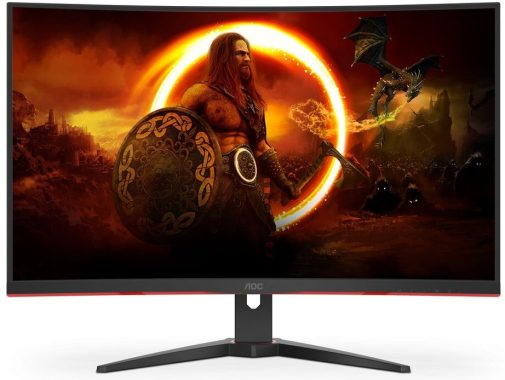
AOC C32G2ZE Curved 31.5-Inch Gaming Monitor

The brightness of the display reaches impressive levels, with a rating in nits. Additionally, the Antiglare (AG) panel treatment ensures that glare and reflections are minimized, allowing for comfortable viewing even in bright environments. The wide viewing angle of 178 degrees horizontally and vertically (CR10) ensures that the visuals remain consistent from various positions.

Gaming enthusiasts will appreciate the high refresh rate of 240 Hz, which reduces motion blur and provides smooth gameplay. The response time is equally impressive, with a GTG (Gray-to-Gray) response time of 4 ms and an MPRT (Moving Picture Response Time) of 1 ms, ensuring minimal ghosting and motion artifacts.

The monitor supports Freesync technology, which synchronizes the monitor’s refresh rate with compatible graphics cards, eliminating screen tearing and providing a fluid gaming experience. The sync range is 48-240, accommodating a wide range of frame rates. It’s worth mentioning that the monitor also features low blue light technology, which reduces eye strain during extended gaming sessions.

AOC C32G2ZE Curved 31.5-Inch Gaming Monitor
AOC C32G2ZE – photos: AOC

The cabinet design is sleek and modern. The 3-sided frameless bezel creates a seamless visual experience, drawing your attention solely to the screen. The front bezel color is a combination of black and red, adding a touch of style to the overall aesthetic. The cabinet finish on both the front and backside is textured, enhancing its premium feel.

The monitor comes with a removable stand, allowing you to mount it on a VESA wall mount with a 100×100 pattern if desired. The ergonomic features include tilt adjustment, with a range from -5 to 23 degrees, enabling you to find the optimal viewing angle for your comfort.

For gamers, the AOC C32G2ZE monitor offers several gaming modes suitable for different genres, including shooters, MMORPGs, action games, racing games, and more. The G-menu feature provides quick and easy access to various gaming settings, enhancing convenience during gameplay. It’s also worth noting that the monitor is suitable for console gaming, adding versatility to its gaming capabilities.

In terms of sustainability, the monitor adheres to several environmentally friendly standards, including WEEE, REACH, ROHS compliance, and being mercury-free. The packaging material is 100% recyclable, contributing to a more sustainable product lifecycle.

The connectivity options include HDMI 2.0 x 2 and DisplayPort 1.2 x 1, providing flexibility in connecting various devices to the monitor. The external power supply supports a wide range of voltages, from 100 to 240V, ensuring compatibility across different regions.

One of the standout features of this monitor is its gaming performance. With a 240 Hz refresh rate, it delivers incredibly smooth gameplay without the need for an expensive video card. It supports AMD FreeSync Premium with low framerate compensation (LFC), ensuring tear-free visuals, even at lower frame rates. We also tested Nvidia G-Sync compatibility, and it worked seamlessly, despite lacking official certification. Additionally, the monitor incorporates a decent overdrive feature that effectively minimizes motion blur.

review AOC C32G2ZE Curved 31.5-Inch Gaming Monitor
AOC C32G2ZE Curved 31.5-Inch Monitor

The Game Setting menu offers a range of customization options to enhance your gaming experience. You can adjust shadow detail to brighten darker areas of the image, which proves especially beneficial on a monitor with deep black levels like the AOC C32G2ZE. Color saturation can be increased, and a low blue light mode is available to reduce eye strain. The overdrive level can be fine-tuned (medium being the optimal setting), and you can toggle Adaptive-Sync on or off and activate a framerate indicator. Disabling FreeSync Premium/Adaptive-Sync activates a blur reduction backlight strobe with adjustable pulse width, allowing you to balance blur reduction and brightness. However, we found that the 240 Hz refresh rate, combined with Adaptive-Sync, provided smooth motion without the need for the blur reduction feature.

When it comes to image quality, the AOC C32G2ZE monitor excels in every aspect except resolution. The monitor exhibits excellent contrast, and after calibration, color accuracy is spot-on. The video processing is solid, contributing to a seamless visual experience. The build quality is sturdy and reliable, ensuring durability over time.

One drawback of this monitor is its lower pixel density due to the 1920×1080 resolution on a 31.5-inch screen. This may be noticeable to some users, especially those with keen eyesight or sitting closer to the monitor. However, the impact on image quality will vary depending on individual preferences.

It’s worth noting that the AOC C32G2ZE does not feature HDR (High Dynamic Range) capability, which may disappoint those seeking enhanced contrast and color reproduction. HDR support can significantly improve the visual experience by providing a wider color gamut and more vibrant highlights and shadows.

The AOC C32G2ZE Curved 31.5-Inch Gaming Monitor offers an exceptional gaming experience with its high refresh rate, smooth motion, and customizable settings. It excels in contrast, color accuracy, and build quality. While the lower pixel density and absence of HDR may be drawbacks for some, overall, this monitor delivers on its promises and is a solid choice for gamers seeking an immersive and visually impressive gaming setup. AOC Gaming C32G2ZE – 32 Inch FHD Curved Monitor price: £219.95AOC C32G2ZE Curved 31.5-Inch Gaming MonitorThe AOC C32G2ZE Curved 31.5-Inch Gaming Monitor offers an impressive range of features for gamers. Here are the pros and cons of this monitor:

Pros:

  • The monitor boasts excellent contrast, delivering deep blacks and vibrant colors, enhancing the overall visual experience.
  • With proper calibration, the color accuracy of the monitor is commendable, ensuring accurate and lifelike color representation.
  • The video processing of the AOC C32G2ZE is reliable and robust, resulting in smooth and seamless visuals during gameplay.
  • The monitor exhibits a strong build quality, ensuring durability and longevity.

Cons:

  • The pixel density of the monitor is relatively low due to its 1920×1080 resolution on a 31.5-inch screen. This might lead to slightly less sharp and detailed visuals, particularly for users with sharper vision or those sitting closer to the monitor.
  • Unfortunately, the AOC C32G2ZE does not support HDR (High Dynamic Range) content. HDR provides a wider color gamut and enhanced contrast, which can significantly enhance the visual experience.

AOC C32G2ZE monitor Specifications

Panel Type / BacklightVA / W-LED, edge array
Screen Size / Aspect Ratio31.5 inches / 16:9
Row 2 – Cell 0Curve radius: 1800mm
Max Resolution & Refresh1920 x 1080 @ 240 Hz
Row 4 – Cell 0FreeSync Premium: 48-240 Hz
Native Color Depth & Gamut8-bit / DCI-P3
Response Time (GTG)1ms
Brightness300 nits
Contrast4,000:1
SpeakersNone
Video Inputs1x DisplayPort 1.2
Row 11 – Cell 02x HDMI 2.0
Audio3.5mm headphone output
USB 3.0None
Power Consumption22w, brightness @ 200 nits
Panel Dimensions WxHxD w/base27.9 x 20.5 x 9.8 inches (709 x 521 x 249mm)
Panel Thickness3.3 inches (85mm)
Bezel WidthTop/sides: 0.3 inch (7mm)
Row 18 – Cell 0Bottom: 0.9 inch (23mm)
Weight15.4 pounds (7kg)
Warranty3 years

Cyrus X Power Stereo Amplifier: Review

0

Introducing the Cyrus X Power: the perfect companion to a Cyrus pre-amp and a versatile addition to your audio setup. This amplifier offers various features and benefits that enhance your listening experience.

The X Power can be paired with selected Cyrus amps for bi-amping or used in mono mode for a significant power boost. By connecting two X Powers and switching them to mono, you’ll unleash a staggering 181 watts of power per channel, delivering a formidable performance even for challenging speaker setups and larger rooms.

Cyrus X Power Stereo Amplifier

With 100 watts per channel at 6 ohms, the X Power surpasses the power output of typical integrated amplifiers. It is particularly well-matched with a Pre2 DAC or Stream XP2, providing not only greater volume but also deeper bass and a wider, more immersive soundstage, elevating your audio experience to new heights.

Enhance Your Cyrus Amp: Connect the X Power to the pre-output of any compatible Cyrus amp and enjoy the superior sound quality of a dedicated pre/power setup. Alternatively, combine it with a suitable Cyrus amp for bi-amping, where one amp handles the tweeters while the other drives the woofers, resulting in enhanced speaker control and improved overall performance.

To further enhance the audio performance, Cyrus offers the PSX-R2 as a plug-in upgrade for the X Power and other Cyrus products. This power supply upgrade features a large toroidal transformer and high-quality audiophile-grade capacitors, delivering a smooth and stable DC feed. This upgrade reveals finer details and musical subtleties that might otherwise go unnoticed.

The X Power is meticulously hand-built in the UK, showcasing Cyrus’ renowned attention to detail. It features an oversized toroidal mains transformer, high-output capacitors, and a short signal path circuitry. These elements combine to produce the signature Cyrus sound—dynamic, precise, and meticulously etched with every subtle detail.Cyrus X Power Stereo Amplifier

The Cyrus X Power stereo is a powerful and versatile audio amplifier that delivers impressive performance. Here’s a review highlighting its pros and cons.

Pros:

  • Robust Power Output: With an output power of 50W at 8 Ohms, this amplifier provides ample power to drive a variety of speakers, resulting in a dynamic and immersive audio experience.
  • Wide Frequency Response: The amplifier offers a frequency response range of 0.2Hz to 100kHz (-3dB), ensuring exceptional clarity and accurate reproduction of audio across the entire spectrum.
  • Excellent Signal-to-Noise Ratio: With a signal-to-noise ratio of 107dB (A-weighted, referenced at 50W), the Cyrus X Power delivers a clean and noise-free audio signal, allowing you to hear even the subtlest details in your music.
  • Low THD+N: The Total Harmonic Distortion plus Noise (THD+N) levels of this amplifier are impressively low, measuring at 0.01% (20Hz-20kHz) and 0.0015% (1kHz). This indicates minimal distortion, resulting in faithful audio reproduction.
  • Dual Output Options: The X Power offers both stereo and mono output configurations. In stereo mode, it delivers 60W at 8 Ohms (internal PSU), while in mono mode (internal PSU), it provides 110W at 8 Ohms and 125W (with PSX-R). This versatility allows you to adapt the amplifier to various setups and speaker configurations.

Cons:

  • Limited Output Power in Stereo Mode: Although the X Power amplifier offers satisfactory power output in stereo mode, it falls slightly behind other amplifiers in its class, providing 70W at 8 Ohms (internal PSU). This might not be ideal for users with power-hungry speakers or larger listening spaces.
  • Signal-to-Noise Ratio at Low Power: While the signal-to-noise ratio remains excellent at higher power levels, it drops to 90dB (A-weighted, referenced at 1W) when operating at lower power. This may affect the audio quality when listening at very low volumes.

The Cyrus X Power comes in a distinctive die-cast casing that offers several advantages over traditional hi-fi designs. It provides exceptional resistance to electrical and mechanical interference from external sources, ensuring clean and interference-free audio reproduction. The integrated heat sink vents efficiently dissipate heat, keeping the amplifier cool without compromising its sleek and stylish appearance. Additionally, Cyrus amplifiers are designed with space-saving in mind, allowing you to fit two units in the space typically occupied by one on most hi-fi shelves.

Cyrus X Power Stereo Amplifier
Cyrus X Power Stereo Amplifier – photo: Cyrus

The Cyrus X Power is a versatile and high-performing amplifier that pairs exceptionally well with Cyrus pre-amps and amps. Whether used in stereo, mono, or bi-amp configurations, it delivers impressive power, precise sound quality, and thoughtful design. Consider adding the optional PSX-R2 upgrade for an even more refined listening experience.

Cyrus X Power Stereo Amplifier Specifications:

Power Supply
Voltage: …………………………………….. As plate on rear of unit
Power Consumption……………………………………………. 360W
Safety Compliance…………………………………………………….CE
EMC (230V)………………………………………………………………CE
EMC (115V)……………………………………………………………. FCC
Enclosure
Dimensions (WxHxD)…………………………..215 x 75 x 365mm
Weight……………………………………………………………….. 5.6kg
Material……………………………………………….. Die cast chassis
Audio Performance
Input Sensitivity (60W/8Ω)…………………………………..413mV
Input Impedance ………………………………………………….20kΩ
Channel Balance…………………………………………………..0.1dB
Frequency Response ………………………. -3dB ..0.1Hz-100kHz
Signal to Noise Ratio (A-WTD)………….. Unwtd………..108dB
(Ref 60W) A-wtd…………115dB
Signal to Noise Ratio (A-WTD)………….. Unwtd………….90dB
(Ref 1W) A-wtd…………..97dB
Output Power Stereo (Internal PSU) …. 6 Ohms ……… 100W
Output Power Mono (Internal PSU) ….. 6 Ohms ……… 181W
Output Power Mono (with PSX-R)…….. 6 Ohms ……… 178W
THD+N (@ 2/3 full power)……………….. 20Hz-20kHz… 0.01%
1kHz………. 0.0015%

KIA AMERICA PROVIDES NEW 2023 AND 2024 SELTOS SUV BUYERS WITH THE APP TO ADVENTURE

0

With the refreshed 2024 Kia Seltos SUV arriving in showrooms now, Kia America has teamed up with the AllTrails+ app to amplify outdoor adventures. Now through December 31, 2023, customers that purchase or lease a new 2023 or 2024 Seltos SUV are eligible to receive a promo code for a six-month trial of the AllTrails+ premium app.

Kia Seltos SUV
Kia Seltos SUV – photo: KIA

“The compact but capable Kia Seltos SUV is for those who take their outdoor activities seriously and with the AllTrails+ app, they are sure to expand their horizons even further – literally and figuratively,” said Russell Wager, vice president, marketing, Kia America. “Whether they’re heading out for an afternoon hike or planning an extended visit to one of our national parks, the Seltos combined with the AllTrails+ app will be their go-to guide to new adventures.”

AllTrails+ is the premium outdoor and adventure trail app with an extensive suite of features designed to help users save time, stay safe, be prepared, and never miss a turn when planning outdoor adventures. The AllTrails+ platform helps users find and explore new trails, connect to routes best suited for their unique needs, and get outside with peace of mind provided by navigation tools, exclusive features, and reviews and photos from other AllTrails+ users. With AllTrails+, people of all abilities can discover, record, and share their outdoor experiences. The AllTrails+ app boasts trail coverage on all seven continents and within every country, making it the world’s largest and most trusted global exploration app and category-leader in the outdoor activity sector.

With its distinctive new design elements, advanced connectivity and the availability of a rugged new X-Line trim, the refreshed 2024 Seltos is the perfect choice for all types of outdoor activities.

About AllTrails

Founded in 2010 on the belief that we’re all made better by spending time in nature, AllTrails has become the world’s largest and most trusted exploration app. Home to a global community of more than 50 million trail-goers around the world, AllTrails helps you find your way outside with detailed reviews and inspiration from a global community of trail-goers. The app features over 400K curated trails and is frequently ranked a top-5 Health and Fitness app with over 1-million 5-star app reviews. AllTrails is a proud 1% for the Planet partner, contributing one percent of company annual revenue to organizations that protect and increase equitable access to the outdoors. Every day, AllTrails is inspired to help get more people outside so they can have healthy, authentic experiences and a deeper appreciation of the outdoors. www.alltrails.com.    

Understanding Analog and Digital TV Tuners

0

Discover the differences between analog and digital TV tuners and how they impact your television viewing experience. Learn about the technology behind these tuners and make an informed decision for your entertainment setup.

What is a analogue TV tuner ?

Analog TV tuners typically include a tuner module, which is responsible for receiving the television signal and converting it into a format that can be displayed on a television screen. These tuners usually operate on specific frequency bands assigned to analog TV broadcasts, such as VHF (Very High Frequency) and UHF (Ultra High Frequency).

The tuner module inside an analog TV tuner contains various circuitry to select and demodulate the desired television signal. It typically includes components like a tuner coil, RF (Radio Frequency) amplifier, mixer, local oscillator, and IF (Intermediate Frequency) amplifier. The tuner coil helps in selecting the specific frequency of the desired TV channel, and the RF amplifier amplifies the weak TV signal received from the antenna. The mixer combines the amplified RF signal with the local oscillator frequency to produce an intermediate frequency, which is easier to process. Finally, the IF amplifier amplifies the intermediate frequency signal before sending it to the television’s display circuitry.

Analog and Digital TV Tuners
photo: Pixabay

Analog TV tuners were commonly found in older television sets, VCRs (Video Cassette Recorders), and standalone tuner devices. However, with the transition to digital television, analog TV tuners became obsolete. Digital TV tuners, which are capable of receiving and decoding digital television signals, are now more prevalent in modern devices.

What is a digital TV tuner ?

Unlike analog TV tuners, which work with analog signals, digital TV tuners are designed to handle the digital signals used in modern digital television systems. These tuners are capable of receiving various digital TV standards, such as ATSC (Advanced Television Systems Committee) in North America, DVB (Digital Video Broadcasting) in Europe and other parts of the world, and ISDB (Integrated Services Digital Broadcasting) in Japan and some South American countries.

Digital TV tuners typically consist of a tuner module, which selects and demodulates the desired digital TV signal, and a decoder, which decodes the digital signal into audio and video formats that can be displayed on a television screen.

The tuner module in a digital TV tuner operates similarly to an analog TV tuner, but it is designed to work with the specific frequency bands and modulation schemes used in digital TV transmissions. It selects the desired channel and extracts the digital signal from the received broadcast. The digital signal, which is encoded using complex modulation techniques, is then sent to the decoder.

The decoder in a digital TV tuner is responsible for decoding the digital signal into audio and video formats. It performs tasks such as error correction, demultiplexing, and decompression. The decoded audio and video streams are then passed on to the television’s display circuitry for playback.

Digital TV tuners are commonly found in modern television sets, set-top boxes, and DVRs (Digital Video Recorders). They enable viewers to receive high-quality digital broadcasts with enhanced picture and sound quality, as well as additional features like electronic program guides and interactive services.

What is a TV tuner – Twin or Dual?

A TV tuner twin is designed with two separate tuner modules within a single device. Each tuner module operates independently, allowing the user to watch or record one channel while simultaneously tuning in to another channel.

With a TV tuner twin, you can perform functions like watching one channel live while recording another channel for later viewing or recording two different channels simultaneously. This feature is especially useful if you want to watch one program while recording a different program that airs at the same time.

TV tuner twins are commonly found in DVRs (Digital Video Recorders) and some advanced television sets. They provide flexibility and convenience, allowing viewers to have greater control over their TV viewing experience. However, it’s important to note that the availability and functionality of a TV tuner twin may vary depending on the specific device or TV model you are using.